The 7 best practices for email customer support

“Nutshell is super user-friendly and intuitive
“I would highly recommend Nutshell
“Easy to use and... wait for it ... 100% buy in!
“Nutshell is both simple and powerful
Your customers expect a response in one hour. You’re responding in twelve. That gap isn’t just an inconvenience—it’s costing you customers, revenue, and growth. Learn how to respond faster, improve first-contact resolution, and retain more customers.


Take our guided tour to explore Nutshell’s incredible features!

Table of Contents
88% of customers expect a one-hour email response, yet most small businesses average twelve hours. This disconnect creates a massive competitive opportunity: the SMBs that master email support will outpace those that don’t.
The numbers prove it. Companies that respond within one minute see 391% more conversions compared to those responding in one hour. Slow email responses correlate with a 15% increase in churn—meaning customers are actively leaving because you’re not responding fast enough. At the same time, 62% of companies don’t even respond to all customer emails, leaving money on the table with every unanswered message.
But here’s the good news: you don’t need to hire more people to close this gap. You need better systems. Email support best practices aren’t complex or expensive. They’re learnable, repeatable processes that scale quality without scaling headcount. This guide walks you through seven actionable best practices, proven processes, and the metrics that matter—so your small team can respond faster, resolve more issues on the first contact, and build genuine customer loyalty.

Email support isn’t just another communication channel. It’s the foundation of customer relationships for most small businesses. Unlike phone support, which requires real-time availability, or chat, which feels transactional, email gives customers time to explain complex issues and gives you time to provide thoughtful, researched responses. This makes email both powerful and risky—because slow or impersonal responses damage trust more than they would in faster channels.
For small businesses, email support presents a unique challenge: you have limited staff but unlimited email volume. Your team is juggling sales, operations, and delivery while also answering customer questions. Without a system, emails get lost in personal inboxes, responses are inconsistent, and follow-ups fall through the cracks. The best support teams don’t heroically manage chaos. They build systems that prevent it.
Here’s what makes email support different from other channels and why it deserves dedicated attention:
Email support best practices aren’t revolutionary. They’re fundamentals that separate good customer experiences from bad ones. Master these seven practices and your team will respond faster, resolve more issues on first contact, and build customer loyalty that shows up in retention metrics.
Speed matters because your response time signals how much you value the customer.
A customer reaches out with a question. A fast response closes the deal. A slow response loses them to a competitor.
The evidence is clear: companies that respond within one minute see 391% more conversions than those responding in one hour. That’s not just about support—that’s about sales velocity.
Practically, responding within one to four hours means setting up a system that acknowledges emails immediately and routes them to the right person. You don’t need to solve every problem in four hours, but you need to acknowledge receipt and set expectations.
Here’s how to implement it:
Nutshell’s automation workflows handle this without requiring technical expertise. Set up auto-responses, create assignment rules, and track response times on a dashboard so you know daily whether you’re hitting targets.
Generic responses are worse than slow responses because they signal indifference. When a customer gets a templated message that could apply to anyone, they feel like a ticket number. When they get a response that references their name, their specific issue, and their history with you, they feel seen.
Personalization builds trust and loyalty. It also improves outcomes: customers who receive personalized responses report higher satisfaction and are less likely to churn.
Here’s how to personalize at scale:
The trick is combining templates with personalization. Start with a template for the response structure, then customize the opening, the specific details, and the closing. This gives you consistency while maintaining a personal touch.
Nutshell’s customer history view shows agents everything about the customer—past interactions, previous issues, account details—in one place. This eliminates the generic email problem because agents have all the context they need to personalize.
Empathy doesn’t cost anything, but it prevents escalation. When a customer is frustrated, they don’t just want a solution—they want to feel heard.
The most powerful first sentence in a support email acknowledges their frustration: “I can see why this is frustrating,” or “You’re right to be upset about this.” Then you take ownership: say “I’m going to fix this” before jumping to the solution. This simple shift transforms the interaction from transactional to relational.
Empathy also de-escalates. A customer who feels understood is more likely to accept a solution that might not be perfect. A customer who feels dismissed will push back no matter how good your solution is.
Here’s how to lead with empathy:
Nutshell’s email templates can include empathy frameworks so every agent starts with the same strong foundation, then personalizes from there.
Customers prefer scannable, well-organized responses over long emails. If your response requires them to read three paragraphs to find the answer, they’ll get frustrated.
Clear writing means short paragraphs, bullet points, and explicit next steps. Instead of burying the action items in prose, make them obvious. Instead of explaining everything you could say, say only what matters.
This clarity also reduces follow-up emails. If customers understand exactly what you’re saying and what happens next, they won’t have follow-up questions.
Here’s how to write clear, concise responses:
Nutshell’s email templates enforce this clarity because they’re designed as templates, not essays.
An SLA is simply a promise about response and resolution time. Without SLAs, your team defaults to “we’ll get to it when we can,” which usually means urgent emails get lost in the shuffle. With SLAs, you have accountability, and customers have expectations.
SLAs matter because they force prioritization. Not all emails are equally urgent. A customer asking a billing question is different from a customer with a critical issue. SLAs help you sort.
Industry standard first-contact resolution sits at 70 to 79%. First response time targets vary by industry but generally fall between one to four hours. Resolution time (actually fixing the issue) is typically 24 hours for standard issues and 4 to 8 hours for critical ones.
Here’s how to set realistic SLAs for your team:
Nutshell’s task system tracks SLA compliance automatically. You can set response and resolution targets, and the system alerts you when you’re at risk of missing them.
First-contact resolution (FCR) is one of the most valuable metrics in support because it directly reduces cost and improves satisfaction. When an agent solves a problem on the first interaction, the customer is happier, and you spend less time on that issue.
Industry standard FCR is 70 to 79%. World-class support teams achieve 80% or better. The jump from 70% to 80% FCR reduces support costs by 10 to 15% because you’re handling fewer repeat contacts.
The barrier to higher FCR isn’t agent skill—it’s context. If agents don’t have full customer information, they can’t solve it on first contact. They have to say “let me look into this and get back to you,” which frustrates both agent and customer.
Here’s how to improve FCR:
Nutshell gives agents complete customer history, linked to engagement records and past interactions. When escalation is needed, agents create follow-up tasks directly linked to the customer record, ensuring nothing falls through the cracks. This context makes FCR possible without escalation.
The best support teams don’t just close the ticket and move on. They follow up to confirm the issue is actually resolved and to gather feedback for continuous improvement.
Follow-up serves two purposes: it confirms the customer is satisfied (and catches issues that weren’t fully resolved), and it signals that you care beyond the initial fix. A customer who receives a “Is this working for you?” email feels more valued than one who doesn’t.
Here’s how to implement follow-up:
Nutshell’s automation can trigger follow-up emails based on ticket closure, collect feedback, and flag issues for your team to address.
These mistakes are common because email support is easy to neglect when you’re focused on sales and delivery. Recognizing these patterns helps you avoid them.
Not responding fast enough. Your default response time is 12 hours, but customers expect 4 hours. Impact: 15% churn increase with slow email responses. Customers feel deprioritized. They leave for competitors who respond faster.
Sending generic, impersonal responses. Your template doesn’t mention the customer’s name or specific issue. Impact: Customers feel like ticket numbers. Trust decreases. Loyalty decreases. They switch to competitors who feel more personal.
No clear next steps. Your response answers their question but doesn’t explain what happens next or when. Impact: Customer confusion. Follow-up emails asking for clarification. Lower first-contact resolution.
Inconsistent quality across team members. Some agents send excellent emails. Others send generic ones. Some follow up. Others don’t. Impact: Customer frustration. Some customers feel valued. Others don’t. Unpredictability damages trust.
No follow-up after resolution. You close the ticket and move on. Impact: Customers are unsure if the issue is actually resolved. They send follow-up emails to check. Lower first-contact resolution. Customers feel like you don’t care once the issue is “solved.”
Managing email outside your CRM. Emails live in personal inboxes, support tickets live in a separate system, and customer information lives in another place. Impact: Lost context. Lost emails. No visibility into what’s happening. Emails falling through cracks.
No metrics tracking. You don’t know response time, first-contact resolution rate, or CSAT. You’re guessing. Impact: Can’t improve what you don’t measure. You think you’re doing great when you might be missing targets. You have no data to justify hiring or training investments.
These mistakes happen when email lives outside your CRM. Nutshell centralizes email so you can avoid them all at once.
You’re juggling sales, delivery, and operations. Email support feels like one more thing. It’s not. It’s the thing.
Here’s the reality: 88% of customers expect a one-hour email response, but SMBs average twelve hours. That eight-hour gap isn’t just an inconvenience. It’s costing you customers.
Start with the conversion impact. Companies responding in one minute see 391% more conversions than those responding in one hour. That’s not theoretical. That’s real revenue. A customer reaches out with a question. If you respond in one minute, you’re 3.91 times more likely to close the deal than if you respond in one hour. Every hour of delay reduces conversion probability significantly.
Now consider churn. Slow email responses correlate with 15% churn increase. Customers who experience slow support are more likely to leave. They take their business to competitors who respond faster. This is especially true in competitive markets where switching costs are low.
And here’s the buried opportunity: 62% of companies don’t respond to all customer emails. That means if you respond to every email, you’re outperforming most competitors. You’re responding to inquiries they’re ignoring. You’re closing deals, they’re losing. You’re building customer loyalty that they’re missing.
Email support isn’t a cost center. It’s a revenue center.
Email matters because it’s often the first touch point in a customer relationship. Your response time and tone set the tone for everything that follows. A fast, friendly, helpful first response creates a relationship. A slow, generic first response creates friction.
Email also creates a permanent record. Unlike a phone call (which you might misremember), email is documented. One excellent email can build a customer for life. One poor email can damage a relationship permanently.
For small businesses specifically, email is the channel where you can compete with larger competitors. You might not have the fancy phone support system or the live chat team that enterprise companies have. But you can have faster, more personal email support than anyone. You can respond in one hour when competitors take twelve. You can personalize every response when competitors send templates. You can follow up proactively when competitors close the ticket.
This is where SMBs win. Not through scale, but through speed and personal touch.
Try Nutshell free for 14 days or let us show you around before you dive in.

“We can either personalize or scale. We can’t do both.” That’s a common belief. It’s wrong.
Personalization at scale is possible when you combine templates with customer history. The template provides structure and consistency. Customer history provides the details that make it personal.
Here’s the tactical approach:
Start with a template structure. Your template should include:
Example template structure:
Hi [First name],
Thanks for reaching out about [specific issue they mentioned]. [Reference to past interaction or account status if relevant].
Here’s what I’m going to do for you:
[Template content about solution]
You should see [specific result] by [specific date]. If you don’t, reply and let me know.
Best,
[Agent name]
Customize the opening. This is where personalization happens. Reference their name, their specific issue, and their history. Not “Thanks for contacting us about a feature question” but “Thanks for reaching out about whether we support X integration. I see you’ve been with us since [date] and you’re currently using Y integration.”
Use template content for the solution. This saves time and ensures consistency. You’re not writing from scratch. You’re customizing a proven solution.
Adjust dates for their situation. If your template says “We’ll get back to you within 48 hours,” adjust based on priority. Critical issue? 24 hours. Standard question? 72 hours.
Personal closing. Include your name. Include your title if it’s relevant. “Best, John” feels more personal than “Regards, Support Team.”
Real example before and after:
Before (generic):
“Hi,
Thanks for contacting us. We do support integrations with many popular tools. Please let us know which tool you’re interested in, and we can help.
Best, Support”
After (personalized template):
“Hi Sarah,
Thanks for reaching out about Slack integration. I saw you just onboarded last week, and you’re already connecting tools—great sign. We do support Slack, and I can walk you through the setup in about five minutes.
Here’s what we need from you:
I’ll set it up and send you a test message so you can see it working. Should be done within one hour.
Let me know if you have questions.
Best, John Customer Success, Nutshell”
Same template structure. Completely personalized. Same time investment as the generic version.
The key is building a template library. In your first week, you build templates for ten common questions. After that, you’re not writing new emails from scratch. You’re personalizing existing templates. This is how personalization scales.
Nutshell’s email templates feature lets you save these with merge fields (customer name, company, issue type) so agents can customize automatically while still maintaining a personal touch.
Every support team gets angry customer emails. Someone is frustrated, and they’re expressing it toward you. These moments matter because how you respond determines whether you fix the relationship or damage it further.
The framework is simple: acknowledge, own, solve, follow up.
Acknowledge their frustration. Don’t ignore it. Don’t minimize it. Recognize it directly: “I can see why this is frustrating.” “You’re right to be upset.” “This must be really annoying.”
This single step de-escalates because the customer feels heard. They’re not fighting against dismissal. They’re talking to someone who gets it.
Take ownership. Don’t blame the system, the policy, or another team member. Say “I’m going to fix this,” not “Our system has an issue” or “The billing team does that.” Taking ownership transforms the relationship from adversarial to collaborative.
Provide the solution. Clear next steps. Realistic timeline. If you can’t fix it immediately, explain why and when you can.
Follow up. Check in after resolution to confirm satisfaction and show you care about making it right.
Real examples:
A customer writes: “I’ve been trying to get this feature working for three days. Your documentation is useless, and your support hasn’t replied. This is ridiculous.”
Strong response:
“Sarah, I completely understand your frustration. Three days without resolution is unacceptable, and I’m sorry we missed the mark on this. That’s on me.
Here’s what I’m going to do right now: I’m going to walk you through the setup personally so we get this working today. I’m also going to flag our documentation for improvement because you’re right—it could be clearer.
Call me at [phone] in the next hour, and I’ll get you set up. If I don’t hear from you, I’ll call you.
Again, I apologize for the frustration. We’ll make this right.
Best, John”
This response:
Another example:
A customer writes: “I was charged twice for my subscription. This is the second time this year. Your billing system is broken. Fix this immediately.”
Strong response:
“Hi Marcus,
You’re right to be upset. Being charged twice is unacceptable, and the fact that it’s happened twice is inexcusable.
Here’s what I’m doing right now:
I’m also going to personally monitor your account for the next 90 days to make sure nothing else goes wrong.
Again, I’m sorry this happened. You deserve better.
Best, John”
This response:
The key is that both responses treat the upset customer as someone worth fixing the relationship with, not as a problem to dismiss.
What works for two people doesn’t work for five. What works for five doesn’t work for twenty. As your team grows, your email support process needs to evolve, or it breaks down.
The mistake most SMBs make is adding people without changing processes. They hire a third support person, and suddenly nobody knows who’s handling what. They hire a fifth person, and emails are getting duplicate responses. They hire a tenth person, and the process collapses.
The solution: Fix the process first, then add people.
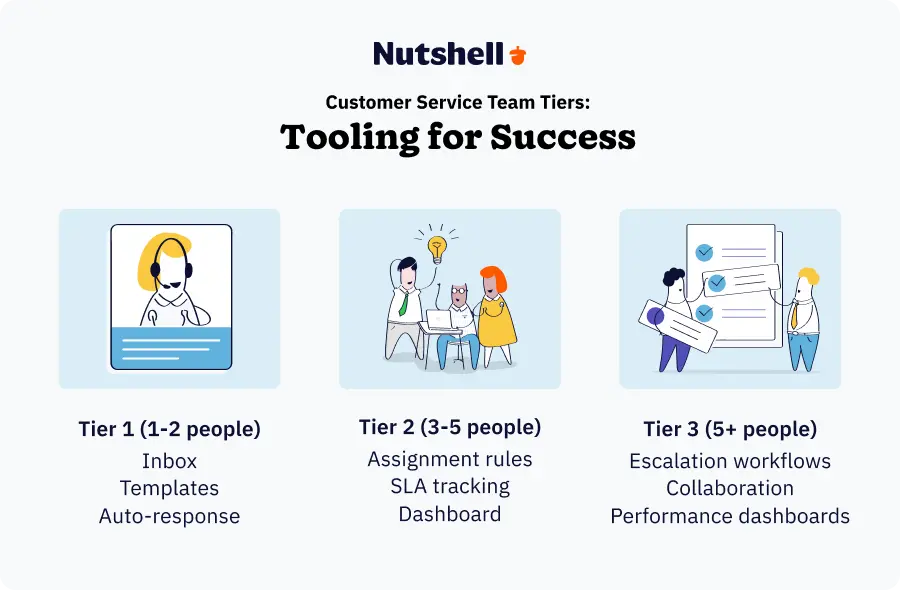
Here’s how email support scales.
This is the critical transition. With two people, you know what the other person is doing. At five people, you don’t unless you have systems.
Systems needed:
Process change: Instead of “respond as things come in,” you shift to “assigned and tracked.” Each person owns certain issue types or customer segments. Everyone follows the same template structure.
Training investment: When you hire person three, they need to understand not just the job, but the process. Spend time walking them through the template library, the assignment rules, and the expected response quality. This training investment prevents bad habits early.
Hiring tip: Look for people who follow processes, not just people who answer questions well. A good process follower becomes excellent. A genius who ignores process becomes chaos.
Nutshell’s role: Enable assignment and consistency. Route emails automatically. Show the dashboard so everyone sees what’s happening.
At this scale, you’re building a team that functions without you reading every email. You need visibility, collaboration, and feedback loops.
Systems needed:
Process change: Instead of “one agent per email,” you shift to “team collaboration when needed.” Some issues are straightforward (one agent handles). Complex issues might need input from multiple people (engineering, sales, operations).
Training investment: As you grow, you need ongoing training. Quarterly reviews of common issues. Monthly coaching for agents who are struggling. Recognition for agents who excel.
Hiring tip: Start looking for leadership potential. When you reach five to ten people, you need someone to mentor others. Invest in developing your strongest agents as informal mentors.
Nutshell’s role: Enable workflow complexity. Let the support lead create escalation rules. Provide visibility into which issues stall. Track individual and team performance.
The key insight: Don’t add people to solve process problems. Fix the process first, then add people.
People don’t solve chaos. Systems do. Once your system is solid, adding people just multiplies good outcomes.
You don’t need to transform your email support overnight. You need to start. This four-week plan takes you from “we’re not great at email support” to “we have a system.”
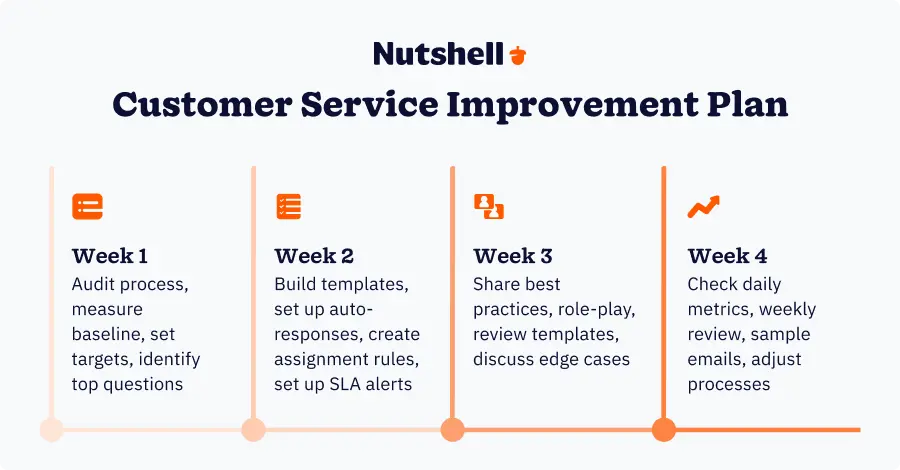
This week, you’re gathering data and setting targets. No implementation yet. Just measurement.
Action items:
Nutshell action: Set up a centralized inbox. Start importing email history if possible, so you have data to analyze.
Time investment: Three to four hours total (mostly thinking and documenting, not doing).
This week, you’re building the foundation. Templates, automation, assignment rules.
Action items:
Nutshell action: Build email templates with merge fields. Create automation workflows for auto-responses. Set up assignment rules for your team.
Time investment: Two to three hours.
This week, you’re getting your team aligned on best practices.
Action items:
Nutshell action: Do a walk-through of Nutshell’s email interface. Show how to access customer history. Show how to use templates and merge fields. Practice together.
Time investment: One to two hours (can be done in a team meeting).
This week, you’re seeing what’s working and adjusting.
Action items:
Nutshell action: Review dashboard daily. Watch for patterns. Share metrics with the team weekly.
Time investment: 30 minutes to one hour daily.
These are easy wins that save hours every week.
Total potential: 10+ hours weekly saved per team member.
Email support isn’t a cost. It’s an investment. Here’s the math.
Start with the core statistics:
Now let’s walk through a real example for a ten-person B2B SaaS company.
Current state:
Goal state (after improvements):
Your response time improves from 12 hours to 2 hours. This alone reduces the speed-related churn. Assuming you prevent 5% of churn:
Your FCR improves from 70% to 80%. This means 20 fewer follow-up emails per month (10% of 200). Each follow-up email costs 30 minutes in team time. That’s 10 hours saved monthly.
You implement follow-up surveys after resolution. This surfaces issues early and prevents some churn. Assume you reactivate 2% of canceled customers (1-2 customers per month):
Faster, more personalized support increases customer satisfaction. Assume 5% of your customer base refers one new customer due to improved support experience. Assume 50% of referred customers close.
Total annual revenue impact: 25,000 + 10,000 + 75,000 = 110,000
Cost of implementation:
Total cost: ~$3,500
ROI: 110,000 ÷ 3,500 = 31x return on investment in year one
This is conservative. Real impact is often higher because:
Even if you achieve only one-third of this impact, you’re at 10x ROI.
Why Nutshell delivers this ROI:
Here’s a summary table showing how email support improvements drive business impact:
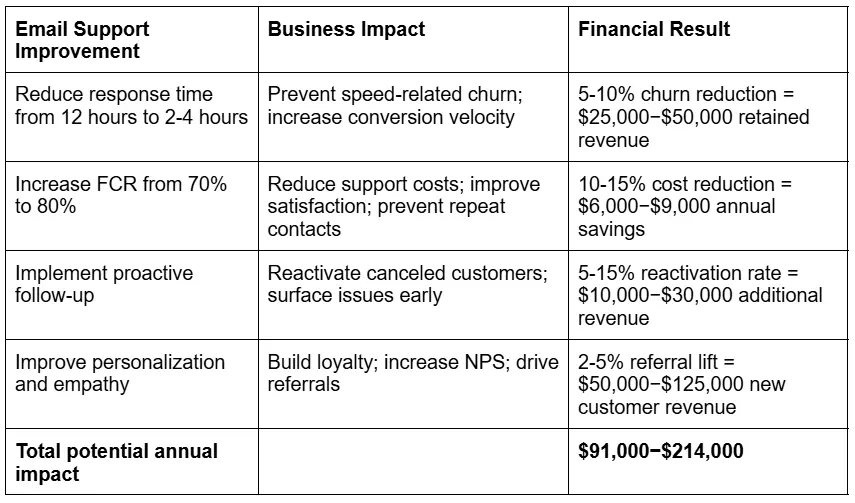
Industry standard is one to four hours, depending on your business type. Home services and B2B SaaS companies should aim for one to two hours because speed directly impacts conversion and churn. Professional services firms can typically manage two to four hours because their questions are more complex. Define what’s realistic for your business based on team size and issue complexity, then communicate it to customers. Customers respect consistent targets much more than undefined promises.
First-contact resolution improves through visibility and empowerment, not headcount. Give your agents full customer context (history, past issues, account details) so they have the information needed to solve. Create a knowledge base of common issues and proven solutions. Empower agents to make decisions without requiring approval for standard solutions. Identify which issues are causing repeat contacts (measure this data) and document solutions. Higher FCR comes from removing blockers to resolution, not from hiring more people.
Response time is how fast you acknowledge the email and start working on it. Resolution time is how long it takes to fully solve the issue. Both matter, but for different reasons. Response time affects perceived quality—customers judge you by how fast you acknowledge. Resolution time affects actual quality—customers judge you by how well you solve the problem. Most emails should be acknowledged within one to four hours (response time), but might take 24 hours or longer to fully resolve (resolution time).
Check response time and volume daily so you catch problems immediately. Review first-contact resolution and customer satisfaction weekly so you see trends. Do a full analysis monthly, including churn correlation and team performance. Adjust processes quarterly based on trends. Metrics are only valuable if you act on them. Daily measurement without action doesn’t improve anything. Weekly or monthly review with action is sufficient for most SMBs.
Auto-responses don’t have to feel robotic if you write them well. Use friendly language in your acknowledgment: “Thanks for reaching out! We love emails that include this much detail. We’ll get back to you within 4 hours.” Personalize the initial acknowledgment with the customer’s name. Automation should buy time for your agents to personalize actual responses, not replace personalization. Your first response might be automated (acknowledgment). Your second response should absolutely be personal (actual answer).
Have them shadow an experienced agent for the first week, so they see best practices in action. Walk through the best practices framework (seven practices outlined in this guide) in a formal training session. Review your email templates together and practice customizing them for different scenarios. Have them role-play responses to different customer situations. Pair them with a mentor who reviews their early emails and provides feedback. For the first month, review at least five emails they’ve sent weekly and give feedback. Look for personalization, clarity, next steps, and SLA compliance.
The SMBs winning today aren’t the ones responding fastest by working overtime. They’re the ones with systems that enable speed at scale.
Email support best practices—responding fast, personalizing responses, leading with empathy, being clear, setting SLAs, resolving on first contact, and following up—aren’t complex. They’re learnable, repeatable processes that scale quality without scaling headcount. The businesses that master them outpace competitors by preventing churn, increasing conversion, and building customer loyalty that shows up in your metrics.
The business case is clear. Reducing your response time from twelve hours to two to four hours prevents churn. Improving first-contact resolution from 70% to 80% reduces costs and improves satisfaction. Implementing proactive follow-up reactivates cancelled customers. Together, these improvements generate 10x to 30x return on your investment.
You don’t need to hire more people to achieve this. You need a system. Start this week with the 30-day improvement plan. Implement the six-step workflow. Build your template library. Set up automation. Measure what matters. Every week, you’ll notice emails moving faster, customers feeling more valued, and team members spending less time on busywork and more time on actual problem-solving.
The SMBs winning today aren’t the ones responding fastest manually—they’re the ones with systems that enable speed at scale. Start your 30-day improvement plan this week. Your customers are waiting for your email. Make sure they get a fast, personal, helpful response.
Start your free 14-day Nutshell trial and implement these best practices this week. See how other SMBs are responding faster, resolving more issues on first contact, and retaining more customers. Your team is ready. The system just needs to catch up.
Let your sales team learn from the masters with our Sell to Win Playbook, packed with 55 top tips from some of the best sales experts around!










