Sauter au contenu principal ↓

Sell Sheet Templates for SMBs: Create and Track Materials That Close Deals

A minimalist illustration of a structured sell sheet document with an upward arrow, representing how standardized sales materials drive deal closure and growth

Your sales team has amazing products to sell. So why do some reps’ materials land with prospects while others sit in inboxes, unread? The difference often comes down to one thing: standardization and tracking. 88% of customers say the buying experience matters as much as the product itself, which means your sell sheets aren’t just marketing collateral—they’re critical touchpoints that shape how buyers perceive your company.

Most small and mid-sized businesses create sell sheets haphazardly. Each rep designs their own version, messaging varies wildly, and nobody tracks which materials actually convert. It’s like throwing darts in the dark and hoping one hits the board. This guide covers everything you need to know about creating standardized sell sheet templates, best practices for design and copy, and—most importantly—how to measure which templates actually move deals forward.

Key takeaways

    • Standardization saves time: Consistent templates eliminate rework and ensure brand alignment across your entire sales team.

    • Measurement drives results: Tracking which sell sheets convert helps reps focus on high-impact materials instead of guessing what works.

    • SMBs need simplicity: Complex tools aren’t necessary—a clean, measurable template in Word or PowerPoint beats an elaborate design nobody can easily customize.

    • One page is the standard: Sell sheets work best when they respect buyer attention spans and deliver value in a single, scannable format.

  • The real value is in tracking: Design matters less than knowing which materials actually move deals forward and why.


Vous avez besoin d'un CRM convivial pour stimuler les ventes et l'efficacité de votre équipe ?

Suivez notre visite guidée pour découvrir les incroyables fonctionnalités de Nutshell!

What is a sell sheet? (And why it matters for your sales team)

A sell sheet is a one-page document that provides a concise overview of your product or service. Think of it as a strategic leave-behind—your sales pitch in print form, working hard when you can’t be in the room. Typically sized at the standard 8.5″ by 11″ format, it’s short enough that a busy prospect can scan it in under two minutes, yet detailed enough to convey real value.

Sell sheets serve a specific purpose in your sales process. Use them in early-stage conversations as a conversation starter, send them after meetings as a follow-up reminder, or leave them behind when walking out the door. They’re distinct from brochures (which go deeper), case studies (which prove results), or one-pagers (which can vary in length and focus). A sell sheet is always one page, always benefits-focused, and always ends with a clear next step.

Why does this matter for SMBs? Because your sales team doesn’t have time to create custom materials for every prospect. Standardized templates save hours of rework and ensure your brand stays consistent whether your newest rep or your top performer sends it. 88% of customers say the buying experience matters as much as the product itself, which means how you present your value matters as much as the value itself.

When your team uses inconsistent materials, buyers get mixed messages. One rep’s sell sheet emphasizes ROI, another emphasizes features, a third one looks like it came from a different company entirely. Standardized templates eliminate that chaos. But creating a sell sheet is only half the battle—the real value comes from knowing which ones actually move deals forward.

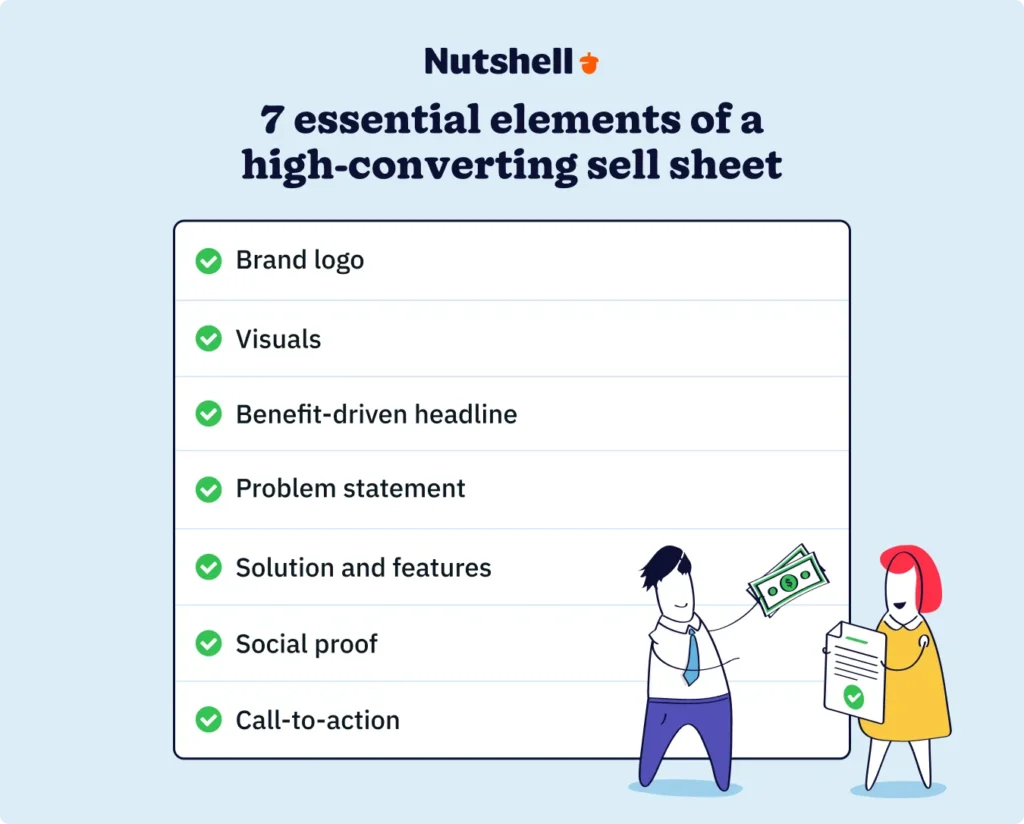
7 essential elements of a high-converting sell sheet

Not all sell sheets convert equally. The ones that win follow a proven structure. Here are the seven elements that separate sell sheets that move deals from those that sit in a folder gathering dust.

1. Brand logo and product name

Your sell sheet should establish credibility in the first three seconds. Include your company logo prominently and make sure your product name is immediately recognizable. A prospect shouldn’t have to guess what they’re looking at. Your branding sets the tone—it tells buyers this is a legitimate, professional company worth their time.

2. Eye-catching visuals

Text alone kills engagement. Include images, icons, or graphics that break up the content and draw the eye to key information. Visuals help buyers scan and understand your message faster. They also make your sell sheet more memorable—people remember visual information longer than text alone.

3. Attention-grabbing, benefit-driven headline

Lead with value, not features. Your headline should answer the buyer’s implicit question: “What’s in this for me?” Instead of “Advanced CRM Platform,” try “Close Deals Faster Without the Complexity.” A benefit-driven headline makes prospects want to keep reading.

4. Clear problem statement

Help buyers see themselves in the problem you solve. Spend a sentence or two identifying a challenge your target audience faces. When buyers recognize their own pain on your sell sheet, they stop scrolling and start paying attention. This is where you earn the right to pitch your solution.

5. Compelling solution and key features

Now that you’ve identified the problem, show how you solve it. Keep this section focused—highlight three to four key features maximum. More than that overwhelms the reader and dilutes your message. Each feature should connect back to the problem you identified earlier.

6. Social proof

Buyers want evidence that your solution works. Include a customer testimonial, an impressive statistic, a case study result, or logos of well-known clients. Social proof builds trust faster than any claim you could make. Even a simple stat—”Trusted by 500+ companies”—carries weight.

7. Strong call-to-action and contact info

End with a clear next step. Should the prospect schedule a demo, request a quote, send an email, or make a phone call? Don’t leave it ambiguous. Include all relevant contact information—phone number, email address, and ideally a link to schedule a meeting. A vague CTA kills momentum at the moment it matters most.

Infographic showing the 7 essential elements of a high-converting sell sheet: brand logo, visuals, benefit-driven headline, problem statement, solution and features, social proof, and call-to-action

When you combine these seven elements intentionally, something shifts. Templates that include these core elements consistently outperform those missing key components. The structure matters because it removes guesswork from both sides—your team knows what to include, and your buyers know what to expect.

How to create your sell sheet template

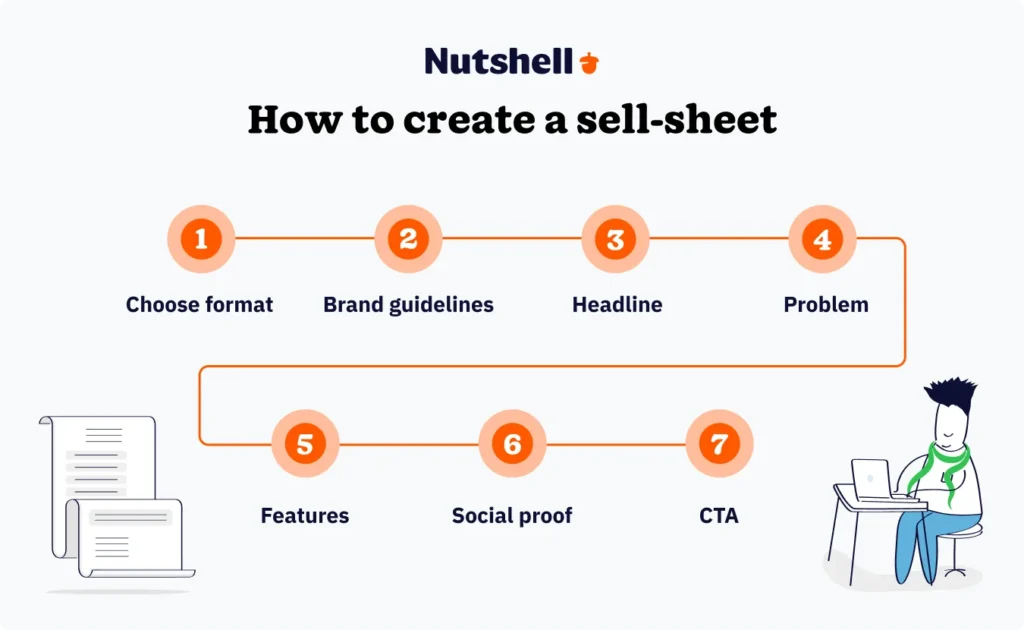
Creating effective sales enablement materials like sell sheets doesn’t require expensive design software or a marketing degree. Follow these steps, and you’ll have a template your whole team can use (and customize) immediately.

1. Choose your format and tool

Start simple—you don’t need fancy design software for this. Microsoft Word, PowerPoint, or Google Docs work perfectly fine. If your team prefers something more visually polished, Canva offers templates anyone can customize without design experience. The tool matters far less than execution: a simple, measurable template in Word beats an elaborate design nobody can easily use.

2. Start with your brand guidelines

Before you write a single word, lock in your brand basics: logo, color palette, fonts, and spacing rules. This consistency ensures every rep’s sell sheet looks like it came from the same company. Brand consistency builds trust and makes your materials instantly recognizable.

3. Write a benefit-focused headline

Skip the feature dump. Your headline should answer a specific buyer need or aspiration. Instead of “Includes Email Automation, Pipeline Tracking, and Reporting,” try “Close More Deals in Less Time.” The second headline makes a promise; the first just lists ingredients.

4. Define the problem your product solves

Spend one to two sentences on this. Make it specific to your target buyer. “Your sales reps spend two hours daily on administrative work instead of selling” resonates more than “Businesses need better tools.” Specificity builds recognition.

5. List three to four key features

Not ten. Not seven. Three to four. Each feature should answer “So what?” and connect directly back to the problem you identified. Use clear, benefit-driven language: “Automatic activity logging saves two hours daily per rep” rather than “Includes advanced logging capabilities.”

6. Add social proof

A testimonial, statistic, or customer logo goes a long way here. If you’re just launching, you can use results from beta customers or case study metrics. Even “Tested by 50+ beta users” is better than nothing. Social proof is the bridge that turns skepticism into interest.

7. End with a clear CTA and contact information

Make it obvious what happens next. “Schedule a 15-minute demo” is stronger than “Learn more.” Include phone, email, and ideally a calendar link. Remove friction from the next step.

Design best practices

Keep white space generous. Cramming information into every corner makes your sell sheet feel claustrophobic and hard to scan. Use a readable font size (at least 11-point), establish a clear visual hierarchy, and add breathing room between sections—these details make your materials feel professional and approachable.

Copy best practices

Use short sentences and active voice. “We help you close deals faster” beats “Our platform is designed to facilitate faster deal closure.” Write for the buyer, not about your product. Every sentence should answer “Why should I care?” not just “What does this feature do?”

The 80/20 rule for customization

Here’s the insight most SMBs miss: 80% of your template stays locked in, 20% stays flexible. Your problem statement, solution overview, social proof, and CTA shouldn’t budge. But feature highlights, specific use cases, and industry-specific language? Those can shift based on who’s reading. This ratio keeps your brand recognizable while letting reps actually customize without going rogue.

Don’t overthink design. A clean, simple template beats an elaborate design nobody can easily customize. Your reps won’t use a beautiful template they can’t modify in five minutes. Accessibility matters more than polish.

Step-by-step flowchart showing the 7-step process for creating a sell sheet template, from choosing format through final call-to-action

Measuring sell sheet effectiveness (The gap competitors miss)

Here’s what most sell sheet guides miss: they never explain how to measure whether your templates actually work. You can create the perfect one-pager, but without visibility into whether it’s moving deals, you’re flying blind.

This is where most SMBs miss out—they create great templates but never measure the impact. Your CRM should track critical questions about sell sheet performance:

Which sell sheets are sent most?

Identify which materials your team actually uses. If a sell sheet sits dormant while another one gets sent daily, that tells you something. High usage often correlates with effectiveness, though not always.

Which formats convert better?

Does your team send digital versions, print them, or both? Some audiences prefer email-ready PDFs, others want printed materials they can leave behind. Track both to see what resonates with your buyers.

Which buyer personas respond to which materials?

Your enterprise buyer persona probably needs different messaging than your mid-market buyer. Track which sell sheets get the strongest response from different customer segments, then optimize your templates accordingly.

What’s the follow-up rate after sending a sheet?

Sending a sell sheet should trigger a follow-up. Track how many prospects actually respond, request a demo, or engage further after receiving your materials. This tells you which sheets spark interest and which fall flat.

How long before a buyer acts?

Some sell sheets get results in days, others take weeks. Understanding the timeline helps your reps know when to follow up and which materials move deals fastest.

Your CRM should automatically track when sales materials are sent, who received them, and what happened next—so you can see patterns without manual spreadsheet work. Tools like Nutshell make this effortless by integrating directly with your sales process, turning sell sheet data into actionable insights that help your team focus on what actually works.

Connect material sends to deal stages. Automate follow-ups so no opportunity slips through the cracks just because a rep forgot to check in. CRM automation ensures that every sell sheet send triggers a timely follow-up, keeping your pipeline moving without adding to your team’s workload. This integration turns sell sheets from static assets into performance drivers.

The companies winning right now aren’t just creating good templates—they’re measuring which ones work, learning from the data, and updating their approach constantly. And remember: 58% of deals stall when reps can’t clearly add value. Your sell sheets are your answer to that problem, but only if you can prove they’re working.

Téléchargez notre guide de survie du directeur des ventes !

Ready to become the best sales manager for your team? Get 70+ leading tips and strategies from the experts for sales management success with our Sales Manager’s Survival Guide.

Free sell sheet templates & tools

You don’t need to start from scratch. But here’s the reality: most of these tools are overkill for what you actually need. That said, here are some solid starting points if you want a foundation to build from:

  • Canva is ideal if you want visually polished templates without design skills. Their marketplace includes hundreds of sell sheet templates you can customize in minutes. Great for creating visuals, but it doesn’t help you measure impact.
  • Adobe Express offers similar functionality with Adobe’s design ecosystem. If your team already uses Adobe products, this integrates seamlessly. Again, great for design—less useful for tracking effectiveness.
  • Visme provides interactive templates and collaboration features. Useful if your team needs to work together on designs. The trade-off: more complexity for most SMBs.
  • Template.net has thousands of pre-made sell sheet templates across industries. Download, customize, and go. Simple but limited customization for specific needs.
  • Figma works best if you have a designer on your team or want to collaborate on more sophisticated designs. Overkill for most SMBs just trying to standardize.
  • Microsoft Word and PowerPoint are still the best choice for SMBs. They’re simple, everyone knows how to use them, and your whole team can easily customize templates in seconds. The tool matters less than the process—a simple, measurable template beats an elaborate design no one uses.

Once you’ve created your template, store it in your CRM so your team has easy access and can track when it’s used. This simple step transforms your sell sheets from static files into trackable assets that move deals forward.

Common sell sheet mistakes to avoid

Even good sell sheets can fail if they’re built on faulty assumptions. Watch out for these common pitfalls.

Too much information

Your prospect has 90 seconds. Respect that. A sell sheet crammed with 10 features, three case studies, and a company history is DOA. Stick to one page. Violate that rule, and you’ve just created a brochure, not a sell sheet. Buyers get overwhelmed and put it aside for “later”—which means never.

No clear call-to-action

A prospect reads your sell sheet and thinks, “Now what?” If your next step is ambiguous, the moment dies. Be explicit. “Schedule a demo,” “Request a quote,” “Email us to learn more.” Every sell sheet ends with a clear action.

Inconsistent branding

Each rep uses a different version. Different logos, different fonts, different colors. Your brand gets diluted with every send. Standardization isn’t just nice to have—it’s essential for buyers to recognize your company across multiple touchpoints.

Not customizing for audience

A one-size-fits-all sell sheet fails because one size doesn’t fit all. An enterprise buyer has different concerns than a startup. A CMO cares about different things than an operations manager. Your best templates acknowledge these differences. Use the 80/20 rule: keep 80% consistent, customize 20% for the specific audience.

Never measuring effectiveness

You have no idea which materials work. You’re guessing which sell sheets move deals. If you’re not tracking this, you’re leaving revenue on the table. Start measuring today—which sheets get sent, which get positive responses, which lead to next steps.

Feature-focused language

Buyers don’t care about your features in isolation—they care about the results your features deliver. “Automated email logging” is a feature. “Spend less time on data entry and more time selling” is a benefit. Rewrite every feature-focused statement as a benefit statement.

Using outdated information

Your pricing changed three months ago, but your sell sheets still show the old numbers. A product was discontinued, but the sell sheet still mentions it. Outdated information kills credibility faster than almost anything else. Refresh templates regularly as your product evolves.

Conclusion

Your sell sheets are only as good as you can measure them. A beautiful, well-designed template that moves no deals is just expensive paper. But a simple, tracked template that drives consistent results is a revenue machine.

The real value isn’t in how your sell sheets look—it’s in what they do and what you learn from how they’re received. Standardization saves your team time. Measurement reveals what actually moves deals. Combined, they’re unstoppable.

Want to see how other SMBs are using their CRM to track sell sheet effectiveness and close deals faster? Check out our customer stories to learn how teams like yours transformed their sales process with better tools and smarter workflows.

Foire aux questions

  • 1. What should a sell sheet include?

    The seven essential elements are brand logo and product name, eye-catching visuals, attention-grabbing headline, clear problem statement, compelling solution and key features (three to four max), social proof, and a strong call-to-action with contact info. Follow that structure, and you’ve got a sell sheet with solid fundamentals.


  • 2. How long should a sell sheet be?

    One page, always. Stick to 8.5″ by 11″ format. Anything longer becomes a brochure, not a sell sheet. The constraint forces you to prioritize your most compelling information and respect your buyer’s time.


  • 3. What’s the difference between a sell sheet and a one-pager?

    The terms are often used interchangeably, but there’s a distinction. A one-pager is any single-page document, while a sell sheet is specifically a one-page sales tool designed to move deals forward. A one-pager could be a company overview or an explainer. A sell sheet always has a selling purpose.


  • 4. How often should you update your sell sheet templates?

    Review templates quarterly at minimum. When product details, pricing, or messaging changes, update immediately. When you notice certain templates underperforming, revisit them. Stale information hurts credibility, so treat template maintenance as an ongoing responsibility.


  • 5. Should sell sheets be digital or printed?

    Both. Track which format your specific buyer personas prefer. Some prefer digital (easier to forward, searchable, no waste). Others prefer printed (more memorable, leaves a physical reminder). The best approach is creating both and measuring which drives better results with different audiences.


  • 6. How do you measure if a sell sheet is working?

    Track these metrics: which templates get sent most, which get the highest response rate, how long between send and next action, and which buyer personas engage most with specific templates. Connect these data points in your CRM, and patterns emerge quickly. Measure or guess—there’s no middle ground.


See Nutshell in action. No credit card required

RETOUR AU HAUT DE LA PAGE

Rejoignez plus de 30 000 professionnels de la vente et du marketing. Inscrivez-vous à notre lettre d'information Vendre pour gagner !