The CRM Learning Curve: How Long It Really Takes to Get Your Team Up and Running

-


Key takeaways
- Most SMB teams reach basic CRM proficiency in one to two weeks and full team adoption in 30 to 60 days — but that timeline is almost entirely determined by which platform you choose and how deliberately you roll it out.
- 55% of CRM implementations fail to meet their objectives,[1] and over 60% of those failures are people-related — not technology-related. The software isn’t the problem. The adoption is.
- Platform choice is the single biggest variable in how steep the CRM learning curve is. Two platforms with identical feature sets can have dramatically different adoption timelines based on UX design and onboarding support alone.
Most CRM implementations don’t fail because the software doesn’t work. They fail because teams never fully learn it. The CRM learning curve – that gap between purchasing a platform and actually having your whole team use it every day – is where most of the money, time, and momentum gets lost.
Here’s what Nutshell has observed across thousands of customers: the platform matters less than whether your team actually uses it. A CRM sitting at 40% adoption is not a business tool – it’s a subscription you’re paying for. And a steep learning curve isn’t just an inconvenience. It’s a strategic liability. Every week your team is still figuring out the platform is a week your pipeline data is incomplete, your follow-ups are inconsistent, and your manager’s visibility is unreliable. The learning curve has a direct revenue cost.
This article isn’t a vendor pitch. It’s an honest breakdown of what the CRM learning curve actually looks like: how long it takes by role and company size, how the five most popular platforms compare, why adoption fails (and how to prevent it), and a pre-purchase framework you can use during your free trial. By the end, you’ll have everything you need to evaluate a CRM’s learning curve before you sign a contract — not after.
Table of contents
- What does “CRM learning curve” actually mean?
- Why the learning curve matters more than you think
- How long does it take to learn a CRM?
- CRM learning curve compared: Platform-by-platform breakdown
- What makes a CRM easy to use?
- The real reasons CRM adoption fails (and how to avoid them)
- How to evaluate a CRM’s learning curve before you buy
- Why Nutshell is built for fast adoption
- CRM onboarding best practices and common training mistakes
- Signs your CRM might be too complex for your team
- Getting your team up and running: A 5-step onboarding framework
- FAQs about CRM learning curve
What does “CRM learning curve” actually mean?
CRM systems are not inherently hard to learn, but the learning curve varies dramatically depending on the platform and what “learned” actually means for your team. Most buyers conflate three distinct phases of CRM adoption, and that confusion is where timelines go sideways.
Understanding the difference between these phases matters because each one has a different timeline and a different failure mode. Getting stuck in Phase 1 is usually a platform problem. Getting stuck in Phase 2 is usually a training problem. Never reaching Phase 3 is almost always a strategy problem.
Here’s how we define each phase:
- Phase 1 – Initial setup and configuration: Getting the CRM connected, pipelines built, and data imported. This is the technical foundation — and on platforms with high admin dependency, it can stall before a single rep ever logs in.
- Phase 2 – Individual user proficiency: Each team member learning to log activity, move deals, and run their daily workflow inside the tool. This is where friction in the UI becomes friction in your sales process.
- Phase 3 – Full team adoption: The entire team using the CRM consistently enough that it becomes the single source of truth for pipeline data. This is the only phase that actually delivers ROI — and it’s the one most implementations never reach.
Phase What it involves Typical timeline Initial setup and configuration Pipeline building, data import, integrations One to five days (SMB) to two to four weeks (enterprise) Individual user proficiency Logging activity, moving deals, daily workflow One to two weeks Full team adoption Consistent usage across all users 30 to 60 days (SMB) to three to six months (enterprise) 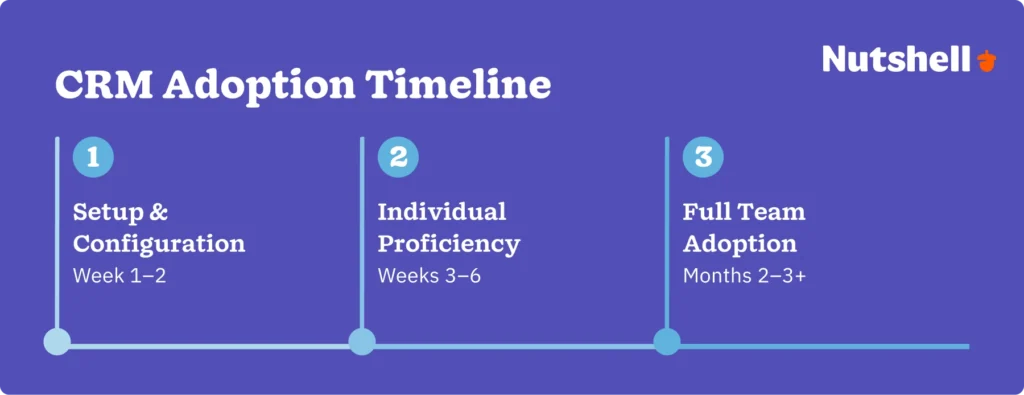
Why the learning curve matters more than you think
CRM failure is a people problem, not a technology problem — and the data is unambiguous on this point. 55% of CRM implementations fail to achieve their planned objectives, and over 60% of those failures trace back to people-related challenges: low user adoption, inadequate change management, and lack of internal buy-in. Only 6 to 10% of failures are caused by actual technical issues with the software.
20% of CRM users have switched platforms specifically because of poor usability, and 32% cite a lack of technical expertise as a direct barrier to adoption. These aren’t edge cases — they’re the majority experience for teams who chose the wrong platform or rolled it out without a plan.
A CRM your team won’t use is your most expensive software purchase. The licensing cost is the smallest part of what you lose — the bigger cost is the pipeline data you’re not capturing, the follow-ups that fall through, and the revenue visibility your managers never get.
“The CRM your team won’t use is the most expensive software you’ll ever buy. We built Nutshell so that adoption isn’t something you have to manage — it’s something that happens naturally because the tool actually fits how sales teams work.” — Jessica Hall, Director of Sales & Customer Experience, Nutshell
How long does it take to learn a CRM?
For most small business teams, a well-designed CRM takes one to two weeks to learn the basics and 30 to 60 days to reach full team adoption — but the platform you choose matters enormously. A platform built for enterprise administrators and a platform built for SMB sales reps have very different learning curves, even when their feature lists look similar on paper.
Learning timelines by role
Timelines vary significantly depending on what each team member needs to do inside the CRM. Here’s what we see across Nutshell customers and the broader market:
- Sales reps: One to two weeks to basic proficiency. The focus is on contact logging, deal movement, and follow-up task creation. For reps on a well-designed platform, the first deal closed entirely inside the CRM is the milestone that signals real adoption.
- Sales managers: Two to three weeks. Managers are learning a different tool — pipeline visibility, reporting, and team activity review require a higher-level understanding of how data flows through the system.
- CRM admins: Two to six weeks depending on platform complexity. Configuration, integrations, and user management vary enormously across platforms — this is where Salesforce and Zoho diverge sharply from Nutshell and Pipedrive.
Role Learning phase focus Typical timeline Key milestone Sales rep Contact logging, deal movement, follow-up tasks One to two weeks First deal closed entirely inside the CRM Sales manager Pipeline visibility, reporting, team activity Two to three weeks First weekly pipeline review run from CRM data CRM admin Configuration, integrations, user management Two to six weeks Full team onboarded and active Learning timelines by company size
Company size shapes the CRM learning curve just as much as platform choice. The more people, pipeline stages, and integration requirements involved, the longer each phase takes. For a detailed breakdown of what to expect at each stage of your rollout, Nutshell’s CRM onboarding guide walks through realistic milestones by team size.
- SMBs (under 50 employees): Two to four weeks to full team adoption with a well-designed platform. Minimal admin overhead and a flat team structure work in your favor here — there’s no bureaucratic approval layer slowing the rollout.
- Mid-market (50 to 500 employees): Four to eight weeks. More pipeline complexity, more role variation, and more stakeholders mean the configuration phase takes longer and role-based training becomes critical rather than optional.
- Enterprise (500+ employees): One to three months. A dedicated admin is typically required, a phased rollout is standard, and getting executive buy-in at every level of the organization is the difference between 30% and 90% adoption.
CRM learning curve compared — platform-by-platform breakdown
To give you an honest comparison, we evaluated five of the most widely used CRM platforms against the same criteria: setup time, admin dependency, training requirements, and time to full team adoption. Our analysis draws on customer data, G2 and Capterra reviews, and our direct experience working with thousands of SMB sales teams.
CRM platform Typical setup time Admin dependency Training required Time to full team adoption Ease of use rating Nutshell One to three days Low — self-serve onboarding with live support included Minimal — guided pipeline and next-action workflows Two to four weeks ⭐⭐⭐⭐⭐ Pipedrive One to three days Low Low to moderate Two to four weeks ⭐⭐⭐⭐ HubSpot CRM Three to seven days Moderate Moderate — feature depth creates navigation complexity Four to eight weeks ⭐⭐⭐⭐ Zoho CRM Five to fourteen days Moderate to high High — consistently cited for steep learning curve on G2 Six to twelve weeks ⭐⭐⭐ Salesforce Two to eight weeks High — dedicated admin typically required High — complex architecture requires structured training Two to six months ⭐⭐ Worth noting: Nutshell offers free onboarding for qualifying customers — something most platforms on this list charge extra for.
Nutshell is purpose-built for SMB sales teams that want to get up and running fast without sacrificing capability. The next-action pipeline approach guides reps through their workflow without requiring configuration expertise — which is why adoption timelines are consistently shorter than nearly every comparable platform.
Pipedrive is a strong option for small teams that prioritize deal-focused workflows. Its visual pipeline is intuitive and setup is fast — the tradeoff is that reporting and automation features require more configuration work as teams grow.
HubSpot CRM has a generous free tier and a strong brand, but the feature depth that makes it powerful for marketing-led teams also creates real navigation complexity. Teams without a dedicated HubSpot admin often find themselves underusing the platform rather than overconfiguring it.
Zoho CRM is highly customizable — but customization requires expertise. G2 reviewers consistently cite the learning curve as the platform’s biggest barrier, and implementation timelines for SMB teams frequently exceed initial projections.
Salesforce is the enterprise standard for good reason: it handles complex, multi-department sales operations at scale. But that power comes at a cost — most SMB teams need a dedicated Salesforce administrator to configure and maintain it, and the time-to-adoption timeline for small teams is measured in months, not weeks.
“The question buyers should be asking isn’t ‘what does this CRM do?’ – it’s ‘how long before my team is actually using it?’ Time to adoption is the real metric, and it’s the one most CRM vendors don’t want you to focus on.”
– Will Gordon, Sr. Director of Marketing, NutshellWant to see how Nutshell stacks up in real life?
Start your free 14-day trial – no credit card required.

What makes a CRM easy to use?
“Easy to use” is not a feature — it’s an outcome of specific, observable design decisions. Here are the characteristics that actually define ease-of-use in a CRM, and that you can evaluate during a free trial:
- Intuitive navigation: Every common task — logging a call, moving a deal, adding a contact — should be reachable in two to three clicks from the main dashboard. If you’re hunting for basic functions, that friction compounds daily.
- Workflow guidance (the next-action approach): The best CRMs don’t just store data — they tell reps what to do next. Nutshell’s next-action pipeline approach is a concrete example of this design principle in practice: rather than leaving reps to decide what step comes after every interaction, the CRM guides them through the workflow. This reduces cognitive load and dramatically shortens the learning curve.
- Minimal admin dependency: An easy CRM is one that any team member can configure at a basic level without IT support. If every pipeline change requires a power user or a support ticket, that’s not ease of use — that’s a single point of failure.
- Fast data entry: Logging activity should feel effortless — ideally automatic where possible (email sync, call logging). Every required manual field is friction that compounds into resistance.
- Out-of-the-box reporting: If your basic pipeline report requires custom configuration, the platform wasn’t designed for how sales teams actually work. The first report should be ready before the first deal closes.
When you’re evaluating platforms, these are the five dimensions that determine what to look for in a CRM beyond feature lists.
The real reasons CRM adoption fails (and how to avoid them)
Most CRM adoption failures are predictable — and preventable. The patterns repeat across industries, team sizes, and platforms. Here are the five failure modes we see most consistently:
- No internal CRM champion: Without one person accountable for driving adoption, usage drifts within weeks of launch. A CRM rollout is a behavior change project, not a software installation — it needs an owner.
- No role-based training: Training everyone the same way ignores the fact that reps, managers, and admins use the CRM completely differently. A one-size-fits-all onboarding session is one of the most reliable predictors of partial adoption.
- Over-customization before launch: Teams that spend weeks perfecting the setup before anyone uses it create complexity that discourages first-time users. Build the minimum viable configuration, then iterate.
- Lack of executive buy-in: If managers aren’t visibly using the CRM to run pipeline reviews, reps treat it as optional. Adoption flows downhill from leadership.
- Choosing complexity over fit: The most powerful CRM is not the best CRM — it’s the one your team will actually use every day. Feature count is not a proxy for business value.
What the Caffè Umbria evaluation looked like in practice
Marie Franklin, Director of Strategic Development at Caffè Umbria, researched a dozen CRMs before selecting Nutshell — and her decision criteria captures exactly what the failure patterns above predict. She wasn’t looking for the most powerful platform. She was looking for a CRM that didn’t change how her team worked.
“A CRM has to flow with the day to day and serve the people that are using it,” Marie says. “Nutshell does that for us.” The result was quick, smooth team adoption — no implementation crisis, no months-long rollout, no reps reverting to spreadsheets. The team was up and running because the tool fit them, not the other way around. Read the full Caffè Umbria story.
How to evaluate a CRM’s learning curve before you buy
When working with teams evaluating CRMs, these are the questions we recommend asking during your free trial — before you commit to a platform or a contract. A 14-day trial is enough time to surface most friction points, but only if you’re asking the right questions.
That’s exactly the kind of evaluation Marie ran across 12 CRMs before selecting Nutshell. It’s also a practical application of the broader question of how to choose a CRM — and why the right framework matters more than the feature checklist.
- How long did it take to enter your first contact and create a deal? If it took more than 15 minutes without help, that’s a signal of unnecessary friction for first-time users. The first few minutes inside a CRM tell you more than any feature comparison spreadsheet.
- Can a non-technical team member configure a new pipeline stage without IT help? Admin dependency is the number one driver of extended implementation timelines. If your least technical rep can’t make a basic configuration change, you’re building a platform that only one person can maintain.
- Does the onboarding include live support, or just documentation? Documentation-only onboarding consistently correlates with lower adoption rates for SMB teams. Live support at the start of a rollout is not a nice-to-have — it’s a meaningful predictor of whether your team reaches full adoption.
- How many clicks does it take to log a call or move a deal? Friction in daily tasks compounds — small inefficiencies become team-wide resistance over time. Count the clicks during your trial; you’ll feel the difference at month three.
- Can you run a basic pipeline report without custom configuration? Out-of-the-box reporting signals a platform designed for how sales teams actually work. If you need a consultant to run your first pipeline report, that cost doesn’t end at implementation.
- Does the CRM guide you to the next action, or do you have to decide what to do next? Workflow guidance is the difference between a tool that drives adoption and one that requires it. A CRM that tells reps what to do next gets used every day. A CRM that waits for reps to figure it out gets checked once a week.
Why Nutshell is built for fast adoption
Nutshell was designed from the ground up for SMB sales teams that need to get their whole team productive fast — without sacrificing the pipeline visibility, reporting, and automation that growing businesses actually need.
The features that shorten the CRM learning curve aren’t incidental to Nutshell’s design — they’re central to it. Guided pipeline workflows with next-action prompts mean reps always know their next step. Live onboarding support is included at every plan level, not gated behind a premium tier. Flat pricing with full feature access from day one means teams aren’t discovering capabilities they didn’t know they were paying for. And the visual drag-and-drop pipeline is exactly as simple as it looks in the demo.
Brothers Leather Supply experienced this firsthand. Adam Kail, Founder and CEO, credits Nutshell with helping his company reach strong month-over-month growth — and specifically highlights how quickly new employees could be trained. By 2016, the company was seeing 40% month-over-month growth, with bags sold through 25+ wholesale partner stores nationwide alongside their retail location in downtown Grand Rapids. “In the past I’ve worked at other big companies with different CRM options,” Adam says. “Nutshell is the best I’ve used by far.” That kind of fast new-hire onboarding isn’t luck — it’s what happens when a platform is genuinely designed for everyday users, not just power users. Read the full Brothers Leather Supply story.
SkySpecs, a B2B technology company managing complex sales cycles, addresses the concern that simple CRMs can’t scale. Josh Coral, Director of Business Development, calls Nutshell “the perfect CRM for a B2B company” — and credits it with growing alongside the organization through constant change. The “simple = limited” objection is the most common hesitation we hear from teams evaluating Nutshell against Salesforce — and SkySpecs is the most direct proof point that it’s a false trade-off. Read the full SkySpecs story.
One G2 reviewer put the adoption outcome more bluntly than we ever would: “Easy to use and…wait for it…100% buy in!” That’s not a product pitch. It’s the outcome every sales manager is actually looking for.
One honest caveat: Nutshell is built for SMB sales teams. If you’re an enterprise organization with complex multi-department CRM requirements, multiple custom objects, or a need for developer-level API customization, you’ll want to evaluate Salesforce or HubSpot alongside Nutshell. We’d rather tell you that upfront than have you discover it post-implementation.
CRM onboarding best practices and common training mistakes
Here’s what works — and what consistently derails rollouts that should have been straightforward. The Nutshell CRM onboarding guide goes deeper on each of these practices with specific milestone benchmarks. Whether you’re rolling out Nutshell to a five-person sales team or managing a mid-market deployment, these principles apply.
Start with role-based training paths, not company-wide sessions
Reps, managers, and admins use the CRM differently — they should be trained differently. A rep doesn’t need to know how to build a custom report on day one. A manager doesn’t need to know how to configure an integration. Mixing these audiences in a single training session wastes everyone’s time and guarantees that nobody gets the depth they actually need.
Mistake to avoid: One generic training deck treats a sales rep and a sales manager as interchangeable CRM users. Build separate training tracks for reps, managers, and admins — focused on the specific workflows each role actually uses.
Use a power-user-first rollout
Give your three to five most tech-comfortable team members a two-week head start. They’ll find the friction points, build the internal vocabulary, and become the advocates who answer questions during the full rollout. This approach consistently outperforms big-bang launches.
Mistake to avoid: The whole-team onboarding session feels efficient and produces low retention. Your early adopters will answer more questions in week two than your training session covered in two hours.
Set a 30-day adoption milestone with clear metrics
Define what “adopted” looks like before the rollout begins — not after. Three specific signals work well: deals updated at least once per week, tasks completed on time, and at least one pipeline report run from CRM data per week. Measure against these at 30 days and you’ll know immediately whether you have an adoption problem or a training gap.
Mistake to avoid: Measuring adoption by logins. Login frequency tells you who opened the platform — not whether anyone’s using it. Measure by pipeline activity instead.
Designate a CRM champion before launch day
The CRM champion owns adoption — not IT, not the vendor, not the manager who approved the budget. This person answers daily questions, escalates issues before they become habits, and keeps the rollout accountable. Choose someone who uses the CRM daily, has credibility with the sales team, and is willing to be the internal expert.
Mistake to avoid: Skipping the champion entirely. The absence of a champion is the single most reliable predictor of partial adoption across every team size.
Connect CRM usage to individual rep outcomes
Show reps exactly how their CRM data informs their pipeline reviews, forecast conversations, and commission calculations. When reps understand that incomplete CRM data directly affects how their performance is perceived, adoption stops being a mandate — it becomes self-interest.
Mistake to avoid: Failing to connect CRM usage to individual rep outcomes. Reps who don’t see a direct connection between their CRM activity and their personal performance will always find a reason to skip it.
Ready to put these into practice? Nutshell’s free onboarding and 14-day trial make it easy to get started.
Signs your CRM might be too complex for your team
If your team is struggling with adoption and you’re not sure whether it’s a training problem or a platform problem, these warning signs will help you diagnose it quickly:
- Team members are logging activity in spreadsheets instead of the CRM after the initial rollout period — the most reliable signal that the platform feels harder to use than the workaround.
- Deals are only updated before pipeline reviews — not as a natural part of the daily sales workflow — meaning the CRM is a reporting obligation, not a working tool.
- Only one person knows how to run reports — a clear indicator of admin dependency that limits team-wide value and creates a bottleneck every time that person is unavailable.
- New hires take more than a month to become independently productive in the CRM, which suggests the platform’s learning curve is longer than your onboarding process accommodates.
- Your team asks “do I have to put this in the CRM?” — the most honest real-time feedback a CRM rollout can produce. It means the tool feels like overhead rather than an asset.
If two or more of these apply to your team, it may be worth re-evaluating whether your current CRM is the right fit — or whether your rollout approach needs an adjustment. Our guide on switching CRMs can help you think through that decision.
Getting your team up and running: A 5-step onboarding framework
This framework delivers value regardless of which CRM you choose. The teams that move fastest through the learning curve aren’t using the most powerful platform — they’re running the most deliberate rollout.
Step 1 – Define your pipeline stages before you configure anything. The most common implementation mistake is building inside the CRM before agreeing on the process outside it. Align your team on pipeline stages, deal definitions, and activity requirements first — then configure. A CRM built on a contested sales process is a CRM nobody trusts.
Step 2 – Start with three to five power users, not the whole team. Early adopters become internal advocates. Give them two weeks to find the friction points before you roll out to everyone. Their feedback will shape your training, your configuration, and your CRM champion’s FAQ document.
Step 3 – Prioritize data entry automation over manual fields. Every manual field you require is friction that compounds into resistance. Start with auto-logging for email and calls where the platform supports it, and minimize required fields to the absolute essentials. You can always add fields later.
Step 4 – Set a 30-day adoption milestone with clear metrics. Define what “adopted” looks like — deals updated weekly, tasks completed on time, pipeline reviewed from CRM data — and measure against it at 30 days. A milestone without a metric is just a hope.
Step 5 – Designate a CRM champion. This is the single highest-leverage move in any CRM rollout. The champion owns adoption, answers team questions, and escalates issues before they become habits. Choose someone who uses the CRM daily and has credibility with the sales team — not just the person who attended the vendor training.
If you’re evaluating Nutshell, this is essentially the process our onboarding team walks you through — and for qualifying customers, it’s included at no extra cost.
Stop treating the learning curve like a fixed obstacle
The CRM learning curve is not a fixed obstacle — it’s a function of which platform you choose and how deliberately you roll it out. Two businesses can buy the same CRM and have completely different adoption outcomes based on whether they run a structured rollout or just hand out logins.
Three takeaways worth keeping:
- Platform choice is the biggest variable: Two CRMs with identical feature sets can have dramatically different adoption timelines based on UX design and onboarding support alone. Evaluate this during your trial — not after your contract is signed.
- Adoption is a strategy, not a side effect: Teams that designate a champion, define milestones, and start with power users consistently outperform teams that treat rollout as an IT task. The 5-step framework in this article gives you a starting point regardless of which CRM you choose.
- You can evaluate the learning curve before you buy: Use the pre-purchase checklist from this article during your trial. Don’t commit to a platform until your least technical team member can use it independently — that’s the only test that matters.
See how fast your team can get up and running. Start your free 14-day Nutshell trialand be productive before the two-week mark.
FAQs
-
1. What is the typical CRM learning curve for a small business?
For most small business teams, basic CRM proficiency takes one to two weeks — and full team adoption takes 30 to 60 days. Platform choice and onboarding support are the two biggest variables: a well-designed CRM with live onboarding support can cut this timeline significantly compared to complex enterprise platforms that require dedicated admin support.
-
2. Are CRM systems hard to learn?
It depends almost entirely on which platform you choose. Platforms like Salesforce and Zoho have steeper curves due to configuration complexity and admin dependency. Nutshell and Pipedrive are designed for fast adoption without technical expertise — a non-technical team member can be productive in days, not weeks. The learning curve is a platform design choice, not an inherent feature of CRM software.
-
3. What is the easiest CRM to use?
For SMB sales teams, Nutshell and Pipedrive consistently rank highest for ease of adoption based on G2 and Capterra reviews, setup timelines, and time to full team productivity. “Easiest” depends on your team size, technical resources, and use case — but if your primary criterion is getting your whole team using the CRM quickly, both platforms significantly outperform HubSpot, Zoho, and Salesforce on that metric.
-
4. What are the biggest reasons CRM implementations fail?
Over 60% of CRM failures are people-related , not technology-related. The three most consistent failure patterns are: no internal CRM champion, no role-based training, and choosing a platform based on features rather than fit for your team’s actual workflow.
-
5. How do you train employees on a new CRM?
Start with three to five power users before the full rollout, build role-specific training paths for reps, managers, and admins, measure adoption by pipeline activity (not logins), and designate a CRM champion before launch day. Documentation alone is not a training program — teams with access to live onboarding support consistently reach full adoption faster than those relying on self-serve resources.
-
6. Can a small business team learn a CRM without IT support?
Yes — if the platform is designed for it. Nutshell’s next-action pipeline approach and included live onboarding support are specifically built for teams without dedicated IT resources. A non-technical founder or sales manager can configure pipelines, import data, and onboard their team without writing a single line of code or filing a single IT ticket.
BACK TO TOP Written by
Simone Morgan Associate Content MarketerReady to try
Nutshell for Free?Thank you! Your submission has been received!Oops! Something went wrong while submitting the form.



What’s the Difference Between Hunter, Farmer, and Trapper Sales Personas?
Published on: November 10, 2022
Best Microsoft CRM for 2025: Top Solutions for Microsoft 365 Users
Published on: December 22, 2025Highly Effective Strategies for Elevating Sales Team Performance
Published on: November 10, 2022Join 30,000+ other sales and marketing professionals. Subscribe to our Sell to Win newsletter!










