Best Less Annoying CRM Alternative: Why Nutshell Is Built for Growing Sales Teams

-

Key Takeaways
- LACRM scales at 10-30 people: Pipeline visibility disappears, automation becomes impossible, collaboration breaks down, and you’re paying for separate tools that should be integrated
- We designed Nutshell for growing teams: Our next-action selling prevents deal stalls, built-in automation eliminates tool fragmentation, and AI saves at least two hours per rep daily
- Total cost of ownership favors Nutshell: Comparable per-user cost but includes email, automation, and AI that LACRM users buy separately—typically $3,000−$5,000 in annual savings
- Almost 50% of reps give up after first follow-up: Next-action selling and automated reminders solve this directly by making next steps explicit and automatic
- Migration is low-risk: 14-day free trial, safe data migration, two to four week implementation, white-glove onboarding support, and your data is fully preserved
- Your team will adopt it: LACRM switchers typically hit 90%+ adoption within 30 days because Nutshell feels familiar but more powerful
The problem: Why LACRM stops working at scale
You loved Less Annoying CRM. It was simple, affordable, and got the job done. But then your team grew from five to 15 people. Suddenly, LACRM felt… less simple. Manual follow-ups slipped through cracks. Your pipeline visibility tanked. Coordinating across the team became a nightmare. Not to mention, you realized you’re paying for Mailchimp AND Zapier AND LACRM when you just need one integrated platform that actually scales.
Here’s the reality: 63% of sales time gets eaten up by admin work, and 44% of reps give up after the first follow-up—often because the next step isn’t clear.
The best news? You can test everything with Nutshell’s 14-day free trial at no cost—no credit card required. You’re not locked in, and your LACRM data comes with you.
The solution: Here’s why Nutshell is the natural evolution
We built Nutshell specifically for growing teams. Our next-action selling prevents deal stalls, built-in automation eliminates tool fragmentation, and AI saves at least hours per rep daily.
Here’s why Nutshell is the natural evolution:
- Next-action selling methodology: Every deal has a clear next step, automatically logged, with follow-up reminders built in—preventing reps from giving up on leads early
- Built-in automation and AI: Email marketing, lead scoring, call transcription, and timeline summarization included natively (not via separate tools)
- Pricing that makes sense: Comparable per-user cost to LACRM, but includes what you’re currently paying Mailchimp and Zapier for separately
- Companies using AI CRMs are 83% more likely to exceed their sales goals. You can’t afford to be the team still using manual processes while your competitors use AI.
Is it time to switch?
You’re ready to switch from Less Annoying CRM if you’re:
✓ Managing 10-30 sales reps instead of three to five, and LACRM’s features feel limiting
✓ Paying for LACRM + Mailchimp + Zapier separately, adding $100+ to your monthly stack
✓ Frustrated with manual follow-ups, not knowing which deals are stalling or why
✓ Want visual pipeline management, not buried contact records and hidden deal status
✓ Need your team to adopt AI-powered insights like lead scoring, timeline summaries, and call transcriptionTable of contents
- How we selected the best CRM for growing sales teams
- Key features every growing sales team CRM should have
- Comparison table: Nutshell vs. other CRM alternatives
- Best CRM software for growing sales teams: Detailed reviews
- Why sales teams outgrow Less Annoying CRM
- The cost of staying: LACRM + tool stack reality
- Next-action selling: What it is and why it matters
- Making the switch: Migration and implementation
- Frequently asked questions: LACRM vs. Nutshell
How we selected the best CRM for growing sales teams
We evaluated nine CRM platforms using six criteria specifically relevant to teams outgrowing Less Annoying CRM. Our goal wasn’t to find the “best” CRM universally—it was to identify which platforms solve the problems LACRM can’t.
Here’s what we evaluated:
- Next-action/sales methodology alignment: Does the platform have a built-in sales framework that keeps deals moving? LACRM users need this because so many reps give up after the first follow-up due to unclear next steps.
- Sales automation capabilities: Can the platform automate email sequences, task creation, follow-up reminders, and lead scoring? This directly solves the 63% admin time problem.
- Native AI features: Does the platform include timeline summarization, call transcription, email starters, and predictive scoring? LACRM has zero native AI; users typically buy external integrations for this.
- Pipeline visualization options: Does the platform offer multiple views (Kanban boards, lists, maps, charts)? LACRM’s pipeline is buried and non-visual, making it hard to manage at scale.
- Team collaboration at scale: Can the platform handle four- to 50-person teams with role-based permissions, shared pipelines, and activity feeds? LACRM struggles here.
- Affordability for 10-30 person teams: What’s the total cost of ownership when factoring in email, automation, and AI? This matters because LACRM is cheap per user but expensive when you factor in the tool stack.
- Evaluation scale: We use a 5-point scale (0.0-5.0) with tenths place precision. Ratings reflect how well each platform solves problems for growing sales teams—not universal rankings. Nutshell’s 4.6 score reflects “best choice for this audience,” not perfection.
Key CRM features every growing sales team needs
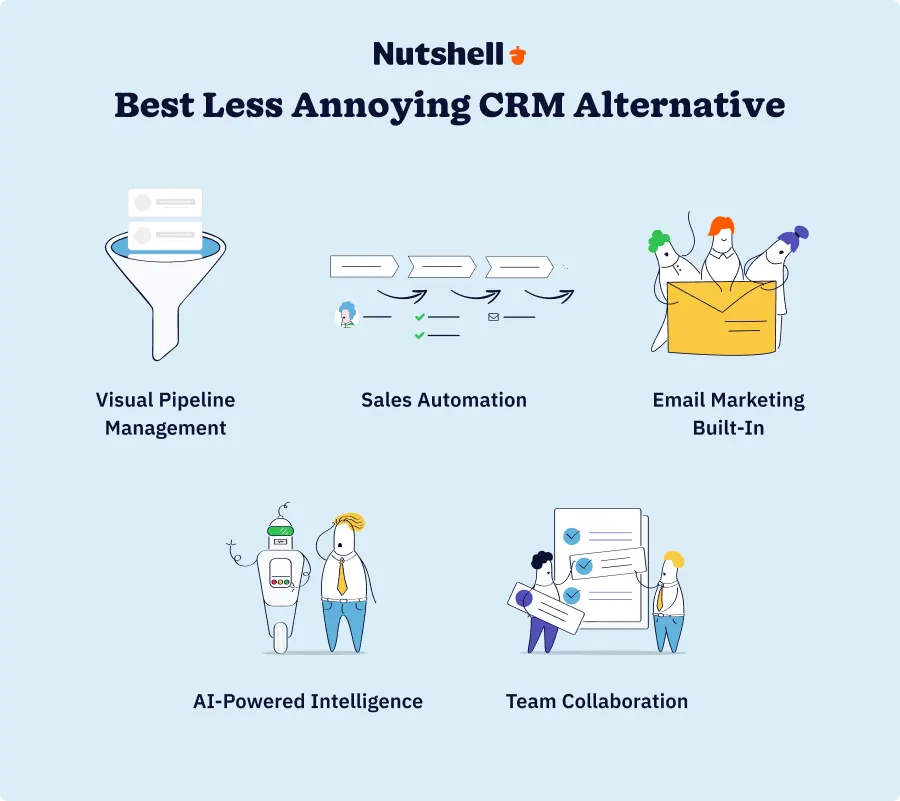
Growing teams don’t need more features—they need smarter automation. Here are the five capabilities that actually matter when you’re scaling beyond 10 people.
1. Visual pipeline management
At five people, you could manage the pipeline in your head. At 15 people, you need to see it. Multiple views—Kanban boards for drag-and-drop workflow management, list views for sorting and filtering, map views for geographic teams, and chart views for forecasting—let different reps work the way they think.
Here’s the problem: LACRM buries your pipeline inside contact records, making it nearly impossible to coach reps on blocked deals or spot forecasting risks. A visual pipeline changes that instantly. When your sales manager can see every deal at a glance and spot which ones are stalling, deals don’t slip through the pipeline.
LACRM gap: Buried, non-visual pipeline that doesn’t scale beyond 5-person teams.
2. Sales automation
At 15+ people, manual follow-ups become impossible. Automation solves this with: email sequences triggered by deal stage, automatic task creation when leads go silent, follow-up reminders before meetings, and lead scoring that surfaces top leads first.
The 44% give-up-after-first-follow-up problem exists largely because reps lack a clear system for next steps. Automation changes that.
When a lead replies “send me a proposal,” automation logs the interaction, creates a follow-up task, suggests an email template, and sets a reminder for a follow-up call in three days if they don’t respond. Reps stop guessing what to do next.
LACRM gap: Minimal automation; most follow-ups are manual, leading to gaps and inconsistency.
3. Email marketing built-in
Most LACRM teams are also paying Mailchimp (starting at $20/month) to send bulk campaigns, which means duplicate data entry and constant syncing headaches. When email marketing is built into your CRM, campaigns pull directly from your pipeline, open rates update automatically, and you stop paying for two platforms. Nutshell’s built-in email marketing works directly from your deal list—no more duplicate data entry, no more syncing headaches between platforms.
One-click email campaigns from your deal list. Drip sequences that trigger based on deal stage. Email tracking that shows you who opened your proposal without asking reps to check their email provider. This reduces your tool stack and automates communication.
LACRM gap: No email marketing capabilities; forces you to buy Mailchimp, Constant Contact, or similar separately.
AI-powered intelligence
This is the biggest differentiator from LACRM. Modern AI features include:
- Timeline summarization: AI reads all customer interactions and gives you the summary
- Call transcription: AI listens to calls and creates summaries automatically
- Email starters: AI drafts your next email in seconds
- Predictive scoring: AI identifies your best leads before you waste time on low-quality prospects
Timeline summarization saves your reps 30+ minutes per day reading old emails. Call transcription saves another 15-20 minutes of manual note-taking. Email starters generate a first draft in 10 seconds. Across a 15-person team, that’s 100+ hours per week reclaimed for actual selling.
As we know, companies using AI-powered CRMs are significantly more likely to reach their sales goals. LACRM users are at a disadvantage competing against AI-enabled teams.
LACRM gap: Zero native AI; users must integrate external tools via Zapier with limited functionality.
Team collaboration at scale
At 3 people, you text each other. At 20 people, you need structure: shared deal pipelines where multiple reps can see the same opportunities, role-based permissions so junior reps don’t accidentally edit forecasts, activity feeds so you know what your team did yesterday, and real-time updates so information doesn’t get stale.
Without collaboration tools, your sales manager spends more than five hours per week in one-on-ones asking “what’s the status of XYZ deal?” With shared pipelines and activity feeds, that information is always current.
LACRM gap: Limited collaboration; team visibility is fragmented, and real-time updates are slow.
Comparison table: Nutshell vs. other CRM alternatives
Feature Nutshell HubSpot Pipedrive Zoho CRM Salesforce Next-Action Methodology ✅ Yes ⚠️ Limited ❌ No ❌ No ❌ No Built-In Email Marketing ✅ Yes ⚠️ Limited ❌ No ⚠️ Basic ❌ No Native AI Features ✅ Yes ⚠️ Limited ⚠️ Limited ✅ Yes ✅ Yes Pipeline Visualization ✅ Board, list, map, chart ✅ Board ✅ ✅ Specialized ✅ Board ✅ Board Team Collaboration ✅ Strong ✅ Strong ✅ Good ✅ Strong ✅ ✅ Excellent Pricing (per user/month) $13-$79 Free-$90 $14-$79 $14-$52 Free-$100 Ideal Team Size 4-50 1-Unlimited 5-500 1-Unlimited 50+ Now that you’ve seen how Nutshell stacks up, let’s dive deeper into the specific limitations that make LACRM difficult to scale—and why they matter for growing teams.
Best CRM software for growing sales teams: Detailed reviews
1. Nutshell
Rating: 4.6
Best for Growing Sales Teams Outgrowing Simple Tools
Official Website: https://www.nutshell.com/
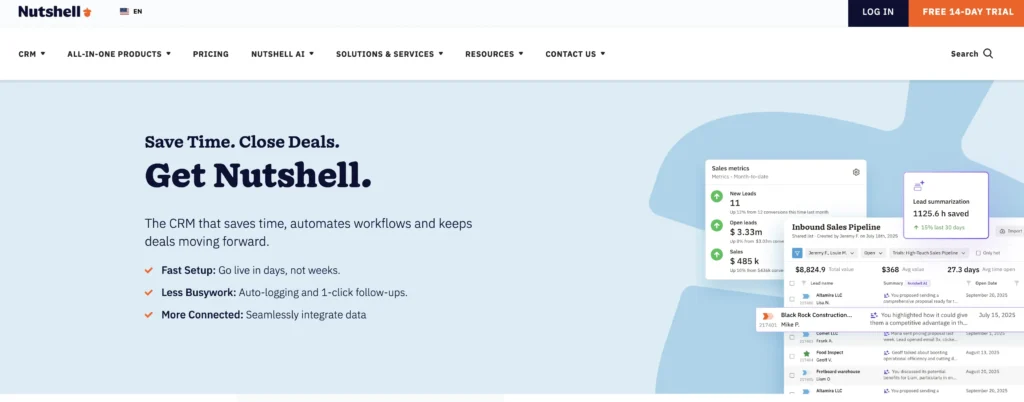
Nutshell is the natural evolution for Less Annoying CRM users. Built specifically for 4-50 person teams, it combines next-action selling methodology (a proprietary framework that keeps deals moving), native AI capabilities, and built-in email marketing—all at a comparable price to LACRM when you factor in what you’re already paying Mailchimp and Zapier for.
Key Features:
- Next-action selling methodology: Every deal includes a documented next step, automatically logged with follow-up reminders
- AI-powered timeline summaries: System reads all customer interactions and generates summaries in seconds, eliminating 30+ minutes of daily review time
- Built-in email marketing: Campaigns, drip sequences, and email tracking without a separate tool
Pros:
- Only CRM with built-in next-action methodology—directly prevents the 44% give-up-after-first-follow-up problem
- AI features (timeline summarization, call transcription, email starters) save 2+ hours per rep daily compared to manual processes
- Designed specifically for 10-30 person teams; scales without becoming complex like Salesforce
- White-glove onboarding and customer support included
Cons:
- Fewer integrations than HubSpot or Salesforce (though expanding rapidly)
- Smaller ecosystem means fewer third-party apps available (though built-in features reduce the need)
Pricing: $13-$79 per user per month depending on tier, billed annually. $19-$89 per user per month when billed monthly.
2. HubSpot
Rating: 4.4
Best for Free Entry or Large Enterprises
Official Website: https://www.hubspot.com/products/crm
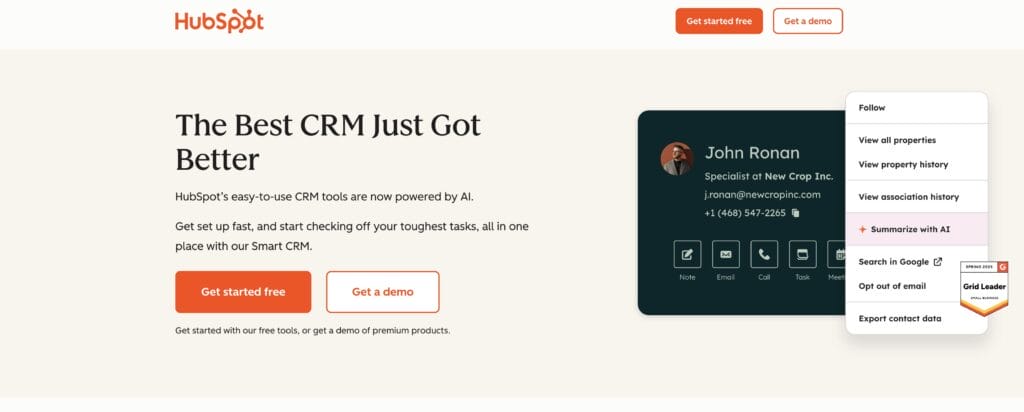
HubSpot dominates the market with a free tier that actually works for basic contact and deal management. If you’re a huge enterprise, it’s powerful. But for 10-30 person teams trying to replace LACRM? Honestly, it’s overkill—and the price jumps fast once you add users.
Key Features:
- Free tier: Unlimited contacts, basic automation, no seat limitations
- Email marketing: Integrated tools for campaigns and sequences
- Basic AI: Limited AI features compared to specialized platforms
Pros:
- Free tier removes the risk of trying CRM software
- Strong integration ecosystem (500+ apps)
- Excellent reporting and forecasting for larger teams
- Brand recognition and excellent support
Cons:
- Pricing gets expensive fast as you add users and features
- Free tier has significant feature limitations; paid tiers start at $50/user for meaningful functionality
- No next-action selling methodology; reps must create their own follow-up systems
- Native AI is limited compared to AI-first platforms
Pricing: Free tier (limited), then $9-$90 per user per month for paid tiers
3. Pipedrive
Rating: 4.3
Best for Visual Pipeline Management
Official Website: https://www.pipedrive.com/
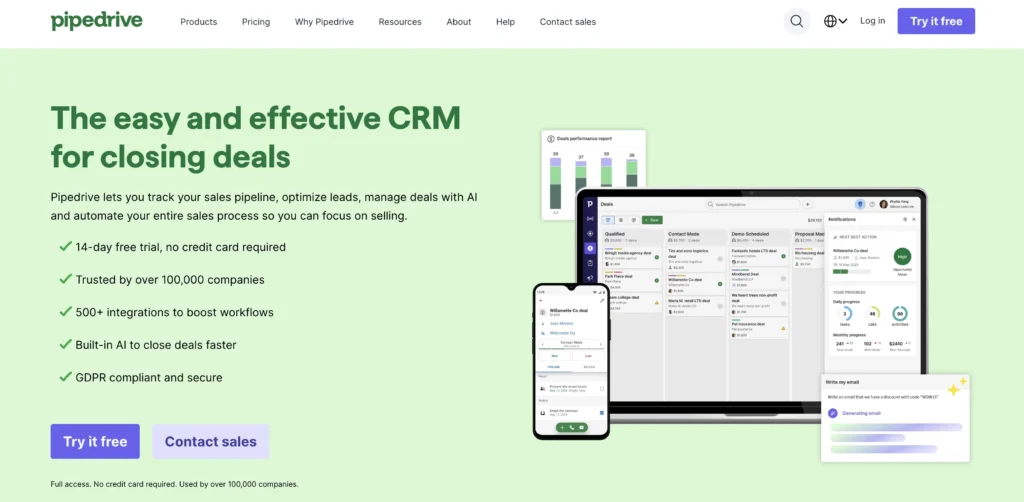
Pipedrive is built around visual pipeline management. If your team loves the Kanban board experience and you want specialized pipeline views, Pipedrive excels. However, it lacks next-action selling methodology and native AI, meaning you’ll still need external tools for automation and insights.
Key Features:
- Specialized pipeline views: Multiple Kanban boards, custom fields, visual deal progression
- Mobile-first design: Strong mobile app for reps in the field
- Basic automation: Task creation and email reminders (but limited compared to modern platforms)
Pros:
- Pipeline visualization is genuinely the best in class—reps love the UI
- Affordable and transparent pricing; no surprise add-ons
- Great for teams that live in their pipeline
Cons:
- No built-in email marketing (you’ll still buy Mailchimp)
- Limited AI capabilities; manual lead scoring required
- No next-action selling framework
- Automation is basic; complex workflows require external tools (Zapier)
Pricing: $14-$79 per user per month, billed annually. $24-$79 per user per month when billed monthly.
4. Zoho CRM
Rating: 4.2
Best for Cost-Conscious Large Teams
Official Website: https://www.zoho.com/crm/
Zoho offers an impressive feature set at a low price, making it attractive for budget-conscious teams. However, it’s harder to implement than LACRM, and the UI feels dated compared to modern alternatives. Best for teams that need customization and can afford implementation support.
Key Features:
- Comprehensive features: Email marketing, automation, analytics, and basic AI
- Affordable pricing: Lowest per-user cost among full-featured CRMs
- Deep customization: Workflow automation and custom modules available
Pros:
- Lowest-cost full-featured option
- Comprehensive feature set (email, automation, analytics included)
- Good for teams needing deep customization
- Basic AI scoring and predictive analytics
Cons:
- Steep learning curve; implementation is slow compared to LACRM’s simplicity
- UI is dated and less intuitive than modern competitors
- No next-action selling methodology
- Support is weaker than HubSpot or Salesforce
- Automation setup requires technical knowledge
Pricing: $14-$52 per user per month, billed annually. $20-$65 per user per month when billed monthly.
5. Salesforce
Rating: 4.0
Best for Enterprises (Not for 10-30 Person Teams)
Official Website: https://www.salesforce.com/
Salesforce dominates the enterprise segment. If you’re a 10-30 person team, Salesforce is overkill—complex, expensive, and requiring dedicated administrators. Many teams that migrate from LACRM to Salesforce regret the switch and look to escape. Mentioned here because some growing teams consider it as they scale.
Key Features:
- Enterprise features: Advanced customization, workflow automation, AI (Einstein GPT)
- Massive ecosystem: 5,000+ integrations and add-ons
- Scalability: Designed to grow from 50 to 50,000 users
Pros:
- Market leader with proven ROI at enterprise scale
- Most integrations available; endless customization options
- Strong AI features (Einstein GPT) for large teams
- Excellent compliance and security for regulated industries
Cons:
- Cost is prohibitive for 10-30 person teams ($25-$100+ per user per month)
- Implementation takes months; requires consultant help
- Steep learning curve; massive admin overhead
- Overkill for teams not yet at enterprise scale
- Known for being complex and difficult to maintain
- No next-action selling methodology; you build your own
Pricing: $25-$100+ per user per month
Why sales teams outgrow Less Annoying CRM
LACRM was the perfect tool for 3-5 person teams. Cheap, simple, no implementation headache. But at 10-30 people, critical gaps emerge that LACRM wasn’t designed to handle. Understanding these gaps helps you see why Nutshell is the natural evolution.
Pipeline management gaps
LACRM’s pipeline is hidden inside individual contact records. Finding the status of “deal X” means opening individual contacts and scrolling. At 5 people, this works. At 15 people, it becomes impossible to coach reps, forecast accurately, or spot blocked deals.
You can’t see your pipeline at a glance, move deals visually, or filter by stage or priority. Your sales manager spends more than five hours per week in one-on-ones asking “what’s the status of XYZ deal?” when a visual board would show it instantly.
Lack of automation
LACRM has minimal automation. Follow-ups are manual. Task reminders are manual. Lead scoring doesn’t exist. When 44% of reps give up after the first follow-up, it’s partly because LACRM doesn’t remind them what to do next or track whether the lead responded.
At scale, manual follow-ups become impossible. Reps forget which leads need a follow-up call. Deals stall silently. Your sales manager can’t tell if a deal is waiting on the rep or on the lead.
No email marketing
LACRM has no email marketing. So you buy Mailchimp. But now you have data in two places—contact info in LACRM, email lists in Mailchimp, open rates nowhere. You’re manually uploading contacts and syncing constantly.
That extra $50-100/month adds up. And the friction of managing two platforms means fewer bulk campaigns actually get sent.
Zero AI capabilities
LACRM has no AI—no timeline summaries, no call transcription, no predictive scoring, no email starters. This means your reps manually read old emails to remember context, manually take notes on calls, and guess which leads are worth pursuing.
Meanwhile, teams using AI CRMs are 83% more likely to exceed their sales goals.[3] You’re at a competitive disadvantage.
Limited team collaboration
LACRM’s collaboration features don’t grow with your team. There’s no shared visibility of the pipeline. No activity feeds showing what your team did yesterday. No role-based permissions. At 20 people, your sales manager can’t see what your team is working on without asking in 1-on-1s.
Building collaborative processes in LACRM requires constant workarounds:
- Spreadsheets
- Slack updates
- Manual status reports
The Cost of staying: LACRM + tool stack reality
Most LACRM teams think they’re getting a deal at $15 per user per month. But that’s just the LACRM cost. Here’s what your real tool stack looks like:
Typical LACRM user’s monthly cost (15-person team):
- LACRM: 15 users × $15 = $225/month
- Mailchimp: $20-$100/month (email marketing)
- Zapier: Free-$69/month (automation to connect tools)
- Additional tools (scheduling, call tracking, etc.): $50-100/month
Monthly total: $295-$494
That’s $3,540−$5,928 per year for 15 people.
Let’s compare that to Nutshell’s all-in cost for a 15-person team:
- Nutshell: 15 users × $42 (mid−tier) = $630/month
- Email marketing: Included
- Automation: Included
- AI features: Included
Total: $630/month
That’s $7,560 per year for 15 people.
The reframe: Nutshell isn’t 1 more per user—it′s 10 × the value when you factor in what you′re already paying elsewhere. You′re actually saving thousands per year while getting AI, automation, and email marketing that LACRM can’t provide.
Ready to see how Nutshell’s built-in automation, email marketing, and AI compare to your current tool stack? Start your 14-day free trial—no credit card required. Migrate your LACRM data during the trial and validate everything transfers correctly before going live.
Need a user-friendly CRM to boost sales and team efficiency?
Take our guided tour to explore Nutshell’s incredible features!

Next-action selling: What it is and why it matters
Most sales frameworks are abstract. “Build relationships.” “Ask discovery questions.” But here’s what actually stops deals from moving: reps don’t know what to do next.
A lead says “send me a proposal”—then what? Do they call in three days? Five? Never? Does someone follow up if the lead doesn’t respond? The rep guesses. The lead gets forgotten. The deal stalls.
What is next-action selling?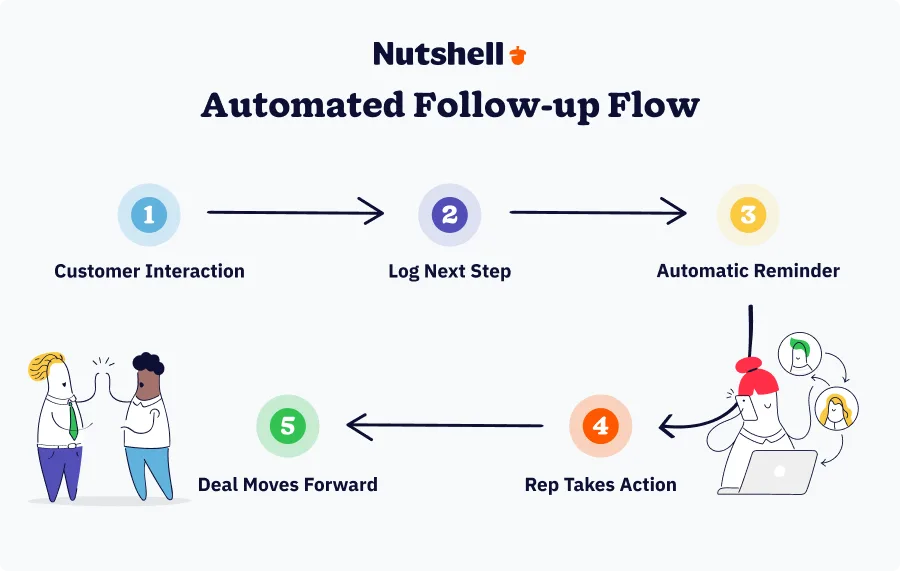
Next-action selling is a methodology where every customer interaction includes a documented next step. Not a vague next step (“follow up”). A specific, logged, dated next action.
Example: “Lead requested proposal. Next action: Send proposal by Tuesday 10am. Follow-up call if no response by Friday.”
That next action is automatically logged in the system. Reminders trigger at the right time. Everyone on the team knows what’s happening with that deal.
Why it prevents deal stalls
The 44% give-up-after-first-follow-up problem exists because reps lose context:
- They don’t remember what the lead asked for.
- They don’t know whose turn it is to follow up.
- They don’t have a reminder system.
Next-action selling solves this by making the next step explicit and automatic. When a lead responds, the system reminds the rep. When a deal goes silent, the system flags it. Deals don’t stall due to unclear next steps—they stall because leads actually aren’t interested.
How Nutshell implements next-action selling
Nutshell’s next-action selling methodology is built into the platform. Every deal includes a “next action” field. When you close a customer interaction, you log:
- What the lead said
- What the next step is (call, email, send proposal, etc.)
- When it should happen
- Who’s responsible
The system automatically creates tasks, sends reminders, and surfaces overdue actions in the reps’ to-do lists. No manual follow-up system. No forgotten deals. No guessing what to do next.
Combined with Nutshell’s email automation and AI, next-action selling becomes powerful: the system suggests which lead to contact next, drafts the email, logs the interaction, and sets the next reminder.
That’s why LACRM users often jump to Nutshell—next-action selling solves the actual problem: deals stalling due to unclear next steps.
Ready to implement next-action selling for your team? See how it works firsthand with Nutshell’s 14-day free trial. Your team will adopt it faster than you expect—Nutshell switchers typically hit 90%+ adoption within 30 days.
Making the switch: migration and implementation
The biggest fear holding LACRM users back from switching isn’t “is this the right tool?”—it’s “how painful will the migration be?” We get it. You’ve built your entire sales process around LACRM. The thought of starting over feels risky.
Here’s the good news: the switch is simpler than you think, and the risk is minimal. Your LACRM data comes with you—validated and preserved.
Data migration
Your data is safe. LACRM uses a standard export format, and Nutshell’s migration team handles the technical work. Here’s what happens:
- Export from LACRM: You export your contacts, companies, and deal history to a standard CSV or JSON file
- Data mapping: Nutshell’s migration specialists map your LACRM fields to Nutshell fields (contact name → contact name, deal status → deal status, etc.)
- Import and validation: Your data imports into Nutshell. You validate that everything looks correct
- Cleanup (optional): Some teams use the migration as an opportunity to clean old data (delete duplicates, update stale records, etc.)
Your records, contacts, and deal history come with you. You don’t lose anything.
Implementation timeline
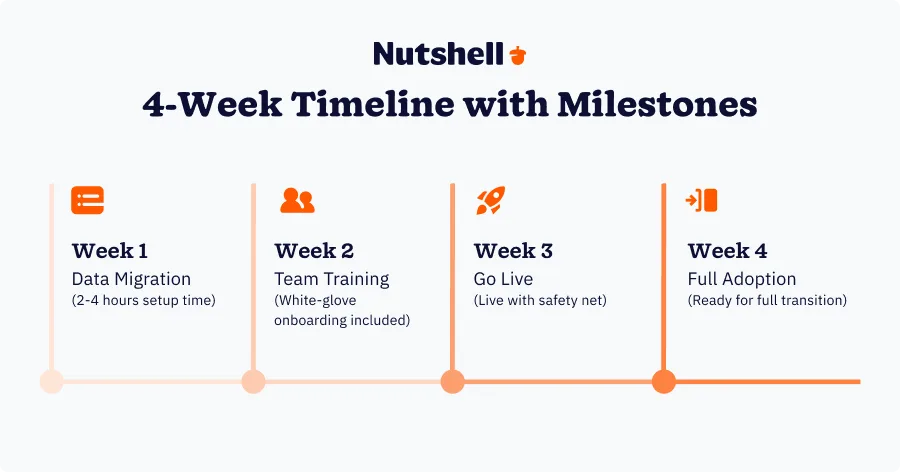
Most teams go live in two to four weeks, depending on:
- Team size: A five-person team usually takes two weeks. A 20-person team can take three to four weeks
- Complexity: Implementing a simple sales process takes about two weeks. For more complex workflows, expect a timeline closer to four weeks
- Customization: Using Nutshell out-of-the-box lets you go live in two weeks. If you need heavy customization, you’ll likely take four or more weeks.
For most LACRM users migrating to Nutshell, expect 2-3 weeks because both platforms are designed for simplicity.
Typical migration timeline:
- Week 1: Data export, mapping, and initial import
- Week 2: Team training, configuration, testing
- Week 3: Go-live; reps start using Nutshell, LACRM runs in parallel for safety
- Week 4: Monitor, fine-tune, confirm full adoption
Onboarding support
You’re not doing this alone. Nutshell provides:
- White-glove setup: A dedicated implementation specialist walks your team through the migration
- Training resources: Video tutorials, documentation, live training sessions
- Implementation checklist: Step-by-step guide to ensure nothing falls through cracks
- Go-live support: Specialists available during your first week of live use
- Post-launch check-ins: 30-day and 90-day checkpoints to confirm you’re getting results
Getting started
Your data is safe, and the 14-day free trial lets you test everything before committing:
Full access to all features (no limitations)
Ability to import sample data (or your real data if you want to test migration)
White-glove onboarding included during trial
No credit card requiredThe trial is long enough to:
- Test the interface and get comfortable with next-action selling
- Run a practice data migration to verify your data imports correctly
- Train two to three reps on the new platform
- Confirm that your team will actually adopt it
The best part? Your risk is minimal. You can explore for two weeks with zero commitment.
Make the switch to Nutshell
Less Annoying CRM did exactly what it was supposed to: provide a simple, affordable CRM for small teams. But you’ve outgrown it. Your team grew from five to 15 people, and your process became more complex. As a result, your reps spend more time on admin work than they do on selling.
The problem isn’t LACRM—it’s that you’ve evolved past what LACRM was designed for. We built Nutshell to solve this problem by combining three things LACRM can’t:
- Next-action selling methodology: Every deal has a clear next step, automatically logged and reminded. No more deal stalls due to unclear next steps.
- Built-in automation + AI: Email marketing, lead scoring, timeline summarization, call transcription—all included natively. No Mailchimp. No Zapier. No guessing.
- Team collaboration at scale: Visual pipeline, role-based permissions, shared visibility, real-time activity feeds. Your sales manager knows what your team is working on.
The switch is simpler than you think, with safe data migration and a 14-day free trial where you can test everything before you commit. Implementation takes just 2-4 weeks. Your team will adopt it faster than you expect because Nutshell is built for teams like yours—teams that loved LACRM but have outgrown it.
Nutshell isn’t just the best Less Annoying CRM alternative—it’s the next-action selling platform your growing team needs to prevent deal stalls, eliminate admin busywork, and compete with AI-powered sales teams.
Ready to see the difference? Start your 14-day free trial today. No credit card required. Migrate your LACRM data during the trial and validate everything transfers correctly before going live.
Want a detailed side-by-side comparison? Check out our 1 to see exactly how Nutshell’s next-action methodology, automation, and AI address the specific gaps LACRM can’t fill.
Frequently asked questions: LACRM vs. Nutshell
-
1. Will we lose data migrating from Less Annoying CRM to Nutshell?
No. Nutshell’s data migration services preserve all records, contacts, and deal history. Your export from LACRM comes with you. The 14-day free trial actually allows you to test the data integrity before full commitment—import your real data into the trial environment and validate everything transferred correctly before going live on the paid plan. Nutshell maintains secure backups throughout the process, so your data is never at risk.
-
2. How long does it take to implement Nutshell?
Most teams go live in 2-4 weeks, depending on team size and complexity. A 10-person team with a straightforward sales process typically launches in 2 weeks. A 25-person team with custom workflows might take 3-4 weeks. Nutshell offers white-glove onboarding to accelerate setup—a dedicated implementation specialist guides you through data migration, team training, and configuration. The 14-day free trial also allows your team to evaluate fit and test processes before committing to the paid plan.
-
3. Is Nutshell really more expensive than Less Annoying CRM?
The per-user cost is comparable (16−67forNutshellvs.16−67forNutshellvs.15 for LACRM), but total cost of ownership analysis shows Nutshell as dramatically better value. Here’s why: LACRM users typically pay for LACRM + Mailchimp (50−100)+Zapier(50−100)+Zapier(30-80) + other tools. Nutshell includes email marketing, automation, and AI natively, so you eliminate those separate costs. For a 15-person team, that’s 3,000−3,000−5,000 per year in savings. You’re paying $1 more per user but getting 10× the functionality that LACRM users buy separately.
-
4. Will our team actually use Nutshell if they love simplicity?
Yes. Nutshell is designed for both ease of use AND power. The next-action selling methodology actually reduces cognitive load by telling reps what to do next—they don’t have to guess. User adoption rates from LACRM switchers are high (typically 90%+ within 30 days) because Nutshell feels familiar to LACRM users but more intuitive and responsive. The 14-day free trial proves adoption before you commit—have your reps use it for two weeks and watch them ask “when are we switching?” instead of resisting.
-
5. How does Nutshell’s AI actually save time?
Nutshell’s AI features save 2+ hours per rep daily through specific, measurable time-savings:
- Timeline summarization: AI reads all customer emails, calls, and notes and generates a summary in seconds. Your reps no longer spend 30+ minutes per day reviewing old interactions to remember context.
Call transcription: AI listens to calls and creates transcripts and summaries automatically. Reps save 15-20 minutes per call that would have gone to manual note-taking.
Email starters: AI generates the first draft of your next email in 10 seconds. Instead of staring at a blank screen, reps edit and send.
Predictive lead scoring: AI identifies your best leads before you waste time on low-quality prospects. Reps focus their selling energy where it converts.
AI agents: Routine tasks (data entry, follow-up reminders, task creation) happen automatically without rep involvement.
For a 15-person team, that’s 30+ hours per week reclaimed for actual selling.
- Timeline summarization: AI reads all customer emails, calls, and notes and generates a summary in seconds. Your reps no longer spend 30+ minutes per day reviewing old interactions to remember context.
-
6. What if Nutshell becomes too complex as we grow?
Nutshell is designed to scale from 4→50 person teams without adding complexity. The interface stays simple. Features hide until you need them. Role-based permissions and team structures help you maintain order as headcount grows. If you eventually exceed 100+ people and need enterprise features like advanced compliance or unlimited customization, migration options exist (though unlikely for most growing teams). Nutshell grows WITH your team—simplicity doesn’t disappear as you scale.

Let’s Talk
Have a question? Need a volume discount? Send us a message or book a meeting with a Sales rep to start the conversation.
 BACK TO TOP
 Written by
Ready to try
Nutshell for Free?Thank you! Your submission has been received!Oops! Something went wrong while submitting the form.



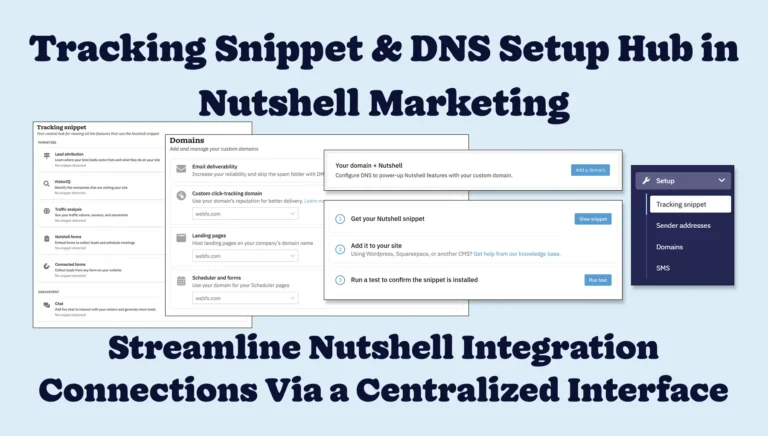
We’ve Made it Easier for You to Track Your Website Analytics, Send Marketing Emails, and More!
Published on: July 17, 2025
What Is Revenue Intelligence? An All-Encompassing Guide
Published on: January 24, 2024Highly Effective Strategies for Elevating Sales Team Performance
Published on: November 10, 2022Join 30,000+ other sales and marketing professionals. Subscribe to our Sell to Win newsletter!










