Why CRMs Are the New And Improved Spreadsheets

-

Key Takeaways
While spreadsheets might seem like a simple solution for managing customer data, they are prone to human error, lack automation, and make collaboration difficult for sales teams. CRMs are a superior alternative because they centralize all customer information, automate repetitive tasks, and provide powerful reporting and analytics to help teams work more efficiently and make data-driven decisions. By using a CRM, businesses can streamline their sales process and gain a much clearer, more accurate view of their customer relationships and sales pipeline.
Spreadsheets might feel like the safe choice. They’re familiar, available instantly, and appear to cost nothing. But that perception hides a costly reality. In 2024, 44% of businesses reported spreadsheet errors monthly. Sales reps waste an average of one hour daily on manual data entry. And companies relying on spreadsheets are losing market share to competitors using modern CRM systems.
To accomplish more and drive more revenue, your team needs a customer relationship management platform (CRM). CRMs are systems businesses use to improve sales pipeline management and team collaboration and avoid common spreadsheet pitfalls. This comparison between CRMs and spreadsheets will show how much more helpful a CRM is for driving business success.
Table of Contents
What is the difference between a CRM and a spreadsheet?
Although CRMs and spreadsheets both store and organize your customer data, the main difference is that they come with vastly different features and help your team accomplish different tasks.
CRMs organize your customers’ and leads’ information, display an in-depth view of your sales pipelines, enable communication between your team, and automate sales and marketing tasks to increase efficiency. In contrast, spreadsheets were designed for one thing: organizing large amounts of data in columns and rows.
6 signs spreadsheets are holding you back
It may be hard for your team to say goodbye to spreadsheets, and understandably so. Spreadsheets are familiar, even comfortable, and have their advantages. For example, spreadsheets are simple for anyone with Excel or Google Sheets experience to understand, and they allow you to easily recalculate data using formulas.
But if you take a hard look at your sales and marketing success, you might find that your use of spreadsheets is hurting, not helping. There are a lot of things spreadsheets can’t do, like automating sales processes and organizing your communication. And even if you’re using a CRM spreadsheet template, you’re still operating with stripped-down features.
Here are a few signs that spreadsheets are holding your team back from fulfilling their full potential:
- Your sales team struggles to keep track of their interactions with prospects.
- You don’t know which sales activities produce the best outcomes.
- You don’t have a standardized sales process.
- Your team can’t effectively forecast sales or analyze deals in your pipeline.
- You don’t have a bird’s-eye view of your sales pipeline.
- You don’t have your customer and lead data integrated with other tools, like marketing platforms.
When it’s time to switch from spreadsheets to a CRM
It’s easy to think “spreadsheets work fine for now” or “we’ll upgrade when we hit a bigger problem.” But waiting costs you. If your team is struggling to keep up with growth, learning how to switch from spreadsheets to a CRM is the most effective way to reclaim your time.
Here are the specific triggers that tell you it’s time to make the move.
Specific metrics that signal you’ve outgrown spreadsheets
You’re managing more than 100 active contacts. At this point, even the most organized spreadsheet becomes unwieldy. You’ll start noticing duplicate entries, conflicting information, and the time it takes to search for a specific contact balloons. A CRM handles this scale effortlessly and keeps your data clean automatically.
Lead volume exceeds five to ten per day. When inquiries are coming in faster than your team can manually log them, something’s gotta give. You’ll start losing leads in Slack messages, emails, and forgotten browser tabs. A CRM that integrates with your website and email automatically captures every lead the moment it arrives.
Preparing weekly reports takes more than an hour. If your sales manager is spending chunks of their week assembling data from multiple spreadsheets, stitching together CSVs, and manually calculating metrics, that’s a red flag. It shouldn’t take an hour to answer “where do we stand with our pipeline this week?” A CRM pulls this together in minutes.
Your team spans more than one manager. The moment multiple people need to work with the same customer data simultaneously, spreadsheets fall apart. Version control nightmares ensue. One person is editing the Tuesday version while someone else is working off Thursday’s. A CRM keeps everyone on the same page, literally and figuratively.
You’ve had a data mishap or near-miss. Ever had someone accidentally delete a row? Had duplicate records that threw off your forecasting? Lost a file because it was saved in the wrong place? These incidents are spreadsheet wake-up calls. CRMs have built-in protections—audit trails, version history, permission controls, and backups.
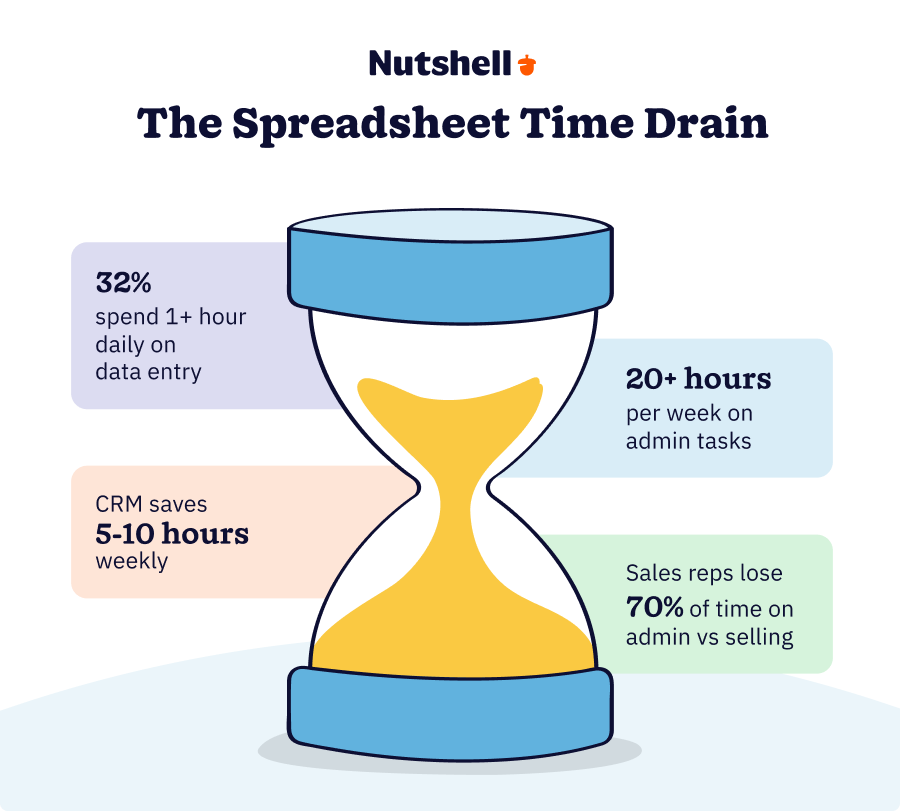
Your sales team is spending more time on data entry than on selling. If reps are frustrated because they’re “doing CRM admin” instead of calling prospects and closing deals, you’re burning money. 32% of sales reps spend more than an hour of their day on data entry and administrative work. That’s hours every week spent not selling. A CRM automates these tasks, freeing your team to focus on what actually moves deals forward.
The hidden cost of staying with spreadsheets
Spreadsheets seem free. They’re included with your Google Workspace or Microsoft 365 subscription, so the math seems obvious: zero cost, problem solved.
Except that math is wrong.
The real cost of spreadsheets shows up in places most businesses don’t track. Let’s break it down.
Time waste adds up fast
Your sales reps aren’t cheap. If you have a team of five selling at an average salary of $60,000 per year, that’s roughly $29 per hour (loaded cost) for each rep. Now multiply that by the hours they’re spending on spreadsheet admin:
A 2024 study found that sales reps spend over one hour every single day just entering and updating data manually. That’s five hours per week per person. For your five-person team, that’s 1,300 hours per year—the equivalent of two full-time employees spent on data entry alone.
At $29 per hour, you’re looking at $37,700 per year in lost selling time. And that’s just on data entry. Add in the time spent searching for information, managing file versions, and building manual reports, and you’re easily over $50,000 per year.
A CRM typically costs $20 to $60 per user per month. Even at the high end—$60 per user per month—that’s $3,600 per year for your five-person team. You’d break even on the CRM investment in less than two months just from the time savings alone.
Errors cost real money
In 2024, 140 public companies were forced to restate their financial statements due to accounting errors. Many of those errors originated in—you guessed it—spreadsheets containing formula mistakes, copy-paste errors, and version control failures.
While your company might not be public, spreadsheet errors still hit your bottom line. A mistyped phone number means a lost follow-up. A formula error in your pipeline forecast means your sales manager makes decisions based on bad data. A duplicate entry means you contact the same prospect twice, wasting time and potentially damaging your reputation.
A 2024 survey found that 44% of businesses report spreadsheet errors on a monthly basis. Not yearly—monthly.
CRMs have built-in validation rules and constraints that prevent common data entry errors before they happen. They maintain a single source of truth, eliminating duplicates and version confusion.
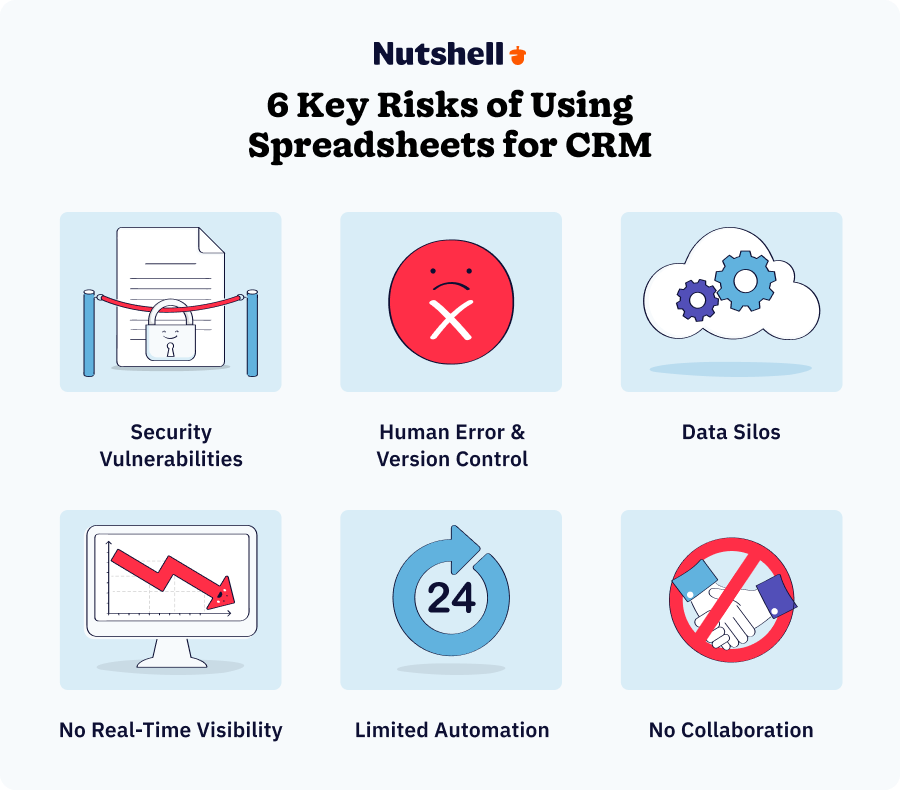
Security and compliance risks are real
Here’s something that keeps finance and legal teams up at night: spreadsheet security is a nightmare.
A spreadsheet containing customer data, pricing information, or financial records can be copied to a personal device, emailed to the wrong person, or left on a laptop. There’s no audit trail. You don’t know who accessed it, when, or what they changed. If you’re handling sensitive customer information or need to comply with regulations like GDPR or HIPAA, spreadsheets are a liability.
CRMs provide role-based access control (some people see everything, others see only their own accounts), encryption, automated backups, and audit logs that track every change. If you need to prove compliance, the CRM gives you the documentation.
The real opportunity cost
Here’s the bigger picture: while your team is managing spreadsheets, your competitors using a CRM are closing more deals.
Sales teams using a CRM see an average productivity increase of 10% to 29%. 94% of businesses report a surge in sales productivity after adopting a CRM.
Spreadsheets aren’t just costing you time and creating risk—they’re costing you deals.
How are CRMs better than spreadsheets?
CRMs bring significant advantages over spreadsheets that can help your team sell better and operate more efficiently. Take a look at the top reasons why CRMs are better than spreadsheets:
A CRM… A spreadsheet… Data organization Stores your data and communications and makes information searchable Makes it difficult to enter and search for data Sales process standardization Automates sales processes and helps your team work efficiently Doesn’t standardize any aspect of your sales process Sales pipeline analysis Gives you a real-time view of your pipeline so you can analyze deals Provides no insight into where leads are in your pipeline Team collaboration Enables your team to communicate within the platform and track all interactions Makes it tricky to assign tasks to sales reps Report generation Generates deep reports to illuminate what turns your leads into customers Won’t let you easily create reports Spreadsheet and CRM comparison chart 1. CRMs keep all your data and interactions in one place
CRMs store and organize all your data and communications in a single location, from your first contact with a lead to your ongoing communication with customers. While your team could manually enter this information into a spreadsheet, it would be incredibly time-consuming and difficult to search.
A CRM centralizes lead contact information, buying history, records of interactions, and so many more types of data, so your team doesn’t have to keep multiple spreadsheets or try to duplicate data across systems. And with easy-to-read dashboards, it’s easier for you to quickly access the information you need.
2. CRMs enable sales process standardization
Standardization can make many aspects of your sales process easier, from automating email outreach to crafting the perfect sales process. When your sales reps know exactly which leads are coming their way and what actions to take at each stage in the sales pipeline, they can work at maximum efficiency.
With a CRM, you can turn proven sales activities into a repeatable process for your sales team to follow, helping them work faster and focus on strengthening relationships. CRMs allow you to design a consistent sales process and provide your reps with guidance and reminders, then measure your impact and improve your process.
3. CRMs reveal the real status of your sales pipeline
Ever been unsure how many deals you have in the pipeline or how many are likely to convert? Spreadsheets make it tricky to get a bird’s-eye view of what’s going on in your sales pipeline.
With a CRM, you’ll never be in the dark. CRMs compare real-time pipeline views to show you how many leads are in each stage of the sales process and help you quickly analyze deals and forecast sales.
4. CRMs keep everyone on the same page
Collaboration with your reps is crucial for making the biggest impact as a team. Sales reps sometimes need help managing a lead or finding an email, and they need to be able to quickly reach the person or data they’re looking for.
When you use a CRM, there’s no more hunting for buried comments in a spreadsheet or forgetting who has that email from a lead. A CRM keeps team collaboration front and center and prevents communication from falling through the cracks. You can also easily assign tasks and stay notified as sales reps accomplish them, seeing into your team’s overall productivity.
5. CRMs generate helpful and actionable reports
Spreadsheets make it challenging to quickly gain insight into your team and company’s data and drill down into the numbers. Yet reporting is crucial to identifying where your sales team excels and where they can improve.
With a CRM’s powerful reporting capabilities, you can tap into your team’s performance metrics in a fraction of the time it would take you to create similar reports from a spreadsheet. Track your sales, lead volume, and team productivity to create an unstoppable action plan.
Why now? The 2026 case for making the switch
If you’ve been sitting with spreadsheets thinking “maybe next year,” this might be the year to reconsider.
Several industry shifts happening right now make this the ideal time to move to a CRM.
AI is becoming a competitive advantage
The market for AI-powered CRM features is exploding. In 2025, the global AI in CRM market is worth $11.04 billion. By 2033, it’s projected to reach $48.4 billion.
What does that mean for you? CRMs are getting smarter. AI can now automatically log calls, summarize customer interactions, suggest next steps, and even predict which deals are likely to close. Spreadsheets will never have these capabilities. If your competitors are using AI-powered CRMs to close deals faster and more accurately, spreadsheets aren’t just slower—they’re putting you at a disadvantage.
Cloud adoption is now the standard
87% of CRMs deployed today are cloud-based. That’s not a niche choice anymore—it’s the default. Cloud-based CRMs mean your team can access customer information from anywhere, on any device. Your data is automatically backed up. There’s no server to maintain.
Spreadsheets, by contrast, are local files or shared drives. They’re harder to access remotely, prone to accidental deletion, and lack the security and backup features of cloud systems.
Real-time visibility is now table stakes
In 2025, sales teams expect real-time visibility into the pipeline. Not end-of-week reports. Not manual updates. Real-time dashboards showing where deals stand, what’s at risk, and what needs attention.
Spreadsheets can’t do this. A CRM makes it standard.
Your team expects better tools
If you’re hiring younger sales talent or trying to attract top performers, spreadsheet-based processes are a hard sell. Anyone who’s worked at a company with a
How to choose a CRM
When you put CRMs and spreadsheets head to head, CRMs are a clear winner in the functionality and flexibility department. But how do you choose which CRM to use? There are dozens of options, all with unique combinations of features at various price points.
Here’s how to pick the CRM that’s really going to help your team reach new heights:
1. Compare prices
Price is one of the most important things to consider when choosing a CRM for your business. Consider what types of features and customer support you get for your money.
2. Read reviews
Customer reviews are a great place to research different CRMs and their performance. As you read reviews from a trusted review site like G2, consider the quantity and quality of reviews. Pay attention to the specific reasons why a CRM received a positive or negative review and whether those reasons are important to your company.
3. Compare CRM features
If your team has been operating out of spreadsheets, you can gain a lot of benefits from the automation, communication, and reporting features a CRM offers. Compare the features you get with different CRM plans to find the one that works best for you. You can use this CRM comparison worksheet to see which CRM best fits your needs.
4. Prioritize ease of implementation
The cost of a CRM goes beyond the monthly subscription. There’s the implementation time—how long it takes to get the system set up, data migrated, and your team trained.
Look for CRMs that promise fast implementation. Some offer white-glove setup services where their team handles the heavy lifting. Others provide templates and pre-built workflows that cut weeks off your timeline.
A 2024 survey found that most small businesses can complete a spreadsheet-to-CRM migration in two to four weeks. Compare this to complex enterprise systems that can take months or even years. Choose a CRM designed for fast adoption, not one that requires a consultant and extensive customization.
5. Check for affordability and transparent pricing
We mentioned price earlier, but it’s worth emphasizing: CRM affordability varies wildly. Some vendors hide features behind enterprise plans. Others charge extra for support, training, or basic integrations.
Nutshell’s advantage is that we’re built specifically for small and mid-sized businesses. Our pricing is straightforward—you know exactly what you’re getting at each tier. No surprise add-ons. No features hidden in a “contact us for pricing” plan.
When comparing CRMs, don’t just look at the per-user-per-month cost. Factor in implementation, training, integration costs, and what happens if you need support. A cheaper CRM that requires expensive customization or support hours isn’t actually cheaper.
How to move your spreadsheet data to a CRM
So you’ve decided it’s time to switch your customer data from a spreadsheet over to a CRM, and you’ve chosen the platform you think will work best for your team’s needs. But how do you export that data while ensuring it all stays intact?
Follow these steps to efficiently move your spreadsheet data into your CRM:
1. Start with clean data
It’s important to ensure your CRM data is accurate, or else it’ll be unusable to your team. Clean up your spreadsheet data so you don’t transfer a tangled mess into your CRM. Start by removing duplicate leads and standardizing the format of your data.
2. Export your spreadsheet
Next, you’ll want to export and download your spreadsheet as a CSV file. This process will vary depending on if you’re using Excel or Google Sheets.
3. Import your data
The final step is importing your spreadsheet data directly into your CRM. As long as you’ve prepared your CRM with the custom fields, tags, and company types that are part of your import, this step should be easy. If you need any help, your CRM might be able to help you with a white-glove import service.
Real-world example: How TechNova Solutions made the switch
Sometimes the best way to understand the impact of switching from spreadsheets to a CRM is to see it in action.
TechNova Solutions is a mid-sized IT service provider. Like many growing companies, they’d been managing customer relationships the way they started—with spreadsheets. Lots of them.
The breaking point
By 2024, TechNova had outgrown its spreadsheet system. Their operations manager was juggling 12 separate Excel files. Customer contact information was in one file. Service tickets were tracked in another. Project updates lived in a third. And because these systems weren’t connected, the same information was being entered and updated manually in multiple places.
To make matters worse, the company was using three different web-based applications—none of which talked to each other. When a customer contacted TechNova, the information had to be manually entered into each system. When a customer’s needs changed, someone had to update all three systems separately.
The result? Chaos. Response times were slow. Important follow-ups were missed because no one had a complete view of what was happening with each customer. The team was frustrated, and customers could feel it.
The solution
TechNova decided to consolidate everything into a single CRM platform. Instead of 12 Excel files and 3 disconnected apps, they now had one system where every customer interaction, ticket, and project update lived in one place.
The migration took less than 30 days. TechNova cleaned up their data, exported it from Excel, and imported it into the CRM. The CRM was then connected to their other tools so information flowed automatically.
The results
Within three months, TechNova saw measurable changes:
Response times dropped by 50%. Because customer information was instantly accessible to the entire team—no more digging through spreadsheets to find the last communication—the team could respond to inquiries much faster. Customers noticed the difference.
The team saved 20+ hours per week in administrative work. That’s almost four full-time employee weeks per week of freed-up time. Time that was immediately redirected toward customer service and account management.
Cash flow improved. With automated billing and ticket tracking, invoices were generated and sent faster. Customers paid sooner, which improved cash flow.
Most importantly, the team was happier. No more hunting for information. No more duplicate data entry. No more version control chaos.
The spreadsheet-to-CRM ROI calculation
Still wondering if a CRM is worth the investment? Let’s do the math.
Research from Nucleus shows that the average CRM ROI is $8.71 for every dollar spent. But let’s calculate what that looks like for your business.
Your time savings
Let’s say you have a team of five sales reps. Based on the research we cited earlier, you’re likely losing 20+ hours per week to spreadsheet admin work. That’s 1,040 hours per year.
At an average fully-loaded salary of $60,000 per rep, that’s roughly $30 per hour. Your time savings: $31,200 per year.
Your error reduction
Spreadsheet errors cost money. Missed follow-ups from duplicate data. Bad forecasts from formula mistakes. Compliance risks from poor data security. Conservatively, a typical growing business loses about 2% of potential revenue to spreadsheet-related errors and inefficiencies.
If your sales team generates $500,000 annually, that’s $10,000 lost revenue you could recover.
Your error reduction savings: $10,000+ per year.
Your total annual savings
Time savings: $31,200
Error reduction: $10,000
Total: $41,200 per yearYour CRM cost
A typical small-business CRM costs $20 to $60 per user per month. For a five-person team:
$40 per user per month × 5 users × 12 months = $2,400 per year
Your ROI
$41,200 in savings ÷ $2.400 investment = 17.2x return
You’re looking at an ROI of 1,620%—and you’ll break even in the first month just on time savings alone.
That’s not hype. That’s math.
Frequently asked questions comparing CRMs with spreadsheets
-
1. Can I use a spreadsheet as a CRM?
While you can use a spreadsheet to manage your sales and marketing processes, it won’t get you the best results. Spreadsheets make it difficult to stay on top of leads, automate steps in the sales process, collaborate with your team, and generate reports. For growing businesses, a CRM is hands-down the better option.
-
2. What is a CRM spreadsheet?
A CRM spreadsheet is a template you can use in Excel or Google Sheets to make your spreadsheet more like a CRM. An Excel or Google Sheets CRM template can help organize lead contact information and records of communication, all within your spreadsheets. However, CRMs provide much fuller functionality, going beyond the basics to automate your sales processes, improve communication, and drive results.
-
3. How long does it take to migrate from spreadsheets to a CRM?
Most small businesses can complete the migration in 2-4 weeks. This includes cleaning your data, importing it into your CRM, and training your team. With Nutshell’s white-glove import service, we handle the heavy lifting so you can start selling faster.
-
4. When should a small business switch from spreadsheets to a CRM?
It’s time to switch when you’re managing more than 100 active contacts, your team struggles to track customer interactions, or you’re spending hours searching for information. If spreadsheets feel like a bottleneck rather than a tool, you’ve outgrown them.
-
5. Is a CRM more expensive than using spreadsheets?
While spreadsheets appear free, they cost you in lost time, missed opportunities, and manual work. Most small businesses find that CRM pricing ($20-60 per user monthly) pays for itself through increased sales efficiency and better customer follow-up within the first few months.
-
6. Will I lose data when switching from a spreadsheet to a CRM?
No, you won’t lose data if you follow proper migration steps. Clean your spreadsheet first, export it as a CSV file, then import it into your CRM. Nutshell offers a white-glove import service to ensure your data transfers safely and accurately.
-
7. Can a CRM integrate with my existing tools better than spreadsheets?
Yes. CRMs are built to connect with your email, calendar, marketing platforms, and other business tools automatically. Unlike spreadsheets that require manual data entry and updates, a CRM syncs information across all your systems in real time, eliminating duplicate work.
-
8. What if we’ve been using spreadsheets for years and our data is messy?
Messy data is common. Before migrating to a CRM, spend a day or two cleaning up your spreadsheets: remove duplicates, standardize phone number and email formats, and fill in missing critical information. A CRM import wizard will flag inconsistencies and allow you to map old fields to new ones. Many CRM vendors (including Nutshell) offer white-glove import services where their team handles the cleanup and migration. This takes about one day of collaboration with your team.
-
9. Can we migrate gradually, or do we have to switch all at once?
You don’t need to switch everything overnight. Some teams import their existing customer database while continuing to use spreadsheets for new leads for a week or two until everyone is comfortable. Other teams run parallel systems for a month. The key is picking a cutoff date and fully committing after that point. A phased approach can ease the transition, but prolonged parallel systems create confusion about which version of the data is correct.
-
10. What if we use other business tools—will a CRM integrate with them?
Modern CRMs are built to integrate with your existing tools. Nutshell connects directly with Gmail, Outlook, Google Workspace, Microsoft 365, Slack, Zapier, and dozens of other platforms. When you integrate a CRM with your email and calendar, customer information syncs automatically. Instead of manual data entry, the CRM captures emails and meeting notes without any effort from your team. Before choosing a CRM, check the integration marketplace to make sure it connects with the tools your team already uses.

Ditch the spreadsheets and start selling better with a CRM
Are you ready to take the leap from spreadsheets to a CRM? Nutshell can help. Our award-winning CRM provides businesses with the tools and features they need to convert more leads to customers.
Nutshell makes it easy to automate your sales process, create meaningful reports, collaborate with your team, and so much more. With robust customer support to help your team make the shift and answer any questions you have along the way, Nutshell offers all the resources you need to take your sales performance to the next level.
Want to see Nutshell in action? Start your 14-day free trial or check out our pricing and plans.
BACK TO TOP Written by
Jewell July Marketing SpecialistEdited by
Will Gordon Sr. Director of MarketingReviewed by
Andy Fowler Co-FounderReady to try
Nutshell for Free?Thank you! Your submission has been received!Oops! Something went wrong while submitting the form.


Best AI Chatbots for B2B Lead Generation: Capture & Qualify Leads 24/7
Published on: December 29, 2025Highly Effective Strategies for Elevating Sales Team Performance
Published on: November 10, 2022Introducing Nutshell Forms Spam Prevention
Published on: April 22, 2024Curing the Tension Between Sales and Marketing: A Q&A With Nutshell Co-Founder Guy Suter
Published on: November 10, 2022Join 30,000+ other sales and marketing professionals. Subscribe to our Sell to Win newsletter!










