Customer Success Tools for SMBs: What You Actually Need (and When)

-

Key takeaways
- Most SMBs managing fewer than 200 customers can achieve strong retention with CRM-based customer success workflows, saving $10,000 to $30,000 annually compared to dedicated platforms
- Cost reality: A capable CRM runs $100 to $300 per month, while dedicated customer success platforms start at $900 to $3,000 per month — that’s 10x the investment for capabilities many SMBs don’t need yet
- Five essential capabilities matter more than advanced features: lifecycle visibility, automated workflows, basic health indicators, unified customer view, and easy integrations — all deliverable through modern CRM platforms
- CRM is enough when you’re managing under 200 customers without a dedicated CS team, need basic automation and tracking, and have limited technical resources — specialized platforms become valuable later as you scale
- You can implement an effective 30-day customer success foundation using your existing CRM — no lengthy implementation, no specialist training, no budget shock
You’ve read the listicles. Gainsight costs $26K per year. Churn Zero runs $30,000 to $40,000. But you’re a team of five managing 80 customers, and your budget doesn’t come close. Meanwhile, your churn rate is ticking upward, and your sales team is stretched thin juggling renewals alongside new business.
Here’s the disconnect: Most customer success tool articles assume you’re running an enterprise operation with a dedicated CS team and a six-figure budget. They don’t address the reality that SMBs achieve 71% retention versus 82% for enterprises, but with 8.7x lower CAC—meaning automation investments deliver the highest ROI for your segment. You don’t need enterprise software to move that needle.
This article cuts through the noise and gives you a practical decision framework. You’ll learn what customer success capabilities actually matter for small teams, whether a CRM can do what you need, how to build effective CS workflows with tools you probably already have, and when—if ever—to invest in specialized platforms. No fluff. No enterprise assumptions. Just honest guidance for businesses like yours.
Table of contents
- What are customer success tools?
- The 5 customer success capabilities every SMB actually needs
- CRM vs. dedicated customer success platforms: What’s right for SMBs?
- How to build customer success workflows in your CRM
- Essential customer success metrics for small teams
- Top customer success tool categories (for when you’re ready to scale)
- Getting started: Your first 30 days of customer success
- Frequently asked questions about customer success tools
What are customer success tools?
Customer success tools are software platforms and systems that help businesses track, manage, and improve customer relationships throughout the life cycle—from onboarding through retention and renewal. These tools provide visibility into customer health, automate proactive outreach, and enable teams to prevent churn before it happens.
The key word here is proactive. Customer success tools transform customer management from reactive problem-solving into anticipatory relationship-building. Rather than waiting for customers to contact you with issues, you’re identifying at-risk accounts, reaching out before they leave, and ensuring they hit key milestones that predict retention.
Customer success tools exist on a spectrum. On one end, a capable CRM with automation features can provide foundational CS capabilities for small teams. On the other end, enterprise platforms like Gainsight or ChurnZero offer sophisticated health scoring algorithms, predictive churn detection, and specialized workflows that justify their $30,000+ annual cost for large operations.
Most SMBs never need the enterprise end of that spectrum. Here’s the truth that tool vendors don’t advertise: Many SMBs don’t need specialized customer success platforms at all. They need a CRM with strong automation and life cycle tracking. That distinction saves you $10,000 to $30,000 per year while still delivering real retention improvements.
The capabilities matter more than the label on the software. If your tool provides visibility into customer lifecycle stages, automates proactive outreach, tracks engagement, and generates basic health indicators, you have a functioning customer success system—regardless of the name.
The 5 customer success capabilities every SMB actually needs
Before you evaluate any tool, understand what actually drives retention for small teams. These five capabilities form the foundation of effective customer success—and all of them are available in modern CRMs without specialized platform costs.
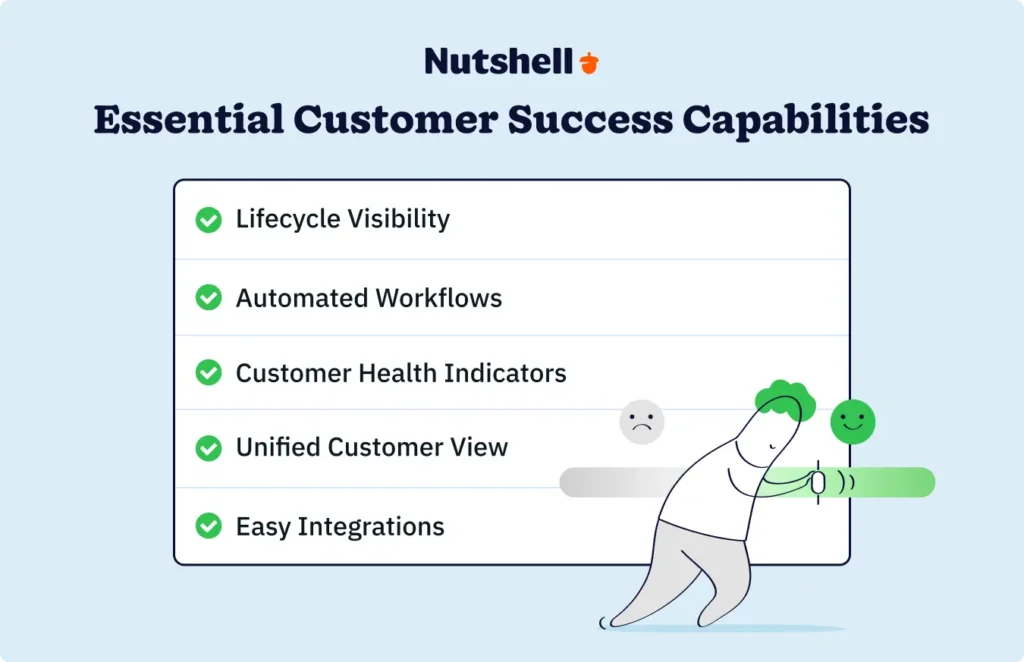
1. Life cycle visibility
Track customers from onboarding through active use and toward renewal. You need to see where each customer sits in their journey—which stage of their lifecycle they occupy, whether they’ve completed key milestones, and when they’re approaching renewal conversations.
This is your early warning system. When a customer hasn’t had contact in 60 days, when they skip a scheduled check-in, or when they miss an expected product milestone, you know something’s off. Visibility prevents customers from “falling through the cracks” while your team juggles competing priorities.
Pipeline and stage management—traditionally thought of as sales features—become CS superpowers. Instead of “lead,” “qualified,” and “closed,” your stages become “onboarding,” “active user,” “expansion opportunity,” and “renewal.” The same workflow engine that tracks deals now tracks customer health.
2. Automated workflows
Manual follow-ups don’t scale. You can personally reach out to every customer when you have 20 of them. When you reach 80, manual outreach becomes inconsistent, sporadic, and ultimately ineffective.
Automated workflows ensure proactive touchpoints happen consistently. A welcome email series greets new customers on day one and guides them toward key success milestones. Thirty-day and sixty-day check-in campaigns surface conversations at predictable intervals. Renewal reminder sequences give customers ample notice before their contract ends.
The magic happens when workflows respond to customer behavior. When a customer hasn’t logged in for 30 days, trigger an automated “we miss you” sequence. When a customer hits a usage threshold, trigger a congratulations note with tips for the next feature level. When a renewal date approaches, trigger a series of check-ins from appropriate team members.
Automation doesn’t replace relationship-building—it ensures relationships don’t slip through gaps created by team capacity constraints.
3. Customer health indicators
You don’t need sophisticated algorithms to identify at-risk customers. Basic signals work surprisingly well and require no machine learning expertise. Proactive customer success outreach delivers +14% retention improvement in six to nine months—and that improvement comes primarily from identifying and addressing customers showing early warning signs.
Track these fundamentals: When was your last contact with this customer? Are they paying their invoices on time? How frequently are they engaging with your product? How many support tickets have they opened recently? Did they complete key onboarding milestones?
A customer showing multiple warning signs—no contact in 45 days, payment delays, declining product usage, increasing support requests—needs immediate attention. These indicators are simple enough to monitor manually if your customer base is under 100 accounts. Beyond that, automated health scoring saves time while improving consistency.
4. Unified customer view
Data silos kill customer success. When customer contact information lives in your CRM, communication history lives in email, support tickets live in a separate system, and billing information lives somewhere else entirely, you can’t see the full picture.
Your team spends time hunting for information that should be immediately available. More importantly, they miss context. A customer support ticket might reveal a critical issue that sales doesn’t know about. An email exchange might show renewed interest in an expansion opportunity. A billing delay might explain why a customer missed a product launch event.
A unified customer view—one place where all relevant information about a customer is centralized—transforms decision-making. You see communication history, deal stages, support interactions, and billing status in one interface. New team members onboarding can immediately understand the customer context. Decisions about renewal strategy or expansion opportunities are made with complete information.
CRMs are built around the unified customer view. This is foundational infrastructure that specialized CS platforms often build on top of, not something they uniquely provide.
5. Easy integrations
Customer success workflows rely on data flowing between systems without manual entry. You need email conversations automatically logged in your CRM. Support tickets need to be visible alongside customer records. Billing and payment information needs to sync automatically.
When integration is difficult or requires technical resources, teams cut corners. Deals don’t get updated. Emails don’t get logged. Important customer information stays siloed. The entire CS system degrades because data isn’t flowing where it needs to go.
Easy, out-of-the-box integrations with email, support ticketing, and billing systems are nonnegotiable. They’re the connective tissue that keeps your customer success system functioning without adding manual work.
CRM vs. dedicated customer success platforms: What’s right for SMBs?
This is the decision that keeps SMB leaders awake at night. You’ve got a legitimate CS need: your churn is creeping up, renewals are getting harder, and your team is overwhelmed. You Google “customer success software” and find yourself staring at enterprise platforms that cost more than you pay some employees.
Let’s be honest about the economics. Enterprise customer success platforms start at $900 to $3,000 per month (that’s $10,800 to $36,000 per year) and scale from there.
For context, a capable CRM for customer success starts at $100 to $300 per month. Here’s the comparison that matters:
Feature/Capability CRM Solution Dedicated CS Platform Best For Pricing $100-300/month $900-3,000/month CRM if budget-conscious; CS platform if budget available Implementation time 1-2 weeks 4-8 weeks CRM if you need speed Customer lifecycle tracking Full capability Full capability Tie—both handle this well Automated workflows Full capability Full capability Tie—both handle this well Health scoring Basic signals Advanced/predictive algorithms CRM if using simple indicators; CS platform if needing AI prediction Product analytics Limited Strong CS platform if product usage is primary health signal Team size support Up to 3-5 users typical 5+ users typical CRM for small teams; CS platform for dedicated CS teams Integration complexity Simple, common integrations More complex, often requires IT CRM if limited tech resources When CRM is enough (and probably the right call for your SMB)
- You’re managing fewer than 200 customers.
- You don’t have a dedicated CS team—sales handles renewals, and customer support manages issues.
- You need basic automation and proactive tracking, not sophisticated churn prediction algorithms.
- Your budget is under $1,000 per month for all CS-related tools.
- You have limited IT or technical resources for platform implementation.
In this scenario, a CRM like Nutshell provides the pipeline management and email automation you need to build effective customer success workflows—at a fraction of specialized platform costs. You get lifecycle visibility, automated sequences, basic health tracking, and unified customer data. You implement in days instead of weeks. Your team learns the system quickly without specialist training.
Need a user-friendly CRM to boost sales and team efficiency?
Take our guided tour to explore Nutshell’s incredible features!

When to consider specialized customer success platforms
- You’re managing 200+ customers, and renewals are increasingly complex.
- You have a dedicated customer success team of three or more people who need specialized tools.
- You’re experiencing churn above 15% annually and need sophisticated intervention strategies.
- Your product usage data is critical to retention predictions, and you need advanced analytics.
- Your budget comfortably accommodates $2,000+ per month in specialized tools.
Here’s the thing: most SMBs don’t hit these criteria for several years. Start with the CRM foundation. Build effective CS practices. Then, as you grow, evaluate whether advanced platform capabilities justify the cost and implementation effort.
Consider this case study: A website security company struggled with high-risk renewals—only 5% of at-risk customers stayed. They implemented proactive outreach workflows in their existing CRM, created basic health tracking, and assigned renewal responsibility to appropriate team members. Within six months, they improved high-risk renewal rates from 5% to 40%—without investing in enterprise CS platforms. The difference was practice and process, not platform sophistication.
This company’s transformation didn’t require enterprise software—it required smart workflows.
Explore Nutshell’s customer testimonials and case studies and learn more about how CRM transformed businesses like yours!
How to build customer success workflows in your CRM
Here’s where it gets practical. You don’t need to wait for budget approvals or platform evaluations. If you have a CRM, you have the foundation for customer success.
This five-step process takes 2 – 4 hours to implement and requires no technical expertise. Let’s walk through each step.
Step 1: Map your customer life cycle stages
Define the actual journey your customers take. Start with onboarding—from signup through initial setup and first meaningful use. Move through active usage—the period where customers are getting value regularly. Then approach renewal—the 90 days before contract expiration.
Identify key milestones within each stage. For a software company, onboarding milestones might be: account created, team members invited, initial settings configured, first dashboard viewed, first action completed. Active usage might be tracked by: monthly login frequency, feature adoption, and support ticket patterns. The renewal phase might include: renewal conversation initiated, contract terms discussed, and a decision made.
Create pipeline stages matching these life cycle phases. Instead of “lead” and “opportunity,” use “onboarding,” “active,” “expansion,” and “renewal.” Move customers through these stages as they progress. This single change transforms your CRM from a sales tool into a customer success tool.
Step 2: Create automated sequences
Set up your welcome email series first. This is where most new customers either succeed or struggle. A strong welcome sequence gets them activated quickly.
For a SaaS product, a welcome series might look like:
- Day 1: Welcome email with quick-start guide and link to setup video
- Day 3: “You’re all set” email with tips for common first steps
- Day 7: Check-in email asking how setup went, offering support if needed
- Day 14: Feature spotlight email highlighting the value they should be experiencing
- Day 30: “How’s it going?” email with usage stats and resources for the next feature level
Build your 30-day and 60-day check-in campaigns next. These are simple relationship-building sequences. Their purpose is to surface conversation naturally before problems develop.
Create renewal reminder sequences: 90 days before renewal, 60 days before, 30 days before, and 14 days before. Each email serves a different purpose. The first opens the conversation. The second asks about satisfaction and any adjustments needed. The third gets specific about renewal terms. The final email treats renewal as urgent but friendly.
Design at-risk customer re-engagement workflows. These trigger when specific warning signs appear—no contact in 45 days, declining product usage, or support ticket patterns suggesting frustration. The sequence is different from routine check-ins. It’s warmer, more personal, and focused on getting the customer back on track.
Step 3: Set up manual tasks
Not everything can be automated. Quarterly business reviews, expansion conversations, and high-touch relationship management require manual work.
Configure QBR reminders. Quarterly business reviews—sit-down conversations reviewing customer outcomes, discussing roadmap alignment, and identifying expansion opportunities—should happen on a predictable schedule. Set tasks for the appropriate team member 60 days before each QBR date.
Create escalation triggers for high-value accounts. Your largest customers need active management. Set tasks ensuring they get regular attention—monthly check-ins, quarterly reviews, and proactive outreach when usage patterns shift.
Build follow-up task templates for common scenarios. After a support ticket is resolved, follow up within five days to ensure the issue is truly resolved. After a product feature launch, follow up with relevant customers to ensure they know about it. After a declined expansion offer, follow up 60 days later with updated terms or new approaches.
When a customer shows warning signs, create a task for management review. This is your escalation mechanism. When multiple warning signs accumulate, a human needs to make a decision: Is this customer at risk? Do we need intervention?
Step 4: Track engagement
Log everything. Every customer call, every email conversation, every support interaction needs to be recorded in your CRM.
This sounds tedious, but automation handles most of it. Email integration automatically logs outgoing and incoming messages. Call logging is typically one click after finishing a conversation. Support ticket integration automatically creates records when customers contact support.
Maintain communication history in a unified timeline. When someone on your team opens a customer record, they should immediately see every interaction with that customer: calls, emails, support tickets, and meetings. This context prevents repeated questions, allows intelligent follow-up, and surfaces opportunities.
Tag interactions by type and outcome. Did this conversation cover renewal discussion, product issues, feature adoption, or expansion? How did it conclude? These tags let you filter and analyze engagement patterns.
Step 5: Build basic health indicators
You don’t need an algorithm. Track these signals manually if your customer base is under 100 accounts, or use CRM reports if you’re larger.
- Last contact date: How many days since the last documented interaction? Customers without contact in 60+ days are at risk.
- Payment/billing status: Are invoices being paid on time? Payment delays often precede churn.
- Support ticket volume: Has the pattern changed? Sudden increases might indicate frustration. Sudden decreases might indicate the customer abandoned you.
- Response rates to outreach: Are customers opening and responding to your automated sequences? Low engagement is a warning signal.
- Expected milestone completion: Did the customer complete their onboarding milestones in the expected timeframe? Are they using the features you expect them to use?
Using Nutshell’s sales automation and pipeline management, you’d set up customer lifecycle stages, build automated email sequences through the marketing module, create task templates for QBR reminders and check-ins, log all interactions in customer records, and generate basic reports showing customer health by tracking stage progression and engagement activity. The same workflow engine that tracks deals now tracks customer success—without complexity or specialist training.
For a deeper dive into building a comprehensive customer success strategy beyond these foundational steps, explore Nutshell’s customer success strategy guide.
Why Our Users Love Nutshell ❤️
See why so many businesses choose the easy-to-use, affordable, all-in-one AI CRM to grow their business

Essential customer success metrics for small teams
Before you drown in analytics, understand which metrics actually predict retention. These five metrics tell you whether your CS efforts are working—and they’re simple enough to track without advanced platforms.
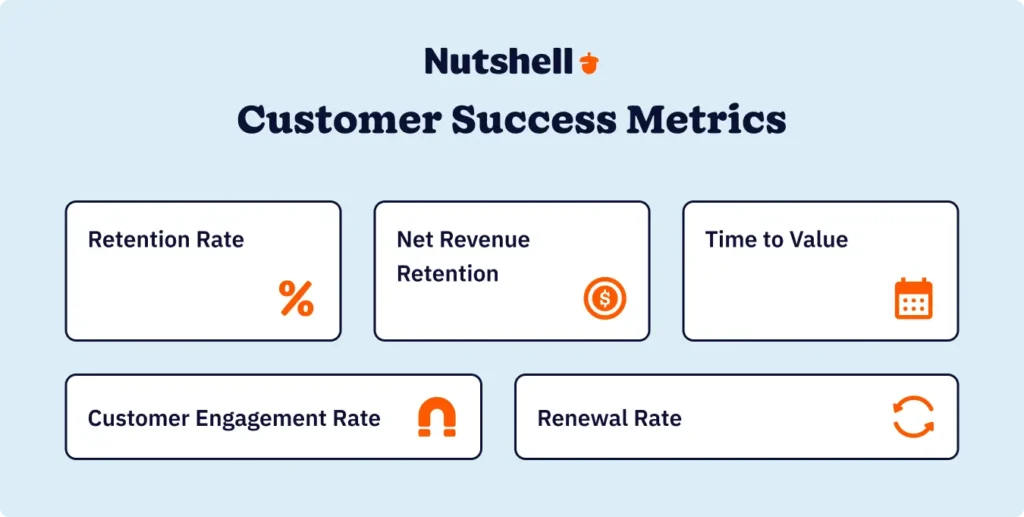
Customer retention rate and churn rate
What it measures: The percentage of customers you retain period-to-period.
Why it matters: This is your most important CS metric. Everything else is diagnostic—this is the outcome you’re trying to optimize.
How to calculate: (Customers at the end of the period minus new customers during the period) divided by customers at the start of the period equals retention rate. Churn rate is 100% minus retention rate.
Example: If you start with 100 customers, lose 10 during the month, and gain 15 new ones, your retention rate is (100 – 15) / 100 = 85%. Your churn rate is 15%.
Net revenue retention
What it measures: Revenue retention, including expansions and contractions.
Why it matters: Retention rate tells you customer count, but net revenue retention shows whether remaining customers are expanding, contracting, or staying flat—a crucial metric for SaaS companies.
How to calculate: (Starting monthly recurring revenue plus expansion revenue minus contraction revenue minus churn revenue) divided by starting MRR.
Example: You start with $100K MRR.You lose $15K from churn but gain $8K from existing customer expansions. Net revenue retention is (100K + 8K – 15K) / $100K = 93%.
Time to value
What it measures: How quickly new customers move from signup to achieving their first meaningful outcome.
Why it matters: Customers who experience a fast time to value are dramatically more likely to stick around. Slow onboarding predicts churn.
How to calculate: Average number of days from account creation to completion of a key success milestone (login, setup, first action, first report, etc.).
Track this metric during onboarding. If customers are taking 45 days to achieve initial setup while you expected 5 days, something’s broken in your onboarding process.
Customer engagement rate
What it measures: Responsiveness to your outreach and product usage.
Why it matters: Engagement is your leading indicator for retention. Customers who don’t respond to check-ins and aren’t using your product are at risk long before they churn.
How to track: Calculate email open rates and click-through rates. Track login frequency. Monitor feature usage. These provide early warning signals.
Example: If your typical customer opens 60% of your emails and logs in twice per week, a customer with 20% email opens and weekly logins is showing warning signs.
Renewal rate by customer segment
What it measures: Retention broken down by customer type, product tier, or acquisition source.
Why it matters: Identifies which customer segments are healthy and which need attention. Maybe your enterprise customers renew at 95% but SMB customers renew at 70%. That insight drives different CS strategies.
How to track: Segment your customer list by relevant categories. Calculate renewal rates separately for each segment.
Example: You might discover that customers acquired through partnerships renew at 85%, while customers acquired through organic search renew at 60%—suggesting you need targeted CS interventions for organic customers.
Bonus metric: Expansion rate
What it measures: Percentage of customers who increased their spend during the period.
Why it matters: Strong CS isn’t just preventing churn—it’s identifying opportunities to expand within existing customers.
How to track: Percentage of customers who purchased additional seats, upgraded tiers, or added new features during the period.
Start with retention rate and engagement rate. These two metrics provide immediate actionable insights without complex setup. Track them monthly, establish a baseline, and watch them improve as your CS workflows take effect.
Top customer success tool categories (for when you’re ready to scale)
You’ve built effective CS workflows in your CRM, and you’re seeing retention improvements. Your customer base is growing. You’re managing more than 200 customers. You’ve hired a dedicated CS person. At some point, specialized tools might make sense. Here are the categories to consider as you scale beyond foundational CRM capabilities.
Customer success platforms (Gainsight, ChurnZero, Totango)
Comprehensive CS management systems that go beyond CRM. These platforms include advanced health scoring using machine learning, playbook-based workflow guidance, sophisticated analytics, and specialized CS reporting.
You typically need these when managing 200+ customers with a dedicated CS team. They justify their $900 to $3,000 per month cost through advanced capabilities that would require significant manual work in a CRM.
Product analytics
Tools that track feature usage, adoption patterns, and user behavior inside your product. They identify which features drive retention, which drive expansion, and where users struggle during onboarding.
Product analytics become valuable when usage patterns are central to your CS strategy—when “this customer used feature X three times this month” is a reliable health indicator.
Customer health scoring (AI-powered risk detection)
Dedicated tools that use machine learning to predict churn risk. They analyze all customer data and output a single “health score” or “churn risk” percentage.
These work best when you have 300+ customers and enough historical data for ML models to be accurate. They’re overkill for smaller customer bases where manual health tracking works fine.
In-app messaging (Appcues, Pendo, Gainsight PX)
Tools that deliver tooltips, guides, and announcements inside your product. Use these to guide customers toward key features, announce new functionality, and provide contextual help during onboarding.
These add serious value when you’re managing 200+ customers. The effort of maintaining in-app guidance is justified by the scale of impact.
Survey and feedback tools (NPS platforms, CSAT tools, Delighted, Typeform)
Systematic customer feedback collection tied to specific moments (post-support, post-feature launch, at renewal). These feed health scoring and help you catch satisfaction issues before they become churn.
Add these when you need structured feedback data at scale—when manually collecting feedback no longer works.
The progression is clear: Start with CRM-based CS workflows, then add specialized tools as specific needs become evident and your team has the resources to implement them. Many of these tools integrate with CRMs like Nutshell, allowing you to extend capabilities without replacing your central customer database.
CRM Integrations That Save You Time
Nutshell offers dozens of software integrations with your favorite customer success tools
Getting started: Your first 30 days of customer success
You don’t need to transform your entire customer success operation overnight. Here’s a realistic 30-day plan to establish your foundation.
Week 1: Audit and assess (4 to 6 hours)
Spend this week getting honest about your current state. Open your CRM and review customer data quality. Are contact records complete and current? Is communication history being tracked? Where are the gaps?
- Map your actual customer lifecycle. Don’t use someone else’s model—use what actually happens in your business. Maybe customers move from “new” through “active” to “renewal.” Maybe you have the “expansion opportunity” stage. Document your reality.
- Define what “healthy” versus “at-risk” looks like for your business. For a SaaS company, healthy might be: account active last seven days, support tickets are feature questions, not bugs, customer is using three or more core features. At-risk might be: no login in 30 days, increasing support tickets, and declining monthly active users.
- Identify the biggest gaps in your current approach. Where are customers slipping through the cracks? When do you lose touch with customers? Where’s communication inconsistent?
By week’s end, you should have a clear picture of where you stand and a realistic list of what needs to improve.
Week 2: Set up automated sequences (6 to 8 hours)
This is where the real impact happens. Move from audit to action.
- Create your welcome email series. This is typically three to five emails over 30 days. Write them in your CRM or email platform. Use simple, helpful language. Avoid hard-sell language—your customers already bought from you.
- Build your 30-day check-in email. This is a simple “how’s it going?” message 30 days after signup. Ask how they’re doing, offer support, and point them toward resources.
- Set up your renewal reminder sequence. Create four emails at 90, 60, 30, and 14 days before renewal. Each one serves a different purpose. Test the sequence with internal team members before deploying.
The goal isn’t perfection—it’s consistency. These sequences create predictable touchpoints that prevent customers from disappearing.
Week 3: Create manual workflows (4 to 5 hours)
Automation handles routine stuff. Manual workflows handle high-touch relationships and important decisions.
- Set up QBR (quarterly business review) task reminders. If you have 20 customers worth quarterly reviews, create 20 tasks scheduled 60 days before each QBR date.
- Document your escalation process. When does a customer become “at-risk”? Who gets notified? What’s the intervention plan? Write this down so your team knows how to respond when warning signs appear.
- Create follow-up task templates. After you close an expansion deal, what happens next? After a customer reports an issue, what’s your follow-up process? Use templates so follow-up is consistent regardless of who handles the account.
- Assign clear ownership. If you’re a team of three, decide who owns which customer relationships. Make sure it’s clear and documented.
Week 4: Establish baseline metrics (3 to 4 hours)
You can’t improve what you don’t measure. Take 4 hours to establish your baseline.
- Calculate your current retention rate. How many customers did you have 12 months ago? How many do you have now? Subtract churn and new customers to find your retention percentage.
- Calculate your churn rate. This is the inverse of retention. Knowing you’re losing 15% of customers annually is important context for your improvement efforts.
- Track engagement metrics. What percentage of customers responded to your last outreach? How many logged in this month? Document this baseline.
- Look at renewal patterns. Of the customers who came up for renewal in the past 90 days, how many renewed? This is your renewal rate—a crucial metric for the next quarter.
- Schedule a monthly review. Set a calendar reminder to check retention, engagement, and renewal metrics every month. Small improvements in these numbers compound significantly over time.
Case study in action: An SMB digital services provider was struggling with customer retention at 72%—losing roughly one-quarter of customers annually. They implemented this 30-day plan, starting with customer lifecycle mapping and moving through automated check-in sequences and basic health tracking.
After three months, they revised their CS metrics to include engagement rate and renewal rate by customer segment. They discovered that mid-market customers renewed at 85% but small business customers renewed at only 55%. This insight drove targeted intervention—different check-in frequencies, different messaging, different renewal strategies.
In Q4, they increased their overall renewal rate from 72% to 79%—converting an additional 7% of customers (roughly 14 accounts at their size). That’s tens of thousands of dollars in retained revenue, accomplished with process improvements and workflow automation, not expensive new software.
Frequently asked questions about customer success tools
-
1. Do I need customer success tools if I’m a small business?
Yes, but “tools” doesn’t necessarily mean expensive specialized platforms. For most SMBs, customer success is a practice supported by tools you likely already have—particularly a capable CRM with strong automation and tracking. Focus on proactive workflows, lifecycle visibility, and basic health indicators before investing in advanced platforms. Even small improvements in retention deliver significant ROI, given SMBs’ lower acquisition costs compared to enterprises.
-
2. What’s the difference between customer success and customer support?
Customer support is reactive—responding to problems and questions as customers encounter them. Customer success is proactive—anticipating needs, preventing issues, and actively driving customers toward their desired outcomes. Support helps customers when they’re stuck. CS ensures they never get stuck in the first place. Both are essential, but CS focuses on long-term relationship health and retention.
-
3. What are the 4 pillars of customer success?
The four pillars are: (1) Onboarding—ensuring customers achieve early value quickly and can use your product independently; (2) Adoption—driving usage of key features and capabilities that create the most value; (3) Retention—preventing churn through proactive engagement and relationship management; (4) Expansion—identifying upsell and cross-sell opportunities where customers can get more value and you can grow revenue. Successful CS strategies address all four pillars throughout the customer life cycle.
-
4. How much should I budget for customer success tools?
SMBs typically budget $100 to $500 per month for CRM-based CS capabilities (often included in your overall CRM cost). Mid-market companies with dedicated CS teams spend $1,000 to $3,000 per month on specialized platforms. Enterprises invest $3,000 to $10,000 or more per month. Start with a capable CRM that covers your foundational needs, then allocate additional budget for specialized tools as specific needs emerge and ROI becomes clear.
-
5. Can CRM software handle customer success?
Yes—For most SMBs managing fewer than 200 customers. Modern CRMs provide pipeline and stage management for lifecycle tracking, email automation for proactive sequences, task management for follow-ups, and reporting for basic health indicators. This covers roughly 80% of SMB CS needs at a fraction of specialized platform costs. CRM becomes limiting when you need advanced predictive analytics, when you’re managing 500+ customers requiring sophisticated segmentation, or when you have a large dedicated CS team requiring specialized workflows.
-
6. When should I hire a dedicated customer success manager?
Consider a dedicated CS hire when: you’re managing 100+ customers where renewals drive significant revenue; your churn rate exceeds 10% annually and needs focused attention; your sales team lacks bandwidth for post-sale relationship management; your customer base requires specialized product expertise; or you have clear opportunities for expansion revenue that need dedicated focus. These conditions typically occur when a company reaches $1 to $2 million annual recurring revenue or manages 150 to 200 customers. At that point, someone focused full-time on customer success usually delivers more value than generalist sales coverage.
-
7. What’s the ROI of customer success software?
5% increase in retention rates can boost profits 5x more than equivalent acquisition spending. For context, B2B SaaS achieves 90% retention with a 5.2-year median customer lifetime when CS practices are strong. Most SMBs see positive ROI on CS investments within 6 to 9 months.
Customer success without the enterprise price tag
Customer success doesn’t require enterprise software or enterprise budgets. This is the most important truth that most CS tool articles miss.
SMBs don’t need $30,000 annual platforms to achieve 80%+ retention rates. They need smart CRM practices, automated workflows that ensure consistency, and clear visibility into customer health. That combination costs $100 to $300 per month—and delivers measurable retention improvements in 6 to 9 months.
Here’s the progression that matters: Start with your CRM. Implement basic lifecycle tracking, set up automated check-in sequences, establish clear ownership of customer relationships, and track simple health indicators. Use this foundation to drive initial retention improvements. As you grow beyond 200 customers or establish a dedicated CS team, evaluate whether specialized platforms justify their cost.
BACK TO TOP Written by
Simone Morgan Associate Content MarketerReady to try
Nutshell for Free?Thank you! Your submission has been received!Oops! Something went wrong while submitting the form.



What Is Revenue Intelligence? An All-Encompassing Guide
Published on: January 24, 2024Highly Effective Strategies for Elevating Sales Team Performance
Published on: November 10, 2022Join 30,000+ other sales and marketing professionals. Subscribe to our Sell to Win newsletter!










