Leveraging Innovation to Set Up and Manage a Simple Online CRM System

-

Remember when implementing a CRM meant months of meetings, hefty consultant fees, and an IT team working overtime? Small businesses watched enterprise competitors deploy these systems and thought, “Not for us. Too complex. Too expensive.”
Cloud computing changed that equation completely. Today, you can set up the same powerful CRM capabilities in days—not months. No server rooms required. No specialized technical expertise.
The global cloud CRM market has grown to $126.17 billion in 2026, and is forecasted to reach $320.99 billion by 2034. That’s a compound annual growth rate of 12.4%.
Why the explosive growth? Because cloud-based systems have eliminated every traditional barrier to CRM adoption.
Leveraging innovation to set up and manage a simple online CRM system has never been easier, and this Nutshell guide shows you how. We’ll walk through how modern cloud-based approaches help any business—regardless of size or technical resources—deploy secure, accessible CRM systems that actually work for distributed teams.
Key takeaways
- Cloud innovations transformed CRM from months-long IT projects requiring dedicated infrastructure into implementations any business can execute in days—94% of enterprise businesses were using at least one cloud solution in early 2026.
- Modern security features like encryption, role-based access control, and continuous monitoring come built into simple online CRM systems, which means small teams get enterprise-grade protection without hiring security specialists or managing complex configurations
- Strategic implementation focusing on user adoption delivers real ROI—companies see an average $3.10 return for every dollar spent on CRM. Their investment also drives 29% sales increases and 34% productivity improvements, but only when teams actually use the system (which is harder than it sounds)
Table of contents
Understanding simple online CRM systems
What makes a CRM “simple” in the cloud era?
A simple online CRM is a cloud-based customer relationship management system designed for straightforward deployment and intuitive daily use—accessible through web browsers without software installation or dedicated IT infrastructure.
That definition matters because “simple” means something very different today than it did ten years ago.
Traditional CRM demanded technical expertise just to get started. You’d purchase server hardware, install complex databases, configure network access, and maintain ongoing infrastructure.
Implementation timelines would be 3 to 6 months for mid-sized deployments, and 6 to 12 months or longer for enterprise implementations. Every single step required specialized knowledge that many businesses didn’t have.
Cloud architecture eliminated all that overhead. Today’s simple online CRM systems run on vendor-managed infrastructure, so you access everything through standard web browsers.
No software installation. No server maintenance. No technical updates to manage. The vendor handles the infrastructure, security patches, and system maintenance, which are all the responsibilities that used to require dedicated IT resources.
This shift created deployment speeds that would’ve seemed impossible a decade ago. A focused rollout for a 10-person team can now run in as little as 6 weeks instead of months. And small businesses have the ability to complete their initial setup in days, not weeks.
What defines a modern, simple online CRM?
Browser-based accessibility
That means no downloads or installations. Users access the complete system through standard web browsers on any internet-connected device. Browser access eliminates compatibility issues, version control nightmares, and the technical overhead of managing software across multiple devices.
Mobile-optimized interfaces
With many businesses now using mobile CRM as well as desktop solutions, modern CRM systems prioritize smartphones and tablets. Sales teams can update records from anywhere deals happen:
- Coffee shops
- Customer offices
- Airport lounges
Pre-configured workflows
You’re not building processes from scratch. Simple cloud-based CRM platforms include ready-to-use templates for common sales, marketing, and service workflows. Customize these frameworks to match your needs with no technical configuration required.
Intuitive data organization
Modern systems structure information around relationships. Contacts connect to companies. Opportunities link to both. Activities are tied to specific records. This relational approach replaces scattered spreadsheet systems, which 63% of companies still use for various sales and customer management functions instead of formal CRM tools.
Built-in security
Encryption, access controls, and authentication methods come standard—Not as add-ons requiring separate configuration. Cloud providers build these protections into the platform architecture, delivering enterprise-grade security that small teams couldn’t necessarily implement independently.
Traditional vs. cloud-based CRM comparison table
Aspect Traditional on-premises CRM Cloud-based simple online CRM Initial setup time 3–12 months Days to weeks Infrastructure required Dedicated servers, networking equipment, IT staff Only internet connection Upfront costs $50,000–$500,000+ for software, hardware, implementation Typically $13–$100 per user per month Technical expertise needed Database administrators, system administrators, developers Minimal—business users can configure Accessibility Office network or VPN required Anywhere with internet access Mobile access Requires separate mobile development Built-in mobile optimization Updates and maintenance Manual patches, scheduled downtime Automatic updates, no downtime Scalability Requires hardware upgrades, capacity planning Instant scaling with user licenses Security management Internal team responsibility Vendor-managed with enterprise-grade protection Data backup Manual backup procedures required Automatic continuous backups The cloud transition didn’t just make CRM faster to deploy. It made implementation more accessible to ordinary business users, so you no longer need technical departments to evaluate requirements.
Businesses can focus on choosing systems that match their sales processes rather than their IT capabilities.
Pre-implementation planning for easy CRMs
Assessing your business needs before CRM setup
The most critical CRM decisions happen before you ever log into a system.
Think about it—CRM implementations fail 75% of the time. The culprits? Unclear objectives, poor planning, and fundamental misunderstandings about what the system should accomplish.
Successful CRM implementation starts with an honest assessment. Ask yourself what your business actually needs versus what seems impressive in software demos.
Identifying essential CRM functions
Start by documenting the specific problems you’re trying to solve. Avoid focusing on vague goals like “better customer relationships.” Pinpoint concrete, measurable challenges.
Consider these questions:
What specific breakdowns are we experiencing?
Maybe sales reps can’t find previous customer conversations when prospects call back. Or your marketing campaigns launch without visibility into which contacts have active sales opportunities. Perhaps it’s your support tickets that reference customers whose purchase history remains invisible to service teams.
Each breakdown points toward specific CRM functionality you’ll actually use.
Where does customer information currently live?
Most businesses discover data scattered everywhere. Email inboxes, spreadsheets, and individual team members’ personal notes.
Mapping this fragmentation reveals which CRM features deliver immediate value.
Which teams need access to customer data?
The shift to remote work highlighted how critical shared access has become. During the early days of the transition, 57% of executives struggled to maintain good customer experiences because their CRM systems weren’t easily accessible to remote workers.
Understanding who needs what access prevents implementing systems that work for sales but fail marketing. Or vice versa.
Decision framework: Determining core simple CRM requirements
Use this framework to identify which capabilities matter most:
Stage 1: Sales process mapping
- How do prospects become customers in your business?
- What information do sales teams need at each stage?
- Where do deals currently get stuck or lost?
- Which sales activities need tracking?
Stage 2: Team collaboration needs
- How many people need CRM access?
- Do teams work remotely or in distributed locations?
- What handoffs occur between departments?
- Where does miscommunication currently happen?
Stage 3: Data and reporting priorities
- What metrics actually drive business decisions?
- Which reports would change how you allocate resources?
- What forecasting accuracy do you need?
- How will you measure CRM success?
Stage 4: Integration requirements
- What tools does your team use daily?
- Which systems must connect to your CRM?
- Where does duplicate data entry waste time?
- What workflows span multiple platforms?
This framework helps you avoid the common trap of selecting a CRM system based on features you’ll never use. Many businesses choose platforms loaded with capabilities that seem valuable in demonstrations but remain untouched in daily operations.
Defining success metrics
Measuring CRM effectiveness requires establishing clear benchmarks before implementation begins.
Companies that set specific success metrics during planning typically achieve significantly higher adoption rates and ROI. Those without defined objectives, adoption stalls. The CRM becomes expensive digital storage rather than a revenue driver.
Consider both leading and lagging indicators
Leading indicators (activities that drive results):
- Daily CRM logins per user
- Activities logged per sales rep
- Time between lead creation and first contact
- Pipeline updates per week
- Mobile app usage rates
Lagging indicators (business outcomes):
- Sales cycle length changes
- Win rate improvements
- Revenue per sales rep
- Customer retention rates
- Forecast accuracy
Companies implementing CRM with clear goals and strong change management practices give themselves a better chance of achieving a high user adoption rate within 3 to 6 months. Without defined objectives, usage becomes optional. And once usage becomes optional, the business case evaporates.
Getting team buy-in
User adoption determines whether CRM implementations succeed or fail. When teams view CRM as administrative overhead rather than a performance advantage, usage becomes optional. And once that happens, your investment yields nothing.
Early team involvement prevents adoption failures before they start. Organizations that include end users in CRM selection and planning report significantly higher long-term adoption because users feel ownership over systems they helped shape.
Effective buy-in strategies
- Involve representatives from each team during CRM evaluation: Sales, marketing, and customer service interact with CRM differently. Each perspective reveals requirements others might miss and builds advocates who champion the system to their colleagues.
- Address the “what’s in it for me” question directly: Instead of focusing on how CRM benefits the company, give your team clear answers about how it makes their work easier. Faster access to customer history? Automated follow-up reminders? Elimination of redundant data entry? Personal value drives adoption.
- Set realistic expectations about the transition period: CRM implementations create temporary productivity dips as teams learn new workflows. Acknowledging this adjustment period upfront builds trust and patience better than promising immediate improvements and disappointing everyone.
- Identify and empower champions: Every successful CRM rollout includes enthusiastic early adopters who help their colleagues through challenges. These champions bridge the gap between management mandates and frontline reality.
Research shows projects with strong adoption initiatives are seven times more likely to meet objectives. The planning phase determines whether your CRM becomes a growth engine or expensive shelfware. Time invested in clarifying needs, setting metrics, and building team buy-in pays dividends throughout implementation and beyond.
Here’s the implementation section reduced by approximately 80%:
Initial simple online CRM system setup
Getting your CRM operational quickly
The first day with a new CRM sets the tone for everything that follows.
Cloud-based platforms let you move from signup to productive use faster than ever before—often within hours rather than the weeks or months traditional systems demanded. The key is to follow a specific sequence that builds functionality in layers rather than trying to configure everything simultaneously.
Connect email and calendar first
Email and calendar integration form the foundation of modern CRM usage. Why? Because sales teams spend most of their day in email inboxes and calendar applications. When CRM connects directly to these tools, adoption happens naturally.
Most cloud-based CRM systems offer one-click authentication for Gmail and Outlook. Once connected, emails automatically associate with relevant contacts and opportunities. Scheduled meetings appear as CRM activities. Complete communication history becomes visible to the team.
Set up user accounts with appropriate permissions
Role-based access control ensures people see only information necessary for their roles. For instance:
- Sales reps need full access to their own records with read-only visibility into teammate pipelines.
- Sales managers require broader visibility for forecasting and coaching.
- Marketing needs contact information for campaigns, but shouldn’t modify active sales opportunities.
Start with your vendor’s default role templates, then adjust based on actual usage patterns.
Import existing contact data
Customer data rarely begins life in a CRM system. Most businesses accumulate contact information across spreadsheets, email address books, and predecessor platforms.
Do the following before importing:
- Deduplicate contacts
- Standardize data formats (phone numbers, addresses)
- Clean invalid information
Modern CRM platforms support CSV imports with preview screens before committing changes. And many vendors offer free migration assistance as part of onboarding.
Cloud-based CRM security setup
Security concerns consistently rank among the top barriers preventing cloud adoption. Yet, when configured properly, cloud-based systems deliver stronger security than most businesses could implement independently.
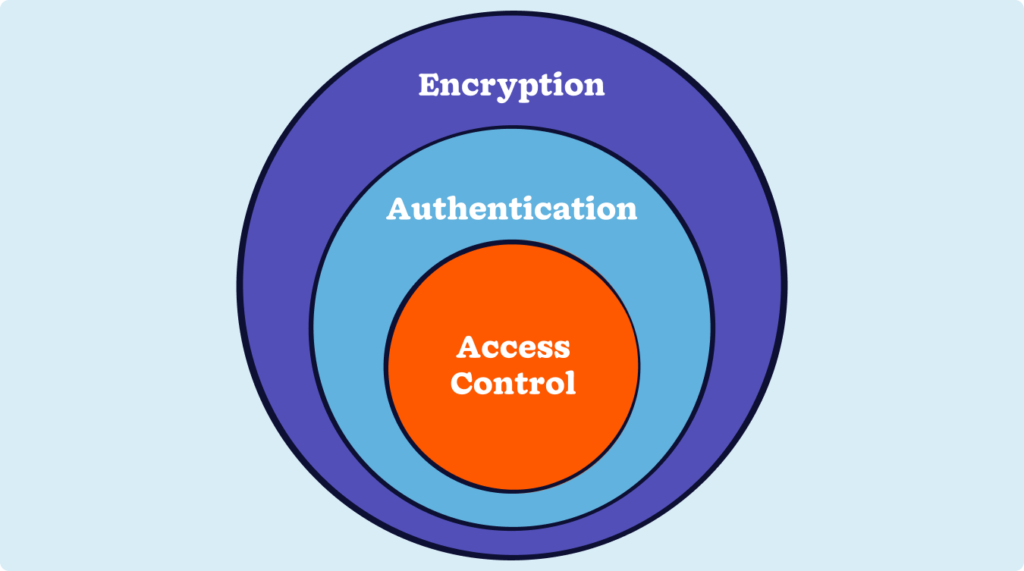
Data encryption
Modern CRM systems encrypt data both in transit (using TLS—the technology behind HTTPS) and at rest (using AES-256 encryption). Most cloud platforms enable encryption by default, requiring no configuration. Verify HTTPS is enforced for all connections and AES-256 for stored data during initial setup.
Multi-factor authentication (MFA)
Multi-factor authentication requires users to provide two or more verification factors—such as a password plus smartphone code—before gaining access. MFA dramatically reduces unauthorized access even when passwords are compromised. Most systems support authenticator apps, SMS codes, or biometric verification.
Role-based access control and audit logging
Implement the principle of least privilege, where users receive only the minimum access necessary for their job functions. Configure object-level, record-level, and field-level permissions based on roles. And enable comprehensive audit logging to track who accessed which data, what changes were made, and when activities occurred. Most cloud CRM systems enable logging by default and retain records for compliance requirements.
Core CRM fundamentals
Organizing contacts, companies, and opportunities
Modern CRM systems organize information around four core objects:
- Companies represent the businesses you work with.
- People represent individuals within those companies.
- Leads represent potential revenue with defined values and timelines.
- Activities represent all customer interactions—calls, meetings, emails, and tasks.
Understanding how these objects interconnect determines whether your CRM creates clarity or confusion.
Data structure best practices
Keep pipeline forecasts and other reports accurate by linking each person to a company. Leads (or opportunities) should be reserved for real deals rather than individual people. It’s also best to log activities against specific contact records to build a searchable relationship history.
Dropdown menus are great for standardizing field values, as free-text entry can lead to formatting inconsistencies. That said, keeping forms manageable is still critical. Require only essential fields to prevent your records from getting too complicated for easy analysis.
Opportunity lifecycle stages
Every opportunity moves through predictable phases:
- Qualification
- Discovery
- Proposal
- Negotiation
- Closed Won/Lost
Document clear criteria for advancing leads between these stages. At a minimum, track the expected value, close date, associated contacts, current stage, and owner. Institute regular pipeline reviews to identify stale opportunities that should be closed or requalified.
Activity and task management
Activities include logging calls, emails, meetings, and notes, which creates relationship context. Most teams use hybrid approaches:
- Calendar syncing automatically logs meetings.
- Email tracking captures message threads.
- Manual notes document phone conversations.
Tasks represent commitments with clear ownership and specific due dates, ensuring follow-ups don’t fall through the cracks.
Configuring for accessibility and remote work
Enabling distributed access
Cloud-based CRM systems eliminate remote access barriers through browser-based architecture. That means that anyone with internet connectivity can reach the full system without VPNs or special configurations. This accessibility has evolved from convenience to business necessity as approximately 22.9% of U.S. employees now work remotely at least part-time.
Mobile CRM capabilities
True mobile optimization recognizes that smartphones enable different workflows than desktops. Mobile CRM apps include features that enhance these workflows for real productivity:
- Voice-to-text note capture
- Quick-action interfaces
- Offline capability
- Location awareness
- Contact integration
Deploy your team’s mobile access with consideration for data consumption, device security, and screen-size limitations.
Browser and offline support
The latest CRM systems support current versions of Chrome, Firefox, Safari, and Edge. Browser-based access delivers instant updates, a consistent experience across devices, reduced IT overhead, and anywhere access. While connectivity remains essential, many platforms cache recent data locally for limited offline functionality.
Team collaboration setup

Shared pipeline visibility
Configure appropriate visibility levels where your sales reps see their own pipelines plus read-only teammate access, managers see all direct reports, and executives see rolled-up summaries. Pipeline transparency prevents duplicate pursuit, enables collaboration, improves forecasting, and facilitates coaching.
Communication integration
Connect your CRM with email, instant messaging (Slack, Teams), and video platforms (Zoom, Google Meet) to eliminate context-switching. Automatic activity logging, CRM notifications in chat channels, and meeting scheduling from CRM records make team collaboration seamless.
Handoff workflows
Design explicit processes for marketing-to-sales, sales-to-success, and support-to-product transitions. Include checklists ensuring information transfers completely and that receiving teams confirm readiness.
Customization and scaling
Strategic customization approach
Start with vendor defaults for the first 1 to 3 months to understand what actually matters. It’s best to add custom fields only when they drive decisions or automate processes. Customize your pipelines to match team terminology and include stage-specific fields. Then, create reports that answer specific business questions rather than extracting general data dumps.
Integration with business tools
Beyond native tools, you can connect your CRM with email, marketing automation, accounting, customer support, e-commerce, and communication platforms. You’ll have the option to choose between native integrations, integration platforms like Zapier, or custom API connections based on your business needs and resources.
Scaling considerations
Cloud platforms handle infrastructure scaling automatically. To identify when your business is ready for an upgrade, monitor for signs that you’ve outgrown your tier, such as performance degradation, feature limitations, and storage constraints. Bear in mind that process scaling requires:
- Territory management
- Approval workflows
- Team hierarchy configurations
- Role specialization
Cloud-based innovations have transformed what used to be multi-week implementation phases into a setup that can happen in as little as a day. This accessibility doesn’t eliminate the need for strategic thinking—it merely shifts planning from technical considerations to process design.
The first hours and days of usage establish whether your CRM will integrate smoothly into daily work or create friction, driving teams back to old habits.
Driving easy-to-use CRM user adoption
Ensuring sustained CRM usage
Even the most sophisticated CRM configuration delivers zero value if teams don’t actually use it.
Research found that less than half of businesses—just 40%—can get 90% of their team to use CRM consistently. This adoption gap represents the difference between CRM as a strategic investment versus an expensive database that gradually fills with outdated information.
User adoption isn’t a post-implementation concern. It’s the central challenge that should drive every implementation decision from platform selection through ongoing management.
The adoption essentials
Training that works
CRM training fails when it focuses on features rather than workflows. Sales reps need training on daily activities:
- Adding contacts
- Updating opportunities
- Logging activities
Managers need pipeline reviews and forecasting, and marketing needs campaign tracking.
Keep your initial training sessions under 90 minutes, focusing on your team’s immediate needs. Supplement that with short video tutorials for on-demand reference.
Incentives over mandates
Mandating CRM usage without incentives creates compliance theater—users do the minimum to avoid trouble while conducting real work elsewhere. Effective incentives align personal interests with CRM usage.
When commission calculations draw from CRM data, reps ensure accurate records. And when CRM eliminates redundant reporting, it becomes helpful rather than burdensome. Giving team members recognition and competitive visibility motivates continued use.
Monitoring and intervention
It’s best practice to regularly track login frequency, activity logging rates, data quality indicators, and feature adoption. Segment your metrics by team, location, and role to identify where adoption struggles lie.
When metrics reveal problems, address them at their root cause, for example:
- Simplifying overwhelming interfaces
- Fixing performance issues
- Demonstrating personal value
- Providing additional training
- Improving integrations with other tools
The numbers tell the story. According to Nucleus Research, businesses earn $3.10 in CRM ROI for every $1 spent—but only if the system is actually used. Companies with strong CRM adoption often see increases in sales, upticks in productivity, and more accurate forecasting. Organizations failing to drive adoption forfeit these potential benefits despite making identical technology investments.
Cloud-based, simple online CRM systems are more intuitive and accessible than ever before, which indicates that the primary challenge is organizational rather than technical.
That means building cultures where CRM usage becomes a habit, providing training that translates to competence, creating incentives that align personal and organizational interests, and continuously monitoring to catch adoption problems before they become ingrained patterns.
Ongoing simple CRM management and optimization
Maintaining CRM effectiveness over time
CRM implementation doesn’t end when users log in for the first time.
Initial setup launches a continuous improvement cycle where businesses refine configurations, maintain data quality, and adapt systems to evolving needs.
Organizations that treat CRM as “set and forget” technology will see their systems gradually decay—Data quality deteriorates, customizations grow complex, and user adoption erodes. Proactive ongoing management prevents these patterns, keeping CRM systems valuable years after implementation.
The management essentials
Data hygiene
Data quality degrades naturally without proper maintenance. That’s why it’s important to implement scheduled cleanups—Weekly pipeline reviews to remove stale opportunities, monthly duplicate detection, quarterly inactive record archiving, and annual comprehensive audits.
Today’s CRM platforms help maintain your data hygiene through automation by required field enforcement, picklist standardization, duplicate warnings, data validation rules, and auto-archiving for inactive contacts.
Performance monitoring
To monitor performance, it’s important to track both the business impact and your system health.
Business impact factors to monitor include:
- Sales cycle duration
- Win rates
- Pipeline accuracy
- Activity-to-outcome correlations
System health elements to track include:
- Data completeness
- User engagement levels
- Integration functionality
- Page load speeds
Continuous measurement reveals whether your CRM delivers its expected value and identifies areas needing attention.
Scaling appropriately
Cloud-based CRM platforms handle infrastructure scaling automatically, but you should monitor for signs that you’ve outgrown your existing plan. Do this by keeping an eye on the following:
- Performance degradation
- Feature limitations
- Storage constraints
- Inadequate support
Process scaling requires deliberate planning as teams grow, including formal territory management, approval workflows, team hierarchy configurations, and role specialization.
Continuous improvement
Establish mechanisms for evolution, such as user feedback channels, change advisory boards, pilot testing before full deployment, clear change communication, and quarterly performance reviews. Cloud-based CRM makes this practical through instant updates without downtime.
Organizations that embrace ongoing CRM management extract far more value than those treating implementation as one-time projects. The initial configuration launches the system, but sustained management and optimization deliver the long-term ROI that justifies the investment.
FAQs about simple online CRMs
-
1. How long does it take to set up a simple online CRM?
Initial setup takes days to weeks rather than months. Basic technical setup—creating accounts, connecting email and calendar, importing contacts—can be completed in a single day. Full deployment, including training and adoption, typically spans 6 to 12 weeks for small teams. The key factor isn’t technical complexity but how thoroughly businesses plan processes, train users, and drive adoption.
-
2. What security measures are essential for cloud-based CRM systems?
Essential measures include data encryption (TLS in transit, AES-256 at rest), multi-factor authentication, role-based access control, and comprehensive audit logging. 88% of data breaches result from human error or misconfigured settings rather than technological vulnerabilities. Cloud CRM platforms build these capabilities in, but businesses must actively configure and enforce them through regular audits, prompt access removal, and clear data handling policies.
-
3. Can remote teams effectively use simple online CRM systems?
Yes—cloud-based CRM platforms specifically address remote work challenges. Browser-based architecture enables access from anywhere without VPN connections. Mobile CRM can improve productivity rates, and businesses using it are more likely to exceed sales goals. Key considerations include reliable internet connectivity, mobile security measures, and offline capabilities for users working without connectivity.
-
4. How much does a simple online CRM cost to implement?
Cloud-based systems typically cost $13 to $100 per user per month, eliminating $50,000 to $500,000+ in up front costs of traditional implementations. For a 10-person team, expect to pay $130 to $1000 monthly for software plus 20 to 40 hours of internal time for setup and training. The subscription model means businesses can start small and scale as needed. The true cost includes ongoing management—typically 5 to 10 hours per month for smaller implementations.
-
5. What’s the biggest challenge in CRM implementation?
User adoption. Only 40% of businesses use their CRM systems consistently. When teams view CRM as administrative overhead instead of a performance advantage, usage becomes optional—and the business case evaporates. Successful implementations address adoption from day one through clear value communication, job-specific training, aligned incentives, and sustained management commitment.
Beyond deployment: Building your advantage
Cloud computing democratized CRM. What once required months of planning and substantial capital now launches in days through browser-based platforms that teams can configure themselves.
Yet accessibility doesn’t guarantee success.
Implementation failures persist not because the technology fails but because businesses rush deployment without strategic planning, skip driving user adoption, or treat CRM as a technical project rather than an organizational change.
The businesses extracting maximum value recognize that excellence comes from strategic planning, thoughtful security configuration, user adoption focus, and continuous optimization.
Cloud-based innovations solved the technical challenges. The remaining challenges—organizational, procedural, cultural—require the same strategic thinking they always did. The difference is that businesses can now spend less time wrestling with infrastructure and more time designing processes that drive results.
The technology works. The question is whether businesses will invest in the strategic thinking and sustained management that transforms working technology into a competitive advantage.
BACK TO TOP Written by
Sam Poole Associate Content MarketerReady to try
Nutshell for Free?Thank you! Your submission has been received!Oops! Something went wrong while submitting the form.




What Is Revenue Intelligence? An All-Encompassing Guide
Published on: January 24, 2024Highly Effective Strategies for Elevating Sales Team Performance
Published on: November 10, 2022Join 30,000+ other sales and marketing professionals. Subscribe to our Sell to Win newsletter!










