Overslaan naar hoofdinhoud ↓

How to Find the Most User-Friendly CRM for Your Needs: Essential Features and Design Principles

Split screen showing a salesperson working on a laptop in a modern office and a salesperson using a mobile phone outdoors by a car

Selecting the right CRM involves evaluating dozens of factors—features, pricing, integrations, and scalability. But there’s one factor that often gets overlooked during the selection process, only to become the most critical factor after implementation: Usability.

When software feels intuitive and responsive, teams naturally integrate it into their workflows. When it doesn’t? Even the most comprehensive feature set can sit underutilized–Features go unexplored, data entry becomes inconsistent, and the projected ROI never materializes.

The usability gap between CRM systems is substantial. Some platforms prioritize user experience as a core design principle. Others treat it as an afterthought, assuming extensive training can compensate for unintuitive interfaces. 

For businesses evaluating CRM options, understanding what makes a system genuinely user-friendly isn’t a secondary consideration—It’s the factor that determines whether your investment drives productivity or creates frustration.

Here is Nutshell’s guide to finding a user-friendly CRM that your team will actually use.

Key takeaways:

  • Less than 54% of organizations hit adoption rates above 90%, which means CRM usability isn’t some soft concern—it’s a make-or-break factor that determines whether your investment pays off or collects dust
  • Design principles from experts like Nielsen and Shneiderman give you a real framework for evaluating whether a CRM will work for actual humans, not just look good in demos
  • Data quality, efficiency, and decision-making capabilities improve with mobile CRM access, making mobile design a must-have rather than a nice-to-have feature

Why CRM usability directly impacts business success

The adoption crisis nobody talks about

Let’s start with some numbers that may make you uncomfortable.

Less than 54% of CRM customers achieve end-user adoption rates above 90%. Read that again. In half of the companies that implement CRM systems, a huge chunk of the team either completely avoids the CRM or uses it so inconsistently that the data becomes basically useless.

In addition, many CRM users use far fewer features than what they’re paying for. Not because they don’t need those features, but often because finding them feels like navigating a maze blindfolded. Companies shell out thousands for comprehensive platforms and then proceed to use them like glorified contact lists.

The hidden costs of poor usability

Here’s where the lack of usability in a CRM really starts to hurt.

When your sales team doesn’t update the CRM consistently, everything downstream breaks. Your marketing team targets the wrong people, sales forecasts become fiction, and customer service can’t figure out the context for incoming problems. It’s like trying to navigate with a map where half the street names are missing.

The result is that every department that touches customers feels the pain.

Then there’s the money you’re spending on training and support. Complex systems demand extensive onboarding, ongoing training sessions, and dedicated support people answering the same basic questions over and over. Each hour your team spends wrestling with confusing workflows is an hour they’re not actually selling anything.

Why a user-friendly CRM works in your favor

User-friendly CRM systems show measurably different results. 

When a system feels natural to use, something interesting happens—People actually use it. Not because someone’s monitoring their login frequency. Because it genuinely makes their work easier instead of harder.

Then, there’s ease-of-use across devices, smoothing the way for better communication and collaboration where your team works. Just adding mobile access increases efficiency for 50% of users. That’s significant.

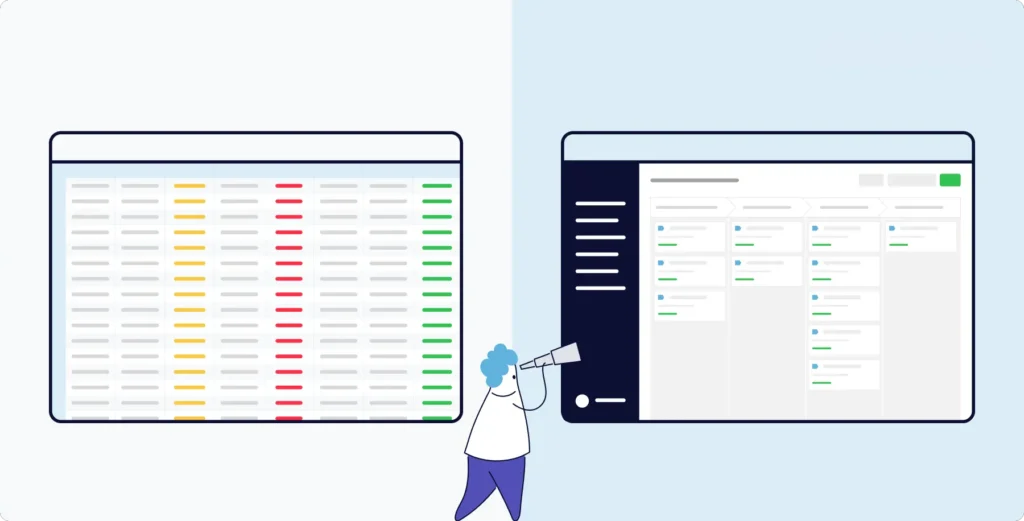
Comparison showing cluttered complex CRM interface versus clean user-friendly CRM interface design

Core design principles that make CRMs user-friendly

User experience researchers have spent decades figuring out what separates good software from software that makes you want to throw your laptop out a window.

Two frameworks keep coming up: 

  1. Jakob Nielsen’s 10 Usability Heuristics 
  2. Ben Shneiderman’s Eight Golden Rules of Interface Design

These aren’t just academic theories—they’re battle-tested principles that actually predict whether people will adopt software or rebel against it.

Nielsen’s usability heuristics in action

Take Nielsen’s concept of visibility of the system status. It’s a fancy term for a simple idea: The software should always tell you what’s happening.

In the CRM world, this means:

  • When you save a contact, you see clear confirmation
  • When reports are generating, you get progress indicators
  • During data sync, you know exactly what’s happening

No mystery. No guessing whether it worked.

The correlation between the system and the real world is another big one. Your CRM should speak in plain language that everyone understands, not force your team to decode technical hieroglyphics. If a sales rep has to figure out what “opportunity pipeline velocity metrics” means when they just want to know which deals are closing this quarter, that’s a design failure.

Why user control matters more than you think

The reality is that sales are messy. Deals don’t follow a neat linear path, contacts switch companies mid-conversation, and priorities can shift without warning.

User control and freedom mean the CRM bends to accommodate reality rather than forcing reality to fit rigid workflows. What you want is navigation that makes it easy to undo an error and doesn’t require IT intervention to fix a mistake.

Clicking the wrong button and discovering there’s no way back can be frustrating to say the least. That’s when team members start avoiding the system entirely.

Consistency and standards prevent the endless relearning that burns out users. When similar actions work the same way everywhere—contacts, deals, reports, whatever—people build muscle memory. They’re not constantly thinking “wait, how does the save button work in this particular module again?” That’s the mark of a truly user-friendly CRM solution.

Shneiderman’s golden rules complement the picture

Shneiderman’s rules add more practical wisdom. Striving for consistency throughout the interface means icons, colors, menus, and workflows follow patterns you can predict. The learning curve flattens fast when you’re not constantly surprised by how things work.

Enabling shortcuts for frequent users recognizes a truth about software: Power users and beginners need different things. Keyboard shortcuts, customizable quick actions, streamlined workflows for repetitive tasks—These all help experienced users fly without cluttering things up for newcomers still learning the basics.

Offering informative feedback keeps everyone sane:

  • Did that email actually send? 
  • Is the contact assigned to the right person now? 
  • Did the import finish? 

Clear, immediate answers prevent the anxiety of wondering whether your action worked or silently failed somewhere.

Less is often more

Aesthetic and minimalist design matters enormously for CRM evaluation. When interfaces throw every possible option at you simultaneously, teams can become overwhelmed. They can’t find what they need and then give up and go back to their spreadsheets.

Smart systems surface essential information and actions prominently. Advanced features stay accessible but don’t dominate the screen. Like a desk where you can actually find things versus one buried under six months of paperwork—Technically, both contain the same information, but only one is usable.

Essential user-friendly interface features to look for

Navigation should feel self-evident

You shouldn’t need a training course to find a contact. Locating contacts, accessing the pipeline, and generating reports—These core tasks should feel obvious. The most user-friendly CRMs offer clear menus, logical organization, and categorization that make sense.

Search needs to be prominent and powerful, allowing team members to quickly type a name or company and find the record. If hunting down a contact feels like playing detective, the interface design has failed.

Dashboards that actually work for different people

One size fits nobody in business software. Different roles need different information. 

Sales reps want their upcoming tasks and hot leads, while managers want team performance and forecast accuracy, and customer service wants recent tickets and response times. Forcing everyone to look at identical dashboards is lazy design work.

User-friendly CRMs let people configure their workspace so they can surface the metrics and data relevant to their job. 

Visual clarity goes beyond looking pretty

Typography should be readable. Not 8-point gray text on slightly lighter gray backgrounds that require perfect vision and ideal lighting.

Color schemes should guide attention, not be an assault on the eyes with random rainbow explosions. Spacing should create obvious boundaries between elements.

Good visual design is invisible—it just works. Bad design makes every interaction harder than it needs to be.

The details that drive daily productivity

Data entry reveals a lot about overall design philosophy:

  • Forms should follow predictable patterns
  • Required fields should be marked clearly
  • Validation should happen in real time
  • Smart defaults should reduce repetitive typing without sacrificing accuracy

Contact pages reveal design philosophy

Lead pages (people and companies) are where teams spend huge amounts of time. How these pages work impacts productivity more than almost any other factor.

Information should be organized logically. Most-used details should appear at the top, and related information—communication history, opportunities, support tickets—should be accessible without endless scrolling or clicking through maze-like navigation.

Reporting shouldn’t require a PhD

Here’s a test: Can a reasonably intelligent person create a pipeline report without consulting documentation or asking IT for help? If the answer is no, the reporting interface is not user-friendly. 

Filters should make sense, visualization options should be flexible, and exporting should be as easy as clicking a button. When teams can generate the insights they need independently, the CRM becomes genuinely useful.

Navigating the learning curve factor

No system requires zero learning

Let’s be realistic. Every CRM requires some learning. The question is whether you’re looking at a gentle slope or a vertical cliff face.

User-friendly systems embrace something called progressive disclosure. Core functions are immediately accessible and intuitive. Advanced features exist, but don’t clutter the initial experience.

That way, new users can be productive quickly with basic tasks, then gradually discover more sophisticated capabilities as needs evolve. You wade in from the shallow end rather than getting thrown into the deep end and told to swim.

Onboarding sets the tone for everything

First impressions matter enormously. Built-in tutorials, contextual help, and guided setup wizards—These reduce the training burden and get people up to speed faster. 

The best systems provide optional guidance, available when needed. They don’t force everyone through identical, rigid tutorial sequences regardless of experience level.

Some people want to explore independently. Others prefer structured walk-throughs. Why not accommodate both instead of picking one approach and making everyone suffer through it?

The eternal tension between power and simplicity

Businesses need comprehensive functionality. Users need uncluttered interfaces. These requirements feel contradictory.

Smart CRMs solve this through thoughtful design, making powerful systems easy to use:

  • Collapsible sections reveal details on demand
  • Customizable views let users hide irrelevant fields
  • Smart defaults work for 80% of use cases while allowing customization for the other 20%

When you need help, it should be there

Documentation quality matters more than people realize when evaluating CRM solutions for user-friendliness.

Questions will always arise, and users need quick access to clear, searchable help. Whether it’s video tutorials for visual learners and knowledge base articles for people who prefer reading, you’ll want contextual help that’s easily accessible, right when you’re confused about something.

Waiting on hold to learn how to export a contact list is not a user problem—it’s a design failure being compensated for with expensive support staff.

Feature discovery shouldn’t feel like archaeology

Remember, a significant number of CRM users make use of fewer than half the features available to them. This is often not because they don’t need those features, but because discovering and learning them feels too burdensome.

User-friendly systems make feature discovery feel natural. Tooltips, contextual suggestions, and the occasional “Did you know?” prompt help users expand capabilities without overwhelming their initial experience.

Mobile accessibility as a non-negotiable requirement

Sales professional using mobile CRM application on smartphone during client meeting or remote work

Your team isn’t chained to desks anymore

Modern sales teams work everywhere—coffee shops, conferences, client sites, home offices, airports, and more.

A CRM that only functions well on desktop computers is fundamentally misaligned with how work actually happens now. This isn’t 2010. Mobile isn’t a luxury feature anymore—it’s basic table stakes.

The productivity numbers don’t lie

According to a recent survey, salespeople using CRM on their mobile devices report increased efficiency (50% surveyed), better decision-making (42% surveyed), and improved data quality (53% surveyed). That’s a substantial, real, measurable competitive advantage.

Think about what this means practically: Sales reps are closing deals faster, customer service is resolving issues on the spot, and managers are checking the pipeline between meetings. All because the software works as well on a phone as it does on a laptop.

What mobile optimization actually means

The term “mobile-friendly” is often thrown around carelessly. Real mobile optimization means interfaces designed to work on smaller screens, touch-based navigation you can explore with your thumbs, and workflows you can manage while standing in a parking lot.

Forms should be streamlined, critical information accessible without pinch-and-zoom gymnastics, and voice input options for note-taking after meetings are a given.

Nobody wants to fight their way through a contact record designed for a 27-inch monitor while standing outside, squinting at their phone in bright sunlight.

Offline functionality isn’t optional

Sales reps can’t always count on internet connections. They may be traveling, at customer locations with spotty Wi-Fi, or experiencing random connectivity dead zones.

A user-friendly CRM will often offer basic functionality while offline—like accessing information and entering data—then automatically sync when connectivity returns. The system handles the technical complexity invisibly.

Native apps versus responsive web

Mobile app design philosophy matters. Responsive web interfaces adapt to different screen sizes and are good for broad accessibility. Native mobile apps can provide smoother performance, better integration with device features, the use of cameras for capturing business cards, and GPS for logging meeting locations.

The best approach depends on your specific use cases. But the mobile experience should never feel like an afterthought.

Small conveniences add up

Integration with mobile communication tools matters more than you might think.

  • Click a phone number, and a call initiates. 
  • Tap an email address, and the email interface opens. 
  • Need to schedule a follow-up, and calendar sync happens seamlessly without app-switching.

These tiny conveniences add up.

Evaluating CRM usability before you commit

Hands-on testing beats what marketing materials tell you

When selecting a user-friendly CRM, you should prioritize real user testing over feature checklists and slick vendor presentations. Free trials and demo environments give you opportunities for realistic assessment.

Don’t just watch the sales rep navigate carefully scripted scenarios that showcase strengths and avoid weaknesses. Have your team members attempt common tasks, then ask:

  • Can they add a contact intuitively? 
  • How many clicks to update a lead? 
  • Can they generate a pipeline report without a support article? 

These answers matter infinitely more than whether the vendor’s slide deck looks impressive.

Your end users know best

Involve your actual end users early, consistently, and throughout the entire evaluation.

Sales representatives, customer service agents, marketing coordinators—the people who’ll use the CRM daily—can spot usability issues that decision-makers miss completely. Their gut reaction about whether an interface feels natural or awkward should carry serious weight.

Ask questions that reveal the truth

Ask specific questions during vendor demonstrations, like:

  • How does the system handle edge cases? (Not the daily conventional stuff—the weird situations that happen often in real business)
  • What happens when users make mistakes? (Can they recover gracefully, or is it a disaster requiring IT intervention?)
  • How easily can workflows be customized to match existing processes? (Not the vendor’s idealized process—your actual process)

Request demonstrations of actual daily tasks. Not the polished showcase features designed to look impressive. Anyone can make a demo look smooth. Real workflows are where the truth emerges.

Red flags wave for a reason

Watch for warning signs:

  • Extensive training requirements signal an unnecessarily complex system. 
  • Heavy reliance on third-party consultants for basic configuration indicates inflexible or complicated architecture. 
  • Vague answers about mobile capabilities or integration options demonstrate poor usability beyond the desktop interface.

Listen to how vendors talk about their interface

Pay close attention to the vendor’s language about their own interface.

Do they emphasize intuitive design and easy learning? Or do they focus primarily on comprehensive features and extensive training resources?

The latter often reveals awareness of usability limitations they’re trying to compensate for through education rather than fixing through better design. Great design doesn’t require lengthy explanations. It just works.

Test usability under realistic conditions

Import sample data reflecting your actual complexity and invite team members with varying technical skill levels to explore the CRM independently.

Run through complete workflows, lead capture through deal closure, and more. These actions should surface friction points during evaluation—when you can still walk away—rather than discovering them after implementation, when you’re stuck.

Calculate the real cost

Consider the total cost of usability—Or lack thereof.

A cheaper CRM with poor usability often becomes more expensive when you factor in extended training time, lower adoption rates, reduced productivity, and potential switching costs when the system eventually fails completely.

A more expensive option that teams actually use consistently delivers better value than a cheaper alternative gathering dust. You’re not buying software. You’re buying the results that software enables.

FAQs

  • 1. What makes a CRM interface truly user-friendly?

    A user-friendly interface gets out of your way. You should navigate intuitively without thinking about it. The system speaks your language—not forcing you to decode technical jargon just to find a contact. Visual hierarchy guides you naturally. 

    Consistent design patterns mean you don’t need to relearn how things work in every module. And when you take an action, immediate feedback tells you it worked. Customization options let you configure your workspace to match how you actually work, not how a software architect imagined you should work.

  • 2. How important is mobile access when evaluating CRM usability?

    Mobile access has become essential rather than optional. Your sales team works everywhere—client sites, coffee shops, their cars, and airports. A CRM that only functions well on a desktop is fundamentally misaligned with how work happens now.

    Research shows productivity and decision-making improve significantly when salespeople have mobile CRM access. Modern work happens on mobile. Look for a responsive design that actually works on smaller screens. Ideally, you’ll want offline capabilities so connectivity gaps don’t derail your team and interfaces optimized for touch rather than mouse clicks. If the mobile experience feels like an afterthought, keep looking.

  • 3. Should I prioritize feature quantity or ease of use when selecting a CRM?

    Prioritize ease of use. A comprehensive feature set means nothing if your team can’t figure out how to use it. You end up paying for functionality nobody touches because it’s too difficult to access or understand. Find a system that handles your core requirements exceptionally well with an interface your team will actually use—consistently, without complaint, without workarounds.

  • 4. How can I test CRM usability before purchasing?

    Request hands-on trial periods rather than relying solely on vendor demonstrations. Have your sales reps, customer service agents, and marketing coordinators attempt realistic daily tasks. Can they add a contact without a training manual? Update an opportunity? Generate a report? How many clicks does it take? Do they need to call support for basic functions?

    Involve team members with varying technical skill levels. The tech enthusiast may overlook usability issues that drive your less tech-savvy people crazy. Real usage under real conditions surfaces problems that polished demonstrations hide.

  • 5. What are the warning signs of poor CRM usability?

    Watch for vendors who emphasize extensive training programs rather than intuitive design. That’s often code for “our interface is confusing.” 

    Systems requiring heavy customization just to handle basic workflows are a red flag. Interfaces cluttered with excessive options, inconsistent navigation across modules, slow response times, and cryptic error messages all indicate fundamental design problems. Simple tasks shouldn’t require multiple clicks through confusing menus. If they do, keep shopping.

Finding clarity in the complexity: Your path to CRM success

The CRM market is drowning in options—Hundreds of vendors, each promising to revolutionize customer relationships and send your revenue through the roof.

But here’s what gets lost in all the marketing noise and feature comparisons: Usability.

Most companies don’t prioritize it during selection. Not until adoption falls flat. Not until teams bypass the system entirely. Not until that expensive implementation becomes a budget disaster nobody wants to discuss.

Then suddenly, usability is all anyone cares about.

Here’s what actually matters: when an interface aligns with how you naturally think and work, when the system gives you clear feedback without mystery, when mobile access lets you be productive anywhere—that’s when CRM transforms. From obligatory software into something genuinely useful.

The statistics back this up. So does experience. Poor usability drives people away—Features go unused, and the entire point of implementing a CRM collapses.

Organizations that get this right share a pattern. They prioritize usability during selection. They involve actual end users in evaluation—not just decision-makers. They demand real workflow demonstrations instead of polished presentations designed to impress.

That’s how they position themselves for actual adoption. For returns that justify the investment. For software that people genuinely use.

Your team deserves tools that help rather than hinder. Start your CRM search with usability as a primary criterion. Test thoroughly before you commit. Never compromise on the interface experience that will shape daily productivity for years.

Because the uncomfortable truth is that the most feature-rich CRM in the world is worthless if nobody uses it. And worthless software is expensive—regardless of how affordable the subscription.

TERUG NAAR BOVEN

Sluit je aan bij 30.000+ andere verkoop- en marketingprofessionals. Schrijf je in voor onze Sell to Win nieuwsbrief!