CRM for Small Business vs. Enterprise: Which Is Right for Your Business?

-

When your business is growing, it’s not always obvious what you should do next.
You know spreadsheets aren’t cutting it anymore, but you’re not sure if you need the complexity—and price tag—of enterprise software. This decision matters: the wrong choice means poor adoption, wasted investment, or outgrowing your solution within two years. The right choice accelerates your growth without adding chaos to the system.
We’re here to help you navigate this decision with clarity. In this guide, we’ll break down the key differences between small business and enterprise CRMs, provide decision frameworks to match your current needs and three-year trajectory, compare real costs beyond subscription fees, and share examples of companies that got it right (and wrong).
Whether you’re a 15-person startup or a 200-person growing business, you’ll walk away knowing exactly which CRM tier makes sense for you.
Key takeaways
- Choose based on now, not later: Pick a CRM that fits your current needs plus your next three years of growth—not guesses about what might happen ten years from now.
- Small business CRMs prioritize adoption: Most teams under 100 employees achieve better ROI and faster time-to-value with solutions designed for simplicity over extensive customization.
- Implementation speed matters: Small business CRMs launch in days; enterprise solutions take three to 12 months—that directly impacts when you start seeing results.
- Total cost of ownership tells the real story: A $20-per-user-per-month CRM can cost three to ten times more when you factor in implementation, training, and administration.
The “Goldilocks zone” is real: Most growing businesses (50 to 250 employees) benefit from enterprise-ready small business CRMs that scale without requiring a platform switch.
Table of contents
- Understanding small business vs. enterprise CRM
- Key differences between small business and enterprise CRMs
- When to choose a small business CRM
- When to choose an enterprise CRM
- The middle ground: Scaling without switching
- Total cost of ownership comparison
- Common mistakes when choosing between small business and enterprise CRM
- SkySpecs: A real-world success story
- Making your decision: A small business vs enterprise CRM framework
- Frequently asked questions
Understanding small business vs enterprise CRM
A small business CRM is designed for teams under 100 employees prioritizing ease of use, quick implementation (days to weeks), and affordability over extensive customization. These solutions aim to get you selling faster instead of spending months configuring systems.
Enterprise CRMs take a different approach. They’re built for 100+ person organizations and lean into advanced customization, complex integrations, and scalability for distributed teams. But here’s the trade-off: these platforms assume you have dedicated IT resources and deeper implementation budgets.
The distinction matters because the underlying software architecture, pricing models, and implementation approaches are fundamentally different. A small business CRM—like Nutshell—might cost under $50 per user per month and launch in two weeks, with transparent pricing and no implementation fees.
An enterprise CRM might cost $150+ per user per month and take six months to implement. One isn’t necessarily “better”—they’re built for different problems. Choosing the wrong tier means either paying for capabilities you won’t use for years, or outgrowing your solution and facing an expensive migration later.
Key differences between small business and enterprise CRMs
Here’s where small business and enterprise CRMs diverge most significantly:
Feature Small Business CRM Enterprise CRM Pricing $10 to $50 per user per month $100 to $300 per user per month Implementation time 1 to 2 weeks 3 to 12 months Customization level Template-based with limited custom fields Fully customizable objects, workflows, and user interface User count capacity Optimized for 5 to 100 users Built for 100 to 10,000+ users Integration complexity Pre-built connectors for common tools Custom API development and complex middleware Support model Self-service resources plus email support Dedicated account managers and 24/7 support Deployment options Cloud-only Cloud or on-premise options Beyond these specs, here’s what these differences actually mean for your team:
- Pricing: Small business CRM pricing is straightforward—you know exactly what you’ll pay. Enterprise pricing involves discovery calls, custom quotes, and ongoing true-ups as your team scales.
- Implementation time: A two-week small business CRM launch means you’re generating ROI immediately. A six-month enterprise implementation means your team is in transition mode for half a year while hoping the new system actually solves the problems you anticipated.
- Customization: Template-based customization means you adapt your processes to the software. Full customization means the software adapts to your existing processes—which is powerful but requires extensive configuration upfront.
- Integration complexity: Pre-built integrations with Slack, HubSpot, QuickBooks, and 200 other tools work immediately. Custom integrations mean API development, testing, and ongoing maintenance.
- Support model: Self-service support works fine when the software is intuitive. Dedicated account managers become essential when configuration is complex and adoption is critical to your investment.
Here’s a practical reality check: 87% of CRM systems are cloud-based, which tells you that deployment preferences have shifted across the industry. Most businesses no longer need on-premise options, yet enterprise CRMs still offer them at additional cost.
When to choose a small business CRM
Small business CRMs make sense when you match specific criteria. Here’s how to evaluate whether it’s right for you:
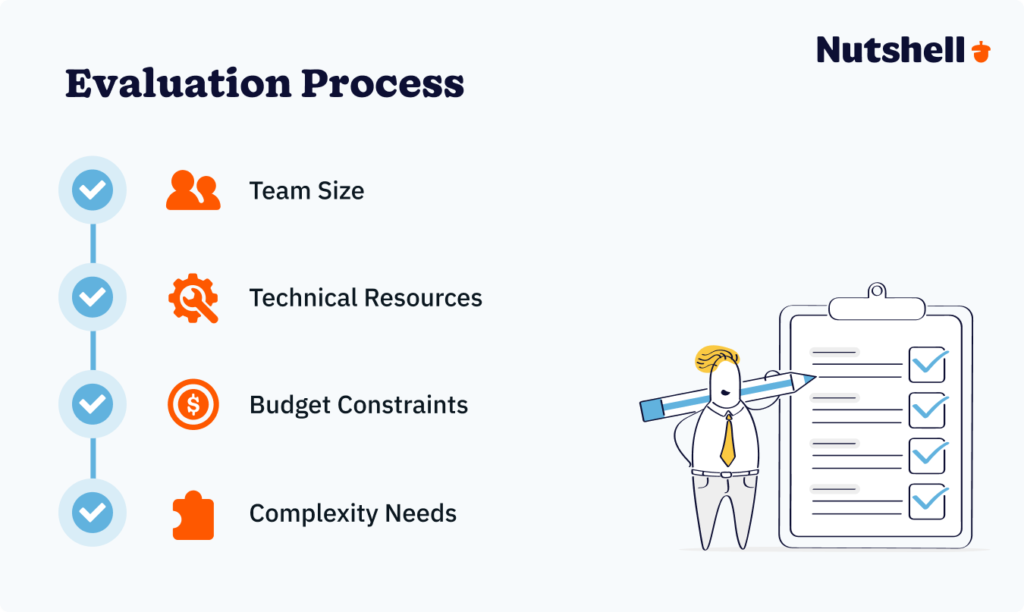
Step 1: Assess your team size
If you have fewer than 100 employees with straightforward sales processes, a small business CRM should be your starting point. Smaller teams benefit dramatically from simplicity—the less complex your CRM, the more likely your team actually uses it daily. User adoption increases exponentially when the system is intuitive. You don’t need role-based permission structures, multiple approval workflows, or advanced territory management when you have one sales team in one location.
Step 2: Evaluate technical resources
Ask yourself honestly: Do you have a dedicated IT department? Technical staff available for implementation and ongoing maintenance? Small business CRMs require minimal technical expertise—they’re designed for self-service setup. Most can be configured by your sales manager or operations person without involving IT. If your team is non-technical, this is a huge advantage. You avoid the bottleneck of waiting for IT support, and you move faster.
Step 3: Check budget constraints
If your total CRM budget is under $5,000 per month, you’re in small business CRM territory. This includes software subscription plus implementation and training. Small business CRMs deliver transparent pricing with no surprise costs. You know what you’re paying, and you’re not locked into multi-year contracts with escalation clauses. Budget predictability matters when you’re bootstrapped or managing tight margins.
Step 4: Measure complexity needs
Assess whether basic sales automation and standard reporting suffice for your business. If you can map your sales process into four to six pipeline stages, manage deals with a few custom fields, and pull basic reports monthly, you don’t need enterprise complexity.
Custom workflows and advanced objects become necessary when you have complex approval chains, multiple business units with different processes, or regulatory requirements. Most growing businesses don’t need these—they just think they do.
Here’s a key statistic: 71% of small businesses use CRM systems, and the vast majority of them use small business solutions. They’re not missing out—they’re making smart choices.
Where does Nutshell fit? Nutshell can be set up in days, not months, and requires no IT department to implement. You get transparent pricing with no hidden implementation fees or surprise annual increases. And you get features that matter for growing teams: pipeline management, email automation, reporting, and team collaboration—without the overwhelming complexity of enterprise software.
Consider the real-world example of Brothers Leather Supply, a retailer that needed CRM without the IT overhead. By choosing a straightforward small business solution, they could focus on selling rather than system administration. Their team adopted the platform immediately because it wasn’t intimidating.
When to choose an enterprise CRM
Enterprise CRMs solve genuinely difficult problems—when you have them. Here’s how to identify when enterprise capabilities become necessary:
Step 1: Assess scale requirements
If you have 100+ employees across multiple regions with complex organizational hierarchies, enterprise features start making sense. When you have distributed sales teams, you need advanced territory management, role-based permission structures, and multi-level approval workflows. When you’re operating in multiple countries, you need multi-currency support, multi-language interfaces, and different compliance frameworks per region. At small business CRM scale, these capabilities are overkill. At enterprise scale, they’re essential.
Step 2: Evaluate compliance needs
Ask whether GDPR, SOC 2, HIPAA, or other regulatory requirements apply to your business. Enterprise CRMs provide audit trails, advanced security features, and data residency options that satisfy strict compliance mandates. If you’re operating in healthcare, financial services, or handling personally identifiable information across borders, enterprise-grade compliance isn’t optional—it’s mandatory. Small business CRMs can be compliant, but enterprise platforms are purpose-built for highly regulated environments.
Step 3: Check integration complexity
Assess whether you need to integrate with ERP systems (SAP, Oracle), legacy databases, or custom applications that don’t have pre-built connectors. Pre-built integrations solve 80% of integration needs for most businesses. When you’re in the remaining 20%—requiring deep API integration, middleware, and custom development—enterprise platforms with sophisticated API ecosystems become necessary. If all your tools have standard integrations (Slack, QuickBooks, HubSpot), you don’t need this complexity.
Step 4: Measure customization needs
Evaluate requirements for custom objects, complex approval workflows, field-level permissions, and unique business processes that don’t fit standard templates. Most businesses can map their sales processes into standard fields and workflows. Some businesses have genuinely unique processes—multi-entity structures, complex service hierarchies, or industry-specific requirements that require extensive customization. When you can’t describe your process in standard terms, enterprise customization becomes worth the investment.
An important reality check: 94% of tech companies use CRM systems, yet most of them use small business platforms even at scale. This includes fast-growing companies like SkySpecs, which scaled from 25 to 150+ employees using Nutshell without switching platforms. Their success came from choosing a CRM designed to grow with them, not from selecting the most complex option available.
The assumption that growth means needing enterprise software is often wrong. Many businesses think they need enterprise when they actually need a small business CRM with better reporting or integration capabilities.
Enterprise CRMs make sense when you genuinely have enterprise problems: 500+ person organizations, multi-region operations, strict regulatory requirements, or complex integrations with custom systems. Most growing businesses don’t have all four of these. Many have one or two. And many assume they have more complexity than they actually do.
The middle ground: scaling without switching
Here’s the question keeping many growing businesses up at night: “What if we outgrow our CRM in two years?”
It’s a legitimate concern. You don’t want to invest in a CRM, migrate all your data, train your team, and then have to rip it out and start over when you hit 150 employees. But here’s the good news: this isn’t an either-or decision. There’s a middle category: enterprise-ready small business CRMs that scale alongside your growth.
Nutshell serves businesses from five to 500 employees effectively, which puts it squarely in this Goldilocks zone. The platform combines small business simplicity with enterprise-grade features:
- Advanced reporting and analytics that don’t require a separate business intelligence tool
- API access for custom integrations when you need them
- Team collaboration features for distributed teams
- Sales automation that saves time whether you have 10 users or 300 users
The key question isn’t “Will we outgrow this CRM?” It’s “When will we actually need enterprise complexity?”
Most businesses reach 200 to 300 employees before they genuinely need enterprise features. That’s five to ten years of growth on a scalable small business platform. By that point, technology has evolved, your processes have shifted, and you’ll likely be reevaluating your software anyway.
Here’s what actually triggers outgrowing a CRM:
Signs you’re outgrowing spreadsheets Signs you need enterprise CRM Losing track of leads in email 100+ users across five or more locations Manual data entry consuming hours Complex compliance requirements (GDPR, HIPAA, SOC 2) Can’t generate reports without manual work Multi-entity or multi-subsidiary structure Can’t see pipeline visibility across team Deep integrations with ERP systems (SAP, Oracle) Team using multiple tools that don’t talk Field-level permissions and advanced approval workflows Notice the left column? Those are problems a small business CRM solves immediately. The right column? Those are genuinely enterprise problems that only a small percentage of businesses face.
91% of companies with 10+ employees use a CRM, and most of that 91% is using small business platforms. The statistic tells you something important: not all growth requires enterprise tools.
Ready to scale without having to switch?
Ready to become the best sales manager for your team? Get 70+ leading tips and strategies from the experts for sales management success with our Sales Manager’s Survival Guide.

Total cost of ownership comparison
Here’s where the sticker price gets deceiving. When you compare just the software subscription, small business CRMs look obviously cheaper. But total cost of ownership—everything you actually spend—tells a different story:
Cost Category 10-Person Team (Small Business CRM) 500-Person Team (Enterprise CRM Software licensing $500 to $1,500 per month $50,000 to $150,000 per month Implementation and setup $500 to $2,000 one-time $100,000 to $500,000 one-time Training Minimal (self-service resources) $25,000 to $100,000 initial plus ongoing costs Ongoing administration 2 to 5 hours per week (any team member) 1 to 3 full-time administrators Integration and customization $0 to $5,000 (pre-built connectors) $50,000 to $250,000+ (custom development) Let’s make this concrete. A 10-person company implementing a small business CRM might spend $10,000 to $25,000 in year one (subscription plus implementation and training), then $8,000 to $20,000 annually.
Total five-year cost: roughly $50,000 to $85,000.
A 500-person company implementing enterprise CRM might spend $250,000 to $1,000,000 in year one (software, implementation, training, customization), then $150,000 to $750,000 annually.
Total five-year cost: easily $750,000 to $4,000,000+.
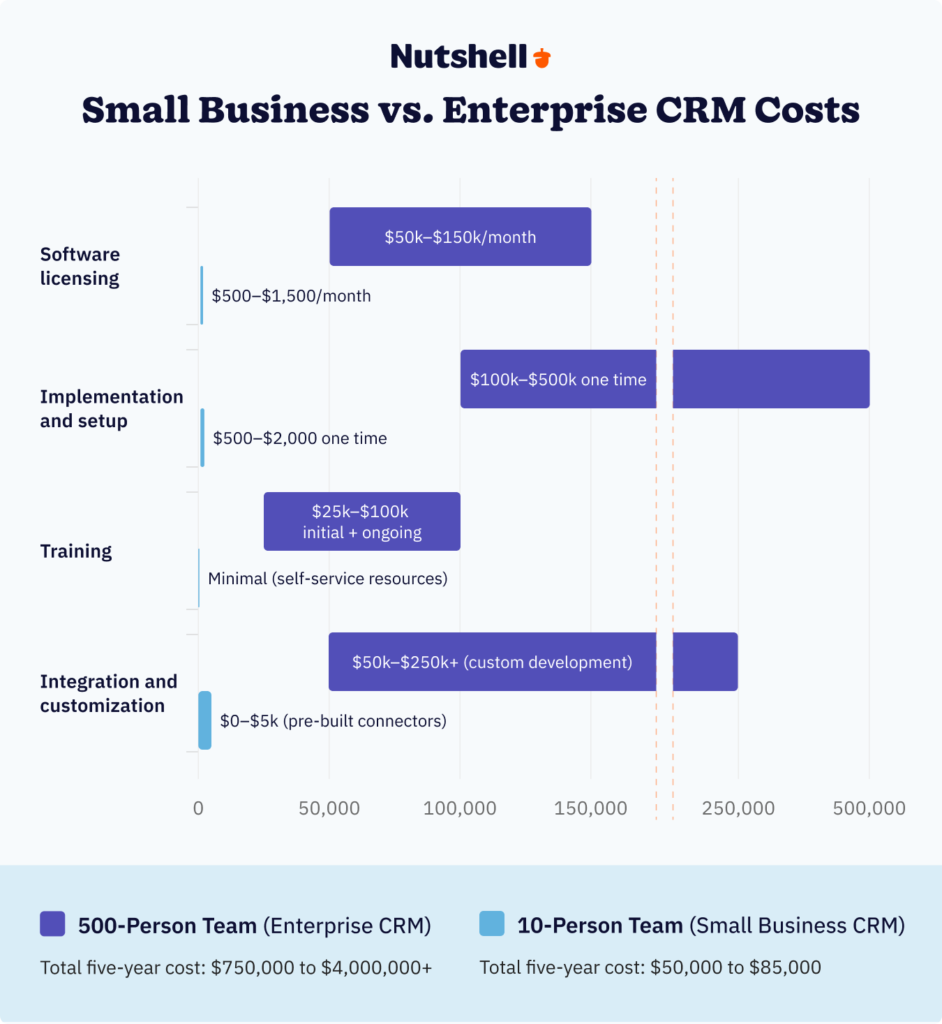
The difference is staggering. And here’s what most businesses overlook: $8.71 in ROI for every $1 spent on CRM. That’s the value, regardless of tier. But when you’re spending $50,000 or $1,000,000, that ROI math looks dramatically different.
Here’s where hidden costs tend to creep in:
- Data migration: Moving your actual data takes time.
- Customization maintenance: Keeping custom code updated is crucial.
- User license true-ups: Adding users may cost more than expected.
- Integration updates: When APIs change, your custom integrations break.
Nutshell’s transparent pricing eliminates much of this uncertainty. Want to dive deeper? Learn more about calculating your true CRM cost of ownership to make confident buying decisions. You know exactly what you’ll pay, there are no surprise implementation fees, and scaling up costs scale proportionally—not exponentially.
Common mistakes when choosing between small business and enterprise CRM
These missteps keep businesses from making optimal CRM decisions:
Mistake 1: Choosing based on features instead of usability
This is the #1 error. Businesses create massive feature comparison spreadsheets—”Does it have API access? Custom fields? Advanced reporting?”—and pick the option with the longest checklist.
Then, adoption flops because the system is too complex. Here’s the truth: a long feature list doesn’t matter if your team doesn’t use the system. According to recent research, 50% of sales leaders said their CRM could be easier to use. About 18% of these sales leaders said this caused them to lose revenue.
Low adoption means zero ROI, regardless of capabilities. Instead, prioritize ease of use and test with actual users during trials.
Mistake 2: Underestimating implementation time
Enterprise CRMs often take six to 12 months to fully implement. Businesses underestimate how disruptive this implementation period can be.
Your sales team is learning the new system while still hitting quota.
Your support team is managing inconsistent data during the transition.
Your IT team is firefighting integration issues.
The opportunity cost is enormous.
A quick way to avoid this: get realistic timelines in writing from vendors and factor it into your decision timeline—not as a nice-to-have but as a core decision factor.
Mistake 3: Ignoring user adoption rates
Here’s the hard truth: adoption and revenue impact are directly correlated. A CRM your team uses 80% of the time generates 3x more value than a CRM your team uses 40% of the time, regardless of which is technically superior.
Adoption depends heavily on ease of use, which favors small business CRMs. Before choosing any system, consider your team’s technical comfort level and training capacity.
A CRM your salespeople actively avoid will underperform every time. That’s why ease of use matters more than feature count.
Explore how to evaluate CRM usability for your specific team to avoid adoption failures.
Mistake 4: Picking enterprise when you need simplicity
This is the opposite problem: over-engineering your CRM decision with features you won’t need for five to ten years.
You pick enterprise because you’re thinking about scenarios a decade away: “What if we expand to three countries? What if we add a product line?” By the time those scenarios happen, you’ll be considering new software options anyway.
Instead, choose for today plus three years. That’s far enough to plan for real growth while staying focused on current problems.
SkySpecs: A compelling real-world success story
SkySpecs, an industrial tech company using drones for infrastructure inspection, scaled from 25 employees to 150+ on Nutshell—without switching platforms. They started with straightforward pipeline management and email automation.
As they grew, they added advanced reporting, team collaboration features, and custom integrations via API. The platform grew with them, proving that enterprise-ready small business CRMs truly can scale past the inflection points most businesses fear.
Here’s the key takeaway. Right-sized solutions outperformed over-engineered ones. User adoption mattered more than feature count. Implementation speed accelerated time-to-value. Choose for your actual needs, not imagined future scenarios.
Making your decision: a small business vs enterprise CRM framework
Here’s how to synthesize all your concerns and make a confident choice:
Action 1: Evaluate your current state
Answer the four key questions from earlier sections: How many employees do you have? What technical resources are available? What’s your realistic CRM budget? How complex is your sales process actually? Not theoretically—actually. Be honest about where you are today, not where you hope to be.
Action 2: Project three-year growth
Where will you be in employee count, revenue, and operational complexity? If you’re 20 people now, will you be 40 or 80 in three years? Will you expand to new geographies or add product lines? Will you need to manage complex approval workflows or advanced compliance? This isn’t fortune telling—it’s understanding your growth trajectory well enough to pick a platform that scales with you.
Action 3: Prioritize your must-haves
List five to seven non-negotiable CRM capabilities your business actually requires. Not “nice to have someday”—must have to operate. For most businesses under 100 employees, this list is shorter than they expect: contact management, deal tracking, email integration, basic reporting, mobile access, and integration with one or two critical tools. Anything else is negotiable.
Action 4: Test with real users
Request trials from your top two to three options. Have your actual sales reps spend a full work week using each system with real data. Do more than watch a demo—let them configure a pipeline, log an activity, run a report, and integrate your email. Usability testing with real users reveals far more than feature comparison spreadsheets.
During evaluation, ask vendors these critical questions:
- What’s a realistic implementation timeline?
- What’s included in pricing versus additional costs?
- How does pricing change as we grow?
- What does customer support actually look like—am I getting a dedicated rep or a support ticket queue?
The decision framework is simple: Choose for today plus three years, not hypothetical scenarios beyond that. Most businesses under 100 employees benefit from small business CRM simplicity. Growing businesses (100 to 300 employees) benefit from enterprise-ready small business platforms. Only businesses over 300 employees with genuine enterprise complexity typically need enterprise software.
Frequently asked questions
-
What’s the main difference between small business and enterprise CRM?
Small business CRMs prioritize simplicity, quick setup, and ease of use for teams under 100 employees, typically costing $10 to $50 per user per month. Enterprise CRMs emphasize extensive customization, complex integrations, and scalability for 100+ employees, with pricing starting at $100 to $300+ per user per month and implementation taking three to 12 months. The core difference: small business CRMs optimize for fast ROI and adoption, while enterprise CRMs optimize for customization and scale.
-
How much should a small business spend on CRM?
Most small businesses spend $500 to $2,000 per month on CRM software for teams of 10 to 40 users, translating to $10 to $50 per user per month. Total cost of ownership including implementation, training, and integrations typically ranges from $10,000 to $25,000 in the first year, then $8,000 to $20,000 annually. Budget predictability is one reason small business CRMs appeal to bootstrapped or margin-conscious companies.
-
Can a small business use an enterprise CRM?
Small businesses can technically use enterprise CRMs, but it’s rarely advisable—the complexity, cost, and lengthy implementation (three to 12 months) typically overwhelm small teams without dedicated IT resources. Most small businesses achieve better ROI and user adoption with purpose-built small business CRMs that can be launched in days rather than months. You’d be paying for capabilities you won’t need for years while delaying the value you need today.
-
When should I upgrade from small business to enterprise CRM?
Consider upgrading when you exceed 100 employees, require complex multi-region operations, need advanced compliance features (GDPR, HIPAA, SOC 2), or must integrate with enterprise systems like ERP platforms. Many businesses scale successfully from five to 500 employees on enterprise-ready small business CRMs without switching platforms. The key question isn’t “Will we eventually outgrow this?” but “When will we genuinely need enterprise complexity?”
-
What features do small businesses actually need in a CRM?
Essential features include contact and deal management, email integration, sales pipeline visualization, basic reporting and analytics, and mobile access. Nice-to-have features include email marketing automation, task management, calendar integration, and pre-built integrations with common business tools. Avoid paying for complex customization or advanced features you won’t use—they increase complexity without proportional value.
-
How long does CRM implementation take?
Small business CRMs typically take one to two weeks to implement, including data migration, basic configuration, and team training. Enterprise CRMs require three to 12 months for implementation, involving extensive customization, complex integrations, change management, and phased rollouts across departments or regions. Implementation timeline is one of the biggest practical differences between tiers.
The decision is easier than you may think
The decision frameworks provided earlier—assessing current state, projecting three-year growth, identifying must-haves, and testing with real users—create clarity around which tier makes sense for your specific situation. Use them. They work.
For businesses in the 50 to 250 employee range, consider looking at enterprise-ready small business CRMs as the sweet spot. These platforms combine small business simplicity with the power to scale—providing the ease of use that drives adoption with the features that support growth. Nutshell supports 5,000+ companies across 50 countries from five to 500 employees, serving exactly this middle ground where most growing businesses operate.
The right CRM accelerates your growth. The wrong one slows you down. But the great news? Making the right choice is straightforward once you stop overthinking hypothetical future scenarios and focus on your actual current needs plus realistic three-year growth.
Start evaluating your needs with a free trial of Nutshell—the enterprise-ready small business CRM.
No credit card required. Most teams are productive within days. Test it with your actual sales reps on real deals.
 BACK TO TOP
 Written by
Ready to try
Nutshell for Free?Thank you! Your submission has been received!Oops! Something went wrong while submitting the form.




B2B Website Visitor Tracking: 10 Best Tools for Identifying Anonymous Traffic in 2026
Published on: February 28, 2024

Highly Effective Strategies for Elevating Sales Team Performance
Published on: November 10, 2022Introducing Nutshell Forms Spam Prevention
Published on: April 22, 2024How to Manage a Sales Pipeline for a Financial Services Company
Published on: June 19, 2024Join 30,000+ other sales and marketing professionals. Subscribe to our Sell to Win newsletter!










