Many businesses today find that their CRM marketing automation setups are failing. They’re allocating the required budget, but their audiences simply aren’t opening the sequences they send out.
Closer inspection reveals that the triggers these teams set up often don’t make sense for their business and audience, which leads to undesirable outcomes. The awe-inspiring automation the CRM rep showed you in the sales demo may have made sense at the time. But the key to marketing automation success is a workflow that aligns with how their specific audience actually behaves.
This Nutshell guide breaks down what solid CRM marketing automation should look like and what to fix when the workflow is broken.
CRM marketing automation is the practice of using your CRM to trigger and deliver marketing actions based on your contacts’ actions. This could include test and email drip campaigns, SMS and email follow-ups, and automatic audience list updates.
Marketing automation and CRM are often confused due to the overlap between these tools, but there is a difference. A CRM is the tool used to store, organize, and manage your customer data. However, marketing automation uses your CRM data to execute marketing activities.
With marketing automation and CRM connected, teams can automate key tasks. An example would be updating a pipeline stage based on a contact’s behavior when they engage with your email marketing campaign.
Integration between the two is essential for campaign success. Without this connection, team members are left to complete related tasks manually, and that’s when human error creeps in.
A 2021 report by Nucleus Research determined the ROI for automated marketing campaigns is $5.44 per dollar spent. On the lead nurturing side, the payoff is 50% more sales-ready leads and 33% less in costs, according to Marketo’s 2019 Lead Nurturing Cheet Sheet.
So, why is it that so many teams never see numbers like these? The reason typically boils down to the following factors:
Leaning into automation for marketing through your CRM can eliminate these obstacles to workflow success.
Clean data affects far more than just the data. Accurate contact data fields lead to more effective audience segmentation, which ensures better automation workflows.
For example, inconsistent industry tags result in empty life cycle stage fields. And when you have duplicate contacts across different mailing lists, your workflow has no idea who it’s communicating with.
The result? Teams may find themselves sending re-engagement campaign messages to active customers or sending a welcome sequence to the same contact multiple times.
Avoid these hiccups by cleaning up your data before you build your marketing automation workflow.
Setting defined SMART goals for each automation workflow gives teams clarity on what success looks like when things are working as they should. These goals need to be measurable and specific outcomes, so teams can evaluate whether the marketing sequence is operating successfully or simply going through the motions.
All workflows include the same three structural elements, whether it’s a simple automation or a complex CRM marketing sequence. The following table provides more detail on what these components are and why they’re important.
| Component | Description | Hvad den gør |
| Trigger | The event that starts the sequence | Ensures workflows fire at the right time, for the right contacts |
| Sequence | The series of actions that follow the trigger | Sends messages relevant to where the contact is in your pipeline |
| Exit Condition | The signal that removes the contact from the workflow | Ensures the content is not part of a workflow that’s no longer relevant to them |
Many marketing teams focus on the trigger and sequence components and completely overlook the exit condition. Skipping this step can result in a contact receiving nurturing emails after they’ve converted or newsletters after they’ve unsubscribed. Exit conditions are essential to avoid spamming your contacts.
Not sure which marketing automations to build in your CRM first? Here are our recommended top three.
Example trigger: A new contact is added to your list.
Little do many teams know, but welcome sequences tend to see the highest open rates of any email marketing sequence. Sending a welcome email within the first 48 to 72 hours often results in the highest return.
You’ll want to include three to four emails in your welcome sequence, sent over five to seven days. A winning email sequence includes short emails focused on one specific goal each. A well-structured drip sequence can make all the difference between warming up a lead versus losing them completely.
Example trigger: A contact hasn’t opened one of your emails in 90 days
Whether simply dormant or entirely lost, unengaged contacts can hurt your email deliverability metrics, painting a false picture of campaign success.
Your re-engagement sequence should incorporate two to three short emails. If the contact fails to respond at all, it’s best practice to suppress them instead of deleting them completely. That way, your deliverability recovers, and the quality of your mailing list improves.
Example trigger: A contact reaches a specific stage in your CRM pipeline.
When a lead moves from one pipeline stage (like “new”) to another (like “qualified”), their entry to the destination stage becomes the trigger. Once they’ve entered the stage, it initiates a targeted email sequence relevant to where they are in the buyer journey.
Clear pipeline stage definitions and goals are paramount for this life cycle trigger workflow to function correctly. Here, your messaging will relate to the lead’s life cycle stage, with the end goal of moving them forward to the next stage in your pipeline funnel.

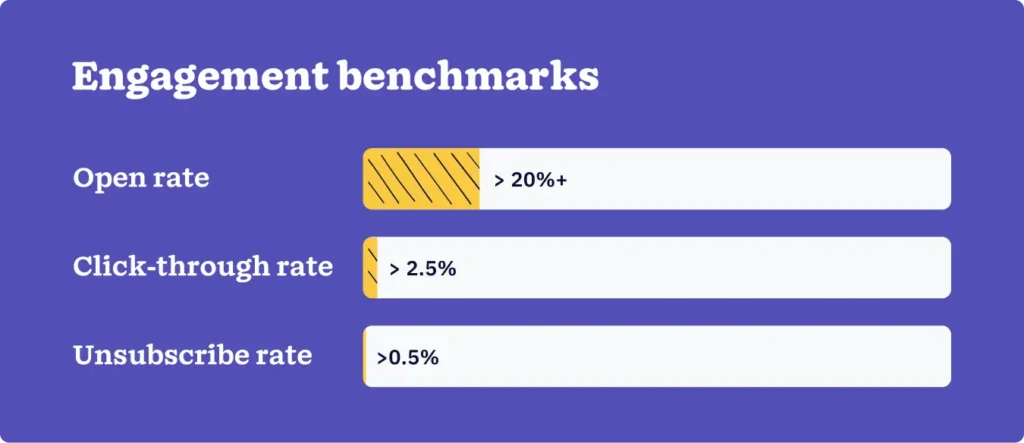
Understanding whether your CRM marketing automation workflows are working is all about knowing which metrics to track. Regardless of the type of workflow, you’ll want to track these core engagement and conversion metrics.
| Metric | Determines | Benchmark |
| Åben rate | Subject line & send time relevance | Review workflows below 20% |
| Click-through rate | Content & CTA relevance | Less than 2.5% indicates a message-market mismatch |
| Afmeldingsrate | Frequency & overall relevance | Spikes above 0.5% signal a sequencing issue |
| Metric | Determines |
| Goal completion rate | If the sequence drives the defined outcome |
| Time to conversion | If the sequence is too long or too short |
| Drop-off point | Where contacts exit before the exit condition |
Analyzing and acting on the data you collect here is vital to seeing these metrics improve and garnering a positive return. That’s why developing workflows with the means to track and assess metrics built in is table stakes.
A couple of things to look out for:
A CRM stores and organizes contact and pipeline data. Marketing automation uses that data to trigger actions—emails, follow-ups, list updates—based on contact behavior. When integrated, the two systems share data in real time. When they’re separate, marketing and sales teams work from different information.
Not necessarily from day one. The businesses that benefit most from automation are those handling more contacts than a person can manage manually. If your team is missing follow-ups or sending the same email repeatedly to different people, automation earns its place. If you have 50 contacts, a spreadsheet might still be faster.
The most reliable triggers are behavior-based—a form submission, an email click, a stage change in your CRM pipeline. Time-based triggers (send after X days) work for welcome sequences but tend to drift from relevance in longer campaigns. Start with behavior triggers and add time-based logic where it fills a specific gap.
As long as it needs to be to reach the defined conversion goal, no longer. Most effective sequences run three to six emails. Sequences that extend past that without a clear exit condition tend to see declining engagement and increased unsubscribes. Set a goal, build toward it, and stop when the contact converts or exits.
Measure against the goal you defined before building. If the goal was demo bookings, track goal completion rate—not just open rates. Open rates indicate interest; goal completion rates indicate performance. If you’re seeing high opens and low conversions, the problem is in the sequence structure or the offer, not the subject line.
The important thing to remember is that the marketing automation challenges you face are most often related to data, goal, or sequencing issues. An automated workflow just makes those issues more prominent because it’s operating at scale.
As simple as it sounds, just getting your foundational elements right can lead to better-performing workflows. That means ensuring your data is clean, outcomes are defined, and exit conditions make sense.
Start with a simple sequence and build from there. And set and track specific, measurable goals. That’s the path to great marketing automation ROI that the demo never shows you.
Slut dig til mere end 30.000 andre professionelle inden for salg og marketing. Abonner på vores Sell to Win-nyhedsbrev!