Zum Hauptinhalt springen ↓

The CRM and Email Marketing Software Metrics That Actually Connect to Revenue


Illustration of an open envelope with a bar chart and magnifying glass on an emerging document representing email marketing analytics

On average, businesses garner an email marketing ROI of $10 to $36 per $1 spent, according to a 2025 study by Litmus. That’s why email marketing is widely considered the driver of the highest rate of ROI across digital marketing channels. The funny thing is that, despite reaping the benefits, most teams fail to actually prove their ROI.

This metric and KPI framework guide, created by Nutshell, will help teams measure the gains that modern CRM and email marketing software make possible. We’ll shed some light on why the dashboard metrics most teams track won’t tell you the whole story and what to analyze to get the full picture.

Key takeaways

  • Most teams measure the impact of their email marketing campaigns with metrics that show audience engagement instead of metrics that show the impact on revenue.
  • Integrating CRM with email marketing software provides a way to access and analyze a deep layer of measurement data linking campaigns to pipeline progression and sales revenue.
  • To get a holistic overview of campaign performance, teams should employ a three-tier metrics framework, which combines engagement, pipeline, and revenue metrics.


What does CRM email marketing analytics actually measure?

CRM email analytics typically measure how your email recipients engage with your messages, tracking opens, clicks, and unsubscribes. This data is useful, but it doesn’t tell you what happens after your audience engages with your email. Open and click-through rates don’t tell you whether a recipient became a lead, moved through the pipeline, or converted to a customer.

An integrated CRM and email marketing software system takes those engagement metrics a step further. This system allows your email campaign data to flow into your CRM, connecting the data with contacts, deals, pipeline stages, and outcomes.

That means your open and click figures are no longer a dead end. Instead, they become a vital foundation to a much broader story that includes revenue, pipeline velocity, and customer lifetime value.

When teams make that analytics shift from engagement data to outcome-based data, it becomes easier to identify the campaigns that work.

Why aren’t open and click rates enough?

Open and click rates give you information about the actions your audience took when they received your email, but not much else. And, unfortunately, this is what many marketers focus on. But you can’t tie opens and clicks directly to revenue-related outcomes, which means you need additional metrics to see the full picture.

A 2024 report by Litmus indicated that 72% of marketers don’t know exactly what their email campaign ROI is. This is largely due to their focus on tracking opens and clicks, and being left to guess the actual impact of the campaign.

Teams that track metrics beyond these engagement basics often still fail to cast their nets wide enough. In its 2024 State of Email and Automation study, Ascend2 reported that 45% of marketing leaders focus on revenue generated as a measure of email campaign success. The study also highlighted that only 22% of marketing decision-makers actually consider customer lifetime value as part of their campaign success equation.

Teams often lean into metrics that provide little to no insight into email marketing campaign success, but continue to track them because they feel comfortable with them.

A more effective CRM email metrics framework

Organizing your CRM email marketing metrics into three tiers helps teams distinguish between measurements that answer different questions. As a result, teams end up using the correct metrics to analyze and report on the data and outcomes they relate to.

TierMetricsWhat they measureWhen they matter
1 – Engagement signalsOpen rate, CTR, CTOR, unsubscribe rateMessage-level interactionCreative testing, deliverability monitoring, list hygiene
2 – Pipeline metricsEmail-to-lead rate, campaign-to-opportunity rate, deal stage touch pointsCampaign influence on sales pipelineLead generation, nurture sequence evaluation, sales-marketing alignment
3 – Revenue metricsRevenue per email sent, campaign-attributed closed revenue, customer acquisition cost via email, CLV by campaign sourceBottom-line business impactBudget decisions, channel ROI reporting, strategic planning

Tier 1: Engagement signals

Measuring open, click-through, and click-to-open rates is useful, but only for specific purposes. If you want to know whether your campaign is hitting the mark when it comes to subject line, sent time, and content relevance, these can all be reliable indicators.

The problem is that you won’t be able to use these figures to determine if the engagement translated into leads or conversions. You can use these metrics to diagnose and refine email content, but they’re not going to help you with performance reporting.

Tier 2: Pipeline metrics

This is where teams begin to see the value of CRM and email marketing software integration. The key pipeline metrics are as follows:

  • Email-to-lead rate: Tracks the percentage of email campaign recipients that convert to leads.
  • Campaign-to-opportunity: Shows the percentage of those leads that have evolved into active deals.
  • Deal stage touch points: Analysis of pipeline stage touch points to determine which email sequences result in leads progressing through the pipeline faster.

Setting up custom campaign tags inside your CRM is the best way to track these metrics. To ensure accurate pipeline attribution, you’ll need a source label linked to specific contacts and deal records for each email sequence. 

Tier 3: Revenue metrics

One of the key metrics gained from an integrated CRM email marketing system that heavily impacts decision-making is the revenue per email sent. Dividing your total campaign revenue by the number of emails sent gives you a real outcome-based figure that leadership can sink their teeth into.

In fact, Litmus data from 2025 tells us that 41% of marketing leaders measure the contribution of email marketing to overall business goals using direct revenue attribution.

But we can take email marketing success metrics a step further. With the customer lifetime value metric by campaign source, we can determine which email acquisition and nurture strategies resulted in the customers that stuck around the longest.

How to connect email activity to revenue in your CRM

Linking email campaign engagement to revenue comes down to your setup and disciplined tracking management.

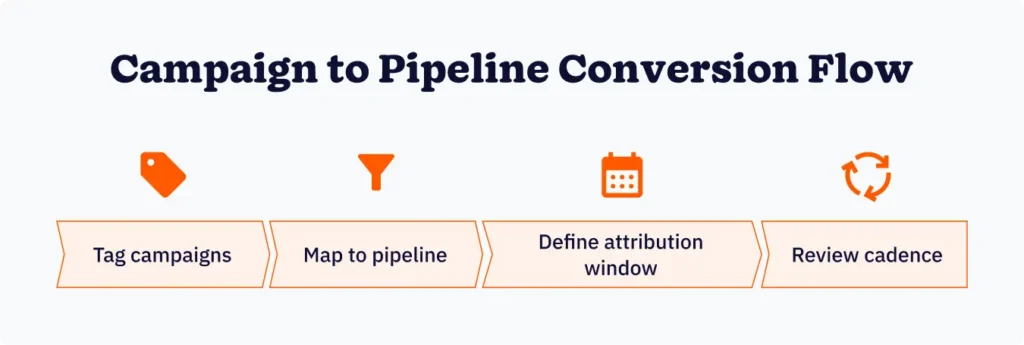
Tag each campaign at its source

Teams need a unique identifier for each email campaign sequence, such as a UTM parameter, campaign-specific tag, or custom CRM source field. The idea is for this identifier to mark and follow the contact from the point of engagement through the pipeline. It’s the best way to ensure attribution doesn’t break when the lead is assigned to your sales team.

Map touch points to pipeline stages

Here, you’ll reverse engineer the pipeline journey, starting from closed deals back to engagement to narrow down the touch points that appeared most often. Any good CRM should be able to surface this data through basic reporting. But bear in mind that the objective is to find the connections before optimizing.

Define your attribution window

Each lead will likely follow a different path from email to conversion to close, affecting how you track and report on attribution. That’s why determining whether you want to measure first-touch, last-touch, or multi-touch is crucial. Once teams are clear on this, they must apply it consistently across the board to ensure accurate and meaningful reporting.

Set a regular review cadence

Establish a review cadence that makes sense for the metrics you’re collecting. For instance, it’s best to analyze your Tier 2 and 3 numbers on a quarterly or campaign basis, because outcomes are determined over a longer period for these. Attempting to measure pipeline and revenue outcomes in real time will prove a painful process.

Benchmarks worth measuring against

Getting the metrics right and comparing them against your own historical data and forecasts is useful. Casting your eye toward broader industry benchmarks paints a clearer picture of your position in the market.

Here are a few worthwhile benchmarks to reference based on original research:

  • Automated email sequences: Although these account for only 2% of the total email send volume, research by Verified Email indicates that automated email sequences typically deliver about 41% of a business’s total email revenue.
  • Marketing segmentation: Litmus’s email trends report highlights that 90% of email marketers who segmented audiences for more targeted campaigns saw an increase in campaign performance.
  • ROI by industry: A Litmus post based on research they’ve done regarding email marketing ROI describes a wide ROI range across various industries of 10:1 to 50:1. For example, the average ROI for businesses in the media and publishing industry is 32:1. And the average ROI for businesses in retail and commerce is 45:1.

Linking email activity to revenue attribution allows teams to make informed, data-driven decisions about segmentation, sequencing, and budget.

CRM and email marketing software analytics FAQs

  • 1. What is the difference between ESP analytics and CRM email analytics?

    ESP analytics measure how recipients interact with individual emails—opens, clicks, bounces, and unsubscribes. CRM email analytics connect those interactions to downstream outcomes: lead creation, pipeline movement, deal closures, and revenue. ESP data tells you how an email performed. CRM data tells you what it was worth.


  • 2. Which email metrics are most important for measuring campaign ROI?

    Revenue per email sent, campaign-attributed closed revenue, and email-to-opportunity rate are the most direct indicators of ROI. Engagement metrics like open rate and CTR are useful for diagnosing creative and deliverability issues, but they don’t substitute for bottom-line revenue measurement.


  • 3. How does a CRM connect email campaigns to revenue?

    By tagging contacts with campaign source identifiers and tracking their progress through the sales pipeline, a CRM can attribute revenue back to the email sequence that first engaged or last influenced a contact. This requires consistent campaign tagging and a defined attribution model—first-touch, last-touch, or multi-touch.


  • 4. What is a good benchmark for email marketing ROI? 

    According to Litmus research, most companies see between $10 and $50 return for every $1 spent on email marketing, with the median sitting around $36:1. ROI varies significantly by industry—retail and ecommerce typically reach 45:1, while software and technology companies average around 36:1. The more meaningful benchmark is your own trend over time.


  • 5. Why do automated email sequences outperform standard campaigns in revenue attribution? 

    Automated sequences are triggered by specific contact behaviors—sign-ups, product interactions, deal stage changes—which means they reach recipients at higher-intent moments. Research indicates that despite making up a small fraction of total email volume, automated flows account for a disproportionate share of total email-attributed revenue.


Revenue attribution starts with CRM and email marketing software integration

The key to closing the gap between understanding whether email campaigns are performing well and knowing how those campaigns have impacted business revenue is the integration between CRM and email marketing software.

Building a three-tier measurement framework is the first step toward optimizing for outcomes instead of engagement. Implementing this fundamental shift typically results in an improvement in campaign metrics across the board.

ZURÜCK NACH OBEN

Schließen Sie sich 30.000+ anderen Vertriebs- und Marketingexperten an. Abonnieren Sie unseren Sell to Win-Newsletter!