Automated data collection and analysis

“Nutshell is super user-friendly and intuitive
“I would highly recommend Nutshell
“Easy to use and... wait for it ... 100% buy in!
“Nutshell is both simple and powerful
Sales and marketing automation offers a variety of benefits for different aspects of your business. Chief among them is improved efficiency. From data collection to streamlining workflows, using automation to improve efficiency can positively impact your business.
Automate Routine Tasks to Save Time and Improve Accuracy: CRM automation handles data entry, lead assignment, and follow-up reminders—freeing up teams to focus on high-impact selling and reducing human error.
Enhance Customer Engagement with Personalized, Timely Outreach: Automated email sequences and pipeline-triggered messages help nurture leads and maintain consistent communication—boosting conversion rates while staying personal at scale.
Build Scalable, Custom Workflows that Grow with Your Team: Workflow automation ensures leads are routed, tasks are triggered, and reps are guided through the sales process efficiently—creating repeatable success even as the business expands.


Take our guided tour to explore Nutshell’s incredible features!

In this guide, we’ll look at specific areas where sales and marketing automation tools can increase efficiency and leave a lasting, positive impact on your business.
Learn more about how Nutshell CRM’s automation tools can help your business by contacting us online today or starting a free trial of Nutshell.
With the help of CRM automation, you can improve the efficiency of your customer data collection and analysis efforts.
Integrating automation tools with data collection helps you collect larger amounts of data more efficiently and analyze them for key insights that can assist in making data-driven decisions related to marketing and sales efforts. With key insights on hand, you can optimize your marketing and sales efforts to maximize impact and efficiency.
With Nutshell CRM’s automated data collection tools, you can collect customer data, easily organize it, and build it into insightful charts, making data analysis easier.
Nutshell’s automation features take the time, effort, and worry out of customer data collection. Automated data collection allows you to automatically pull data from different sources, enrich your existing data, and manage it all in one place—your CRM.
Businesses can use CRM automation to improve customer communication and engagement. By setting up automated email replies with personal email sequences, you can follow up with leads and send the right messages at the right times.
No one likes spending all day replying to emails, especially when there are meetings to attend and sales to close with high-value leads and customers.
Instead of spending a significant chunk of the business day writing email replies, you can set up personal email sequences that are automatically triggered at various sales pipeline stages.
Nutshell’s personal email sequences allow you to automate email replies while still keeping them genuine and personalized for your leads and clients. With the help of this sales automation tool, you can improve reply rates and speed up outreach efforts.
Finally, you can improve workflow efficiency with sales automation software, and streamline marketing processes. By setting up automated workflows with a CRM, you can ensure that tasks are completed in a timely manner and optimize the customer journey.
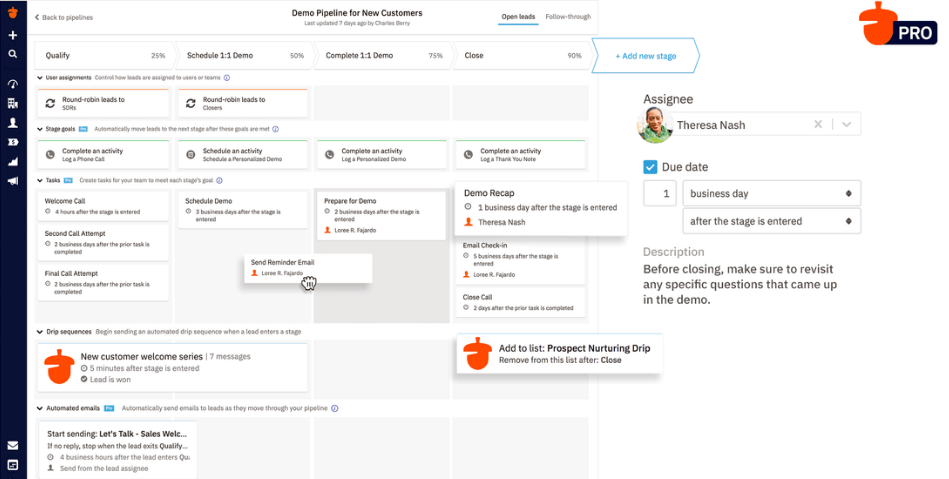
Every business has a unique sales process or workflow. With Nutshell, you can customize your workflows with automation features that meet your needs.
Nutshell’s workflow automation tools include features like auto-assigning leads and automated reminders to make your sales process as smooth as possible.
Manually assigning leads to your sales representatives can take time, especially if you have leads coming in daily. With Nutshell’s auto-assign feature, you can set up your workflow so that new leads are automatically assigned to sales representatives for you.
But wait, what if I want specific leads to go to particular sales reps?
We’re glad you asked—when implementing Nutshell’s auto-assign tool to your workflow, you can define how leads are auto-assigned to your sales representatives. For example, businesses can identify that they want high-value leads that meet specific criteria to be auto-assigned to more experienced sales representatives.
Businesses can improve workflow efficiency with automation tools by implementing automated reminders for sales representatives. Setting up automated reminders triggered at the end of each stage in the sale help ensure important deals don’t fall through the cracks and sales reps are completing tasks on time.
With Nutshell, you’ll gain access to automation tools that help you streamline essential day-to-day and non-selling activities. By automating tasks, you can get back to doing what you do best—delivering quality customer service to your most valuable leads and customers.
Learn more about how you can use Nutshell’s sales automation tools to improve your sales team’s efficiency today by starting a free trial of Nutshell or get in touch with one of our CRM specialists by contacting us online.
CRM automation typically saves sales teams 30-50 hours per month by eliminating repetitive tasks like data entry, lead assignment, and follow-up emails. Studies show sales reps spend 40% of their time on manual tasks—automation reclaims that time for actual selling. For a 6-person team, that’s roughly 180-300 hours monthly redirected toward closing deals and building relationships.
Start with the most repetitive, time-consuming tasks: lead assignment and routing, data entry and contact updates, follow-up email sequences, and meeting reminders. These “quick wins” deliver immediate time savings and build team confidence in automation. Avoid automating tasks requiring personal judgment or relationship-building—like closing high-value deals or handling complex customer issues—until your team is comfortable with basic automation.
CRM automation focuses on sales tasks like lead assignment, pipeline management, and contact tracking throughout the entire customer lifecycle. Marketing automation handles top-of-funnel activities like email campaigns, lead nurturing, and lead scoring before prospects reach sales. Think of it this way: marketing automation attracts and qualifies leads, while CRM automation helps sales teams convert and retain them. The best approach? Use both together for seamless handoffs.
No, and it shouldn’t. CRM automation excels at repetitive, predictable tasks like data logging, follow-up reminders, and lead routing. But sales still requires human judgment for relationship-building, complex negotiations, and strategic decision-making. The goal isn’t to replace your sales team—it’s to free them from busywork so they can focus on what humans do best: building trust, solving problems, and closing deals.
Track time saved on manual tasks, lead response times, pipeline velocity (how fast deals move through stages), and sales cycle length. Monitor automation-specific metrics like email open rates for automated sequences, lead conversion rates, and task completion rates. Most importantly, ask your team: Are they spending more time selling and less time on admin work? If yes, your automation is working.

Let your sales team learn from the masters with our Sell to Win Playbook, packed with 55 top tips from some of the best sales experts around!
Table of Contents