Overslaan naar hoofdinhoud ↓

Switching CRM: The Complete Guide to a Successful Migration

Your CRM was supposed to be the solution that streamlined your customer relationships and drove growth. Instead, it’s become a daily source of frustration for your team—sound familiar?

You’re not alone. Research shows that 55% of CRM implementations fail to deliver their intended value, and many businesses find themselves considering a switch within just a few years of their original implementation.

Switching CRM systems requires careful planning, significant investment, and a clear understanding of what went wrong and what you need next.

The good news? With the right approach, switching CRM systems can transform your business operations, improve team productivity, and finally deliver the ROI you’ve been seeking.

In this comprehensive guide, we’ll walk you through everything you need to know about switching CRM systems—from recognizing the warning signs to executing a flawless migration that keeps your business running smoothly.

Is it time to switch? 10 warning signs your CRM is holding you back

Before diving into a CRM migration, it’s worth confirming that switching is the right move—and not just a temporary frustration you could solve with better setup or training.

A good rule of thumb: if your CRM is creating extra work, slowing down follow-ups, or keeping teams in the dark, it’s not acting like a revenue system anymore—it’s acting like a spreadsheet with a login.

Here are 10 warning signs your CRM is holding you back (and what they typically mean).

1. Your team actively avoids using it

If your sales team is “using the CRM” but still keeps notes in notebooks, spreadsheets, inbox folders, or personal task apps, you don’t actually have a CRM—you have scattered systems. Avoidance usually isn’t a discipline problem; it’s a usability problem. If reps feel like every update takes too many clicks, they’ll do the minimum required (or skip it entirely).

What it looks like: Pipeline stages rarely updated, missing next steps, inconsistent deal values, and managers asking for status updates outside the CRM.

Why it matters: Poor adoption means poor data, and poor data means unreliable forecasts and missed follow-ups.

What to look for in a new CRM: An interface that feels intuitive, fast logging of calls/emails/notes, and workflows that match how SMB teams actually sell. Nutshell is built for teams that want a CRM people will actually use—without needing a full-time admin to “keep it alive.”

2. You’ve outgrown your current system’s capabilities

Many SMBs choose a CRM that works for 5 users and breaks at 15. Growth changes what you need: more pipelines, more automation, clearer permissions, better routing, and cleaner handoffs between teams. If you’re constantly hearing “the CRM can’t do that,” you’re likely paying for a tool that’s no longer designed for your operating reality.

What it looks like: Manual workarounds for lead assignment, separate tools for automation, or “we track that in a spreadsheet because the CRM can’t.”

Why it matters: Every workaround introduces delay, inconsistency, and risk—especially when your lead volume increases.

What to look for next: Flexible pipeline management, customization that doesn’t require custom code, and scalable automation. (If you’re comparing options, prioritize CRMs that can grow with you without turning into an IT project.)

3. Data quality is consistently poor

CRMs don’t fail because teams “don’t care about data.” They fail because the system makes it hard to maintain clean data. Duplicate contacts, outdated fields, inconsistent company names, and missing deal details make the CRM feel untrustworthy—so people stop relying on it. That’s a fast path to “CRM abandonment.”

What it looks like: Multiple records for the same person, unknown lead sources, incomplete contact fields, and deals with no next step.

Why it matters: Bad data kills reporting, segmentation, automation, and follow-up timing. It also makes your AI tools less useful—because AI is only as good as the data you feed it.

What to do now: Use the switch as a chance to clean and standardize data.

4. Security and compliance concerns are growing

Your CRM holds some of your most sensitive data: customer contact information, sales activity history, deal values, and internal notes. If your current system lacks modern security basics—or makes it hard to control permissions—you’re taking on unnecessary risk.

What it looks like: Weak access controls, unclear audit trails, difficulty enforcing strong passwords, or concerns about how data is stored and protected.

Why it matters: Security incidents, accidental data exposure, and compliance issues can be expensive and reputation-damaging—especially for small businesses where trust is everything.

What to look for in a new CRM: Role-based permissions, modern authentication options, clear vendor security documentation, and strong administrative controls. Even if you’re not an enterprise, your CRM should treat security like a first-class feature.

5. Limited integration capabilities create silos

If your CRM can’t connect with your email, calendar, marketing tools, lead capture forms, customer support system, or accounting platform, it becomes a “dead end.” Teams end up duplicating work across tools, and customer context gets trapped in different places.

What it looks like: Reps manually copying form leads into the CRM, marketing not seeing sales outcomes, or finance/customer success lacking visibility into what was promised during the sales process.

Why it matters: Every handoff becomes slower and less accurate. Leads get missed, follow-up quality drops, and reporting becomes guesswork.

What to look for next: Strong native integrations, a clear integration ecosystem, and documented workflows. Learn more about effective CRM integration strategies, and make it your priority to connect sales activity with the rest of your go-to-market stack.

Past Nutshell perfect bij jouw favoriete software?

Nutshell integrates with thousands of tools, natively and through Zapier. See if your favorites are on the list.

6. Lack of mobile accessibility slows your team down

If your team sells on the go—field sales, trade shows, onsite visits, or even just quick follow-ups between meetings—mobile access matters. A CRM that’s clunky on mobile encourages delayed updates, which leads to missing details and stale deal status.

What it looks like: Reps saying “I’ll log it later,” notes living in text messages, or follow-ups slipping because the CRM isn’t convenient outside the office.

Why it matters: The best time to capture accurate info is right after the interaction. Waiting increases errors and decreases consistency.

What to look for in a new CRM: A mobile experience that supports your core workflows (updating deals, logging notes, searching contacts, and tracking next steps). If you’re switching CRMs, ask vendors to show a real mobile workflow—not just screenshots.

7. Inadequate reporting and analytics leave you guessing

If your CRM can’t answer basic questions quickly—like “Which lead sources convert best?” or “What’s our forecast by rep?”—it’s not supporting decision-making. Some CRMs have reporting, but it’s so hard to configure that only one person ever uses it (and everyone else waits for spreadsheets).

What it looks like: Pipeline reviews happening outside the CRM, leadership losing confidence in forecasts, or marketing and sales disagreeing on performance numbers.

Why it matters: When your CRM can’t surface insights, you make decisions based on instinct instead of data—which gets riskier as your business grows.

What to look for next: Customizable dashboards, easy filtering, and reporting that managers can operate without needing a BI specialist. Nutshell is worth consideration for SMBs that want reporting and pipeline visibility without a steep learning curve.

8. Vendor support issues are hurting your operation

Support quality becomes very real during critical moments: onboarding, migration, integration setup, and “something broke and we need answers now.” If your vendor’s support is slow or generic, you’ll feel it in productivity, morale, and adoption.

What it looks like: Unanswered tickets, unclear documentation, or support responses that don’t address your actual use case.

Why it matters: Every unresolved issue becomes a reason for users to stop using the CRM (or build workarounds).

What to look for in a new CRM: Responsive support, clear onboarding resources, and implementation guidance that matches SMB reality. Nutshell’s team is known for being hands-on and helpful—something that matters a lot when you’re switching CRMs and can’t afford downtime.

9. Rising costs without added value

Price increases aren’t always bad—sometimes they reflect meaningful product improvement. But if your CRM costs keep climbing while usability, support, and outcomes stay flat, you’re paying for brand, complexity, or add-ons you don’t need. SMBs often get hit hardest by “nickel-and-dime” pricing: features that should be standard placed behind premium tiers.

What it looks like: Add-on fees for reporting, automation, storage, or integrations—and a total cost that’s much higher than expected.

Why it matters: Bloated CRM costs reduce ROI and limit your ability to invest in other growth initiatives.

What to do: Calculate your true cost of ownership (licenses + admin time + workarounds). If the numbers don’t justify the outcomes, it’s time to compare alternatives. Nutshell is a strong option for teams that want modern CRM capabilities with straightforward value.

10. Your CRM doesn’t connect teams

A CRM should be a shared source of truth across customer-facing teams—sales, marketing, customer success, and leadership. If your CRM creates bottlenecks or forces departments to operate independently, it’s actively working against your customer experience.

What it looks like: Marketing can’t see sales outcomes, sales can’t see customer history, and customer success doesn’t know what was promised during the deal cycle.

Why it matters: Disconnected teams create inconsistent experiences, slower response times, and missed expansion opportunities.

What to look for in a new CRM: Shared timelines, easy internal collaboration, clear handoff workflows, and automation that keeps the right people informed. Nutshell is designed to help SMBs align around customer data and pipeline activity—without introducing a ton of complexity.

Quick self-check: how many signs apply to you?

If you recognized 3 or more of these warning signs, your CRM is likely limiting growth—and switching CRM systems may be the most practical path to better adoption, cleaner data, and more predictable revenue operations.

Zie Nutshell in actie!

Probeer Nutshell 14 dagen gratis uit of laat ons je rondleiden voordat je erin duikt.

The hidden costs of switching (and how to budget properly)

CRM migration involves more than just software licensing fees. Understanding the full cost structure helps you budget accurately and avoid unpleasant surprises.

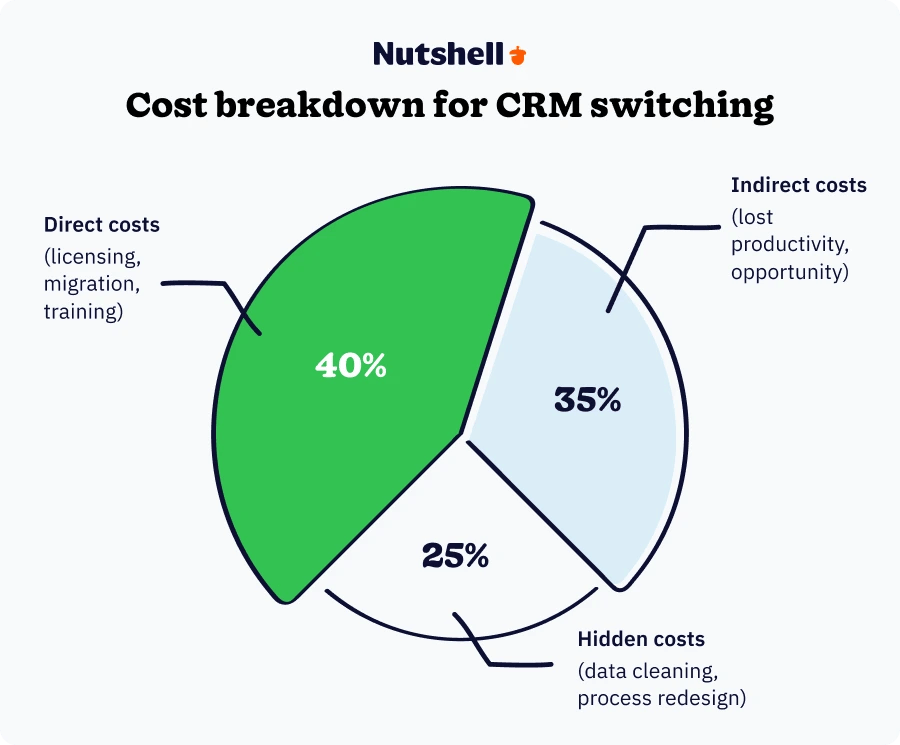
When budgeting for a CRM switch, most organizations focus only on software licensing fees. However, the true cost extends across three categories: direct implementation costs, indirect productivity impacts, and often-overlooked hidden costs.

Direct costs

These are the “line item” costs that show up clearly in your budget. They’re also the easiest to underestimate because the sticker price of a CRM is rarely the full picture.

  • New CRM licensing: This is the obvious cost, but it’s rarely as simple as “price × number of users.” Many CRMs charge differently for advanced reporting, automation, additional pipelines, or higher limits on storage and integrations. Budget for your core user seats, any add-ons (e.g., marketing emails, SMS, web chat), and any premium AI or analytics features you plan to use.
  • Data migration services: Data migration isn’t just exporting a CSV and importing it somewhere else. Your team needs to map fields, handle duplicates, preserve relationships (company → contact → deal), and confirm that history and ownership rules carry over correctly. Budget for internal admin time, cleanup time, and (if needed) vendor or consultant migration help.
  • Custom development: Many teams assume they’ll need custom development because their current CRM is heavily customized—but often, those customizations were workarounds for missing workflows or poor usability. Budget for only the “must-have” custom objects/fields and truly unique integrations.
  • Training programs: Training isn’t a one-time event. Teams need role-based training (sales reps vs. managers vs. admins), and most companies need refreshers after 30–60 days once real workflow questions start coming up. Plan for training sessions, documentation, office hours, and manager coaching time.
  • Integration development: Your new CRM must connect to email, calendar, lead capture forms, marketing automation, support tools, accounting, and more. Even when integrations exist, your team still needs to configure data flow rules and confirm that attribution and ownership fields stay consistent. You may need to budget for integration setup, testing time, and ongoing maintenance when apps update.

Indirect costs

Indirect costs don’t always appear on a vendor invoice, but they are real—and they often determine whether switching CRMs feels “worth it” in the first year.

  • Lost productivity: Even the best CRM migration creates a temporary slowdown. Reps take longer to log activities, managers spend extra time answering “how do I…?” questions, and reports may be incomplete while new workflows stabilize.
  • Opportunity costs: Your best operators will spend time on CRM switching instead of revenue-generating work. If you don’t plan for this, it can feel like the migration “stole a quarter” from your pipeline.
  • Risk mitigation: The more complex your migration, the more you need guardrails—backups, test environments, rollback plans, and security reviews.

Hidden costs to consider

Hidden costs are the “death by a thousand cuts” of CRM switching—small items that don’t sound expensive until they stack up.

  • Data cleaning: Most teams discover duplicates, outdated contacts, inconsistent naming, and missing fields right before import. If you migrate messy data, you’re importing your old problems into a new tool.
  • Process redesign: A CRM switch is the best time to simplify your sales process. If your pipeline has 19 stages because “that’s how the CRM was set up,” you’ll get better adoption by redesigning the workflow first.
  • Change management: The technical migration is only half the project. People need context: why you’re switching CRMs, what success looks like, what changes in their day-to-day, and how they’ll be supported.
  • Parallel system operation: Running two CRMs at once can protect continuity—but it also creates duplicate work if you don’t define rules.
  • Email, form, and marketing migration (often forgotten): Many SMBs discover late that the CRM isn’t the only thing being replaced. If your current CRM handles web forms, email lists, or nurture sequences, you may need to migrate those too.

Overcoming common migration challenges

Understanding the cost of CRM switching helps you budget—but knowing the challenges helps you avoid the pitfalls that turn budgets into overruns. Here are the four biggest obstacles teams face when switching CRMs, and how to overcome them.

Challenge 1: Data migration complexity

The problem: CRM systems use different data structures, making migration complex and error-prone.

The solution:

  • Start with a full data inventory (not just contacts): List every record type you rely on—companies/accounts, contacts, deals/opportunities, activities, notes, tasks, products/services, custom fields, and tags. Then decide what must move on day one vs. what can be archived.
  • Create a “field mapping” document your team can actually use: Map every field from old → new, including picklists (status values), ownership fields, and source/attribution fields. If you have custom fields, confirm whether you’ll keep, merge, or retire them.
  • Plan for transformation, not just transfer: This is where most migrations break. Examples include splitting one field into two (Full Name → First + Last), standardizing phone formats, or merging multiple “Lead Source” fields into one clean list.
  • Use a real test migration (multiple times): Run at least two pilots:
    • Pilot 1: verify field mapping and relationships (company ↔ person ↔ deal)
    • Pilot 2: validate workflows, reporting, and duplicate prevention rules
  • Choose the right migration method for your team: SMBs often succeed fastest with a vendor-supported import process rather than DIY spreadsheet imports—especially if you have lots of custom fields or messy history.

Challenge 2: User adoption resistance

The problem: Teams resist change, especially when they’ve developed workarounds for the old system.

The solution:

  • Involve users early—but keep the “decision team” small: Let reps and managers demo options, but assign final decisions to a small group to avoid endless debates.
  • Train to workflows, not features: Adoption improves fastest when training covers what each role does every day, from reps and admins to managers.
  • Appoint champions and power users (with real authority): Identify 1–2 power users per department. Give them early access, ask them to document “how we do it here,” and empower them to support teammates.
  • Design quick wins into week one: Pick 2–3 outcomes users can feel immediately (e.g., fewer manual follow-ups, clearer next steps, simpler pipeline views). Publicize wins so the CRM is associated with momentum—not admin work.
  • Make expectations explicit: Adoption fails when “optional CRM usage” becomes the culture. Define minimum usage standards (e.g., every active deal has an owner, value, next step, and close date).
  • Offer ongoing support channels: A 30-minute training isn’t enough. Run office hours, record short videos, and keep a feedback form open for the first 60–90 days.

Challenge 3: Business continuity concerns

The problem: Teams worry about losing access to critical customer information during the switch.

The solution:

  • Choose a cutover strategy intentionally: Most SMBs do best with a short parallel period (2–4 weeks) where the old CRM is read-only (or nearly read-only) and the new CRM becomes the system of record.
  • Schedule the migration around business reality: Migrate during low-activity periods, avoid quarter-end, and avoid major marketing or product launches. Build in buffer time for surprises.
  • Use a “data freeze window” to avoid missing records: Define a short period (often a weekend) where new deal creation pauses or is logged in a temporary intake sheet that gets imported after cutover.
  • Create backups and access plans: Export full datasets before migration and store them securely. Decide who retains admin access to the old CRM after launch, and for how long.
  • Communicate a clear timeline: Users tolerate change better when expectations are concrete about what changes on launch day, what to do if something looks wrong, and who to contact for help.
  • Have a rollback plan (even if you never use it): Define what conditions would trigger rollback, who decides, and what the steps are. The existence of a rollback plan reduces anxiety and helps teams stay productive.

Challenge 4: Integration complexity

The problem: New CRM must work seamlessly with existing marketing, support, and business tools.

The solution:

  • Map every current integration and data flow before switching CRMs: Don’t rely on memory—document what connects to your current CRM (forms, email marketing, ads, accounting, support, calling tools, etc.) and what data moves in each direction.
  • Prioritize integrations by revenue impact: Start with integrations that affect lead capture and follow-up speed (email/calendar sync, form fills, lead routing). Then move to reporting, finance, and “nice-to-have” tools.
  • Use sandbox environments and test accounts: Validate that your integrations work with sample data first, especially field mappings, attribution, and ownership rules.
  • Plan for temporary workarounds: Some tools may not have a direct integration immediately. Decide whether you’ll use a connector tool, a manual process, or a phased rollout.
  • Document integration ownership: Assign a single owner for each integration so maintenance doesn’t become “everyone’s problem,” which usually means no one’s problem.
  • Consider AI and reporting needs upfront: If your team wants AI search, summaries, or “ask my CRM” workflows, make sure your next CRM supports that direction—because it impacts how data needs to be structured and synced.
  • Consider CRMs with AI integration: If AI-supported workflows matter, look for CRMs that support AI features and connections to tools like ChatGPT/Claude so teams can get more value from clean CRM data.

How to reduce switching risk: Choose a CRM that helps you migrate

One of the biggest mistakes SMBs make when switching CRMs is treating migration like a DIY project—especially if the current CRM data is messy, heavily customized, or spread across multiple tools.

If your team doesn’t have a dedicated CRM admin, consider choosing a CRM vendor that helps you move faster with:

  • Guided onboarding: So you’re not guessing which settings matter
  • Data import assistance: So your team isn’t stuck rebuilding fields and relationships by hand
  • Responsive support: So small issues don’t derail adoption for weeks
  • Modern automation and AI features: So the new CRM actually reduces busywork (instead of just relocating it)

Nutshell offers onboarding-focused support options like white-glove data imports and clear import resources, which can be especially valuable when you’re switching from systems like Salesforce or HubSpot and need your team selling again quickly.

Headshot

Klaar om Nutshell in actie te zien?

Woon een live rondleiding bij!

  • Elke maandag en woensdag om 10 uur ET/7 uur PT
  • Elke dinsdag en donderdag om 15:00 ET/12:00 PT

Planning your CRM switch: A strategic framework

Step 1: Conduct a thorough needs assessment

Before you compare CRMs, document what you actually need—based on workflows, not wish lists. A strong needs assessment prevents you from switching CRMs twice.

  • Current system pain points and limitations: List the issues in plain language (e.g., “reps can’t find customer history,” “reporting takes hours,” “it doesn’t work on mobile,” “automation is too limited”). Then label each issue as usability, process, data quality, or tooling.
  • Required features and capabilities for your new CRM: Separate requirements into:
    • Must-have: non-negotiables tied to revenue and continuity
    • Should-have: important but workable with short-term workarounds
    • Nice-to-have: only if budget/time allows
  • Integration requirements with existing tools: Make an inventory of your tech stack and highlight systems that MUST connect (email/calendar, forms, marketing, accounting, support). Add notes about what data needs to sync and how often.
  • User personas and their specific needs: Define how each role will use the CRM daily:
    • Sales reps: speed, follow-up reminders, easy updates
    • Sales managers: forecasting, pipeline visibility, coaching reports
    • Marketing: lead sources, campaign attribution, segmenting lists
    • Leadership: revenue dashboards and trend reporting
  • Growth projections and scalability requirements: A CRM that works for 5 users may fall apart at 20 if permissions, reporting, and pipelines don’t scale. Document where you expect headcount, lead volume, and process complexity to be in 12–24 months.
  • AI and automation requirements (increasingly important): If your team wants AI summaries, faster follow-ups, or “search my CRM” capabilities, add that now so you evaluate platforms that can support AI-driven workflows.

Step 2: Build your migration team

Successful CRM switches require cross-functional collaboration:

  • Executive Sponsor: Provides authority and resources
  • Project Manager: Coordinates timeline and deliverables
  • IT Representative: Handles technical requirements
  • Department Champions: Sales, marketing, and service representatives
  • Data Analyst: Manages data quality and migration

Step 3: Create a detailed timeline

A typical CRM migration timeline follows these phases:

  • Weeks 1-2: Vendor selection and contract negotiation
  • Weeks 3-4: System configuration and customization
  • Weeks 5-6: Data preparation and mapping
  • Weeks 7-8: Pilot testing with select users
  • Weeks 9-10: Full migration and training rollout
  • Weeks 11-12: Optimization and support

Step 4: Develop your data migration strategy

Data migration is where CRM switches succeed or fail. Treat this like a product launch: define scope, test repeatedly, and validate everything.

  • Data Audit: Identify what data you have, where it lives, and what shape it’s in. Don’t forget spreadsheets, inboxes, form tools, and marketing lists. Decide what data is essential for day-one selling vs. “nice to keep for history.”
  • Data Cleaning: Remove duplicates, correct inaccuracies, standardize formats, and define naming conventions (especially for companies). The cleaner the data, the faster your team trusts the new CRM.
  • Field Mapping: Create a mapping sheet that includes:
    • field name (old CRM) → field name (new CRM)
    • field type (text, number, dropdown)
    • allowed values (for dropdowns)
    • ownership rules and required fields
  • Relationship Integrity: Confirm you preserve relationships like:
    • company ↔ people/contacts
    • people/contacts ↔ deals/leads
    • deals/leads ↔ activities/notes/tasks
  • Migration Testing: Run pilot migrations with real data:
    • test with one segment (e.g., 25 customers + 25 active deals)
    • validate reporting outputs and pipeline movement
    • verify duplicate prevention rules and matching logic
  • Backup Planning: Export full datasets from the old CRM before your final import. Create a plan for how long you’ll retain read-only access (and who owns it).
  • Import order (important): Many teams get better results by importing foundational records first (companies → people → deals/leads) so associations work correctly from the start.

The CRM migration process: Step-by-step

Now that you understand the timeline, costs, and challenges involved in a CRM switch, let’s walk through the actual migration process. The planning phase typically spans weeks 1-4, while the execution and optimization phases span weeks 5-12.

Phase 1: Preparation (Weeks 1-4)

  • Finalize new CRM selection and confirm licensing scope (users, tiers, add-ons)
  • Build your “minimum viable CRM” design:
    • pipelines and stages
    • required fields
    • lead sources/tags
    • ownership and permissions rules
  • Clean and organize existing data (dedupe, standardize naming, fix missing fields)
  • Create detailed field mapping documents (including dropdown values and custom fields)
  • Set up foundational integrations (email/calendar, form capture, lead routing)
  • Prepare training materials, a go-live plan, and a simple internal CRM playbook (“how we use it here”)

Phase 2: Testing (Weeks 5-6)

  • Conduct pilot data migration with a subset of records (customers + open deals)
  • Validate record relationships, ownership rules, and duplicate prevention logic
  • Test integrations end-to-end:
    • form fill → lead created → assignment → follow-up task
    • email/calendar sync behaviors
    • reporting accuracy (pipeline totals, stage conversion, source attribution)
  • Gather feedback from pilot users and refine configuration
  • Finalize migration procedures, checklists, and rollback plans

Phase 3: Migration (Weeks 7-8)

  • Execute full data migration during a low-activity period
  • Verify data integrity (counts, required fields, stage placement, associations)
  • Activate integrations and configure automations (lead assignment rules, follow-up tasks, reminders)
  • Begin role-based training and onboarding (reps first, then managers, then admins)
  • Monitor adoption daily (logins, deals updated, activities logged) and resolve friction quickly

Phase 4: Optimization (Weeks 9-12)

  • Gather user feedback weekly and address the biggest blockers first
  • Optimize workflows and automation rules based on real usage
  • Create dashboards and reports that managers actually use in pipeline reviews
  • Run refresher training and office hours (especially for lagging users)
  • Measure success against predefined metrics (time-to-first follow-up, forecast accuracy, data completeness)
  • Plan phase-two improvements (advanced automation, additional integrations, marketing workflows)

Best practices for CRM migration success

Switching CRM systems is as much a people-and-process project as it is a technical migration. The best CRM migrations don’t just “move data”—they improve adoption, tighten workflows, and make your customer information easier to find, trust, and act on.

Use these best practices to reduce risk, accelerate user adoption, and make your CRM migration actually pay off.

Start with executive buy-in

A CRM switch succeeds fastest when leadership treats it like a core business system—not an optional tool “for sales.”

Executive buy-in isn’t just approval for budget. It’s visible, ongoing support that removes blockers and sets expectations across teams.

What executive buy-in should include:

  • A clear reason for switching CRMs: “We’re switching because reps aren’t using the CRM” is different from “We’re switching to improve follow-up speed, pipeline visibility, and reporting.”
  • Defined success outcomes: Examples: “90% of active deals have next steps,” “forecast is accurate within ±10%,” “first response time improves by 25%.”
  • Authority to standardize processes: Leaders help settle debates like “Do we need 12 pipeline stages?” or “Which fields are required?”
  • Active usage: When executives use the dashboards and pipeline views (and ask questions based on CRM data), everyone else follows.

Practical tip: Assign an executive sponsor and hold a 15-minute weekly check-in during the migration window to unblock decisions quickly.

Prioritize user experience

Most CRM migrations fail for one simple reason: the system becomes “extra work.” If your new CRM adds clicks, adds fields, or slows reps down, user adoption will suffer—even if the CRM is powerful.

A strong migration plan designs the CRM around real day-to-day workflows, not a theoretical “perfect” setup.

How to prioritize UX during a CRM switch:

  • Build a “minimum viable workflow” first: Focus on what users must do daily:
    • capture leads
    • create deals
    • log calls/emails/notes
    • schedule next steps
    • move deals through stages
  • Avoid field overload: Too many required fields = poor adoption. You can always add fields later once the team trusts the system.
  • Design for speed: Ask vendors to demo how fast a rep can:
    • add a new lead
    • create a deal
    • log a call + add next steps
    • find the latest email/note for a contact
  • Match the CRM to how SMB teams sell: SMBs rarely have time for complex admin work. A CRM should feel intuitive from day one.

If you’re switching CRMs because the current one is “too complicated,” prioritize options built for SMB usability and quick adoption. Nutshell is designed to be simple to use without requiring a full-time CRM administrator—especially helpful when you need the team productive quickly after migration.

Implement comprehensive change management

CRM migration challenges are rarely caused by the import itself. They’re caused by behavior changes: new habits, new process rules, and new expectations.

Change management bridges the gap between “we launched the CRM” and “the CRM is how we work now.”

A simple change management framework for switching CRMs:

  • Communicate the why (early and often):
    • Why are we switching?
    • What problems will this solve?
    • What will change for each role?
  • Create a champion network: Identify 1–2 champions per team (sales, marketing, service) and give them early access so they can help drive adoption.
  • Train by role and workflow:
    • Reps: pipeline updates, follow-ups, tasks, email logging
    • Managers: pipeline reviews, forecasting, coaching views, reporting
    • Admins: fields, permissions, integrations, data hygiene rules
  • Set realistic expectations: Tell users upfront that week one may feel slower—and that support is available.
  • Make it easy to ask questions: Office hours, a Slack channel, a shared FAQ doc, and a single “help request” form reduce frustration.

When evaluating CRMs, look for vendors with responsive support and onboarding guidance—because fast answers reduce resistance. If you’re unsure how much change management you’ll need, contact our team to talk through your migration plan and common adoption pitfalls.

Focus on data quality

Your new CRM will only be as strong as the data you migrate into it. If you bring messy data forward, your new system will feel unreliable—and teams will stop using it.

Treat data cleanup as a non-negotiable step in your CRM migration process.

Data-quality best practices during CRM switching:

  • Do a pre-migration data audit: Identify duplicates, outdated records, missing values, and inconsistent formats.
  • Standardize key fields: Company name conventions, lifecycle stages, lead sources, and industry categories are common problem areas.
  • Reduce dropdown chaos: If “Lead Source” has 47 values, reporting will always be misleading. Consolidate to a clean list.
  • Decide what not to migrate: Many SMBs don’t need to import every closed deal from 10 years ago. Consider migrating:
    • all active leads + open deals
    • current customers
    • recent activity history (or a curated subset)
    • archived exports for older records (kept outside the CRM if needed)
  • Create ongoing hygiene rules: Prevent the mess from returning with:
    • required fields (used carefully)
    • duplicate prevention processes
    • periodic data reviews (monthly or quarterly)

Learn more about managing and organizing customer data.

Plan for continuous learning

Even with great training, most real CRM questions don’t happen on day one—they happen after reps have used the system for two weeks and run into edge cases.

Continuous learning is what turns a CRM migration into a lasting operational upgrade.

How to build a sustainable training plan:

  • Use a 30–60–90 day plan:
    • Day 0–30: onboarding, basic workflows, daily support
    • Day 30–60: optimization, reporting, coaching habits
    • Day 60–90: advanced workflows, automation improvements, integration expansion
  • Create micro-training assets: Short 2–5 minute videos or one-page how-to guides (“How we create a deal,” “How we log calls,” “How we hand off to service”).
  • Train managers to coach in the CRM: Pipeline reviews should happen inside the CRM, using the fields and stages you expect reps to maintain.
  • Onboard new hires into the CRM playbook: CRM adoption drops when new team members learn “their own way” instead of the company’s standard process.

Measure and optimize

A CRM migration isn’t “done” at go-live. The strongest teams measure adoption and outcomes, then iterate.

Start by baselining your current state (before switching CRMs):

  • follow-up speed (time-to-first response)
  • number of touches per deal
  • conversion rates by stage
  • sales cycle length
  • forecast accuracy
  • CRM adoption signals (logins, activity logging, deal updates)

Then track success metrics after migration in three categories:

1) Adoption metrics (is the CRM being used?)

  • % of active deals with a next step
  • # of activities logged per rep per week
  • % of deals updated in the last 7 days
  • CRM logins per user (trend over time)

2) Process metrics (is the workflow healthier?)

  • time-to-first follow-up after a new lead
  • lead assignment speed
  • stage-to-stage conversion rates
  • pipeline aging (deals stuck too long)

3) Business outcomes (is it improving revenue performance?)

  • win rate
  • average deal size
  • sales cycle length
  • churn/retention impact (if applicable)

Optimization tip: Build a simple monthly “CRM health review” where you:

  • review adoption data
  • identify friction points
  • remove unnecessary fields
  • refine automation and handoffs

If automation is part of your migration goal, learn more about setting up CRM automation and workflows.

Maintain vendor relationships

Your CRM vendor shouldn’t disappear after the contract is signed. A strong vendor relationship reduces downtime, accelerates adoption, and helps you get more value from the platform over time.

How to get more from your vendor after switching CRMs:

  • Use onboarding strategically: Bring your real workflows, field mapping questions, and reporting needs to onboarding—not just “how do I log in?”
  • Ask about best practices for your industry: Many vendors have patterns for common SMB pipelines and lifecycle stages.
  • Stay in the product loop: Join webinars, review product updates, and share feedback about what would improve adoption for your team.
  • Treat support as part of ROI: Fast support responses reduce stalled deals, missed follow-ups, and internal frustration.

If you’re switching CRMs and want a partner that stays involved, Nutshell can support your onboarding and long-term success. If you’re planning a migration now, contact our team to talk through your timeline and risk areas—or try Nutshell free to see how it fits your workflow before committing.

CRM migration best practices checklist (quick reference)

✅ Define success metrics before switching CRMs

✅ Clean and standardize data before importing

✅ Map fields and test migration at least twice

✅ Pilot with a small group before full rollout

✅ Keep go-live workflows simple (minimum viable CRM)

✅ Train by role and reinforce in the first 30–90 days

✅ Track adoption and business outcomes weekly, then optimize

✅ Maintain a strong vendor relationship for ongoing support

Making the business case: ROI framework for CRM switching

To justify the investment in switching CRM systems, build a comprehensive ROI analysis:

Quantifiable benefits

  • Productivity gains: Time saved through automation and better workflows
  • Revenue impact: Improved lead conversion and customer retention
  • Cost savings: Reduced manual work and system maintenance
  • Risk mitigation: Better data security and compliance

ROI calculation formula:

ROI = (Total Benefits – Total Costs) / Total Costs × 100

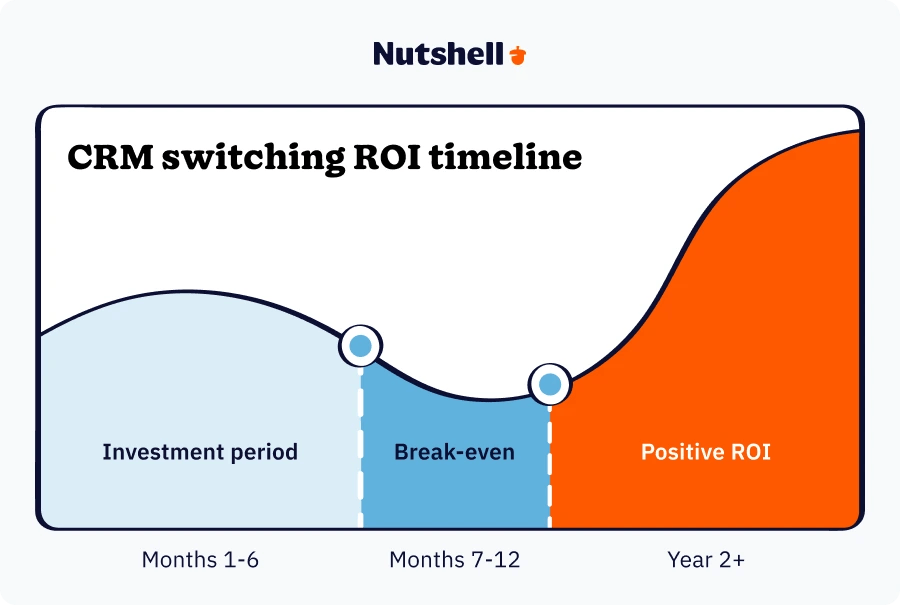
Typical ROI timeline

  • Months 1-6: Investment period with minimal returns
  • Months 7-12: Break-even as productivity gains materialize

Year 2+: Positive ROI as teams fully adopt optimized processes
Ready to see how a modern CRM can improve your ROI? Try Nutshell free—no credit card required—and see exactly how much time your team can save.

Your next steps for a successful switch

Switching CRM systems is a significant undertaking that can transform your business—or become a costly mistake. The difference lies in proper planning, realistic expectations, and professional execution.

Before making any decisions, conduct a thorough assessment of your current situation and future needs. Remember that the most expensive CRM system isn’t necessarily the best fit for your business, and the cheapest option may cost more in the long run.

Switching CRM systems is a significant undertaking, but with the right strategy and the right partner, it doesn’t have to be overwhelming. Contact our team to discuss your migration strategy—or try Nutshell free for 14 days if you’re ready to see what a modern CRM can do.

With the right CRM—like Nutshell, built specifically to save time and keep deals moving—your migration can transform how your team works.

Veelgestelde vragen

  • 1. How long does a CRM migration typically take?

    Most CRM migrations take 8-12 weeks from planning to go-live. Simple migrations with clean data can complete in 6-8 weeks, while complex migrations from legacy systems like Salesforce may need 4-6 months. Timeline depends on data volume, customization needs, and team availability during implementation.

  • 2. Can I switch CRM systems without losing data?

    Yes, you can migrate all your data safely when you follow proper procedures. The key is thorough planning: clean your data before migration, map fields carefully between systems, run test migrations first, and verify data accuracy after transfer. Professional migration tools and experienced vendors minimize risk significantly.

  • 3. Should I run my old and new CRM systems at the same time?

    Running both systems during transition (called parallel operation) is smart for 2-4 weeks. This gives your team time to adapt while maintaining access to critical customer data. Plan a hard cutover date to avoid duplicate data entry becoming permanent, and migrate any new data captured during overlap.

  • 4. When is the best time of year to switch CRM systems?

    Start planning 9-12 months before your current CRM contract renewal to align budgets and avoid rushed decisions. Schedule the actual migration during slow business periods—avoid peak sales seasons, major campaign launches, or fiscal year-end. Many businesses choose summer months or early Q1 for implementation.

  • 5. How much training does my team need after switching to a new CRM?

    Plan for 4-8 hours of initial training per user, spread across 2-3 sessions during the first two weeks. Include role-specific training, hands-on practice in a sandbox environment, and ongoing support for 30-60 days post-launch. User adoption typically takes 30-90 days, so continuous learning resources are essential.

See Nutshell in action. No credit card required

TERUG NAAR BOVEN

Sluit je aan bij 30.000+ andere verkoop- en marketingprofessionals. Schrijf je in voor onze Sell to Win nieuwsbrief!