Pronto para ver Nutshell em ação?
Assistir a uma visita guiada ao vivo!
- Todas as segundas e quartas-feiras às 10h ET/7h PT
- Todas as terças e quintas-feiras às 15h00 ET/12h00 PT

Your CRM was supposed to be the solution that streamlined your customer relationships and drove growth. Instead, it’s become a daily source of frustration for your team—sound familiar?
You’re not alone. Research shows that 55% of CRM implementations fail to deliver their intended value, and many businesses find themselves considering a switch within just a few years of their original implementation.
Switching CRM systems requires careful planning, significant investment, and a clear understanding of what went wrong and what you need next.
The good news? With the right approach, switching CRM systems can transform your business operations, improve team productivity, and finally deliver the ROI you’ve been seeking.
In this comprehensive guide, we’ll walk you through everything you need to know about switching CRM systems—from recognizing the warning signs to executing a flawless migration that keeps your business running smoothly.
Before diving into a CRM migration, it’s worth confirming that switching is the right move—and not just a temporary frustration you could solve with better setup or training.
A good rule of thumb: if your CRM is creating extra work, slowing down follow-ups, or keeping teams in the dark, it’s not acting like a revenue system anymore—it’s acting like a spreadsheet with a login.
Here are 10 warning signs your CRM is holding you back (and what they typically mean).
If your sales team is “using the CRM” but still keeps notes in notebooks, spreadsheets, inbox folders, or personal task apps, you don’t actually have a CRM—you have scattered systems. Avoidance usually isn’t a discipline problem; it’s a usability problem. If reps feel like every update takes too many clicks, they’ll do the minimum required (or skip it entirely).
What it looks like: Pipeline stages rarely updated, missing next steps, inconsistent deal values, and managers asking for status updates outside the CRM.
Why it matters: Poor adoption means poor data, and poor data means unreliable forecasts and missed follow-ups.
What to look for in a new CRM: An interface that feels intuitive, fast logging of calls/emails/notes, and workflows that match how SMB teams actually sell. Nutshell is built for teams that want a CRM people will actually use—without needing a full-time admin to “keep it alive.”
Many SMBs choose a CRM that works for 5 users and breaks at 15. Growth changes what you need: more pipelines, more automation, clearer permissions, better routing, and cleaner handoffs between teams. If you’re constantly hearing “the CRM can’t do that,” you’re likely paying for a tool that’s no longer designed for your operating reality.
What it looks like: Manual workarounds for lead assignment, separate tools for automation, or “we track that in a spreadsheet because the CRM can’t.”
Why it matters: Every workaround introduces delay, inconsistency, and risk—especially when your lead volume increases.
What to look for next: Flexible pipeline management, customization that doesn’t require custom code, and scalable automation. (If you’re comparing options, prioritize CRMs that can grow with you without turning into an IT project.)
CRMs don’t fail because teams “don’t care about data.” They fail because the system makes it hard to maintain clean data. Duplicate contacts, outdated fields, inconsistent company names, and missing deal details make the CRM feel untrustworthy—so people stop relying on it. That’s a fast path to “CRM abandonment.”
What it looks like: Multiple records for the same person, unknown lead sources, incomplete contact fields, and deals with no next step.
Why it matters: Bad data kills reporting, segmentation, automation, and follow-up timing. It also makes your AI tools less useful—because AI is only as good as the data you feed it.
What to do now: Use the switch as a chance to clean and standardize data.
Your CRM holds some of your most sensitive data: customer contact information, sales activity history, deal values, and internal notes. If your current system lacks modern security basics—or makes it hard to control permissions—you’re taking on unnecessary risk.
What it looks like: Weak access controls, unclear audit trails, difficulty enforcing strong passwords, or concerns about how data is stored and protected.
Why it matters: Security incidents, accidental data exposure, and compliance issues can be expensive and reputation-damaging—especially for small businesses where trust is everything.
What to look for in a new CRM: Role-based permissions, modern authentication options, clear vendor security documentation, and strong administrative controls. Even if you’re not an enterprise, your CRM should treat security like a first-class feature.
If your CRM can’t connect with your email, calendar, marketing tools, lead capture forms, customer support system, or accounting platform, it becomes a “dead end.” Teams end up duplicating work across tools, and customer context gets trapped in different places.
What it looks like: Reps manually copying form leads into the CRM, marketing not seeing sales outcomes, or finance/customer success lacking visibility into what was promised during the sales process.
Why it matters: Every handoff becomes slower and less accurate. Leads get missed, follow-up quality drops, and reporting becomes guesswork.
What to look for next: Strong native integrations, a clear integration ecosystem, and documented workflows. Learn more about effective CRM integration strategies, and make it your priority to connect sales activity with the rest of your go-to-market stack.
Nutshell integrates with thousands of tools, natively and through Zapier. See if your favorites are on the list.

If your team sells on the go—field sales, trade shows, onsite visits, or even just quick follow-ups between meetings—mobile access matters. A CRM that’s clunky on mobile encourages delayed updates, which leads to missing details and stale deal status.
What it looks like: Reps saying “I’ll log it later,” notes living in text messages, or follow-ups slipping because the CRM isn’t convenient outside the office.
Why it matters: The best time to capture accurate info is right after the interaction. Waiting increases errors and decreases consistency.
What to look for in a new CRM: A mobile experience that supports your core workflows (updating deals, logging notes, searching contacts, and tracking next steps). If you’re switching CRMs, ask vendors to show a real mobile workflow—not just screenshots.
If your CRM can’t answer basic questions quickly—like “Which lead sources convert best?” or “What’s our forecast by rep?”—it’s not supporting decision-making. Some CRMs have reporting, but it’s so hard to configure that only one person ever uses it (and everyone else waits for spreadsheets).
What it looks like: Pipeline reviews happening outside the CRM, leadership losing confidence in forecasts, or marketing and sales disagreeing on performance numbers.
Why it matters: When your CRM can’t surface insights, you make decisions based on instinct instead of data—which gets riskier as your business grows.
What to look for next: Customizable dashboards, easy filtering, and reporting that managers can operate without needing a BI specialist. Nutshell is worth consideration for SMBs that want reporting and pipeline visibility without a steep learning curve.
Support quality becomes very real during critical moments: onboarding, migration, integration setup, and “something broke and we need answers now.” If your vendor’s support is slow or generic, you’ll feel it in productivity, morale, and adoption.
What it looks like: Unanswered tickets, unclear documentation, or support responses that don’t address your actual use case.
Why it matters: Every unresolved issue becomes a reason for users to stop using the CRM (or build workarounds).
What to look for in a new CRM: Responsive support, clear onboarding resources, and implementation guidance that matches SMB reality. Nutshell’s team is known for being hands-on and helpful—something that matters a lot when you’re switching CRMs and can’t afford downtime.
Price increases aren’t always bad—sometimes they reflect meaningful product improvement. But if your CRM costs keep climbing while usability, support, and outcomes stay flat, you’re paying for brand, complexity, or add-ons you don’t need. SMBs often get hit hardest by “nickel-and-dime” pricing: features that should be standard placed behind premium tiers.
What it looks like: Add-on fees for reporting, automation, storage, or integrations—and a total cost that’s much higher than expected.
Why it matters: Bloated CRM costs reduce ROI and limit your ability to invest in other growth initiatives.
What to do: Calculate your true cost of ownership (licenses + admin time + workarounds). If the numbers don’t justify the outcomes, it’s time to compare alternatives. Nutshell is a strong option for teams that want modern CRM capabilities with straightforward value.
A CRM should be a shared source of truth across customer-facing teams—sales, marketing, customer success, and leadership. If your CRM creates bottlenecks or forces departments to operate independently, it’s actively working against your customer experience.
What it looks like: Marketing can’t see sales outcomes, sales can’t see customer history, and customer success doesn’t know what was promised during the deal cycle.
Why it matters: Disconnected teams create inconsistent experiences, slower response times, and missed expansion opportunities.
What to look for in a new CRM: Shared timelines, easy internal collaboration, clear handoff workflows, and automation that keeps the right people informed. Nutshell is designed to help SMBs align around customer data and pipeline activity—without introducing a ton of complexity.
If you recognized 3 or more of these warning signs, your CRM is likely limiting growth—and switching CRM systems may be the most practical path to better adoption, cleaner data, and more predictable revenue operations.
Experimente Nutshell gratuitamente durante 14 dias ou deixe-nos mostrar-lhe tudo antes de mergulhar de cabeça.

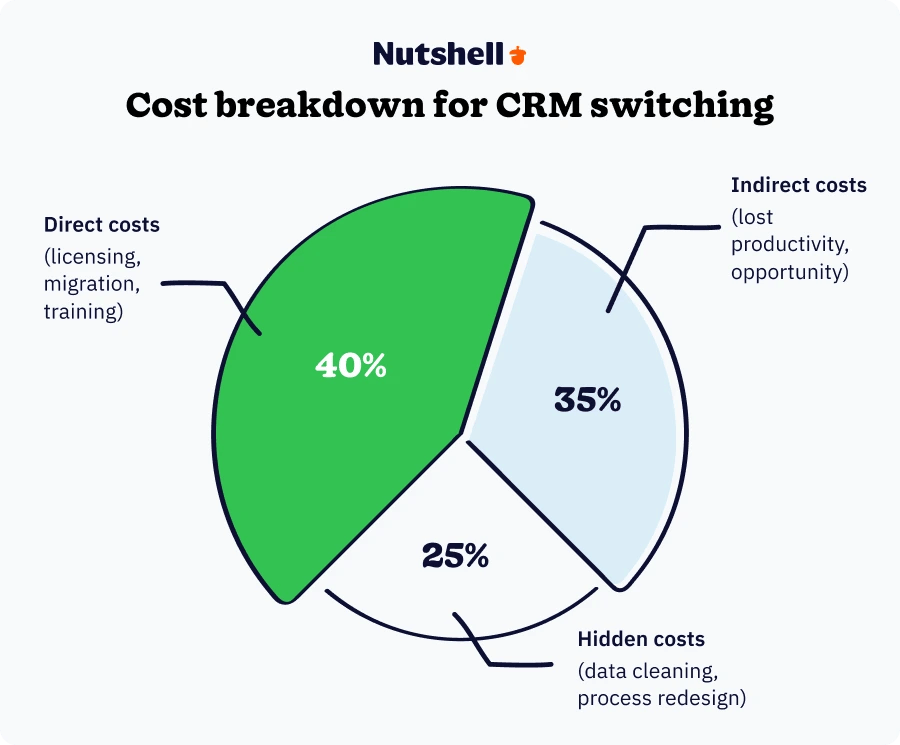
CRM migration involves more than just software licensing fees. Understanding the full cost structure helps you budget accurately and avoid unpleasant surprises.
When budgeting for a CRM switch, most organizations focus only on software licensing fees. However, the true cost extends across three categories: direct implementation costs, indirect productivity impacts, and often-overlooked hidden costs.
These are the “line item” costs that show up clearly in your budget. They’re also the easiest to underestimate because the sticker price of a CRM is rarely the full picture.
Indirect costs don’t always appear on a vendor invoice, but they are real—and they often determine whether switching CRMs feels “worth it” in the first year.
Hidden costs are the “death by a thousand cuts” of CRM switching—small items that don’t sound expensive until they stack up.
Understanding the cost of CRM switching helps you budget—but knowing the challenges helps you avoid the pitfalls that turn budgets into overruns. Here are the four biggest obstacles teams face when switching CRMs, and how to overcome them.
The problem: CRM systems use different data structures, making migration complex and error-prone.
The solution:
The problem: Teams resist change, especially when they’ve developed workarounds for the old system.
The solution:
The problem: Teams worry about losing access to critical customer information during the switch.
The solution:
The problem: New CRM must work seamlessly with existing marketing, support, and business tools.
The solution:
One of the biggest mistakes SMBs make when switching CRMs is treating migration like a DIY project—especially if the current CRM data is messy, heavily customized, or spread across multiple tools.
If your team doesn’t have a dedicated CRM admin, consider choosing a CRM vendor that helps you move faster with:
Nutshell offers onboarding-focused support options like white-glove data imports and clear import resources, which can be especially valuable when you’re switching from systems like Salesforce or HubSpot and need your team selling again quickly.

Assistir a uma visita guiada ao vivo!

Before you compare CRMs, document what you actually need—based on workflows, not wish lists. A strong needs assessment prevents you from switching CRMs twice.
Successful CRM switches require cross-functional collaboration:
A typical CRM migration timeline follows these phases:
Data migration is where CRM switches succeed or fail. Treat this like a product launch: define scope, test repeatedly, and validate everything.
Now that you understand the timeline, costs, and challenges involved in a CRM switch, let’s walk through the actual migration process. The planning phase typically spans weeks 1-4, while the execution and optimization phases span weeks 5-12.
Switching CRM systems is as much a people-and-process project as it is a technical migration. The best CRM migrations don’t just “move data”—they improve adoption, tighten workflows, and make your customer information easier to find, trust, and act on.
Use these best practices to reduce risk, accelerate user adoption, and make your CRM migration actually pay off.
A CRM switch succeeds fastest when leadership treats it like a core business system—not an optional tool “for sales.”
Executive buy-in isn’t just approval for budget. It’s visible, ongoing support that removes blockers and sets expectations across teams.
What executive buy-in should include:
Practical tip: Assign an executive sponsor and hold a 15-minute weekly check-in during the migration window to unblock decisions quickly.
Most CRM migrations fail for one simple reason: the system becomes “extra work.” If your new CRM adds clicks, adds fields, or slows reps down, user adoption will suffer—even if the CRM is powerful.
A strong migration plan designs the CRM around real day-to-day workflows, not a theoretical “perfect” setup.
How to prioritize UX during a CRM switch:
If you’re switching CRMs because the current one is “too complicated,” prioritize options built for SMB usability and quick adoption. Nutshell is designed to be simple to use without requiring a full-time CRM administrator—especially helpful when you need the team productive quickly after migration.
CRM migration challenges are rarely caused by the import itself. They’re caused by behavior changes: new habits, new process rules, and new expectations.
Change management bridges the gap between “we launched the CRM” and “the CRM is how we work now.”
A simple change management framework for switching CRMs:
When evaluating CRMs, look for vendors with responsive support and onboarding guidance—because fast answers reduce resistance. If you’re unsure how much change management you’ll need, contact our team to talk through your migration plan and common adoption pitfalls.
Your new CRM will only be as strong as the data you migrate into it. If you bring messy data forward, your new system will feel unreliable—and teams will stop using it.
Treat data cleanup as a non-negotiable step in your CRM migration process.
Data-quality best practices during CRM switching:
Learn more about managing and organizing customer data.
Even with great training, most real CRM questions don’t happen on day one—they happen after reps have used the system for two weeks and run into edge cases.
Continuous learning is what turns a CRM migration into a lasting operational upgrade.
How to build a sustainable training plan:
A CRM migration isn’t “done” at go-live. The strongest teams measure adoption and outcomes, then iterate.
Start by baselining your current state (before switching CRMs):
Then track success metrics after migration in three categories:
1) Adoption metrics (is the CRM being used?)
2) Process metrics (is the workflow healthier?)
3) Business outcomes (is it improving revenue performance?)
Optimization tip: Build a simple monthly “CRM health review” where you:
If automation is part of your migration goal, learn more about setting up CRM automation and workflows.
Your CRM vendor shouldn’t disappear after the contract is signed. A strong vendor relationship reduces downtime, accelerates adoption, and helps you get more value from the platform over time.
How to get more from your vendor after switching CRMs:
If you’re switching CRMs and want a partner that stays involved, Nutshell can support your onboarding and long-term success. If you’re planning a migration now, contact our team to talk through your timeline and risk areas—or try Nutshell free to see how it fits your workflow before committing.
✅ Define success metrics before switching CRMs
✅ Clean and standardize data before importing
✅ Map fields and test migration at least twice
✅ Pilot with a small group before full rollout
✅ Keep go-live workflows simple (minimum viable CRM)
✅ Train by role and reinforce in the first 30–90 days
✅ Track adoption and business outcomes weekly, then optimize
✅ Maintain a strong vendor relationship for ongoing support
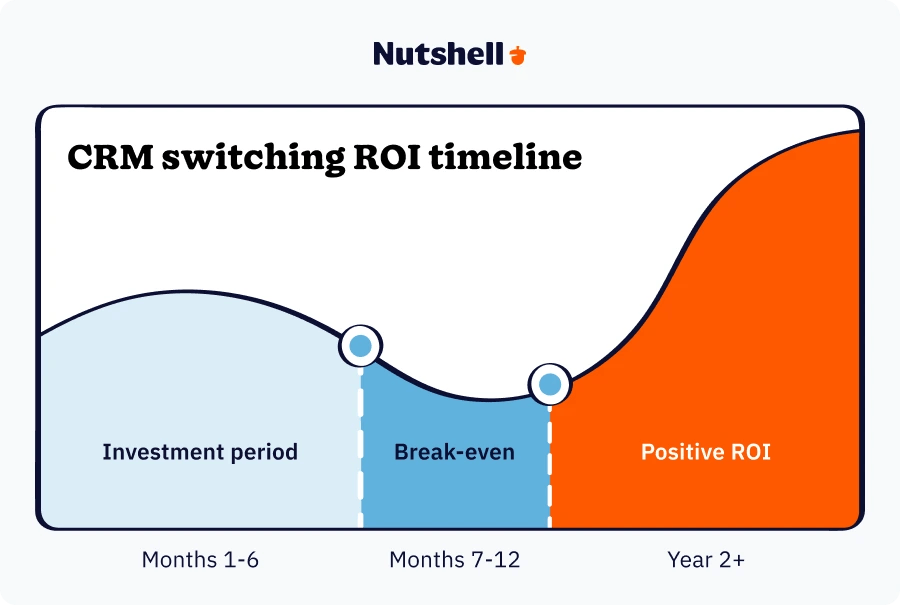
To justify the investment in switching CRM systems, build a comprehensive ROI analysis:
ROI = (Total Benefits – Total Costs) / Total Costs × 100
Year 2+: Positive ROI as teams fully adopt optimized processes
Ready to see how a modern CRM can improve your ROI? Try Nutshell free—no credit card required—and see exactly how much time your team can save.
Switching CRM systems is a significant undertaking that can transform your business—or become a costly mistake. The difference lies in proper planning, realistic expectations, and professional execution.
Before making any decisions, conduct a thorough assessment of your current situation and future needs. Remember that the most expensive CRM system isn’t necessarily the best fit for your business, and the cheapest option may cost more in the long run.
Switching CRM systems is a significant undertaking, but with the right strategy and the right partner, it doesn’t have to be overwhelming. Contact our team to discuss your migration strategy—or try Nutshell free for 14 days if you’re ready to see what a modern CRM can do.
With the right CRM—like Nutshell, built specifically to save time and keep deals moving—your migration can transform how your team works.
Most CRM migrations take 8-12 weeks from planning to go-live. Simple migrations with clean data can complete in 6-8 weeks, while complex migrations from legacy systems like Salesforce may need 4-6 months. Timeline depends on data volume, customization needs, and team availability during implementation.
Yes, you can migrate all your data safely when you follow proper procedures. The key is thorough planning: clean your data before migration, map fields carefully between systems, run test migrations first, and verify data accuracy after transfer. Professional migration tools and experienced vendors minimize risk significantly.
Running both systems during transition (called parallel operation) is smart for 2-4 weeks. This gives your team time to adapt while maintaining access to critical customer data. Plan a hard cutover date to avoid duplicate data entry becoming permanent, and migrate any new data captured during overlap.
Start planning 9-12 months before your current CRM contract renewal to align budgets and avoid rushed decisions. Schedule the actual migration during slow business periods—avoid peak sales seasons, major campaign launches, or fiscal year-end. Many businesses choose summer months or early Q1 for implementation.
Plan for 4-8 hours of initial training per user, spread across 2-3 sessions during the first two weeks. Include role-specific training, hands-on practice in a sandbox environment, and ongoing support for 30-60 days post-launch. User adoption typically takes 30-90 days, so continuous learning resources are essential.


Junte-se a mais de 30.000 outros profissionais de vendas e marketing. Subscreva a nossa newsletter Sell to Win!