Advanced Email Automation Triggers for B2B Lead Nurturing

-

Quick answer: What are advanced email automation triggers for B2B?
Advanced email automation triggers send messages based on specific buyer actions and behaviors, not fixed schedules. When a prospect opens your email, clicks a link, visits your pricing page, or goes silent for weeks, your system automatically responds with the right message at the right moment. The seven key trigger types are engagement-based, intent signals, account-level, stage progression, inactivity, event-based, and lead scoring triggers. This behavior-driven approach generates 320% more revenue than non-automated campaigns because you’re nurturing leads based on where they actually are in their buying journey, not where your calendar says they should be.
Rather than blasting pre-set email sequences on a calendar, advanced email automation triggers respond to actual buyer behavior. When a prospect opens your email, clicks a link, visits your website, or goes silent for three weeks, your system springs into action with the right message at the right moment. The result? Automated emails generate 320% more revenue than non-automated campaigns.
Yet eighty percent of B2B leads never convert—not because they’re unqualified, but because they’re not properly nurtured. In complex B2B environments where deals involve 13 stakeholders on average (up to 22+ in complex enterprise deals) and stretch across months, generic time-based sequences simply don’t work. Your sales team is too busy managing dozens of relationships to send timely, relevant follow-ups to every lead. That’s where email automation triggers come in.
This guide walks you through seven types of advanced B2B triggers that turn email automation from a nice-to-have into a revenue driver—and shows you how to implement them without the complexity of juggling multiple disconnected tools.
Key takeaways
- Automated emails deliver measurable ROI: Campaigns using behavioral triggers generate 320% more revenue than time-based sequences, making automation a critical revenue lever for B2B teams
- Seven trigger types solve different nurturing challenges: Engagement-based, intent signal, account-level, stage progression, inactivity, event-based, and lead scoring triggers each address specific moments in the B2B buyer journey
- Speed matters enormously: Prospects are 21x more likely to convert when you respond within five minutes, and 220% more leads respond after the first follow-up—automated triggers ensure you never miss these critical windows
- Multi-stakeholder nurturing requires role-based strategies: With 13+ stakeholders involved in average B2B deals (up to 22+ in complex transactions), you need triggers that deliver different content to CFOs, IT leaders, and end users based on their specific roles and behaviors
- Unified CRM + email automation eliminates complexity: Separate marketing automation and CRM platforms create data silos and slow implementation—a unified system gets you nurturing in days, not weeks
- Measurement drives improvement: Tracking trigger engagement rates, lead velocity, conversion rates, and revenue attribution reveals which triggers drive deals—and which need refinement
- Implementation happens faster than you think: A structured six-step approach gets your first advanced trigger campaigns running and learning within weeks
Table of contents
- Understanding email automation triggers in B2B contexts
- The seven types of advanced B2B email automation triggers
- Building multi-stakeholder nurture sequences with triggers
- Timing your triggers: when automation should strike
- Measuring what matters: KPIs for trigger-based nurturing
- Common trigger mistakes (and how to avoid them)
- Implementing your first advanced trigger campaign
- Frequently asked questions
Understanding email automation triggers in B2B contexts
Email automation triggers are conditional workflows that send messages based on specific actions or behaviors—not on dates. When a lead takes a defined action, the trigger fires automatically, delivering the next relevant message in your sequence. Think of it like an if-then statement: “If lead clicks the demo link, then send them the product comparison guide.”
This differs fundamentally from time-based automation, which sends emails on a fixed schedule regardless of engagement. Time-based sequences work like this: “Send email one on day zero, email two on day three, email three on day seven.” They’re simple to set up but wasteful—you’re sending the same generic message to leads in completely different stages of their journey, and they often feel robotic because they ignore actual behavior.
B2B trigger strategies require a different approach than B2C. Here’s why:
- B2B deals stretch across months, not days—requiring inactivity triggers to prevent deals from stalling when key stakeholders go silent
- Multiple stakeholders with different priorities demand role-based trigger sequences, not generic blasts to everyone at the account
- Account-level behavior (one stakeholder’s engagement signals interest for the entire account) drives different trigger logic than B2B-to-consumer approaches
Automated emails generate 320% more revenue than non-automated campaigns, particularly when those campaigns use behavioral triggers to deliver relevant content at the moment leads are most engaged. This is why email automation isn’t optional for B2B teams—it’s the infrastructure that prevents the 80% lead loss problem.
Nutshell’s email automation features allow you to set up behavioral triggers that respond to engagement signals, stage progression, and activity patterns—ensuring your team focuses on leads who are ready to move forward, not those in early awareness stages.
The seven types of advanced B2B email automation triggers
B2B lead nurturing requires a diverse toolkit of triggers because different situations demand different responses. Here are the seven trigger types that unlock advanced nurturing strategies—each with specific use cases and B2B examples.
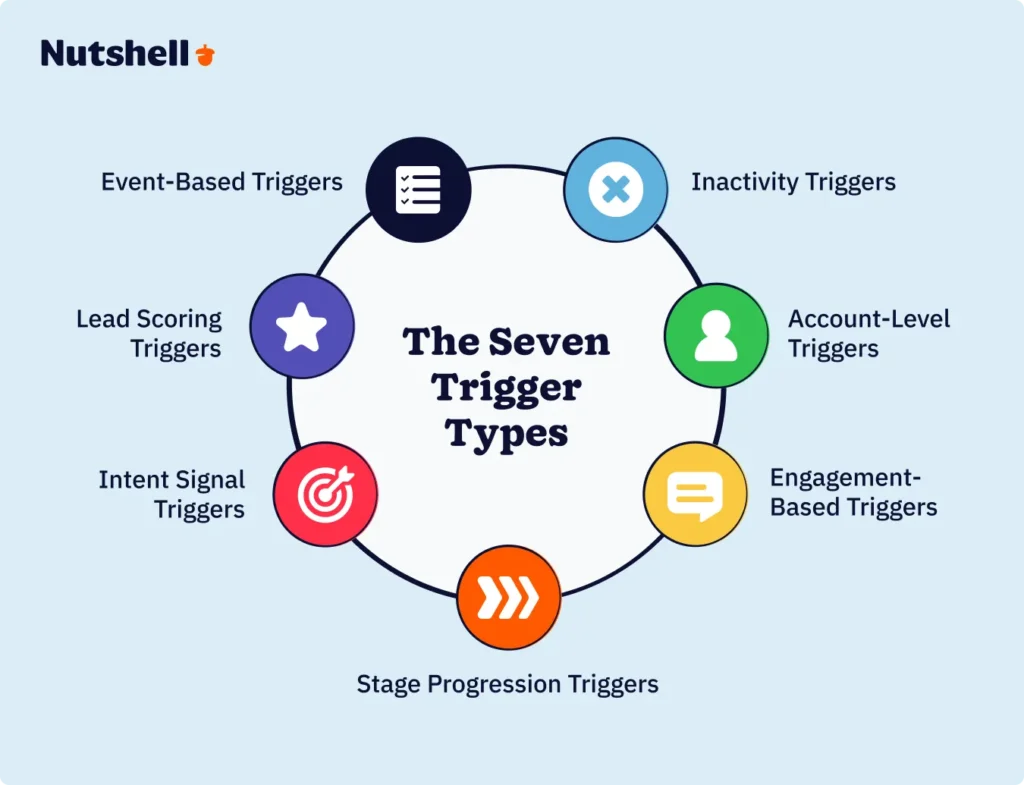
Engagement-based triggers
Engagement-based triggers respond to how leads interact with your emails and content. When a lead opens your email, clicks a specific link, or downloads a resource, the trigger fires an automated follow-up.
Example 1: A lead opens your “State of the Industry” report three times but hasn’t clicked the product demo link. Your engagement trigger detects this pattern and automatically sends a message like: “We noticed you’re really interested in industry trends. Here’s how companies like yours are responding to these challenges with automation.”
Example 2: A lead clicks the “Security Overview” link in your email. An engagement trigger fires immediately (within minutes) sending your IT security guide, because this click signals that security is top-of-mind for this particular stakeholder.
Example 3: A lead downloads your ROI calculator but never enters their company information. An engagement trigger sends a follow-up message: “We see you found our ROI calculator helpful. Let’s personalize it for your company—here’s a five-minute setup guide.”
Rather than forcing seven generic emails into someone’s inbox, you’re delivering seven relevant interactions based on their actual engagement with your content.
Intent signal triggers
Intent signal triggers respond to behavioral signals that indicate buying intent—like visiting your pricing page, viewing specific product features, or spending significant time on your website.
Example 1: A lead visits your pricing page but doesn’t request a demo. An intent signal trigger immediately sends a message addressing common pricing questions and offering a personalized quote: “Looking at our pricing? Let’s talk about what ROI looks like for your company.”
Example 2: A stakeholder watches two of your product demo videos in succession. The intent signal trigger recognizes this focused research and sends a message: “You’ve been exploring our [feature name] capabilities. Here’s a deeper technical overview written by our engineers.”
Example 3: An account shows intent signal activity across multiple stakeholders—the CFO visits your security page, the IT director reads about integrations, and the operations manager watches your workflow demo. Account-level intent triggers recognize this coordinated research and send an executive-level message: “Your team is actively exploring solutions. Let’s schedule a strategic conversation with key stakeholders.”
Intent signal triggers often create 220% more leads responding after the first follow-up because you’re contacting leads at the exact moment they’re actively researching solutions.
Account-level triggers
Account-level triggers recognize that in B2B sales, the account is your unit of focus, not individual contacts. When any stakeholder within an account exhibits buying behavior, the system notifies your sales team and can trigger nurturing across all key stakeholders within that account.
Example 1: A junior analyst at a prospect company visits your website and downloads a resource. Account-level triggers identify that this contact works at a high-value target account (based on your ICP), and they alert your sales rep to reach out—because even entry-level interest at a target account is significant.
Example 2: Multiple stakeholders from the same company (but different departments) open emails from your recent campaign. Account-level triggers recognize this broad engagement and automatically escalate communication, potentially triggering a message to the C-level: “Multiple teams within your organization are exploring solutions in this area.”
Example 3: An account you’ve been nurturing for four months suddenly shows a surge in website activity—three different people visit your platform, someone signs up for a webinar, and another downloads a case study. Account-level triggers detect this activity surge and alert your sales team: “Account [X] is now showing hot intent signals.”
Stage progression triggers
Stage progression triggers fire when a lead moves from one stage of your pipeline to the next, automating the messaging and nurturing that matches their new position in the buyer journey.
Example 1: When a lead moves from “Initial Interest” to “Active Evaluation” stage, a stage progression trigger automatically enrolls them in a more detailed technical nurturing sequence featuring case studies, product comparison guides, and technical documentation—different content than someone still in early awareness.
Example 2: A lead moves from “Active Evaluation” to “Final Decision” stage. A stage progression trigger sends a message: “Congratulations on moving forward in your evaluation. Here’s what you should expect from our implementation team, along with references from companies similar to yours.”
Example 3: A lead advances to “Negotiation” stage. A stage progression trigger automatically sends deal-closing resources: contract templates, sample SLAs, and executive summary documents that help close the deal faster.
Inactivity triggers
Inactivity triggers detect when leads go silent—no opens, no clicks, no website visits for a defined period—and automatically attempt to re-engage them before the deal stalls.
Example 1: A lead has been engaged for six weeks but suddenly goes quiet. After ten days with no activity, an inactivity trigger sends a message: “We haven’t heard from you in a while, and we want to make sure you still have what you need. Any questions we can answer?”
Example 2: An account shows activity from multiple stakeholders, but the key decision-maker (the CFO) has been silent for three weeks while their team continues researching. An inactivity trigger targets the CFO specifically: “Your team has been actively exploring our platform. Would now be a good time to discuss how this aligns with your organization’s goals?”
Example 3: A lead opened your first email, clicked through to your website, then completely disappeared for two weeks. An inactivity trigger sends a re-engagement message with new content: “Since you last checked in, we’ve released [new feature] that directly addresses the challenge you were researching.”
Event-based triggers
Event-based triggers respond to external events or milestones—like a lead attending a webinar, registering for a conference, or having a birthday (yes, really).
Example 1: A lead registers for your webinar but doesn’t attend. An event-based trigger sends a follow-up message: “We missed you at yesterday’s webinar. Here’s the full recording, transcript, and slides—plus a summary of the key takeaways.”
Example 2: A lead attends your webinar and actively participates in the Q&A. An event-based trigger fires immediately after sending them the resources they asked about, plus a message to your sales rep: “This lead asked detailed questions during the webinar. Contact them while momentum is high.”
Example 3: Your target account has a known industry event or conference coming up. An event-based trigger sends content a week before: “We’ll be at [Conference] next week. Want to schedule a booth meeting?” This catches leads planning their conference schedule.
Lead scoring triggers
Lead scoring triggers respond to cumulative behaviors that push a lead’s overall score above a threshold, indicating they’re sales-ready.
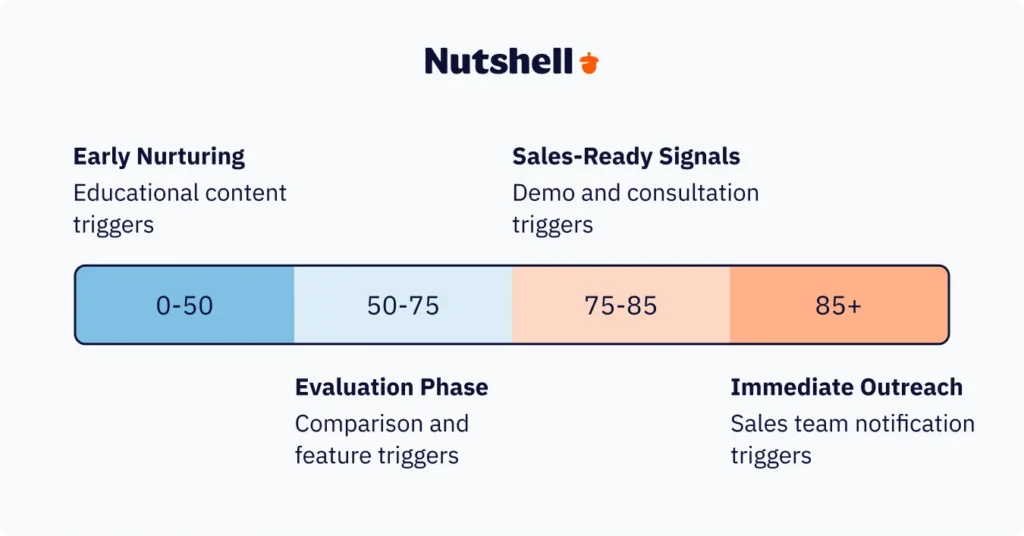
Example 1: A lead’s score reaches 75 (based on opening multiple emails, visiting pricing, watching demos, and downloading technical guides). A lead scoring trigger automatically sends a message: “Based on your recent activity, it looks like you’re ready to explore options. Let’s schedule a live demo tailored to your needs.”
Example 2: A lead’s score exceeds 85 (very high intent). A lead scoring trigger not only sends them a sales-ready message but also alerts your sales rep: “This lead is now sales-qualified. Their behavior indicates they’re actively in the buying process.”
Example 3: A lead’s score reaches 50, but their engagement has plateaued for two weeks. A lead scoring trigger sends educational content designed to push them higher: “Here are the five questions you should ask before investing in automation.”
 GET MY FREE PROPOSAL
Get emails sent faster with email automation
Building multi-stakeholder nurture sequences with triggers
Here’s the uncomfortable truth about B2B sales: you’re not nurturing one lead. You’re nurturing 13+ stakeholders per account on average—sometimes 22+ in complex enterprise deals. Each person has different priorities, timelines, and objections. The CFO cares about ROI and budget justification. The IT director cares about security, integrations, and technical requirements. The operations manager just wants something that works and doesn’t require retraining. And they’re not all moving at the same pace.
A structured lead nurturing approach ensures each stakeholder receives content tailored to their specific concerns. Rather than sending the same email to all 13+ stakeholders, you create role-based trigger sequences that deliver different content based on the lead’s role and behavior.
Personalized emails get 6x higher conversions compared to generic messages, and this effect is even more dramatic in B2B where personalization extends beyond first names to role-specific content.
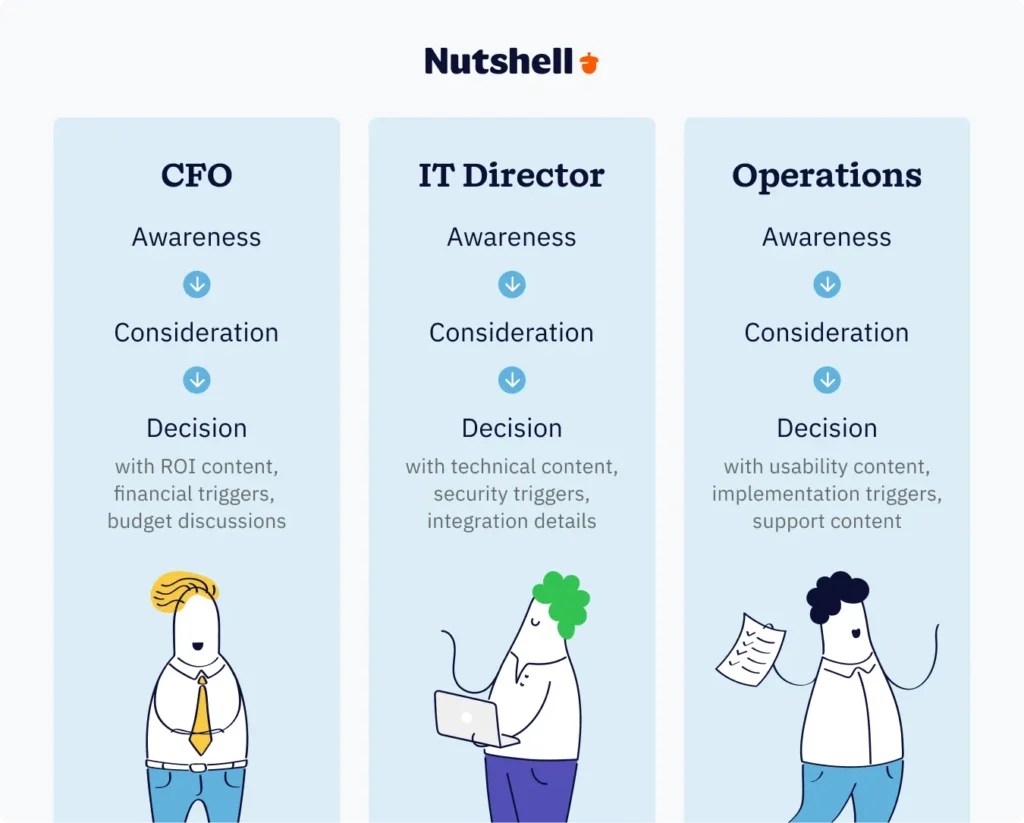
Here’s how role-based trigger strategies work:
CFO/Finance stakeholder trigger path:
- Initial engagement trigger: When a finance stakeholder opens your email, they receive ROI-focused content
- Intent signal trigger: When they visit your pricing page or download the cost-benefit analysis, send the financial justification guide
- Stage progression trigger: When they move to evaluation stage, send a case study showing financial impact for companies their size
- Objection trigger: If they go inactive, send testimonials from other CFOs and budget-approval timelines
IT/Technical stakeholder trigger path:
- Initial engagement trigger: When IT stakeholders open your email, they receive technical architecture content
- Intent signal trigger: When they visit security or integration pages, send detailed technical documentation
- Stage progression trigger: When they move to evaluation, send security certifications, integration lists, and API documentation
- Implementation trigger: When they move to negotiation, send implementation timelines and technical requirements
End user/Operations stakeholder trigger path:
- Initial engagement trigger: When operations stakeholders open your email, send usability and ease-of-use content
- Intent signal trigger: When they download feature guides, send detailed walkthroughs and video tutorials
- Stage progression trigger: When moving to evaluation, send case studies about implementation success and user adoption rates
- Training trigger: When moving to negotiation, send access to your learning platform and training schedule
Nutshell’s sales automation features allow you to organize multiple stakeholders within a single account and set up role-specific trigger sequences. This unified approach ensures that while you’re nurturing dozens of stakeholders, each person receives content tailored to their specific concerns and position in the decision-making process.
The key framework is progressive content path mapping:
Awareness stage content by role: “What challenges are companies in your industry facing?”
Consideration stage content by role: “Here’s how companies like yours are solving this challenge”
Decision stage content by role: “Here’s why we’re the best fit for your specific needs (from your perspective)”This ensures that as leads progress through your pipeline stages, they’re receiving increasingly specific, decision-focused content—but always tailored to their individual role. A CFO in decision stage gets budget and implementation timelines. An IT director in decision stage gets security audits and integration testing plans.
Timing your triggers: when automation should strike
Understanding the mechanics of triggers is one thing. Timing them correctly is what separates effective automation from campaigns that feel pushy or poorly synchronized.
The research is clear: prospects are 21x more likely to convert when you respond within five minutes, and 31% higher response rates come from following up within three days. This creates an interesting tension in B2B nurturing—you want to be fast, but not so fast that you overwhelm leads with constant emails.
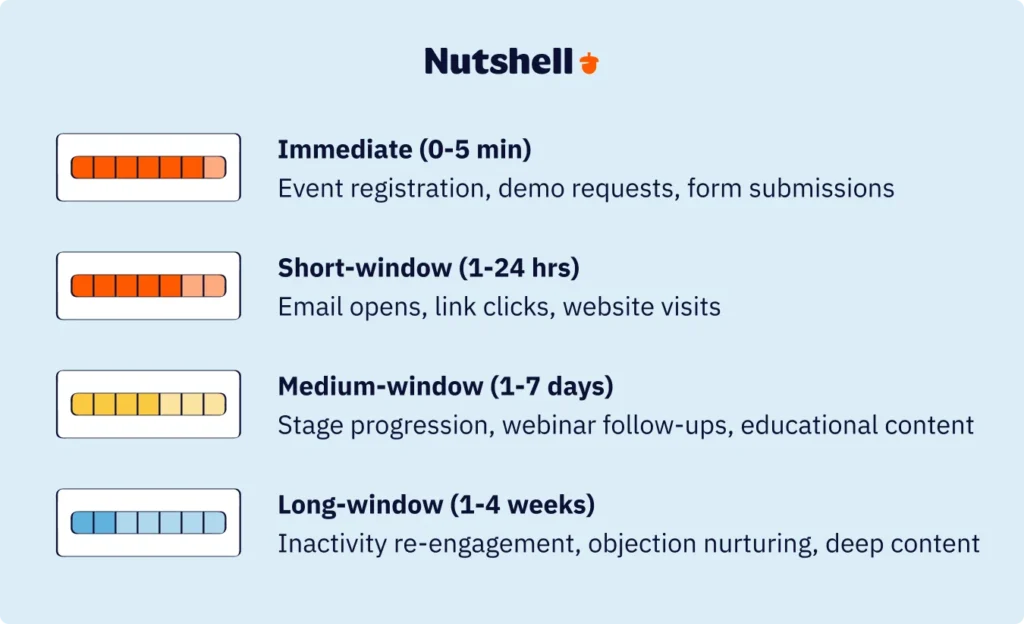
Immediate response triggers (0-5 minutes)
Some triggers demand instant response because the lead has signaled active interest right now.
Example triggers in this category:
- Event registration: When someone signs up for your webinar, send immediate confirmation with login details
- Download confirmation: When they download a resource, send immediate access plus related materials
- Demo request: When they request a product demo, respond instantly with available time slots
- Form submission: When they submit any form, send immediate confirmation and next steps
The five-minute window matters because leads who are engaged enough to take action are still in an active mindset. If they request a demo and don’t hear back for six hours, that momentum is lost. If they hear back in five minutes, they’re more likely to complete the conversation.
Short-window triggers (1-24 hours)
Most engagement and intent signal triggers fall in this window. The lead has shown behavior indicating interest, and you want to follow up while that interest is fresh without appearing obsessive.
Example triggers in this category:
- Email opens: Someone opened your email—send follow-up content within 24 hours, but ideally within four to eight hours
- Link clicks: They clicked a specific link in your email—send the deeper resource or next step within 12 hours
- Website visit: They visited your website—send a relevant follow-up within 24 hours
- Whitepaper download: They downloaded content—send related resources within 12 hours
Research shows that 220% more leads respond after the first follow-up, but only if that follow-up happens while they’re still thinking about your company. A 24-hour window is reasonable for most B2B triggers because it respects business hours and doesn’t feel instantaneous.
Medium-window triggers (1-7 days)
These triggers acknowledge engagement but give leads time to process before the next touchpoint. They’re often used for stage progression or educational content in longer sales cycles.
Example triggers in this category:
- Stage progression: When a lead moves to evaluation stage, send comprehensive evaluation content three days later
- Webinar attendance: They attended your webinar—send follow-up content three days later (not immediately, giving them time to absorb)
- Initial meeting: Your sales rep had an initial discovery call—automated follow-up goes out 24 hours later with call summary and next steps
- Quote request: They requested pricing—send detailed options within two days (not immediately, as you may need to customize)
Long-window triggers (1-4 weeks)
These are typically inactivity or nurturing triggers designed to maintain engagement over longer stretches without overwhelming leads.
Example triggers in this category:
- Inactivity re-engagement: Ten days of no activity triggers a “checking in” message
- Objection nurturing: After an objection is raised, send relevant content two weeks later addressing that specific concern
- Educational content: Send deeper educational content at strategic intervals (one week, three weeks, one month) to keep your company top-of-mind
Balancing speed with frequency
The key tension in trigger timing is this: faster is usually better for conversion, but more frequent is usually worse for unsubscribes. If you set all your triggers to fire within minutes of any engagement, leads will be overwhelmed and unsubscribe. If you set them all to 30-day intervals, you’ll lose momentum entirely.
The solution is frequency throttling—limiting how many emails a single lead can receive in a specific timeframe. For example: “Allow no more than three emails per week to any single lead, regardless of trigger activity.” This ensures you’re responsive and timely without becoming annoying.
Nutshell’s sales automation features emphasize a “next-action” focus that helps your team prioritize the most time-sensitive triggers. This prevents your team from being overwhelmed by hundreds of automated emails and instead highlights the high-value triggers that demand immediate attention.
The framework many successful B2B teams use is: Fast for hot signals (0-24 hours), thoughtful for engagement (1-7 days), patient for long nurturing (1-4 weeks).
Measuring what matters: KPIs for trigger-based nurturing
You can’t improve what you don’t measure. The reason many teams struggle with email automation isn’t that triggers don’t work—it’s that they don’t know which triggers are working and which are wasting time.
There are four essential metrics to track for trigger-based nurturing:
Trigger engagement rates
These measure whether leads are actually responding to your automated messages.
Specific metrics:
- Opens per trigger type: What percentage of leads who receive the engagement trigger open it? What about intent signal triggers? Stage progression triggers? Different trigger types will have different open rates
- Clicks per trigger type: Opening is nice; clicking matters more. Track which trigger types drive actual engagement
- Reply rate: This is gold in B2B. What percentage of people actually reply to your automated messages? Replies mean genuine interest
Why it matters: If your engagement triggers have a 15% open rate but your intent signal triggers have a 35% open rate, that tells you something important—intent signals are working. You might allocate more resources to detecting and acting on intent signals.
Lead progression velocity
This measures how quickly leads move through your pipeline stages when exposed to trigger-based nurturing.
Specific metrics:
- Days from awareness to consideration: On average, how many days does it take leads to move from the awareness stage to the consideration stage? Triggers should accelerate this
- Days from consideration to decision: How quickly do leads move from evaluating solutions to being ready to decide?
- Account velocity: In complex deals with multiple stakeholders, how quickly do accounts move through your pipeline when multiple stakeholders are engaged?
Why it matters: If your trigger campaigns reduce the time from awareness to consideration by 30 percent, that’s a massive efficiency gain. You can calculate the ROI of trigger implementation by multiplying deals closed per year by average deal value by the percentage velocity improvement.
Conversion rates by trigger type
Not all triggers are created equal. Some trigger types convert leads at much higher rates than others.
Specific metrics:
- Conversion rate by trigger: Of leads who receive an engagement trigger, what percentage eventually become customers? What about intent signal triggers, stage progression triggers, or inactivity triggers?
- Conversion rate by role: Are your CFO-specific triggers converting at higher rates than IT-specific triggers? This might indicate your messaging needs adjustment
- Conversion rate by account type: Do triggers work differently for mid-market accounts versus enterprise accounts? Some triggers might be more effective at certain company sizes
Why it matters: If inactivity triggers have a 12% conversion rate while engagement triggers have a 4% conversion rate, inactivity triggers deserve more attention and resources. You might expand your inactivity trigger program or adjust other trigger types to work more like your high-performing inactivity triggers.
Revenue attribution
This is the ultimate measurement—which triggers actually close deals and generate revenue?
Specific metrics:
- Revenue per trigger type: In total, how much revenue can you trace back to campaigns initiated by engagement triggers, versus intent signal triggers, versus other trigger types?
- Average deal value by trigger: Do deals that started with high-scoring leads (from lead scoring triggers) have higher average values than deals from other trigger types?
- Sales velocity improvement: Are deals closing faster when multiple stakeholders are engaged via different role-specific triggers? The speed of closure directly impacts cash flow and revenue
Why it matters: Everything comes down to revenue. If you learn that top 10% of workflows generate $16.96 per recipient versus $1.94 for average workflows, that tells you the triggers in the top 10% deserve detailed analysis. What are they doing differently? Can you replicate that success?
Practical implementation approach
Most teams track these metrics in their CRM reporting dashboard. If you’re using Nutshell, the reporting and analytics features let you build custom dashboards showing trigger engagement, pipeline velocity, conversion rates, and revenue attribution all in one place.
The key is establishing baseline metrics first. Before you implement advanced triggers, measure your current performance: What’s your average days-to-close? What’s your typical email open rate? What percentage of leads eventually convert? Then, after implementing triggers, track those same metrics monthly. When conversion rates jump by 15 percent or deals close three weeks faster, you’ll have concrete proof that your trigger strategy is working.
Many B2B teams find that once they can attribute revenue to specific triggers, it’s easier to justify the time investment in building more sophisticated trigger sequences. You move from “we’re automating emails” to “this trigger campaign generated $47,000 in revenue.”
Common trigger mistakes (and how to avoid them)
Teams building their first trigger campaigns often make the same mistakes. Here are the three most common pitfalls and how to avoid them.
Mistake 1: over-automation creating robotic experiences
The problem: When teams first learn about triggers, they go trigger-crazy. They set up a trigger for every possible behavior: email opens, email clicks, website visits, page scrolls, form submissions. The result? Leads receive email after email from the same company, all automated, all feeling impersonal. It feels robotic because it is. The lead unsubscribes or marks you as spam.
Why it happens: Teams understandably want to maximize automation and responsiveness. If one trigger is good, ten triggers must be better, right? Wrong. Automation should feel like helpful support, not relentless bombardment.
The solution: Start with high-value triggers only. Focus on triggers that directly impact deal progression: intent signals, stage progression, and major inactivity. Skip low-value triggers like “email opened.” Maintain a frequency cap—no more than three emails per week to any lead. Build personalization into every trigger: use the lead’s name, reference their company, acknowledge their situation. This ensures your automation feels personalized, not robotic.
Test your sequences with colleagues before sending them to leads. Does it feel like a natural conversation or an automated barrage?
Mistake 2: too many triggers overwhelming leads
The problem: Even with good intentions, some teams build trigger sequences that are too comprehensive. “Let’s send onboarding emails, educational emails, nurture emails, objection-handling emails, and re-engagement emails all with different triggers.” The result is a lead receiving eight emails in their first two weeks—regardless of whether they’re ready for all of that.
Why it happens: Teams want to be thorough and address every possible scenario. They don’t want to miss any opportunity to move deals forward.
The solution: Prioritize ruthlessly. Identify the three to five highest-value trigger types for your business and build those well before adding more. For most B2B teams, those top triggers are: (1) intent signal triggers (leads showing active buying interest), (2) stage progression triggers (moving toward decision), and (3) inactivity triggers (preventing deals from stalling). Master those, then expand. Also, use conditional logic to prevent trigger stacking. “If they’ve received two emails in the past seven days, don’t send this trigger” prevents overwhelming leads with too much frequency.
Mistake 3: lack of sales-marketing alignment on trigger definitions
The problem: Marketing sets up triggers based on one definition of “engagement” or “readiness,” while sales has a completely different definition. Marketing sends “this lead opened three emails” to sales as a qualified lead. Sales says, “This lead isn’t ready yet—they haven’t even asked about pricing.” The result is friction between teams, wasted time, and leads getting contacted too early or too late.
Why it happens: Sales and marketing teams often work with different tools, different data, and different definitions of what “qualified” means. Without alignment, they talk past each other.
The solution: Create a unified platform where sales and marketing work from the same data and definitions. Nutshell’s unified CRM + email automation eliminates data silos by keeping all lead information, engagement history, and trigger activity in one place. Both teams see the same lead score, the same engagement history, and the same stage. When they’re working from the same information, alignment is much easier.
Beyond platform integration, create explicit definitions together: “A lead is sales-ready when they have a lead score of 75 or higher AND have responded to at least one email in the past seven days.” Document these definitions and review them quarterly as you learn what actually predicts conversions.
Also, 43% of marketers struggle with creating targeted content—ensure your marketing team has time and resources to create role-specific, valuable content for each trigger. Triggers are only effective if the underlying emails are valuable. If you’re automating bad emails, you’re just automating bad results faster.
Implementing your first advanced trigger campaign
Ready to get started? This six-step framework gets your first advanced trigger campaign live within two to three weeks.
Step 1: audit your current lead behavior data
Before building any triggers, understand what data you currently have about your leads. Log into your CRM and examine what you’re already tracking: email opens, clicks, website visits, form submissions, content downloads, pipeline stage, lead score, and so on. Are there any major gaps in what you’re measuring?
If you’re missing critical behavior data, set up tracking. At minimum, you want to track: email engagement (opens, clicks), website behavior (pages visited, time on site), content consumption (downloads, video views), and sales activity (calls, meetings, stage changes).
Step 2: map your B2B buyer journey stages
Write out the stages that leads go through in your specific business. Most B2B buyer journeys include awareness, consideration, and decision stages, but they might have more detail: initial contact, research, evaluation, negotiation, implementation planning.
For each stage, note the typical time spent in that stage and the key activities that signal stage progression. This becomes the backbone of your trigger strategy. Once you’ve mapped your sales pipeline and identified high-value trigger opportunities, you’re ready to move forward.
Step 3: identify high-value trigger opportunities
Look at your recent closed deals. Trace back through their history: What triggered engagement? What behavioral moments predicted they were ready to progress? If you notice that deals typically accelerate when leads visit your pricing page, that’s an intent signal trigger opportunity. If you notice deals stall when leads go inactive for two weeks, that’s an inactivity trigger opportunity.
List your top five to seven trigger opportunities based on frequency and impact.
Step 4: create role-specific content for each trigger
For each trigger you identified, create content that matches the trigger moment and the lead’s role. An intent signal trigger for a CFO who visited your ROI calculator needs ROI-focused content. The same intent signal for an IT director who visited your security page needs security-focused content. Create this content before you build triggers—you can’t automate emails that don’t exist yet.
Step 5: set up workflows and test
In your CRM, set up the trigger workflows. Start with simple triggers and test them:
- Create a test lead and manually change their behavior to match your trigger criteria
- Confirm the automated email fires correctly
- Have a colleague review the email content—does it feel natural and valuable?
- If everything looks good, expand to a small segment (maybe 50 to 100 leads) before launching broadly
Step 6: measure and iterate
After two weeks of running triggers, pull your metrics. What’s the open rate? What’s the click rate? Are any leads complaining or unsubscribing? Are deals actually closing faster? Use these metrics to refine your triggers: adjust timing, improve email content, or expand successful trigger types.
The implementation timeline depends on your team size and complexity, but most teams can go from concept to launch within two to three weeks if they’re focused. Nutshell’s setup is particularly fast—most companies are live in days rather than weeks—which removes a huge barrier to implementation. 26% of marketers have no lead nurturing strategy at all, often because the tools feel too complex to set up. A simpler, unified platform makes it realistic for any team to implement sophisticated nurturing.
A quick-start template you can adapt: Build your first trigger campaign around stage progression. When leads move from “Initial Interest” to “Active Evaluation,” automatically send them your three most valuable evaluation resources, plus a message from your sales team: “We’re glad you’re interested in learning more. Here are the top resources our customers wish they’d seen during evaluation. Questions? Reply here or let’s schedule a demo.”
Ready to turn email automation into a revenue accelerator? Start by auditing your current lead behavior data, mapping your buyer journey, and identifying your top five trigger opportunities. Try Nutshell’s email automation + CRM integration for free and set up your first advanced trigger campaign within days. See for yourself how behavioral triggers turn email from busywork into a revenue driver.
Conclusion
The gap between basic email automation and advanced trigger-based nurturing is the difference between hoping leads stay engaged and ensuring they stay engaged. Basic time-based sequences send the same email to everyone on the same schedule—efficient but ineffective. Advanced triggers respond to actual behavior: When a CFO visits your ROI calculator, they get ROI content. When an IT director goes silent, they get a re-engagement message. When multiple stakeholders from the same account show buying intent, your sales team knows it’s time to have the conversation.
The opportunity is substantial. Automated emails generate 320% more revenue than non-automated campaigns, and 80% of automation users report increased leads. Yet many B2B teams never implement sophisticated triggers because the complexity feels overwhelming—coordinating separate CRM and marketing automation platforms, managing data silos, aligning sales and marketing on trigger definitions, building role-specific content for each trigger type.
This alignment doesn’t happen by accident. It requires initial planning, ongoing monitoring, and a willingness to refine processes as your organization learns what works. But the investment—measured in data quality improvement, time saved, and ultimately in customer relationships—delivers lasting value.
Ready to implement advanced email automation triggers? Start your free 14-day trial with Nutshell’s unified CRM and email automation platform. Get live support, guided setup, and access to trigger-building tools that let you launch campaigns in days, not weeks.Frequently asked questions
-
Which tool is commonly used for email automation?
Email automation can be implemented through marketing automation platforms (like HubSpot or Marketo), CRM platforms with email automation (like Nutshell), or dedicated email service providers. For B2B teams, the best choice is usually a CRM with integrated email automation. Why? Because B2B sales require tracking multiple stakeholders per account, managing complex pipeline stages, and maintaining sales-marketing alignment—all things that are much harder when your email tool and CRM are separate systems. When your email triggers pull data from the same CRM that your sales team uses daily, everything is synchronized. You avoid data silos, duplicate work, and the constant “is this lead actually in the system?” questions that plague disconnected tools. For B2B teams, compare top sales automation tools that integrate email with CRM to avoid data silos.
-
How much is 1,000 emails worth?
The value of 1,000 emails depends entirely on how well they’re targeted and what they generate. Generic promotional emails to a bought list? Nearly worthless—probably negative ROI after accounting for spam complaints and reputation damage. Targeted trigger-based emails to engaged leads? Valuable. If 1,000 emails generate even a 2% conversion rate and each conversion is worth 5,000 in average deal value,that′s
$100,000 in potential revenue. But the math only works if those emails are reaching the right people at the right time with relevant content. This is why trigger-based campaigns outperform batch-and-blast approaches—they’re inherently more targeted because they respond to actual behavior rather than guessing at timing and relevance. Automated emails generate 320% more revenue than non-automated campaigns, which means the same 1,000 emails sent via triggers might generate three times the revenue compared to a time-based sequence. -
What are the best email automation triggers?
The best triggers depend on your specific business, sales cycle, and buyer journey. However, the highest-performing triggers across B2B organizations are typically:
- Intent signal triggers (pricing page visits, product demo views, high time-on-site)
- Stage progression triggers (when leads advance through your pipeline)
- Inactivity triggers (when deals risk going cold)
- Engagement-based triggers (email opens, link clicks)
- Account-level triggers (coordinated activity from multiple stakeholders)
Start by tracking which trigger types drive the highest conversion rates and revenue for your business, then double down on those while testing new variations.
-
What is an effective method for nurturing leads in a B2B context?
The most effective B2B lead nurturing combines role-based content personalization with behavioral trigger timing. Rather than generic sequences, you create specific content for each stakeholder role (CFO content about ROI, IT content about security, end user content about usability), then automate delivery based on actual behavior (when someone downloads ROI content, they’re clearly a finance stakeholder, so send them more finance-focused material). Add account-level tracking so that when multiple stakeholders from the same company show interest, you escalate to a sales conversation. Finally, use inactivity triggers to prevent deals from stalling—when leads go silent, automated re-engagement messages bring them back. This approach—role-based content plus behavioral triggers plus account-level coordination—is proven to accelerate deals and prevent the 80% lead loss problem that plagues teams relying on generic nurturing.
Skip the blank template—generate email campaigns with AI
Go from prompt to polished first draft in minutes with the 1-click AI email campaign builder!
 BACK TO TOP
Ready to try
Nutshell for Free?Thank you! Your submission has been received!Oops! Something went wrong while submitting the form.







B2B Website Visitor Tracking: 10 Best Tools for Identifying Anonymous Traffic in 2026
Published on: February 28, 2024Highly Effective Strategies for Elevating Sales Team Performance
Published on: November 10, 2022Introducing Nutshell Forms Spam Prevention
Published on: April 22, 2024Curing the Tension Between Sales and Marketing: A Q&A With Nutshell Co-Founder Guy Suter
Published on: November 10, 2022Join 30,000+ other sales and marketing professionals. Subscribe to our Sell to Win newsletter!










