Email Personalization: The SMB Guide to Turning Data Into Revenue

-
Most emails never get opened. In fact, the average email open rate across industries is approximately 21%, indicating that nearly four out of five emails remain unread. However, what’s particularly interesting is that personalized emails yield six times higher transaction rates than non-personalized ones.
That gap—between what most businesses send and what actually works—is where real revenue opportunity lives. For small and medium-sized businesses, email personalization is no longer a luxury—it has become a necessity in marketing. It’s the difference between growing your customer base and spinning your wheels with generic blasts that nobody reads.
The problem is that most SMBs are stuck. Either they’re doing basic name personalization (which isn’t really personalization), or they’re looking at enterprise email software that costs thousands and requires a PhD to set up. What if there was a simpler way? What if your CRM and email marketing actually worked together instead of fighting each other?
In this guide, we’ll walk you through everything you need to know about email personalization—from foundational concepts to advanced tactics that actually move deals forward. We’ll show you how integrated CRM platforms like Nutshell make personalization accessible without the complexity. And most importantly, we’ll give you a clear roadmap to implement these strategies in your business today.
Key takeaways
- Email personalization goes far beyond first names and can increase transaction rates by up to six times
- Unified CRM data makes personalization easier and more effective than stand-alone email tools
- Foundation, intermediate, and advanced strategies give you a roadmap matched to your team’s capabilities
- Measurement and iteration turn personalization from a nice-to-have into a revenue driver
- Implementation doesn’t require technical expertise when you use the right platform
Table of Contents
- What is email personalization (and why it matters)
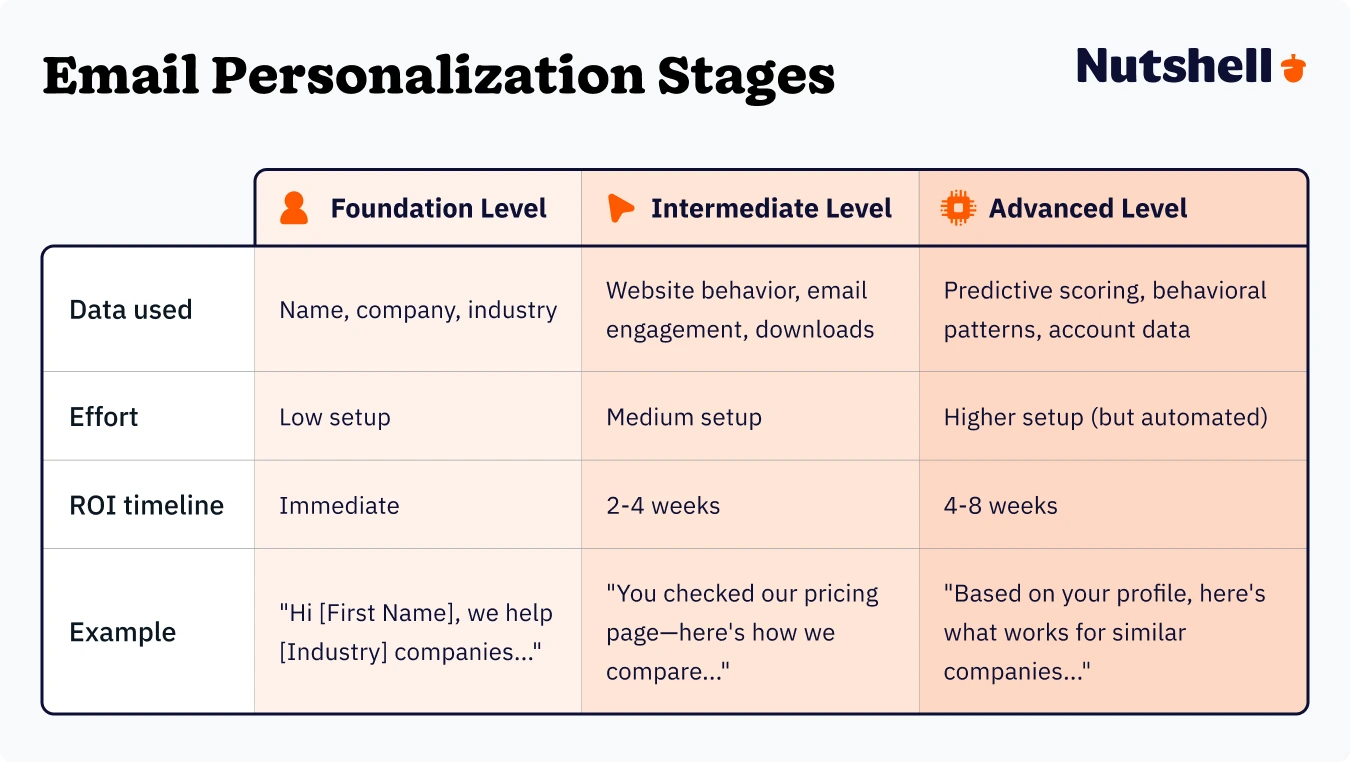
- The spectrum of email personalization: From basic to advanced
- The B2B business case for personalized email
- How CRM-powered data transforms your email strategy
- Foundation-level personalization strategies
- Intermediate tactics: Predictive and dynamic content
- Advanced approaches: Predictive and dynamic content
- Measuring what actually works
- Your step-by-step implementation roadmap
- Common pitfalls to avoid
- Email personalization FAQs
What is email personalization? (And why does it matter?)
When most people hear “email personalization,” they think of inserting a recipient’s first name into the subject line. That’s… technically personalization. But it’s also basically useless at this point. Everyone does it, nobody is impressed, and it doesn’t move the needle on meaningful business metrics.
Real email personalization is about sending the right message to the right person at the right time, based on who they actually are and what they’ve actually done. It’s the difference between a generic “Hey there!” and “Hi Sarah—we noticed you downloaded our pricing guide last week, so here’s a comparison of how we stack up against your current solution.”
The impact is measurable. Personalized emails deliver five times higher ROI than non-personalized campaigns, and companies that segment their emails see 14.31% higher open rates than those that don’t.
Stop Manually Sending Emails! Ready to Automate?
Automate personalized emails based on triggers, behaviors, and lead scoring. Nutshell handles the timing and sequencing so your reps focus on selling.

The spectrum of email personalization: From basic to advanced
Email personalization exists on a spectrum. You don’t need to master everything at once. Most successful SMBs start simple, then layer in sophistication as they understand their data better.
Throughout this guide, we’ll walk you through three tiers: foundation-level tactics that anyone can implement immediately, intermediate approaches that use behavioral data, and advanced strategies powered by predictive intelligence and account-based thinking.
The good news? Each tier builds on the last. You don’t need to jump straight to AI-powered dynamic content. Master the basics first, prove ROI, then scale up.
Let’s begin with why this progression is particularly important for B2B sellers.
The B2B business case for personalized email
B2B buying cycles are long. Complex. Filled with multiple decision-makers and competing priorities. In this environment, generic emails have little chance of success.
77% of B2B email marketers report improved open rates since adopting personalized email strategies, and personalized emails drive up to a 15% increase in revenue. These aren’t small improvements. These are the kinds of gains that directly impact revenue.
But here’s what really matters: B2B buyers today expect personalization. They expect you to be familiar with their industry, its challenges, and the size of their company. They expect your emails to reflect what you know about them. When you deliver that, you build trust. When you don’t, you look like every other vendor in their inbox.
62% of B2B buyers say they’re more likely to respond to personalized content, and that’s because personalization signals that you actually understand their business. It’s not a tactic. It’s table stakes.
How CRM-powered data transforms your email strategy
Here’s where most small businesses get stuck: their data is everywhere and nowhere.
Your sales team tracks customer interactions in your CRM. Your marketing team manages email campaigns in a separate platform. Customer support logs tickets in yet another tool. Nobody knows what anyone else knows, so your emails read like they’re from three different companies.
When you send an email, you have no idea if the person received a helpful support email yesterday or if they just closed a big deal with your team. You’re flying blind. You’re personalizing based on half-truths. And your emails reflect that disconnect.
Unified CRM platforms change this. When your sales and marketing data live in one place, everything shifts. Your emails aren’t just pulling from a customer database. They’re pulling from a complete picture of that person’s relationship with your company.
The real-world difference
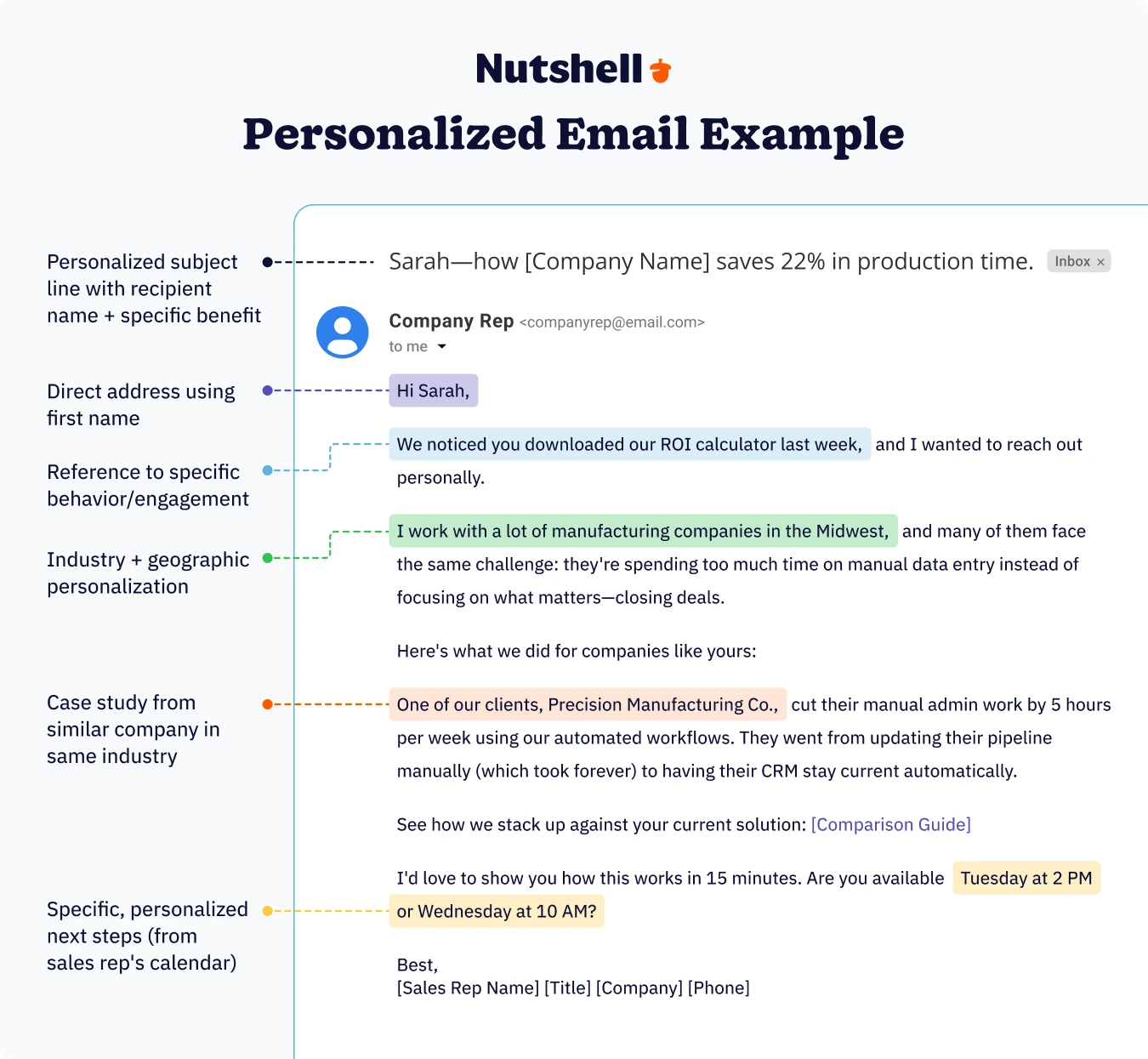
Let’s say you’re using Nutshell. Sarah downloaded your ROI calculator last week, and your system flagged her as a “high-intent lead.” Your sales representative had a call with her yesterday, during which she mentioned that she’s evaluating three solutions. Today, your automated email goes out—but instead of a generic follow-up, it includes:
- A personalized subject line referencing her industry (manufacturing)
- A case study from another manufacturing company with similar challenges
- A direct link to a comparison guide showing how you stack up against her specific pain points
- A note from the sales rep offering a specific time to demo your solution
This email hits because it’s informed by actual CRM data for personalized marketing. Your sales team’s notes. Your marketing automation system. Customer history. Everything converges in one place.
That’s not just “personalization.” That’s intelligence.
Foundation-level personalization strategies
This is where every email personalization program starts. We call this “foundation-level” because these tactics are the building blocks that everything else rests on. If your data is messy or your segments are poorly defined, advanced tactics won’t be enough to save you. Let’s start by mastering the fundamentals first.
What is basic personalization? It’s the simplest form—using someone’s name, company, industry, location, or their position in your sales process. It’s easy to implement and creates an immediate baseline of relevance. But it’s also the minimum people expect now. Basic drip campaign personalization alone won’t move the needle on revenue—it just keeps you from looking careless.
Create Segmented Email Campaigns That Convert!
Design, segment, send, and measure email campaigns without switching platforms. Nutshell brings email marketing and CRM together for maximum impact.

Here’s the foundation-level playbook.
Start with better data collection
Before you can personalize anything, you need information. And not just email addresses. You need the details that actually matter for your business.
At minimum, capture:
- Company information: Name, industry, company size, revenue range (if relevant)
- Role and seniority: Job title, department, decision-making level
- Engagement signals: How they found you, what they downloaded, pages they visited
- Timeline indicators: When they signed up, when they last engaged, where they are in your sales process
- Explicit preferences: What they want to hear about, how often, which channels
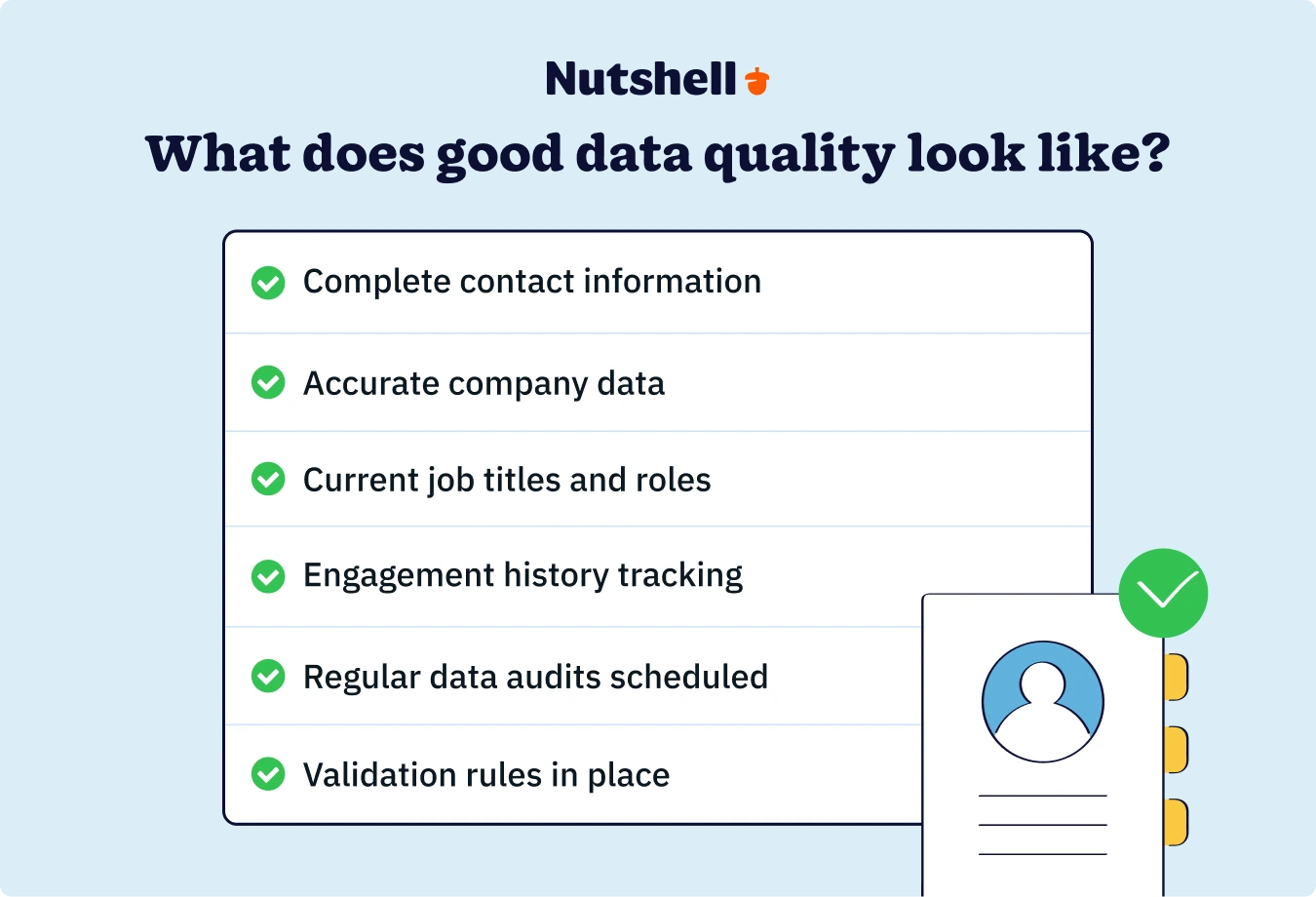
If your CRM isn’t collecting this information automatically (or semi-automatically), it’s costing you. 79% of marketers say data quality is their biggest email personalization challenge, so don’t underestimate the importance of clean, complete data.
Segment based on the basics
Segmentation is just organized personalization. Instead of blasting the same email to everyone, you’re splitting your list into smaller groups and tailoring your message to each group’s characteristics.
Start simple:
- Geographic segmentation: Send different messaging to your East Coast vs. West Coast customers
- Industry segmentation: Manufacturing companies get different content than service providers
- Company size segmentation: Your approach to a 10-person startup should look different than your approach to a 500-person enterprise
- Sales stage segmentation: New leads need different messaging than existing customers
These segments are easy to set up in most CRM platforms, and they immediately improve your results. Segmented email campaigns have 14.31% higher open rates than non-segmented campaigns.
Find your quick wins
While building out your personalization infrastructure, look for quick wins—easy implementations with immediate results.
Personalized subject lines are your fastest win. You don’t need complex data or advanced automation. Just use their first name or company name in the subject line. Emails with personalized subject lines have 26% higher open rates.
Company-specific content is another quick one. If you have case studies or examples that directly apply to their industry or company size, reference them specifically. “We helped three other manufacturing companies in the Midwest cut production time by 22%—here’s how.” That’s more interesting than generic success stories.
Reference recent activity. If they downloaded a guide, attended a webinar, or visited your pricing page, be sure to mention it. “I saw you checked out our pricing guide” immediately signals that you’re paying attention.
These foundation-level tactics are straightforward, yet effective. Master them before you move on.
Intermediate tactics: Behavioral personalization
Once you’ve established your basic segmentation and data collection, behavioral personalization is where things get interesting—and where results start to accelerate.
What is behavioral personalization? Instead of personalizing based on static traits (such as name, company, or industry), you personalize based on what people actually do. Did they click a specific link? Download a guide? Spend 10 minutes on your pricing page? That behavior reveals what they care about, and you tailor your next email to those interests.
This is the tier where email transitions from a “nice-to-have” to a “revenue-driver.” Here’s how to implement it.
Website behavior tracking
Your website is constantly telling you what people care about. Which pages do they visit? How long do they stay? What do they click? This behavioral data is gold for email personalization.
- Page engagement tells a story: If someone spent 15 minutes on your “automating sales workflows” page, they’re interested in automation. Your next email should address automation challenges and solutions, not generic product features.
- Content downloads are even more explicit signals: When someone downloads a “lead scoring best practices” guide, they’re signaling interest in lead quality and prioritization. Send them content about lead scoring, lead qualification, and pipeline management—not product tours.
- Pricing page visits are high-intent signals: Someone checking out your pricing is seriously considering your solution. Your follow-up email shouldn’t be another educational guide. It should be a conversation-starter: “Interested in learning more? Here’s what you get at each plan level, and here’s a time to chat with our team.”
The key is using this behavioral data to inform your email content and timing. If someone visits your pricing page on Tuesday, your email shouldn’t go out on Thursday morning in the regular batch. It should go out on Wednesday afternoon, while they’re actively thinking about your solution.
Email engagement behavior
Your previous emails reveal a great deal about what works with each recipient.
- Did they open your last email? What was in the subject line that made them click?
- Did they click specific links? What topics were they interested in?
- Did they forward your email to colleagues? That’s a signal of strong interest.
- How often do they typically open your emails? Are they an engaged subscriber or someone who almost never clicks?
Email engagement data helps you avoid the dreaded “unsubscribe” moment. If someone hasn’t opened your last five emails, sending them more of the same won’t help. It’s time to change your approach—either re-engage them with different content or move them to a less-frequent send schedule.
Nutshell’s email automation tools track this automatically. You can see which team members are engaging with which emails, personalize future sends based on that engagement, and automate re-engagement campaigns for subscribers who are going cold.
Purchase history and product interests
If someone bought your product, their buying history is incredibly valuable for personalization.
What did they purchase? When? Are they a repeat customer or a one-time buyer? Which features are they actually using in your product? Have they expanded their usage, or has usage been flat?
Each of these data points should inform your email strategy:
- New customers need onboarding and adoption content, not sales pitches
- Repeat customers are more likely to respond to upsell or cross-sell offers
- Power users (people using all features) are great candidates for case study participation or referral programs
- Inactive users need re-engagement content that reignites value
Advanced approaches: Predictive and dynamic content
This is where email personalization stops being a tactic and becomes a revenue strategy. Advanced personalization combines multiple data sources to predict what will work best for each individual recipient.
What is predictive personalization? Using data patterns and AI to anticipate what customers need next. Based on someone’s behavior, industry, company size, and stage in the buyer journey, you can predict which message or offer will resonate most. Instead of reacting to what they’ve done, you’re proactive—staying one step ahead of their needs.
Here’s what predictive personalization often looks like for SMBs.
Lead scoring integration
Lead scoring ranks your prospects based on their level of fit and engagement. Some leads are ready to talk to sales. Some aren’t there yet. Some are barely interested.
When you integrate lead scoring with email personalization, everything changes. You’re no longer sending the same email to everyone. You’re matching the email content to their readiness level.
- High-scoring leads should receive sales-focused emails: Demo requests, case studies from similar companies, and direct outreach from your sales team. They’re ready to buy.
- Medium-scoring leads need nurturing content: Educational guides, comparison resources, and webinars. They’re evaluating, and you want to influence their evaluation.
- Low-scoring leads get awareness content: Industry trends, thought leadership, best practices. Your goal is to build credibility and demonstrate expertise, rather than pushing toward a sale.
Nutshell’s reporting and analytics features can automatically identify where prospects are in the buying cycle, and you can set up email automation rules based on your lead scores. When someone crosses from “low interest” to “high interest,” they automatically get different emails. You’re not just personalizing. You’re matching your messaging to their readiness.
Sales stage personalization
In a B2B sales cycle, the same person might receive dozens of emails as they move through your funnel. Each of those emails should reflect their current stage in that journey.
- Awareness stage: They just found you. They’re learning about the problem, not the solution. Your emails should educate them about the challenge they’re facing and why it matters.
- Consideration stage: They recognize they have a problem and are evaluating potential solutions. Your emails should help them understand your approach and how it compares to alternatives.
- Decision stage: They’re down to final choices. Your emails should address their specific objections and why you’re the right fit.
Although this may not be complicated in practice, it makes a significant difference. When your emails align with someone’s stage in the buying journey, they feel more relevant. When they don’t, they feel like spam.
Dynamic product recommendations
This is the advanced play. Imagine sending an email where the product recommendations change based on who’s reading it.
For a software company, that might mean:
- Manufacturing customers see case studies and product tours focused on production workflow automation
- Service companies see content about service dispatch and crew scheduling
- Enterprise customers see advanced features and integration capabilities
- SMBs see simplicity and ease-of-use messaging
Each recipient receives an email that feels like it was written specifically for them, because the content was indeed written with them in mind. Dynamic content blocks swap in and out based on the recipient’s profile data.
Companies that use dynamic content see 20% higher conversion rates compared to those using static content. That’s not a fluke. When someone reads content that’s actually relevant to them, they engage.
Account-based personalization
For enterprise or high-value accounts, you might personalize at the company level rather than the individual level.
All contacts at Company X get emails mentioning Company X’s specific challenges, recent news about Company X’s industry, and case studies from similar companies. Your messaging acknowledges that they’re part of a specific organization with specific needs.
This requires more sophisticated data and setup, but it’s incredibly effective for high-touch, high-value sales cycles. 89% of sales leaders say ABM (account-based marketing) contributes significantly to their overall conversion rate and deal success.
Measuring what actually works
You can send the most beautifully personalized emails in the world, but if you’re not measuring their impact, you’re just guessing whether they’re effective.
The good news is that email metrics are straightforward. The less-good news: most businesses focus on the wrong ones.
Engagement metrics (important, but not everything)
- The open rate indicates whether your subject line was effective.
- The click-through rate indicates whether your content was engaging enough to prompt someone to click.
Both matter, but they’re not the whole story.
Higher open and click rates are nice, but they don’t matter if they don’t lead to revenue. You could send the most clickable email ever—something shocking or entertaining—and still not move the needle on business outcomes.
The real question isn’t “Did they open this?” It’s “Did this email contribute to a sale?”
Conversion metrics (this is what actually matters)
- Lead quality is where personalization truly proves its worth: Personalized emails generate significantly more high-quality leads, and those higher-quality leads convert to customers at higher rates.
- Sales cycle length is another critical metric: If personalized emails move leads through your funnel faster, that’s directly impacting revenue. Even a one-week reduction in sales cycle length across your customer base compounds into a significant revenue impact.
- Revenue per email campaign might be the most honest metric: How much revenue did this campaign generate per email sent? Personalized campaigns typically generate two to three times higher revenue than generic blasts.
Relationship metrics (the long game)
Customer retention and customer lifetime value indicate whether personalization is fostering stronger relationships or merely generating quick sales.
If personalized emails help you acquire customers who stick around longer and buy more from you over time, that’s proof that personalization works. If you’re driving shorter-term transactions that don’t foster genuine customer relationships, you’re missing the true value.
Setting up measurement in your CRM
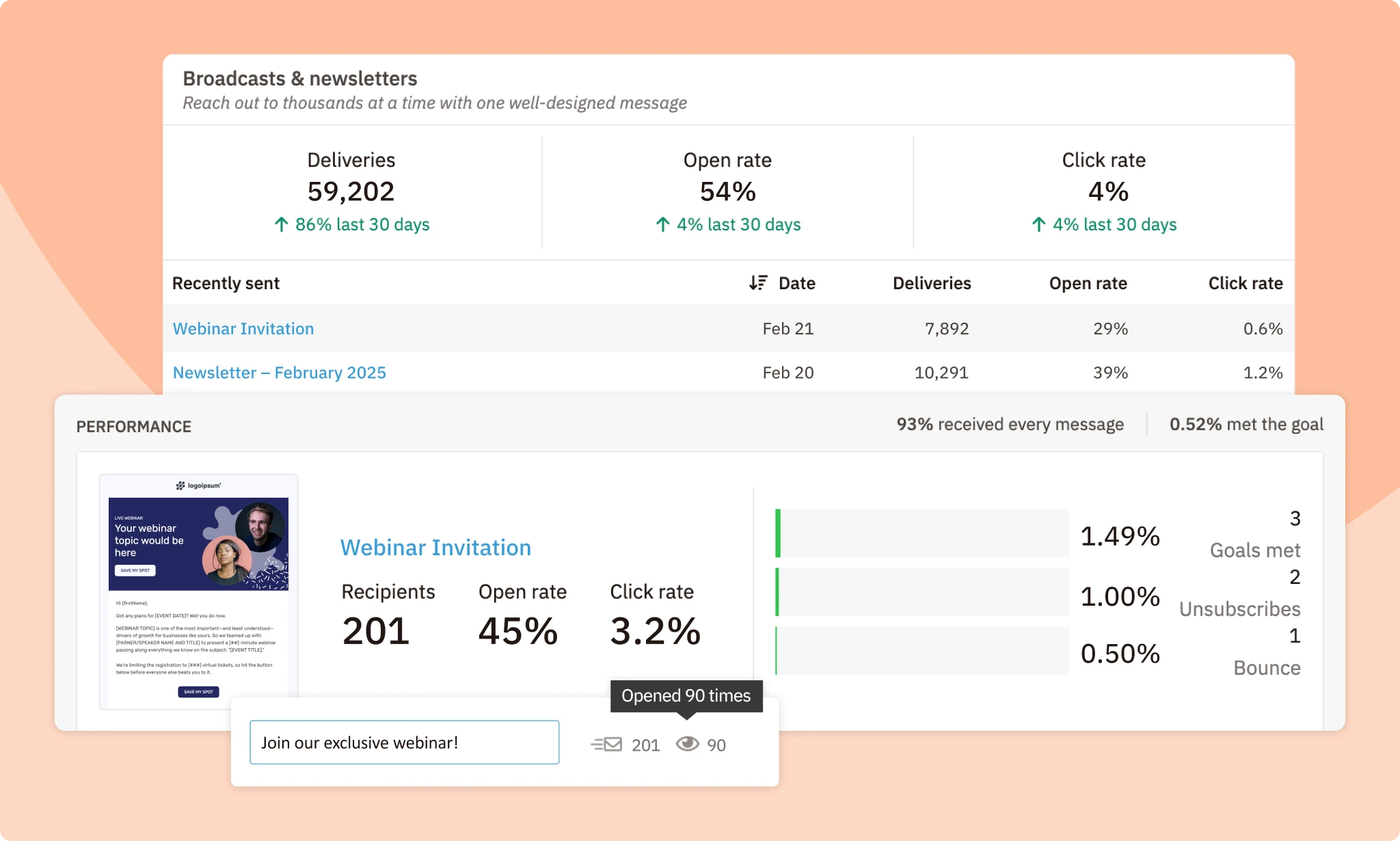
The best part about using a unified CRM platform like Nutshell is that measurement is built in. You can track:
- Which emails drove which actions (opened, clicked, downloaded)
- Which emails contributed to moving deals forward
- Which segments and personalization tactics generate the highest-quality leads
- Revenue impact of specific campaigns
You don’t need advanced analytics skills. You can build dashboards that show you, in plain language, whether your personalization efforts are working.
Stop Guessing. Start Measuring: See Which Emails Actually Drive Revenue
Track email performance, lead quality, and deal impact in real time. Nutshell’s reporting and analytics show you exactly which campaigns move deals forward—so you know what to double down on.
Your step-by-step implementation roadmap
Now that you understand how to measure success, let’s walk through the specific steps to implement these strategies in your business.
Theory is great. Implementation is where the real value happens. Here’s how to actually start doing this in your business.
Step 1: Audit your current email and customer data
Start by examining what you have. How complete is your customer data? Are you collecting email addresses, but missing company information? Do you have engagement data, but no behavioral data?
Run a quick audit:
- What fields do you currently capture on every customer or lead?
- How accurate is that data? (Run spot-checks on 50 random records)
- What critical information are you missing? (Industry? Company size? Website behavior?)
- Where is your data spread across? (Email marketing platform, CRM, support platform, analytics?)
This audit tells you exactly where to start. You can’t personalize with data you don’t have, so identifying gaps is the first step.
Step 2: Set up basic segmentation rules
Once you understand your data, start segmenting. Begin with the easy stuff: industry, company size, geographic location, or sales stage.
In Nutshell, this is straightforward. You set up filters based on customer profile data, and boom—you’ve got segments. You can then send different email campaigns to different segments.
Test one segment first. Maybe your manufacturing customers. Create an email campaign tailored specifically to them, incorporating industry-relevant examples and case studies. Send it. Measure the results. Compare it to your previous non-segmented campaigns.
You’ll see improvement immediately. That builds momentum for the next step.
Step 3: Create personalized email templates
Now that you have your segments, create email templates that address the specific needs of each segment.
Don’t overthink this. Start with three to four core templates:
- New lead nurture: For prospects who just joined your list
- Product education: For engaged leads who are learning about your solution
- Sales conversation: For high-intent leads ready to talk to sales
- Customer success: For existing customers
Each template should include personalization fields (such as first name, company name, and industry) as well as segment-specific content blocks. The manufacturing template mentions manufacturing challenges. The services template mentions service-specific pain points.
Step 4: Set up automated workflows
This is where email personalization gets powerful. Instead of manually sending emails, you’re setting up triggers that automatically send the right message at the right time.
Examples:
- When someone joins your list: Automatically send a welcome email personalized to their industry
- When someone downloads a guide: Automatically send relevant follow-up content based on what they downloaded
- When someone visits your pricing page: Automatically send an email positioning your solution for their company size
- When a lead scores above a threshold: Automatically notify sales and send a sales-ready email
Nutshell’s automation makes this simple. You set up the trigger, define the conditions, and choose the email to send. The system handles the rest.
Start with two or three automated workflows. Get comfortable with them. Then add more complexity as you go.
Step 5: Monitor, measure, and optimize
Set up a simple dashboard that tracks:
- Email open rates by segment
- Click-through rates by campaign
- Lead quality (score of leads generated)
- Pipeline impact (how many personalized email leads moved to deals?)
- Revenue impact (how much revenue came from personalized email campaigns?)
Check this dashboard monthly. Are certain segments responding better to certain messages? Are some email triggers driving higher-quality leads than others?
Use this data to optimize. If your manufacturing segment opens emails at 28% while your services segment opens at 18%, your manufacturing content is more relevant. Double down on what’s working.
Common pitfalls to avoid
Email personalization is powerful, but it’s also easy to get wrong. Here are the mistakes we see most often.
The “creepy factor”
There’s a fine line between personalization and stalking. If your email mentions something too personal or too specific, it feels invasive rather than relevant.
How do you avoid this? Stick to the data they’ve provided or explicit behavioral signals. “We saw you visited our pricing page” is fine. “We noticed you didn’t open our last three emails” is borderline. “We tracked your online behavior and know you’re job-hunting” is creepy.
Stay on the right side of that line.
Poor data quality
Personalization only works if your data is accurate. If your system mistakenly identifies someone as working in manufacturing when they actually work in healthcare, your personalized email is just embarrassing.
Make data quality a nonnegotiable part of your process. Validate data when leads come in. Run regular audits. When you notice an error, trace it back to its source and resolve the issue.
Nutshell’s data validation features help prevent this by flagging incomplete or suspicious data, allowing you to clean it up before it impacts your personalization efforts.
Over-personalization leading to analysis paralysis
“What if we personalized based on company revenue AND employee count, AND industry, AND pain points?” Sure, you could build infinitely complex personalization logic. But you’ll spend three months building it, and nobody will see it.
Start simple. Segment by one variable. Test. Measure. And add complexity only when it’s justified by results.
The 80/20 rule applies here: basic personalization gives you 80% of the benefit. The remaining 20% comes from advanced tactics, but requires 80% of the effort.
Ignoring privacy and permissions
When you’re using customer data to personalize emails, you’re making an implicit promise that you’re using it responsibly and legally.
Respect opt-out requests. Be transparent about how you’re using data. Make sure you have permission to collect and use the data you’re collecting. Follow GDPR, CAN-SPAM, and any other relevant regulations.
Not only is this legally required, but it’s also good business. Customers appreciate transparency and respect for their privacy.
Email personalization FAQs
-
1. What is email personalization?
Email personalization utilizes real data—such as company, industry, behavior, downloads, and email opens—to create messages that feel relevant and personal. It’s about sending the right message to the right person at the right time based on who they actually are and what they’ve actually done.
-
2. Why does email personalization matter for SMBs?
Personalization is often the difference between growing your customer base and sending generic blasts nobody reads. Personalized emails yield six times higher transaction rates and move deals forward faster. B2B buyers expect you to know their industry and challenges. When you deliver that, you build trust and level the playing field against larger competitors.
-
3. What’s the difference between basic, intermediate, and advanced personalization?
Foundation uses static data (name, company, industry). Intermediate users utilize behavioral data (what they clicked, downloaded, and visited). Advanced combines multiple data sources with predictive intelligence and dynamic content. Start with foundation-level, prove ROI, then layer in sophistication as your team gets comfortable.
-
4. How do I measure email personalization success?
Don’t just track open rates and clicks. Focus on lead quality, sales cycle length, and revenue impact. Are personalized emails generating higher-quality leads? Moving deals through your funnel faster? Generating two to three times higher revenue than generic campaigns? Track these metrics in your CRM to demonstrate the effectiveness of personalization.
-
5. Does Nutshell support email personalization?
Yes. Nutshell’s unified platform consolidates sales, marketing, and analytics into a single platform. You can segment based on any CRM data point, set up automated workflows triggered by behavior, and see exactly which emails drove which leads and revenue. No switching between platforms or manual data moving is required.
-
6. What’s the first step in implementing email personalization?
Start with an audit. Check your data completeness and accuracy. Identify gaps and where data is scattered across tools. Clean up your data, build basic segments, and launch your first personalized email campaign. You don’t need to be perfect—just start and measure what works.
-
7. How long does it take to see results from email personalization?
Foundation-level personalization shows results within one to two weeks. Intermediate tactics show impact within two to four weeks. Advanced tactics take four to eight weeks but deliver the highest ROI. Start small, measure quickly, and iterate. Don’t wait for perfection before you launch.
-
8. What’s the biggest mistake teams make with email personalization?
Teams either don’t start because it feels complicated, or they try to build infinitely complex personalization before testing anything. Start simple: segment by one variable, send a campaign, measure results, then add complexity only when justified. Basic personalization delivers 80% of the benefit with 20% of the effort.
How Nutshell simplifies email personalization
If you’re thinking, “This all sounds great, but I don’t have the infrastructure for this,” Nutshell solves exactly that problem.
Most email personalization requires three separate tools: a CRM, an email platform, and an analytics system. You’re constantly switching between platforms, manually pulling data, and hoping everything syncs correctly.
Nutshell brings it all together. Your customer data, email marketing, sales pipeline, and analytics live in one platform. You don’t export data from your CRM into your email platform. You don’t import analytics data back into your CRM. It’s all integrated.
That means:
- Sales and marketing data in one place: Your team has a complete picture of every customer relationship
- Automated personalization: Set rules once, and Nutshell personalizes automatically based on real-time customer data
- Built-in analytics: See exactly which emails drive leads, which leads convert, and how much revenue your personalized campaigns generate
- No technical setup required: You don’t need an engineer or data analyst to make this work. It’s built into the platform
Ready to implement email personalization in your business?
Start your free 14-day trial of Nutshell to see how integrated email personalization works in practice. No credit card required.
See Nutshell in action!
Try Nutshell free for 14 days or let us show you around before you dive in.
 BACK TO TOP
 Written by
Sam Poole Associate Content MarketerReady to try
Nutshell for Free?Thank you! Your submission has been received!Oops! Something went wrong while submitting the form.


5 Things You Can Do With Constant Contact Email You (Probably) Didn’t Know About
Published on: November 10, 2022
Establishing a System for CRM Data Entry and Management
Published on: April 11, 2023Highly Effective Strategies for Elevating Sales Team Performance
Published on: November 10, 2022Introducing Nutshell Forms Spam Prevention
Published on: April 22, 2024Join 30,000+ other sales and marketing professionals. Subscribe to our Sell to Win newsletter!










