With 3 billion active monthly users and over 8 million paying business customers, Google Workspace has become the dominant productivity platform for organizations worldwide. Yet despite this widespread adoption, many businesses struggle to find a CRM solution that integrates seamlessly with their Google infrastructure.
The problem isn’t a lack of options—it’s the opposite. Hundreds of CRM vendors claim Google Workspace compatibility, but few deliver meaningful integration that actually simplifies workflows rather than complicating them.
For sales managers, business owners, and marketing teams already invested in Google’s ecosystem, selecting the right Google CRM software requires a structured evaluation approach.
This guide, prepared by Nutshell, presents a decision-making framework to help you assess Google CRM options objectively. Rather than focusing on which solution has the most features, we’ll walk through the criteria that matter most: Integration quality, total cost of ownership, implementation reality, and long-term fit.
Key takeaways
Integration depth varies dramatically: Native Google-based CRM solutions with direct automation capabilities can eliminate more manual data entry per employee compared to API-based alternatives.
Hidden costs add up fast: Total cost of ownership for CRM extends far beyond subscription fees and typically includes implementation, training, data migration, and opportunity costs during deployment.
One-third of implementations fail: Success depends on clear objectives, vendor viability, process automation fit, user experience design, and systematic evaluation—not feature count.
Google Workspace dominates organizational productivity for a reason: Real-time collaboration, seamless integrations, and cloud-first infrastructure reduce friction in daily work. Yet most CRM solutions were built independently and retrofitted with Gmail integrations, creating awkward workflows that require constant switching between platforms.
For organizations already using Gmail and Google Workspace, native integration isn’t a luxury—it’s a foundation. Email remains the backbone of business communication, with an estimated 392.5 billion emails sent and received daily globally. A CRM for Gmail that operates within your email workflow, rather than beside it, eliminates context switching and reduces manual data entry.
Research shows that connected systems with automated workflow processing can reduce execution time by 151 times compared to manual work. When your CRM, email client, and calendar operate as one system, sales teams gain immediate visibility into customer interactions without leaving Gmail. Marketing teams can track email engagement alongside deal progress. Support teams can reference the complete customer history instantly.
This integration advantage extends beyond efficiency. Organizations using deeply integrated systems report better data quality, faster response times, and higher user adoption rates. The question isn’t whether integration matters—it’s how deep that integration runs and whether it translates to your team’s actual workflows.
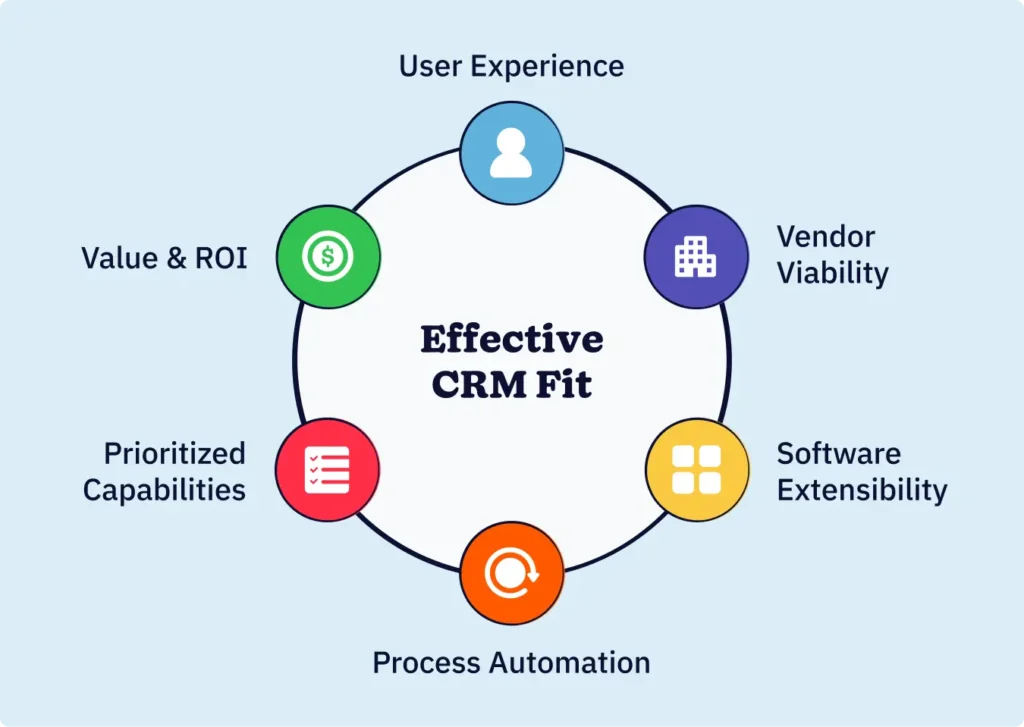
The six-dimensional Google CRM software evaluation framework
Evaluating Google CRM software objectively requires moving past marketing claims to assess what actually delivers value for your organization. Industry research identifies six dimensions that separate effective solutions from overhyped ones. By assessing each dimension systematically, you can compare options fairly and make a decision grounded in business needs rather than vendor promises.
1. Value and ROI
CRM pricing extends far beyond monthly subscription costs. Total cost of ownership includes implementation, customization, data migration, training, ongoing support, and opportunity costs during deployment. Many organizations discover hidden expenses after commitment: Setup fees ranging from $1,500 to $50,000+, per-user overage charges, feature gating, and required add-ons.
Transparent pricing matters more than low pricing. Calculate the total cost across three years, including subscription costs ($X per user per month × users × 36 months), implementation (typically 10-25% of first-year subscription cost), training, and estimated customization needs. Then evaluate measurable benefits: Time saved from automation, reduced manual data entry, faster sales cycles, improved forecast accuracy.
Red flags include vendors charging extra for essential features (email sync, custom fields, API access), surprise setup fees, or inflexible contracts that prevent scaling down. Compare three solutions using the same cost calculation to identify which delivers genuine value versus apparent discounts hiding future expenses.
2. Vendor viability
Before investing months of implementation and training, confirm the CRM vendor will be in business long-term. Company stability affects security updates, feature development, and your ability to migrate data if needed.
For established vendors, viability is less concerning. For smaller, specialized CRM solutions, conduct due diligence: Review funding history, customer retention rates, and market positioning. Vendors serving niche markets with strong adoption typically survive acquisition or consolidation better than undifferentiated alternatives. Check whether the company is hiring, releasing regular updates, and addressing security concerns responsibly.
3. Software extensibility
Business needs change. Your CRM must adapt without requiring expensive professional services or technical expertise. Evaluate the vendor’s customization approach: Low-code/no-code builders, API access, third-party ecosystem strength, and community support.
Solutions that enable users to modify fields, workflows, and integrations independently reduce ongoing costs and maintenance burden. Avoid solutions requiring developer expertise for basic customizations. Strong extensibility means your CRM grows with your business without escalating costs or technical dependencies.
4. Process automation capabilities
Effective process automation requires tools designed around your workflows, not workflows forced into the tool’s constraints.
Assess automation depth: Can you automate lead assignment based on custom rules? Trigger multistep workflows from customer actions? Create conditional logic in email sequences?
Mature automation handles complex scenarios: Escalations based on deal velocity, triggered actions across multiple systems, and conditional branching. The difference directly impacts how much manual work your team handles daily.
5. Prioritized capabilities
Identify essential features your team needs before evaluating anything else. These prioritized capabilities typically include:
Email tracking and link-click detection
Contact and deal management from Gmail inbox
Calendar synchronization with Google Calendar
Pipeline visibility and sales forecasting
Real-time customer interaction history
Mobile access and offline functionality
Reporting and custom field flexibility
Email deliverability and tracking accuracy
Once you’ve identified must-have features, evaluate how well each candidate solution delivers them. A feature that’s technically present but buried in clunky workflows provides less value than simpler, more accessible functionality.
6. User experience
Industry research distinguishes between UI (user interface simplicity) and UX (user experience across workflows). A visually clean interface means nothing if accessing customer history requires six clicks. Effective CRM UX puts frequently needed information immediately accessible and reduces steps for common actions.
Test candidate solutions with your actual workflows, not demo scenarios. Have team members complete a typical task: Log an email, create a deal, update customer information. Notice how many clicks, page loads, and context switches each requires. Superior UX accelerates adoption, reduces training time, and decreases errors from confused workflows.
Google CRM integration depth assessment
“Google integration” means different things. Some solutions check Gmail but pull data poorly. Others sync Gmail actively but struggle with Google Calendar or Contacts. Understanding how to evaluate Google Workspace CRM integration quality separates effective solutions from superficial compatibility.
Basic integration means the CRM can read your Gmail account. You manually create records in the CRM, then link them to emails. This provides minimal automation benefit.
API-level integration syncs data bidirectionally—emails flow into CRM automatically, CRM updates push to Gmail. Setup requires technical configuration but results in meaningful automation.
Native integration means the CRM runs on Google’s infrastructure (Google Apps Script, Sheets API, BigQuery). No external servers, no data pipes, no integration breakage when Google updates its APIs. This delivers the most stable, secure integration and fastest data flow.
Connected systems have the potential to eliminate 5 to 15 hours weekly of manual data entry per employee. Real-time bidirectional syncing creates a single source of truth, enabling sales teams to see complete customer context instantly. Assess whether a solution’s integration depth justifies your investment or merely duplicates work across systems.
CRM feature comparison essentials for Google integration
Create a feature comparison grid comparing your top three candidates. Include essential capabilities your team identified, plus these standard CRM features:
Feature
Solution A
Solution B
Solution C
Email tracking
Yes
Yes
Limited
Deal tracking from your inbox
Yes
Yes
No
Google Calendar sync
Native
API-based
Manual
Pipeline forecasting
Advanced
Basic
Manual entry
Mobile app
iOS/Android
Web only
iOS only
Custom fields
Unlimited
50 limit
25 limit
API access
Yes
Enterprise only
No
Email deliverability
98%+
92%
Unknown
Distinguish between promised features and practical functionality. A feature that technically exists but requires workarounds provides less value than simpler, more accessible alternatives. Weight features based on your team’s specific needs, not vendor marketing.
Google Workspace CRM implementation considerations
Approximately two-thirds of CRM implementations fail, typically due to unclear objectives, poor change management, or inadequate user training. Understanding implementation realities up front prevents costly surprises.
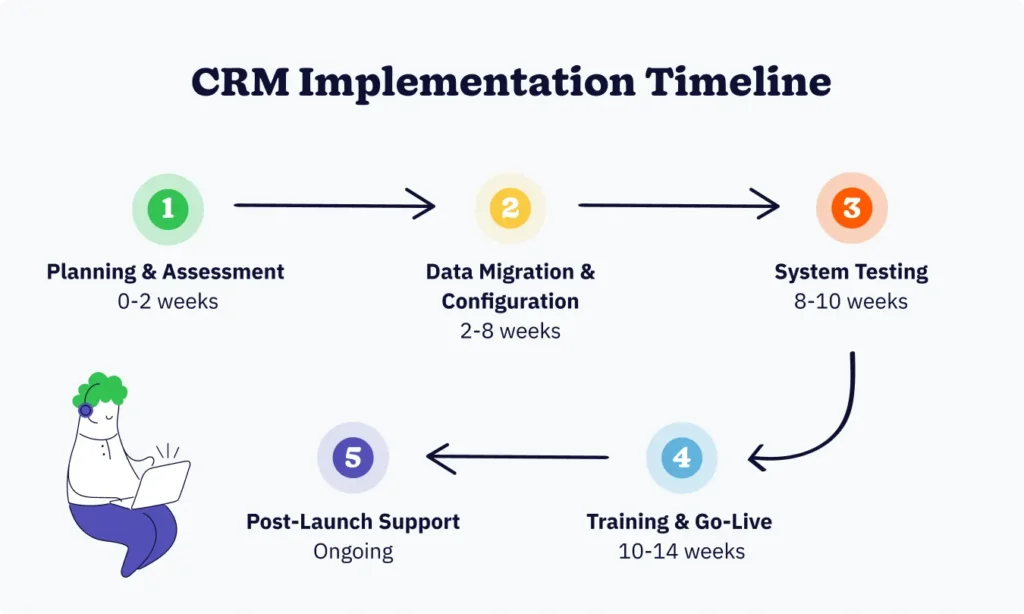
Implementation costs typically include data migration (cleansing, deduplication, formatting existing data), system configuration, integration setup, and training. Data migration alone often takes 4 to 8 weeks and can reveal data quality issues your current system masks. Phased rollouts reduce risk but extend timelines. Big-bang implementations move faster but carry a higher failure risk.
Testing requirements include system testing, integration testing, performance testing, and acceptance testing. Rushing to go-live before completing these creates operational disruption and user frustration. Plan realistic timelines—most implementations take 8-16 weeks for small teams, longer for complex organizations.
Post-launch support determines adoption success. Budget for ongoing training, champions within each department who guide colleagues, and technical support for issues. Organizations investing in change management see significantly higher adoption and faster time-to-value.
Building your Google CRM weighted decision matrix
Transform your evaluation into a systematic comparison using a weighted decision matrix. This approach removes bias and makes trade-offs explicit.
Step 1: List your top six decision criteria (value, vendor viability, extensibility, automation, prioritized capabilities, user experience).
Step 2: Weight the criteria by importance. If vendor stability matters little but integration depth is critical for your team, weigh integration higher. Total weights must equal 100.
Step 3: Rate each solution 1-5 on each criterion based on your research and testing. Be honest about gaps.
Step 4: Multiply each rating by its weight, then sum scores for each solution. The highest score indicates the best fit for your specific needs.
Example: If integration depth is weighted 25%, a solution scoring 5/5 on integration contributes 125 points. A solution scoring 3/5 contributes 75 points—a meaningful difference reflecting real capability gaps.
This systematic approach clarifies which solution genuinely fits your organization versus which vendor’s marketing impressed you most. Final decisions made with a completed matrix are far more defensible than gut-feel selections.
Frequently asked questions about Google CRM software
1. What’s the difference between Google integration and native Google integration in CRM software?
Basic Google integration means the CRM can access your Gmail account, but requires manual data entry. API-level integration syncs data bidirectionally between Gmail and the CRM. Native integration runs directly on Google’s infrastructure (Google Apps Script, BigQuery) with no external servers, eliminating integration breakage and delivering the fastest, most stable data flow.
2. How much should I budget for the total CRM cost of ownership over three years?
Calculate subscription costs (per-user cost × users × 36 months) plus implementation (typically 10-25% of first-year subscription), training, data migration, and ongoing support. Many organizations discover hidden costs, including setup fees ($1,500-$50,000+), per-user overages, and feature gating. Compare using this formula: (Initial Cost + Ongoing Costs + Training + Migration) – Remaining Value = Total TCO.
3. Why do CRM implementations fail?
Approximately two-thirds of CRM implementations fail, primarily due to poor user adoption (the leading cause), lack of integration with existing tools (17%), unclear objectives, and complexity of use. Success requires clear planning, executive sponsorship, comprehensive training, change management support, and phased rollouts that allow teams time to adapt.
4. What are the most essential CRM features for Google Workspace users?
Essential features include email tracking/link-click detection, contact and deal management from Gmail inbox, Google Calendar synchronization, pipeline visibility and sales forecasting, real-time customer interaction history, mobile access, custom fields, and accurate email deliverability. Prioritize features your team actually needs daily rather than comprehensive feature lists.
5. How long does a typical CRM implementation take?
Most implementations take 8-16 weeks for small teams. This includes data migration (4-8 weeks), system configuration, integration setup, testing (system, integration, performance, and acceptance testing), and training. Data migration often uncovers existing data quality issues, and phased rollouts extend timelines but reduce risk. Plan realistically and allocate dedicated resources for success.
Selecting the right Google Workspace CRM requires moving beyond feature lists to assess how solutions fit your team’s actual workflows. The decision-making framework outlined here—value and ROI, vendor viability, extensibility, process automation, prioritized capabilities, user experience, and integration depth—reflects what separates effective CRM implementations from expensive disappointments.
The “best” CRM isn’t the one with the most features or the biggest brand recognition. It’s the solution that integrates seamlessly with your Google infrastructure, automates your team’s actual workflows, provides transparent pricing aligned with true value delivered, and scales as your business grows.
Take time to research objectively, test with real workflows, and evaluate systematically using a weighted decision matrix. This disciplined approach reduces implementation risk, accelerates adoption, and ensures your CRM investment delivers genuine productivity gains rather than creating another tool your team tolerates but doesn’t love.