Sauter au contenu principal ↓

Save Time With Automatic Call Logging Through Aircall

Sales conversations move quickly. But when your phone system and CRM don’t talk to each other, your team ends up tracking calls in spreadsheets, relying on memory, or skipping call logging altogether.

The new Nutshell + Aircall integration changes that—so your calls, notes, and follow-ups stay organized automatically, right inside Nutshell.

Meet Nutshell’s Aircall integration

If your team lives in Aircall, you shouldn’t have to change tools just to keep your CRM up to date.

Nutshell’s Aircall integration connects your phone system to your CRM so you can:

  • Make calls through Aircall directly from Nutshell
  • Automatically log completed inbound and outbound calls as activities
  • Apply default activity types to keep your reporting clean and consistent
  • See all your calls in one central view, alongside AI-generated summaries

The result: Less time logging, more time selling.

Call from Nutshell with the tools you already use

Reps shouldn’t have to copy-paste phone numbers or bounce between apps just to start a conversation.

Once Aircall is connected, your team can:

  • Click any phone number in Nutshell to launch a call through Aircall
  • Decide what should happen when a phone number is clicked (for example, always use Aircall, or choose another provider if you have more than one connected)

That means fewer interruptions, fewer misdials, and a smoother workflow. Nutshell works where you work—inside the tools your team already knows.

Save time with automatic call logging

Manual call logging is one of those tasks everyone knows is important—but it’s also one of the first things to slip when your day gets busy.

With the Aircall integration:

  • Completed calls are logged automatically as Nutshell activities
  • You can choose whether calls are auto-logged during setup
  • Each call appears with the correct default activity type, so your reports stay consistent and easy to trust

Your team doesn’t have to stop after every conversation and type up what happened. The call is there, in the timeline, ready for a quick note or follow-up—no extra clicks required.

See every call in one place

After you connect Aircall, all your calls appear on the Sales > Calls page in Nutshell.

This view is split into two helpful tabs:

  • Unlogged calls: Calls that haven’t been logged as activities yet. You can quickly log any call with the Log activity button.
  • Logged calls: Calls that have already been logged, including those created automatically based on your integration settings.

To make review even easier, the call table includes an AI-generated summary column. Hover over the summary to quickly see what the call was about—without opening the full activity. That makes it faster to prep for your next touch, review team activity, or catch up after a busy day.

How to get started with Aircall + Nutshell

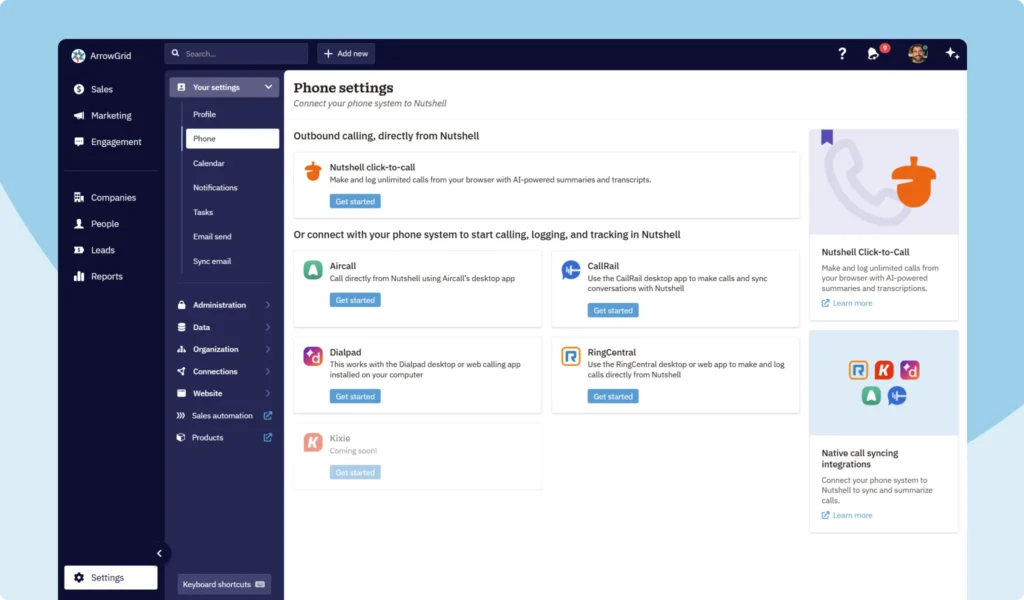
Screenshot of instant CRM phone integration options in Nutshell

Ready to connect Aircall?

  1. In Nutshell, go to Settings > Your settings > Phone.
  2. Find Aircall in the list of available phone integrations.
  3. Click Get started and follow the guided setup.
  4. Choose your logging preferences, default activity types, and click-to-call behavior.
  5. Save your settings—and start making and logging Aircall calls from Nutshell.

You can connect multiple providers if your team uses more than one phone system; Aircall will simply be one of the options you configure.

Head to our Aircall integration support page for even more details.

Connect Aircall to start logging calls in Nutshell

Put simply, Nutshell works where you work—so your team can stay focused on conversations, not admin.

If you’re already using Aircall and Nutshell, head to Your settings > Phone to connect the integration and start saving time on every call.

Not a Nutshell customer yet? Give our award-winning CRM solution a try when you sign up for a free 14-day trial (no credit card required).

Connect Every Call to Your Sales Process!

Automatically log and track every conversation by connecting Nutshell to the phone providers you already use. See how easy it is to ensure your CRM always reflects the most up-to-date and complete record of your relationships and outreach.

RETOUR AU HAUT DE LA PAGE

Rejoignez plus de 30 000 professionnels de la vente et du marketing. Inscrivez-vous à notre lettre d'information Vendre pour gagner !