Pipedrive Alternatives: 8 CRMs to Consider for High-Powered Sales Teams

-

Key takeaways
- While Pipedrive offers a streamlined, visual pipeline-first approach with strong mobile capabilities, Nutshell is a cost-effective, full-featured, and user-friendly alternative with advantages in unlimited contact storage, AI CRM tools, award-winning support and more.
- Zendesk Sell is a close second, as it’s the most like Nutshell with the exception of a few missing features. HubSpot is a strong choice for B2B professionals needing depth in marketing automation, while Salesforce caters to those requiring enterprise-level customization, but both come with higher costs and complexity.
- When evaluating CRMs, B2B professionals should map their essential workflows, budget for implementation and support, and leverage free trials and demos to test real-world fit, considering factors like UI comfort and data migration ease.
Why Pipedrive users are switching:
- ⭐ 4.2/5 rating on G2: Solid but not exceptional; missing features cited in 7% of reviews
- 🛑 7% low-star reviews on Trustpilot: Billing disputes and slow support are cited frequently
- 📊 <1% CRM market share: Smaller platform means fewer integrations and longer support queues
Pipedrive CRM is a popular sales-focused CRM used by over 100,000 companies in more than 170 countries. It positions itself as a simple, well-rounded choice for businesses of any size and an instrumental tool for making salespeople’s lives easy. While it’s undoubtedly a good CRM, it isn’t a good fit for everyone, and many teams eventually find themselves looking for Pipedrive alternatives due to the platform’s limitations.
Pipedrive comes with several challenges and downsides, including a lack of marketing features, difficulty with integrations, deal caps and poor customer support. It’s crucial to compare Pipedrive’s features, reviews, and costs with the best Pipedrive alternatives to find the CRM that provides the best value for your team.
To help you find the right CRM for your needs, we’ve compiled the best Pipedrive alternatives in 2026. Using this comparison guide can help you identify the alternatives and ensure you’re really choosing a CRM that works for you.
In this guide, we’ll start with a breakdown of Pipedrive’s CRM. Then, we’ll outline the criteria we used to evaluate these tools, compare the top alternatives at a glance, and dive into each option. Let’s get started!
Pipedrive alternatives at a quick glance
Looking for a fast overview? Here’s how our eight alternatives rank and what they’re best suited for:
- Nutshell (5.0/5): Best for B2B teams needing all-in-one sales, marketing and engagement
- Zendesk Sell (4.6/5): Best for sales-only teams, especially those using Zendesk Support
- HubSpot (4.5/5): Best for marketing-heavy teams wanting deep sales and marketing integration
- Salesforce (4.2/5): Best for enterprise-scale customization and complex sales processes
- Zoho CRM (4.0/5): Best for budget-conscious teams needing extensive customization
- Freshsales (4.0/5): Best for teams wanting AI-powered lead scoring without complexity
- Monday CRM (3.9/5): Best for visual, customizable pipelines with project management
- Copper (3.5/5): Best for Google Workspace users living in Gmail and Google Drive
Understanding Pipedrive CRM
Before we dive into the best Pipedrive alternatives, let’s review some essential information about the Pipedrive CRM.
Pipedrive pros
Pipedrive is a popular CRM for a reason. Here are some of the pros of using Pipedrive:
- Ease of use: Users and prospective buyers appreciate Pipedrive’s clutter-free user interface. Pipedrive strives to provide a simple and intuitive experience so that its users can focus on selling.
- Sales management features: Pipedrive also excels in its pipeline and sales management features. Customers on every plan can see an overview of their leads and communications, and customize their pipelines.
- Useful extra features: Under the hood, advanced features like email sync, templated email automation, and the ability to connect with one-click call integrations can propel any sales team toward its goals.
Pipedrive cons
Despite its benefits, Pipedrive also has a few cons. Take a look at some of the disadvantages we see most often with Pipedrive:
- Open deals limits: One of the major downsides of Pipedrive’s CRM is the limit on the number of open deals you can have in your pipeline per plan. For example, if you’re on the Essential plan, you can’t have more than 3,000 open deals in your pipeline — or else you have to start paying nearly double for the next highest plan. What this means is that when your business grows and starts working more leads through its pipeline, Pipedrive forces you to pay more.
- Lack of comprehensive CRM features: Pipedrive is primarily built for sales teams, leaving marketing and support teams without much value. Furthermore, even the expensive plans often don’t report on what users actually want. Pipedrive’s reporting lacks capabilities like viewing how many touches a prospect got, setting custom date ranges, and reporting on activities across users.
- Poor customer service: Pipedrive’s customer support — or lack thereof — is one of the most common complaints from their customers. Countless users express frustration with their phone support, citing long wait times and responses that don’t actually address the users’ concerns.
- Insufficient customization options: Many businesses struggle with Pipedrive’s limited customizability. Many have voiced that automation and workflow depth feel limited or unintuitive, and that contact management and analytics constraints are a problem. Another common complaint is the lack of native integrations and complex API requirements for custom connections.
Pipedrive pricing
Pipedrive’s price starts at $19 per user per month, which is an attractive number when compared to many other CRMs.
But there’s a catch—that entry-level price point lacks many of its marquee features. This “Lite” version leaves much to be desired. Choosing this entry-level plan leaves you and your team without the ability to sync your email account to Pipedrive, no email or task automation, and no user/admin permissions.
Its Growth plan is the next tier up, starting at $34 per user per month, which opens access to a few core features with restrictions. You’ll be able to sync one email address per user with Pipedrive, but you still won’t be able to create a team or adjust user/admin permissions.
Bumping up to the $64 per user per month Premium plan will give you access to more features, but you’ll still be subject to deal, team, sequence, permissions, automation, and email sync limitations.
Lastly, Pipedrive offers the “Ultimate” plan, which costs $89 per user per month and offers higher limits and phone support.
How we selected the best Pipedrive CRM alternatives
When evaluating Pipedrive competitors, we considered the following key criteria:
- Feature set: Robust sales pipeline management is a must, along with contact management, automation, reporting, AI tools, and (ideally) marketing and engagement features.
- Pricing & value: Affordable entry-level plans and scalable pricing as your team grows. We noted if a tool has free plans or if costs escalate with add-ons.
- Ease of use: An intuitive interface and low learning curve for quick adoption. A CRM only delivers value if your team actually uses it.
- Integrations and ecosystem: Ability to connect with email, marketing, support, and other tools (either natively or via integrations) to fit into your workflow.
- Customer support: Access to helpful support resources or live help when you need it. Great support can make onboarding and troubleshooting much smoother.
Using these criteria, we identified the most relevant and widely used CRM alternatives to Pipedrive for 2026. Below is a quick comparison table, followed by in-depth reviews of each tool.
What we validated
Our analysis included:
- Real user feedback from 2,500+ verified reviews on G2 and Capterra
- Feature parity testing with realistic sales scenarios (pipeline management, email logging, reporting)
- Pricing accuracy verified directly from vendor websites (January 2026)
- Support responsiveness tested through live chat and email
- Migration complexity based on documented case studies and vendor migration tools
Using these criteria, we identified the most relevant and widely used CRM alternatives to Pipedrive for 2025. The result? Eight solutions that address the specific pain points driving Pipedrive users to switch.
Why companies are leaving Pipedrive in 2026
Pipedrive’s limitations aren’t just complaints—they’re documented trends across industry reviews and migration case studies. Here’s what’s driving the shift away from Pipedrive.
Feature gaps are the top complaint
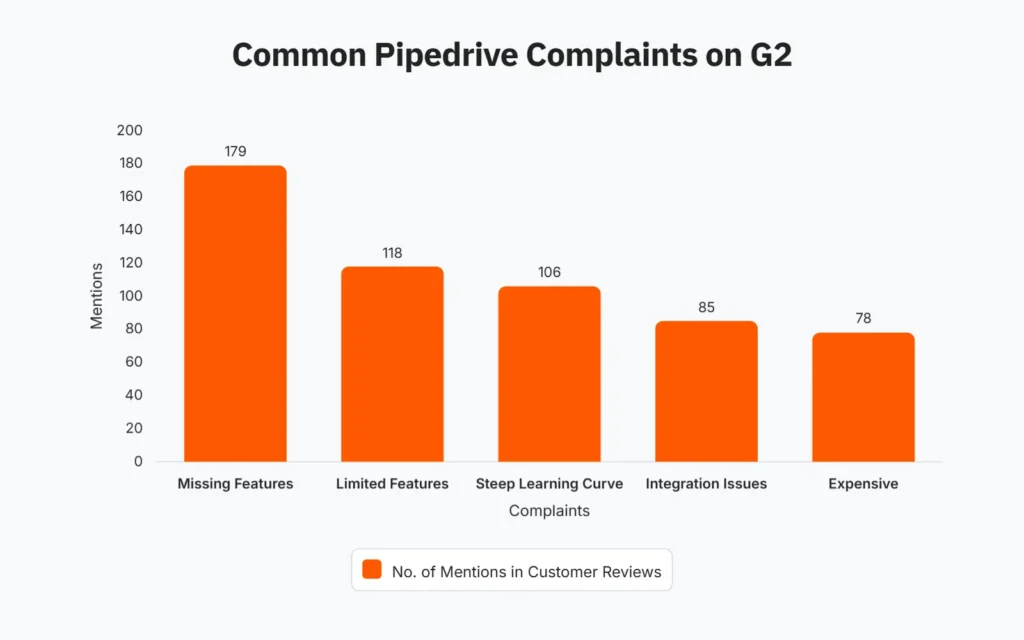
On G2, “missing features” ranks as the #1 complaint about Pipedrive, cited in 7% of all reviews (179 mentions out of 2,569 reviews as of July 2025). The most common gaps include:
- Limited reporting customization (can’t set custom date ranges or view activity touchpoints)
- Thin marketing automation features (essentially non-existent)
- Rigid workflow automation (limited customization for complex sales processes)
- Restricted integrations (many require custom API work rather than native connections)
Pricing complexity creates sticker shock
Pipedrive’s entry-level plan ($19/user/month) lacks essential features like email sync, automation, and user permissions. Teams inevitably upgrade to the Growth plan ($34/user/month) or Premium ($64/user/month)—a 180-300% price jump for core functionality that competitors include on base plans.
The result? A growing number of specialized migration services now focus exclusively on moving teams out of Pipedrive (Trujay, Import2, Instrumental Group)—a trend that signals widespread dissatisfaction.
Support responsiveness is a common frustration
On Trustpilot, approximately 7% of reviewers (201 out of 2,871) assign one to two stars, often citing slow support response times and billing disputes. This support gap becomes critical during implementations and data migrations.
The shift toward all-in-one platforms
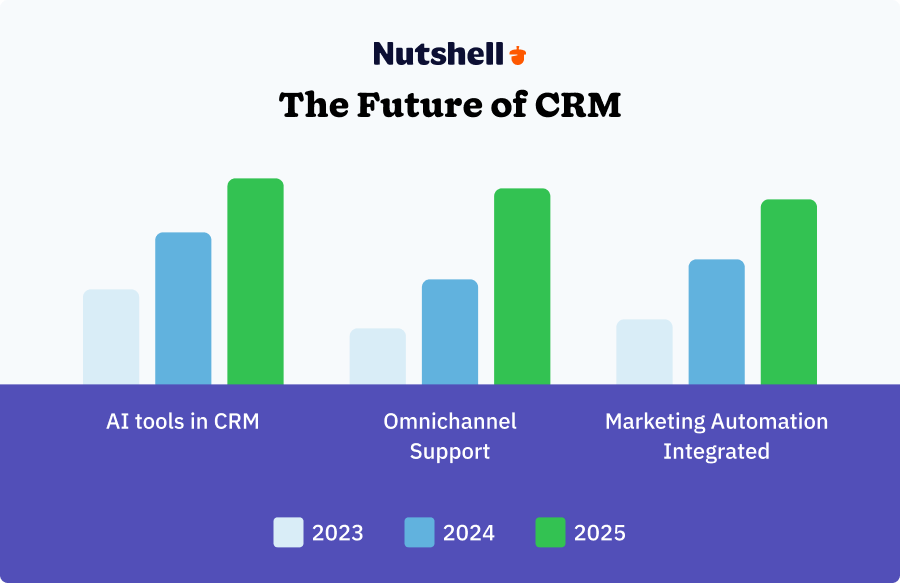
In 2025, businesses are moving decisively away from single-purpose, vertical CRM systems toward flexible, integrated platforms that unite sales, marketing, and engagement. Pipedrive was built for sales teams only, leaving marketing and customer success teams without meaningful functionality.
Teams managing modern sales cycles—which require marketing nurturing, customer engagement, and post-sale support—increasingly see Pipedrive as too narrow.
Top Pipedrive alternatives comparison table
CRM Best For Key Features Ease of Use Price Range Overall Rating Nutshell All-in-one sales, marketing, & engagement for B2B teams (Best overall) Pipeline management, email marketing, automation, reporting, AI tools Very intuitive $13–$79/user/mo 5/5 Zendesk Sell Sales-only teams (esp. those using Zendesk Support) Lead & deal management, integrated calling/SMS, email tracking, sales engagement tools, Support integration Easy, modern UI $19-$169/user/mo (product has been retired) 4.6/5 HubSpot Inbound marketing & sales integration Free CRM, marketing automation, sequences, CMS Easy Free–$150/user/mo + 4.5/5 Salesforce Enterprise-grade customization & scale Custom objects, AppExchange, Einstein AI Steeper curve $25–$550/user/mo + 4/5 Zoho CRM Smaller teams on a budget Lead mgmt, workflows, Zia AI, omnichannel Moderate Free–$65/user/mo 4/5 Freshsales AI-powered sales engagement Freddy AI, built-in phone/chat, multiple pipelines Very easy Free–$71/user/mo 4/5 Monday CRM Visual, customizable pipelines + project handoff Boards, automation recipes, PM/CRM in one Very easy $15–$$$/user/mo 4/5 Copper Teams living in Gmail/Google Workspace Gmail sidebar CRM, auto contact sync, Google integrations Easy (Gmail) $12–$134/user/mo 3.5/5 The 8 best Pipedrive alternatives for 2025
If you’re considering Pipedrive, it’s likely that you’ve heard of these alternatives or seen them on software review sites. While the bulk of their features are similar, each has its own unique pros and cons, which, depending on your needs, could make or break your CRM experience.
Check out these eight Pipedrive alternatives:
1. Nutshell
Rating: 5.0/5
Best for B2B teams needing an intuitive all-in-one CRM with built-in marketing and engagement.
Summary
Nutshell is an award-winning CRM platform and the best Pipedrive alternative. It helps B2B sales, marketing, and customer teams work together to close more deals and elevate customer experiences.
Powerful enough to support any element of your business and simple enough to implement without a paid admin or IT department, Nutshell is favored among small to medium-sized companies who know better than to overpay for software they’ll never use.
According to customer reviews, Nutshell’s features often outshine its competitors in terms of both usability and comprehensiveness.
Key Features
- Enhanced contact management: Store unlimited records, track timelines, and segment audiences with ease.
- Advanced pipeline automation: Drag-and-drop boards, multiple pipelines, and assignment rules streamline sales ops.
- Leading native marketing tools: Build segments, send campaigns, and automate follow-ups without leaving the CRM.
- Robust reporting and forecasting: Ready-made and custom dashboards reveal pipeline health and revenue outlook.
- Top-notch integrations: Over 5000 popular integrations (Google/Microsoft, QuickBooks, Zapier) keep work connected.
- AI-powered productivity: Leverage AI tools, like Nutshell’s AI chatbot, email reply starters, meeting/call summaries, voice-to-text, lead research assistant, and more.
- World-class customer engagement tools: 1:1 and bulk SMS plus web chat keep conversations centralized inside Nutshell.
- Free onboarding data import assistance: Switching to Nutshell is easy with its white-glove import service ready to take care of your data importing needs.
Pros
- User-friendly UI: Clean, clutter-free design makes onboarding fast and keeps reps focused on selling.
- Built-in email marketing: Create broadcasts and drip campaigns in the same place you manage deals.
- Automation and AI: Pipeline rules, reminders, and AI tools (summaries, voice-to-text, research) cut busywork.
- Affordable with no limits: All plans include unlimited contacts/storage and live support—no surprise caps or add-ons.
- Excellent support: Real humans by phone and email help you solve problems quickly.
- Easy migration and onboarding: Import Pipedrive (and other CRM) data in a few clicks, with free white-glove assistance.
Cons
- Fewer niche integrations: The marketplace covers popular tools, but it isn’t as vast as Salesforce’s.
- Lower name recognition: A smaller brand presence, though customers often get more personalized attention.
Pricing
- Sales Foundation: $13/user/month
- Sales Growth: $25/user/month
- Sales Pro: $42/user/month
- Sales Business: $59/user/month
- Sales Enterprise: $79/user/month
Note that Nutshell users on any Sales plan can access and use features on its Marketing Foundation and Engagement Foundation plans.
Watch out for
Users indicate that the feel of the mobile application doesn’t match the PC interface with which they are familiar.
PER USER COST
 Comparisons based on similarly priced packages (Nutshell Pro and Pipedrive Professional)
SALES PROCESS AUTOMATION
Automatically move your leads through your pipeline based on automated triggers.
SALES REPORTS AND ANALYTICS
Instantly view how you’re tracking against quota and previous periods, and segment by product, rep, lead source, and more to identify what’s really driving your sales.
LIVE CUSTOMER SUPPORT
Available on Monday-Friday from 7:30am to 7:30pm eastern (excluding holidays).
CONTACTS AND COMPANY RECORDS
Unlimited contact, company records and data storage.
PIPELINE MANAGEMENT FEATURES
Flexibility for teams who have multiple processes or to use for other objectives such as Customer Retention or Customer Success.

$42 per month billed annually,
$49 per month billed monthlyUp to 5 fully customizable pipelines
Included, Unlimited
Online chat
Unlimited
Drag-and-drop board, list view, map view, chart view

$49 per month billed annually,
$64 per month billed monthly150 per company
250 reports per user
Online chat
Unlimited
Drag-and-drop board
Compare Nutshell and Pipedrive
To learn more about how Nutshell and Pipedrive stack up, check out our in-depth, head-to-head comparison.
2. Zendesk Sell
Rating:4.6/5
Best for sales teams wanting strong lead management and native communication, especially with Zendesk Support.Note: Zendesk announced on September 9, 2025 that it has decided to retire Zendesk Sell, with existing customers able to retain access to their Zendesk Sell data until August 31, 2027.
Summary
Zendesk Sell is a sales-first CRM with streamlined lead tracking, deal management, and built-in calling/SMS, that keeps reps moving fast. It shines if you also use Zendesk for support, thanks to tight ecosystem alignment. Note that marketing automation isn’t native, so full-journey campaigns require additional tools.
Key Features
- Lead and contact management: Centralized database with tools to capture, qualify, and convert leads.
- Pipeline tracking: Customizable deal pipelines with drag-and-drop functionality similar to Pipedrive.
- Communication suite: Integrated calling, SMS, and email tools with activity tracking and templates.
- Task and activity management: Built-in reminders and task automation help reps follow up consistently.
- Mobile CRM: iOS and Android apps designed to keep sales teams connected in the field.
Pros
- Simple, modern UI: Highly rated for being easy to learn and navigate, keeping reps focused on selling rather than data entry.
- Strong lead and pipeline management: Capture, track, and qualify leads in a structured process with customizable deal pipelines.
- Built-in communication tools: Email integration, power dialer, and SMS functionality let reps manage outreach directly in the CRM.
- Mobile-first design: The mobile app is praised for being fast, reliable, and enabling reps to manage their pipeline on the go.
- Zendesk ecosystem integration: Works seamlessly with Zendesk Support, enabling a unified view of customer interactions across sales and service.
Cons
- Limited marketing features: Unlike Nutshell, Zendesk Sell lacks built-in email marketing or campaign management, requiring third-party tools for marketing automation.
- Pricing can climb quickly: Add-ons for advanced features and higher seat counts increase overall costs.
- Less flexibility for complex reporting: While reporting covers basics well, advanced analytics may be limited compared to Salesforce or HubSpot.
Key Features
- Lead and contact management: Centralized database with tools to capture, qualify, and convert leads.
- Pipeline tracking: Customizable deal pipelines with drag-and-drop functionality similar to Pipedrive.
- Communication suite: Integrated calling, SMS, and email tools with activity tracking and templates.
- Task and activity management: Built-in reminders and task automation help reps follow up consistently.
- Mobile CRM: iOS and Android apps designed to keep sales teams connected in the field.
Pricing
While Zendesk Sell is no longer available to purchase, this is what existing customers pay:
- Team: $19/user/month
- Growth: $55/user/month
- Professional: $115/user/month
- Enterprise: $169/user/month
Watch out for
While Zendesk Sell is a solid sales tool, you’ll need to consider a CRM alternative. As Zendesk has announced the retirement of Sell, existing customers may face long-term support and updates limitations. It may be helpful to note that Nutshell offers quick and easy migration from Zendesk Sell, with free white-glove onboarding to ensure the transition is seamless.
3. HubSpot
Rating: 4.5/5
Best for inbound teams that need a CRM tightly integrated with powerful marketing tools.
Summary
HubSpot is a robust platform that unifies CRM, marketing automation, CMS, and service to centralize your funnel. Powerful builders and workflows let teams launch pages, forms, and multi-step campaigns without stitching tools together. Costs can climb quickly at higher tiers, so it best suits teams that can invest in breadth.
Key Features
- Contact & deal tracking: Centralize interactions and customize multiple pipelines for different motions.
- Marketing automation: Build drip journeys and full-funnel campaigns via Marketing Hub when added.
- Sales tools: Sequences, templates, tracking, dialer, and AI “Breeze” assist reps with timing and cleanup.
- Analytics & dashboards: Blend sales and marketing data for clear, full-funnel visibility.
- Native HubSpot integrations: Add HubSpot’s Marketing, Service, Content, Data, and Commerce Hubs to bring departments together.
Pros
- Basic free tier: The free CRM supports unlimited users and up to a million contacts for a zero-cost ramp-up.
- Integrated marketing tools: The option to add a HubSpot marketing plan with marketing-specific tools to align your sales and marketing teams.
- Sizeable app ecosystem: A deep marketplace and open APIs make it easy to connect your stack.
Cons
- Rising costs at scale: Advanced automation, AI, and reporting often require pricey upgrades.
- Tier-gated features: Many premium capabilities live behind higher plans or add-ons.
- Limited for complex edge cases: Customization exists, but can’t match Salesforce-level flexibility.
Pricing
- Sales Hub Starter: $15/user/month
- Sales Hub Professional: $10/user/month
- Sales Hub Enterprise: $150/user/month
Watch out for
Don’t be fooled by the free version—it’s barely more functional than an Excel workbook. If you want to use all of HubSpot’s features, it will cost a small fortune. Furthermore, those who aren’t HTML pros will need HubSpot to design their marketing pages for them. And opting for a Professional or Enterprise plan comes with a required onboarding fee starting at $1,500, depending on your plan.
4. Salesforce CRM
Rating: 4.2/5
Best for enterprises requiring deep customization and large-scale scalability.
Summary
Another one of the standout Pipedrive alternatives is Salesforce. Salesforce is a comprehensive and robust software solution platform centered around its lead management and CRM functionality.
With Salesforce (and its associated cloud applications), it’s possible to implement: Customer journey-related custom sales workflows, plugin application builders, and integrations with your existing systems, to name a few.
Be warned that the basic setup fee starts at around $5,000, and if you want the above-mentioned functionality, your setup will start at $50,000.
Key Features
- Accounts/contacts/opportunities: Handle complex hierarchies and long B2B cycles with rich detail.
- Einstein AI & automation: Lead scoring, insights, and powerful workflow tools reduce manual effort.
- Custom reports & dashboards: Visualize any metric with granular, role-based views.
- AppExchange & integrations: Thousands of vetted apps extend quoting, calling, and marketing.
- Mobile & offline: Full-featured mobile app supports on-the-go updates and offline sync.
Pros
- Significant customization: Custom objects, fields, and flows model even the most complex sales processes.
- Enterprise scale: Trusted by large teams for performance, security, and global deployments.
- Extensive ecosystem: AppExchange and APIs connect everything from ERP to e-signature.
- Advanced analytics & AI: Einstein prioritizes leads, forecasts revenue, and recommends next actions.
- Cross-department platform: Sales, service, and marketing Clouds run on one shared backbone.
Cons
- Extremely high cost: Feature access, add-ons, and support tiers add up quickly as you grow.
- Heavy admin lift: Set-up and ongoing maintenance often require dedicated expertise.
- Steeper learning curve: Users typically need training to navigate and adopt efficiently.
Pricing
- Starter Suite: $25/user/month
- Pro Suite: $100/user/month
- Enterprise: $175/user/month
- Unlimited: $350/user/month
- Agentforce 1 Sales: $550/user/month
Watch out for
Salesforce is significantly more expensive and complex than Pipedrive and the other Pipedrive alternatives on this list. The steep learning curve means it can take a long time before you start getting value from the tool, and you will likely need to hire outside Salesforce consultants to help you get started.
Related: Salesforce Contracts, Explained: 7 Things to Know Before Signing
5. Zoho
Best for SMBs seeking a budget-friendly CRM with a wide feature set and AI support.
Summary
Zoho CRM is one application that exists in Zoho’s diverse ecosystem of bite-sized applications, which are typically sold in bundles. The CRM offers basic contact management tools and automation, like automatically converting website visitors into leads.
The reporting in Zoho is also top-notch, allowing users to report across products, locations, accounts, and statuses and providing useful sales forecasting.
Key Features
- Lead/contact management: Qualify, convert, and track interactions across multiple pipelines.
- Sales automation: Workflow rules and Blueprint standardize tasks and stage progress.
- Zia AI: Win-probability, anomaly detection, sentiment, and voice commands surface insights.
- Analytics & reporting: Prebuilt and custom reports with optional Zoho Analytics for deeper BI.
- Multichannel engagement: Email, phone, live chat, social, and SMS connect inside one platform.
Pros
- Decent value: Free plan for tiny teams and low-cost tiers pack in a fair amount of capability.
- Useful standard features: Scoring, forecasting, workflows, and Blueprint enforce consistent processes.
- Zia AI assistant: Predictions, anomaly alerts, sentiment, and automation suggestions aid decision-making.
- Connection to Zoho suite: The option to add Zoho Books, Desk, Campaigns, and more creates an all-in-one stack.
- Customizable for SMBs: Fields, related lists, and custom modules adapt to many industries.
Cons
- Dated UI feel: Powerful but less polished, which can add a learning curve.
- Top features at higher tiers: AI, advanced analytics, and territories typically require Pro/Enterprise.
- Support tiers vary: Faster response times often require upgraded support plans.
Pricing
- Standard: $20/user/month
- Professional: $35/user/month
- Enterprise: $50/user/month
- Ultimate: $65/user/month
Watch out for
Zoho has lots of add-on applications that vary in price, making it difficult to get a quote without going through demos, trials, and hassle. For the complete package, you may need to buy additional applications à la carte.
Looking for an easy-to-use CRM with all the features you need to boost sales?
Nutshell has what you’re looking for.

6. Freshsales
Rating: 4.0/5
Best for sales teams that want AI-driven insights plus built-in calling and chat.
Summary
Freshsales pairs automation with AI for lead scoring, deal insights, reminders, and forecasting. It’s built-in dialer, SMS, email, chat, and third-party messaging log every interaction right in the CRM. Multiple pipelines, solid integrations, and a clean UI make it a strong, low-complexity choice.
Key Features
- Contacts, accounts & deals: Multiple pipelines and 360° timelines centralize activity.
- Freddy AI assistant: Scores, enriches, forecasts, and highlights priority actions.
- Voice & email built in: Browser calling, recording, logging, and tracked emails streamline comms.
- Chat & messaging: Omnichannel threads sync into the CRM for easy context.
- Light CPQ: Generate quotes and collect e-signatures on higher plans.
Pros
- AI-driven guidance: Freddy AI scores leads, flags at-risk deals, and suggests next best actions.
- Built-in telephony & chat: Dialer, SMS, email, chat, and WhatsApp keep outreach in one place.
- Easy to use: A clean interface and quick actions make daily selling straightforward.
- Workflow automation: Triggered rules nudge follow-ups and reduce manual tasks.
- SMB-friendly pricing: Free tier and low starting costs deliver strong value.
Cons
- Reporting depth inconsistent: Advanced analytics can lag behind enterprise leaders.
- Smaller app marketplace: Fewer third-party apps than many other CRMs on this list.
- Less ideal for large orgs: Complex permissions and territories can be limiting.
Pricing
- Growth: $11/user/month
- Pro: $47/user/month
- Enterprise: $71/user/month
Watch out for
Freshsales’ built-in reports are fine for basics, but advanced analytics may require third-party BI tools. Its app marketplace isn’t as extensive as most CRMs on this list, which can limit niche integrations. Also, while the communication suite is powerful, call minutes and SMS credits come at an added cost.
7. Monday Sales CRM
Rating: 3.9/5
Best for teams that want visual, customizable pipelines tied to project workflows.
Summary
Monday Sales CRM is built on Monday.com’s Work OS and offers visual, highly customizable boards that adapt to your sales process. Teams link sales to projects, automate routine steps, and integrate tools like Gmail or Slack in one hub.
Reporting and deeper CRM specializations are lighter than dedicated platforms, but usability is top-tier.
Key Features
- Visual sales pipelines: Board-based stages with drag-and-drop deal movement.
- Contacts & companies: Related boards link people and organizations to opportunities.
- Activities & reminders: Updates, subitems, and automations keep follow-ups on track.
- Dashboards: Visual widgets track revenue, stages, and rep performance in real time.
- Emerging AI tools: Task suggestions, drafting aids, and risk flags are rolling into CRM boards.
Pros
- Visual and intuitive: Colorful boards and status columns make pipeline health obvious at a glance.
- Flexible workflows: Custom fields, groups, and automations adapt to simple or complex cycles.
- Native to Monday.com: Link sales to projects and campaigns for seamless handoffs.
- Team collaboration: Mentions, files, and activity feeds keep everyone aligned.
- Automations & integrations: Recipes and popular app connections reduce manual steps.
Cons
- CRM depth trade-offs: Email marketing, dialer, and advanced analytics often need add-ons.
- File clutter risk: Heavy attachments can get messy without external document systems.
- Seat-based pricing: Best features start at Standard/Pro, and seat bundles can feel inflexible.
Pricing
- Basic: $15/user/month
- Standard: $20/user/month
- Pro: $33/user/month
- Enterprise: Custom pricing
Watch out for
Monday CRM offers excellent flexibility, but its depth as a dedicated CRM is limited—features like marketing automation, advanced reporting, and calling tools require extra setup or integrations.
Pricing can also rise quickly since advanced features only start on Standard or Pro plans, and seats are sold in bundles. Without careful organization, boards and file attachments can become cluttered as usage scales.
8. Copper CRM
Ratings: 3.5/5
Best for small teams using Google Workspace that want a CRM built into Gmail and Drive.
Summary
Copper CRM is an innovative approach to customer relationship management. Describing itself as a “relational CRM” as opposed to a “transactional CRM,” its focus is to exist solely in the G Suite space to facilitate faster and more effective use of the Google app suite.
Its Chrome extension comes in handy for scheduling meetings and creating follow-ups over email without going out of the way.
Key Features
- Leads, contacts, and companies: Convert senders to records and keep Google Contacts in sync.
- Pipeline boards: Drag deals through stages with values, dates, and custom fields.
- Tasks & reminders: Tie to-dos to records and use mentions and alerts to stay responsive.
- Gmail sidebar: View CRM context, add notes, and update fields directly from the inbox.
- Core reporting: Pipeline, forecasts, conversion, and activity dashboards cover essentials.
Pros
- Native Gmail experience: Manage contacts and deals from a Gmail sidebar without tab-switching.
- Google Workspace synergy: Tight Calendar, Contacts, and Drive sync lowers adoption friction.
- Simple, clean UI: Kanban pipelines and clear records make it easy for non-technical users.
- Auto data capture: Email signatures and activity timelines reduce manual entry.
- Strong relationship view: Emails, files, and events roll up into a concise timeline per contact.
Cons
- Google-centric by design: Limited appeal outside Gmail and the Google ecosystem.
- Fewer advanced features: No built-in marketing automation, limited AI, and lighter customization.
- Value drops at higher tiers: Automation and reporting upgrades can feel pricey for what you get.
Pricing
- Starter: $12/user/month
- Basic: $29/user/month
- Professional: $69/user/month
Business: $134/user/month
Watch out for
Copper is designed for Google users only, so it won’t play nicely with any of your non-Google software. Copper’s onboarding is expensive and is only included in their most expensive package. Copper’s plans also come with limits on the number of contacts you can have.
How to find the best Pipedrive alternative
Shopping for a CRM is tough because you’re essentially choosing which software is going to run your sales operations. There are many hidden factors at play that won’t show up on a typical CRM’s “features” page, like ramp-up time, implementation costs, additional services needed, quality of customer support, and more. So, how do you choose the right Pipedrive CRM alternative for your business? Here are a few tips.
1. Consider your business goals and needs
Before you start testing CRMs, determine what you want to accomplish with your CRM and the essential features for achieving these goals. Survey team members across various departments who will use the CRM about the features they plan to use. Having a clear idea of your goals will help you weed out tools that don’t meet your needs.
2. Check for integration capabilities
When your CRM can integrate with your other tools, it becomes that much more useful. When evaluating CRMs, take a look at your existing tech stack and whether each potential new CRM integrates with the tools your company uses.
3. Read reviews
Software review sites are also invaluable because customers will often tell the stories that CRM salespeople can’t. Checking review sites helps you get a variety of perspectives and opinions about each option.
4. Start a free trial
In order to ensure you’re making the right choice, the best approach is to take a free trial and see if the CRM can really support all of your requirements. Test out the features that matter to you and interact with the CRM’s support team to see how responsive and helpful they are.
Need a user-friendly CRM to boost sales and team efficiency?
Take our guided tour to explore Nutshell’s incredible features!

Why Nutshell Is the Best Pipedrive Alternative for B2B Teams
All the CRMs above have their strengths, and the “best” choice ultimately depends on your specific needs. That said, Nutshell stands out as the top overall Pipedrive alternative, especially for B2B sales and marketing teams. Here’s why:
All-in-one Sales, Marketing, and Engagement
Unlike Pipedrive (which is purely sales-focused), Nutshell offers built-in email marketing and automation tools on top of its heavy-lifting sales features. B2B teams can nurture leads with email drip campaigns and track those engagements right alongside sales conversations.
No need for a separate email platform – it’s all in one place, which simplifies your tech stack and saves money. This integration is a game-changer for companies where sales and marketing must work hand-in-hand to close deals.
Ease of use
Both Pipedrive and Nutshell are known for being user-friendly, but Nutshell takes it further with a warm, inviting interface that new team members can pick up quickly. There’s no steep learning curve or need for technical admins.
As G2 users have noted, “Nutshell’s intuitive interface makes it easy for small businesses to get started quickly”. For B2B teams that might not have dedicated CRM specialists, this ease of adoption is crucial.
No hidden limits
Nutshell doesn’t put limits on the number of contacts, deals, or storage in your account – even on the entry plan. Pipedrive, by contrast, imposes caps (for example, the Essentials plan caps open deals and lacks important features until you upgrade).
Nutshell’s philosophy is to grow with you, not hold your data hostage for an upsell. This makes it ideal for B2B organizations that are scaling up their customer base; you won’t hit a sudden wall and be forced into a higher plan unexpectedly.
Better support
Nutshell prides itself on world-class customer support. Every Nutshell customer gets free access to real human support by phone or email. If your team has a question or an issue, you’ll get a quick, friendly response from a team that really cares (and is often mentioned by name in reviews for being so helpful!).
Pipedrive’s support, on the other hand, is a common source of frustration – users have cited long wait times and a lack of helpful responses. For B2B teams that need reliable support (especially if you’re implementing a CRM for the first time), Nutshell provides the guidance you can count on.
Designed for B2B sales processes
B2B sales cycles often involve longer timelines, multiple stakeholders, and careful follow-up.
Nutshell is built to handle that: You can create multiple pipelines (e.g., one for new business, one for renewals or implementations), use lead assignment rules to distribute leads to reps, and set activity reminders to ensure no prospect falls through the cracks.
The platform’s reporting gives insight into how many touches it takes to close a deal or where deals are stalling – helping B2B sales managers coach their teams more effectively. It’s a CRM that understands B2B complexities but keeps things simple for the users.
Affordable full functionality
When you compare pricing, Nutshell often delivers more value at a lower cost than its competitors. At $19/user/month, you get features like unlimited contacts, sales automation, and integrations that some other CRMs charge double for.
Even the advanced AI-driven features in Nutshell, like the personal email sequencing and AI-driven insights in higher plans, come at a price point accessible to growing businesses. This matters for B2B teams that need robust capabilities without breaking the bank.
How to migrate from Pipedrive to a new CRM
Switching CRMs may seem daunting, but the process is straightforward with the right plan in place. Here’s how to do it efficiently:
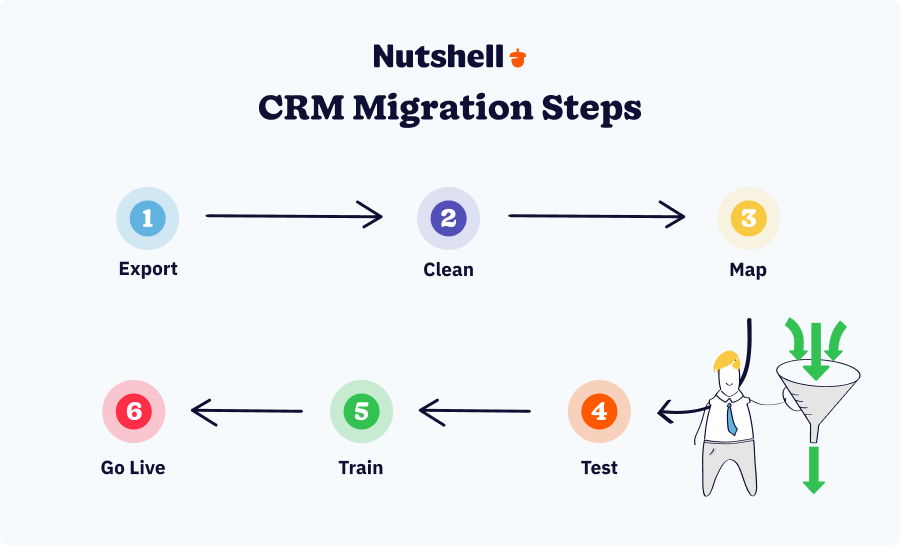
Step 1: Export your Pipedrive data
Navigate to Settings → Data → Export in Pipedrive and download your contacts, companies, deals, and activities. Pipedrive allows CSV exports, which most modern CRMs can import.
Tip: Export separately by data type (contacts, companies, deals) to make mapping easier.
Step 2: Clean and deduplicate your data
Before importing data into a new system, audit it thoroughly. Remove duplicates, standardize naming conventions, and fill in critical missing fields. This step prevents carrying over Pipedrive’s data quality issues into your new platform.
Pro tip: Use a data cleaning tool, such as Zapier, or a migration service to automate this step.
Step 3: Map fields to your new CRM
Each CRM structures data differently. Create a mapping document that shows how Pipedrive fields align with your new CRM’s field structure. For example:
- Pipedrive “Custom Fields” → New CRM “Properties”
- Pipedrive “Pipeline Stages” → New CRM “Deal Stages”
- Pipedrive “Activities” → New CRM “Activity Timeline”
Step 4: Test migration in a sandbox
Before going live, run a test migration in a sandbox environment to ensure everything is working as expected. Verify that the data was imported correctly, relationships between contacts and companies are intact, and deal history is preserved.
Step 5: Train your team
Before full rollout, conduct training sessions covering:
- How to log activities and manage deals
- Where to find critical information (pipeline, reports, customer history)
- New workflows and automation rules
- How to use any new features your previous CRM lacked
Step 6: Go live and monitor adoption
Execute the final migration during off-peak hours. Monitor for issues during the first week and provide rapid support to teams encountering challenges.
- Timeline: 2–3 weeks from start to full adoption
- Cost: Most migration services charge $1,000–$5,000, depending on data complexity. Nutshell’s Import2 partnership offers free white-glove migration, which can save significant time and expense.
FAQs about Pipedrive alternatives
1. Is there a free version of Pipedrive?
No—Pipedrive does not offer a permanent free plan. It only provides a 14-day free trial, after which paid plans start at $14 per user per month. If you’re looking for free options, HubSpot CRM and Zoho CRM both offer free tiers with limited functionality.
2. What is the best free CRM alternative to Pipedrive?
HubSpot CRM is the most popular free alternative, with unlimited users and up to one million contacts. Zoho CRM also has a free plan for up to three users and includes pipeline tracking and workflow automation. These options are ideal for small teams who want to test a CRM before investing in a paid plan.
3. What’s better, Pipedrive or HubSpot?
Pipedrive is great for teams that want a simple, sales-focused pipeline tool, while HubSpot shines for companies that need marketing and customer service integrations. Pipedrive is generally more affordable and easier to use out of the box, but HubSpot provides broader functionality if you’re willing to pay for higher-tier plans.
4. How long does it take to migrate from Pipedrive to a new CRM?
Most migrations take one to two weeks from planning to go-live, depending on data volume and complexity. The process typically includes:
- Days 1–2: Export data from Pipedrive and audit for duplicates and quality issues
- Days 3–4: Map Pipedrive fields to your new CRM’s field structure
- Days 5–7: Execute test migration in a sandbox environment and verify data accuracy
- Days 8–10: Complete final migration to your live system
- Days 11–14: Train your team and monitor adoption
Many CRM vendors (including Nutshell, with its Import2 partnership) offer free white-glove migration assistance that handles the heavy lifting and reduces downtime.
5. Does Nutshell have deal limits like Pipedrive?
No. Nutshell includes unlimited contacts, companies, and deals on every plan—including the entry-level $13/user/month plan. There’s no surprise tier upgrade when your pipeline grows. This is one of the biggest differentiators for teams leaving Pipedrive, where deal limits force painful mid-year plan upgrades.
6. What should I look for when evaluating Pipedrive alternatives?
Focus on five key areas:
- Feature set: Does the CRM include sales pipeline, contact management, automation, reporting, and ideally marketing or engagement tools? Or will you need add-ons?
- Pricing and value: Compare total cost of ownership, not just per-user fees. Does the base plan include essential features, or do you need to upgrade for email integration or automation?
- Ease of use: Can your team get productive within hours, not weeks? Test the free trial with real workflows.
- Integrations: Will the new CRM connect natively with your email, calendar, and critical third-party tools? Or will you need workarounds?
- Support quality: Is live support included in your plan? What’s the response time? Do they offer migration assistance?
7. Can I integrate Pipedrive with other tools?
Yes, Pipedrive integrates with email, calendar, and third-party apps, but with caveats. Integration complexity is a frequent complaint in reviews—many integrations require custom API setup rather than simple one-click connections. Better alternatives like Nutshell, HubSpot, and Salesforce offer more native integrations and cleaner marketplace ecosystems.
If your tech stack is heavy on integrations (marketing automation, customer support, accounting software), consider a platform with deeper integration support from day one.
Choose Nutshell: The ideal Pipedrive alternative
Ultimately, the best CRM is the one that meets your company’s needs, budget, and growth trajectory. When you’re evaluating Pipedrive alternatives, the choice becomes clearer—especially when you compare what you’re actually getting for your money. With its robust features, world-class customer support, and affordable pricing, Nutshell is a great choice.
Nutshell offers the right balance of simplicity and power. It covers all the bases that Pipedrive does—intuitive pipeline management, contact tracking, mobile access—and then goes further by adding built-in marketing and engagement tools, top-notch support, and a more generous usage model with unlimited storage and no deal caps.
Why Nutshell stands out
- Better value: At $13/user/month for the entry plan, you get unlimited contacts, basic email marketing, and automation. Pipedrive forces you to upgrade to $34+ per user per month for comparable features.
- All-in-one without the enterprise overhead: HubSpot and Salesforce offer similar breadth, but they come with steeper learning curves, higher costs, and lengthy implementations. Nutshell proves you don’t need enterprise complexity to get enterprise capabilities.
- Support you can actually reach: Every plan includes live phone and email support. No waiting on chatbots or hoping for email replies.
- Built for growth: No surprise deal caps or hidden tier upgrades. Nutshell grows with your business without forcing painful transitions.
- Designed for B2B sales: Multi-stakeholder deals, long sales cycles, complex reporting needs—Nutshell handles it all natively, without add-ons.
Take the next step
For B2B organizations that want a CRM partner to grow with them, Nutshell is a solution that will not only meet your needs out of the box but also actively help your team sell smarter and work together better.
Ready to experience a better alternative to Pipedrive?
Start your free 14-day trial of Nutshell — no credit card required, full access to all features. See why thousands of sales teams have switched from Pipedrive and never looked back.Or if you’d prefer a walk-through: Book a personalized demo with our team. We’ll show you exactly how Nutshell solves the specific pain points that are driving your team away from Pipedrive, and we can even help you plan a seamless migration.
BACK TO TOP Written by
Will Gordon Sr. Director of MarketingReady to try
Nutshell for Free?Thank you! Your submission has been received!Oops! Something went wrong while submitting the form.






What Is Revenue Intelligence? An All-Encompassing Guide
Published on: January 24, 2024Highly Effective Strategies for Elevating Sales Team Performance
Published on: November 10, 2022Join 30,000+ other sales and marketing professionals. Subscribe to our Sell to Win newsletter!










