Lead Management Best Practices: 18 Proven Ways to Convert More Leads

-

Lead management best practices are the systems, habits, and tools that help sales teams consistently move leads from first contact to closed deal — without letting opportunities fall through the cracks. Companies that implement a structured lead management process generate 50% more sales-ready leads at 33% lower cost, according to Forrester Research. Nurtured leads make 47% larger purchases than leads that never receive consistent follow-up, per The Annuitas Group. The difference between a team that hits quota and one that doesn’t often comes down to how deliberately they manage the leads already in their pipeline.
Lead management is the end-to-end process of capturing, tracking, qualifying, nurturing, and converting leads into paying customers. It connects marketing efforts to sales outcomes by giving every rep a clear, consistent system for handling every lead at every stage. CRM platforms like Nutshell, HubSpot, Salesforce, Pipedrive, and Microsoft Dynamics 365 are the primary tools teams use to execute lead management at scale — but the platform is only as effective as the process behind it.
This guide covers 18 lead management best practices that work for B2B sales teams of all sizes. Whether you’re building your first lead management system or tightening up an existing one, these practices will help your team spend less time on busywork and more time closing deals.
Key takeaways
- Lead response time is everything: Leads contacted within five minutes are 21 times more likely to convert than those contacted after 30 minutes
- Quality beats quantity: Scoring and segmenting leads before routing them to sales saves time and dramatically improves close rates
- Your CRM is the foundation: Every practice in this guide depends on a CRM that your team actually uses — consistently
- Automation isn’t optional: Sales reps who automate data entry and follow-up tasks recover an average of eight hours per week to spend on selling
- Sales and marketing alignment drives revenue: Teams with a formal lead handoff process between marketing and sales close deals faster and at higher rates
- Data decay is your silent killer: 30% of CRM data becomes inaccurate every year — clean data is a competitive advantage, not a housekeeping task
- Nurturing never stops: 80% of sales require five or more follow-up attempts, yet most reps quit after four
Table of Contents
- What is lead management?
- What are the major steps the in lead management process?
- Why does lead response time matter so much?
- How we selected these lead management best practices
- 18 lead management best practices
- Case study: How NEW used Nutshell to bring lead management out of the dark
- What causes leads to get stuck in a sales pipeline?
- Lead management best practices FAQs
What is lead management?
Lead management is the process of capturing, organizing, qualifying, nurturing, and converting leads into customers through a structured, repeatable system. It is the operational backbone of any sales team — the difference between a pipeline full of real opportunities and a list of contacts that never go anywhere. Essentially, it is how you manage leads from start to finish.
A lead is any person or organization that has expressed interest in your product or service but hasn’t yet made a purchase. Lead management is how your team turns that interest into revenue. It encompasses everything from the moment a lead fills out a web form or gets added to your CRM to the moment they sign a contract — and every touchpoint in between.
Effective lead management requires four things working together: a clear process for capturing and routing leads, a system for qualifying and prioritizing them, a strategy for nurturing leads that aren’t ready yet, and a CRM to keep all of it organized and visible across your team. Without all four in place, leads get lost, follow-ups get missed, and revenue gets left on the table.
What are the major steps in the lead management process?
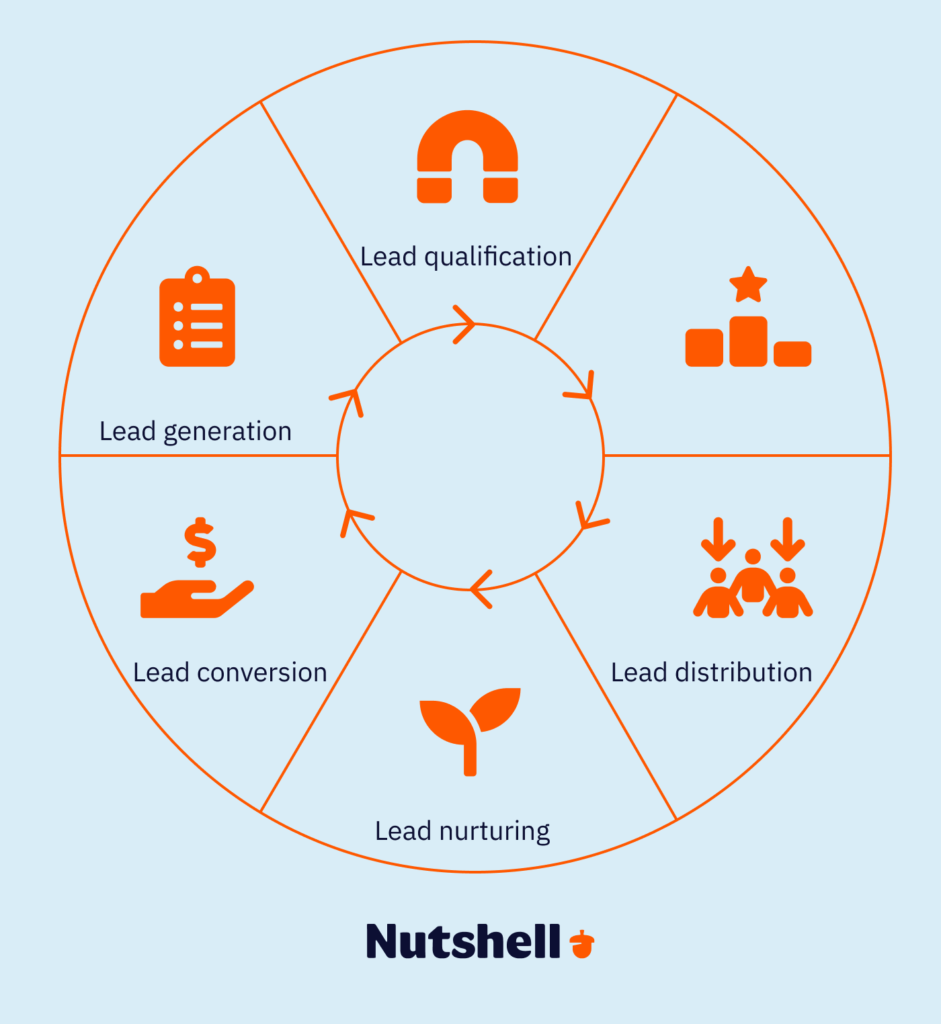
There are several stages involved in the sales lead management process, and it’s important to optimize your process at each step of the way. Each of these stages is a crucial part of managing sales leads. These stages are:
- Lead generation: The first step in managing leads is lead generation. This stage is all about creating interest in your company. You can collect leads via forms on your website, social media, email marketing, and through other channels. Currently, lead generation remain underused, with only 15% of companies fully leveraging lead generation and management tools.
- Lead qualification: Once you have a lead, you need to qualify it to determine if it’s a good fit for your solution. Some leads may not be your ideal customer, and spending too much time on them isn’t the best use of resources. Qualify them early on to save effort and energy.
- Lead scoring: In this stage, you determine the value of a lead using a combination of criteria that matter most to your company. A lead’s score then dictates how much time and effort your team puts into winning the deal.
- Lead distribution: When a lead is qualified and scored, it can be distributed to the right salesperson on your team for nurturing. You can use automation to send leads to the rep most qualified to work with them based on experience, geography, performance, or other factors.
- Lead nurturing: The lead nurturing step focuses on converting leads into customers by staying in touch with valuable content and timely follow-ups that guide decision-making. Companies that nurture their leads have experienced up to a 45% increase in lead generation return on investment.
- Lead conversion: Finally, you’ve won the sale! The lead conversion step is a big win, but don’t rest just yet—as you maintain the customer relationship, you may have opportunities for cross- or upsells.
Why does lead response time matter so much?
Lead response time is one of the single most impactful variables in your entire lead management process — and most teams dramatically underestimate it. Leads contacted within five minutes of submitting a form are 21 times more likely to convert than leads contacted after 30 minutes, according to research from SalesOSO. Responding within one minute can increase conversions by up to 391% compared to waiting an hour.
The reason is simple: when a lead reaches out, they’re in an active decision-making moment. Every minute that passes without a response is a minute your competitors can use. B2B buyers are already 61% through their buying journey before they make first contact with a vendor, according to Forrester Research — which means when they do reach out, they’re close to a decision. Being first matters.
The fastest way to improve your speed-to-lead is through automation. Nutshell’s lead routing and notification features ensure that the moment a lead enters your CRM — whether from a web form, email, or manual entry — it’s immediately assigned to the right rep with a triggered follow-up reminder. No leads sitting in a queue. No reps missing the window.
Keep up the momentum after you close a lead!
Nutshell’s closed lead follow-up pipeline automation instantly routes Won, Lost, or Cancelled leads to the next pipeline—so every opportunity stays managed, nurtured, and on track.

How we selected these lead management best practices
These 18 practices were identified through an analysis of lead management outcomes across Nutshell’s network of 5,000+ customers in more than 50 countries, combined with research from Forrester Research, The Annuitas Group, MarketingSherpa, and the Demand Gen Report. Each practice was selected because it has a direct, measurable impact on at least one of three outcomes: lead conversion rate, sales cycle length, or revenue per closed deal. Think of these as your go-to lead management tips. We prioritized practices that apply to B2B sales teams at small and mid-sized businesses — the teams most likely to be working without dedicated RevOps support, large SDR benches, or enterprise-level tooling. Every practice in this list is actionable with a CRM like Nutshell and a committed sales team.
18 lead management best practices
Once you know what’s getting your prospects stuck, the next challenge is removing those snags and moving them through your pipeline, a tall order given that 65% of small businesses struggle with lead management.
The good news is that when you put the right lead management tactics into action, you can get those leads moving forward again. Let’s go through 14 lead management process best practices that you can emulate to ensure you’re managing leads effectively and closing more deals this year:
1. Define your ideal customer profile
An ideal customer profile (ICP) is a detailed description of the type of company or individual most likely to buy your product, get value from it, and stay a customer long-term. It is the foundation every other lead management practice is built on — because if you don’t know who you’re looking for, no scoring system, nurture sequence, or follow-up cadence will save you.
Why it matters: Teams that define their ICP before building their pipeline generate higher-quality leads, shorter sales cycles, and better retention. Without an ICP, your team spends time on leads that look active but will never close. The clearer your ICP, the more efficient every downstream process becomes — from lead scoring to email personalization to pipeline forecasting.
How to do it: Define your ICP using four criteria — firmographic fit (company size, industry, location), technographic fit (tools they already use), behavioral signals (how they found you, what content they engaged with), and pain fit (the specific problem your product solves). In Nutshell, you can build custom fields and tags that map directly to your ICP criteria, so every new lead is automatically evaluated against the same standard — and reps spend less time making judgment calls on fit.
Pro tip: Revisit your ICP every six months. Markets shift, your product evolves, and the customers who were a perfect fit two years ago may no longer reflect your best opportunities.
2. Score your leads
Lead scoring is a method of assigning numerical values to leads based on how well they match your ICP and how actively they’ve engaged with your brand. It is the mechanism that separates leads worth pursuing now from leads that need more nurturing — and it keeps your sales team focused on the opportunities most likely to close.
Why it matters: Without lead scoring, reps default to working the leads that look busiest or were most recently added — not the ones most likely to convert. Lead scoring fixes that by giving every rep an objective, data-driven priority list. Teams that use lead scoring see 68% higher conversion rates, according to MarketingSherpa.
How to do it: Assign positive scores for fit signals (right industry, right company size, right role) and engagement signals (opened emails, visited pricing page, attended a webinar). Assign negative scores for disqualifying signals (wrong geography, student email address, competitor domain). Nutshell’s lead confidence feature lets you set a confidence percentage on every lead — so your team always knows at a glance which leads deserve immediate attention and which can wait.
Pro tip: Score decay matters. A lead who was highly engaged six months ago and has gone silent should have their score reduced automatically. Nutshell’s activity tracking makes this easy to spot.
THAT’S PRO
Write less email, get more replies.
Are you falling off your prospects’ radars? With Nutshell’s personal email sequences, we’ll remember the follow-up for you.

3. Segment your leads
Lead segmentation is the practice of dividing your leads into distinct groups based on shared characteristics — so you can deliver relevant, targeted communication to each group instead of sending the same message to everyone.
Why it matters: Generic outreach gets ignored. Segmented, relevant outreach gets responses. Personalized lead nurturing emails improve click-through rates by 14% and conversion rates by 10%, according to the Aberdeen Group. Segmentation is what makes personalization possible at scale — without it, you’re guessing.
How to do it: Segment by at least three variables: industry or vertical, company size or revenue tier, and lead source (organic search, paid ad, referral, outbound). In Nutshell, tags and custom fields let you create as many segments as you need — and those segments can trigger different email sequences, pipeline stages, and rep assignments automatically, so the right message reaches the right lead without your team having to manually sort through their pipeline every morning.
Pro tip: Don’t over-segment. Starting with three to five meaningful segments is more effective than building 20 segments you can’t maintain. Complexity is the enemy of consistency.
4. Respond to leads fast
Speed-to-lead is not just a best practice — it’s a make-or-break differentiator. As covered above, leads contacted within five minutes are 21 times more likely to convert than those contacted after 30 minutes. Every minute of delay reduces your odds of conversion, and your competitors aren’t waiting.
Why it matters: B2B buyers are evaluating multiple vendors simultaneously. The first rep to provide a helpful, personalized response sets the frame for the entire evaluation. Being first doesn’t just win the meeting — it frequently wins the deal. 50% of buyers choose the vendor that responds first, regardless of other factors, according to SalesOSO.
How to do it: Set a team standard for lead response time — ideally under five minutes for high-scoring leads, under one hour for all others. Use Nutshell’s automated lead assignment and activity reminders to trigger immediate action the moment a new lead enters your pipeline. Pair this with email sequence automation so that even if a rep is unavailable, a personalized first-touch email goes out instantly — keeping the window open until a rep can follow up directly.
Pro tip: Measure your average lead response time monthly and make it a team metric. What gets measured gets managed.
5. Define your lead stages
Lead stages are the named milestones a lead passes through in your sales process — from first contact to closed deal. They give your entire team a shared vocabulary for pipeline progress and make it possible to spot bottlenecks, forecast revenue, and coach reps on the right activities at each stage.
Why it matters: Without defined stages, “this lead is progressing” means something different to every rep on your team. That ambiguity kills forecasting accuracy and makes it impossible to identify where leads are consistently getting stuck. Clearly defined stages are also what make pipeline reporting meaningful — you can’t analyze what you haven’t named.
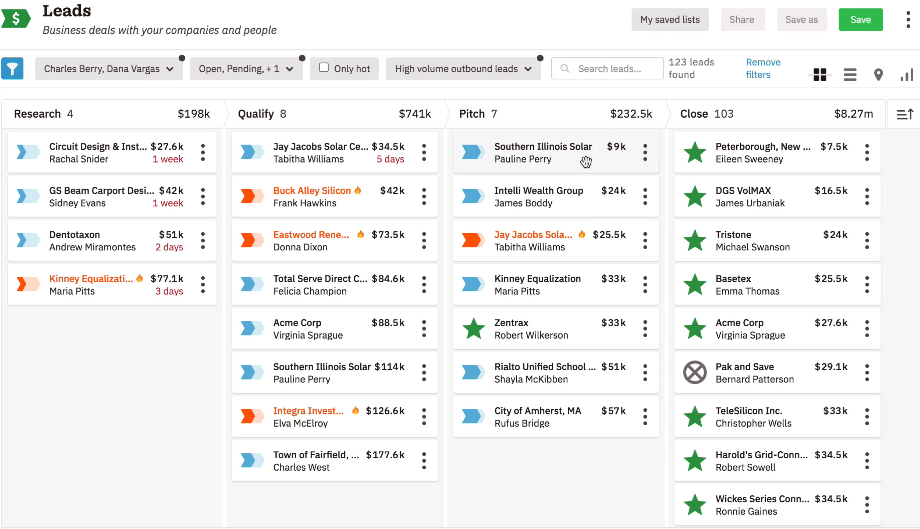
How to do it: Define five to seven stages that map to your actual sales process — not a generic template. A typical B2B pipeline might look like: New → Contacted → Qualified → Demo Scheduled → Proposal Sent → Negotiation → Closed Won / Closed Lost. In Nutshell, you can create multiple custom pipelines with unique stages for different products, markets, or sales motions — so your process reflects reality, not a textbook.
Pro tip: Each stage should have clear entry criteria — a specific action or event that moves a lead from one stage to the next. “I feel like they’re interested” is not an entry criteria.
6. Align sales and marketing with a service level agreement
A sales and marketing SLA is a formal agreement that defines what each team is responsible for in the lead management process — specifically, what marketing will deliver to sales and what sales will do with those leads. It is one of the most underutilized tools in B2B lead management, and one of the most impactful.
Why it matters: Without an SLA, marketing blames sales for not following up on leads, and sales blames marketing for sending unqualified ones. An SLA replaces that friction with accountability. Organizations with tightly aligned sales and marketing teams achieve up to 38% higher win rates, according to MarketingSherpa. The SLA is what makes alignment operational — not just aspirational.
How to do it: Your SLA should define at minimum: the criteria that qualify a lead for handoff from marketing to sales (MQL definition), the maximum time sales has to follow up after receiving a lead, and the feedback loop — how sales communicates lead quality back to marketing. In Nutshell, shared pipeline visibility means both teams can see the same data in real time, making SLA compliance easy to monitor and enforce without separate reporting tools or weekly alignment meetings.
Pro tip: Review your SLA quarterly. Lead definitions should evolve as your market and product evolve.
7. Understand the difference between MQLs and SQLs
A Marketing Qualified Lead (MQL) is a lead that marketing has determined is worth nurturing based on fit and engagement, but isn’t yet ready for a sales conversation. A Sales Qualified Lead (SQL) is a lead that sales has accepted as ready for direct outreach based on more rigorous qualification criteria. These two definitions — and the handoff process between them — are at the heart of every well-functioning lead management system.
Why it matters: Sending MQLs directly to sales before they’re ready wastes rep time and damages the lead relationship. Holding SQLs in marketing nurture sequences too long means losing deals to faster competitors. The MQL/SQL distinction gives each team clarity on where a lead belongs and what should happen next. SQLs convert to closed opportunities at 20 to 30%, compared to five to 15% for MQLs — the distinction is worth getting right.
How to do it: Define your MQL criteria collaboratively with both sales and marketing. Typical MQL signals include: downloaded a high-intent resource, visited the pricing page two or more times, attended a webinar, or reached a lead score threshold. SQL criteria should require a confirmed budget signal, decision-making authority, an identified need, and a defined timeline — commonly known as BANT. In Nutshell, lead stages and custom fields make it easy to track and enforce both definitions so there’s no gray area at the handoff.
8. Use a CRM to centralize your lead data
A CRM — Customer Relationship Management platform — is the system of record for your entire lead management process. It is where lead data lives, where activity gets logged, where pipelines get managed, and where your team coordinates without relying on memory, sticky notes, or shared spreadsheets.
Why it matters: Sales reps spend an average of 5.5 hours per week on manual data entry when they don’t have a well-configured CRM, according to Salesforce State of Sales research. A CRM that’s actively used eliminates that waste and gives every rep full context before every touchpoint — so no one walks into a call blind. Will Jones III, Relationship Manager at NEW (Nonprofit Enterprise at Work), put it this way after switching to Nutshell: “When somebody logs in to their Nutshell dashboard and can quickly see everything they need to get done that day… it makes a difference.”
How to do it: Choose a CRM your team will actually use. The most powerful CRM in the world is worthless if your reps avoid it. Nutshell is designed for adoption — it’s intuitive enough for a first-time CRM user and powerful enough for a seasoned sales manager. Setup takes days, not months, and every contact, email, call, and note is automatically logged so nothing falls through the cracks.
Feature + benefit: Nutshell’s automatic email sync logs every conversation directly to the contact record — so reps spend less time entering data and more time selling.
Looking for an easy-to-use CRM with all the features you need to boost sales?
Nutshell has what you’re looking for.

9. Automate repetitive tasks
Sales automation is the use of technology to execute routine, repeatable tasks — data entry, follow-up reminders, lead assignment, email sequences — without manual intervention. It is not about replacing sales reps. It’s about giving them back the time they’re currently spending on work that doesn’t require human judgment.
Why it matters: CRM automation reduces manual data entry by up to 65% and saves an average of eight hours per rep per week, according to research aggregated by Overton Collective. That’s a full day of selling time returned to every rep, every week. Teams that automate lead management workflows see a 10% or greater revenue increase within six to nine months, according to Gartner. The math is straightforward — less time on admin means more time on revenue.
How to do it: Start with the three highest-volume repetitive tasks your team does manually: lead assignment, first-touch follow-up, and activity reminders. In Nutshell, automated pipelines can trigger next-step actions the moment a lead moves from one stage to another — no rep has to remember to send the follow-up email or schedule the check-in call. It happens automatically, every time, without exception.
Feature + benefit: Nutshell’s email sequence automation sends personalized follow-up emails on a schedule you set — so leads stay warm even when your reps are focused on active deals.
10. Track and act on lead behavior
Lead behavior tracking is the practice of monitoring how leads interact with your brand — which emails they open, which pages they visit, which content they download — and using that data to time and personalize your outreach. It is what turns a generic follow-up into a relevant, well-timed conversation.
Why it matters: B2B buyers are 61% of the way through their buying journey before they make first contact with a vendor, according to Forrester Research. That means the signals they’re sending through their digital behavior — revisiting your pricing page, downloading a case study, attending a webinar — are telling you exactly where they are in the decision process. Acting on those signals in real time is the difference between being helpful and being ignored.
How to do it: Use your CRM to track email opens, link clicks, and website visits. In Nutshell, the timeline view on every contact record shows a full history of every interaction — so when a rep picks up the phone, they know exactly what the lead has seen, read, and responded to. Pair this with Nutshell’s website visitor identification feature to see which companies are visiting your site even before they fill out a form — turning anonymous traffic into actionable lead intelligence.
11. Personalize your outreach
Personalization in lead management means tailoring your communication to the specific situation, pain points, and behavior of each individual lead — rather than sending the same template to everyone in your pipeline. It is the single most effective way to improve reply rates, build trust, and move leads through your pipeline faster.
Why it matters: 82% of B2B buyers say content targeted to their specific industry is more valuable than generic content, according to MarketingSherpa. Personalized outreach isn’t just preferred — it’s expected. Generic emails signal that you haven’t done your homework, and in a crowded inbox, they get deleted before they get read.
How to do it: Personalization doesn’t require writing every email from scratch. It requires using the right data at the right time. Reference the lead’s company, industry, or a specific action they took — “I noticed you downloaded our guide to CRM migration — happy to walk you through what that looks like for a team your size.” In Nutshell, contact and company records store all the context you need to personalize at scale — industry, company size, recent activity, past conversations — so every rep can send relevant outreach without spending hours on research.
12. Follow up consistently
Consistent follow-up is the practice of maintaining regular, structured contact with leads throughout the sales process — not just at the beginning. It is one of the most straightforward lead management best practices and one of the most consistently ignored.
Why it matters: 80% of sales require five or more follow-up attempts, yet 92% of sales reps quit after four, according to research from SalesOSO. That gap — between what it takes to close a deal and what most reps are willing to do — is where revenue gets lost. The reps who follow up consistently aren’t more talented. They’re more persistent — and they have a system that makes persistence effortless.
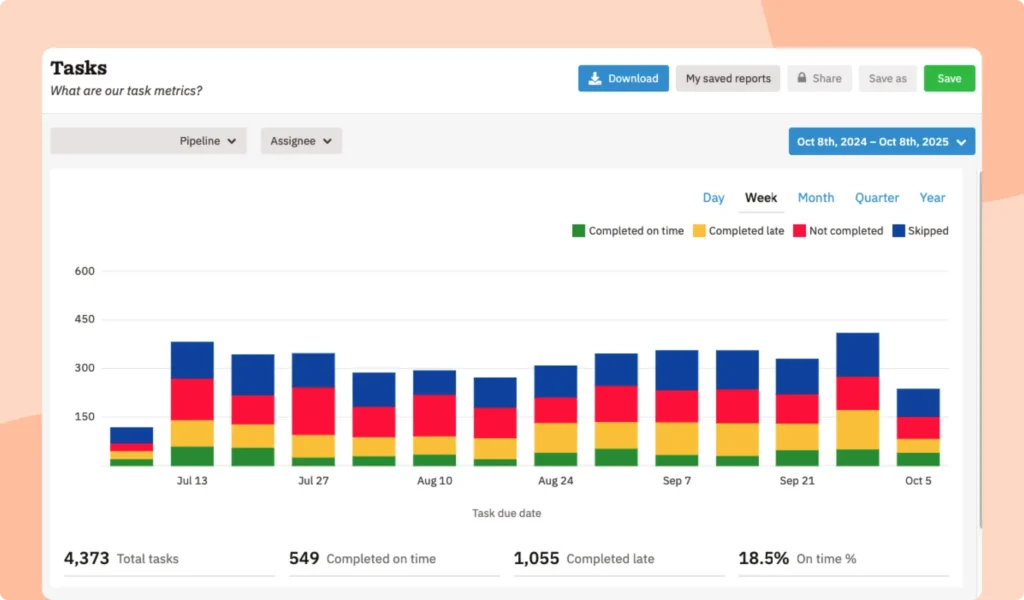
How to do it: Build follow-up into your process, not your memory. In Nutshell, every lead in your pipeline has a “next action” assigned to it — a specific task with a specific due date. The next-action sales approach means no lead ever sits idle without a scheduled follow-up. Reps start every day knowing exactly what they need to do and who they need to contact — without spending 20 minutes reviewing their pipeline to figure out where things stand.
Feature + benefit: Nutshell’s next-action dashboard surfaces every overdue and upcoming task in one view — so reps never have to wonder what to work on next.
13. Nurture leads that aren’t ready to buy
Lead nurturing is the process of building relationships with leads who are interested but not yet ready to make a purchase — by delivering relevant, valuable content over time that keeps your brand top of mind and moves them gradually toward a buying decision.
Why it matters: Only 27% of B2B leads are ready to talk to sales when they first raise their hand, according to MarketingSherpa. The other 73% need nurturing. Companies that excel at lead nurturing generate 50% more sales-ready leads at 33% lower cost, according to Forrester Research, and nurtured leads make 47% larger purchases than non-nurtured leads, per The Annuitas Group. Discarding leads that aren’t immediately ready is one of the most expensive mistakes a sales team can make.
How to do it: Build a nurture sequence for leads that don’t meet your SQL criteria yet. A basic sequence includes an educational email series (three to five emails over two to four weeks), an invitation to a relevant webinar or resource, and a re-engagement check-in at 30 and 60 days. In Nutshell, email sequences can be triggered automatically based on lead stage — so nurturing happens in the background while your reps focus on active opportunities.
14. Use multiple channels
Multi-channel outreach is the practice of reaching leads through more than one communication channel — email, phone, LinkedIn, and text — in a coordinated sequence rather than relying on any single method.
Why it matters: No single channel reaches everyone. Some leads respond to email. Others only engage on LinkedIn. Some won’t respond until you call. Multi-channel sequences increase your chances of breaking through — and they signal to leads that you’re genuinely interested, not just blasting a list. B2B teams using multi-touch, multi-channel campaigns see 40% higher engagement rates than single-channel approaches, according to Marketo.
How to do it: Build a coordinated outreach sequence that uses at least three channels over two to three weeks. A standard sequence might look like: Day 1 — personalized email. Day 3 — LinkedIn connection request. Day 5 — follow-up email. Day 8 — phone call. Day 12 — final email with a clear close or opt-out option. In Nutshell, activity tasks can be set for each channel alongside your email sequences — so your entire multi-channel playbook is visible in one pipeline view and nothing gets skipped.
15. Ask the right qualifying questions
Lead qualification is the process of determining whether a lead has the budget, authority, need, and timeline to actually buy from you. It is what prevents your team from spending time on opportunities that look promising but will never close.
Why it matters: Time is your most finite resource. Every hour a rep spends on an unqualifiable lead is an hour not spent on one that can close. Qualification frameworks like BANT (Budget, Authority, Need, Timeline), MEDDIC (Metrics, Economic Buyer, Decision Criteria, Decision Process, Identify Pain, Champion), and CHAMP (Challenges, Authority, Money, Prioritization) exist because structured qualification consistently produces better outcomes than instinct alone. Teams with mature qualification practices achieve a 9.3% higher sales quota attainment rate, according to CSO Insights.
How to do it: Choose a qualification framework and build it into your sales process as a defined stage entry criteria — not an optional step. In Nutshell, custom fields make it easy to track BANT or MEDDIC answers directly on the lead record, so every rep and manager can see qualification status at a glance. If a lead can’t answer your qualification questions, that’s data — not a dead end. Route them back to nurture and revisit when the timing is right.
16 sales process templates for B2B pipelines
Whether you’re building your first sales process or overhauling an existing one, these Nutshell-approved templates will give you a great head-start.
16. Track your lead management metrics
Lead management metrics are the quantitative measures that tell you how well your process is working — and where it’s breaking down. They are what separate teams that manage by instinct from teams that manage by evidence.
Why it matters: You can’t improve what you don’t measure. The most common lead management failures — slow follow-up, poor qualification, inconsistent nurturing — are invisible without the right metrics in place. Teams with mature lead management measurement practices achieve a 9.3% higher sales quota achievement rate, according to CSO Insights.
How to do it: Track at minimum: lead response time, lead-to-opportunity conversion rate, opportunity-to-close rate, average deal size, and sales cycle length. In Nutshell, built-in reporting dashboards make all of these metrics visible without manual calculation — and you can segment them by rep, territory, lead source, or time period to surface the insights that actually drive decisions rather than just describe what already happened.
Pro tip: Review your metrics weekly at the team level and monthly at the individual level. Weekly reviews catch problems early. Monthly reviews reveal patterns.
17. Keep your CRM data clean
CRM data hygiene is the ongoing practice of reviewing, updating, correcting, and removing inaccurate or outdated records in your CRM to ensure your team is always working from reliable information. It is the least glamorous lead management practice and one of the most important.
Why it matters: CRM data decays at a rate of 30% per year — meaning roughly one in three records in your database becomes inaccurate within 12 months due to job changes, company mergers, updated contact details, and deals going stale. Dirty data leads to missed follow-ups, embarrassing outreach errors, and inaccurate forecasting. Clean data is a competitive advantage — teams that maintain it consistently outperform those that don’t.
How to do it: Schedule a quarterly data audit. Identify and merge duplicate records, update contact information for key accounts, archive closed-lost leads that have been inactive for more than 12 months, and review custom field usage for consistency. In Nutshell, duplicate detection and bulk editing tools make data hygiene manageable — even for teams without a dedicated RevOps person or a data analyst on staff.
Pro tip: Assign data hygiene ownership to a specific person on your team — ideally your sales manager or ops lead. Without an owner, it doesn’t get done.
18. Review and refine your process
A lead management process review is a scheduled, structured evaluation of your entire lead management system — from ICP definition to close — designed to identify what’s working, what isn’t, and what needs to change. It is what keeps your process aligned with your market, your product, and your team’s capabilities over time.
Why it matters: The best lead management process you had two years ago may be actively hurting you today. Markets change. Buyer behavior shifts. New tools emerge. Teams that build review cycles into their rhythm adapt faster and outperform teams that treat their process as permanent. A process that no one questions is a process that no one owns.
How to do it: Conduct a full process review every six months. Evaluate each stage of your pipeline for conversion rate, average time in stage, and win/loss patterns. Identify the one or two practices with the lowest performance and redesign them before your next review cycle. In Nutshell, pipeline reporting gives you stage-by-stage conversion data in a single view — so your review meetings are spent making decisions, not pulling numbers together from three different spreadsheets.
Pro tip: Include both sales reps and sales managers in your review sessions. Reps know where the process breaks in practice. Managers know where it breaks in the numbers. You need both perspectives.
What causes leads to get stuck in a sales pipeline?
When you do a bit of digging, you’ll likely be able to link inactive leads to a few specific causes.
Not reaching the right person
If you don’t have the right contact information for the decision-maker at a company, you won’t be able to make a sale. Alternatively, a prospect may enter an email address that they don’t use very often when they fill out a form on your site. This is a problem in both cases because your message isn’t getting in front of the people who need to see it. Take a look at the bounce rates for your emails. If they’re high, that’s one indicator that you aren’t selling to the right person (or anyone at all).
There’s a problem with your product/service
Another reason why a lead might be stuck is that they are having trouble using your solution, or they think it’s too expensive when compared to similar options. Whatever the case may be, it’s important to find and fix any issues that are within your control. While you won’t be able to please every prospect, making the right changes can have a great impact on your bottom line. For example, if you’re finding that a lot of users abandon the account creation process on your site, do your best to reduce friction at that step.
Your buyer isn’t ready yet
It might be that your prospect isn’t sure that they want to make a change and adopt your solution. The majority of people won’t be ready to buy the minute they enter your pipeline. As a result, you have to focus on nurturing and education during your early pipeline stages. Not doing so can leave some prospects hanging without the confidence to make a purchase. You can increase the chances of making a sale by being helpful and relevant.
Case study: How NEW used Nutshell to bring lead management out of the dark
NEW (Nonprofit Enterprise at Work) is a Detroit-based nonprofit that connects professionals with volunteer opportunities at other nonprofits. Before Nutshell, their team was managing relationships across disconnected systems — no single place to see a contact’s full history, no way to know what a colleague had already communicated, no pipeline visibility across service lines.
After switching to Nutshell, NEW built tailored pipelines for each of their distinct service lines, giving every team member a clear view of where every relationship stood at any given moment. Activity logging — emails, notes, meetings — flows directly into each contact record, so no one walks into a conversation without full context. As Will Jones III, Relationship Manager at NEW, put it: “Having that holistic sense of how folks are engaging with NEW makes our outreach more worthwhile.”
The NEW story illustrates something we see across Nutshell’s network of 5,000+ customers: the biggest lead management wins don’t always come from radical process overhauls. They come from giving a dedicated team the visibility and structure they need to do what they’re already good at — building relationships — with more consistency and less guesswork.
Lead management best practices FAQs
-
1. What is the 5-minute rule for lead response, and why does it matter?
The 5-minute rule states you should contact new leads within five minutes of their inquiry. Research shows you’re 100 times more likely to connect with a lead when you respond within five minutes versus waiting an hour, and conversion rates jump 391% when response time is under one minute. Fast response demonstrates reliability and catches prospects while their interest is highest. Use CRM automation to route leads instantly and set up alerts so your team can act immediately.
-
2. What’s the difference between lead scoring and lead qualification?
Lead scoring assigns numerical values to leads based on demographics, firmographics, and behaviors (like website visits or email opens) to rank them automatically. Lead qualification is the human process of verifying whether a lead meets your criteria through conversations—assessing their budget, authority, need, and timeline. Think of scoring as the “what” (data-driven ranking) and qualification as the “why” (confirming fit). Use scoring to prioritize which leads to qualify first, making your sales process more efficient.
-
3. What CRM features are essential for effective lead management?
Essential CRM features include automated lead capture from multiple sources, lead scoring and segmentation tools, automated lead routing and assignment, activity tracking across all touchpoints, email integration and automation, customizable pipelines and stages, reporting and analytics dashboards, and mobile access for on-the-go updates. Look for a CRM that offers these capabilities without overwhelming complexity. Nutshell provides all these features in an intuitive interface designed for teams who want powerful tools without the learning curve.
-
4. How do you measure the success of your lead management efforts?
Track these key metrics: lead response time (aim for under 5 minutes), lead-to-opportunity conversion rate, cost per lead by source, lead velocity (how quickly leads move through your pipeline), sales cycle length, and win rate by lead source. Also monitor lead scoring accuracy by comparing predicted vs. actual conversions. Review these metrics monthly to identify bottlenecks and optimize your process. Your CRM should make tracking these metrics easy with built-in reporting dashboards.
-
5. How long does it take to implement a lead management system?
Most small to mid-sized teams can implement a lead management system in 4-6 weeks. Week 1 focuses on planning and data preparation, Week 2 on CRM setup and customization, Week 3 on pilot testing with a small team, and Week 4 on full rollout and training. The key is starting with core features first rather than trying to configure everything at once. With the right CRM and proper planning, you can see productivity gains within the first month. Nutshell’s onboarding team helps you get up and running quickly with guided setup and training.
-
6. How fast should you follow up with a new lead?
As fast as possible — ideally within five minutes of the lead submitting a form or making contact. Leads contacted within five minutes are 21 times more likely to convert than those contacted after 30 minutes. Every minute of delay reduces your odds of conversion. Automated CRM tools like Nutshell can trigger immediate follow-up notifications and email sequences so that even if a rep is unavailable, the lead gets an immediate, personalized response.
-
7. How do you keep CRM data clean?
CRM data hygiene requires a consistent quarterly review process: identify and merge duplicate records, update outdated contact information, archive inactive leads, and audit custom field usage for consistency. CRM data decays at approximately 30% per year — meaning without active maintenance, nearly a third of your database becomes unreliable within 12 months. Nutshell’s duplicate detection and bulk editing tools make this process manageable for teams without dedicated RevOps support.
-
8. What CRM is best for lead management for small businesses?
Nutshell is purpose-built for small and mid-sized B2B sales teams that need a full-featured CRM without the complexity or cost of enterprise platforms like Salesforce or Microsoft Dynamics 365. Nutshell includes built-in lead scoring, multiple pipeline management, email sequence automation, reporting dashboards, and next-action sales tools — all in one platform — at a price point designed for SMBs. Most teams are live in days, not months.
Ready to put these lead management best practices to work?
Lead management is the process that turns your marketing spend into revenue. Every lead your team captures, qualifies, nurtures, and closes is a direct result of how well that process is working. The 18 practices in this guide give you a complete system — from defining your ICP to keeping your CRM data clean — that works whether you’re a team of two or a team of 200.
Nutshell is the all-in-one CRM built to make every one of these practices easier, faster, and more consistent. With built-in pipeline automation, email sequences, lead scoring, and reporting dashboards, Nutshell gives your team everything it needs to save time and close more deals — without the complexity of enterprise platforms like Salesforce or Microsoft Dynamics 365.
Start your free 14-day trial today — no credit card required — and see why 5,000+ companies in more than 50 countries trust Nutshell to power their sales process.
 BACK TO TOP
 Written by
Will Gordon Sr. Director of MarketingEdited by
Andy Fowler Co-FounderReady to try
Nutshell for Free?Thank you! Your submission has been received!Oops! Something went wrong while submitting the form.


The 20 Digital Marketing Skills You Need to Excel in Your Marketing Career (2026)
Published on: November 10, 2022
19 Best Email Testing Tools to Help You Drive Revenue (And Avoid Embarrassment)
Published on: November 10, 2022
What Is Revenue Intelligence? An All-Encompassing Guide
Published on: January 24, 2024Highly Effective Strategies for Elevating Sales Team Performance
Published on: November 10, 2022Join 30,000+ other sales and marketing professionals. Subscribe to our Sell to Win newsletter!










