Skip to main content ↓

“Nutshell is super user-friendly and intuitive

“I would highly recommend Nutshell

“Easy to use and... wait for it ... 100% buy in!

“Nutshell is both simple and powerful

CRM and email marketing, minus the juggling

Capture leads, send campaigns, automate follow-ups as deals move, and see what earns revenue, all in one place.

Start 14-day free trial Book free demo

🎉 No credit card required!

ReviewsReviews4.3Reviews(1,462)

CRM and email marketing software working together from the same data

Your marketing and your sales teams finally share one customer record. No exporting lists. No syncing tools. No wondering which version of a contact is right.

three orange arrows pointing to the right on a white background
Email that follows the deal

Create audiences from your CRM data. Automate follow-ups at any pipeline stage.

Emails without the code

A drag-and-drop editor and ready-made templates, with optional AI to get you started.

Orange checklist on a whitebackground
Grow your list

Landing pages and forms add every sign-up to your CRM, ready to email.

a closeup of an orange bar graph on a white background
Proof of what earns revenue

Track opens and clicks, then see which channels, email included, win deals.

Audiences built from your CRM data

Every contact’s details, tags, and activity live in your CRM, so you can send to the right people without exporting a list.

  • Build audiences from tags, custom fields, and pipeline data
  • Tag contacts automatically when they meet your criteria
  • Personalize emails with names and company details from your CRM
  • Start follow-up sequences when a lead enters a stage or a tag is added
Options for adding members to email blasts, including People, Leads, Companies, and new contacts

Send smarter emails, faster

Launch newsletters, broadcasts, and drip campaigns in minutes.
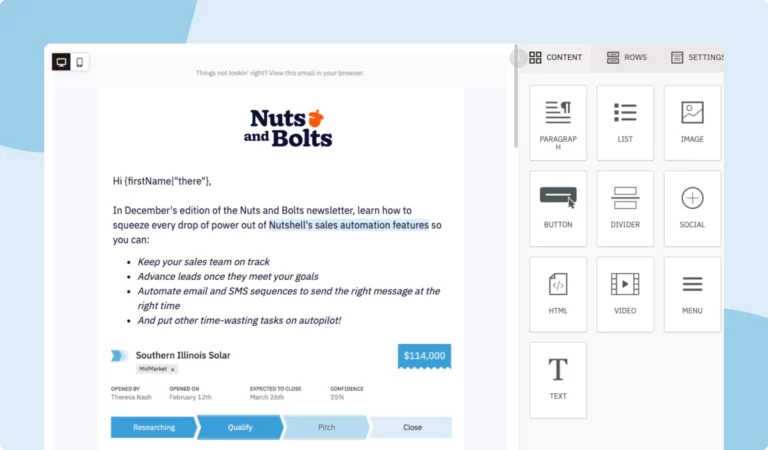
  • Start from ready-made templates
  • Design emails with an intuitive drag-and-drop editor, no code needed
  • Draft emails and whole campaigns with AI tools
  • A/B test subject lines and content, then send the winner automatically
Craft CRM Email Marketing Campaigns With A User-Friendly Builder

Landing pages and forms to feed your campaigns

Every submission lands in your CRM, and form answers can tag contacts and add them to the right audience automatically.
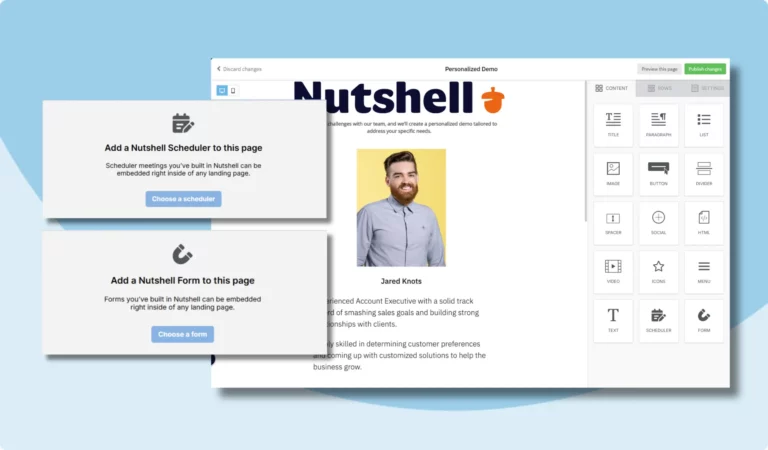
  • Publish unlimited landing pages from 30+ templates
  • Add branded forms that create or update contacts in your CRM
  • Start follow-up sequences when someone joins an audience or gets a tag
  • Let prospects book meetings straight from an email or landing page
A composite image showing Nutshell's no-code landing page builder with options to include a meeting scheduler and web form

Reports that connect email to revenue

Track what your emails do for your pipeline.
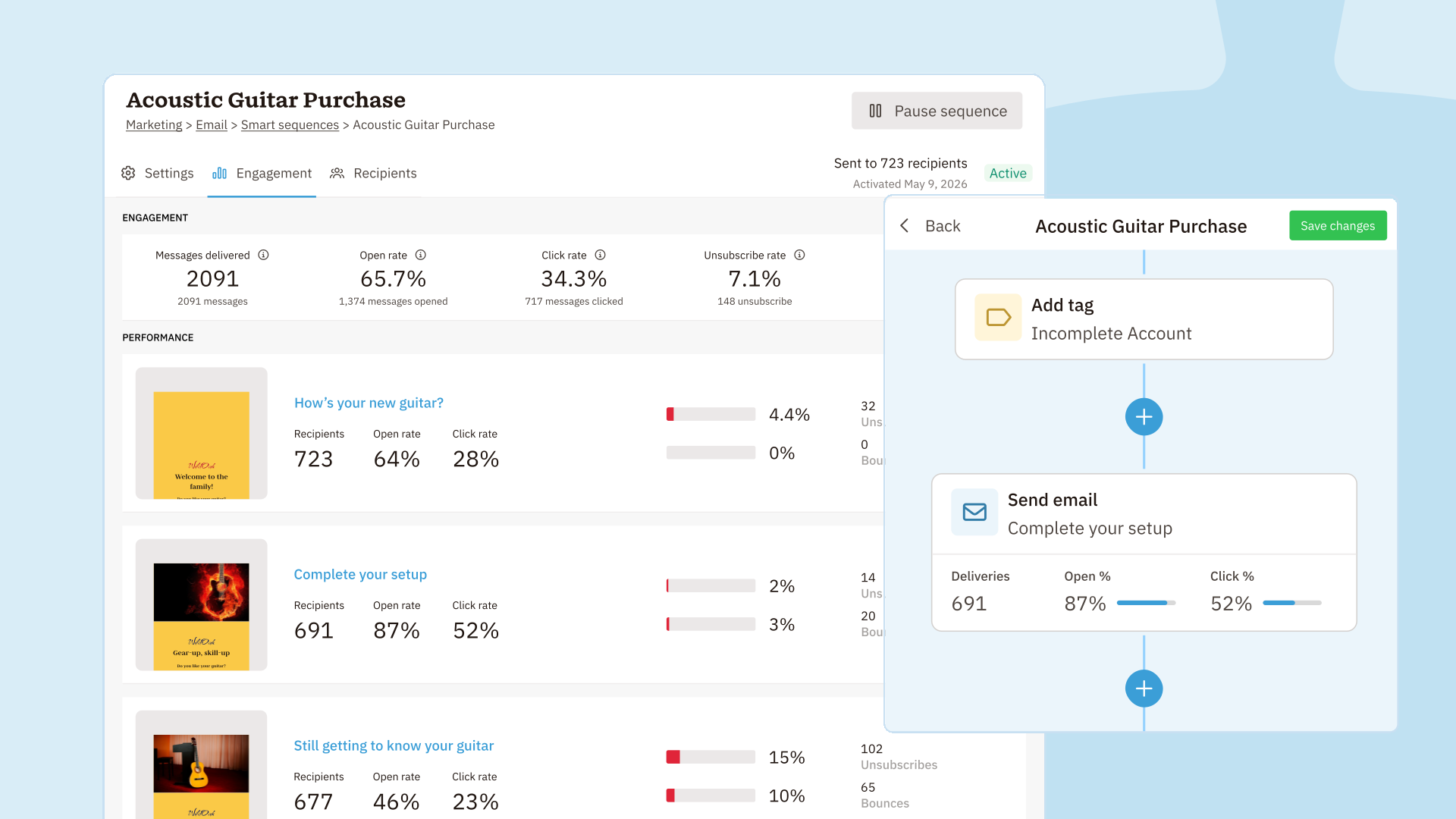
  • See sends, opens, clicks, unsubscribes, and bounces for every campaign
  • See new leads and won deals by channel with lead attribution reports
  • Report on the number and value of won deals, filtered any way you need
  • Build custom reports filtered by source, tag, stage, and more
  • Describe the sales report you want in plain English, and Smart Reports builds the charts

Free onboarding and live support

We want you to succeed, so we don’t charge for support or onboarding.

  • Get live chat and email support on every plan, starting with your trial
  • Have us import your data for you
  • Get free onboarding to help your team get set up

See Nutshell in action!

Try Nutshell free for 14 days or let us show you around before you dive in.

🎉 No credit card required!

How does pricing work?

  1. Choose your CRM plan.
  2. Choose included Marketing features or Upgrade to Marketing Pro (compare plans)
  3. Choose your number of email marketing contacts.


$13 per user / month

Pricing shown is based on annual commitment

$0 / month

Marketing Foundation is included with all CRM plans.

$0

Monthly send limit is equal to 8x your total number of contacts.

Common questions about getting started

  • Can I bring my existing email lists?

    Yes. Import a CSV, or bring your list from another email marketing tool like Mailchimp or Constant Contact. You can include each person’s unsubscribe status, so you won’t email anyone who opted out.

  • Do I have to pay to try email marketing?

    No. Every month includes 150 free marketing sends, so you can design and test campaigns before you pay. After that, email marketing is billed by your number of marketing contacts. Personal emails you send from your own inbox are never charged.

  • Does Nutshell work with Gmail and Office 365?

    Yes. Gmail and Office 365 sync with Nutshell on every plan, so the emails you send and receive show up on the right contact.

  • What happens after the 14-day trial?

    Your trial ends automatically, and we never ask for a credit card up front, so you won’t be charged. To keep going, pick a plan and add payment details. Your data stays intact, and you can change or cancel any time.


Thousands of happy users can’t be wrong.

ReviewsReviews
4.3Reviews(1,462)

"User-Friendly and robust Features"

Nutshell is a CRM that is incredibly easy to set up and use. One of its standout features is the customizable email templates, which allow us to add items and placeholders effortlessly. This product is very cost-effective and helps us maintain an up-to-date record of our leads.

Carol M. Analyst, Small Business
"Easy and User Friendly Platform for CRM and Email Marketing"

Nutshell makes my job so much easier. I primarily use it for email marketing, and I’m honestly impressed by how intuitive and flexible it is. Designing beautiful, custom emails is a breeze.

Raven S. Content Marketing Specialist, Mid-Market Business
"User friendly and very dynamic"

I use Nutshell daily for both lead management and customer tracking. We also use the Marketing function for email blasts and their builder is really easy to use and produces great looking emails.

Hugh M. Vice President of Sales, Small Business