Import All Your Products to Streamline CRM Setup
-
Last updated on: April 3, 2026
If your organization manages lots of product or service SKUs, keeping up with the details can become a challenge—especially if you’re also managing which products are connected with sales opportunities in your CRM.
Nutshell’s new product importer tool makes it easy to import or update all your products and services at once, so you can spend less time on CRM setup and more time closing deals.
How does Nutshell’s product importer work?
The new product importer allows you to import products or services via a spreadsheet, so you can get your products and prices into Nutshell quickly and without hassle. From there, it’s easy to connect products to your leads to track lead value, generate accurate sales reports and more.
How do I use the product importer?
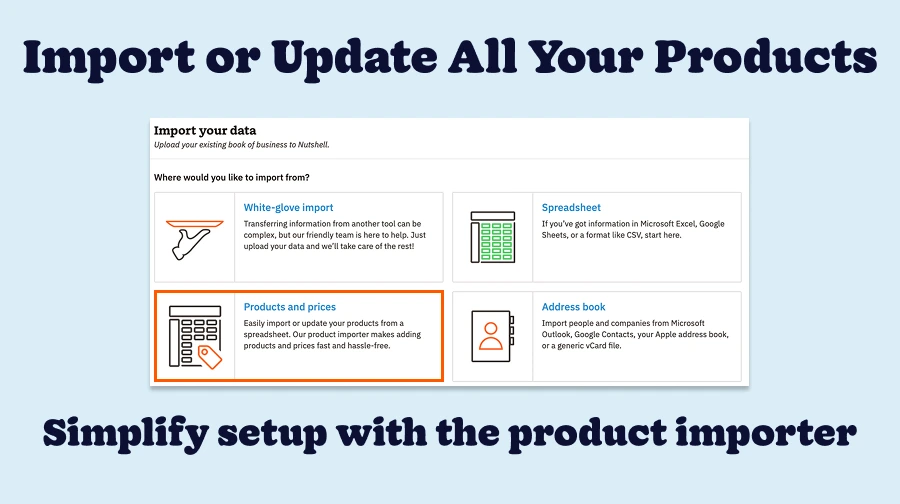
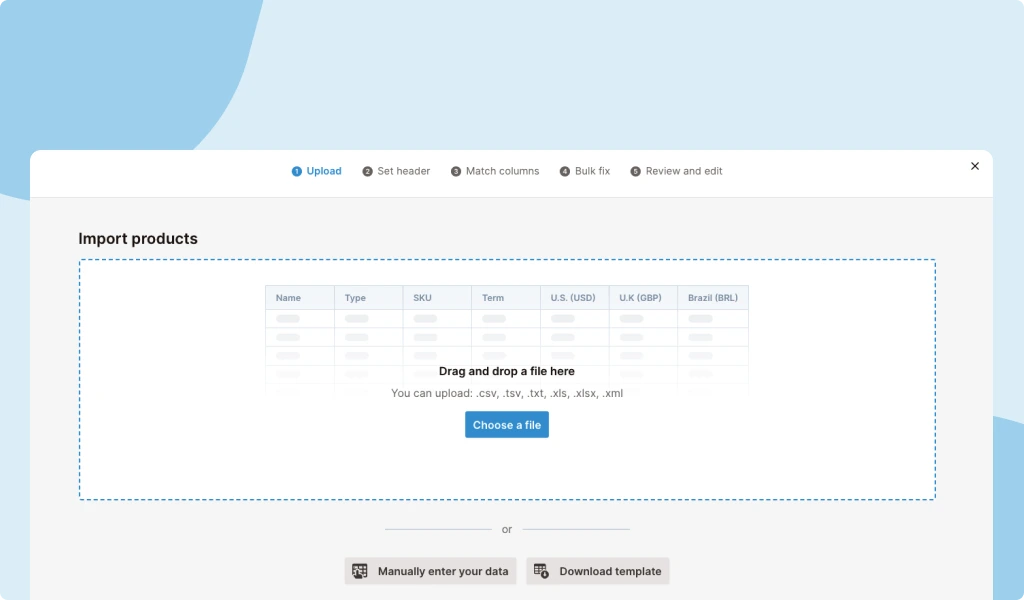
To start importing your products and services, navigate to the Import page in Settings and select ‘Products and prices.’ From there, the product importer walks you through the process of importing your product spreadsheet, mapping the columns in Nutshell and cleaning up any errors to ensure your data imports accurately. Once your import is complete, products will be automatically added or updated in Nutshell, and you’ll see the changes reflected across the platform.

Get started with the product importer
The new product importer enables you to add or update your CRM products and services in bulk. Whether you’re just getting set up with Nutshell or you need to update your pricing, the product importer makes the process seamless and saves your team time on manual data entry.
Go to your product import page to start importing, or reach out to our support team with any questions. Happy Nutshelling!
FAQs about Nutshell’s product importer
-
1. Who can access the product importer?
By default, only admin-level Nutshell users have permission to import data, including using the product importer. If your account adds additional custom roles, you can control which roles have import permissions and which do not.
-
2. Will the product importer respect multiple markets?
The product importer dynamically updates to support the markets you’ve added in Nutshell. This ensures that product pricing is accurate across all of your leads, since products have unique pricing in different markets and leads are attached to specific markets.
-
3. Is there a file size limit for product imports?
While Nutshell doesn’t impose strict file size limits, we recommend keeping imports under 50MB for optimal performance. For larger catalogs, split your file into batches of 5,000-10,000 products to ensure smooth processing and easier error troubleshooting.
-
4. What happens if my import fails halfway through?
Don’t worry—partial imports won’t corrupt your existing data. Nutshell processes each row individually, so successfully imported products remain in your CRM. Simply fix any errors in the failed rows and re-import only those items using the same spreadsheet format.
-
5. Can I test the import with a small batch before importing everything?
Absolutely! We recommend starting with 10-15 products to verify your spreadsheet formatting and field mapping. This test run helps identify any issues with column headers, data formatting, or required fields before committing to your full catalog import.
-
6. How do I prepare my spreadsheet to avoid common import errors?
Ensure your SKU column contains unique values, remove special characters from product names, and use consistent formatting for prices (no currency symbols). Save as CSV or XLSX format, keep column headers exactly as shown in Nutshell’s template, and verify all required fields are populated.
-
7. Will importing new products affect my existing product data or active quotes?
No, importing new products won’t modify existing products or disrupt active quotes. The Product Importer only updates products when you specifically match SKUs. Your sales team can continue working with quotes while you import—the new products simply become available for future use.
Easily Import Products Into Nutshell
Nutshell’s product importer makes it easy to start tracking lead value or update product pricing!
BACK TO TOPWritten by
Chris Cain VP of Product Development, NutshellReady to try
Nutshell for Free?Thank you! Your submission has been received!Oops! Something went wrong while submitting the form.
“Empathy Is a Superpower in Marketing and Sales”: A Q&A With Brian Carroll of Markempa
Published on: November 10, 2022Sales Performance Reviews: 9 Tips to Make Them Valuable
Published on: November 10, 2022Highly Effective Strategies for Elevating Sales Team Performance
Published on: November 10, 2022What Are the Top 3 Go-To-Market Strategies?
Published on: November 10, 2022Join 30,000+ other sales and marketing professionals. Subscribe to our Sell to Win newsletter!
- Product
- Nutshell Overview
CRM & Sales
Our powerful and easy-to-use flagship product.Marketing
Email marketing, forms, landing pages, and more.Engagement
Webchat, SMS, WhatsApp & more in your Omni-Channel Inbox.Prospecting
Prospect for new leads and new contacts in your CRM.Quotes & Invoices
Quickly create quotes & invoices in your CRM.
AI
See why Nutshell is the leading AI CRM.Integrations
Connect to Google/Microsoft and over 5,000 Apps.
ReportingCreate reports and forecasts in an instant.CRM Advisor
Get a dedicated point of contact to get the most out of Nutshell.Partner Marketplace
Find trusted partners to help optimize your Nutshell CRM.
- Pricing
Nutshell AI
- Resources
- Contact Us
Contact Sales
Send us your questions or book a 1-on-1 demo.Join a Demo
Join a group demo for a general overview of Nutshell.
Contact Support
Contact our support team via live chat in app or via email.Become a Partner
Refer businesses to Nutshell & earn commissions.
Contact Marketing
Questions about our website or our marketing opportunities?Careers
Join our growing team! See current openings.