










Web Chat
Allow website visitors to start chatting with your team directly from your customized chat widget so you can meet their needs and open more opportunities.

“Nutshell is super user-friendly and intuitive
“I would highly recommend Nutshell
“Easy to use and... wait for it ... 100% buy in!
“Nutshell is both simple and powerful
No new tools, no setup headaches. Nutshell Chat turns website visitors into leads and logs every conversation automatically.
🎉 No credit card required!
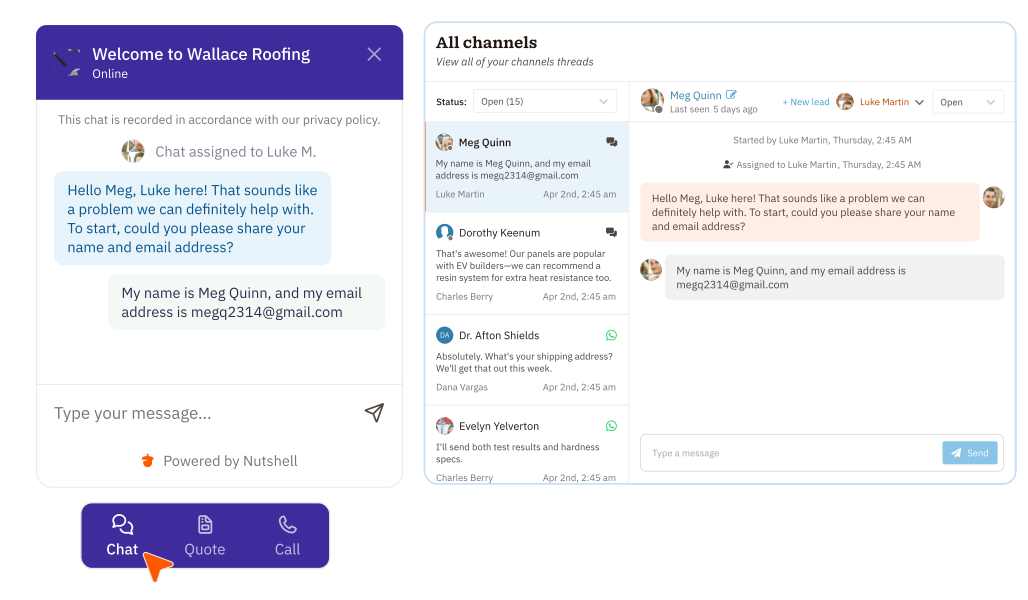
Engage visitors instantly and every chat automatically logs to the right contact and deal in your CRM.
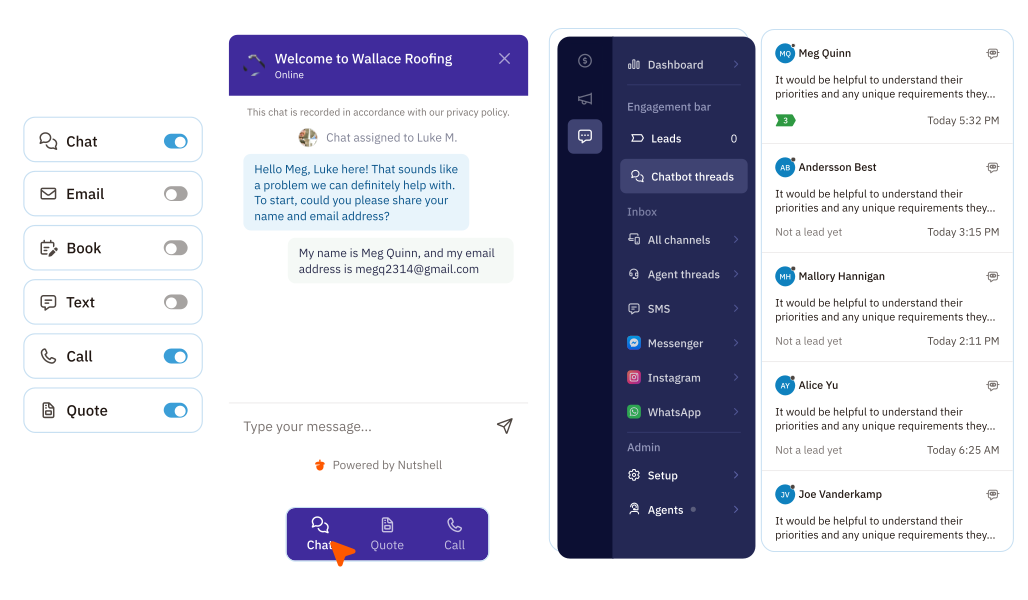
Add Nutshell Chat to your site with a single tracking snippet, and your team can respond to visitors directly from inside Nutshell.
Every conversation is automatically linked to a contact record, so your team has the full picture right there in front of them—no switching tabs, no missing context.

Customize your chat widget’s look and the questions it asks so every visitor interaction feels like a natural extension of your website.
You can also set custom greetings and availability messages, so visitors always get a helpful response even when your team is offline. First impressions matter—make sure yours is on brand.

When no rep is available, Nutshell Chat collects visitor info one question at a time—and stores it automatically on their contact record so your team picks up right where the conversation left off.

Nutshell’s Chatbot Report helps you understand what visitors are asking, so you can tailor your site content to their needs.

Try Nutshell free for 14 days or let us show you around before you dive in.
🎉 No credit card required!
Business web chat software is a widget tool installed on your website that typically displays as a pop-up in the corner of each page. It allows website visitors to communicate with your business while on your website for quick feedback, and it answers questions they may have about your product or service.
Adding a live one-on-one chat tool like Web chat to your website comes with several benefits, including:
Your CRM solution should provide the tools you need to achieve your business goals. While no two businesses are the same, there are at least a few core CRM features every business should prioritize.
Search for a solution with these essential features when investing in a CRM system:
It’s simple. Copy a code snippet from your Nutshell account and paste it into your website—no developer needed. The chat widget works with any website platform and goes live in minutes. You can customize colors, messages, and settings right from your Nutshell dashboard.
Nutshell Chat is included free with every Nutshell Sales subscription as part of the Engagement Foundation plan. You get unlimited web chat and AI chatbot usage at no additional cost. If you want to add SMS messaging, you can upgrade to Engagement Pro for $16 per user per month.
Every chat conversation is automatically saved to your CRM. Transcripts appear on the contact’s timeline, so your team can see the full conversation history and follow up effectively. You can also create leads directly from chats, connecting visitor details to your sales pipeline without manual data entry.

Allow website visitors to start chatting with your team directly from your customized chat widget so you can meet their needs and open more opportunities.


Manage conversations with leads and customers across Facebook Messenger and Instagram DMs—all without leaving your CRM.

Connect with our world-class support team to get fast, friendly, and free support when needed.

We take the security and reliability of your data seriously. We partner with the industry’s most trusted infrastructure provider, Amazon Web Services.


Explore the comprehensive selection of features available in Nutshell’s Sales Suite

Find out more about Nutshell’s extensive range of Marketing Suite features

Discover the broad spectrum of features and tools available to Nutshell customers