





Skip to main content ↓

Nutshell is super user-friendly and intuitive

I would highly recommend Nutshell

Easy to use and... wait for it ... 100% buy in!

Nutshell is both simple and powerful

Web chat

Free Live Chat Built Into Your CRM

No new tools, no setup headaches. Nutshell Chat turns website visitors into leads and logs every conversation automatically.

See pricingBook free demo

🎉 No credit card required!

Explore features

Keep visitors engaged with quick answers to their questions

Engage with visitors right from your website

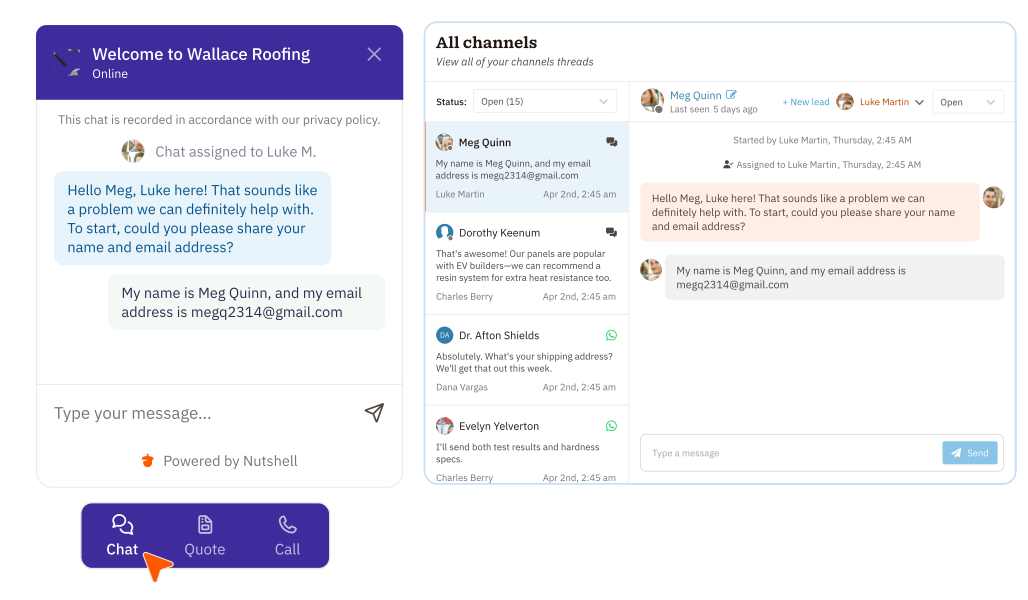
Meeting website visitors where they are is crucial to giving them the best experience with your company. With Web chat, website visitors can start conversations with your team from your customized chat widget. It’s easy to set up your Web chat widget with your universal Nutshell tracking snippet, allowing you to give visitors the answers they need, connect them with the right person, and collect information about potential prospects.

Engage Website Visitors From Your CRM With Chat

Customize the chat experience to your needs

Customize the chat experience to your needs

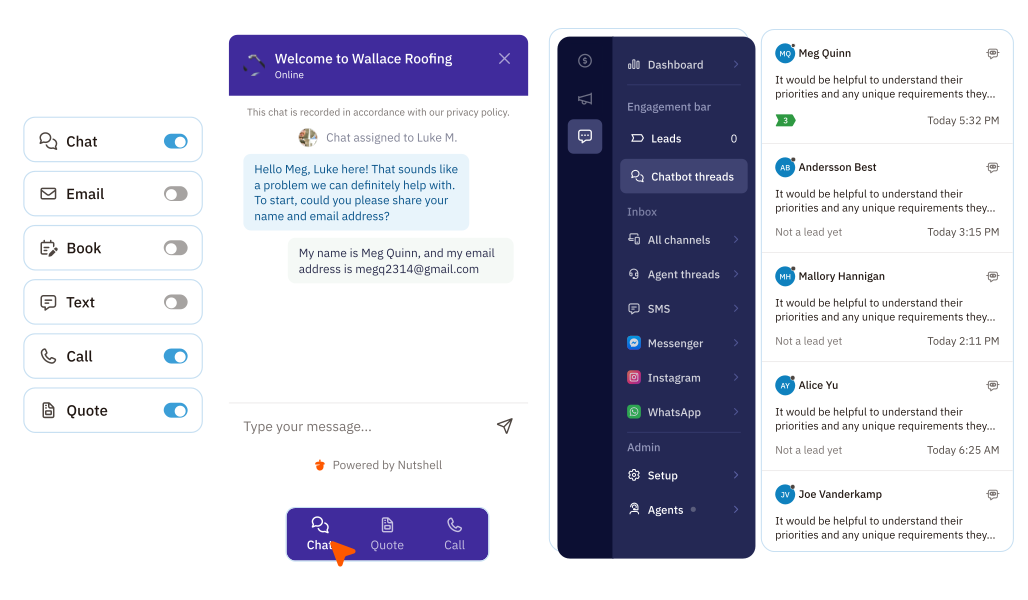
From the colors and icon on your chat widget to the forms you offer visitors—craft a chat experience that encourages conversations and perfectly strengthens your brand.

Gather critical customer data and keep it organized

Whether your team is online or off, collect essential information about visitors so you can meet their needs or connect them with the team member who can. Maintain a natural conversational experience when you choose to gather website visitor information through the chat, one question at a time, instead of asking visitors to fill out a form. And because Nutshell Chat is built into your CRM, every detail is automatically stored on the visitor’s contact record—so you can access contact information, preferences, and important notes whenever you need them.

Gather critical customer data and keep it organized

Manage chat assignments and team availability

Manage chat assignments and team availability

Admins choose how to assign incoming chats so they’re distributed evenly throughout your agents. With assignment options like round-robin, specific-user, and queue, you ensure that visitors are helped quickly when your agents are online.

Quickly create new leads from chats with visitors

Chatting with a visitor who seems like a good fit for your products or services? Add a new lead for them directly from the chat thread so you can start sending them through your sales pipeline and win a new deal!

Nutshell CRM Web Chat Create New Leads From Website Visitors

Engage visitors, capture leads, and secure bookings 24/7

Turn visitor inquiries into leads—even after business hours. Nutshell Chat also includes the option to implement an AI-powered chatbot that welcomes every visitor, answers questions using your chosen knowledge sources, and nudges them to call, text, book a meeting, or share their details—automatically creating a lead and boosting conversions. With the Nutshell AI chatbot, your team can focus on high-value interactions while leads keep flowing into your CRM.

Understand and optimize the customer journey with advanced reporting

With the Engagement report, you can visualize how customers interact with your chat widget to optimize chatbot interactions and drive more sales. See the whole journey, from first visit to conversion, and invest in the engagement actions that create the best outcomes.

See Nutshell in action!

Try Nutshell free for 14 days or let us show you around before you dive in.

🎉 No credit card required!

Live web chat for business FAQs

  • 1. What is business web chat software?

    Business web chat software is a widget tool installed on your website that typically displays as a pop-up in the corner of each page. It allows website visitors to communicate with your business while on your website for quick feedback, and it answers questions they may have about your product or service.

  • 2. Why should I offer a live one-on-one chat option through my website?

    Adding a live one-on-one chat tool like Web chat to your website comes with several benefits, including:

    • The ability to address prospect questions and concerns promptly can increase your conversion and sales opportunities.
    • It’s a great way to elevate your website visitor’s experience with your brand, typically improving overall customer satisfaction.
    • Live web chat offers an affordable way to provide efficient customer support, saving your business time and money.
    • You can use chat transcripts to spot audience trends and improve your sales and marketing efforts.
  • 3. What features should I look for in a CRM with real-time website messaging for businesses?

    Your CRM solution should provide the tools you need to achieve your business goals. While no two businesses are the same, there are at least a few core CRM features every business should prioritize.

    Search for a solution with these essential features when investing in a CRM system:

    • Sales automation: Ensure your CRM can automate non-selling tasks, giving your team more time to focus on relationship-building activities.
    • Pipeline management: Your CRM should let you create pipelines that complement your sales or workflow processes and provide comprehensive pipeline management tools, including various ways to view leads.
    • Reporting and analytics: The CRM should include advanced reporting and analytics tools to track team and campaign performance easily.
    • Email automation: Make sure your CRM comes with the tools needed to create custom personal email sequences and track email success.
    • Artificial intelligence: Look for a CRM with cutting-edge AI features, like contact timeline summarization, Zoom call transcription summarization, voice-to-text notetaking, email writing assistance, data enrichment, and more.
  • 4. How difficult is it to add Nutshell Chat to my website?

    It’s simple. Copy a code snippet from your Nutshell account and paste it into your website—no developer needed. The chat widget works with any website platform and goes live in minutes. You can customize colors, messages, and settings right from your Nutshell dashboard.

  • 5. Does Nutshell Chat cost extra, or is it included with my CRM?

    Nutshell Chat is included free with every Nutshell Sales subscription as part of the Engagement Foundation plan. You get unlimited web chat and AI chatbot usage at no additional cost. If you want to add SMS messaging, you can upgrade to Engagement Pro for $16 per user per month.

  • 6. What happens to chat conversations after they end?

    Every chat conversation is automatically saved to your CRM. Transcripts appear on the contact’s timeline, so your team can see the full conversation history and follow up effectively. You can also create leads directly from chats, connecting visitor details to your sales pipeline without manual data entry.

CRM features that boost your engagement effectiveness

Web Chat

Allow website visitors to start chatting with your team directly from your customized chat widget so you can meet their needs and open more opportunities.

SMS icon
SMS

Send, receive and manage text messages with contacts through Nutshell SMS.

Team collaboration icon
Messaging Apps

Manage conversations with leads and customers across Facebook Messenger and Instagram DMs—all without leaving your CRM.

Orange customer support headset icon
Free Customer Support

Connect with our world-class support team to get fast, friendly, and free support when needed.

Features Page Icon Security
Security

We take the security and reliability of your data seriously. We partner with the industry’s most trusted infrastructure provider, Amazon Web Services.


Nutshell logo icon
App Marketplace

Integrate Nutshell with the rest of your tech stack

Nutshell sales suite logo
See Nutshell’s Sales Features

Explore the comprehensive selection of features available in Nutshell’s Sales Suite

Nutshell marketing icon
See Nutshell’s Marketing Features

Find out more about Nutshell’s extensive range of Marketing Suite features

a logo for Nutshell with a Nutshell icon in the middle
See all of Nutshell’s features

Discover the broad spectrum of features and tools available to Nutshell customers

Thousands of happy users can’t be wrong.

ReviewsReviews
4.3Reviews(1,410)