Customer relationship management (CRM) software has become essential for businesses of all sizes. Yet many teams hesitate to adopt CRM systems, citing one primary concern: Complexity. The irony is striking—Tools designed to simplify customer interactions often overwhelm users with features they’ll never use, clunky interfaces, and lengthy implementation timelines.
Today, a growing category of simple CRM software exists specifically for teams that need essential functionality without the burden of enterprise-level complexity. But here’s the critical insight: The simplest CRM solution for a real estate brokerage may look fundamentally different from the simplest CRM for a B2B consulting firm or a financial services practice.
The Nutshell team has compiled this guide, which explores how to identify the simplest CRM solution for your specific industry and business model. Rather than chasing feature lists, this approach focuses on matching core capabilities to your actual operational needs—ensuring fast adoption, genuine user engagement, and measurable business impact.
Before diving into industry-specific requirements, it’s important to define what “simple” actually means in the context of CRM software. A simple CRM isn’t necessarily stripped down or lacking capability. Instead, it’s designed around a principle: Surface only what users need to do their jobs, and make those tools intuitive enough that minimal training is required.
Research from CRM vendors and business technology analysts consistently identifies core features that define a simple, easy-to-use CRM:
The distinction matters because many teams mistakenly equate “simple” with “incomplete.” In reality, a simple CRM contains everything your team needs and nothing it doesn’t. This focused approach directly translates to adoption rates. Teams embrace tools that make sense immediately, rather than systems requiring weeks of training.
The average entry-level plan for a simple CRM solution typically falls within the $10 to $20 per user per month price range. This price point correlates with tools that prioritize core functionality over premium add-ons—a financial indicator that a CRM is genuinely designed for accessibility rather than feature overload.
One of the most common mistakes in CRM selection is the assumption that the best solution for one business type will serve another equally well. This assumption fails because different industries operate under fundamentally different constraints and priorities.
Consider the variables that differ across industries:
These variables explain why the simplest CRM for one business might be completely misaligned for another. Granted, top-tier universally simple CRM solutions do exist, but the goal is to find the simplest CRM that addresses your specific industry requirements.
The following breakdown examines how different industry categories typically approach CRM needs. Use this as a reference point for your own business, not as a definitive requirement list.

(Including real estate, insurance, direct sales, and B2B sales)
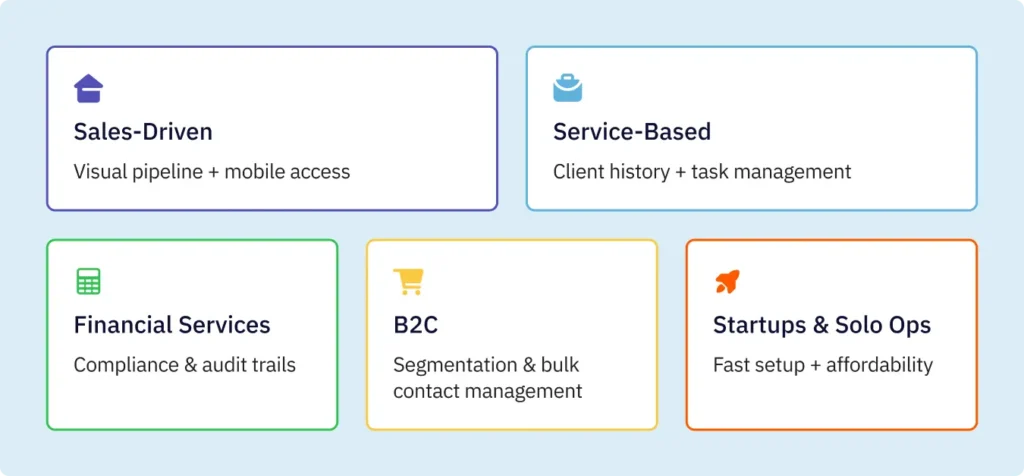
Sales-driven industries depend on pipeline visibility and rapid follow-up. For these teams, the simplest CRM must include visual deal pipeline management—typically a drag-and-drop interface showing deals moving through stages.
Mobile field access is nonnegotiable, as salespeople frequently update information from client sites, showings, or meetings. Email and SMS communication tools should be integrated, not bolt-on additions, to minimize app-switching.
Why these requirements matter: Sales effectiveness depends on consistent follow-up. Teams without mobile access miss updates. Teams without integrated communication waste time toggling between tools. Visual pipelines provide immediate clarity on deal status without requiring dashboard interpretation.
For instance, real estate professionals benefit from stage-based pipelines customized to their workflow:
Qualified leads → Showings scheduled → Property viewed → Offer negotiated → Contract signed → Closed.
This specificity matters because a generic sales pipeline doesn’t reflect how real estate actually operates.
(including consulting, freelancing, agencies, and professional services)
Service businesses often need CRM capabilities that blur into project management. The simplest CRM for these teams tracks client relationships alongside project status, deliverables, and timelines.
Task management should be robust, as service delivery depends on internal workflow visibility. Client history and communication logs need to be easily accessible, as service quality depends on understanding prior work and client preferences.
Why these requirements matter: Service businesses succeed through relationship continuity. New team members must quickly access historical context. Projects often involve multiple team members, requiring shared visibility. Unlike transactional sales, service delivery is relationship-intensive and timeline-dependent.
(including financial advisors, insurance brokers, and wealth managers)
Financial services firms operate under unique constraints. The simplest CRM for these teams must include robust security and compliance features—Audit trails, data encryption, and user permission controls are essential, not optional.
Relationship tracking should support documenting the depth and breadth of client relationships. Document management capabilities matter, as regulatory compliance often requires maintaining detailed records of client interactions and decisions.
Why these requirements matter: Financial services operate under regulatory oversight. Audit trails aren’t luxuries—they’re legal requirements. Long-term client relationships are core to the business model, meaning historical context must be preserved and accessible. Simple doesn’t mean unsecured—it means security is built in by default.
(including retail, e-commerce, and consumer services)
B2C companies typically manage larger customer bases with shorter interaction cycles. The simplest CRM for these teams prioritizes customer segmentation and basic marketing campaign capabilities.
Quick transaction tracking helps identify high-value repeat customers. Contact organization should support bulk operations, as B2C teams often work with hundreds or thousands of customers rather than dozens.
Why these requirements matter: B2C businesses succeed through customer segmentation and targeted engagement. Scale matters—Tools built for 50 customers are unlikely to serve 5,000. Transaction frequency tracking helps identify loyalty and churn patterns without complex analytics.
For early-stage businesses and solo operators, the simplest CRM prioritizes three things: affordability, minimal setup time, and no IT requirements. These teams cannot justify $50+ per user per month or dedicate resources to system configuration. The ideal simple CRM can be operational within hours, not weeks, and requires no technical expertise to maintain.
Why these requirements matter: Startups often operate with constrained budgets and limited staff. Time spent configuring systems is time not spent selling or serving customers. The opportunity cost of lengthy implementations is prohibitive. Additionally, many solopreneurs and small team founders have no IT background, so systems requiring technical knowledge create adoption barriers.
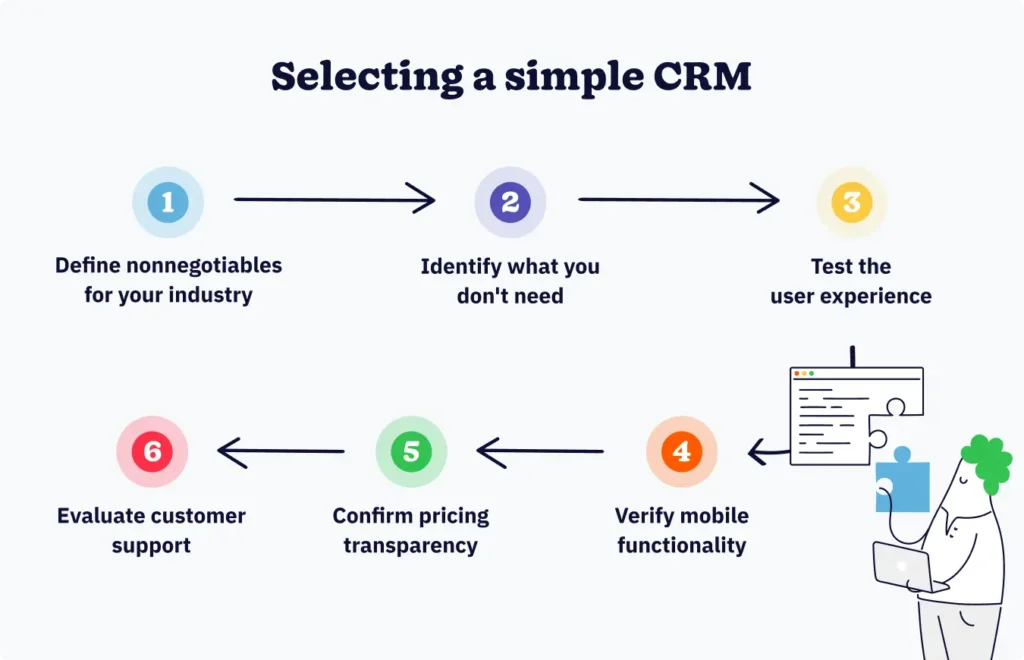
Rather than comparing feature lists or vendor claims, use this framework to systematically identify the simplest CRM aligned to your needs.

Based on the industry breakdown above, identify 3-5 features that are genuinely essential for how your business operates. Not features you might eventually use—features you need from day one.
A real estate agent’s nonnegotiable might be mobile pipeline management. A consultant’s nonnegotiable might be client history and task management. A financial advisor’s nonnegotiable might be audit trails and security compliance.
Write these down. This list becomes your evaluation baseline.
This step is equally as important as identifying what you do need. Questions to ask include:
Be ruthlessly honest about what you don’t need.
Request free trials from 2 to 3 vendors that claim to meet your requirements. But don’t test alone—Bring 2 to 3 actual users from your team into the trial.
Have them attempt core workflows without reading documentation: Can they create a contact, add a deal, set a follow-up task, and check their mobile app—all without asking for help? If not, it’s not as simple as claimed.
Note: The simplest CRM is the one your team will intuitively understand. If users need constant guidance, it’s not simple.
In 2026, mobile access is essential for most teams. Test the mobile experience thoroughly.
Poor mobile experiences drive adoption failure faster than any other factor.
Pricing should be straightforward.
Simple CRMs typically avoid surprise costs—that’s part of being simple.
Non-technical teams need accessible CRM support.
For simple CRMs, good customer support often matters more than comprehensive features—It’s what helps teams adopt quickly.
Understanding what goes wrong in CRM selection helps you avoid common pitfalls.
Some teams, attracted by the word “simple,” select CRMs that lack essential capabilities for their industry. A real estate agent picking a basic contact management tool without pipeline management is buying simplicity at the cost of functionality. Simple means focused, not insufficient. Ensure the simple CRM you choose contains every core feature your industry requires.
Teams often evaluate CRMs based on generic capabilities without considering industry-specific workflows. A B2B sales team purchasing a B2C-focused CRM may find the tool misses critical features for complex, multi-stakeholder sales processes. Conversely, a small consulting firm doesn’t need the compliance features built for financial services. Align simplicity to your specific industry reality.
CRM demos are polished and guided by experts. Real usage by non-expert users reveals whether simplicity is genuine or illusory. A CRM that looks simple during a vendor demo might confuse your actual team. Always test with representative users performing real tasks before committing.
Teams evaluating CRMs on desktop often discover the mobile experience is an afterthought. In 2026, mobile functionality isn’t optional—it’s essential. If your team works in the field, meets with clients, or works remotely, thoroughly test the mobile app.
Nearly 81% of CRM users access their system from multiple devices, ensuring convenience and seamless workflow. A CRM that’s simple on desktop but clunky on mobile will fail in actual use.
The cheapest CRM isn’t always the simplest or best fit. For example, $5-per-user tool that requires 40 hours of setup costs more in team time than a $15-per-user tool that’s operational in 4 hours. Evaluate the total cost of ownership—including setup time, training time, and staff adoption friction—not just monthly fees.
Actionable advice: Spend at least 2 to 3 hours testing with your actual team before committing. This investment pays for itself many times over by preventing adoption failures.
A simple CRM is purpose-built to be intuitive and easy to adopt, with essential features focused on your core needs—even if it costs $10 to $20/user/month. A free CRM is often a freemium model that limits features, storage, or users to encourage upgrade to paid plans. Simple CRMs prioritize usability—free CRMs prioritize affordability but may require workarounds or lack functionality.
Simple CRMs can be operational within hours to days, not weeks or months like enterprise solutions. However, data migration, user training, and customization can add time. Most small teams see full adoption within 2 to 4 weeks if they follow the 6-step selection framework and test with real users before committing.
Yes, but it’s costly in terms of time and resources. Switching requires data migration, retraining your team, and rebuilding workflows in a new system. This is why testing with real users during the trial phase (Step 3 of the framework) is so critical—it prevents costly switches down the road.
Most simple CRMs are designed to scale with growing teams by adding users, not by adding complex features. If your business processes fundamentally change (e.g., moving from B2C to B2B sales), you may outgrow the tool—but a well-chosen simple CRM typically serves 5-50 person teams effectively for years.
Mobile access is essential in 2026, not optional. Nearly 81% of CRM users access their systems from multiple devices, and field-based teams (sales, service, consulting) rely on mobile to log interactions, update deals, and access customer history in real time. Always test the mobile app thoroughly during your trial phase.
The simplest CRM solution isn’t necessarily a universal product—it’s the system that best aligns with how your business actually operates. And the framework above helps you systematically identify that fit.
The real measure of CRM success isn’t feature breadth or vendor claims—It’s adoption. Teams embrace tools that make sense immediately, solve real problems, and don’t create new ones. Complexity doesn’t indicate capability—Often, it indicates poor design. Simplicity—the kind built intentionally around your actual requirements—is the mark of purposeful design.
As you evaluate simple CRM options, return to your nonnegotiable requirements list, and ask yourself:
These questions matter far more than feature lists or vendor marketing claims.
The simplest CRM is the one your team will use consistently, from day one. Everything else is secondary.
Join 30,000+ other sales and marketing professionals. Subscribe to our Sell to Win newsletter!