AI Agent vs Chatbot: Which Does Your Business Actually Need?

-

Quick answer: What’s the difference between AI agents and chatbots?
The main difference is autonomy. Chatbots are reactive and respond when you ask a question, like answering “What are your hours?” or handling FAQ requests. AI agents are proactive and work independently in the background to complete multi-step tasks, like automatically logging sales activities in your CRM, scoring leads, and triggering follow-up workflows without anyone asking them to. Most SMBs benefit from chatbots for customer service and AI agents for sales and operations automation.
Key takeaways
Navigating the world of AI can feel overwhelming when you’re trying to figure out what tools will make the biggest impact on your business. Here’s what you need to know to make a smart decision about chatbots and AI agents—and why most SMBs benefit from having both.
- Chatbots are reactive; AI agents are proactive. Chatbots wait for someone to ask a question and then respond. AI agents work independently, taking actions without being prompted—automating entire workflows behind the scenes.
- Chatbots excel at customer service; AI agents excel at sales automation. If your challenge is answering repetitive questions 24/7, a chatbot is your answer. If your challenge is eliminating manual data entry and ensuring no lead falls through the cracks, you need AI agents.
- The real ROI comes from combining both. Companies using AI-enhanced CRM see 29% faster sales cycles and 42% higher conversion rates. But here’s the secret: they’re not choosing one technology—they’re using each where it makes sense.
- 83% of sales teams that use AI see revenue growth vs. 66% of those that don’t. The goal isn’t to replace your team; it’s to remove the busywork so they can focus on relationships and closing deals.
- Most SMBs benefit from a hybrid approach. You don’t need enterprise-grade AI agents or simple chatbot-only solutions. Modern CRMs combine both capabilities in one platform—without requiring a technical team to manage it all.
- Implementation matters more than technology hype. The difference between successful AI adoption and failed projects? Starting with one high-impact, low-risk use case and expanding progressively—not trying to automate everything at once.
- Choose based on task requirements, not buzzwords. The best companies aren’t chasing the latest AI trends. They’re asking: “What problem does this solve for our team right now?”
If you’ve spent the last few months seeing “AI agent” and “chatbot” mentioned everywhere—in your sales software, marketing emails, and industry news—you’re not alone. Search interest for phrases like “AI agent vs chatbot” has spiked as businesses try to figure out which technology actually fits their needs. The problem? Most articles either dive into technical weeds or use the terms interchangeably, leaving you more confused than when you started.
The confusion makes sense. Both chatbots and AI agents use artificial intelligence. Both can be “conversational.” Both promise to save time. So what’s actually different, and more importantly, which one does your business need?
We’ll cut through the buzzwords and give you a clear framework for understanding these technologies in the context that matters most for SMBs: how they show up inside your CRM and how they impact your sales process. We’ll show you how modern CRMs like Nutshell combine both approaches, helping teams work smarter without adding complexity.
What are chatbots and AI agents?
Before we compare them, let’s define our terms clearly. Here’s what you’re actually dealing with:
- Chatbot: A reactive system that responds to user inputs with pre-programmed or AI-generated answers. Chatbots wait for prompts and primarily handle customer service inquiries, FAQs, and simple question-answer interactions.
- AI Agent: A proactive, autonomous system that perceives its environment, makes decisions, and takes actions to achieve specific goals. AI agents can operate independently and handle complex, multi-step workflows without waiting for human prompts.
- Conversational AI: An umbrella term encompassing AI technologies that enable human-like dialogue, including both chatbots and AI agents.
- Hybrid Intelligence: A combination of reactive (chatbot) and proactive (AI agent) capabilities within a single platform.
Table of Contents
- What’s the actual difference between AI agents and chatbots?
- What does this look like in practice?
- How do I know which one my business needs?
- Why this matters when choosing a CRM
- The best CRMs use both – here’s how
- What people get wrong about AI agents and chatbots
- The hybrid approach: Combining chatbots and AI agents effectively
- Common challenges when implementing AI in CRMs
- How AI agents and chatbots impact the customer experience
- How to implement AI without overwhelming your team
- Frequently asked questions about AI agents and chatbots
What’s the actual difference between AI agents and chatbots?
The main difference is autonomy. Chatbots are reactive, meaning they respond to user questions. AI agents, on the other hand, are proactive—they take independent actions to accomplish their goals. Think of chatbots as helpful responders and agents as autonomous assistants.
Here’s how they compare across the key dimensions that matter for your business:
Criteria Chatbot AI Agent Autonomy Passive; waits for user to initiate conversation and ask questions Proactive; initiates actions based on triggers, goals, or environmental changes Action Capability Generates text responses only; cannot modify systems or trigger workflows Takes action across systems: creates CRM records, sends emails, updates databases, triggers automated sequences Complexity Handling Handles simple, single-turn Q&A interactions; struggles with multi-step problems Manages complex, multi-step workflows requiring planning and sequential decision-making Reasoning Pattern recognition and keyword matching; generates responses based on training data Goal-oriented planning; evaluates options and chooses actions to achieve specific outcomes Tool Usage Limited to information retrieval; may access knowledge bases or FAQs Full API access; integrates with CRM, email, calendar, and business tools to execute tasks Primary Use Cases Customer service, support tickets, FAQs, appointment scheduling Sales automation, lead qualification, data entry, follow-up sequences, pipeline management Resource Requirements Lower cost and faster setup; minimal training needed Higher initial investment and complexity; requires clear process definition Let’s make this concrete. A chatbot waits for a website visitor to ask, “What are your hours?” and then answers. An AI agent notices a high-value lead visiting your pricing page, automatically sends a personalized follow-up email, and logs that activity in your CRM—all without anyone asking it to do anything.
Here’s another example: a chatbot answers, “Our return policy is 30 days” when a customer asks. An AI agent processes the return request, updates your inventory system, schedules a refund, and notifies your accounting team. One responds to what’s asked, while the other takes action independently in the background.
This distinction matters because it determines what each technology can actually do for your business. Chatbots handle communication; AI agents handle workflow automation. Both are valuable, but in very different ways.
What does this look like in practice?
Understanding definitions is helpful, but real-world examples make the difference clear. Here’s how chatbots and AI agents actually show up in SMB operations.
Chatbot examples in action
A website FAQ bot handles tier-1 support questions from potential customers (“What’s your refund policy?” “Do you ship internationally?”) at 2am when your team is offline. The customer gets an instant answer instead of waiting until morning, and your team doesn’t get woken up with simple questions.
An appointment scheduling bot responds to booking requests from leads, checking your calendar availability, and automatically confirming meeting times. No back-and-forth emails, no coordination needed from your team.
An order status checker provides tracking information the moment a customer inquires, eliminating support tickets for a question your system can answer instantly.
AI agent examples in action
A sales development agent monitors lead behavior across your website and email, scores leads based on engagement patterns, and automatically books qualified prospects into your sales rep’s calendar. The rep logs in to find pre-qualified meetings waiting—no manual lead qualification work required.
A CRM agent logs all sales activities automatically (emails, calls, meetings) without anyone manually entering data, updates deal records based on activity patterns, and suggests next actions based on deal stage. Your sales rep spends time selling, not updating the CRM.
A customer success agent monitors product usage patterns, identifies accounts at risk of churning, and triggers renewal workflows or intervention alerts before the customer even realizes they’re unhappy. You catch problems before they become cancellations.
What’s the key difference?
In the chatbot examples, humans initiated something (asked a question, requested a booking, inquired about status). The AI agent examples show AI working independently in the background, taking action without being prompted.
Understanding these differences matters, but the real question is: which one does your business actually need?
How do I know which one my business needs?
The answer depends on what you’re trying to solve. Let’s break this down into two categories—one for each technology—then walk you through a decision framework.
Use a chatbot if:
- You need 24/7 availability to answer common questions when your team is offline
- Your support queries are repetitive and predictable (FAQs, order status, basic troubleshooting)
- You want to reduce tier-1 support volume so human agents can focus on complex issues
- Budget is limited and you need quick wins with minimal investment
- Your team can handle complex issues during business hours without bottlenecks
Use an AI agent if:
- You need automation beyond question-answering (data entry, multi-step workflows, system updates)
- Your processes involve multiple systems or sequential steps (for example, lead qualification → CRM update → email sequence)
- You want proactive outreach and follow-up without manual intervention
- Speed-to-lead is critical for your sales process (immediate response to high-value actions)
- You’re struggling with manual data entry and administrative work that pulls reps away from selling
Now let’s apply a decision framework to figure out what your business actually needs.
Step 1: Assess your current process
Ask yourself: “Are we primarily answering questions (reactive) or automating workflows (proactive)?”
If your biggest challenge is that the same questions get asked repeatedly, you’re dealing with a reactive problem. If your biggest challenge is that work isn’t getting done consistently or quickly enough, you’re dealing with a workflow problem.
Mostly answering questions? Lean toward a chatbot.
Automating multi-step processes? Lean toward an AI agent.
Step 2: Evaluate complexity
Ask: “Does this require single-step responses or multi-system actions?”
A single-step response is answering a FAQ or providing status information. A multi-system action involves multiple tools (CRM, email, calendar, database) working together in sequence.
Single-step (FAQ, status check) → chatbot sufficient. Multi-step (qualify lead + update CRM + trigger email sequence) → AI agent needed.
Step 3: Consider resources
Ask: “Do we need quick implementation or strategic investment?”
Chatbots can be deployed in days with minimal configuration. AI agents require more planning and process definition but deliver higher ROI once implemented.
Quick implementation, limited budget → start with chatbot. Strategic automation, willing to invest → implement AI agent.
Decision point: Most SMBs discover they need both
Here’s what we see work best: chatbots for customer service and AI agents for sales and operations automation. They serve different purposes and complement each other.
Remember that 72% of consumers are open to using an AI chatbot, but only if there is a way to escalate complex issues to a human agent. The goal isn’t to replace humans but to handle repetitive work (chatbots) and automate administrative tasks (AI agents) so your team can focus on high-value relationships.
A customer who gets a chatbot answer to “What are your hours?” is happy. A customer who needs a refund processed shouldn’t get bounced between a chatbot and a human—they should get efficient help. That’s where AI agents shine.
Why this matters when choosing a CRM
Here’s what most articles comparing AI agents and chatbots miss: these aren’t abstract technologies you buy separately. They’re built into many modern CRM platforms—and understanding which features are chatbot-style versus AI agent-style helps you choose the right CRM for your business.
When you evaluate a CRM, you’ll see both types of AI features. Some feel like helpful assistants responding to your requests chatbot-style. Others work silently in the background, automating workflows AI agent-style. Understanding the difference helps you assess whether a CRM will actually save your team time or just add another system to manage.
Chatbot-style CRM features include:
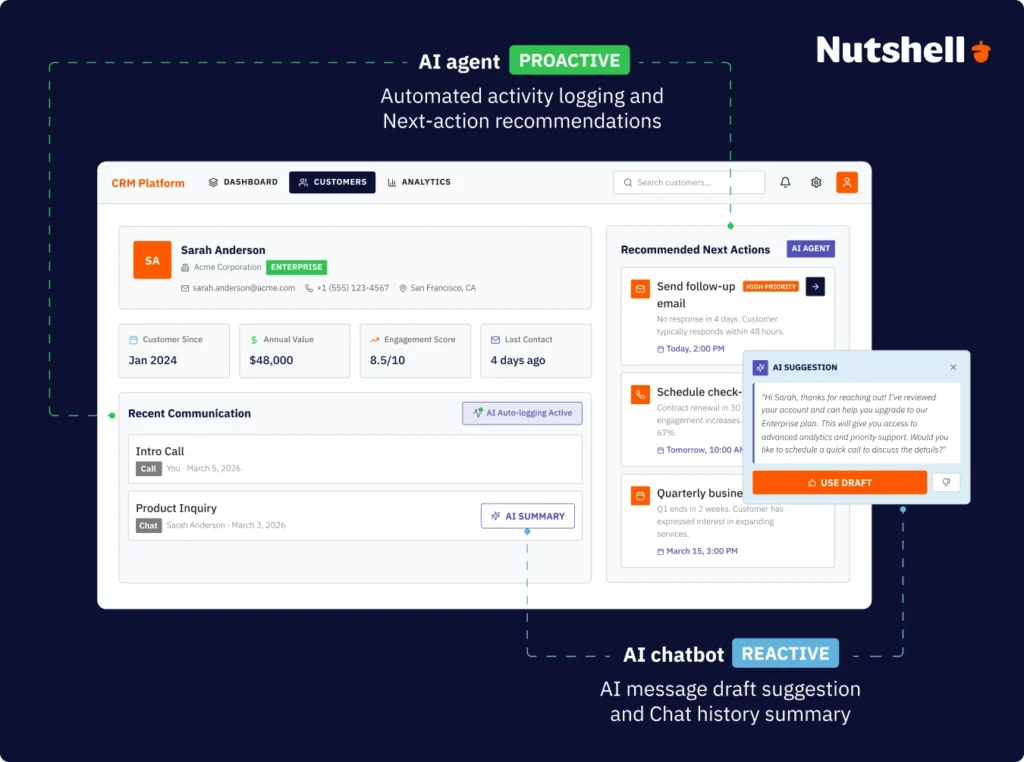
- AI-drafted email responses: Generate reply suggestions when you’re responding to leads or customers. You request the suggestion, and AI drafts something for you to edit and send (reactive—waits for you to click “draft”).
- Conversation summaries: Provide quick recaps of email threads or call recordings. You ask for a summary, and it’s generated instantly (reactive—summarizes after you request it).
- Quick status answers: “What’s the status of the Johnson deal?” You ask the question via chat or search, and AI returns an instant answer (reactive Q&A).
Why these matter: They reduce time spent writing repetitive emails and searching for context before calls. You still control the action, but AI makes the work faster.
In contrast, AI agent-style CRM features have more complexity:
- Automated activity logging: Automatically captures emails, calls, and meetings in your CRM without manual entry. You don’t prompt it; it runs continuously in the background (proactive—no prompt needed).
- Next-action recommendations: Analyzes deal stage and suggests specific next steps to move deals forward. The CRM identifies what matters most without you asking (proactive guidance).
- Predictive lead scoring: Continuously evaluates leads and prioritizes which to contact first based on engagement and fit. The system works without intervention (proactive prioritization).
- Autonomous follow-up sequences: Triggers personalized email sequences when leads take specific actions. Once activated, it runs without manual execution (proactive outreach).
Why do these features matter, though? They eliminate manual data entry (the top reason CRMs fail adoption) and ensure no lead falls through cracks because the system catches what humans miss.
Why SMBs need both AI chatbots and agents
Chatbot-style features save time in the moment. When you’re drafting an email, AI-suggested text saves minutes. When you need context before a call, conversation summaries save minutes.
AI agent-style features prevent work from piling up in the first place. Automated logging eliminates hours of administrative work. Proactive lead scoring ensures your best leads get attention immediately.
With CRM delivering an average return of $8.71 for every dollar spent, choosing a CRM platform that combines both approaches maximizes your investment.
When evaluating CRMs, ask: “Does this platform offer both reactive AI (helping me when I ask) and proactive AI (working in the background without prompts)?”
The best CRMs use both—here’s how
The most effective CRMs don’t force you to choose between chatbot and AI agent capabilities. They integrate both, using chatbot-style features for on-demand assistance and AI agent-style features for continuous automation.
Let’s walk through how this works in practice using Nutshell as an example—a CRM specifically built for SMBs that combines both approaches.
Nutshell’s chatbot-style reactive features include:
- AI-drafted emails suggest responses when you’re writing to leads or customers, reducing time spent composing messages.
- Conversation summaries provide context before calls or meetings, eliminating manual note review.
- On-demand insights answer questions about pipeline status, deal health, and team performance as you ask them.
Nutshell’s AI agent-style proactive features include:
- Automated activity logging captures all emails, calls, and meetings without manual entry, eliminating the data entry burden that derails CRM adoption.
- Next-action recommendations guide reps to prioritize the most important tasks for moving deals forward—implementing Nutshell’s signature “next-action” philosophy that naturally focuses teams on what matters most.
- Predictive insights surface patterns and opportunities without prompts, helping your team see what they’d otherwise miss.
Here are the key differentiators:
Nutshell is built for SMBs, which means AI features work out-of-the-box without requiring dedicated administrators. Unlike enterprise CRMs that demand technical expertise and configuration, Nutshell’s AI activates immediately after setup. This directly addresses a core SMB pain point: 51% of sales teams cite time and budget constraints as barriers to AI adoption. Nutshell eliminates that barrier by making AI accessible without overhead.
Time-saving is the focus, not feature maximization. AI exists to create more selling time, not more features to manage. That distinction matters because it shapes how every feature is designed and implemented.
AI features are included in standard pricing, not expensive add-ons that blow up your budget. Nutshell delivers hybrid intelligence without the enterprise price tag.
The “next-action” philosophy naturally guides reps to what matters most rather than overwhelming them with dashboards and reports. Instead of forcing reps to interpret data and decide what to do, Nutshell’s AI suggests the specific action that moves deals forward.
Results that matter:
This hybrid approach delivers real results: 83% of sales professionals using AI say it helps them spend more time selling, and AI-enhanced CRMs deliver 29% faster sales cycles. For SMBs, that’s not just impressive—it’s the difference between hitting goals and missing them.
When your team spends less time on data entry and more time on relationships, everything moves faster. It’s easier for your team to stay motivated because they’re doing the work they were hired to do instead of hours of administrative busywork.
These aren’t theoretical benefits. SMBs across industries are seeing measurable ROI from AI-enhanced CRMs that combine reactive and proactive capabilities.
Need a user-friendly CRM to boost sales and team efficiency?
Take our guided tour to explore Nutshell’s incredible features!

What people get wrong about AI agents and chatbots
As AI adoption has accelerated, several misconceptions have taken hold. Let’s address the ones that matter most for your decision.
Misconception 1: “Chatbots are old technology, AI agents are new”
Reality: Both use modern AI; the difference is design intent and purpose, not age. Today’s chatbots use the same large language models powering cutting-edge AI agents.
What makes them different is what they’re designed to do (respond to requests versus take independent actions), not when they were invented or how sophisticated they are.
Misconception 2: “AI agents will replace human sales reps”
Reality: Agents handle repetitive tasks so humans focus on relationships and complex problem-solving. AI-empowered sales teams see 42% higher conversion rates as the tools improve human efficacy instead of taking over entirely.
The goal is augmentation. For example, AI might do data entry and routine follow-up while humans do discovery calls, negotiations, and relationship building. Even spending 30 minutes less per day on busywork gives reps more time to have real conversations that close deals.
Misconception 3: “You need technical expertise to use AI agents”
Reality: Modern CRM-embedded AI agents require zero coding or technical configuration. Pre-built workflows activate with simple toggles rather than complicated commands.
If you can use email, you can use modern AI agents. The days of needing engineers to configure automation are gone for SMB-focused platforms.
Misconception 4: “More autonomous = always better”
Reality: It’s best to match the tool to the task. Chatbots excel at specific use cases where autonomy isn’t needed, while agents keep tasks moving with intelligent automation.
TL;DR: The best approach uses both where they make sense.
On the question “Are chatbots the same as AI?”
Kind of! While chatbots are a type of AI, not all AI instances are chatbots. It’s like how all squares are rectangles, but not all rectangles are squares.
Chatbots use AI to understand and respond to questions. AI agents use AI to take autonomous actions. Both are AI-powered, but they’re designed for different purposes and operate in fundamentally different ways.
The hybrid approach: combining chatbots and AI agents effectively
The companies getting the most ROI from AI aren’t choosing one or the other. They’re building strategies that use both.
Framework for task assignment:
Chatbots work best for repetitive, predictable interactions where speed matters and answers are consistent:
- Customer FAQs
- Appointment scheduling
- Basic troubleshooting
- Order status
AI agents work best for complex, multi-step workflows that call for active decision-making and system coordination:
- Lead qualification and routing
- Sales activity automation
- Follow-up sequences
- Data enrichment
Workflow example 1: Lead management
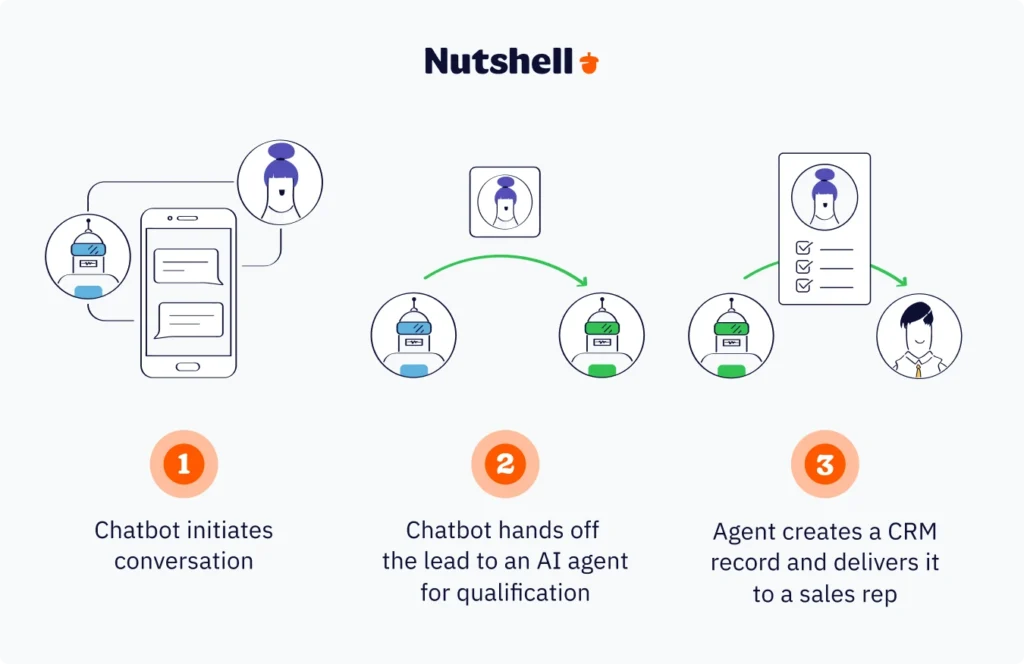
A chatbot handles the initial website interaction: “How can I help you today?”
Once a lead shows buying intent, an AI agent takes over by:
- Qualifying the lead based on predefined criteria.
- Creating a CRM record with all relevant information.
- Assigning it to the appropriate sales rep based on territory and capacity.
- Triggering a personalized email sequence.
The human rep receives a fully qualified lead with complete context, ready for a meaningful conversation. The chatbot got the conversation started. The AI agent did the qualification work. The rep focused on closing.
Workflow example 2: Customer support
A chatbot handles tier-1 questions during and after business hours:
- FAQ
- Status checks
- Basic troubleshooting
When an issue exceeds chatbot capability—something complex or emotionally charged—an AI agent takes over. At this stage, the agent:
- Creates a support ticket
- Assigns priority based on urgency and customer value
- Notifies the appropriate team member
- Schedules a follow-up
The chatbot filtered out 70% of routine inquiries, and the AI agent made sure the serious ones got handled immediately.
This collaboration helps ensure human support specialists focus only on complex issues requiring expertise and empathy.
Workflow example 3: Sales follow-up
After initial contact, an AI agent monitors lead behavior:
- Email opens
- Website visits
- Content downloads
- Form submissions
When engagement hits a defined threshold, a chatbot can offer immediate assistance: “I see you’re interested in our pricing—would you like to schedule a demo?”
Simultaneously, the AI agent notifies the rep and prepares a conversation brief with all context—what content the lead viewed, how many emails they’ve opened, when they visited last.
The rep enters the call fully informed. The chatbot and agent did the setup work. The rep focused on the conversation.
💸 Cost-efficiency note: This layered approach maximizes ROI by using less expensive chatbot technology where appropriate and reserving AI agent capabilities for high-value automation. Instead of automating everything, you’re automating strategically.
Common challenges when implementing AI in CRMs (and how to avoid them)
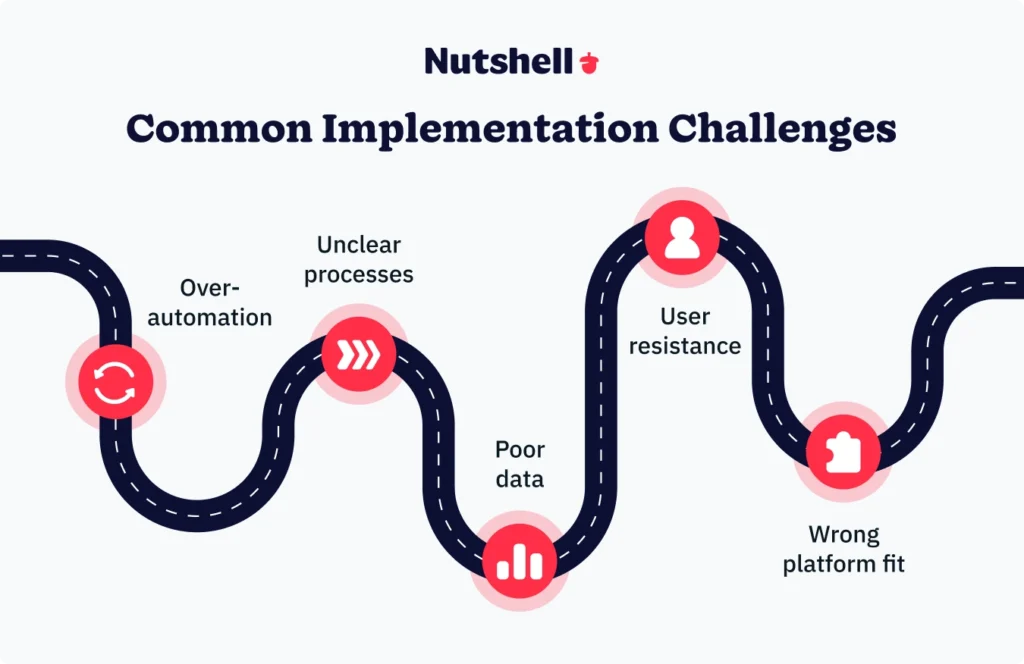
Most CRM AI implementations hit a few predictable obstacles. Here’s how to see them coming.
Challenge 1: Automating too much too quickly
Symptom: You turn on every AI feature at once, overwhelming the team and creating distrust in AI recommendations.
Avoidance strategy: Start with one high-impact, low-risk use case. Automated activity logging is the ideal first step—it saves time immediately without requiring the team to trust complex AI decision-making.
Measure success before expanding to additional features. Once your team sees that activity logging actually works and saves them time, they’ll be ready for next-action recommendations and predictive scoring.
Challenge 2: Lack of clear process definition
Symptom: Your AI agent can’t automate a process that isn’t clearly defined, and results are inconsistent.
Avoidance strategy: Document your ideal workflow BEFORE implementing AI. Start with processes that are already consistent and repeatable so you can automate what works. If your lead qualification criteria are fuzzy, an AI agent will struggle to replicate that fuzziness consistently.
Challenge 3: Poor data quality
Symptom: Your AI makes poor recommendations because CRM data is incomplete, outdated, or inconsistent.
Avoidance strategy: Choose a CRM with AI agents that reduce manual entry and automatically improve data quality. Before implementing predictive features, you should also clean your existing data. Garbage in, garbage out applies to AI just like everything else.
Challenge 4: Insufficient user buy-in
Symptom: Your sales team resists AI features, preferring “the old way.” AI adoption stalls as a result.
Avoidance strategy: Prioritize time-saving benefits over technology features. Don’t talk about “automated activity logging”—talk about the “5 hours per week your team gets back.”
Show the team exactly how many hours AI saves weekly. Make it personal and tangible. When a rep realizes they’re getting an extra day per week of selling time, resistance disappears.
Challenge 5: Wrong CRM for your business size
Symptom: An enterprise CRM with advanced AI requires dedicated admin, but most SMBs lack resources to manage it.
Avoidance strategy: Enterprise platforms with powerful AI agents require enterprise resources, so your best bet is to choose the best SMB-focused CRM with AI features that work out-of-the-box.
Approximately 50% of businesses cited lack of technical skill as the top barrier to AI adoption in 2025. Choosing a right-fit, easy-to-use CRM from the start can help your team get started right away.
How AI agents and chatbots impact the customer experience
Balance is everything when implementing AI customer-facing tools. You want speed and consistency, but you also need to preserve the human connection that builds loyalty.
The customer benefits of customer-facing AI tools
Immediate responses mean chatbots provide instant answers to common questions, even at midnight. A customer who gets an answer at 11pm instead of waiting until 9am the next morning feels valued.
Consistency matters because AI delivers the same quality information every time. No Monday morning versus Friday afternoon variability in support quality. Every customer gets the same thorough answer.
Proactive support is powerful because AI agents can identify and resolve issues before customers even notice them. An alert about a delayed shipment before the customer asks about it shows you care about their experience.
Common customer concerns
Lack of empathy is real—79% of American consumers prefer interacting with human agents, especially for complex or emotionally-charged issues. A frustrated customer who gets routed through a chatbot loop feels more frustrated, not helped.
Limited flexibility means chatbots struggle with situations outside their training. A customer with a unique problem feels unheard when the bot keeps offering standard answers.
Feeling undervalued happens when customers can’t get to a human rep. The phrase “They couldn’t even give me a real person” damages brand perception and loyalty.
The hybrid solution: Blending chatbots and AI agents
Chatbots built for speed work best on simple, transactional interactions where customers want quick answers, not conversation. “What are your hours?” deserves a chatbot. “I’m canceling my subscription” deserves a human.
Humans for complexity handle emotionally charged situations, complaints, cancellations, and high-value opportunities. These moments build or break relationships.
AI agents in the background handle invisible automation—data entry, follow-up reminders, internal workflows—customers never see. They’re not in the customer experience; they’re improving the employee experience.
A seamless handoff from bot to human should feel natural, with full context transferred. If a customer gets transferred to a human and the human says “Can you repeat that?”—you’ve failed.
When to automate
Repetitive, predictable questions with clear answers should be automated. After-hours availability for time-sensitive but straightforward requests deserves automation. High-volume, low-complexity interactions benefit from speed. Background administrative work is invisible—automate all of it.
When to involve humans
Emotionally-charged situations, such as complaints, cancellations, and sensitive issues need human empathy. Complex problem-solving requires judgment and experience.
High-value sales opportunities deserve human relationship building. That said, any request where a customer explicitly asks for human assistance should go to humans immediately.
Bottom line: The best customer experience uses AI for speed and efficiency while preserving human connection for moments that matter.
How to implement AI without overwhelming your team
With 55% of SMBs planning to increase technology spending in 2026, AI adoption is accelerating. But successful implementation isn’t about doing everything at once—it’s about strategic, progressive deployment that your team can absorb without chaos.
Step 1: Start with automation, not replacement
Identify the single most time-consuming manual task your team handles repeatedly. Usually, it’s data entry or follow-up emails. Choose ONE AI feature that eliminates that specific task. Automated activity logging is ideal—it eliminates manual email and call logging immediately.
Measure the time saved per rep per week. Make the benefit tangible and personal. If activity logging saves one rep five hours per week, that’s 260 hours annually. At a $50 hourly loaded cost, that’s $13,000 in time saved per rep per year.
That’s how you talk about ROI—in terms your team understands.
Step 2: Choose a low-risk, high-impact first use case
Some examples of the best first implementation use cases include:
- Activity logging
- AI-drafted emails
- Conversation summaries
These are features that assist humans (low risk) rather than replacing human judgment (higher risk). You’re not betting the business on the first implementation—you’re building confidence.
On the other hand, some examples of worst first implementations include:
- Autonomous decision-making
- Complex workflow automation
- Predictive forecasting
These use cases require the team to trust the AI with high-stakes decisions before they’ve seen it work.
Step 3: Measure time saved, not features used
Don’t track “How many AI features did we turn on?” Track “How many hours per week did we save per rep?”
Convert time savings to revenue opportunity. If AI saves five hours per week and your average deal takes three hours, that’s 1.6 additional deals per rep per week. That’s a business impact everyone understands.
Step 4: Gradually expand to more complex workflows
Once your team trusts AI for administrative tasks, introduce proactive features: lead scoring, next-action recommendations. Then add autonomous workflows: follow-up sequences, trigger-based actions.
This progression should take two to three months, not two to three weeks. Patience pays off with better adoption and results.
What to look for in AI-ready CRM platforms
Fast setup—live in days, not weeks. Implementation shouldn’t require consultants or IT involvement.
Pre-built AI features that require no configuration. If you’re toggling features on and off, you’re ready to start. If you’re writing code, the platform wasn’t built for SMBs.
Transparent pricing with no surprise AI add-on costs buried in fine print. You should know exactly what you’re paying.
Integration ecosystem connecting to tools you already use: email, calendar, communication platforms. If you need a developer for basic integrations, the platform isn’t SMB-focused.
SMB-appropriate complexity built for teams without dedicated CRM administrators. Enterprise platforms demand enterprise infrastructure.
Bottom line: AI agents and chatbots deliver the best results when working together
The chatbot versus AI agent debate misses the point: your business doesn’t need to choose. Your best option is to implement a CRM that combines chatbot-style reactive features (helping when you ask) with AI agent-style proactive automation (working in the background), without requiring a technical team to manage it all.
The companies seeing real results aren’t chasing the latest AI buzzwords. They’re choosing platforms that deliver practical AI built for their business size.
Here’s what actually matters: Does your CRM save time? Does it help close deals faster? Does it work for teams without dedicated administrators?
Try Nutshell free for 14 days and experience AI that saves time without the complexity. No credit card required. Setup takes minutes, not months.
Frequently asked questions about AI agents and chatbots
-
1. Can AI agents replace human sales reps?
No, AI agents can never truly replace human sales reps. AI agents handle repetitive tasks so reps can focus on relationship building and closing deals. When a rep spends less time on data entry, they have more time selling—that’s where revenue comes from.
-
2. How much does AI agent technology cost?
How much AI agent technology costs varies widely. Enterprise platforms can easily range from $100 to $300 per user per month, plus implementation fees.
SMB-focused CRMs like Nutshell include AI in standard pricing with no hidden costs. The real question isn’t the price—it’s the ROI.
-
3. Do I need technical expertise to use AI agents?
You don’t need technical expertise to get started with modern CRM-embedded AI agents. These features activate via simple toggles—no coding or IT required.
Bottom line: if you can use email, you can use AI agents in Nutshell.
-
4. What’s the difference between conversational AI and AI agents?
While conversational AI enables human-like dialogue, AI agents are a subset that can also take autonomous actions.
TL;DR: A chatbot converses. An AI agent converses and acts.
-
5. How do AI agents integrate with existing business tools?
Modern AI agents typically integrate via APIs to email, calendars, and communication platforms. Look for CRMs with pre-built integrations corresponding to your tech stack (Gmail, Outlook, Slack, etc.).
Setup should be automatic—no developer needed.
-
6. Are chatbots or AI agents better for customer service?
Most effective customer service methodologies use both chatbots and AI agents.
Chatbots handle tier-1 support (FAQs, order status, troubleshooting) 24/7. AI agents handle escalations—creating tickets, assigning priority, notifying specialists, and triggering follow-ups. Together, they reduce response time while getting complex issues to the right person.
Download our Sales Manager’s Survival Guide!
Ready to become the best sales manager for your team? Get 70+ leading tips and strategies from the experts for sales management success with our Sales Manager’s Survival Guide.
BACK TO TOP
Ready to try
Nutshell for Free?Thank you! Your submission has been received!Oops! Something went wrong while submitting the form.






Establishing a System for CRM Data Entry and Management
Published on: April 11, 2023Highly Effective Strategies for Elevating Sales Team Performance
Published on: November 10, 2022Introducing Nutshell Forms Spam Prevention
Published on: April 22, 2024Join 30,000+ other sales and marketing professionals. Subscribe to our Sell to Win newsletter!










