How to Assess CRM Customer Support Quality Before You Commit

-

Choosing a CRM solution is never an easy decision. Sales managers, marketing directors, and business owners spend weeks comparing features, pricing models, and integrations. But when it comes time to sign the contract, most teams overlook a critical factor: The quality of the CRM’s customer support system.
This oversight becomes costly fast. When your team faces a technical issue during a critical sales quarter or needs urgent help configuring a new automation workflow, the difference between responsive, knowledgeable support and a frustrating ticket queue can directly impact your bottom line.
According to a customer experience survey, 73% of customers say they would switch services after multiple bad support experiences. In the CRM world, where adoption drives ROI, poor vendor support doesn’t just frustrate users—it derails implementations and diminishes the value of your entire investment.
Here’s Nutshell’s framework for evaluating CRM vendor customer support systems before you commit, ensuring you get the most from your CRM investment and partner with a vendor that will support your team when it matters.
Key takeaways
- Support quality directly impacts productivity and ROI—Evaluate it before committing, not after problems arise
- Most vendor SLAs are misleading because response time doesn’t equal resolution time—Know what questions to ask before you invest
- A structured evaluation framework prevents costly support disappointments and helps you compare vendors objectively
Table of contents
Why CRM vendor support quality matters
The connection between vendor support quality and CRM success extends far beyond resolving technical glitches. When sales representatives can’t access critical customer data because of a sync error, or marketing teams lose hours troubleshooting email automation failures, the productivity cost compounds quickly.
Research shows that 89% of customers are more likely to make repeat purchases after experiencing good customer service—and this principle applies equally to software vendors and their clients.
The productivity impact of poor support
Consider a common scenario: A sales manager implements a new pipeline workflow on Monday morning, only to discover that lead routing rules aren’t triggering correctly. With responsive CRM support, this issue is resolved within hours through live chat or phone support, minimizing disruption.
Without quality support, the same issue becomes a multi-day email thread where team members repeatedly explain the problem to different support agents. It leads to missed follow-ups and frustrated sales representatives who lose trust in the system.
How support quality affects CRM adoption
The impact on CRM adoption rates is particularly significant. When teams know they can get quick, knowledgeable help when problems arise, they’re more likely to explore advanced features and optimize their workflows.
But when support experiences are consistently frustrating, users revert to spreadsheets and manual processes, undermining the entire purpose of the CRM investment.
What support quality reveals about vendors
Beyond immediate problem resolution, vendor support quality tells you something deeper about the CRM vendor’s organizational characteristics. Companies that invest in a comprehensive support infrastructure—including robust knowledge bases, multiple communication channels, and well-trained support teams—tend to demonstrate the same attention to detail in their product development and customer relationships.
Evaluating support quality during the vendor selection process provides insight into the long-term partnership you’re considering.
Understanding the CRM support evaluation framework
Evaluating CRM vendor support requires moving beyond surface-level promises and examining concrete, measurable factors that indicate true support quality.
Many CRM vendors highlight their “award-winning support” or “dedicated customer success teams” in marketing materials. But these claims mean nothing without a structured evaluation framework to assess actual capabilities.
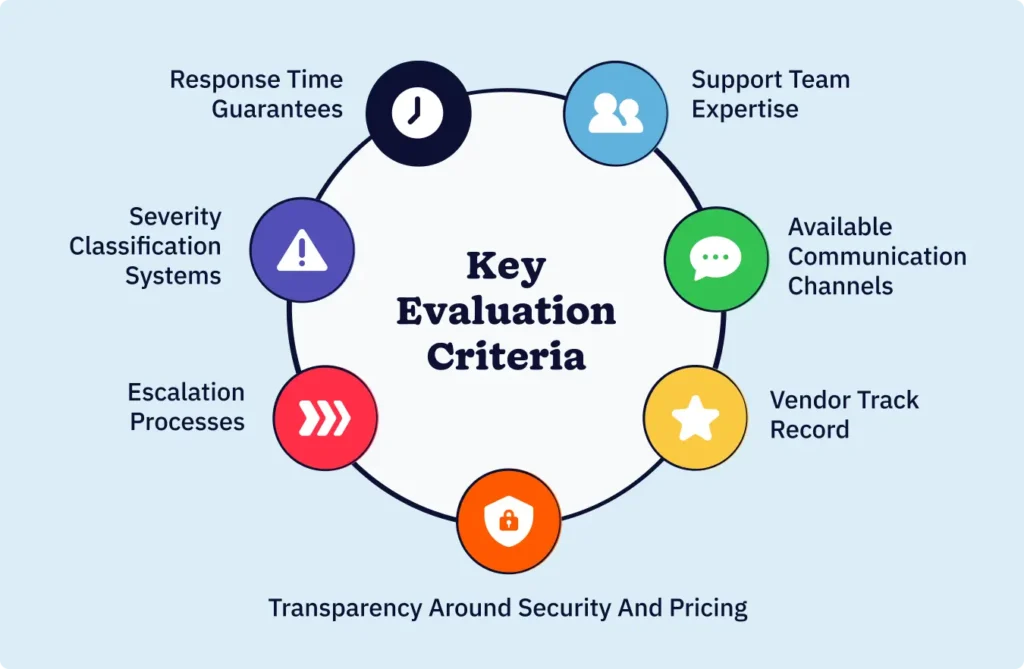
The seven evaluation dimensions
A solid support evaluation framework should examine seven key dimensions:
- Response time guarantees
- Available communication channels
- Severity classification systems
- Escalation processes
- Support team expertise
- Vendor track record
- Transparency around security and pricing
Each dimension provides specific insight into how the vendor will handle your support needs across different scenarios, from routine questions to critical system failures.
Why structured evaluation prevents bias
Without structured evaluation criteria, buyers can experience “last vendor bias”—where the most recent demo or sales conversation disproportionately influences their decision.
Research indicates that organizations with documented evaluation requirements complete vendor selection faster and with better outcomes than those that define needs reactively during the RFP process.
Creating objectivity through scoring
Putting together a weighted scoring system before you talk to vendors allows for objective comparison across multiple CRM options.
This systematic approach reveals meaningful differences that casual conversations miss—such as whether “24/7 support” truly means round-the-clock access to knowledgeable agents or simply an automated ticket system that acknowledges requests outside business hours.
7 key evaluation criteria for CRM vendor support
1. Response time guarantees (and what they really mean)
Most vendor SLAs highlight impressive response times. But understanding what these promises actually deliver requires careful examination. Many CRM vendors advertise impressive response times—”We respond to all inquiries within one hour!”—without clarifying what “response” means in practice.
The critical distinction: Response vs. resolution
The critical distinction lies between response time and resolution time. A “response” might be an automated email acknowledging your ticket, while “resolution” represents actual problem-solving by a knowledgeable support agent.
According to research on IT service management, organizations frequently confuse these metrics, leading to inflated expectations and disappointment when urgent issues remain unresolved despite meeting published response time SLAs.
What to examine in response time SLAs
When evaluating response time guarantees, there are two specific factors to look out for.
First, determine if the commitment applies 24/7 or only during business hours. A vendor promising one-hour response times during their business hours offers significantly less value than one providing round-the-clock support, particularly for teams operating across multiple time zones.
Second, verify how the vendor defines different severity levels and if response times would vary accordingly. Critical production outages should trigger faster response protocols than general feature questions.
Real-world example: Same-day response
Consider this example: Company A’s CRM vendor promises “same-day response for all support inquiries.” When a database sync failure prevents the sales team from accessing updated lead information, they submit a support ticket at 9am.
They receive an automated acknowledgment within minutes, but the first substantive response from a human agent doesn’t arrive until 4pm—technically meeting the same-day commitment but leaving the team without functionality for a full business day.
On the other hand, Company B’s CRM vendor defines response time as “initial troubleshooting begins within” specific time frames based on severity level. This provides Company B’s sales team with clearer expectations and more meaningful guarantees.
What to look for in quality CRM vendors
The best CRM with excellent customer support will provide detailed SLA documentation that specifies exact time frames for both response and resolution across different issue types, along with clear escalation procedures when these commitments aren’t met.
2. Support channels and availability
Modern CRM users need flexibility in how they access support, and the range of available communication channels reveals the vendor’s commitment to accessibility.
The importance of multi-channel support
The most effective support systems offer multiple channels, including phone, email, live chat, and video conferencing. This multi-channel approach allows users to choose the method that best fits their immediate needs and communication preferences.
Why live chat matters
Live chat has emerged as a particularly valuable support channel for CRM users. Unlike email, which can involve lengthy back-and-forth exchanges, or phone support, which requires scheduling and availability alignment, live chat enables real-time problem-solving while maintaining written documentation of the conversation.
Teams can share screenshots, error messages, and account details instantly, accelerating diagnosis and resolution. Live chat maintains a consistently high average customer satisfaction rate, typically over 80%.
The role of AI chatbots in 24/7 support
The integration of AI chatbots alongside human support represents an evolution in CRM customer support availability. Well-implemented AI chatbots provide instant responses to common questions about features, account settings, and basic troubleshooting. And it’s available 24/7 without the need for a human agent.
When issues require human expertise, effective chatbot systems seamlessly hand off the conversation to live agents along with the full context of the discussion, preventing customers from repeating information.
Example: AI chatbot with human handoff
Consider how a comprehensive support system might work: A marketing manager encounters an issue with email automation at 11pm while preparing a campaign for the next morning. They access the CRM vendor’s live chat, where an AI chatbot trained on the vendor’s knowledge base immediately provides relevant troubleshooting steps based on the specific error message.
If the automated guidance resolves the issue, the manager continues their work without much delay. If the problem requires human expertise, the chatbot captures all relevant details and routes the conversation to the first available support agent when business hours resume. This ensures the support agent has complete context for immediate troubleshooting.
Evaluating coverage hours and geography
The availability dimension extends beyond channel variety to include coverage hours and geographic support. Vendors serving global clients should provide support across multiple time zones, while those focused on specific regions might reasonably limit coverage to business hours in their primary markets.
The key is transparency—vendors should clearly communicate when different support channels are staffed and what level of assistance is available during off-hours.
3. Severity classification system
A well-defined severity classification system ensures that CRM vendors prioritize support requests appropriately. With it, critical issues receive immediate attention, and routine questions move through standard channels.
Why severity definitions matter
The absence of clear severity definitions creates ambiguity that can leave urgent business problems languishing in general support queues.
The standard four-tier system
Most enterprise software vendors, including leading CRM platforms, use a four-tier severity system that establishes objective criteria for classifying issues.
- Severity 1 (Critical): Typically covers situations where the CRM system is completely down or a critical business function is unavailable, requiring immediate response and continuous work until resolution.
- Severity 2 (High): Addresses significant degradation where key features are impaired, but workarounds exist.
- Severity 3 (Medium): Encompasses partial degradation or minor feature issues that don’t prevent overall system use.
- Severity 4 (Low): Includes general questions, feature requests, and informational inquiries.
How objectivity prevents misclassification
This framework’s value lies in its objectivity. When a sales director can’t access the CRM due to authentication failures, a clear severity system classifies this as S1 or S2, triggering appropriate response protocols.
When a user asks how to customize a dashboard view, the same system appropriately categorizes this as S4, setting realistic expectations for response timing without suggesting the request lacks importance.
Red flags: Missing severity definitions
Red flags emerge when vendors lack published severity definitions or use vague language like “we treat all issues seriously” without specifying how priorities are assigned. This ambiguity often results in critical issues receiving the same queued response as routine questions, potentially leaving teams without essential functionality for extended periods.
Questions to ask CRM vendors
When evaluating a CRM vendor’s customer support, ask specifically about their severity classification system. Request documentation showing how different issue types map to severity levels, what response and resolution time commitments apply to each level, and how customers can escalate if they believe an issue is misclassified.
Vendors confident in their support systems will readily provide this information, while those who deflect or provide vague answers may lack structured support processes.
4. Escalation process documentation
Even the most capable front-line support agents occasionally encounter issues requiring specialized expertise or management intervention. A documented escalation process ensures that complex problems move efficiently to the right resources without leaving customers stuck in endless back-and-forth with agents who lack the authority or knowledge to resolve their concerns.
Three types of escalation paths
Effective escalation frameworks typically incorporate three types of escalation paths:
- Functional escalation: Routes issues to specialists with specific technical expertise—transferring a complex API integration question from general support to the engineering team, for example.
- Hierarchical escalation: Elevates issues to managers or senior engineers when initial troubleshooting doesn’t achieve resolution or when customers request higher-level involvement.
- Automated escalation: Triggers when predetermined time frames pass without resolution, ensuring no issue languishes unattended regardless of manual oversight.
The impact of documented procedures
Research on vendor management shows that companies with well-defined escalation procedures experience 37% faster resolution times and higher satisfaction rates. Documentation itself signals organizational maturity—vendors who have formalized escalation paths have typically invested in support infrastructure and accountability systems that prevent issues from falling through gaps.
What to request from vendors
When evaluating CRM vendors, request specific documentation outlining their escalation procedures. This should include clear contact points at each escalation level, time frames that trigger automatic escalation, and protocols for customers who believe their issues require immediate escalation.
Strong vendors will confidently share this information, often providing direct access to escalation tools within their support portal.
Warning signs of poor escalation
Red flags include vague statements like “We escalate as needed” without documented procedures, resistance to sharing escalation pathways, or support systems that require customers to start over with new agents each time an issue escalates. These patterns suggest ad-hoc support processes that create frustration when complex problems arise.
Escalation example: Integration sync failure
Consider how escalation might work in practice: A finance team discovers that their CRM’s integration with their accounting software stopped syncing overnight, preventing invoice generation.
They submit a support ticket classified as S2 (high severity). The tier-one agent troubleshoots standard connectivity issues but can’t identify the cause.
A well-designed escalation process automatically routes this to a tier-two specialist with integration expertise after 30 minutes, who discovers a recent API change requiring configuration updates.
The escalation happens seamlessly, with the specialist receiving full context from the initial troubleshooting. As a result, the issue reaches resolution within two hours of the initial ticket.
Without clear escalation processes, the same issue might bounce between multiple agents over several days as the customer repeatedly explains the problem.
5. Support team expertise and resources
The knowledge and capacity of a vendor’s support team directly determine how effectively they can help users maximize their CRM investment. Even the most sophisticated support infrastructure delivers poor results when staffed by inexperienced agents working with inadequate resources or unrealistic workload expectations.
Training and product knowledge
Several factors indicate support team quality. Examine whether the vendor invests in comprehensive agent training. CRM systems can be complex, spanning sales automation, marketing workflows, reporting analytics, and integrations with dozens of third-party applications.
Support agents need deep product knowledge to diagnose issues quickly and provide accurate guidance. Vendors who treat support as a cost center rather than a strategic investment often underinvest in training, resulting in agents who read from scripts rather than truly understanding the platform.
Team capacity and turnover rates
Assess team capacity and stability. High agent turnover rates—common in call centers with demanding quotas and limited support—create inconsistent experiences as institutional knowledge continuously walks out the door.
Industry data suggests call center attrition rates average around 42%, but a CRM with the best customer support typically maintains significantly lower turnover by treating support professionals as valued technical experts rather than expendable call handlers.
Specialization and tiered expertise
Investigate how the vendor structures support tiers and specializations. Mature support organizations may even include specialists who focus on specific product areas—marketing automation experts, API integration specialists, data migration professionals—allowing complex issues to reach appropriate expertise quickly rather than exhausting general agents who lack specialized knowledge.
Questions about team qualifications
When evaluating vendors, ask direct questions about their support team:
- What training do new support agents receive?
- What is the average tenure of support staff?
- How are complex issues routed to specialists?
- Do agents have the authority to make decisions, or must they escalate routine requests to management?
CRM vendors with strong customer support systems will answer these questions confidently, often highlighting their team’s expertise as a competitive advantage.
Red flags in team capability
Red flags include resistance to discussing team qualifications, vague responses about training programs, or evidence that support agents lack basic product knowledge during initial interactions. If the sales process reveals that the vendor’s own team struggles to answer product questions accurately, this foreshadows the support experience after purchase.
6. Track record and references
Past performance provides the most reliable predictor of future support quality. While every vendor can craft compelling marketing messages about their commitment to customer success, their actual track record with existing customers reveals the truth about their support capabilities.
Requesting similar customer references
During evaluation, specifically request references from companies with similar characteristics to your organization—Comparable size, industry, and use cases. When speaking with these references, ask targeted questions that reveal support quality:
- What was your last critical issue, and how long did the resolution take?
- How often do you need to escalate beyond first-level support?
- Do support agents typically understand your questions, or do you spend significant time explaining context?
- Has the vendor’s support quality changed over time as they’ve grown?
Examining aggregate review data
Beyond individual references, examine aggregate indicators of support quality. Review platforms like G2, Capterra, and Trustpilot provide unfiltered customer feedback across large user bases.
Look beyond overall ratings to read specific comments about support experiences, noting patterns in both praise and criticism. Strong vendors typically show consistent positive feedback about responsiveness and expertise, while problematic patterns—repeated complaints about slow response times, unhelpful agents, or unresolved issues—signal concerns regardless of how impressive the sales pitch sounds.
Learning from case studies
Case studies offer another valuable perspective, particularly those documenting how vendors handled challenging situations. Did they help customers navigate major product updates or platform migrations successfully? How did they respond when service outages occurred?
Vendors confident in their support quality will readily share stories of how they’ve supported customers through complex challenges.
Evaluating incident transparency
Also consider the vendor’s public transparency during incidents. When technical problems affect customers, strong vendors communicate proactively through status pages and direct notifications, providing regular updates until resolution.
Vendors who go silent during outages or provide vague, defensive responses demonstrate a problematic support culture that will frustrate users during inevitable technical issues.
7. Security, compliance, and transparency
A vendor’s approach to security, compliance, and pricing transparency reveals fundamental characteristics about their trustworthiness and long-term viability as a CRM partner. Evasiveness or opacity in these areas often indicates deeper organizational problems that will manifest in support quality and overall reliability.
Security certifications and practices
A security evaluation should examine both technical safeguards and organizational practices. Strong CRM vendors maintain industry-standard certifications like SOC 2 Type II, ISO 27001, and compliance with regulations such as GDPR, where applicable.
These certifications require regular third-party audits, demonstrating ongoing commitment to security rather than one-time efforts. Beyond certifications, evaluate how the vendor handles data—including encryption practices, access controls, backup procedures, and incident response protocols.
How vendors respond to security questions
During vendor evaluation, discuss security practices directly and observe how the vendor responds. Confident vendors with mature security programs will discuss their practices openly, often providing detailed documentation and connecting you with security specialists who can address technical questions.
Red flags include reluctance to discuss security, vague responses about “industry-standard practices” without specifics, or resistance to providing evidence of certifications.
The importance of transparency
75% of consumers rate transparency as the top qualitative attribute they value in service providers. This transparency extends beyond security to include honest communication about product limitations, realistic timelines for issue resolution, and clear pricing without hidden fees.
Many fail because SLA language lacks clarity around performance expectations, escalation paths, or accountability—Problems rooted in insufficient transparency during the sales process.
Pricing transparency matters
Pricing transparency particularly matters for CRM support evaluation. Some vendors advertise attractive base prices but charge additional fees for phone support, after-hours assistance, or faster response times on support tickets. Others include comprehensive support in standard pricing.
Neither approach is inherently wrong, but the lack of transparency creates budget surprises and resentment. When evaluating CRM vendors, explicitly ask whether any support channels or services incur additional costs beyond standard subscription fees.
Transparency as a competitive advantage
The most trustworthy CRM vendors treat transparency as a competitive advantage, knowing that honest communication builds long-term partnerships. They readily discuss both strengths and limitations, provide clear documentation of security practices and pricing structures, and demonstrate through actions—not just promises—their commitment to supporting customers effectively.
Creating your CRM support evaluation scorecard
Converting evaluation criteria into an objective decision-making tool requires a structured scorecard that weights different factors according to your organization’s specific priorities.
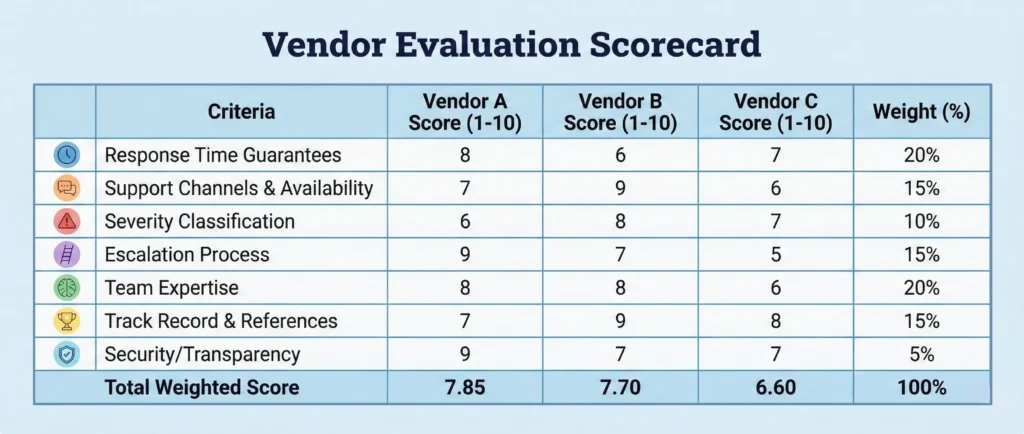
Building your scorecard structure
Start by listing the seven key evaluation criteria as scorecard rows:
- Response time guarantees
- Support channels and availability
- Severity classification system
- Escalation process documentation
- Support team expertise
- Track record and references
- Security/compliance/transparency
For each criterion, define specific rating levels (typically 1 to 5 or 1 to 10) with clear descriptions of what each score represents.
Assigning criterion weights
Next, assign weight percentages to each criterion based on your priorities. A global enterprise operating across time zones might weigh after-hours support availability at 25%. In contrast, a small business working standard hours might assign this only 10% and place greater emphasis on response time guarantees at 25%.
The weights should total 100% and reflect your team’s realistic needs rather than theoretical ideals.
Example weighting approach
For example, a midsized B2B company might weight their scorecard as follows:
- Response time guarantees (20%)
- Support channels and availability (15%)
- Severity classification (10%)
- Escalation processes (15%)
- Team expertise (20%)
- Track record (15%)
- Security/transparency (5%)
This weighting reflects that response speed and team knowledge matter most to them, while they’re less concerned about after-hours availability or security certifications.
Gathering evidence for scoring
When evaluating each vendor, gather specific evidence for scoring.
For response time guarantees, examine SLA documentation and note whether commitments cover response or resolution and apply 24/7 or business hours only.
Test available support channel options:
- Initiate a pre-sales chat to assess responsiveness
- Submit a question via email to gauge typical response quality
- Review the knowledge base for comprehensiveness.
For a track record, speak with at least three references and read recent online reviews.
Documenting your rationale
Document the rationale behind each score. Rather than simply assigning “7/10” for team expertise, note “Score 7: Support agents demonstrated strong product knowledge during pre-sales interactions, training program described as comprehensive, but several online reviews mention increased wait times, suggesting possible capacity issues.”
This documentation helps when scores are close across vendors and provides justification for your final recommendation.
Calculating weighted scores
Calculate weighted scores by multiplying each criterion score by its weight percentage, then summing these for a total score.
Example: A vendor scoring 8 on response time (20% weight) contributes 1.6 points (8 × 0.20) to their total.
The highest-scoring vendor based on weighted criteria represents the most objective match for your specific support needs.
Using scorecards to inform decisions
Remember that scorecards inform decisions rather than make them automatically. If two vendors score within a few points of each other, review the detailed scoring to understand where the differences lie.
Perhaps one vendor excels at response speed but lacks robust escalation processes, while another offers the inverse. Understanding these trade-offs helps you make informed choices aligned with your true priorities.
Creating stakeholder documentation
The scorecard approach also creates valuable documentation for stakeholders. When explaining your CRM selection to leadership or budget committees, you can demonstrate a thorough, objective evaluation process rather than relying on subjective impressions from demos.
This documentation proves particularly valuable if support quality issues emerge after purchase. It allows you to reference the evaluation criteria and vendor commitments made during the selection process.
Red flags in CRM vendor support systems
Certain warning signs during vendor evaluation reliably predict problematic support experiences after purchase. Recognizing these red flags allows you to eliminate poor options before committing, regardless of how attractive other aspects of their CRM platform might appear.
Vague scope definitions
Vague scope definitions rank among the most common and consequential red flags. When vendors describe support coverage using broad language like “comprehensive support” or “assistance with all platform features.” Without specifying what’s included or excluded, they’re setting up future conflicts.
Strong vendors provide detailed documentation listing covered support areas, explicitly noting any limitations or services requiring additional fees. Ambiguous scope language often leads to disputes where customers believe certain requests should be covered while vendors claim they fall outside standard support boundaries.
Weak response time guarantees
Response time guarantees that lack substance represent another critical warning sign. Vendors may advertise impressive response times while defining “response” as mere acknowledgment rather than active troubleshooting.
Weak guarantees also fail to specify coverage hours, severity-based variations, or consequences when commitments aren’t met. When vendors resist providing specific SLA documentation, they’re signaling that their actual support performance doesn’t match their marketing promises.
Missing escalation procedures
Missing or unclear escalation procedures indicate ad-hoc support structures that function poorly under pressure. During evaluation, ask vendors to explain their escalation process step-by-step, including contact points, time frames, and criteria triggering escalation.
Vague responses like “customers can request escalation if needed” without documented procedures suggest the vendor lacks a formal support infrastructure.
Security and compliance evasiveness
Vendors handling sensitive customer data have an obligation to discuss security practices transparently.
Those who deflect security questions, provide only vague assurances, or resist sharing certification documentation may lack adequate safeguards. This evasiveness often correlates with broader trust issues that manifest in support interactions.
Overpromising without proof
Overpromising capabilities without proof represents a red flag extending beyond support to overall vendor reliability.
When vendors make extraordinary claims—”We resolve 95% of issues within one hour!” or “Our support team has never missed an SLA commitment!”—without offering evidence through case studies, customer references, or published metrics, they’re likely exaggerating.
Strong vendors back bold claims with data and readily connect you with customers who can verify these assertions.
Poor pricing transparency
Hidden fees for support services, vague language about what triggers additional charges, or resistance to providing detailed cost breakdowns all signal vendors prioritizing short-term deal closure over long-term partnership.
Service contract research shows that this lack of transparency directly contributes to high vendor relationship failure rates.
Single points of failure
Single points of failure in the support structure indicate insufficient resource investment. If one person handles all specialized support for your industry, you’ll encounter significant delays when that individual is unavailable.
During evaluation, ask about team depth and backup coverage for specialized expertise areas.
Reactive-only service approach
Reactive service with no strategic guidance suggests vendors view support narrowly as problem-fixing rather than partnership. The best CRM customer support proactively shares best practices, alerts customers to potential issues before they become problems, and provides strategic guidance on maximizing platform value.
When service is reactive, vendors focus purely on closing tickets without helping customers succeed, demonstrating concerning priorities.
When to walk away
When you encounter these red flags during evaluation, don’t rationalize them away based on attractive pricing or features.
Support quality issues compound over time, and what seems like a minor transparency concern during the sales process typically becomes a major friction point once you’re locked into a contract.
Trust the warning signs and continue evaluating alternatives.
Questions to ask during CRM vendor evaluation
Asking targeted questions during vendor evaluation reveals critical details about support quality that marketing materials deliberately obscure. The following questions, organized by category, help you assess vendor capabilities objectively.
Response and resolution time frames
- What is your average first response time for each severity level?
- How do you define “response” versus “resolution”?
- Do your SLA commitments cover response time, resolution time, or both?
- What hours does your SLA coverage apply—24/7, business hours in specific time zones, or variable by support tier?
- What happens if you miss your SLA commitments—do customers receive credits, refunds, or other compensation?
Support channels and availability
- Which support channels do you offer (phone, email, live chat, video conferencing, in-person)?
- Are all channels available during the same hours, or do some have limited availability?
- Do you use AI chatbots or automated systems, and if so, how do they hand off to human agents?
- Can customers speak directly with technical specialists, or must all requests route through generalist agents first?
- Do any support channels incur additional costs beyond base subscription fees?
Escalation and issue tracking
- Do you have a documented escalation process?
- Can you provide written escalation procedures showing contact points and time frames at each level?
- How do customers request escalation if they feel their issue isn’t receiving adequate attention?
- Do escalated issues get assigned to new agents, or do they maintain continuity with existing support relationships?
- How do you prevent escalated issues from falling through organizational gaps?
Team expertise and knowledge
- What training do new support agents receive before handling customer requests?
- What is the average tenure of your support team members?
- Do you have specialists focused on specific product areas (integrations, automation, reporting) or general agents handling all request types?
- How do you measure and maintain support team knowledge as the product evolves?
- Can customers request assignment to specific agents who understand their environment?
Security and compliance
- What security certifications do you maintain (such as SOC 2, ISO 27001, and GDPR compliance)?
- Can you provide documentation of your most recent certification audits?
- How do you handle data encryption, access controls, and backup procedures?
- What is your incident response process if security issues occur?
- How do you notify customers about security incidents?
Pricing and hidden costs
- Does your quoted pricing include full access to all support channels?
- Are there additional fees for phone support, after-hours assistance, or priority response times?
- How do you handle support costs if our team size or usage grows significantly?
- What support is included during initial implementation and onboarding versus ongoing operations?
- Do you charge separately for data migration, API support, or complex integration assistance?
References and track record
- Can you provide references from companies similar to ours in size, industry, and use case?
- What was your largest service outage in the past year, and how did you handle customer communication during the incident?
- How has your support quality changed as your customer base has grown?
- What do your customer satisfaction scores or Net Promoter Scores for support indicate?
- Can you share case studies showing how you’ve helped customers through complex implementations or challenges?
How the CRM vendor responds matters
The vendor’s response to these questions often reveals as much as the answers themselves. Strong vendors welcome detailed questions, answer confidently with specifics, and readily provide documentation.
Defensive responses, vague generalities, or pushback against transparency requests signal concerns.
Pay attention to whether vendors try to deflect questions to “discuss after contract signing” or claim certain information is “proprietary.” Reputable vendors understand that customers need this information to make informed decisions.
Document vendor responses systematically
Keep organized records of vendor responses, ideally using a spreadsheet where you can compare answers across multiple CRM options. This documentation proves valuable during final decision-making and provides reference material if support quality issues emerge after purchase.
Making your final CRM vendor decision
Converting evaluation findings into a confident vendor selection requires synthesizing objective scores, subjective impressions, and strategic considerations about long-term partnership potential.
Reviewing scorecard results
Begin by reviewing your weighted scorecard results. If one vendor scores significantly higher than alternatives—typically 15% or more difference in total weighted score—this provides strong quantitative support for that selection.
However, when scores fall within a narrow range, examine where vendors differ most significantly. Perhaps Vendor A excels at response speed but lacks robust escalation processes, while Vendor B offers comprehensive escalation but slower initial response.
Understanding these trade-offs helps you prioritize based on your team’s realistic needs rather than theoretical ideals.
Aligning with team needs
Consider how each vendor’s support strengths align with your team’s working style and pain points. A sales organization that rarely encounters technical issues but needs fast answers when problems arise might prioritize response speed over escalation infrastructure.
A marketing team running complex automation workflows might value deep technical expertise and proactive guidance over multi-channel availability. The “best” support system isn’t objectively the best—it’s the best for your specific requirements.
Negotiating SLA commitments
Negotiate SLA commitments based on evaluation findings. Rather than accepting vendors’ standard support agreements, discuss customizing terms to address your priorities.
If response time is critical, negotiate specific commitments with financial penalties for missed targets. If you need guaranteed escalation paths for critical issues, get these procedures documented in your contract.
Strong vendors accommodate reasonable customization requests, recognizing that formalized commitments demonstrate confidence in their support capabilities.
Identifying dealbreakers
Identify dealbreaker red flags that eliminate vendors regardless of other factors. Perhaps your organization handles sensitive customer data requiring specific security certifications, or your global operations demand 24/7 support coverage.
Vendors who can’t meet these nonnegotiable requirements shouldn’t remain under consideration, regardless of attractive pricing or features. Compromising on true requirements creates ongoing problems that compound over time.
Creating decision documentation
Document your decision rationale comprehensively. When presenting your CRM selection to leadership, stakeholders, or budget committees, explain how you evaluated support quality systematically rather than relying on sales pitches.
Show your weighted scorecard, summarize key differentiators between vendors, and explain how your recommended option aligns with organizational priorities. This documentation proves particularly valuable if you need to revisit vendor selection or if support issues arise post-purchase—you can reference the evaluation criteria and commitments the vendor made during selection.
Planning for accountability
Plan for post-purchase accountability. Before signing contracts, establish baseline metrics for measuring actual support performance against vendor commitments.
How will you track response times, resolution rates, and satisfaction? What triggers will indicate you should escalate concerns about support quality to vendor management? Setting these parameters in advance creates objective standards for ongoing vendor relationship management rather than relying on subjective impressions.
Recognizing that selection isn’t permanent
Remember that vendor selection isn’t permanent. Most CRM contracts include annual renewal points that provide opportunities to renegotiate or switch vendors if support quality doesn’t meet commitments.
Document support experiences throughout the contract term, noting both positive interactions and concerning patterns. This ongoing assessment informs renewal decisions and provides leverage for requesting service improvements.
Accepting reasonable uncertainty
Finally, recognize that even a thorough evaluation involves some uncertainty. Vendors can’t predict every scenario your team will encounter, and support quality sometimes changes as companies grow or face resource constraints.
The goal isn’t eliminating all risk but rather making the most informed decision possible based on available evidence. Your structured evaluation significantly improves the odds of selecting a vendor whose support capabilities truly match your needs.
Frequently asked questions about CRM customer support
-
1. What’s the difference between response time and resolution time?
Response time measures how quickly a vendor acknowledges your support request, while resolution time measures how long actual problem-solving takes. Many vendors define “response” as an automated acknowledgment rather than human troubleshooting. Always clarify whether SLA commitments cover response, resolution, or both—and verify that response means meaningful engagement.
-
2. How do I know if a CRM vendor’s SLA is actually achievable?
Look for specific, measurable commitments with defined consequences for missing targets. Achievable SLAs specify exact time frames for different severity levels, clarify 24/7 versus business hours coverage, distinguish response from resolution, and explain customer compensation when commitments aren’t met. Request references and check online reviews for patterns in actual support performance experiences.
-
3. Should I prioritize 24/7 support or business hours support?
It depends on your team’s working patterns and how critical uninterrupted CRM access is. Organizations with global teams, operations outside traditional hours, or automated workflows requiring constant uptime typically need 24/7 coverage. Companies working standard hours in a single region may find business hours support adequate, especially with strong self-service resources like comprehensive knowledge bases and AI chatbots available outside staffed hours.
-
4. What does “escalation” mean in CRM support?
Escalation moves support issues to a higher expertise or authority level when initial troubleshooting doesn’t resolve problems. Functional escalation routes to specialists, hierarchical escalation elevates to managers with decision-making authority, and automated escalation triggers after predetermined time frames. Effective escalation ensures complex problems reach appropriate resources quickly rather than bouncing between general agents.
-
5. How can I verify a vendor’s security and compliance claims?
Request official documentation like SOC 2 Type II reports, ISO 27001 certificates, or GDPR compliance attestations. Legitimate certifications come from independent auditors with specific dates—vendors should readily provide this during evaluation. You can verify certifications directly with issuing organizations. Also, ask references about their security experience and whether any incidents occurred.
Make CRM customer support work for you from day one
Evaluating CRM vendor support quality before purchase is one of the most strategic decisions in software selection. While features, pricing, and integrations dominate discussions, support quality ultimately determines whether your team will successfully adopt the platform and achieve ROI.
The framework in this guide—examining response time guarantees, support channels, severity classification, escalation processes, team expertise, track record, and transparency—provides a systematic approach that reveals meaningful differences between vendors.
By creating a weighted scorecard, asking targeted questions, and recognizing red flags, you can move beyond marketing promises to understand true support capabilities.
Support quality issues compound over time. What seems minor during evaluation—vague SLA language, missing escalation documentation, or resistance to transparency—becomes a major frustration after purchase. The most expensive CRM is one that sits underutilized because users can’t get the support they need to succeed.
Invest time in a thorough support evaluation during vendor selection. Speak with references, test support channels, review online feedback, and document commitments. This upfront diligence prevents costly mistakes and positions your organization with a CRM partner committed to your success.
When technical issues arise or your team needs guidance, you’ll have confidence that responsive, knowledgeable support is ready to help you get the most from your CRM investment.
BACK TO TOP Written by
Sam Poole Associate Content MarketerEdited by
Will Gordon Sr. Director of MarketingReviewed by
Andy Fowler Co-FounderReady to try
Nutshell for Free?Thank you! Your submission has been received!Oops! Something went wrong while submitting the form.




What Is Revenue Intelligence? An All-Encompassing Guide
Published on: January 24, 2024Highly Effective Strategies for Elevating Sales Team Performance
Published on: November 10, 2022Join 30,000+ other sales and marketing professionals. Subscribe to our Sell to Win newsletter!










