Email marketing vs. social media: Why owning your audience beats renting it

-
You’ve spent months growing your social following. Now you have a product to launch, an event to promote, or news your customers should hear. How many of those followers will actually see it?
That question is a big part of the email marketing vs. social media debate. Social platforms can introduce your business to new people, but a follow doesn’t guarantee they’ll see your next post. Email, on the other hand, gives you a direct channel to contact them, though you still have to earn a place in the inbox.
This difference is often described as “renting” your audience on social media versus “owning” it through email. In this post, we’ll look at what that really means, how much control each channel gives you, and how email and social media can work together to turn attention into stronger customer relationships.
Key takeaways
- Social media is great for reaching new people, but you have less control over who sees your posts.
- Email gives you a more direct way to stay in touch with people who have chosen to hear from you.
- Email and social media work best together, with social driving discovery and email helping nurture interest.
- A CRM can help connect activity across channels and give you a clearer view of the customer journey.
Table of contents
What does it mean to “own vs. rent” your audience?
“Owning your audience” means people have signed up directly with your business, usually through a signup form, and shared their contact details with you.
You can manage those details through an email marketing platform and connect your list to a customer relationship management (CRM) tool to keep track of customer interactions. If you change providers, you can take your list with you without asking everyone to sign up again.
A “rented” audience, on the other hand, follows you on a platform they’ve already joined, such as Instagram or LinkedIn. You’ve earned their interest, but that connection stays on the platform. Following you doesn’t automatically give you their email address or a way to contact them elsewhere.
Why is reaching your social media audience less predictable?
A few years ago, I rarely had to wonder whether people were seeing my Twitter posts. As the platform became X and the algorithm and For You feed changed, my engagement gradually dropped. Some of my followers even asked why I hadn’t been posting lately, even though I was posting as usual. At the same time, my feed showed me more content that had little to do with my interests.
From a business perspective, that raises a frustrating question: are your posts reaching the people who actually want to see them?
That uncertainty extends beyond X. According to Hootsuite’s overview of platform reach data:
- Facebook’s average organic reach dropped from about 16% in 2012 to between 1% and 2% by 2025.
- Instagram’s organic reach fell 12% between 2024 and 2025.
- LinkedIn’s reach dropped 34% in 2025 compared with the previous year.
Your own results may look different, but a bigger following won’t necessarily mean more people see your content. To get an announcement seen, you may need to try a video, post a reminder, or put some budget behind it.
Apart from that, AI is also changing how content is selected. LinkedIn, for instance, is introducing more advanced AI models to match posts with each person’s interests and activity. So, following your business is only one part of what determines whether someone sees your content.
As a result, planning is a lot harder than it used to be. And when you have a launch coming up or an event to fill, last month’s engagement is a useful reference, but it’s no guarantee of how many people you’ll reach this time.
Does email marketing give you more control?
Once someone joins your list, an email marketing tool like Constant Contact gives you more control over when to follow up and what to send based on their activity. That might mean welcoming them with a 10% discount, recommending products they’ve shown interest in, or reminding them about items left in their cart.
What’s more, segmentation lets you send different emails to active subscribers and people who’ve lost interest. For example, a clothing shop could give regular readers early access to its summer collection. Subscribers who haven’t clicked in three months could receive a win-back email with a few new arrivals and a 20% discount on their next order.
Personalization also helps you carry that through to the content. If someone buys from the collection, your next email can include care tips for their purchase instead of another reminder to buy it.
And when someone considers unsubscribing, a preference center gives them options. They might still want product updates, just less often. According to Single Grain, an ecommerce client saw a 76% decrease in unsubscribe rates after giving subscribers choices around content, frequency, and communication channels. Letting someone choose a monthly email could help them stay subscribed on terms that suit them, while keeping it easy to leave completely.
While you can’t guarantee their attention, you can use their activity and preferences to shape your next email. With an organic social post, you have less control over who sees it and no way to tailor the same post to each person.
How to use email marketing and social media together
Email and social media can help with different parts of the same campaign, from getting people interested to following up when they’re ready to buy.
Small business owners see value in both. In Constant Contact’s Q1 2026 Small Business Now report, 68% expected social media to deliver the most value, while 41% named email marketing. The survey included more than 1,500 small business owners across five countries.
So, how do you put them to work together? Here are a few ideas to try.
Give followers a reason to subscribe to your newsletter
“Join our newsletter” won’t tell your followers much. What will they receive that makes sharing their email address worthwhile?
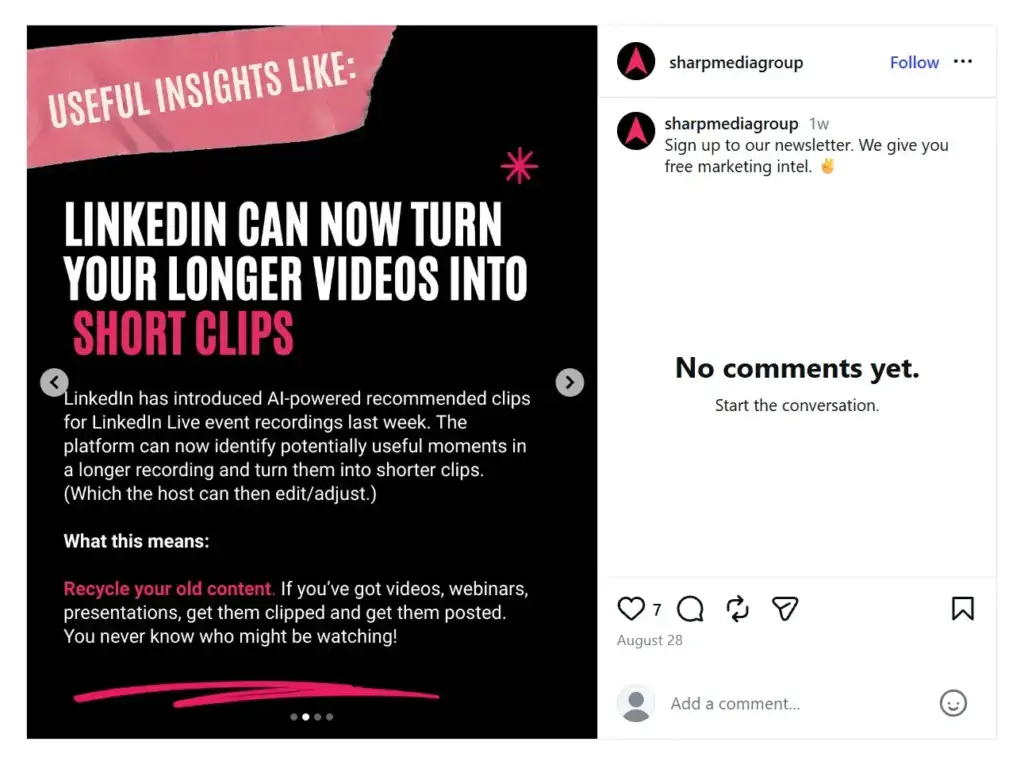
Sharp Media Group answers that question through an Instagram carousel that previews its marketing insights. The slide below explains a LinkedIn update and suggests how businesses could use it. The caption invites followers to subscribe for more free marketing advice, so they’ve already had a taste of what to expect.
You can do something similar with a useful newsletter tip, a preview of an upcoming collection, or an event announcement. Give followers a reason to want the next email, then link directly to the relevant signup page so they don’t have to search for it.
In my experience writing form and landing page copy, shorter forms tend to work best, especially when you’re clear about what people will receive and how often you’ll contact them. Your welcome email should then deliver the promised content or offer while the signup is still fresh in their mind.
Cross-promote your campaigns through email and social media
Let’s say you’re hosting a live session or running a giveaway on social media. Why not invite your email subscribers, too? They may have missed your posts or might not follow you there yet.
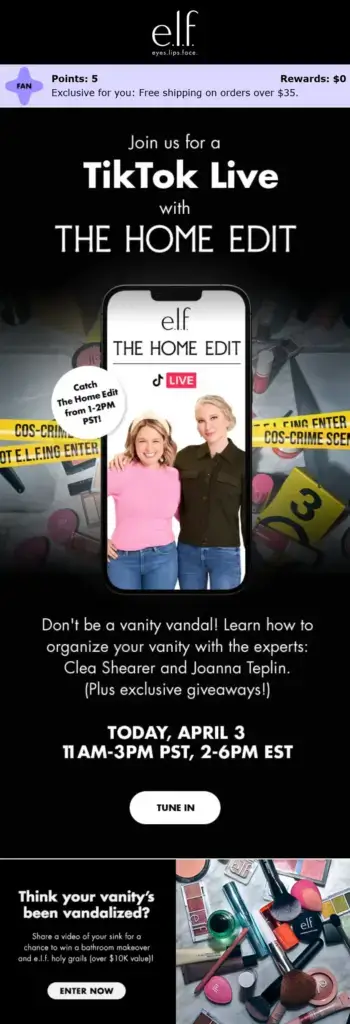
Here’s how e.l.f. Cosmetics does this in the following example, inviting subscribers to a TikTok Live with The Home Edit. The email gives them clear reasons to attend, while the event details and “Tune in” button make it easy to join.

Source: Author’s inbox For your own campaigns, you can explain what’s happening, why it’s worth joining, and where to go. The promotion can work both ways. You could preview an upcoming newsletter on social media or invite email subscribers to submit questions for a live Q&A. Give people something useful to do when they move between channels.
Turn audience questions into useful content
If the same question keeps coming up in comments or DMs, it’s worth answering in your next email. Say you sell project management software, and people keep asking how difficult it is to move their work out of spreadsheets. That’s a great opportunity to use your next newsletter to walk them through importing a spreadsheet and assigning tasks to their team.
Also, social listening, or tracking what people say about your brand and industry online, can help you find questions that don’t appear in your own comments. If people worry their colleagues won’t use a new project management tool, your email could suggest trying it on one small project before asking the whole team to switch.
Your email results can also help you plan your next social post. If the walkthrough gets plenty of clicks, turn it into a short LinkedIn demo. Then invite viewers to share what’s stopping their team from switching, and use those replies to decide what to cover next.
Where does CRM fit into email and social media marketing?
Someone might discover your business on social media, join your email list, click a few emails, and only contact you weeks later. A CRM can connect those steps instead of treating each channel separately.
A CRM connected to your email marketing keeps useful contact and campaign information together. A consultant, for example, might see that a lead came from LinkedIn, signed up for emails, clicked through to a service page, and later booked a call. That gives them a much better idea of what the person is interested in before they speak.
How much you can track also depends on the tools you use and how they connect. Some integrations sync more information than others, so it’s worth checking what data actually passes between your email platform and CRM.
That matters even more when leads take longer to convert, several people manage the relationship, or customers move between email, social media, and sales conversations. Instead of piecing together separate touchpoints, your team gets a clearer view of the journey that led to the conversion.
Turn a rented audience into one you own
Social media is a great place to build awareness and reach new people, but that reach can change from one post to the next. The next step is giving interested followers a reason to join your email list, where you can reach them more directly.
From there, email can help you nurture that interest with useful updates, offers, and content, while your CRM connects activity across channels and gives you a clearer view of the customer journey.
You don’t have to choose between email and social media. Use social media to get discovered and start conversations, then use email to continue them without relying entirely on a platform you don’t control.
Frequently asked questions
-
1. Is email marketing better than social media?
Social media is usually better for reaching new people, while email is better for keeping in touch with people who already know your brand. In most cases, you’ll get more value by using both together.
-
2. Does email marketing have a higher ROI than social media?
Often, yes, but it depends on how you measure results. Email makes it easier to track clicks, sales, and conversions. According to Litmus, email can generate between $36 and $42 for every $1 spent. Social media can be harder to measure because it also supports things like reach and brand awareness.
-
3. Which channel is better for customer retention?
Email is usually better for customer retention. You can send past customers useful messages based on what they bought or showed interest in, such as product updates, reminders, or offers. Social media can still keep your brand visible, but not every customer will see every post.
-
4. What should you measure when comparing email and social media?
Look at what each channel is helping you achieve. For email, that could mean clicks, signups, sales, and unsubscribes. For social media, look at reach, engagement, website visits, and leads. The most useful comparison is whether each channel moves people closer to becoming customers.
BACK TO TOPWritten by
Marilia Dimitriou Lead Content Editor at Constant ContactEdited by
Sam Poole Associate Content MarketerReviewed by
Will Gordon Sr. Director of MarketingReady to try
Nutshell for Free?Thank you! Your submission has been received!Oops! Something went wrong while submitting the form.
What Is Revenue Intelligence? An All-Encompassing Guide
Published on: January 24, 2024Highly Effective Strategies for Elevating Sales Team Performance
Published on: November 10, 2022Join 30,000+ other sales and marketing professionals. Subscribe to our Sell to Win newsletter!
- Product
- Nutshell Overview
CRM & Sales
Our powerful and easy-to-use flagship product.Marketing
Email marketing, forms, landing pages, and more.Engagement
Webchat, SMS, WhatsApp & more in your Omni-Channel Inbox.Prospecting
Prospect for new leads and new contacts in your CRM.Proposals & Invoices
Create & send quotes, invoices and contracts in your CRM.
AI
See why Nutshell is the leading AI CRM.Integrations
Connect to Google/Microsoft and over 5,000 Apps. Reporting
Create reports and forecasts in an instant.Mobile App
Take your CRM with you wherever you go.CRM Advisor
Get a dedicated point of contact to get the most out of Nutshell.
- Pricing
Nutshell AI
- Marketplace
- Resources
- Contact Us
Contact Sales
Send us your questions or book a 1-on-1 demo.Join a Demo
Join a group demo for a general overview of Nutshell.
Contact Support
Contact our support team via live chat in app or via email.Become a Partner
Refer businesses to Nutshell & earn commissions.
Contact Marketing
Questions about our website or our marketing opportunities?Careers
Join our growing team! See current openings.