How to Build a CRM Onboarding Process That Actually Sticks
-
When it comes to CRM onboarding, technology is not the challenge. Most platforms are easier to use and more advanced than ever. Still, a 2025 study published through ResearchGate suggests that CRM implementation fails to meet the desired goals between 60% to 70% of the time. The problem is typically the lack of a structured plan to get people to use the software, not the software itself.
The most significant factor separating successful CRM programs from those that are underutilized is the CRM onboarding process and programs with investments in CRM infrastructure that deliver. This guide by Nutshell will walk through developing a CRM onboarding process that your team uses and sustains.
Key takeaways
- The most common reason for CRM failure is a lack of adoption, and onboarding is where adoption is won or lost
- A phased onboarding process with frequent, task-oriented training by role is far better than a single training session
- Onboarding processes that stick are distinguished by success metrics that go beyond the go-live date
Table of contents
- What does a CRM onboarding process actually involve?
- Why does CRM onboarding make or break adoption?
- How do you build a CRM onboarding plan that works?
- What role does custom CRM onboarding play for different teams?
- How do you measure CRM onboarding success?
- Frequently asked questions about CRM onboarding
What does a CRM onboarding process actually involve?
A CRM onboarding process is the sequencing of training, task completion, and reinforcement to help end users adopt the CRM software. It’s different than implementation, which involves data transfers, integrations, and system setup. Onboarding starts after implementation.
Four elements characterize successful CRM onboarding:
- User training based on roles
- Integration of workflows
- Behavioral reinforcement
- Sustained measurement
Adoption stunts whenever any of these elements are abbreviated or excluded. Launching the system is simply a milestone. The end goal is to have your team using the system, confidently and consistently, on a daily basis.
Why does CRM onboarding make or break adoption?
Many rollout plans fail to recognize that user acceptance hurdles are to be expected and must be addressed. A 2021 KPMG survey of more than 200 professionals found that 41% actually fail to prepare for these obstacles. Nearly half of the teams that were surveyed feel that there is no plan for onboarding.
Another challenge can be found in the learning science. Hermann Ebbinghaus’s forgetting curve, first recorded in 1885 and later validated in a 2015 replication study published in PLOS ONE, shows that, without reinforcement, a person will forget approximately 70% of the information that they learned within a day.
The effectiveness of a single training session, no matter how successful, is essentially doomed to fail against this curve the moment it concludes. Think of a single training session as an event. Consider onboarding as a process that spans several months. This distinction is more important than you might realize.
How do you build a CRM onboarding plan that works?
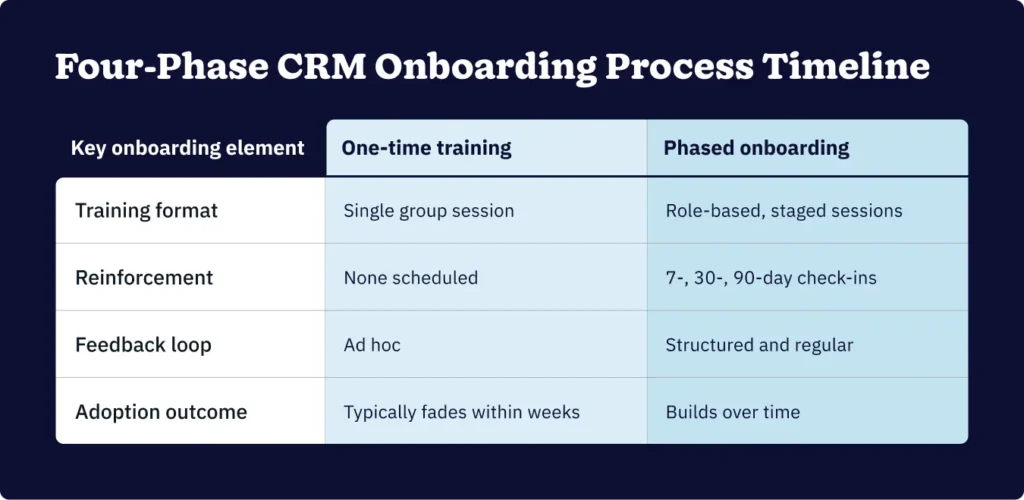
A successful CRM onboarding plan must be a staged and systematic program that supports the transition from ad hoc CRM use after initial training to routine CRM use over a defined period, usually 90 days. This plan consists of four driving phases.
Phase 1: Pre-launch preparation
There are a few important steps within this pre-launch prep phase:
- Audit and cleanse your data before training begins.
- Familiarize yourself with how your current sales and marketing processes integrate with the CRM.
- Identify your internal champions (i.e., advocates for the tool) as those team members who may be able to provide support to their peers post-launch.
- Determine what success will look like before users first log in.
Most teams that neglect this pre-launch preparation phase end up with a poorly populated CRM solution that’s unlikely to be trusted. Users quickly lose faith in an unreliable and untrustworthy CRM.
Phase 2: Guided launch training
Guided launch training is a time-sensitive, role-based instruction. It’s delivered in proximity to the go-live date. Sales teams, marketing managers, and customer service representatives engage with a CRM in different ways and, therefore, have specific training needs.
As an example, pipeline management, contact logging, and activity tracking are critical to a sales rep in a CRM. A marketing manager utilizes features related to audience segmentation, campaign attribution, and lead source data. Training your team with a single unified approach may prove irrelevant to some users, making it a costly and potentially demotivating.
Phase 2 training sessions should be brief and to the point. Two hours of concise, role-specific training is always more beneficial than a full day of general training that doesn’t meet the needs of every role.
Phase 3: Reinforcement and habit-building
This phase is often overlooked and is often the reason why software adoption slows and fails. The reinforcement and habit-building phase consists of regular follow-up sessions that help transform training into a habit. Follow-ups include brief check-ins to assess software adoption and micro-training sessions on the software’s features when employees need them.
It’s a form of software training that addresses habit-forming and reinforces training through spaced repetition, and has proven more effective than traditional, single-session style training. Spaced repetition refers to repeated exposure to the same information, with the time intervals between each repetition gradually increasing. This method is especially effective for software training.
Phase 4: Ongoing optimization
Once the CRM system is setup and in use, continuous assessment and optimization should commence to ensure the CRM remains aligned with how teams actually work. Effective assessment and optimization include:
- Sustained collection of user feedback about the ongoing process
- Workflow adjustment based on where user friction occurs
- Updating training materials when the business or service offerings evolve
Reputable CRMs release product updates frequently, which should surface a small internal onboarding task worth tackling as soon as possible.

What role does custom CRM onboarding play for different teams?
Custom CRM onboarding involves designing an onboarding experience that aligns with each team’s or user’s specific workflows, goals, and use cases. It exists to fill relevance gaps and prevent adoption gaps before it’s too late.
A sales team using a CRM solution needs to build out contacts, progress their deals, and log activities at speed. A marketing team needs to learn about data hygiene, list management, and attribution. A customer service team needs contact histories, communication logs, and ticketing. All of these teams use the same CRM but have different requirements for their day-to-day tasks.
The ADKAR model of change management (Awareness, Desire, Knowledge, Ability, and Reinforcement) corresponds perfectly with the onboarding steps described above. Custom CRM onboarding recognizes that each team is likely to move through the steps of the model at their own pace. A generic rollout fails to provide the same level of flexibility.
How do you measure CRM onboarding success?
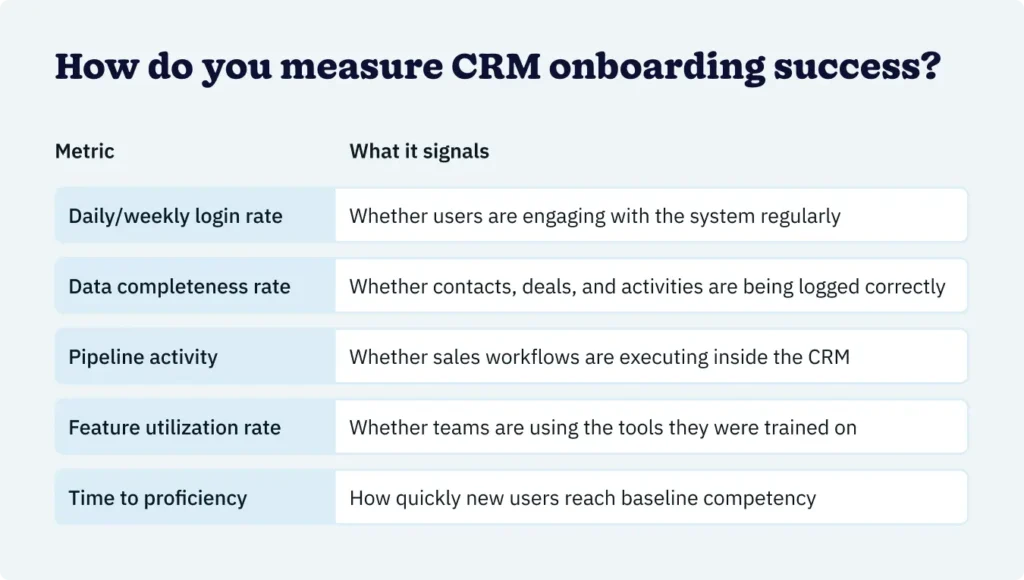
Successful CRM onboarding can and should be measured. This is what differentiates onboarding from an event. While completion rates are important when measuring the success of CRM onboarding, it’s crucial to focus on behavioral metrics. In other words, don’t just focus on whether users attend the training. Ask whether they’re actually using the software a month down the line.

Teams that keep a close eye on these metrics from day one are much more likely to identify the areas where onboarding is successful and those needing reinforcements to keep from losing momentum.
Frequently asked questions about CRM onboarding
-
1. How long should a CRM onboarding process take?
Most teams benefit from a structured 90-day onboarding period. The go-live date is the starting point, not the finish line. Initial training typically spans the first two weeks, followed by reinforcement check-ins at 30 and 90 days.
-
2. What is the difference between CRM implementation and CRM onboarding?
CRM implementation is the technical process of setting up and configuring the software: Data migration, integrations, and workflow builds. CRM onboarding is the human-focused process that follows: Training users, reinforcing habits, and measuring adoption. Both matter. But onboarding is where adoption is ultimately won or lost.
-
3. What is a CRM champion, and why do you need one?
A CRM champion is an internal advocate, usually an experienced team member, who supports peers during and after onboarding. They answer day-to-day questions, model correct CRM usage, and surface friction points back to leadership. Having a champion in place significantly increases the likelihood of sustained adoption, particularly in larger teams.
-
4. Why does role-based training matter for CRM onboarding?
Different teams use a CRM for different purposes. Sales teams focus on pipeline management and activity logging. Marketing teams focus on segmentation and attribution. Customer service teams focus on contact history and communication. Role-based training ensures each group learns what’s most relevant to their work, which improves both engagement and retention.
-
5. How do you know if your CRM onboarding process is working?
Track behavioral metrics: Daily login rates, data completeness, pipeline activity, and feature utilization. If users are logging in regularly, entering data consistently, and executing workflows inside the CRM, onboarding is working. If activity drops off after the first two weeks, the reinforcement phase needs attention.
The payoff is in the process
CRM onboarding is hardly a checklist item. It’s a conscious effort to understand those who will (or won’t) use the CRM. Companies that treat onboarding as an ongoing process, as opposed to a one-time training session, reduce the gap between the potential of the CRM to help them and the performance of the CRM. Ultimately, the software defines the limit, and onboarding exposes how close to that limit the organization can get.
TILBAGE TIL TOPPENWritten by
Andy Fowler CEO & Co-Founder, NutshellEdited by
Will Gordon Sr. Director of MarketingKlar til at prøve
Nutshell gratis?Tak skal du have! Din indsendelse er blevet modtaget!Ups! Noget gik galt, da du indsendte formularen.
3 grunde til, at dit salgsgulv er for stille, og hvad du kan gøre ved det
Udgivet den: 10. november 2022Hvad er de 3 bedste go-to-market-strategier?
Udgivet den: 10. november 2022Slut dig til mere end 30.000 andre professionelle inden for salg og marketing. Abonner på vores Sell to Win-nyhedsbrev!
- Produkt
- Nutshell Overview
CRM & Sales
Our powerful and easy-to-use flagship product.Markedsføring
Email marketing, forms, landing pages, and more.Engagement
Webchat, SMS, WhatsApp & more in your Omni-Channel Inbox.Efterforskning
Prospect for new leads and new contacts in your CRM.Proposals & Invoices
Create & send quotes, invoices and contracts in your CRM.
AI
See why Nutshell is the leading AI CRM.Integrationer
Connect to Google/Microsoft and over 5,000 Apps.
RapporteringCreate reports and forecasts in an instant.Mobile App
Take your CRM with you wherever you go.CRM-rådgiver
Get a dedicated point of contact to get the most out of Nutshell.
- Prissætning
Nutshell AI
- Ressourcer
- Kontakt os
Kontakt salgsafdelingen
Send us your questions or book a 1-on-1 demo.Deltag i en demo
Join a group demo for a general overview of Nutshell.
Kontakt support
Contact our support team via live chat in app or via email.Bliv partner
Refer businesses to Nutshell & earn commissions.
Contact Marketing
Questions about our website or our marketing opportunities?Karriere
Join our growing team! See current openings.