Spring til hovedindhold ↓

How to Evaluate Customizable CRM Software Features and Capabilities


Written by
Andy Fowler CEO, Co-founder at Nutshell
Andy Fowler CEO & Co-Founder, Nutshell
Summarize with ChatGPT Last updated on: June 11, 2026
A sales professional customizing a life-sized CRM dashboard by rearranging modular reporting and activity blocks

Between 60% and 70% of CRM implementations are considered unsuccessful. The prime reason for this is that the software is incompatible. Businesses evaluating CRMs check all the features, do all the demos, and compare all the pricing tiers. Before making their decision, they often neglect to ask a crucial question: Does the CRM fit our needs, or is it flexible enough to adapt to our needs?

Customizable CRM software is software that allows businesses to modify pipelines, data fields, and structure workflow and reporting to match their specific sales processes. This customizability prevents businesses from completely altering and adapting their processes for the CRM.

Finding the right fit is what makes the difference between a productive CRM investment and a wasteful one. This Nutshell guide on evaluating customizable CRM software will help buyers analyze their options rather than rely on a demo.

Key takeaways

  • A significant number of CRM projects fail due to poor organizational fit, which is why evaluating the depth of customization according to your needs before purchasing is essential.
  • CRM customization depth exists on three distinct levels: configuration, workflow automation, and custom development. Ignoring these different degrees of customization can lead to costly mistakes.
  • CRM ROI is directly tied to the business fit. According to a Nucleus Research study conducted in 2024, time savings account for 51% of the total CRM ROI. That means that a system that matches your workflows from the start will be your most valuable asset.

Why do so many CRM investments underperform?

CRM system implementations have a notoriously high failure rate when it comes to meeting the objectives for which they were purchased. According to a 2025 study in Global Market Dynamics, 60-70% of CRM implementations fail to achieve their intended objectives. 

The return on investment for CRM systems has also declined drastically in the last decade. A 2024 study by Nucleus Research states that the average return on CRM systems has fallen to $3.10 per dollar invested, a decline of 37% in 10 years.

This failure has less to do with the CRM systems themselves and more to do with the platform’s fit to your business needs.

Nucleus Research’s study also noted that savings in time, process efficiency, and productivity gains accounted for 51% of the overall return on investment for CRM implementations, with revenue increases contributing the least. 

A CRM system that fails to align with a company’s processes and workflows not only fails to provide ROI but actually renders a negative ROI due to the resultant friction. Ultimately, this typically forces employees to create workarounds, and often results in a drop in CRM users at the company.

According to Global Market Dynamics’ research, inadequate change management, the preparedness of an organization to adopt the CRM system, and a lack of alignment with the strategic goals of the organization are some of the primary causes of the failure of CRM systems. 

The reality is that businesses won’t pick these primary causes up in a comparison of CRM solution features. They can only be uncovered by asking the right questions before making a purchase decision.

What does CRM customization depth actually mean?

CRM customization depth refers to the degree to which CRM can adapt to the needs of a specific business without requiring the business to change its processes. Customization of a CRM system could involve changes to the user interface, data structures, logic of the automations, and the integrations.

Many are under the impression that customization is a single concept, when in reality, it’s a multi-faceted concept, and confusing one type of customization for another could be very costly.

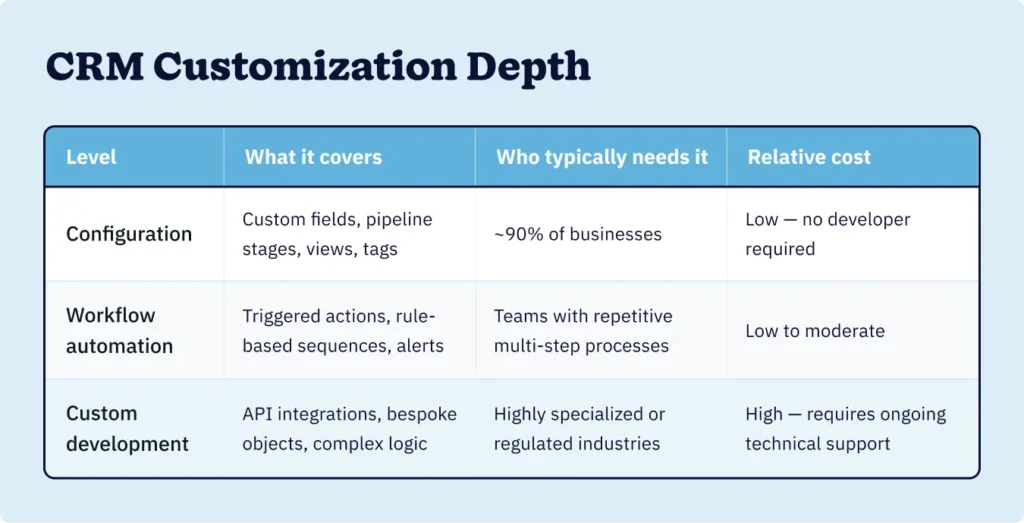
A table breaking down the different levels of CRM customization depth, what they cover, who needs them, and the relative cost for each
  • CRM configuration is the process of changing the available settings on a platform to meet a company’s needs, without coding. 
  • Workflow automation relies on the setting of rules, at which point data can be moved, tasks can be assigned, and messages can be sent, all without manual action. 
  • Custom development is when businesses build new capabilities that are not currently on the platform.

Selecting a platform that is mainly configurable from your perspective, only to find out later that your business process requires custom development, is one of the costliest errors when purchasing a CRM. And it’s more common than you might think.

What features should you evaluate in a customizable CRM?

When evaluating a customizable CRM, it’s important to consider more than just the availability of a feature. Assessing the extensibility of the feature is equally important.

Pipeline flexibility

Pipeline flexibility refers to the ability to have a number of sales pipelines, each of which includes distinct sales stages, associated sales fields, and different degrees of sales confidence. A one-size-fits-all, single pipeline CRM may serve you well for basic needs, but if you have more than one sales motion, you’ll need multiple customizable pipelines to work with.

Custom fields and data architecture

Custom fields and data architecture relate to the type of fields used to collect data and how it affects the way your data is organized and how it can be reported. Some CRMs offer the ability to have multiple custom fields, but also limit those fields to only text. If you need more complex fields, consider the type of fields offered, such as drop-down lists, date fields, and calculated fields.

Workflow automation rules

Workflow automation rules allow you to set up workflows to complete actions automatically, and typically comprise triggers and resultant actions. The extent to which the rules are flexible for a given automation varies across CRMs. Most offer varying degrees of automation across plans and tiers.

Integration ecosystem

An integration ecosystem is the breadth and variety of automated, native, and API-based integrations available to connect the CRM to the tools your team already depends on. Integrations should have the ability to update data in real-time and should ideally be bidirectional.

Reporting and dashboard customization

Reporting and dashboard customization is the ability to create custom reports and dashboards from your data. CRMs typically provide “standard” reports from the system, but those reports may be too generic for your sales process.

Role-based permissions

Role-based permissions determine what users can view, edit, or export CRM data. For teams spanning different departments and separate roles, such as sales reps, managers, marketing coordinators, and account managers, flexibility with permissions is a must.

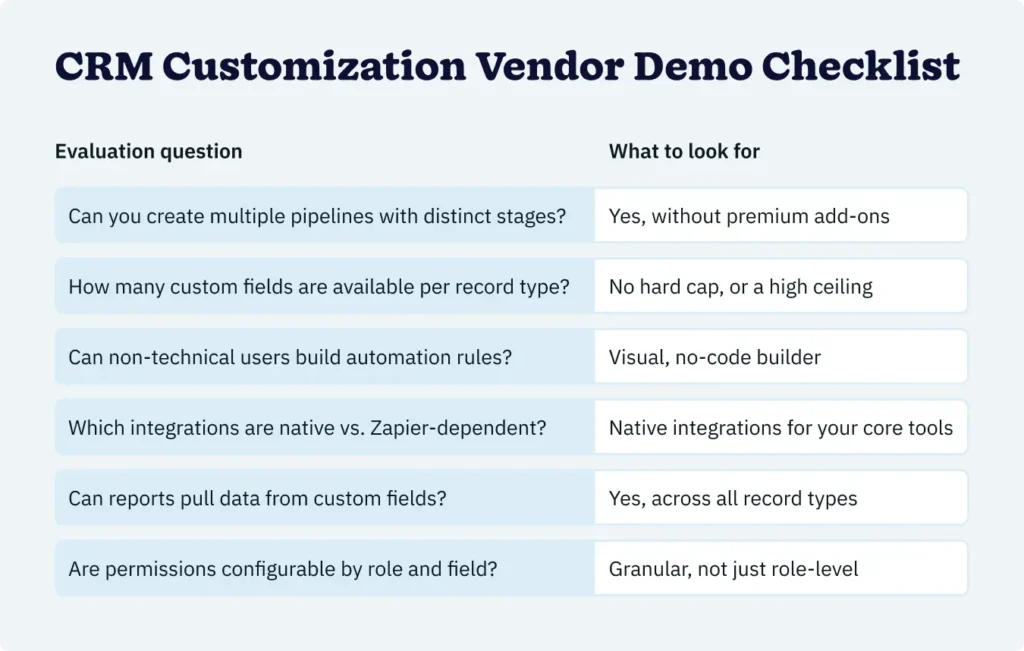
This evaluation checklist will help you learn more about the customizable features you need during vendor demos.

A table breaking down evaluation questions to ask vendors and what to look for when searching for a customizable CRM solution

How should you assess a CRM vendor’s customization capabilities?

A well-designed demo will show the CRM vendor’s offering at its best, but won’t always reflect the system pitfalls. 

The following questions will hold true regardless of what system you are looking at and will illustrate what the vendor’s system will look like once the contract is signed.

1. Who owns ongoing customization after go-live? 

If adding a custom field requires a developer or a vendor support request, the CRM is a bottleneck from day one. Specifically ask if your internal admin can reconfigure the data model and do it independently without assistance from an IT professional.

2. What does reconfiguration look like six months post-launch? 

Flexibility at the point of purchase means nothing if the cost of adjusting the system is restrictive. Ask vendors for an example of a company that restructured its pipeline after implementation, and ask how that was done.

3. How does your platform handle customization at scale? 

A system that is easily configurable for 10 users may become problematic if 100 users require customization. Ask vendors for documented examples of flexibility when scaling for companies similar to yours in size and complexity of needs.

4. What is the true total cost of ownership for our customization requirements? 

The total cost of ownership for CRM systems is the complete cost of the system over multiple years, and includes the price of the licenses, implementation, training, and ongoing support to configure the system. Many software vendors provide an attractive price for their entry tiers but will gate meaningful customizations behind their enterprise tiers. Make sure you get the full cost to your company before you model the system’s ROI.

5. How do platform updates affect existing customizations? 

Simply ask the vendor if an upgrade to their system can overwrite custom fields, automation rules, and integrations. Then ask them what support looks like if it happens.

Real-world CRM vendor customization success story

A biotech firm with operations spanning two continents needed a flexible CRM system that could manage highly consultative, multi-part sales processes, including sales that could not be categorized with the help of traditional pipeline templates. 

The company underwent a rapid adoption process designed to fit its specific needs, where the system was adapted to its existing sales process. As a result, the firm was able to double its revenue within a year. The custom alignment accelerated adoption, and the rate of adoption accelerated the positive results.

How do you calculate the ROI of CRM customization?

Calculating your CRM ROI depends solely on how well the software aligns with your business processes and needs.

A well-configured, flexible CRM that is a mirror image of the company’s actual processes is a time, cost, and workflow efficiency ROI winner. On the other hand, a bad fit does the exact opposite and includes, but is not limited to, workarounds, shadow spreadsheets, and phantom users.

Time savings, according to Nucleus Research in 2024, represent 51% of the total ROI of CRM systems. The CRM that your team actually uses with efficiency is the quickest to deliver a positive ROI.

A pragmatic ROI calculation relies on these three inputs:

  1. Cost of customization: The time and money required to configure the system, including internal admin time, any vendor professional services fees, and ongoing costs for maintaining custom rules and fields.
  2. Cost of workarounds: What your team is currently spending on work that the system should be doing. This includes manual data entry, duplicate data entry efforts, and time keeping the record reconciliation straight, be it Google Sheets, Airtable, or other disconnected email threads.
  3. Adoption rate impact: Calculated by comparing revenue and efficiencies for a team using a CRM with a capacity of 40% versus one with 80% capacity. According to a 2024 Freshworks survey of 600 business professionals, companies that utilize CRMs are 86% more likely to surpass sales expectations. However, that correlation depends on substantial usage as opposed to token usage.

After implementing a CRM, monitor the following three indicators: 

  1. The average weekly manual data entry time per sales rep
  2. Conversion rates for pipeline stages as compared with baseline rates before the CRM implementation
  3. The proportion of closed sales deals with a full data record

Frequently asked questions about evaluating customizable CRM software

  • 1. What is the difference between CRM customization and CRM configuration?

    CRM configuration is the adjustment of built-in platform settings, such as custom fields, pipeline stages, and user views, without writing code. CRM customization typically refers to deeper modifications, including workflow automation rules and custom-developed integrations or data objects. Most businesses only need configuration, not custom development.

  • 2. How do I know if a CRM is flexible enough for my business?

    Ask vendors to walk through your specific sales process, not a scripted demo. If the platform requires visible workarounds to represent your pipeline accurately during the evaluation phase, it will require those same workarounds in production. Test whether a non-technical admin can make structural changes without IT involvement.

  • 3. What CRM features matter most for customization?

    The highest-impact customization features are multiple pipeline support, custom fields across all record types, no-code workflow automation, and granular role-based permissions. Integration depth, particularly API access and bidirectional native connectors, becomes critical for businesses with complex existing tech stacks.

  • 4. What is CRM total cost of ownership?

    CRM total cost of ownership (TCO) is the full multi-year cost of a CRM investment, including licensing fees, implementation and onboarding, training, ongoing configuration support, and any custom development required. Entry-tier pricing rarely reflects TCO, particularly on platforms that gate advanced customization behind higher-cost plans.

  • 5. How long does it take to see ROI from a customizable CRM?

    CRM ROI timelines vary by team size, implementation quality, and adoption rate. According to Nucleus Research’s 2024 study, the greatest ROI driver is time savings from improved process efficiency, meaning teams that configure their CRM to match actual workflows from day one see returns faster than those adapting to rigid system defaults.

The evaluation is part of the investment

Most discussions about CRM usage happen after the purchase. Research indicates that this is already too late.

A flexible CRM is one that balances how your sales team functions with how your sales team is expected to function. This balance, when ignored during evaluation, becomes the difference between the potential output of the CRM and what most organizations actually achieve.

The framework for customizable CRM success isn’t difficult to employ. Simply identify the three levels of customization, look for depth when assessing features, and demand and validate a post-contract usage guarantee. Then, assess the return on investment based on the actual, daily usage of the CRM that integrates smoothly with your sales team versus potential return scenarios.

TILBAGE TIL TOPPEN

Slut dig til mere end 30.000 andre professionelle inden for salg og marketing. Abonner på vores Sell to Win-nyhedsbrev!