Siirry pääsisältöön ↓

How to Customize Your CRM to Fit Your Business Processes


Customer relationship management systems have become essential business tools. The numbers tell the story: 70% of surveyed organizations now use CRM for customer service, and 64% have adopted it for B2B marketing automation.

But adoption doesn’t equal success.

Many organizations fail to realize the full value of their CRM investment. The culprit? Poor customization and implementation. And the consequences aren’t trivial—research shows that 37% of CRM users have actually lost revenue as a direct result of poor data quality. That’s revenue walking out the door because of bad data.

Meanwhile, businesses lose substantial revenue due to inefficient processes. We’re talking about a critical gap between CRM adoption and getting real value from these systems.

What’s the solution? Thoughtful CRM customization that aligns the system with your actual business processes. You’re not forcing your team to bend around rigid, out-of-the-box configurations. When you get this right, customized CRM systems show a strong correlation with customer satisfaction.

Need help customizing your customer relationship management system? This guide from Nutshell walks you through everything—from initial workflow mapping to ongoing optimization.

Key takeaways

  • Map workflows before customization to avoid costly mistakes and ensure your CRM mirrors how work actually gets done (not how you think it should get done)
  • Automate repetitive tasks strategically—teams save at least four hours per week while cutting down on errors
  • Keep testing and iterating based on what users tell you, transforming CRM from a glorified spreadsheet into something people actually want to use

Why CRM customization matters for business success

CRM customization goes way beyond changing colors or moving buttons around.

It’s about fundamentally aligning how your organization operates with how your technology supports those operations. Out-of-the-box CRM solutions are designed for broad markets—generalized features that work “okay” for many companies. And sure, this approach works for some organizations.

But most businesses? They have unique processes shaped by their industry, customer base, regulatory requirements, and competitive positioning. A generic CRM implementation forces teams to work around the system. That friction diminishes productivity, and it tanks data quality.

Research demonstrates measurable benefits when organizations properly customize their CRM systems. One quantitative study examined the correlation between CRM usage and business outcomes. The findings? Strong relationships between system implementation and customer satisfaction.

Published in Foundations of Management, the research indicated that CRM systems could improve relationships with existing customers, help attract new ones, and even win back former customers. The catch—and there’s always a catch—is that this only happens when you implement properly.

Poor CRM implementation hits the bottom line hard. Poor data quality directly affects revenue. More than one-third of CRM users report measurable losses from this issue alone. These losses show up as missed follow-ups. Duplicate outreach. Inaccurate forecasting. Diminished customer trust.

Effective CRM customization tackles three core challenges:

  • First, it eliminates process friction by matching system workflows to how the business actually operates.
  • Second, it improves data quality through fields and validation rules that capture meaningful information.
  • Third, it increases user adoption by making the system intuitive and relevant to what people do every day.

Customizing your CRM to match your business processes

Step 1: Map your current business workflows

It’s important to understand how work flows through your organization before you can customize anything effectively. This mapping process reveals the specific touch points, decision points, and information exchanges that define your business operations.

Document existing processes

Start by documenting current workflows. Don’t try to optimize them yet—just document what’s actually happening.

Gather representatives from sales, marketing, customer service, and any other teams that interact with customers. Walk through each stage of the customer journey. From initial awareness all the way through post-purchase support.

For each stage, identify:

  • What actions team members actually take (not what the handbook says)
  • What information they need to make decisions
  • What decisions they’re making
  • What outcomes they’re trying to achieve

Pay attention to handoffs between teams. These transition points expose gaps in information sharing more than anything else.

Create visual process maps showing how prospects and customers move through your systems. Include both ideal scenarios and common exceptions—because real-world workflows rarely follow perfect linear paths. Your CRM needs to accommodate the messy reality of business operations, not some theoretical ideal.

Identify pain points and bottlenecks

Now that you’ve documented current processes, examine where friction occurs.

Ask team members about tasks they find most time-consuming. What information do they struggle to find? What repetitive work pulls them away from higher-value activities?

Common pain points include:

  • Manual data entry consuming productive time
  • Difficulty tracking customer interactions across channels
  • Unclear ownership of accounts or opportunities
  • Lack of visibility into pipeline status

These frustrations indicate opportunities for customization that will deliver immediate value.

Look for bottlenecks where work piles up or slows down. Approval processes require too many steps. Information gaps are forcing team members to chase down details. Reporting requirements are consuming excessive time. Each bottleneck represents a customization opportunity.

Define success metrics

Establish clear, measurable criteria for evaluating your customization efforts. Connect these metrics directly to business outcomes—not just system usage statistics.

Relevant metrics might include:

  • Customer response times
  • Myyntisyklin pituus
  • Lead conversion rates
  • Forecast accuracy
  • Customer retention rates
  • Team productivity measures

Choose metrics reflecting your organization’s priorities. Metrics you can reliably measure before and after customization.

Document baseline performance for each metric. This baseline provides the reference point for assessing whether your efforts deliver intended improvements. Without clear before-and-after measurements, you’re just guessing about success.

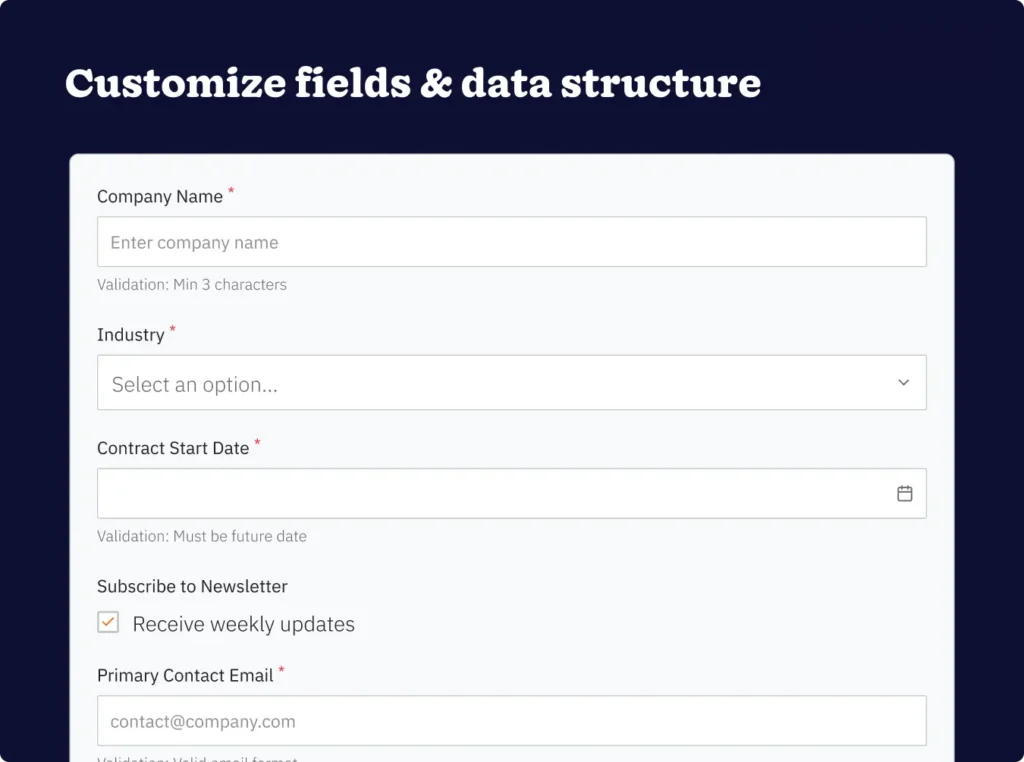
Step 2: Customize fields and data structure

Your CRM’s data structure determines what information you can capture, analyze, and act upon. Thoughtful field customization ensures you collect meaningful data—without overwhelming users with unnecessary complexity.

Align custom fields with your workflow

Standard CRM fields cover basic contact and company information. But they rarely capture the nuanced details that matter for your specific business.

Custom fields bridge this gap. They record information unique to your operations.

Before creating custom fields, consider what information your team needs to do their jobs effectively. Ask:

  • What details help them qualify leads?
  • What factors influence purchasing decisions?
  • What product configurations matter?
  • What service history affects future interactions?

Create custom fields that serve clear purposes. Each field should either help users make decisions, support segmentation and analysis, or enable automation.

Don’t create fields simply because you can capture the information. Every additional field increases complexity. It reduces the likelihood that users will maintain accurate data.

Use appropriate field types for different kinds of information. Drop-down menus ensure consistency for categorical data. Checkboxes work well for yes-or-no questions. Date fields enable time-based analysis. The right field type makes data entry easier and improves data quality.

Establish data quality standards

Poor data quality undermines even sophisticated CRM customization. Remember that 37% of users lost revenue due to data quality issues? That underscores the importance of maintaining accurate, complete information.

Implement validation rules preventing common data quality problems.

Required fields ensure critical information gets captured. Format validation maintains consistency. Duplicate detection prevents redundant records. These guardrails work in the background—maintaining data integrity without creating frustrating roadblocks for users.

Establish clear guidelines for recording different types of information. Standardize approaches to company names. Contact titles. Address formatting. Other commonly entered data. Consistency makes information searchable and enables accurate reporting.

Plan for regular data maintenance. Data quality degrades over time, even with strong validation rules. Contacts change roles. Companies get acquired. Information becomes outdated.

Schedule periodic data cleaning activities. Assign clear responsibility for maintaining accuracy.

Create naming conventions

Consistent naming conventions might seem like a minor detail. They’re not—they dramatically affect system usability.

When everyone follows the same patterns for naming accounts, opportunities, campaigns, and other records, information becomes much easier to find and analyze.

Develop naming conventions incorporating key identifying information. For opportunities, this might include company name, product or service, and expected close date. For campaigns, consider channel, audience, and time period.

The goal? Make records identifiable at a glance.

Document your naming conventions clearly. Make them easily accessible to all users. Include examples illustrating proper formatting and explain the reasoning behind each convention. The more intuitive your conventions are, the more consistently team members will apply them.

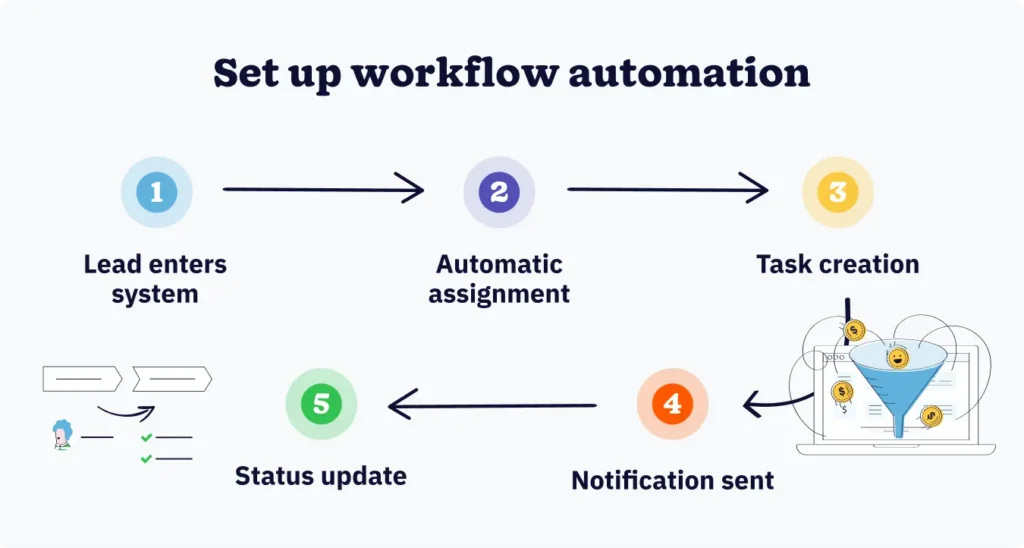
Step 3: Set up workflow automation

Workflow automation eliminates repetitive manual tasks. It ensures consistent execution while freeing team members to focus on work requiring human judgment and creativity.

Research indicates that 75% of IT and engineering leaders report saving at least four hours per week through workflow automation software. That’s not insignificant time savings.

Identify repetitive tasks to automate

Begin by cataloging tasks your team performs repeatedly with minimal variation. These routine activities represent prime automation opportunities—they follow predictable patterns and don’t require complex decision-making.

Common candidates for automation include:

  • Lead assignment based on territory or product interest
  • Follow-up task creation after specific activities
  • Status updates when deals reach certain stages
  • Notification triggers when records meet defined criteria

Pay attention to tasks occurring frequently but not requiring much time individually. These quick activities might not seem burdensome. But their cumulative impact on productivity? Substantial.

Automating dozens of small tasks creates meaningful time savings across your team.

Consider tasks where human error commonly occurs. Automation eliminates mistakes caused by forgetting steps, overlooking details, or applying inconsistent logic. This reliability is particularly valuable for processes affecting customer experience or data accuracy.

Design automation rules

Effective automation rules translate your business logic into system instructions. These rules specify when automation should trigger, what actions should occur, and what conditions must be met.

Start with straightforward automations delivering clear value:

  • Automatically creating a follow-up task when a lead reaches a specific score
  • Sending a notification when an opportunity hasn’t been updated within a certain time frame
  • Updating a contact’s status when they engage with marketing content

These simple automations build confidence. They demonstrate value.

Structure automation rules with appropriate safeguards. Include conditions preventing actions from occurring in inappropriate circumstances—like only sending notifications during business hours or avoiding duplicate task creation.

Thoughtful rule design prevents automation from becoming a source of noise or confusion.

Document each automation rule’s purpose and logic. When team members understand why automations exist and how they work, they can use the system more effectively. They can suggest improvements. Documentation also helps troubleshoot issues when automation doesn’t behave as expected.

Test automation before full deployment

Never—and I mean never—deploy automation to your entire team without thorough testing.

Automation errors multiply quickly. They create significant cleanup work. They erode user trust in the system.

Set up a test environment mirroring your production CRM but operating independently. Run your automation rules through various scenarios. Include edge cases that might reveal unexpected behavior.

Verify that automations trigger appropriately, execute the correct actions, and don’t interfere with each other.

Involve actual users in testing. The people who will work with automated processes daily often spot issues or improvement opportunities that aren’t apparent to administrators. Their feedback helps refine automation before it affects the broader organization.

Start with pilot deployments to small groups before rolling out automation across the entire organization. This phased approach allows you to identify and address issues while limiting their impact. It creates opportunities to gather feedback and make adjustments based on real-world usage.

Step 4: Optimize user experience and adoption

The most sophisticated CRM customization delivers zero value if users don’t embrace the system.

Zero. Nothing. Nada.

User experience optimization ensures your CRM becomes a tool people want to use—not an obligation they try to avoid.

Simplify navigation and interface

Visual complexity creates cognitive load. It makes systems feel difficult to use.

Simplifying your CRM interface reduces this burden. It helps users focus on their actual work rather than navigating the system.

Key simplification strategies:

  • Remove unnecessary fields, sections, and options from user interfaces
  • Customize page layouts for different user types to show only relevant information
  • Organize related fields together with clear section headers
  • Place frequently accessed or important fields at the top of pages

This structure helps users quickly locate what they need without scanning through unrelated content. Consider the order in which information appears. Respect how people naturally scan screens to reduce the time required to find key information.

Create role-based permissions

Not every user needs access to all CRM features and data. Role-based permissions ensure users can access what they need while protecting sensitive information and preventing accidental changes to critical records.

Define roles reflecting your organizational structure and responsibilities. Common roles might include sales representatives, sales managers, marketing team members, customer service agents, and executives.

Each role should have permissions aligned with its job requirements.

Balance security with usability. Overly restrictive permissions frustrate users. They create workarounds undermining data security.

Grant access broadly enough that users can do their jobs effectively. But limit permissions that could compromise data integrity or confidentiality.

Review permissions regularly as roles evolve and team members change positions. Outdated permissions create security risks and usability problems. Periodic audits ensure that access rights remain appropriate for current organizational needs.

Develop training protocols

Even intuitive CRMs require some training. Effective training helps users understand not just how to use the system, but why customizations exist and how they support business objectives.

Create role-specific training focusing on workflows relevant to each user type. Sales representatives need different training than marketing team members or customer service agents.

Targeted training respects users’ time. It increases the relevance of what they learn.

Use multiple training formats, accommodating different learning preferences. Combine live training sessions with video tutorials, written documentation, and quick reference guides. This variety ensures users can access help in the format that works best for them.

Establish ongoing support mechanisms beyond initial training. Designate power users or champions who can answer questions, share best practices, and provide peer-to-peer guidance.

This support network reduces the burden on administrators while building a community around CRM usage.

Step 5: Test, refine, and iterate

CRM customization isn’t a one-time project. It’s an ongoing process of improvement.

Regular testing and refinement ensure your system continues serving evolving business needs.

Conduct pilot testing

Pilot testing validates your customization decisions before they affect your entire organization.

Select a small group of users representing different roles and use cases. Deploy your customizations to this pilot group and monitor their experience closely.

Collect both quantitative and qualitative feedback during pilots. Track metrics like:

  • Data entry time
  • Error rates
  • System adoption rates
  • User satisfaction with specific features

This combination of objective measurements and subjective experience provides a complete picture.

Set clear success criteria for pilot testing. Determine in advance what results would indicate readiness for broader deployment versus the need for additional refinement.

Kerää palautetta käyttäjiltä

Your CRM users provide the most significant insights into what’s working and what needs improvement.

Create regular opportunities for feedback, making it easy for users to share their experiences.

Implement structured feedback mechanisms such as quarterly surveys asking specific questions about system usability, pain points, and desired enhancements. Structured feedback helps you identify patterns and prioritize improvements.

Supplement structured feedback with open channels where users can report issues or suggest improvements anytime. This ongoing input captures problems as they occur—not months later during scheduled feedback opportunities.

Act on the feedback you receive. When users see that their input leads to tangible improvements, they’re more likely to continue sharing insights.

When feedback can’t be acted upon? Explain why. Help users understand the reasoning behind decisions.

Monitor performance metrics

Track the success metrics you established during workflow mapping. Measure whether your customization efforts deliver intended results.

Regular monitoring reveals whether you’re moving toward your goals or need to adjust your approach.

Create dashboards displaying key metrics in accessible formats. These dashboards should be visible to relevant stakeholders so everyone can see how CRM customization affects business outcomes.

Look for unexpected changes in metrics that might indicate unintended consequences of customization. If data quality improves but data entry time increases significantly, you might need to balance accuracy requirements with usability.

Review metrics on appropriate time frames. Some improvements appear quickly. Others require longer periods to manifest.

Set realistic expectations for when different types of changes should become visible in your data.

UKK

  • 1. How long does CRM customization typically take?

    The timeline varies wildly based on organizational complexity and how much customization you need. Basic field customization and simple automation? A few weeks. Comprehensive customization, including complex workflows and integrations? Several months.

    Most organizations benefit from phased implementation, delivering value incrementally. Don’t try to customize everything at once.

  • 2. Should we customize our CRM immediately or use it out of the box first?

    Start with basic customization, aligning the system with your core workflows. Add sophistication over time.

    Using a completely standard system helps you understand the platform’s capabilities. But waiting too long to customize? That creates habits around workarounds that become difficult to change.

    Strike a balance. Implement essential customizations early. Defer nice-to-have features until you have more experience with the system.

  • 3. How do we prevent customization from becoming too complex?

    Regularly audit your CRM. Identify unused fields, obsolete automation rules, and unnecessary complexity.

    Before adding any new customization, ask whether it solves a real problem for multiple users or serves a clear business need.

    Establish governance processes requiring justification for new customizations and periodic review of existing ones. Complexity accumulates gradually—intentional pruning maintains system usability.

  • 4. What happens to our customizations when the CRM platform updates?

    Most CRM platforms maintain backward compatibility, preserving customizations through updates. But significant platform changes occasionally require adjustments to custom fields, automation rules, or integrations.

    Stay informed about upcoming platform changes through vendor communications. Test updates in sandbox environments before applying them to production.

    This proactive approach prevents unexpected disruptions.

  • 5. How do we measure the ROI of CRM customization?

    Compare performance metrics before and after customization. Quantify improvements in areas like sales cycle length, lead conversion rates, customer retention, and team productivity.

    Factor in both direct costs (implementation time) and indirect costs (opportunity cost of team members’ time).

    Calculate time savings from automation. Multiply by team members’ hourly costs to determine financial value. Track user adoption rates as leading indicators of long-term ROI.

Building a CRM that evolves with your business

The most successful CRM implementations share one common characteristic: they adapt continuously to changing business needs.

They don’t remain static after initial setup.

As customer expectations shift, teams grow, and market conditions evolve, your CRM customization should evolve alongside them.

Organizations investing in thoughtful CRM customization position themselves to capture measurable benefits. Stronger customer relationships. Improved data quality. More efficient operations.

The difference between thriving teams and struggling ones? It often comes down to how well their systems support actual work rather than creating additional burdens.

Approach customization as a capability you build within your organization. Not just a technical project you complete and forget about.

When your team develops the skills to continuously evaluate, adjust, and optimize your CRM, you create a lasting competitive advantage that compounds over time.

BACK TO TOP

Liity yli 30 000 muun myynnin ja markkinoinnin ammattilaisen joukkoon. Tilaa Sell to Win -uutiskirjeemme!