Engage With Visitors on Your Website Through Web Chat
-
When your website visitors have questions, it’s important to give them answers quickly to optimize their chances of becoming a lead and provide a good experience with your company.
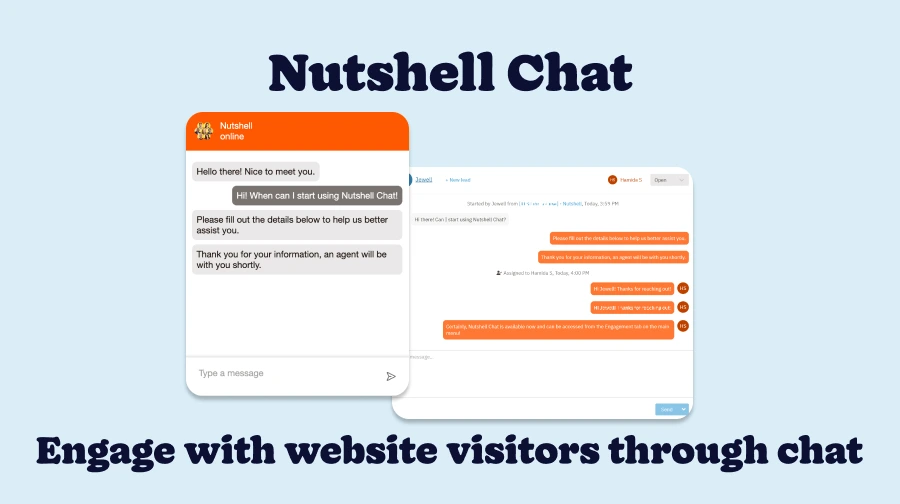
Introducing Web chat, your gateway for connecting with website visitors in real time. With Chat, leads and customers can engage with your team directly from your website, chatting with your agents live so they can connect with the answers they need. And Nutshell’s automations make it easy to start sending visitors through your sales funnel and record every conversation for reference later.
Discover what you can do with Web chat!
What is Web Chat?
Web chat is a web-based messaging feature that lets website visitors connect with your team directly from your website through a chat widget. Because Chat is built right into Nutshell, you can manage messages, quickly create new leads and assign them to your sales pipelines, and sync the information you collect about the visitor to their page in Nutshell.
How does Web Chat work?

Web chat uses a chat widget embedded on your website to give website visitors the ability to start conversations with your team from any page. Here’s how it works:
- Visitors start a chat with your company via the chat widget on your website
- Nutshell assigns chats to your agents based on the rules you’ve set up
- If your agents are online, visitors can have conversations in real time
- If your agents are offline, visitors can leave a message through a Nutshell form for your team to review later
- Your team can manage chats through the Nutshell Engagement inbox, including creating new leads from visitors who are interested in your products and services
How do I get started with Web Chat?
As part of Chat’s beta launch, all CRM customers can get started with free unlimited usage of Chat and it’s current features via the Engagement Suite Foundation plan! After the beta, we plan to add more features and levels of access to those features.
To enable specific Nutshell users as Chat agents, go to Settings > Users & teams and toggle on the Engagement license next to the team members who need access.
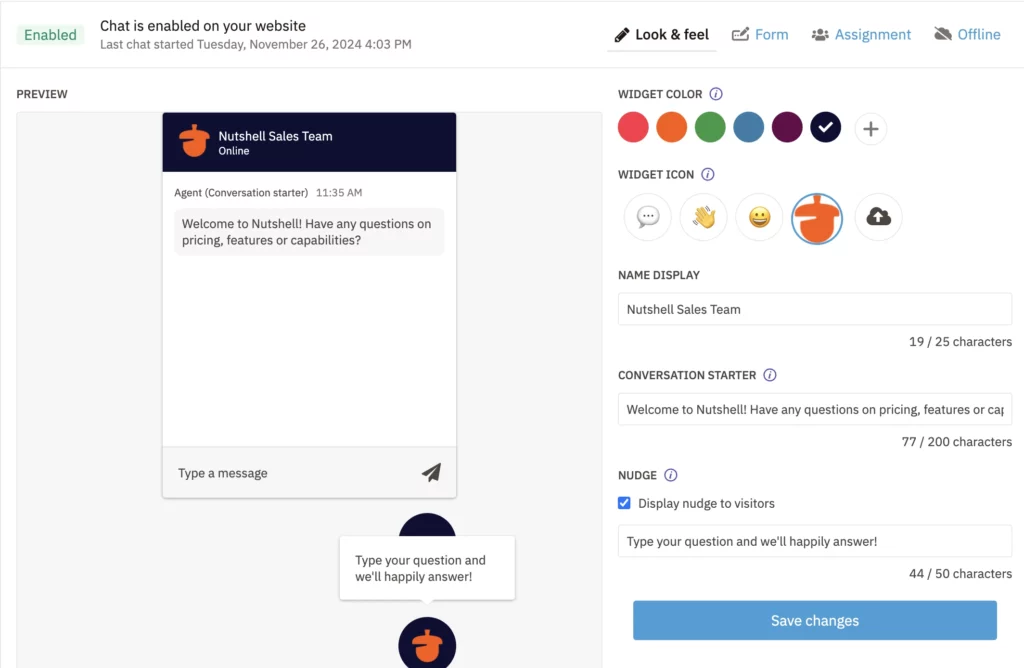
From there, you can customize your chat widget and intake form, set up visitor assignment rules and craft visitors’ experience flow when agents are offline. Then you’re ready to start engaging with visitors!
Support conversations right from your website with Web Chat
Want to start engaging with visitors and collecting leads directly from your website? Web Chat makes it easy to track conversations, generate leads, and manage relationships with website visitors, all without leaving your CRM.
Learn more in our Chat support article, or head to your Engagement inbox in Nutshell to get started.
Get Started with Web Chat!
Want to start engaging with website visitors right from your CRM? Head to your Engagement inbox in Nutshell to get started!
BACK TO TOPWritten by
Chris Cain VP of Product Development, NutshellReady to try
Nutshell for Free?Thank you! Your submission has been received!Oops! Something went wrong while submitting the form.
Overcome closed lead management challenges with follow-up pipeline automations
Published on: August 11, 2025Sales Performance Reviews: 9 Tips to Make Them Valuable
Published on: November 10, 2022What Are the Top 3 Go-To-Market Strategies?
Published on: November 10, 2022Join 30,000+ other sales and marketing professionals. Subscribe to our Sell to Win newsletter!
- Product
- Nutshell Overview
CRM & Sales
Our powerful and easy-to-use flagship product.Marketing
Email marketing, forms, landing pages, and more.Engagement
Webchat, SMS, WhatsApp & more in your Omni-Channel Inbox.Prospecting
Prospect for new leads and new contacts in your CRM.Quotes & Invoices
Quickly create quotes & invoices in your CRM.
AI
See why Nutshell is the leading AI CRM.Integrations
Connect to Google/Microsoft and over 5,000 Apps.
ReportingCreate reports and forecasts in an instant.CRM Advisor
Get a dedicated point of contact to get the most out of Nutshell.Partner Marketplace
Find trusted partners to help optimize your Nutshell CRM.
- Pricing
Nutshell AI
- Resources
- Contact Us
Contact Sales
Send us your questions or book a 1-on-1 demo.Join a Demo
Join a group demo for a general overview of Nutshell.
Contact Support
Contact our support team via live chat in app or via email.Become a Partner
Refer businesses to Nutshell & earn commissions.
Contact Marketing
Questions about our website or our marketing opportunities?Careers
Join our growing team! See current openings.