











Sales automation
Put time-wasting tasks on autopilot so your team can focus on building relationships and nurturing leads through your sales pipeline.

“Nutshell is super user-friendly and intuitive
“I would highly recommend Nutshell
“Easy to use and... wait for it ... 100% buy in!
“Nutshell is both simple and powerful
Build pipelines around the way your team sells, automate the busywork, and keep every deal moving with clear next steps, better visibility, and reporting that helps you spot what’s working.
🎉 No credit card required!
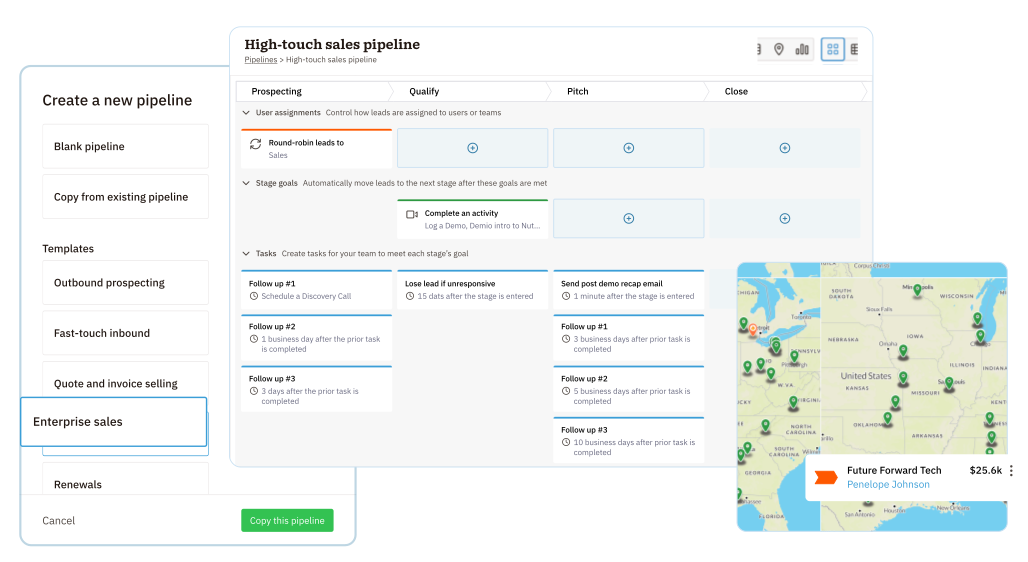
No two sales teams work the same way, and your pipeline should be just as flexible.
With Nutshell, you can create pipelines that fit the way your team actually sells, with:
And when you need more than one process, you can create separate pipelines for different teams, offerings, or customer journeys.
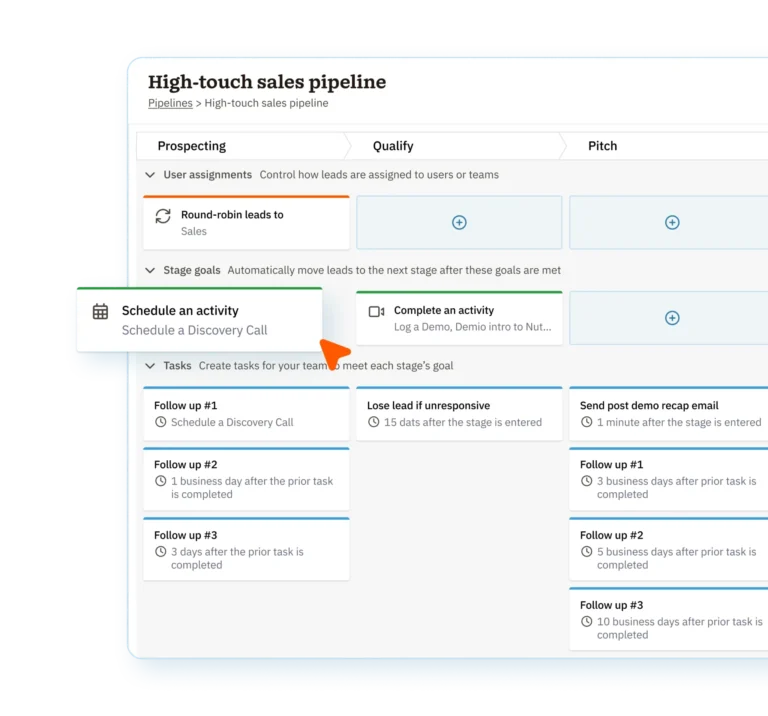
Give every rep a clear view of what they need to do next.
Board, list, map, and chart views make it easy to manage deals in the office, on the road, or anywhere in between.
You can also surface the fields that matter most with a customizable lead board, so the details your team relies on stay front and center.
Keep deals moving without relying on manual updates and memory.

When the next step is clear, your team can stay consistent and keep momentum going.
Nutshell helps you guide each stage with:
A healthy pipeline isn’t just full—it’s measurable.
Nutshell gives you reports for forecasts, funnels, snapshots, activities, tasks, and more, so you can see what’s coming in, where deals are stalling, and how your team is performing over time.

Good follow-up starts with good context.
Nutshell keeps emails, calendar events, scheduled activities, and logged touchpoints connected to the right records, so your team can see the full history before every call, demo, or check-in.

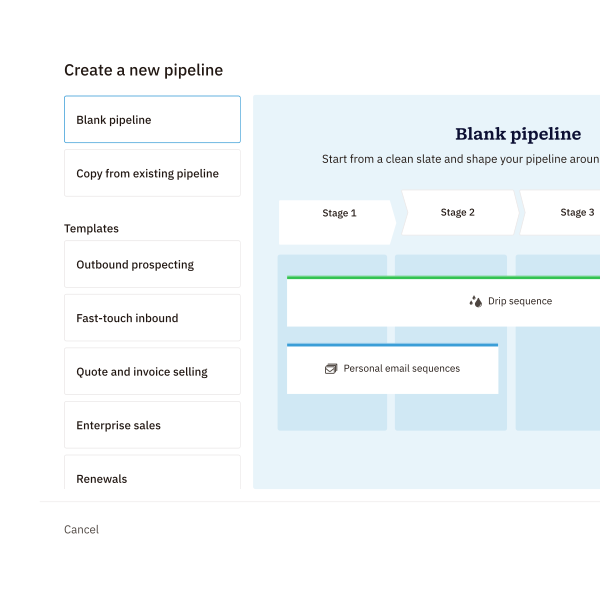
You don’t need to start from scratch to build a strong process.
Nutshell gives you pre-built pipeline starter packs with stages, goals, tasks, sequences, custom fields, activity types, and more, plus draft pipelines so you can test and refine everything before going live.
And when you want help shaping your process, Nutshell’s Sales Pipeline Designer AI Assistant can help you organize stages, goals, and tasks faster.

Pipeline management shouldn’t stop when a rep leaves the office—or when a deal closes.
Map view helps outside sales teams plan visits and manage territory-based work, while follow-up pipelines make it easy to move won, lost, or cancelled leads into the next process without losing context.

Try Nutshell free for 14 days or let us show you around before you dive in.
🎉 No credit card required!

A sales pipeline management tool is software that optimizes your sales pipeline for efficiency and productivity and creates a smoother experience for your customers and your reps, helping your team close more deals. With pipeline management software like Nutshell, teams get a range of powerful features that help them customize their sales process, stay on top of leads and sales, automate smaller tasks, and stay organized with all the prospects in their pipelines so they can work more efficiently.
Pipeline management is a critical skill for sales professionals seeking to win more deals. With multiple prospects, tasks, relationships, and even pipelines to juggle at once, sales reps need tools that help them stay ahead of the game. The right pipeline management software can help sales teams:
While every business has unique requirements, the best pipeline management software is the one that saves your team time, automates lower-priority tasks, and ultimately results in increased sales. Here are a few top features to look out for:
Multiple pipelines are available on Nutshell Sales Pro and above. The Sales Pro plan starts at $42/user/month and includes up to 5 customizable pipelines. The Business plan offers increased pipelines, while the Enterprise plan provides unlimited pipelines for complex sales organizations.
Note that draft pipelines are available on all Nutshell plans. This means that users can create and test multiple draft pipelines regardless of their plan, without affecting their plan limits.
Building a custom pipeline takes as little as 20 minutes. You can create stages, add automation rules, and configure goals quickly. Or use our pipeline starter packs to get up and running even faster with pre-built templates.
Yes. You can create your own unique stages for each pipeline in Nutshell, allowing you to customize them to match your different sales processes. This lets you track B2B sales separately from B2C, or manage new sales differently from renewals.

Put time-wasting tasks on autopilot so your team can focus on building relationships and nurturing leads through your sales pipeline.

Create custom pipelines and manage them easily with multiple views to nurture leads efficiently and stay on top of every deal.

Provides robust reporting and analytics to help you track your team’s performance and to help you gain quick insights with automated reporting.

One-click calling, AI call summaries, AI next steps, and easy scheduling.

Increase sales efficiency with Nutshell’s powerful email automation tool. Create personalized campaigns & track success right in your CRM

Streamline daily processes using the generative power of AI in Nutshell to simplify sales activities and open up a world of possibilities.

Create and manage virtual meetings and sync the information with your Calendar without leaving your CRM.

Quickly create, send, track, and get signatures on custom quotes, invoices, and contracts directly from Nutshell.

Store customer notes, interactions and easily bring colleagues into the conversation and stay notified of everything that needs your attention.

Easily accelerate revenue-driving tasks in your CRM, so you and your team can spend more time on selling.

Improve calendar, email, & contact organization from any source with Nutshell’s contact management software.

Quickly import your entire products and services list with Nutshell’s Product Importer, so you and your team can spend less time on administration and more time on selling.

Search through over 200 million contacts, add ideal customers to your CRM, and connect with your future buyers.
Pinpoint the companies and individuals visiting your site so you can proactively target warm leads.
Locate specific individuals working at the companies in your book of business and reveal their contact information so you can start the conversation.

With channel and source data automatically added to your new leads, you can know where your best leads come from and invest smarter in your marketing.

Connect with our world-class support team to get fast, friendly, and free support when needed.

Easily sync your email and calendar with Nutshell to make your CRM work where you do.

We take the security and reliability of your data seriously. We partner with the industry’s most trusted infrastructure provider, Amazon Web Services.


Find out more about Nutshell’s extensive range of Marketing Suite features

Learn more about Nutshell’s industry-leading Engagement Suite features

Discover the broad spectrum of features and tools available to Nutshell customers