Nutshell Announces New Email Sync Controls
-
Some emails—like those from HR, your company’s legal team, or just sensitive conversations—aren’t meant to sync into your CRM. To keep private messages private, you and your team need complete control over how your email communications are shared in Nutshell.
Nutshell already offers tools for hiding emails so you can keep sensitive information out of your Nutshell account. And now, email controls are even better!
Nutshell’s improved email sync controls allow you to block emails from certain domains, remove all emails from a domain right from your timeline, and add a domain to your company-wide blocklist in just a few clicks.
Learn more about these email sync controls and how they’ll improve your Nutshell email experience!
What can you do with improved email sync controls?
These new updates cover three separate areas in Nutshell:
Internal domains

If your organization owns multiple domains, syncing internal communication between them into your CRM may not be necessary.
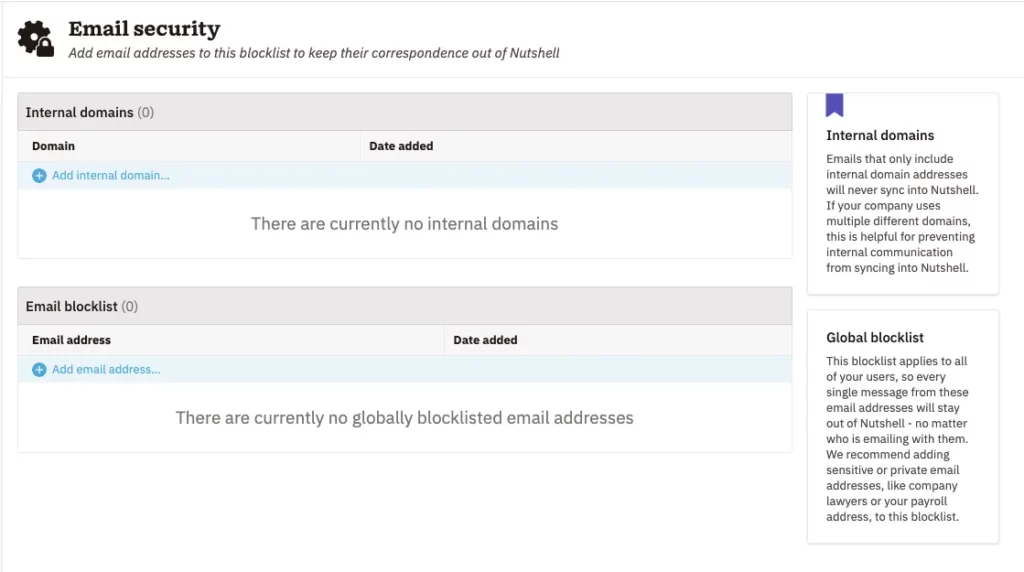
The brand new ‘Internal domains’ table is now where Nutshell admins can add different domains to their organization. When you add a domain to this table, you tell Nutshell to consider individuals using that domain as being within your organization, preventing one-to-one email sync between them.
An important exception: All communication between internal domains that also includes a CRM contact will still sync! That means you can keep syncing emails involving your customers and leads, even if they include multiple people in your organization using different domains!
Timeline controls

Internal domains are a preventative measure for keeping potentially sensitive messages out of Nutshell. But what happens when a sensitive email somehow slips through your defenses?
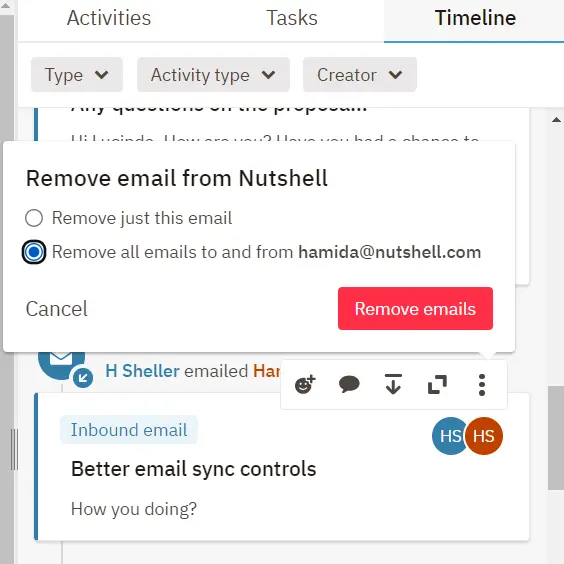
Nutshell admins can now also choose to remove all emails to and from a specific email address. And you can do so right from your Nutshell timeline.
If you notice an email in your timeline that shouldn’t have synced, you can remove just that email or choose to remove all emails to and from that address.
And if that user has multiple email addresses associated with them, Nutshell will also ask which address you’d like to remove from a thread.
Add to blocklist

Nutshell users currently have their own email blocklists, or lists of email addresses whose communications they never want to sync into Nutshell.
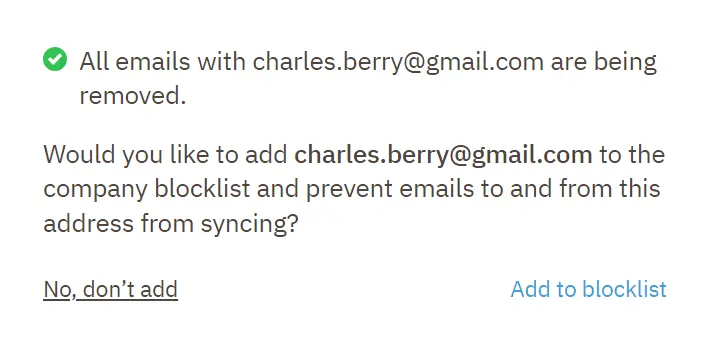
With these updates, your organization also has a company-wide blocklist that applies to your entire team. And adding addresses to the blocklist is simple. When you remove emails from an email address from your company timeline, you’ll also have the option to add that address to your company blocklist.
How will these email sync controls benefit my team?
These enhanced email sync settings give you even greater control over how email messages are shared in Nutshell. With proactive and as-it-happens controls at your fingertips, you can both prevent sensitive messages from being shared and react quickly and decisively if a mishap occurs.
Take charge of your team’s email settings like never before!
With these email sync updates, you’ll have more granular controls over what emails sync into Nutshell so you can prevent accidentally sharing sensitive information.
So dive in and start enhancing your team’s email sync controls! Happy Nutshelling!
FAQs about email sync controls
-
1. How do I find my email security settings?
You can update your team’s email security settings by navigating to Settings and selecting ‘Email security.’ This page was previously called ‘Email blocklist’ but has been updated to reflect the new controls.
-
2. Who can update a company’s email sync control settings?
Only Nutshell admins can update email sync settings company-wide.
-
3. What if someone adds a contact with a blocklisted email address in Nutshell?
When a Nutshell user adds a contact with either an internal or blocklisted address, you’ll see a note alerting you of the domain’s status.
See Nutshell in action
Give our powerful, easy-to-use CRM a try for free for 14 days! Or join a live demo to see Nutshell at work!
BACK TO TOPWritten by
Chris Cain VP of Product Development, NutshellReady to try
Nutshell for Free?Thank you! Your submission has been received!Oops! Something went wrong while submitting the form.
Sales Performance Reviews: 9 Tips to Make Them Valuable
Published on: November 10, 2022What Are the Top 3 Go-To-Market Strategies?
Published on: November 10, 2022Join 30,000+ other sales and marketing professionals. Subscribe to our Sell to Win newsletter!
- Product
- Nutshell Overview
CRM & Sales
Our powerful and easy-to-use flagship product.Marketing
Email marketing, forms, landing pages, and more.Engagement
Webchat, SMS, WhatsApp & more in your Omni-Channel Inbox.Prospecting
Prospect for new leads and new contacts in your CRM.Quotes & Invoices
Quickly create quotes & invoices in your CRM.
AI
See why Nutshell is the leading AI CRM.Integrations
Connect to Google/Microsoft and over 5,000 Apps.
ReportingCreate reports and forecasts in an instant.CRM Advisor
Get a dedicated point of contact to get the most out of Nutshell.Partner Marketplace
Find trusted partners to help optimize your Nutshell CRM.
- Pricing
Nutshell AI
- Resources
- Contact Us
Contact Sales
Send us your questions or book a 1-on-1 demo.Join a Demo
Join a group demo for a general overview of Nutshell.
Contact Support
Contact our support team via live chat in app or via email.Become a Partner
Refer businesses to Nutshell & earn commissions.
Contact Marketing
Questions about our website or our marketing opportunities?Careers
Join our growing team! See current openings.