Introducing Nutshell’s Enhanced CRM API: New REST API for Developers
-
Last updated on: March 11, 2026
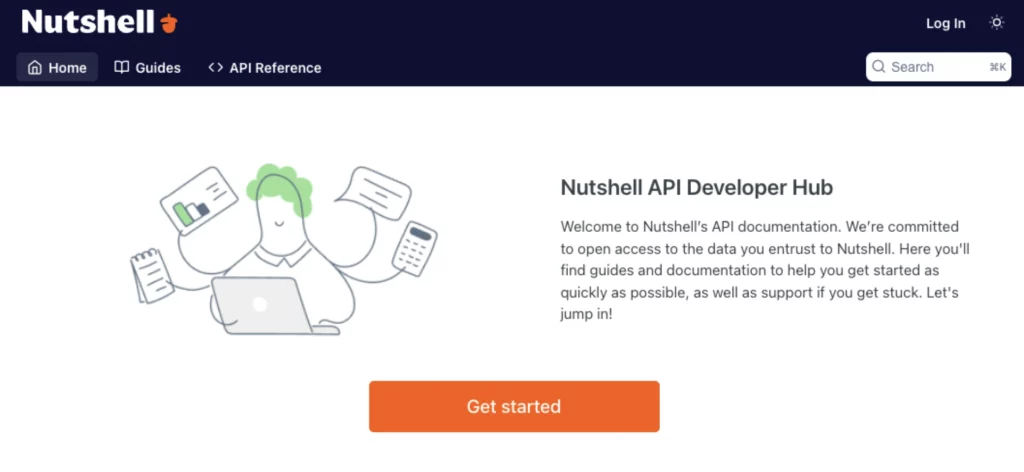
When Nutshell launched in 2010, open API access was at our core. Today, we’re launching broad new swaths of CRM API access via REST API, with a comprehensive documentation and testing suite (powered by Readme.com). This will enable easier integrations between Nutshell and other tools and give you more control over how you use the platform.
How will the new REST API documentation benefit my team?
We’ve made it easier to access data with better filtering and searching capabilities via our new list APIs. We’ve expanded the availability to access and filter Nutshell timelines. And our REST API powers much of our application, so we will continue to publish more documentation for new capabilities inside Nutshell.
The new documentation also includes an API console so you can test REST API requests with live data and experiment with what’s possible.
Other integration points
In addition to this new CRM REST API and documentation suite, Nutshell integrates through a number of other channels:
- We continue to support and maintain our existing JSON-RPC API. Those docs live inside our new developer site
- Nutshell Enterprise comes with read-only SQL access for the deepest data access
- Our Zapier integration grows every month (we just added a “Log an activity” action)
- Webhooks allow you to subscribe to pushes from Nutshell when your data changes
- Any saved Nutshell list can be exported as a CSV file
Why use a CRM API?
A CRM API gives developers programmatic access to customer data, enabling seamless integrations between your CRM and other business tools.
With Nutshell’s CRM API, you can:
- Automate data synchronization across your tech stack.
- Build custom workflows tailored to your business processes.
- Extend CRM functionality beyond out-of-the-box features.
Whether you’re connecting Nutshell to proprietary internal systems, creating custom reporting dashboards, or syncing customer data with marketing automation tools, our CRM REST API provides the flexibility and control developers need to build powerful, scalable integrations.
How can I get started with REST API?
If your team is interested in accessing Nutshell’s REST API, our developer website is the resource you need to find guides and documentation for getting started.
FAQs about Nutshell’s REST API
-
What’s the difference between Nutshell’s REST API and JSON-RPC API?
REST API is resource-based and uses standard HTTP methods (GET, POST, PUT, DELETE), making it easier to learn and more cache-friendly. JSON-RPC is action-based and calls specific functions. REST is ideal for modern integrations and third-party tools, while JSON-RPC offers more flexibility for complex, function-driven workflows.
-
What can I build with Nutshell’s REST API?
You can build custom integrations to sync Nutshell data with other business tools, automate lead capture from web forms, create custom dashboards and reports, build mobile apps that access your CRM data, and connect Nutshell to accounting software, marketing platforms, or project management tools for seamless data flow.
-
Do I need to be a developer to use Nutshell’s REST API?
Not necessarily. While the REST API is designed for developers, you can use no-code tools like Zapier to connect Nutshell with other apps without writing code. For custom integrations, you’ll need development skills or can work with a developer to build what you need.
-
How do I get started with Nutshell’s REST API?
Visit developers.nutshell.com for comprehensive documentation and guides. You’ll need to generate an API key from your Nutshell account, then use the API console to test requests with live data. The documentation includes authentication details, endpoint references, and code examples to help you get up and running quickly.
-
Is Nutshell’s REST API available on all plans?
Full API access is included at no charge for all Nutshell customers. We provide API strategy support for customers on our Enterprise plan.
BACK TO TOPWritten by
Chris Cain VP of Product Development, NutshellReady to try
Nutshell for Free?Thank you! Your submission has been received!Oops! Something went wrong while submitting the form.
Sales Meeting Mastery: 9 Quick Tips & Agenda Hacks to Boost Meeting Success
Published on: November 10, 2022
How to Use a CRM to Build Your Real Estate Empire: The Complete Agent’s Guide
Published on: May 11, 2023Sales Performance Reviews: 9 Tips to Make Them Valuable
Published on: November 10, 2022Highly Effective Strategies for Elevating Sales Team Performance
Published on: November 10, 2022What Are the Top 3 Go-To-Market Strategies?
Published on: November 10, 2022Join 30,000+ other sales and marketing professionals. Subscribe to our Sell to Win newsletter!
- Product
- Nutshell Overview
CRM & Sales
Our powerful and easy-to-use flagship product.Marketing
Email marketing, forms, landing pages, and more.Engagement
Your omni-channel inbox in your CRM.Prospecting
Prospect for new leads and new contacts in your CRM.Quotes & Invoices
Quickly create quotes & invoices in your CRM.
AI
See why Nutshell is the leading AI CRM.Integrations
Connect to Google/Microsoft and over 5,000 Apps.
ReportingCreate reports and forecasts in an instant.CRM Advisor
Get a dedicated point of contact to get the most out of Nutshell.Partner Marketplace
Find trusted partners to help optimize your Nutshell CRM.
- Pricing
Nutshell AI
- Resources
- Contact Us
Contact Sales
Send us your questions or book a 1-on-1 demo.Join a Demo
Join a group demo for a general overview of Nutshell.
Contact Support
Contact our support team via live chat in app or via email.Become a Partner
Refer businesses to Nutshell & earn commissions.
Contact Marketing
Questions about our website or our marketing opportunities?Careers
Join our growing team! See current openings.