CRM Email Segmentation: How to Turn Contact Data Into Higher Revenue

-

Email segmentation is one of the most powerful levers marketing teams have—yet most aren’t pulling it effectively. The numbers tell the story: segmented email campaigns drive 14% higher open rates and over 100% more clicks compared to one-size-fits-all blasts. But here’s the catch: nearly two-thirds of mid-market marketing teams are working with incomplete information when they segment, creating data silos that make effective segmentation nearly impossible without manual workarounds and constant tool-switching.
Complicated segmentation isn’t the real problem. It’s that most marketing teams are trying to segment without a solid foundation—disorganized contact data scattered across multiple platforms, static lists that go stale within weeks, and no unified way to track customer behavior across all touchpoints. This article will show you how to build segmentation the right way: starting with organized contact data in your CRM and then building in dynamic segments that automatically evolve as your customers’ needs change.
Key takeaways
- Segmented email campaigns outperform generic sends by 14% in opens and over 100% in clicks—and drive nearly 60% of total email revenue for most businesses, making segmentation a direct ROI multiplier
- Dynamic CRM segmentation—segments that update automatically as customer behavior changes—saves marketing teams an estimated 10+ hours per month by eliminating manual list maintenance and data decay
- Organized contact data is the foundation—teams spending significant time monthly on data cleanup can’t execute sophisticated segmentation until they establish clean, well-structured contact fields in their CRM
- Start with five core segments covering 80% of your needs, then scale intelligently—adding too many segments too fast creates complexity that slows your team down, while a simple-to-advanced progression keeps teams focused and winning
Table of Contents
- Why email segmentation matters
- The cost of poor contact data organization
- Email segmentation methods that actually work
- How to set up CRM segmentation: A practical framework
- Real-world segmentation success stories
- Common segmentation mistakes to avoid
- Email segmentation tools and features to look for
- Segmentation approaches by industry
- How to get buy-in from your team for segmentation
- Segmentation metrics and KPIs to track
- Scaling your segmentation strategy over time
- Frequently asked questions about CRM email segmentation
Why email segmentation matters
Segmented email campaigns drive 14% higher open rates and over 100% more clicks compared to non-segmented sends, which is why even modest segmentation efforts move the revenue needle. But the business case goes deeper than engagement metrics. When you segment effectively, you’re not just improving performance—you’re respecting your audience.
Consider what happens when a prospect receives an email irrelevant to their needs. 81% of consumers say they ignore marketing messages that aren’t relevant to them, and their response is swift: unsubscribe, mark as spam, or worse—stop engaging with your brand entirely. Each irrelevant email erodes trust and increases the likelihood they’ll never open another message from you. The cost compounds across your entire database, especially as newer contacts decide whether to engage with your brand at all.
On the flip side, when someone receives an email that speaks directly to their situation—whether it’s a specific product feature they’ve shown interest in, content aligned with their role, or a message timed to their exact moment in the buyer’s journey—they engage. They click. They convert. And they trust you with future communications.
Segmentation creates a multiplier effect here: each relevant message increases engagement, which improves your sender reputation, which increases deliverability, which means more emails land in the inbox. It’s a virtuous cycle that compounds over time.
The revenue impact is concrete. Segmented lists generate nearly 60% of all email revenue depending on your industry and sophistication level. That could mean an additional $125K to $300K for a SaaS company generating $500K in annual email revenue—from the same audience, same send volume, same budget. To understand the full cost of email marketing and ROI potential, see our guides.
The cost of poor contact data organization
Before you can segment effectively, your contact data must be organized. And here’s where most marketing teams hit a roadblock: close to half of marketing teams report spending significant time each month on data hygiene tasks—removing duplicates, filling in missing fields, standardizing company names, updating outdated information. That’s 120+ hours every year your team spends on busywork instead of strategy.
The financial toll is significant. Bad data costs the U.S. economy an estimated $3.1 trillion annually when you factor in wasted marketing spend, missed sales opportunities, compliance issues, and the time teams burn managing the mess. Much of this damage stems from data silos: CRM data lives in one place, email platform data in another, website behavior scattered across a third tool. Your marketing automation platform syncs sometimes. Your CRM integration occasionally works. Nobody has a complete picture of any single customer.
Segments then go stale. A contact marked as a high-intent prospect three months ago remains in that segment even though they’ve since converted to a customer—or worse, they’ve been inactive for six months and started complaining about irrelevant emails. You send them the wrong message because your systems don’t talk to each other, and the customer has a bad experience.
Nearly two-thirds of mid-market marketing teams are working with incomplete information when they segment, which means they’re building campaigns on a shaky foundation. This gap is especially painful because it’s preventable. The solution isn’t buying more tools—it’s using a unified CRM—like Nutshell—that serves as your single source of truth for all customer data, organizes contacts intuitively, and syncs automatically with your email campaigns.
Email segmentation methods that actually work
There’s no single “right” way to segment your email list. Different segmentation methods serve different purposes, and most successful teams use a combination of approaches. Here’s how to think about the major segmentation types and when to use each one.
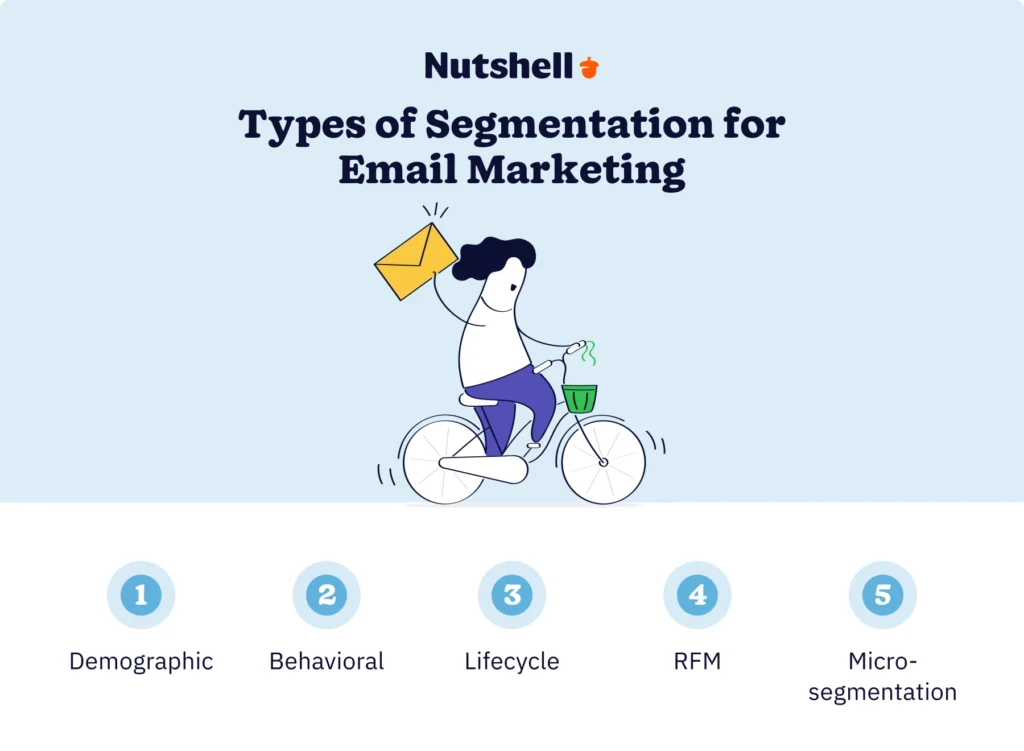
Demographic segmentation
Demographic segmentation divides your audience based on standard characteristics: job title, company size, industry, location, company revenue, number of employees, or similar firmographic data (company-level characteristics like industry, size, and revenue) for B2B audiences.
In your CRM, demographic segmentation relies on contact fields that capture this information. You’d create fields like “Job Title,” “Company Industry,” and “Company Size,” then populate them during lead capture or through data enrichment. Then you’d build segments using simple rules: “All contacts where Job Title = ‘Marketing Manager’ AND Company Size = ’10-100 employees’ AND Industry = ‘Technology.'”
Here’s a real example: A B2B software company segments their list by role because different personas need different messages. A segment for “C-suite executives” receives messaging about ROI and competitive advantage, while a segment for “individual contributors” receives tactical how-to content. Same product, completely different value propositions—and both segments outperform generic messaging.
When to use demographic segmentation: You have clear buyer personas and different value propositions for each one. It’s especially powerful for B2B companies with complex sales cycles and multiple decision-makers.
Behavioral segmentation
Behavioral segmentation groups customers based on their actions: which emails they’ve opened, which links they’ve clicked, how frequently they’ve engaged, what pages they’ve visited on your website, which products they’ve tried, or features they’ve used.
In your CRM, behavioral segmentation relies on engagement tracking. Your CRM should automatically log email opens, clicks, and form submissions. It should track website behavior if integrated with your web analytics. Over time, you build a complete picture of how engaged each contact is. In Nutshell, this happens automatically—the platform logs email engagement and lets you build behavioral rules that tag contacts the moment they hit your criteria. You might create a segment like: All contacts who’ve opened five or more emails in the last 30 days = ‘Engaged’ tag.” Or: All contacts who visited the pricing page but never converted = ‘In-market prospect’ tag.
Here’s the power of behavioral segmentation in practice: Imagine a SaaS company that notices customers who completed their onboarding tutorial within the first week were far more likely to convert to paid plans, while those who skipped the tutorial had a significantly higher churn rate within three months. They create a behavioral segment—”Trial customers who haven’t completed onboarding”—and build an automated email sequence to walk them through key features. The result: a meaningful boost in trial-to-paid conversion from a single workflow change.
When to use behavioral segmentation: You want to move contacts based on engagement level or specific actions taken. It’s especially valuable for SaaS companies optimizing trial-to-paid conversion and B2C retailers driving repeat purchases. For step-by-step guidance on creating personalized and targeted campaigns from your segments, see our walkthrough.
Lifecycle segmentation
Lifecycle segmentation organizes your contacts based on their stage in the customer journey: lead, sales-qualified lead (SQL—a lead that meets your qualification criteria and is ready for a sales conversation), customer, loyal customer, at-risk, or churned. Each stage receives different messaging because their needs and concerns are fundamentally different.
In your CRM, lifecycle segmentation uses a dedicated “Lifecycle Stage” field that moves contacts forward (and sometimes backward) as they progress. You’d start new contacts as “Lead,” move them to “SQL” when they meet qualification criteria, advance them to “Customer” upon purchase, and monitor them for “At-Risk” status if engagement drops or renewal is approaching.
A concrete example: An e-commerce company segments by lifecycle stage. New leads receive educational content building confidence in the brand. Prospects further along receive comparison content and reviews. Customers receive onboarding guides, upsell offers, and loyalty rewards. At-risk customers (those who haven’t purchased in six or more months) receive “we miss you” messaging with an incentive to re-engage. The same product, four completely different messages—each optimized for the contact’s situation.
When to use lifecycle segmentation: You have distinct messaging for different stages of the journey. It’s the foundation of nearly all segmentation strategies and works for every business model.
RFM segmentation
RFM stands for Recency, Frequency, and Monetary value—a data-driven approach that segments customers based on three metrics:
- Recency: How recently did they purchase or engage? (Last purchase two weeks ago vs. last purchase two years ago = very different customers)
- Frequency: How often do they purchase or engage? (Five purchases in the last year vs. one purchase = different loyalty levels)
- Monetary value: How much have they spent? (Customers spending $10K annually vs. $100 annually = justify different investment levels in retention)
In your CRM, RFM segmentation requires fields tracking purchase dates, purchase frequency, and total lifetime value (CLV—the total revenue a customer generates over their entire relationship with your business). You then create segments by combining these metrics: “High-value customers” (high frequency + high monetary value), “At-risk VIPs” (previously high value, but recent activity dropped), “Promising newcomers” (recent purchase, but low frequency). Each segment gets treatment appropriate to their value and behavior.
Here’s why this matters: A subscription e-commerce company discovered that their top 10% of customers (by RFM score) generated 40% of revenue. By sending this segment priority support, early access to new products, and exclusive VIP discounts, they increased retention and dramatically improved lifetime value per customer. The same company used RFM to identify “at-risk VIPs” and launched a win-back campaign that reactivated a meaningful portion of those customers.
When to use RFM segmentation: You have transactional data and want to prioritize your marketing and retention efforts based on customer value. It’s essential for e-commerce, subscription businesses, and any model with trackable purchase behavior.
Micro-segmentation
Micro-segmentation takes the previous methods and combines them into hyper-specific audience slices. Instead of “all engaged customers,” you’d have “engaged customers in the manufacturing industry, with the title ‘Operations Director,’ who’ve opened our product update emails three or more times.” Instead of “at-risk customers,” you’d have “customers who’ve reduced usage by 50% in the last month AND haven’t opened support resources AND have a contract renewal in 60 days.”
Micro-segmentation in your CRM combines multiple fields and behavioral triggers into complex, precise rules. Your CRM’s dynamic tagging system then automatically assigns contacts to these micro-segments based on criteria changes.
A practical example: Huda Beauty used segmented, personalized email campaigns to match messaging to customer behavior and preferences across their audience. The result was dramatic—they doubled their Klaviyo-attributed revenue year over year. Hyper-personalized emails didn’t just drive sales; they deepened the customer relationship at scale.
When to use micro-segmentation: You’re ready to move from basic segmentation to sophisticated personalization. You have clean, organized CRM data and enough audience size to justify the complexity. Micro-segmentation is where segmentation becomes a significant revenue driver.
How to set up CRM segmentation: A practical framework
Ready to implement CRM segmentation? Here’s a step-by-step framework that takes you from data audit to running segmented campaigns. Each step has a clear purpose, specific actions, and a time estimate so you know what you’re signing up for.
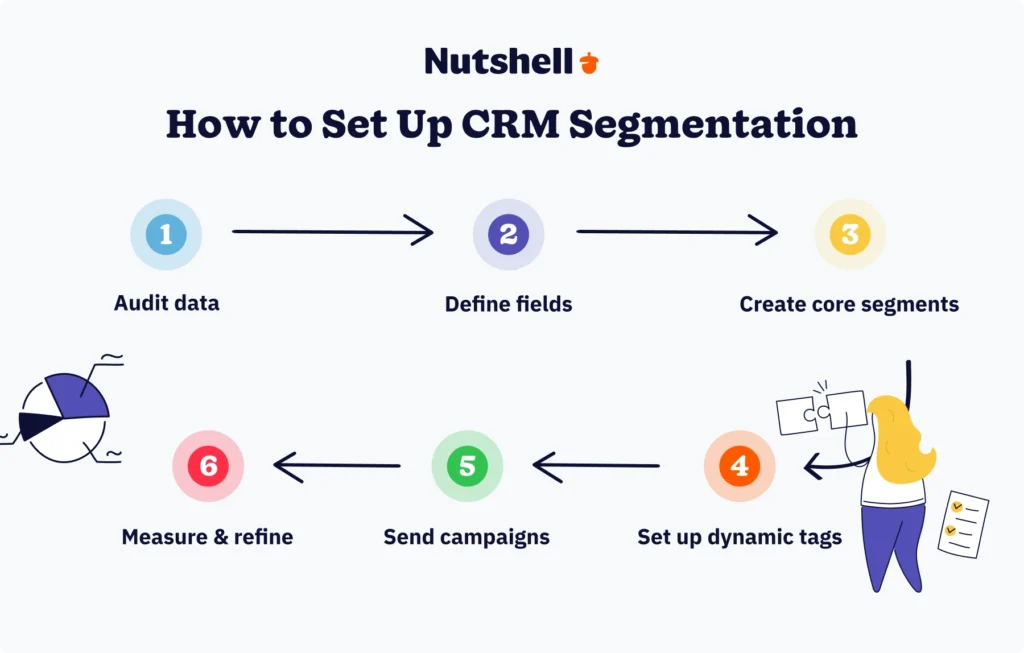
Step 1: Audit and clean your contact data
Why: Garbage in, garbage out. If your foundational data is messy, your segments will be unreliable and your campaigns will reach the wrong people. A data audit prevents you from building sophisticated segmentation on a shaky foundation.
How: This step deserves dedicated time on your calendar—block it before you do anything else. Review your contact database for:
- Duplicates: Search for contacts with similar names, emails, or company names. Merge true duplicates into single records, preserving the most complete information.
- Missing critical fields: Identify gaps in essential data (email address, company name, job title, or whatever fields are critical for your segmentation). Flag these contacts for re-engagement or data enrichment.
- Outdated information: Spot contacts with old activity dates, outdated job titles, or inactive engagement. Consider removing truly dormant contacts from active segments.
- Data standardization: Ensure consistency in how data is entered. “VP of Marketing,” “VP – Marketing,” and “Vice President, Marketing” should all be standardized to one format.
Nutshell benefit: Your contact data stays clean without a weekly audit—Nutshell’s duplicate detection flags conflicts automatically, and the contact interface makes inconsistencies easy to spot and fix.
Timeframe: One to two weeks depending on database size. Yes, it’s worth the investment.Step 2: Define your core contact fields
Why: You can’t segment on data you don’t have. Defining your core fields tells you exactly what information you need to capture at lead signup and what gaps you need to fill through enrichment.
How: Sit down with your sales and marketing teams and list the fields you absolutely need for segmentation. Your core fields will depend on your business model:
- B2B fields: Company name, company size, industry, revenue range, job title, decision-maker role, location, management level, and buying timeline
- SaaS fields: Trial signup date, onboarding completion status, feature adoption (which features they’ve tried), usage frequency, plan level, and contract renewal date
- E-commerce fields: Purchase history (date, amount, product category), browsing behavior, email engagement, customer lifetime value (CLV), geographic location, and preference data (size, style, etc.)
Once you’ve identified core fields, audit whether you’re capturing them. If not, update your lead capture forms or data enrichment processes.
Nutshell benefit: Nutshell’s contact field customization lets you create the exact fields your business needs without any coding. You control what data matters.
Timeframe: One week to define fields, then ongoing to populate them.
Step 3: Create five core segments to start
Why: Adding too many segments too fast creates complexity that slows your team down. You don’t need 50 segments. Most businesses can drive substantial revenue lift from five core segments that cover 80% of their messaging needs. Start here, master these segments, then expand.
How: Here are five segments that work for nearly every business:
- High-intent prospects: Contacts who’ve shown strong buying signals (visited pricing page, opened five or more emails, attended webinar, requested demo). These people are closest to conversion.
- Active customers: Contacts who’ve purchased and remain engaged. They should receive onboarding support, upsell opportunities, and loyalty rewards.
- At-risk/dormant: Contacts who were once engaged but have gone inactive (no opens in 90 days, no purchases in six or more months). Win-back campaigns often reactivate these contacts.
- VIP/high-value: Your best customers by revenue or engagement. They deserve priority treatment, exclusive access, and dedicated support.
- New leads: Contacts captured in the last 30 days who haven’t yet been qualified. They need nurture content to move toward sales conversations.
Nutshell benefit: These five segments cover 80% of your email needs. Add more as you learn what works. Nutshell makes it easy to create segments using simple rules, then expand as your strategy matures.
Timeframe: One day to define, then ongoing as you add contacts.
Step 4: Set up dynamic tags
Why: Static lists go stale. Dynamic tags automatically update based on behavior changes, which means your segments stay accurate without manual maintenance. Here’s where CRM segmentation starts paying for itself.
How: Configure your CRM to automatically assign tags based on specific criteria. Here are four rules worth setting up from day one:
- If contact opens five or more emails in 30 days → assign “Engaged” tag
- If contact has no opens in 90 days → assign “At-risk” tag
- If contact’s lifecycle stage = “Customer” AND last purchase was six or more months ago → assign “At-risk customer” tag
- If contact attended a webinar → assign “Webinar attendee” tag
Your CRM should update these tags automatically as behavior changes. No manual work required.
Nutshell benefit: What does that look like in practice? Nutshell’s dynamic tags update the moment a contact’s behavior changes. When a contact opens an email, the tag updates instantly. When they go inactive, a different tag applies. Your segments evolve with your customers—no busywork required. Teams typically save 10 or more hours a month compared to maintaining lists manually.
Timeframe: One to two weeks to configure initial tags, then automated from there.
Step 5: Send segmented campaigns
Why: You don’t build segments to admire them—you build them to use them. Start sending campaigns to your segments immediately. That’s when segmentation starts generating real ROI.
How:
- Start with one segment: Send your first segmented campaign to one of your five core segments (high-intent prospects typically show the biggest performance lift).
- Use segment-level data: Build messaging specific to that segment’s needs. High-intent prospects want to see ROI and implementation details; new leads want educational content and trust-building.
- A/B test within segments: Test two versions within a segment to learn what resonates. Does this segment prefer short-form content or detailed? Urgency or value-focused messaging?
- Measure before moving on: Track opens, clicks, and conversions by segment. Compare results to your baseline (non-segmented) sends.
- Gradually expand: Once you’ve validated one segment, segment another. Within a month, you should be sending segmented campaigns to all five core segments.
Nutshell benefit: One-click campaign sending from your CRM using your segments. No tool-switching, no manual list exports, no delays. Everything stays in one platform.
Timeframe: First campaign in week two, all five segments active within four to six weeks.
Step 6: Measure and refine
Why: Data-driven iteration improves results over time. You’re not done after your first segmented campaign—you’re just getting started. The real value comes from continuous optimization.
How:
- Track segment-level metrics: For each segment, monitor open rate, click rate, conversion rate, and revenue per email (if available). Build a simple dashboard showing these metrics by segment.
- Identify your winners and laggards: Which segments perform above your average? Which underperform? Start digging into high performers to understand what’s working. Low performers might need messaging adjustments or audience refinement.
- Update segments quarterly: Every three months, review your segment criteria. Has the definition of “high-intent” changed? Should your “at-risk” threshold move from 90 days inactive to 60 days? Update based on what you learn.
- Expand your segmentation: Once your core five segments are humming, add a sixth. Then a seventh. Build complexity gradually as you learn what drives revenue in your specific business.
Nutshell benefit: Nutshell’s built-in reporting shows segment-level performance by campaign. You see which segments drive the most revenue, which have the highest engagement, and where to invest next. Pages updated within 30 days earn 3.2x more AI citations, so keep your segment data fresh.
Timeframe: Review quarterly, update annually (or more frequently if you see clear patterns).Ready to put the framework to work?
Nutshell’s dynamic tags and built-in email campaigns make segmentation simple from day one

Real-world segmentation success stories
Theory is great, but real revenue comes from execution. Here are four companies that transformed their email performance through smart segmentation.
Jenni Kayne: Interest-based and location-based segmentation
A 14.5% increase in email revenue—from the same list, the same send volume, no additional budget. That’s what Jenni Kayne, a luxury apparel brand, achieved after implementing interest-based and location-based segmentation in Q1 2023.
Before segmentation, they sent the same email to their entire audience regardless of location or product interest. A customer in California received messaging about winter coats (irrelevant in their climate), and someone who’d browsed their accessories section saw only apparel campaigns. The result: generic open rates and missed revenue.
They fixed it by tracking which product categories customers browsed and layering in geographic segmentation by region. Winter wear went to northern customers; lightweight pieces to southern customers. Accessory lovers received accessory-focused content; shoe shoppers saw shoe campaigns.
Nutshell lesson: Organized CRM data tracking customer interests and location enables sophisticated segmentation. When you know what someone wants and where they are, you can send the perfect message. Results reflect Q1 2023 performance; individual outcomes will vary based on list size, industry, and segmentation maturity.
SaaS project management tool: Lifecycle segmentation for trial conversion
Here’s how lifecycle segmentation might work for a growing project management SaaS with a healthy trial signup volume but a conversion problem. Trial customers had dramatically different needs depending on where they were in their journey: Day 1 trial customers needed onboarding help, Day 10 needed feature education, and Day 20 needed pricing information or they’d risk churning.
The solution: lifecycle segmentation by trial day. A prospect entering their trial received an onboarding sequence. Day 5 triggered a feature walkthrough. Day 15 triggered a “here’s what you can do with our advanced features” message. Customers who didn’t convert within 30 days received a re-engagement offer.
By sending the right message at the right stage in their journey, this approach helps more people see value and commit—turning a good product into a product people actually pay for.
Nutshell lesson: Lifecycle stage tracking in your CRM powers behavioral segmentation. When you know where someone is in their journey, you can anticipate their needs and move them forward.
Food & beverage e-commerce: Dynamic segmentation catching churn before it happens
A specialty food e-commerce company had excellent new customer acquisition but struggled with retention. Customers would make one or two purchases then disappear. They didn’t know who was at-risk until after the churn happened.
They implemented dynamic segmentation based on RFM scores. A segment flagged anyone whose purchase frequency dropped by 50% or who hadn’t purchased in six months as “at-risk.” These customers automatically received a win-back email with a special offer.
The result: an up to 19% monthly reactivation rate on at-risk customers, which translated to a 2x reduction in churn rate. Instead of losing customers silently, they caught them at the moment engagement dropped and gave them a reason to return. Outcomes vary based on product category and churn threshold settings.
Nutshell lesson: Dynamic tags that automatically flag behavior changes prevent customer churn before it fully develops. CRM data tracking purchase history enables RFM segmentation that predicts who’s slipping away.
Huda Beauty: Micro-segmentation for hyper-personalization
Huda Beauty used segmented, personalized email campaigns to match messaging to customer behavior and preferences across their audience—combining purchase history, product preferences, and engagement patterns to serve each subscriber content that actually matched their interests.
The result was dramatic: they doubled their Klaviyo-attributed revenue year over year. Hyper-personalized emails didn’t just drive sales—they deepened community engagement and strengthened the customer relationship at scale.
Nutshell lesson: Micro-segmentation combining multiple data points (frequency, preferences, engagement) delivers hyper-personalization that strengthens customer relationships. The investment in organizing detailed contact data pays off through dramatically higher engagement.
Common segmentation mistakes to avoid
Learning from others’ mistakes is faster than making them yourself. Here are five critical mistakes that derail segmentation projects—and how to avoid them.
Mistake 1: Oversegmentation
The pitfall: You create 30, 40, even 50+ segments and then struggle to write unique messaging for each one. Your team gets overwhelmed, campaigns slow down, and the complexity defeats the purpose.
The solution: Start with five core segments covering 80% of your needs. Master these segments first. Once you’re confident in execution and seeing results, add a sixth. Build complexity gradually. You don’t need 50 segments—you need the right five, executed well. As you scale, progress toward micro-segmentation (combining multiple data points) rather than adding disconnected segments.
Mistake 2: Static lists that go stale
The pitfall: You create a segment of engaged customers based on a campaign from three months ago. Those customers remain in the segment even though they’ve now gone inactive. Meanwhile, contacts who became engaged last month never make it into the segment because you haven’t manually updated it.
The solution: Use dynamic tags that auto-update based on behavior changes. When a contact opens five or more emails in the last 30 days, the “Engaged” tag applies automatically. When they go 90 days without opens, a different tag applies. Your segments evolve with your customers, requiring no manual maintenance.
Nutshell benefit: Dynamic tags automatically update based on criteria you define, preventing segments from going stale.
Mistake 3: Ignoring data quality
The pitfall: You build segments on incomplete or inaccurate data. Half your contacts are missing job titles, so your “decision-maker” segment ends up reaching the wrong people. Company names are misspelled, so industry-based segmentation doesn’t work.
The solution: Before segmenting, audit and clean your contact data. Remove duplicates, fill critical fields, standardize formats. A week spent on data quality prevents months of poor segmentation performance. This is foundational—you can’t build sophisticated segmentation on bad data.
Nutshell benefit: Nutshell’s organized contact model makes it obvious when fields are incomplete. Duplicate detection and contact merging streamline the cleanup process.
Mistake 4: Failing to measure
The pitfall: You create segments and send campaigns, but you never track performance. You don’t know which segments are driving revenue, which messages resonate, or where to focus next. You continue doing what you’ve always done because you have no data saying otherwise.
The solution: Set up segment-level reporting from day one. Track open rate, click rate, conversion rate, and revenue per segment. Update your reporting dashboard quarterly. Use these metrics to refine your segments, improve messaging, and identify where segmentation is delivering the biggest ROI. Let data guide your next decisions.
Mistake 5: Using CRM data without email integration
The pitfall: You organize beautiful contact data in your CRM—perfect segments, clean fields, dynamic tags. But then you export lists to a separate email platform, and now you have a sync problem. Your segments don’t match your email lists. Updates in your CRM don’t propagate to email. You’re back to manual maintenance and data silos.
The solution: Use a unified CRM with built-in email functionality. Your contact data organizes in one place, and your segments sync automatically to your email platform. No exports, no manual updates, no sync delays. One contact database, one source of truth, one workflow.
Nutshell benefit: Nutshell combines CRM and email in one platform. Build segments in your CRM, send campaigns from your CRM. Everything stays in sync automatically.Email segmentation tools and features to look for
Not all CRMs are created equal when it comes to segmentation. Here are the four features that separate segmentation-capable platforms from those that will leave you frustrated.
Dynamic tag automation
What it does: Automatically assigns tags to contacts based on criteria you define. When a contact opens five or more emails in 30 days, a tag applies. When they haven’t opened anything in 90 days, a different tag applies. Tags update in real time as behavior changes.
Why it matters: Manual segmentation creates work that scales with your database size. Dynamic tags eliminate this busywork. They update automatically, keeping your segments accurate without ongoing effort. Teams typically save 10 or more hours per month in manual list maintenance.
Contact field customization without coding
What it does: Lets you create custom contact fields for any data you need (job title, company size, product interest, lifecycle stage, etc.) without writing code or asking your developer.
Why it matters: Every business has unique segmentation needs. A SaaS company needs “trial start date” and “feature adoption level.” An e-commerce company needs “CLV” and “purchase category preference.” You can’t rely on templated fields—you need fields built for your business. Codeless customization means you’re not held back by technical constraints.
Unified contact view showing complete engagement history
What it does: Shows everything in one contact record: when they signed up, every email they’ve opened or clicked, their website activity, previous purchases, support tickets, and notes from conversations.
Why it matters: Segmentation decisions should be informed by complete contact history. If you don’t see that a prospect opened your pricing email yesterday, you might send them the same message again today—a bad experience. If you don’t know a customer’s support ticket history, you might send messaging that conflicts with recent support interactions. A unified view prevents these disconnects.
One-click segment sending and segment-level reporting
What it does: Lets you build a campaign, select a segment, and send—all from your CRM. Then immediately see how that segment performed: opens, clicks, conversions, revenue.
Why it matters: If you have to export segments to a separate email platform, you’ve lost the workflow efficiency that segmentation should provide. One-click sending keeps you in your CRM. Segment-level reporting lets you see which segments drive the most value so you can allocate time accordingly. Together, these features turn segmentation from a side project into a core workflow.
Segmentation approaches by industry
Segmentation strategy looks different depending on your industry. Here’s how to adapt the framework for your business model.
B2B segmentation: Firmographics plus engagement
B2B buying decisions involve multiple stakeholders with different concerns. A CIO cares about security and infrastructure. A CFO cares about ROI and cost savings. A procurement manager cares about terms and implementation timeline. Same product, three completely different value propositions.
Start with demographic/firmographic segmentation based on company characteristics: company size, industry, revenue range, and buyer role. Then layer in behavioral segmentation tracking engagement: which prospects have opened your content, visited your demo page, attended a webinar, or downloaded a case study. Your highest-value segment combines the right firmographics (target company profile) with high behavioral engagement (real buying signals).
For B2B companies, lifecycle stage segmentation is essential because your sales cycle is long. Segment by sales stage: early-stage lead, qualified lead, sales conversation, proposal stage, customer, loyal customer, at-risk. Each stage needs different messaging—educational content for early-stage, ROI-focused content for later-stage.
Example: An enterprise software company segments by company size (targeting 100–1,000-employee companies), industry (targeting financial services), buying role (targeting CFOs and controllers), and engagement level (those who opened three or more pieces of content in 30 days). This micro-segment represents their ideal customer and receives highly personalized outreach.
SaaS segmentation: Lifecycle plus behavioral
SaaS companies have the advantage of rich, real-time behavioral data. You can see exactly which features a trial customer has tried, how often they log in, whether they’ve completed onboarding, and when their trial expires.
Start with lifecycle segmentation—trial customers, onboarding-stage customers, active paying customers, at-risk customers, churned customers. Each stage needs different communication cadence and content. Trial customers need help and encouragement. Active paying customers need upsell opportunities and advanced feature education. At-risk customers need check-ins and win-back offers.
Layer in behavioral segmentation based on feature adoption: which features has each person tried? Have they completed the essential onboarding flow? What’s their engagement trend—increasing or decreasing? A trial customer who’s completed onboarding and used three key features is dramatically more likely to convert than one who’s skipped onboarding. Segment accordingly and send conversion-focused messaging to high-probability trial customers.
Example: A project management SaaS company segments trial customers into “high-conversion probability” (completed onboarding + used collaboration features three or more times) and “at-risk trial” (seven or more days into trial, hasn’t completed onboarding, minimal logins). High-conversion gets feature education and upsell content. At-risk gets a personalized check-in: “Looks like you haven’t started yet—let’s get you set up.”
E-commerce and B2C segmentation: RFM plus micro-segmentation
E-commerce has transactional data that powers RFM segmentation. You know exactly how recently someone purchased, how frequently they buy, and how much they spend. This data is gold.
Segment by RFM score: VIP customers (high frequency, high monetary value), loyal regulars (consistent, moderate spend), big spenders (infrequent but high-value purchases), price-sensitive buyers (frequent, low-value), at-risk VIPs (previously high value, recent decline), and promising newcomers (recent purchase, low frequency so far).
Then layer in micro-segmentation based on purchase history and preferences. A fashion e-commerce company might segment by recent purchase category (dresses, shoes, accessories), size, price point preference, and browsing behavior. The same customer might be in the “VIP + shoes preference + size 6” segment, which gets personalized shoe recommendations.
Example: A specialty food company segments customers into VIP buyers (purchasing monthly or more, $500+ lifetime value) who receive early access to limited-edition products, exclusive discounts, and a personal account manager. Meanwhile, “at-risk VIP” customers (previously purchased frequently, now six or more months inactive) receive targeted win-back campaigns with a special offer.
How to get buy-in from your team for segmentation
Implementing segmentation requires time investment upfront, and your leadership team might ask: “Is this worth it?” Here’s how to build a business case that gets approval.
Lead with revenue impact: “Segmented email campaigns drive 14% higher open rates and over 100% more clicks. For our business, this could mean nearly 60% more email revenue from the same audience.” If you generate $100K in annual email revenue, moving to segmentation could mean an additional $60K—from the same list, same send volume, same budget.
Quantify time savings: “Dynamic segmentation will save our team 10 or more hours per month on data cleanup and list maintenance. That’s 120+ hours annually we can reinvest in strategy, content creation, and testing.” Put that in business terms: that’s equivalent to redirecting one full-time employee toward higher-value work.
Show the churn prevention angle: Close to half of marketing teams report spending significant time each month on data hygiene tasks because of poor organization. By cleaning and organizing our contact data upfront, we prevent this ongoing drain and build a foundation for sophisticated segmentation. If your team spends 10 hours monthly on cleanup at $50/hour, that′s $6K annually in wasted labor on data cleanup alone.
Present a phased approach: “We’ll implement five core segments in the first month, then expand intelligently. This isn’t a big-bang project—it’s a gradual progression from simple to sophisticated.” This removes the sense of overwhelming change.
Show competitive context: “Nearly two-thirds of mid-market marketing teams are working with incomplete CRM and email data, creating silos that hurt segmentation. Competitors using unified platforms with integrated segmentation are likely outperforming us in email revenue. This is the baseline.”
Put these together in a simple one-page summary with the revenue upside, time savings, and competitive context. Most leadership teams greenlight segmentation projects when they see the math.
Segmentation metrics and KPIs to track
You can’t improve what you don’t measure. Here are the key metrics to track by segment so you understand what’s working.
What does segment size tell you?
The number of contacts in each segment is a health indicator. If your “engaged” segment shrinks 20% month-over-month, either your audience is becoming less engaged or your engagement criteria are too strict. Track it as a leading signal, not just a snapshot.
Open rate by segment
What it is: Percentage of emails opened within each segment.
Why it matters: Different segments will have different open rates, and that’s expected. Your high-intent segment might have a 45% open rate while your “cold lead” segment sits at 12%. What matters is trend: Is your high-intent segment’s open rate improving (45% → 48%) or declining (45% → 42%)? If it’s declining, your messaging might need adjustment.
Click rate by segment
What it is: Percentage of emails clicked within each segment.
Why it matters: Open rate tells you if people opened the email. Click rate tells you if the content resonated enough to take action. A segment with a 40% open rate but 2% click rate suggests your subject lines are working, but your email content isn’t compelling. Different segments will naturally have different click rates based on their buyer journey stage.
Conversion rate by segment
What it is: Percentage of emails that resulted in a conversion (purchase, demo request, form submission, etc.).
Why it matters: This is where segmentation shows its value. Your high-intent segment might convert at 8%, while your “nurture” segment converts at 1%. That’s not a failure—it’s expected. What matters is improvement over time. If you’re implementing segmentation well, conversion rates should improve for each segment as your messaging becomes more targeted.
Revenue per segment
What it is: Total revenue generated from emails sent to each segment, divided by the number of emails sent (or divided by segment size).
Why it matters: This is the ultimate metric. Some segments generate revenue; others don’t. Your “active customer” segment might generate $50K annually. Your “cold lead” segment might generate $2K. This tells you where to invest your energy. VIP segments justify personalized, high-touch campaigns. Cold segments justify efficiency-focused, automated approaches.Sample monthly segmentation dashboard
Segment Size Open Rate Click Rate Conversion Rate Revenue This Month Trend High-intent prospect 2,400 42% 8% 2.1% $12,400 ↑ Active customer 8,200 38% 6% 1.8% $28,600 → At-risk/dormant 3,100 18% 2% 0.3% $1,200 ↑ VIP/high-value 900 56% 12% 4.2% $18,900 ↑ New leads (0–30 days) 1,800 22% 3% 0.5% $800 → Review this dashboard monthly. Trends matter more than individual numbers—a declining open rate in your high-intent segment is a stronger signal than any one campaign’s performance.
Scaling your segmentation strategy over time
Starting with five segments is the right move, but don’t stay there forever. Here’s how to progress from basic segmentation to sophisticated, revenue-driving micro-segmentation without overwhelming your team.
Phase 1 (Weeks 1–4): Foundation building
Attribute Detail Segments Five core segments (high-intent, active customer, at-risk, VIP, new leads) Data focus Demographic + lifecycle stage Effort Moderate—you’re building the foundation, cleaning data, and setting up initial tags Expected results 15–25% lift in email engagement metrics vs. non-segmented baseline Team bandwidth ~20–30 hours total, primarily one person Phase 2 (Months 2–3): Adding behavioral sophistication
Attribute Detail Segments Expand to 10–15 segments by adding behavioral and RFM layers Data focus Demographic + lifecycle + behavioral engagement + RFM New segments to add Engagement-based: “Highly engaged,” “Moderately engaged,” “Disengaged” / Behavioral: “Pricing page visitors,” “Webinar attendees,” “Demo requesters” / RFM-based: “High-value repeat customers,” “At-risk VIPs,” “Price-sensitive buyers” Effort Moderate-to-high—configuring more dynamic tags and segment combinations Expected results 30–40% lift in engagement; conversion rates improving 15–25% Team bandwidth ~15–20 hours monthly Phase 3 (Months 4+): Micro-segmentation and hyper-personalization
Attribute Detail Segments 20–30+ micro-segments combining multiple data points Data focus All of the above, plus micro-segmentation rules Micro-segment examples “VIP customers in manufacturing, no purchases in 60 days, account renewal in 90 days” / “Trial customers, completed onboarding, used collaboration feature 3+ times, trial expiring in 7 days” / “Email-engaged but product-inactive SaaS customers” Effort High upfront, then moderate-to-low—dynamic tags handle the maintenance Expected results 40–50% lift in engagement; conversion improvements of 20–35% Team bandwidth ~10–15 hours monthly Common scaling challenges and solutions
Challenge 1: “We don’t have enough data to micro-segment yet”
You don’t need perfect data to start. Build segments on the data you have. As you collect more (email engagement, website behavior, purchase history), layer it in gradually. Start with demographics, add behavior, then layer in RFM. Each phase adds richness.
Challenge 2: “Our email tool doesn’t support this complexity”
This is exactly why a unified CRM matters. Your email tool should be built into your CRM, with bidirectional sync and dynamic tag support. If your current email platform can’t handle dynamic segmentation, it’s worth evaluating a unified CRM that combines contact management and email in one platform.
Challenge 3: “We’re overwhelmed writing unique messaging for 30 segments”
You don’t need unique content for every segment. Build campaign templates and customize one or two elements. “All active customers” get the same base content, but high-value customers get a premium tier mention while price-sensitive customers see a discount offer. Personalization doesn’t have to mean 100% custom content.
Frequently asked questions about CRM email segmentation
1. How many segments should I create?
Start with five core segments covering 80% of your needs (high-intent, active, at-risk, VIP, new). Add a sixth, seventh, or eighth only after you’ve mastered the first five and demonstrated ROI. Oversegmentation creates complexity that outweighs the benefits. Most teams find their sweet spot between 5 to 15 segments.
2. How often should I update my segments?
Dynamic segments update automatically as contact behavior changes—this is real-time. Review your segment strategy quarterly to ask: Are these definitions still accurate? Should the “at-risk” threshold move from 90 days inactive to 60 days? Update annually or when you see clear patterns suggesting criteria changes.
3. Can I segment by behavior if my CRM doesn’t track it?
Yes, if your CRM integrates with your email platform or web tracking tool. The integration should sync engagement data (opens, clicks) and web behavior (pages visited, forms submitted) back into your CRM. If your current CRM doesn’t support this integration, you’re back to data silos—which is exactly the problem we’re solving by using a unified CRM.
4. What’s the difference between dynamic and static segmentation?
With static segmentation, you manually create a list (e.g., “all contacts who opened the March campaign”) and send to that list. The list doesn’t update—if someone opens a future email, they don’t automatically move into a different segment. You have to manually rebuild lists.
With dynamic segmentation, you create rules that automatically assign tags (e.g., “if contact opens five or more emails in 30 days, assign ‘Engaged’ tag”). As contact behavior changes, tags update automatically. A new contact who starts opening emails automatically becomes “Engaged” without you doing anything.
5. How long does it take to see ROI from segmentation?
You should see early lift in email engagement metrics (opens, clicks) within 30 to 60 days. These metrics show that your segmentation is working—people are engaging more with relevant content. Full ROI (revenue impact) typically shows within 90+ days as you refine messaging based on performance data and scale segmentation across more of your campaigns.
6. What data fields do I need in my CRM for effective segmentation?
It depends on your industry, but essential fields include:
- All industries: Contact source (where did they come from?), engagement score (are they opening emails?), lifecycle stage (lead, customer, etc.)
- B2B: Job title, company name, company size, industry
- SaaS: Trial signup date, feature adoption (which features they’ve used), usage frequency, subscription plan level
- E-commerce: Purchase history (date, amount, category), location, browsing behavior, customer lifetime value
Start with these essentials, then add industry-specific fields as you mature.
Conclusion
Email segmentation is one of the highest-ROI projects a marketing team can take on. Segmented campaigns drive 14% higher open rates, over 100% more clicks, and generate nearly 60% of your email revenue—and those numbers only improve as you refine your strategy.
But sophisticated segmentation starts with a foundation. It starts with organized contact data, clean fields, and dynamic tags that auto-update as customers evolve. It starts with a unified CRM that serves as your single source of truth instead of scattered data across multiple platforms.
The good news? You don’t need 50 segments or a complex marketing stack to start winning. Five core segments covering 80% of your needs, implemented in a CRM that keeps your data organized and your segments updated automatically, will move the revenue needle immediately. And as you scale from there, you’re building on a foundation that doesn’t require manual maintenance or constant tool-switching.
Start with your data audit. Define your core fields. Create five segments. Send your first campaign. Measure the results. Then refine and expand.
Ready to turn your CRM contact data into powerful email segments? Explore Nutshell’s CRM features and see how dynamic tags, intuitive contact organization, and unified email campaigns make segmentation simple. Start your free 14-day Nutshell trial—no credit card required.
BACK TO TOP Written by
Simone Morgan Associate Content MarketerReady to try
Nutshell for Free?Thank you! Your submission has been received!Oops! Something went wrong while submitting the form.


8 Tips to Leave Better Professional Sales Voicemails & Boost Response Rates (With Examples)
Published on: November 10, 2022

The 13 Best Sales Management Software Tools to Help Your Team Sell Smarter
Published on: November 14, 2022What Is Revenue Intelligence? An All-Encompassing Guide
Published on: January 24, 2024Highly Effective Strategies for Elevating Sales Team Performance
Published on: November 10, 2022Join 30,000+ other sales and marketing professionals. Subscribe to our Sell to Win newsletter!










