CRM onboarding solutions: 5 kinds of implementation support to fast-track your ROI

-
Business professionals today expect to see a positive ROI in their software purchases as quickly as possible. That timeline begins the moment a CRM vendor and its customer sign their agreement. As a result, one of the leading deciding factors for businesses has become the level of CRM setup and training assistance they receive as part of the package.
Buyers should know that they have the power to influence the outcome, though. This Nutshell guide details five key types of CRM onboarding solutions offered by vendors, which range from free guides to white-glove support. It also explains what businesses should request in writing before signing the agreement.
Key takeaways
- CRM vendors typically offer onboarding solutions in five different ways, including self-serve guides, group sessions, one-on-one calls, white-glove data import and set up, and consultant-led implementation.
- When vendors use words like “free,” “personalized,” and “white-glove,” they can have different meanings. It’s important to have the vendor clarify the scope of that support in writing.
- Choose support that aligns with the size of your team, the amount of data you have, and your six-month ROI window.
Why does the scope of CRM onboarding matter more now?
The service a CRM vendor provides to help your team implement your new CRM system, including setup and training, is known as CRM onboarding. Opting for vendor CRM onboarding support is a great way to get your team up and running on the new system as quickly as possible.
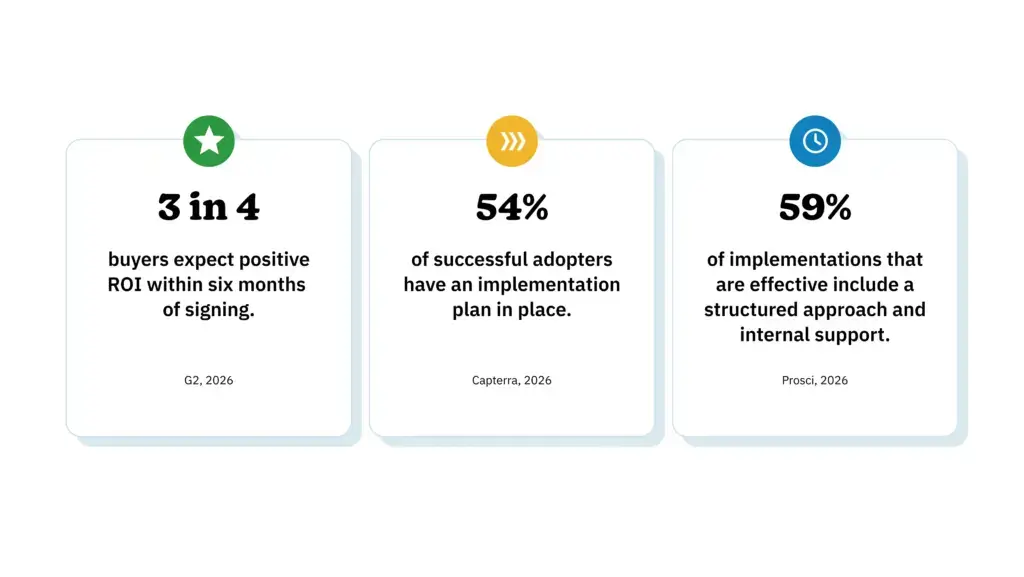
In 2026, G2 surveyed over 1,000 B2B decision-makers and discovered that three out of every four software buyers envision obtaining a positive ROI on their purchase within six months of signing up. 25% of those surveyed cited implementation planning as the biggest delay in selecting and purchasing a CRM subscription.
Capterra’s 2026 Software Buying Trends Report revealed that 54% of successful adopters compiled a comprehensive implementation plan that included training and integration. Some of the most common adoption issues cited in this report were integration problems, trouble migrating data cleanly, and delays in the implementation process.
Support within the organization is just as important as support from the vendor. Research by Prosci in 2026 found that 59% of participants who used a structured approach experienced an effective software implementation process.
So, planning helps, and support from the CRM vendor and within the company are some of the key elements of successful onboarding and adoption. Understanding what the vendor-side onboarding offering includes and whether it fits your needs is vital.

What types of CRM onboarding solutions are available?
There are essentially five core types of onboarding offered by CRM vendors, and many vendors offer more than one of these. What’s available to you will often depend on your plan tier, but some vendors offer several options at no extra cost.
Self-serve guides, templates, and checklists
Self-serve onboarding materials usually include written documents and articles, as well as video walk-throughs. Teams opting for self-serve onboarding will set up the CRM themselves and can work at their own pace. Look for onboarding guides that include crucial implementation steps like connecting your email and calendar, importing your data, building pipeline stages, and adding users.
If you’re able to hand your CRM admin an effective onboarding checklist and guide, they should have what they need to cover the basics. It’s best to ask the vendor if their onboarding materials are role-specific and whether they’re up to date.
Live group sessions
Group onboarding sessions typically involve online meetings with new customers to walk through the setup process. These are often held at regular intervals and are ideal for teams who learn best through a live demonstration and Q&A environment. Sometimes these sessions are recorded, so the vendor might be able to send a link if any team members were unable to attend.
One important pitfall of live group onboarding sessions is that the examples used in the walk-through are generalized. If your company requires a custom or slightly more complex setup, this may not be an ideal option for you.
One-on-one onboarding calls
Often referred to as personalized onboarding, one-on-one calls are scheduled online meetups with a specialist from the vendor’s team. Here, the specialist will guide you through implementation in your actual account, so the setup is specific to your needs. For example, you can get the specialist to help you set up your pipeline according to how your team sells.
This onboarding solution often includes a few calls but differs per vendor. Ask the vendor how many calls are included, how long each call will be, and if unused calls will expire.
White-glove data import and setup
White-glove support means the vendor provides a specialist to carry out specific implementation tasks on your behalf rather than merely passing on a set of instructions. This service is sometimes limited to the data import process, where the specialist handles field mapping, loads records, and checks the transfer results.
It’s a great option for teams switching from spreadsheets to a CRM, providing them with a clean start, which encourages adoption. A few things to ask your vendor before onboarding are which formats are accepted for imports, whether there are record limits, and what can’t be transferred.
Consultant- or partner-led implementation
Consultant- or vendor partner-led onboarding and training is common for more involved setups. This typically involves a comprehensive implementation plan executed by a dedicated team, including handling complex data, facilitating multiple software integrations, and large-scale projects.
This service is often priced separately, so it’s wise to request a written quotation upfront, including the exact scope of work, deliverables, timeline, and price.
What should you ask for in writing before you sign?

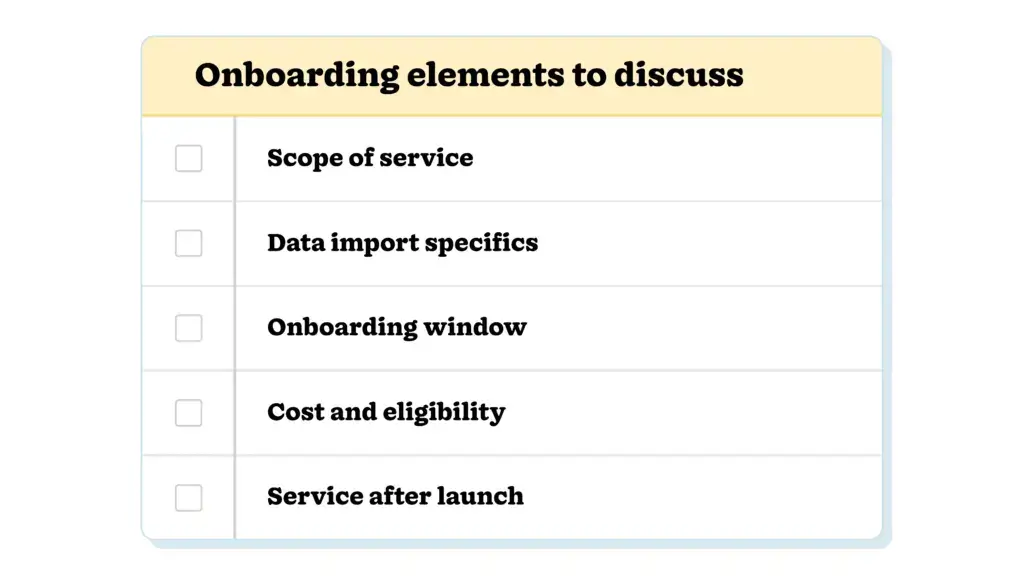
Vendors may use similar wording to describe very different types of support, like the terms “free,” “personalized,” and “white-glove,” which are commonly used. To ensure you’re clear on exactly what the onboarding support includes, ask the vendor for a short written outline of the service. These five elements should cover the majority of that outline:
- Scope: Determine the number of sessions, session length, who leads them, and if they’re recorded.
- Data import: You’ll want to know about the accepted file formats, record limits, turnaround time, and anything that won’t be transferred.
- Timing: Find out when the onboarding window begins and ends, and whether any time you don’t utilize is lost after that date.
- Cost and eligibility: Ask whether there’s an additional fee for the service. If not, ask about the plan, seat count, or spend level that qualifies your business for hands-on assistance.
- After launch: Establish what you’ll have access to after launch, like a specific person you can contact, a complimentary follow-up session, and who an admin should reach out to with questions.
Asking these questions over email gives you a written record you can refer back to when in the throes of onboarding. It also makes it easier to compare service offerings across vendors.
How do you match the type of service to your team?
Determining your ideal service type comes down to team size and data complexity. For example, a small team with a clean contact list could likely get set up with a live group session and a detailed checklist.
A bigger team moving a few years of contact history from a spreadsheet into a CRM will benefit from a white-glove import service and a few one-on-one onboarding calls. Consultant or partner involvement typically happens when dealing with a large company that has multiple departments and requires a host of integrations.
Prosci’s 2026 research also found that teams that collected useful resources as backup for post-launch use had a better chance of a successful implementation. That means finding a vendor that can provide you with recorded onboarding sessions, short refresher calls, guides and walk-throughs, and a check-in after the first 30 days.
Get it in writing, then get your team selling
When investing in a CRM, you need an onboarding solution that suits your team and your data. Finding the right match comes down to knowing exactly what the onboarding service includes.
Start by establishing which of the five types of onboarding your team needs. Then, get the vendor to confirm the scope of the service, import formats and limitations, onboarding window start and end dates, and any additional costs involved in writing.
Making sure the agreement between you and your vendor is clear from the get-go gives your team the support it needs to achieve that six-month ROI.
Frequently asked questions
-
1. Which CRM offers free onboarding?
Many CRMs include some free onboarding, but the term “onboarding” covers a wide range of services. Self-serve guides and group sessions are the most common free layer, while hands-on projects are more often scoped or priced separately. Terms vary by vendor and plan, so ask them what’s included, whether any fees apply, and if eligibility depends on plan, seat count, or spend.
-
2. What CRM offers personalized onboarding?
Personalized onboarding usually means that someone configures or teaches using your own pipeline, data fields, and roles, instead of running a generic demo. Look for a named specialist, role-based training, and sessions built on your own data. Ask the vendor to describe a typical first month and who qualifies for it.
-
3. What does white-glove CRM onboarding include?
White-glove onboarding means that the vendor does hands-on work for you. Common elements are data import, account configuration, and tailored training. Definitions vary between vendors, from a full project to import only, and everything in between. It’s best to confirm the deliverables, turnaround time, and any limits before you sign up.
-
4. How much do CRM implementation services cost?
Costs range from included at no charge to flat fees, hourly rates, or a percentage of the license price for premium support. Larger partner projects are usually quoted as a statement of work. Ask for a written scope and price, and whether the fee is one-time or recurring.
-
5. Do you have to qualify for onboarding help?
Sometimes. Some vendors tie one-on-one help to the plan, seat count, or monthly spend. Others offer the same help to all accounts. Eligibility criteria aren’t always published, so ask your sales contact what qualifies and get the answer in writing.
BACK TO TOPWritten by
Will Gordon Sr. Director of MarketingEdited by
Sam Poole Associate Content MarketerReviewed by
Chris Cain VP of Product Development, NutshellReady to try
Nutshell for Free?Thank you! Your submission has been received!Oops! Something went wrong while submitting the form.
Highly Effective Strategies for Elevating Sales Team Performance
Published on: November 10, 2022Introducing Nutshell Forms Spam Prevention
Published on: April 22, 2024Join 30,000+ other sales and marketing professionals. Subscribe to our Sell to Win newsletter!
- Product
- Nutshell Overview
CRM & Sales
Our powerful and easy-to-use flagship product.Marketing
Email marketing, forms, landing pages, and more.Engagement
Webchat, SMS, WhatsApp & more in your Omni-Channel Inbox.Prospecting
Prospect for new leads and new contacts in your CRM.Proposals & Invoices
Create & send quotes, invoices and contracts in your CRM.
AI
See why Nutshell is the leading AI CRM.Integrations
Connect to Google/Microsoft and over 5,000 Apps. Reporting
Create reports and forecasts in an instant.Mobile App
Take your CRM with you wherever you go.CRM Advisor
Get a dedicated point of contact to get the most out of Nutshell.
- Pricing
Nutshell AI
- Marketplace
- Resources
- Contact Us
Contact Sales
Send us your questions or book a 1-on-1 demo.Join a Demo
Join a group demo for a general overview of Nutshell.
Contact Support
Contact our support team via live chat in app or via email.Become a Partner
Refer businesses to Nutshell & earn commissions.
Contact Marketing
Questions about our website or our marketing opportunities?Careers
Join our growing team! See current openings.