Introducing Nutshell Forms Spam Prevention
-
If you use forms on your website, you may get a few spammy submissions that distract your sales team and clog your pipelines. Protecting your forms from spammers is important for boosting team productivity and maintaining clean customer data.
Introducing new Nutshell forms spam prevention features! Now Nutshell will filter out spammers for you, so you can keep fake form submissions out of your CRM.
How does Nutshell forms spam prevention work?

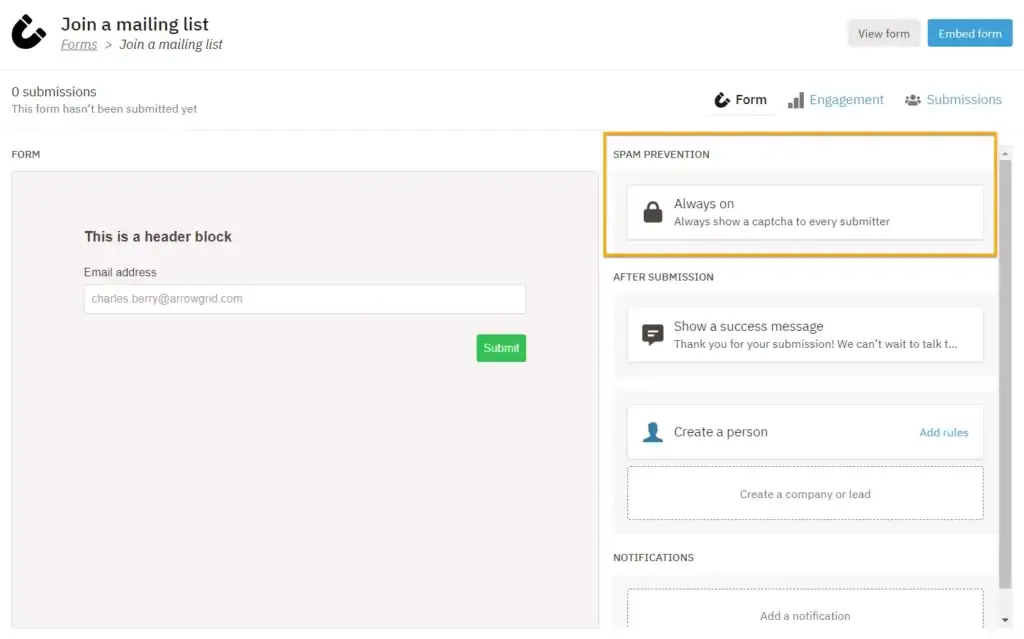
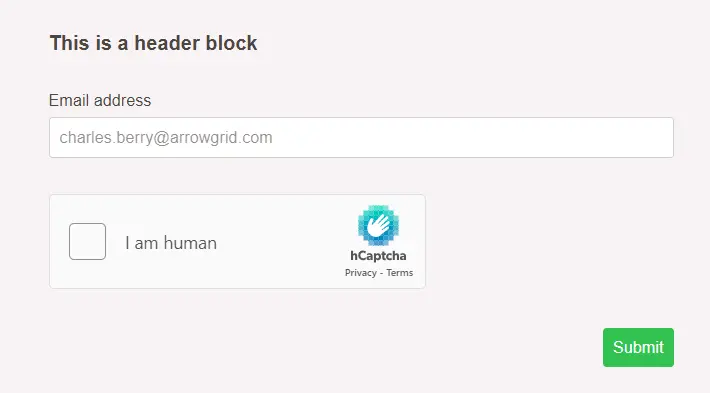
With new spam prevention features, your team can opt in to add hCaptcha to all your new Nutshell forms. The captcha will present form submitters with a puzzle designed to be easy for humans to solve but difficult for bots.
Your human form submitters can easily submit forms, while Nutshell keeps bots out!
And if any spam submissions get into Nutshell, we’ll prevent any new leads or contacts from being automatically created in Nutshell, so your team doesn’t have to spend time sorting through fake leads.
What spam prevention options are there?

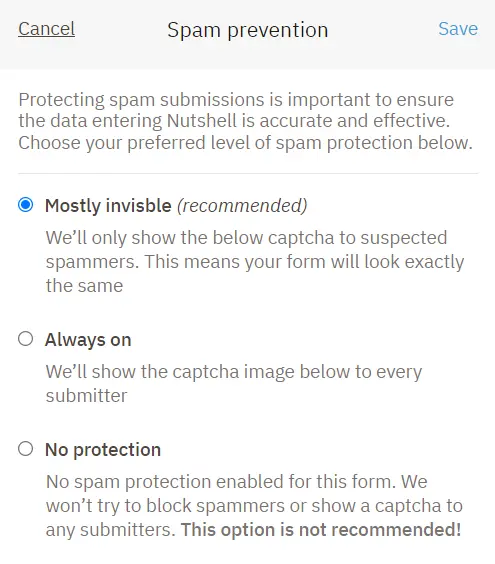
You can choose from three spam prevention settings with each form you create in Nutshell:
- Mostly invisible: The hCaptcha will only display to users Nutshell suspects are spammers or malicious.
- Always on: You can also configure your form to always show the hCaptcha for all form submitters.
- No protection: No captcha will be shown.
Our recommended and default option is “Mostly invisible.” This allows you to catch potentially malicious form submissions while easily allowing good ones through. The choice is up to you!
You can also customize spam prevention settings for different forms to get exactly the level of protection you need.
What are the benefits of form spam prevention?
Preventing spammy form submissions benefits your team by:
- Saving you the time it takes to deal with fake leads and bogus submissions
- Keeping your CRM data clean
- Protecting you from potential security threats
FAQs about Nutshell forms spam prevention
Do I have to manually update every form’s spam prevention settings?
Nutshell will automatically set spam prevention settings to “Mostly invisible” for every new form you create. You can choose whether to leave that setting enabled or pick another level of spam protection.
Where does the captcha appear?
The captcha Nutshell adds will always appear at the bottom of your form, right before the submission button.
What if a suspected spammer is actually a legitimate form submitter?
Even with Nutshell’s form spam prevention settings, you’re still in control of the data you bring into Nutshell. All suspected spam will still be saved so you can review it and mark it as not spam.
Where can I learn more?
Want to keep reading about Nutshell forms? Check out our Nutshell forms support article.
Start protecting your Nutshell forms from spammers!
Ready to get started with Nutshell form spam prevention? Head to your forms page in Nutshell to add spam prevention! And if you aren’t already a Nutshell customer, start your 14-day free trial today!
Get started with Nutshell forms
Click below to go to Nutshell forms and start designing web forms that generate new leads.
Not a Nutshell customer yet? Sign up for a 14-Day free trial and try Nutshell forms during your trial!
BACK TO TOPWritten by
Chris Cain VP of Product Development, NutshellReady to try
Nutshell for Free?Thank you! Your submission has been received!Oops! Something went wrong while submitting the form.
Beating the ‘I’ve Never Heard of You’ Objection: 5 Sales Experts Share Their Best Strategies
Published on: November 10, 2022Sales Performance Reviews: 9 Tips to Make Them Valuable
Published on: November 10, 2022What Are the Top 3 Go-To-Market Strategies?
Published on: November 10, 2022Join 30,000+ other sales and marketing professionals. Subscribe to our Sell to Win newsletter!
- Product
- Nutshell Overview
CRM & Sales
Our powerful and easy-to-use flagship product.Marketing
Email marketing, forms, landing pages, and more.Engagement
Webchat, SMS, WhatsApp & more in your Omni-Channel Inbox.Prospecting
Prospect for new leads and new contacts in your CRM.Quotes & Invoices
Quickly create quotes & invoices in your CRM.
AI
See why Nutshell is the leading AI CRM.Integrations
Connect to Google/Microsoft and over 5,000 Apps.
ReportingCreate reports and forecasts in an instant.CRM Advisor
Get a dedicated point of contact to get the most out of Nutshell.Partner Marketplace
Find trusted partners to help optimize your Nutshell CRM.
- Pricing
Nutshell AI
- Resources
- Contact Us
Contact Sales
Send us your questions or book a 1-on-1 demo.Join a Demo
Join a group demo for a general overview of Nutshell.
Contact Support
Contact our support team via live chat in app or via email.Become a Partner
Refer businesses to Nutshell & earn commissions.
Contact Marketing
Questions about our website or our marketing opportunities?Careers
Join our growing team! See current openings.