Skip to main content ↓

How to Use AI in Your CRM to Sell Smarter, Not Harder


Written by
Will Gordon director of Marketing at Nutshell
Will Gordon Sr. Director of Marketing
Last updated on: June 18, 2026
Illustration of a central AI hub connected to multiple sales and marketing team members, departments, and elements, representing AI-assisted CRM workflows

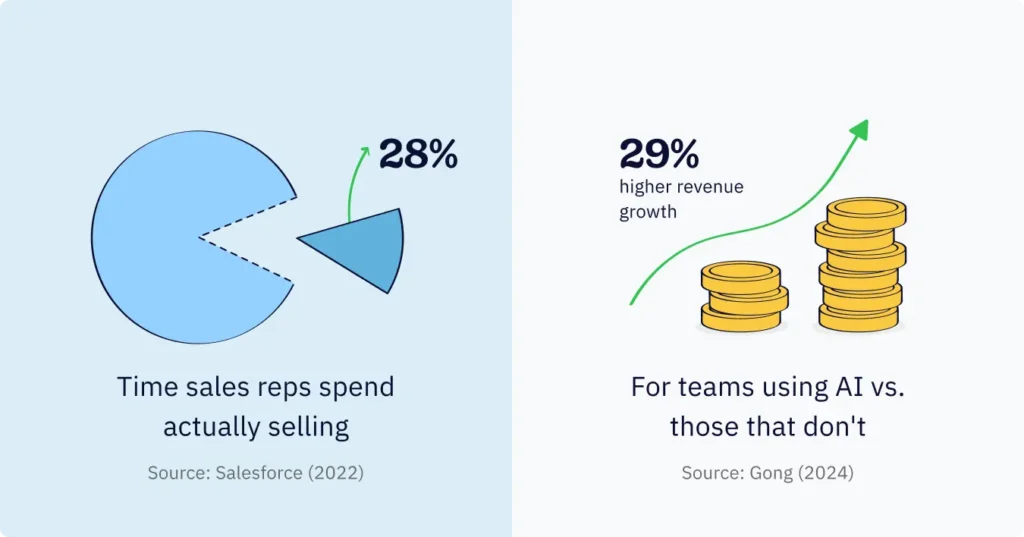
A study done by Salesforce in 2022 found that sales reps dedicated only 28% of their week to selling. The other 72% of their time is spent on admin, research, data entry, and coordination. 

The study highlights a serious issue for sales teams. Fortunately, the solution may already exist inside their CRM system: AI. In fact, revenue teams that make use of AI in their CRMs see a 29% increase in sales growth, according to research conducted by Gong in 2024. 

This Nutshell guide offers a step-by-step walk-through, with examples, detailing exactly how to use AI in your CRM and what to expect.

Key takeaways

  • Most modern CRM systems include AI, which helps teams in several core areas of their daily work activities, including data summarization, outreach and follow-up, research and lead intelligence, reporting and visibility, and lead capture and engagement.
  • The best way to integrate AI in CRM systems is at the workflow level. This means connecting two or three relevant capabilities to perform a task in its entirety rather than in separate parts.
  • Although 91% of sales and marketing professionals use AI on a regular basis, as per Workbook’s 2025 report, and a mere 38% actually use it in their CRM, which means that most teams have unused capabilities in the systems they pay for.


What is AI in CRM?

AI in CRM is about bringing cutting-edge functionality across machine learning, natural language processing, and generative AI into customer relationship management solutions. 

Machine learning is an AI subfield that refines its outputs by analyzing and learning from existing datasets. Natural language processing allows CRM systems to comprehend and produce human language outputs, transforming a plain-English question or spoken note into a well-formatted, actionable output.

These systems work on the contacts, deals, emails, and activity data that the CRM already stores, which is the differentiator between CRM-integrated AI and separate systems like ChatGPT or Claude.

When a CRM has AI built in, it’s familiar with the sales pipeline, contact history, and the most recent interactions with each lead. There’s no need to copy and paste or to hop between browser windows. The information output is useful and relevant immediately.

Here, we’ve grouped the capabilities of AI in CRM into five distinct categories that correspond to the primary tasks sales and marketing teams engage in on a daily basis.

When a CRM has AI built in, it’s familiar with the sales pipeline, contact history, and the most recent interactions with each lead. There’s no need to copy and paste or to hop between browser windows. The information output is useful and relevant immediately.

Summarization: How does AI summarization save time across the sales process?

AI CRM summarization tools capture everything from meetings to notes and calls, pulling from deal and contact timelines and logging relevant information in the CRM with no user input required. It delivers results fast, leading to noticeable time savings.

With the inclusion of AI summarization tools, sales reps no longer need to spend 25 minutes preparing for a call to understand the context. They can go directly to the call, and immediately after, the CRM provides a summary of the conversation and the desired next steps.

Example AI summarization scenario 

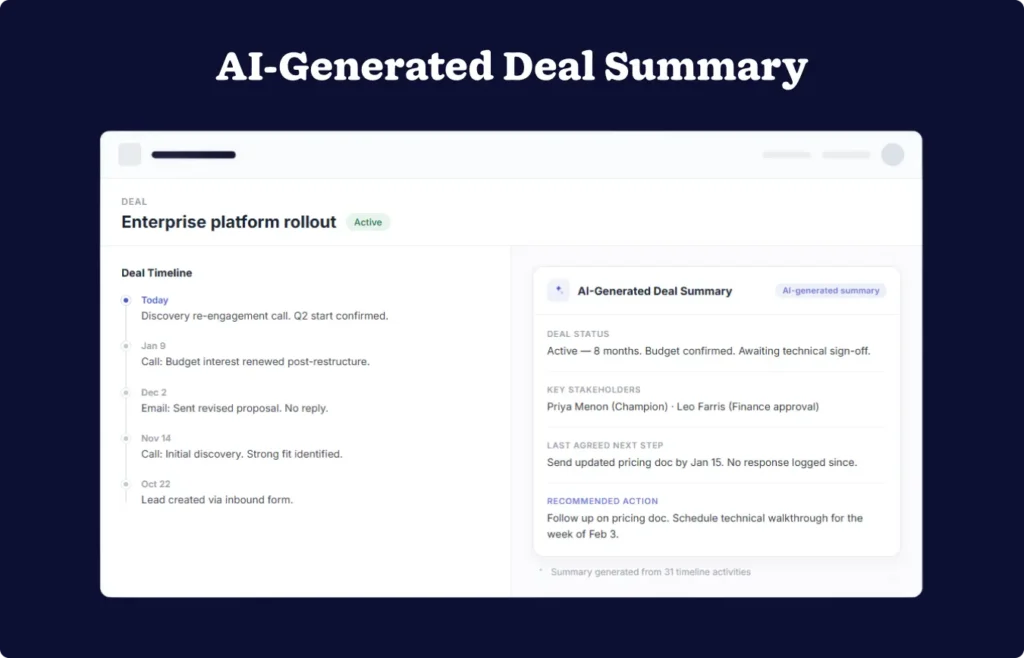
A sales rep has an upcoming call with an old prospect. There have been 31 documented interactions with this prospect. Instead of going through the logged activities one by one, the sales rep requests an AI lead timeline activity summary and lead recap. 

The AI timeline summarization tool then scans logged activities on that lead’s timeline and provides a summary of interactions with the lead. The rep now has a quick overview of the relationship so far.

Next, the rep asks the AI for a quick recap on the last meeting with the lead so they can continue where they left off on the next call. Here’s what that input and output might look like:

Example AI lead recap input:

“Please highlight the last agreed next step discussed with this lead and the suggested next action to take.”

Example AI lead recap output:

This deal has been active for eight months. During the last call, which took place on January 9, the prospect stated that they have a renewed interest in the budget following an internal restructuring. The prospect has confirmed that Angela is the primary contact for this deal and that Leo is a member of their team who will be making the financial decision. 

The last agreed-upon next step was to send the updated offer by January 15. During the call that took place last week, the prospect stated that they would like to start this deal in Q2 and have requested a technical walk-through. 

From this, we gather that a technical demo should be scheduled for the week of February 3.

Generic CRM interface showing an AI-generated deal summary card with key stakeholders and next steps

Outreach and follow-up: How can AI improve sales outreach and follow-up?

The AI outreach and follow-up functionality built into a CRM can draft communications for sales reps, ranging from short email replies to personal email sequences. And it does so based on the context of the existing deal and interactions with the relevant contact. 

Sales reps no longer need to switch tools or stare at a blank email, unsure of what to say. Nor do they need to think about the last thing that happened and what they need to do next to move the deal toward “closed.” The AI in their CRM system does this for them.

Example AI outreach and follow-up scenario 

An account executive needs to produce a quick follow-up email directly after a strong discovery call. Time is of the essence, and the follow-up email must provide a recap of the call, verify the next steps, and include a case study that was discussed. However, there are three back-to-back calls that fill the account executive’s calendar before lunch. To speed things up before their next call, the account executive opens their CRM, types a brief prompt, and the AI in the CRM draws upon the recent meeting summary to craft the email recap for them.

Example AI email follow-up input: “Draft a warm, professional follow-up email to send to this lead. Cover these key points: Thank them for the call, provide a quick recap that they’re evaluating options for Q2, confirm that their 1:1 demo is booked for Thursday at 1 PM, mention the retail sector case study attached to the email.”

Example AI email follow-up output: 

“Hi Marcus, 

Really enjoyed our conversation this morning. 

It’s clear you’re thinking about this the right way for your team’s Q2 plans. And I think we would be an ideal partner to help your business reach those goals and beyond. 

As promised, I’ve attached the case study from our retail sector work. Page 4 speaks directly to the pipeline visibility challenge you mentioned. 

We’re all set for your 1:1 demo on Thursday at 1 PM. Looking forward to showing you around the product. 

Reach out if anything comes up before then.”

Benefit: With AI in the mix, personalized follow-ups like this go out much faster and can also be sent consistently as part of a sequence. Marketing teams can build drip sequences fast, dramatically reducing the time it takes to manually build campaigns and ensuring uniform on-brand outreach and nurturing.

Research and lead intelligence: How does AI research and lead intelligence change the way teams prioritize?

AI research and lead intelligence in the CRM provides a way to automate the collection, synthesis, and valuation of data related to prospects and the companies they’re associated with. The CRM AI then organizes the data into a structured summary, which is added to the lead record along with an initial fit score.

A fit score is the AI’s estimate of the degree to which a lead matches the company’s ideal customer profile (ICP). Researching, assessing, and scoring the lead in the traditional manner is incredibly time-intensive. But with AI built into your system, this process is significantly expedited.

Example AI research and lead intelligence scenario

Imagine for a moment that an SDR opens their CRM on a Monday morning to 18 new inbound leads that came in over the weekend. Researching and evaluating each lead one at a time would call for a large portion of the morning dedicated to determining things like the lead company size, industry, potential pain points, and prior activity relevant to the lead in the CRM.

Instead of wasting precious selling time on that, the team leans into batch processing for AI research. That way, each lead is analyzed, scored, and summed up with a company outline. The AI can also detect any prior contact with the lead

Example input: “Research this lead. Company: Ardent Supply Co. Summarize what they do, assess fit for our product, and flag any prior activity in the system.”

Example output: “Ardent Supply Co. is a regional wholesale distributor, with approximately 60 employees, and operates across three states. Likely challenges: Managing a distributed sales team and a potential lack of pipeline visibility as a result. Fit score: Strong. Prior activity: One email exchange was detected, which was logged 4 months ago. No follow-up was recorded. Recommended angle: Pipeline accountability and team reporting.”

Benefit: Leads that are a strong fit are immediately actionable and easy to follow up with. It also makes it easier to re-engage with cold leads, offering a clear next step.

Reporting and visibility: What can AI reporting and visibility tools tell you that dashboards can’t?

AI reporting and visibility on CRM data translates into automatic, contextual summaries of team performance, pipeline health, and individual priorities, proactively and delivered in digest form, or generated in response to a natural language query. Essentially, these AI capabilities eliminate the friction of manual report building. 

It allows you to gain a consolidated view of prospect and customer conversations across multiple touch points, as well as clearer visibility regarding team reporting and pipeline data. Most CRM systems rely on the user having a clear idea of what they’re looking for, and AI enables a reporting process where the insights come to you.

Example AI reporting and visibility tool scenario

A sales manager begins the week without opening any dashboards. However, the AI summary she received via email that morning has already processed the hottest leads for the week, identified two deals that need following up, and informed her that one sales rep has a thinning sales pipeline. 

Later that week, a colleague asks for a summary of deals won by the industry over the last 90 days. She quickly uses her reporting AI, asking it for the information in plain English. She receives her answer seconds later, with the option to quickly generate a report and chart to save as a PDF or share directly with her colleague.

Example input: “Show me won deals by industry for the last 90 days, ranked by deal value.”

Example output: 

“Won deals for the last 90 days: 

  1. Manufacturing: 14 deals, $187,400. 
  2. Professional Services: 11 deals, $134,200. 
  3. Healthcare: 8 deals, $98,750. 
  4. Retail: 6 deals, $61,300. 

Note: Manufacturing industry win rate is up 18% vs. the previous 90-day period.”

Benefit: Managers can quickly generate an AI-powered report on deals to follow up on, sales related to a specific focus area, and more. Which means that reps can easily access the highest priority information. Orum’s 2024 State of Sales Development report states that 87% of sales professionals cite a positive increase in efficiency and focus related to the use of AI in their daily work.

Lead capture and engagement: How does AI lead capture and engagement work beyond the web form?

AI lead capture and engagement in CRM includes the use of a built-in AI chatbot. An AI chatbot is a real-time engagement tool that uses AI to converse with and record website visitor data based on that company’s trained content. 

This tool qualifies visitor intent, captures contact information, and manages the routing of conversations and meetings directly to team members. It represents the functionality of AI at the top of the funnel, and includes an integrated workflow for the stages that follow.

Example AI lead capture and engagement scenario

For this example, we’ll have a potential customer access the pricing page of a B2B software company at 9 PM. No sales rep is there to assist at 9 PM, so the AI chatbot converses with the customer to answer a couple of product questions. It records the customer’s information and schedules a product demo with the customer for the following Wednesday morning. 

By the time the sales team arrives at work at 8 AM, the AI chatbot has already logged the conversation, created a lead record, confirmed the meeting, and attached a transcript of the conversation. Now, the sales rep’s very first conversation with the customer is actually informed, instead of a cold outreach.

Example website visitor input: “Do you integrate with Microsoft Teams? We’re a team of about 25.”

Example output (AI chatbot): “Yes. There’s a native Microsoft Teams integration that logs calls and meetings directly to your CRM records automatically. For a team your size, that typically saves a few hours a week in manual data entry. Want me to book a quick demo so you can see it in action? I can find a time that works for you right now.”

Benefit: This way, leads are captured even outside business hours. Leads are context-filled and have intent, and users have the next steps clearly defined. Using AI in this way results in a fully formed interaction and zero downtime on the conversation.

What does it take to get real results from AI in your CRM?

Stat graphic showing 28% of sales time spent selling versus 29% higher revenue growth for AI-using teams

Three aspects influence the success of the implementation of AI tools within your CRM.

Data quality

AI generates its output based on the input data, such as the lead record. Teams that log activities consistently gain better outcomes when compared to teams with inconsistent logging habits. 

Breadth of use 

The research by Workbook in their 2025 The State of AI in CRM in B2B report showed that using several AI capabilities leads to an impactful shift, as opposed to using just one feature, which typically just leads to a nudge. 

Workflow thinking

This involves connecting capabilities to allow one output that immediately funnels into the next. Start with the most time-consuming task, then build from there.

Frequently asked questions about using AI in CRM

  • 1. What’s the difference between AI built into a CRM and a stand-alone tool like ChatGPT?

    Stand-alone AI tools are general-purpose, working from whatever context you provide in a prompt. AI built into a CRM already has access to contact records, deal history, email threads, and pipeline data. The outputs are immediately relevant and log directly to the right record, with no copy-pasting required.

  • 2. Do you need technical skills to use AI features in a CRM?

    No. Modern AI CRM capabilities are designed for everyday users, not developers or data scientists. Most are triggered by a button click, a plain-English question, or run automatically in the background. The learning curve is typically measured in minutes, not weeks.

  • 3. Is AI in CRM only useful for sales teams, or does marketing benefit too?

    Both benefit significantly. Sales teams gain the most from summarization, research, and reporting capabilities. Marketing teams benefit most from AI outreach tools, particularly email campaign builders, sequence writers, and chatbot-driven lead capture. Many of the highest-value workflows span both departments.

  • 4. What kind of data does a CRM need for AI to work well?

    Consistently logged activity data is the foundation, including call notes, email threads, deal stage updates, and contact records kept current. AI summarization and research tools perform best when the underlying records are complete and regularly maintained. Sparse or outdated data produces thin outputs.

  • 5. How quickly can a team expect to see results from AI in their CRM?

    Teams typically notice time savings within the first week of using summarization and email drafting features. Pipeline-level benefits, like better prioritization, faster follow-up, and improved visibility, tend to compound over the first 30 to 60 days as usage habits solidify and the AI has more data to work with.

What separates the teams gaining ground right now?

AI exists in numerous modern CRM’s, helping teams adapt to changes in the market and enhance their overall productivity. Companies that have pushed their teams to embrace AI are doing less busy work and focusing more of their time on customer and deal-related activities. The teams seeing the most success are the ones actually utilizing the AI features they have access to.

BACK TO TOP

Join 30,000+ other sales and marketing professionals. Subscribe to our Sell to Win newsletter!