When Do You Actually Need CRM Customization?

-

The pitch is seductive: “Our CRM will fit your business like a glove. We can customize anything.” You nod along, imagining a system perfectly molded to your unique processes.
Then the quote arrives—$75,000 to $150,000 for custom development. And that’s before the annual maintenance bills kick in.
Here’s what most vendors won’t tell you—more than half of businesses fail to fully implement their CRM systems, often because they’ve over-engineered solutions that are too complex for their teams to actually use. You’re told customization is the answer, but what if the real problem is that you’re solving the wrong problem?
The uncomfortable truth is this—90% of businesses don’t need custom CRM development. They need smart configuration. There’s a difference, and it’s worth understanding before you commit to months of development and six-figure investment.
Key takeaways
- Configuration, not customization, solves most CRM challenges. The vast majority of “unique” business requirements can be met through built-in configuration options—custom fields, pipeline stages, workflow automation—all without requiring developers.
- The 3-level framework clarifies when customization is actually necessary. Configuration handles 90% of needs, while workflow automation covers 7%. Only the remaining 3% of businesses truly require custom development for critical integrations or specialized compliance.
- The real metric of success is user adoption, not technical complexity. A simple, well-configured CRM that your team actually uses beats an over-engineered system that sits unused every single time.
Table of contents
- What is CRM customization? Understanding your options
- The 3-level customization framework: When you actually need it
- Five warning signs you’re over-customizing your CRM
- The real cost of CRM customization beyond the price tag
- Configuration first: Why smart setup beats custom coding for most businesses
- Critical questions to ask before customizing your CRM
- How Nutshell delivers smart customization without the complexity
- Frequently asked questions about CRM customization
What is CRM customization? Understanding your options
CRM customization means adapting your system to match unique business processes, data requirements, and workflows. The challenge is that “customization” has become an umbrella term covering everything from simple field configuration to multi-month development projects.
Understanding the customization spectrum is critical because the path you choose determines your timeline, cost, team adoption, and long-term maintenance burden. Most businesses conflate all three levels of customization into one category, even though they’re fundamentally different solutions requiring different expertise, investment, and ongoing support.
There’s a framework that clarifies when customization is actually necessary—and it’s simpler than you think. Let’s break down the three distinct approaches you’re really choosing from:
1. CRM configuration
Configuration is what most businesses actually need. This involves using built-in platform settings to adapt the CRM to your business. For example, you can:
- Add custom fields for industry-specific data.
- Create multiple pipeline stages that match your sales process.
- Build automation rules that eliminate manual tasks.
- Set up role-specific dashboards.
Configuration requires no coding, so your business users can make changes without IT involvement. Automatic platform updates enhance your setup rather than breaking it.
2. CRM customization
Customization sits in the middle of the spectrum and requires some technical skill (but not full custom development). This category covers features and capabilities like:
- Workflow automation beyond basic rules
- API integrations that connect your CRM to specialized tools
- Platform extensions that add functionality the vendor doesn’t provide natively
Customization is more complex than configuration but less expensive and risky than full custom development. Think of it as thoughtful extensions to the platform, not rebuilding the platform itself.
3. Custom CRM development
Custom development means building a CRM from scratch or heavily modifying the core system. This approach requires developers, project management, testing cycles, and ongoing maintenance.
A custom-built CRM might integrate with a proprietary legacy system, implement highly specialized compliance requirements, or create entirely new data models that can’t be adapted within the platform’s standard architecture. This is an expensive, time-intensive process that creates technical debt and requires ongoing developer resources.
What do you really need?
Here’s the key insight vendors often downplay. Your CRM doesn’t need to match your current inefficient processes perfectly. It needs to support your best processes and help your team move toward those practices.
Most perceived “customization needs” can actually be solved through flexible configuration.
Too often, businesses see the statistic of $8.71 return per $1 spent on CRM and forget that ROI only applies with proper system adoption. Customization that harms adoption destroys this ROI equation.
Smart configuration that your team actually uses? That’s what generates returns.
The 3-level customization framework: When you actually need customization
You understand the framework. Now let’s dive deeper into each level with real percentage data that helps you determine where your business belongs.
Level 1: Configuration (90% of businesses)
Configuration solves the vast majority of CRM challenges without requiring developers.
This level addresses the most common frustration: “Our CRM doesn’t capture the data we need” or “The pipeline stages don’t match our sales process.”
So, when do you need configuration? When standard fields don’t capture your key data points.
Every industry has unique information that matters for decision-making:
- A manufacturing business needs to track lead size and delivery requirements.
- A professional services firm needs to track project type and billing method.
- A technology company needs to track product tier and trial status.
None of these examples require custom development—they require custom fields.
What does configuration solve? Well, you can:
- Capture industry-specific tracking through custom fields
- Create multiple pipelines for different business processes
- Build automated task creation based on stage changes
- Set up role-based dashboards so salespeople see their personal pipeline while managers see team performance and executives see revenue forecasts
- Implement territory assignments that automatically route leads.
- Create sophisticated segmentation combining multiple data points.
For example, a marketing team might add custom fields for campaign source, engagement score, and content preferences. A sales team could create separate pipelines for new business acquisition versus expansion deals, each with appropriate stages and probability settings.
Configuration is also low-cost and low-complexity. It’s included in your platform subscription, so there’s no additional development investment or ongoing maintenance beyond the platform itself.
The implementation timeline for CRM configurations is just days to weeks. A typical setup takes one to two weeks for configuration, data migration, and team training. You’re operational and seeing value quickly.
Level 2: Workflow automation (7% of businesses)
Workflow automation addresses the next level of sophistication—when manual processes create bottlenecks, errors, or missed opportunities. This moves beyond static data structure into active business process automation.
When do you need workflow automation?
It might be time to implement workflow automation if:
- Your sales reps are spending time on repetitive tasks instead of selling
- Your follow-up sequences are inconsistent because they depend on human memory
- Leads aren’t being assigned consistently
- Handoffs between teams create delays or drop through cracks
- Information isn’t flowing automatically between systems
What does workflow automation solve?
Here are just a few of the ways workflow automation can help your team save time:
- Automated lead assignment based on territory plus product type
- Email sequences triggered by stage changes that execute consistently
- Automatic notifications to customer success when deals close
- Lead enrichment that happens automatically without manual research
- Task creation that ensures nothing falls through cracks
- Cross-team handoffs that happen automatically instead of requiring email coordination
Concrete examples
Here’s how workflow automation can translate into your day-to-day:
- A sales team sets up lead routing so inbound leads are automatically assigned based on geographic territory and product interest.
- A marketing team creates workflows that send a welcome sequence when someone downloads a resource, then a follow-up sequence if they visit pricing pages.
- An operations team builds an automation that triggers a “renewal preparation” task 60 days before a contract expires.
- A customer success team creates a workflow that fires when a customer hasn’t logged in for 30 days, creating an outreach task and notifying the success manager.
Setting up workflow automation
As a process, setting up workflow automation ranks at about low to medium complexity because it’s configuration-based, not coding-based. You may need to invest time in process mapping and workflow design.
While no developers are required, someone needs to think through the logical flow.
The implementation timeline ranges from weeks to months, depending on workflow complexity. Simple automations (lead assignment, task creation) take weeks. Complex multi-step workflows take longer but still don’t require the months that custom development does.
Level 3: Custom development (3% of businesses)
Custom development is the heavy-lifting solution for the rare business that truly can’t function within platform constraints. This requires developers, significant investment, and ongoing maintenance.
When do you need custom development? A critical integration doesn’t exist in the vendor’s marketplace. Compliance requirements are so specialized that the platform can’t be configured to meet them. Your proprietary business model requires a completely custom data structure.
Legacy systems have such unique data formats that no standard API connector will work.
What does custom development solve? Integration with proprietary manufacturing ERP systems that have no standard connectors. Specialized compliance reporting for heavily regulated industries. Custom security implementations for government contracting. Proprietary data models that can’t fit within standard CRM architecture.
Here’s a little reality check. Custom development starts around $30,000 and climbs to $300,000+ for complex projects. Then add 15-20% of that initial investment annually for maintenance. Those annual costs continue indefinitely as long as the system exists. You’re not just paying for initial development. You’re committing to ongoing support.
Some examples of business use cases that require custom development:
- A manufacturing company integrating with a proprietary ERP that controls production scheduling and inventory.
- A financial services firm building custom compliance reporting for regulatory requirements.
- A healthcare organization creating specialized data encryption for HIPAA compliance.
- A government contractor implementing custom security controls for federal contracts.
Cost and complexity? High. This kind of project requires developers and multi-level project management. It also often creates technical debt that limits future flexibility.
Implementation timeline? Months to years. Complex custom development projects average 6-12 months, with some enterprise implementations taking 18-24 months. You’re not operational quickly, and ROI realization is delayed.
Framework decision criteria
Here’s how to move through this framework systematically:
- Start with Level 1 configuration for every single business. There’s no business that shouldn’t implement smart configuration first. Map out your key data requirements, pipeline stages, and workflows. Spend the weeks configuring your platform. Get teams operational.
- Move to Level 2 workflow automation only when you have documented bottlenecks that configuration can’t solve. Don’t automate theoretical future processes. Automate current, measurable problems that are costing time or creating errors.
- Consider Level 3 custom development only when critical business processes absolutely cannot function without it.
And before you commit, calculate the 3-year total cost: initial development plus 15-20% annual maintenance. Compare that against the documented business value. Most businesses will find that Level 1 and Level 2 solutions solve 95%+ of their needs.
Five warning signs you’re over-customizing your CRM
Over-customization is insidious because it happens gradually. You add one custom feature, then another, then another—each one seemingly necessary in isolation. Then suddenly, your CRM is so complex that nobody wants to use it.
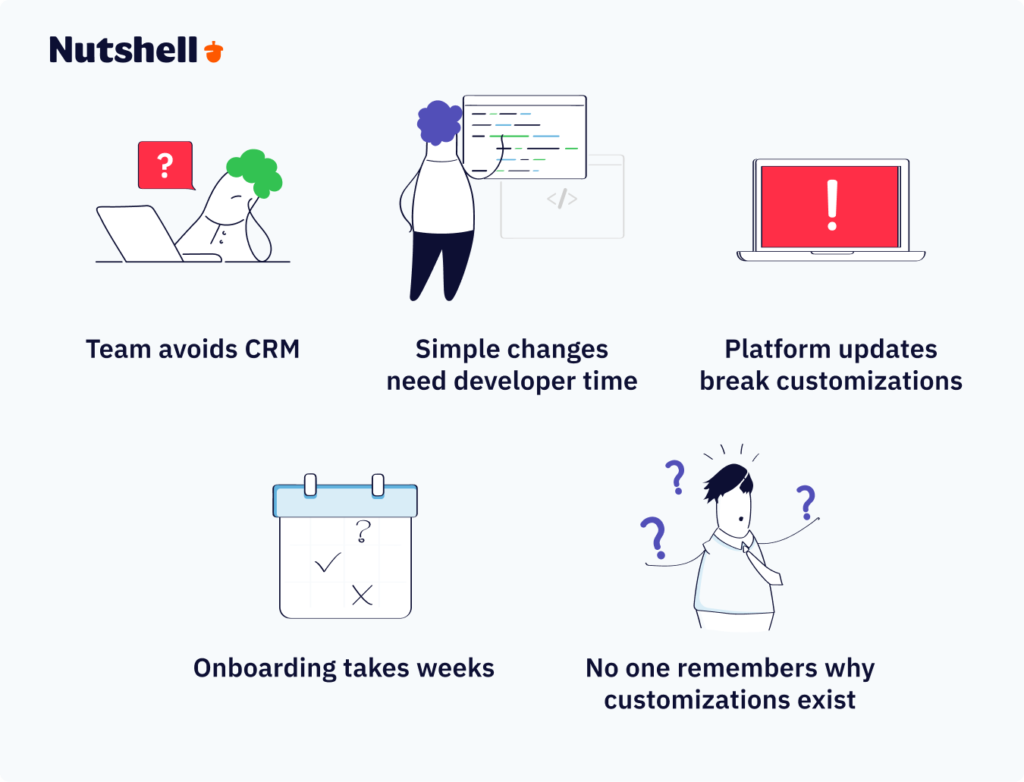
Sign 1: Your team avoids the CRM because it’s “too complicated”
This is the death knell. If user adoption is declining because of complexity, customization is counterproductive. You’ve built something technically sophisticated that solves the wrong problem.
Here’s the harsh reality. Less than 40% of businesses fully implement their CRM systems. The stated reasons vary, but complexity is a consistent culprit. Teams develop workarounds. They maintain spreadsheets alongside the CRM. They skip steps because the process is too cumbersome. The system you built to improve productivity actually reduces it.
The metric that matters is adoption. Not feature count. Not lines of custom code. Not vendor impressiveness. Adoption.
Sign 2: Simple changes require developer time and project planning
If your sales manager wants to add a new pipeline stage, that should take 15 minutes. If it takes a developer sprint, you’ve created technical debt.
When basic changes require technical resources, you’ve built a system that can’t adapt to business needs. Your business will evolve. Your processes will change. Your sales strategy will shift. If every adjustment requires hiring developers and scheduling projects, you’re frozen in place.
Sign 3: CRM platform updates regularly break your customizations
This is the maintenance burden that nobody budgets for. Heavy customization means the platform vendor’s updates regularly create conflicts with your custom code. Your developers spend time fixing compatibility issues instead of building new value.
Think about this over three years:
- Year one: You invest $100,000 in custom development.
- Year two: A major platform update breaks something—$15,000-$20,000.
- Year three: Another update, another fix. By the end of year three, you′ve spent $150,000-$160,000 total, and you’re back where you started because you’re maintaining something that could have been configuration-based all along.
Sign 4: Onboarding new employees takes weeks instead of days
Complex customizations require extensive training. New sales reps can’t start working immediately. Marketing team members need days of orientation. Operations staff require specialized instruction on custom workflows.
Approximately 42% of businesses cite lack of training as their biggest CRM barrier. Over-customization makes this worse. Every custom feature requires explanation. Workarounds need documentation. Standard processes are buried under layers of customization.
Simple, intuitive systems have the opposite effect. New team members become productive in days because the system makes sense. The interface guides them. They don’t need specialized training to understand configurations you’ve added.
Sign 5: No one can explain why certain customizations exist anymore
This is the legacy customization graveyard. You talk to long-time team members, and they shrug: “I think John built that when he worked here in 2019. I’m not sure anyone uses it.”
You’ve created technical debt masquerading as capability. These orphaned customizations consume maintenance resources, complicate platform updates, and add no value. They’re technical drag.
The real cost of CRM customization beyond the price tag
Every business knows custom development is expensive. What most businesses underestimate is how expensive it really is when you total up all the costs over three years.
Total cost breakdown
Let’s be specific. Here’s what you’re actually investing in:
- Initial development: $30,000 to $300,000+ depending on complexity. This is the number most businesses focus on because it’s the most visible cost.
- Hidden costs: Add 25-40% to initial estimates for requirements changes, testing, and unforeseen complications. You budgeted $100,000? Plan on $125,000 to $140,000 minimum.
- Annual maintenance: 15-20% of initial development cost every single year for updates, bug fixes, and compatibility issues. That $100,000 project now costs $15,000 to $20,000 per year indefinitely.
- Training investment: Often underestimated. Custom systems require custom training materials and ongoing education. This includes trainer time, documentation creation, and employee time away from productive work. Budget another $5,000 to $10,000.
- Technical debt: Future limitations when you want to add features or upgrade platform versions. Customizations create constraints. You can’t switch vendors without redeveloping. You can’t upgrade to new platform features that conflict with custom code.
- Opportunity cost: Developer time spent maintaining customizations instead of building new capabilities. Instead of your developers solving business problems, they’re firefighting compatibility issues.
3-year total cost comparison
Let’s compare two approaches for a 10-person sales team:
The configuration approach
- Platform subscription: $75 per user per month × 10users × 36 months = $27,000
- Setup and data migration: $2,000
- Ongoing training and support: Included in platform
- Total 3-year cost: $29,000
- Can adjust processes as business evolves at no additional cost
The custom development approach
- Platform subscription: $75 per user per month × 10 users × 36 months = $27,000
- Initial development: $100,000 (realistic mid-range estimate)
- Hidden costs (30% buffer): $30,000
- Year 1 maintenance: $18,000
- Year 2 maintenance: $18,000
- Year 3 maintenance: $18,000
- Training and documentation: $8,000
- Total 3-year cost: $219,000
- Requires developer resources for ongoing changes
- Can’t easily upgrade platform or switch vendors
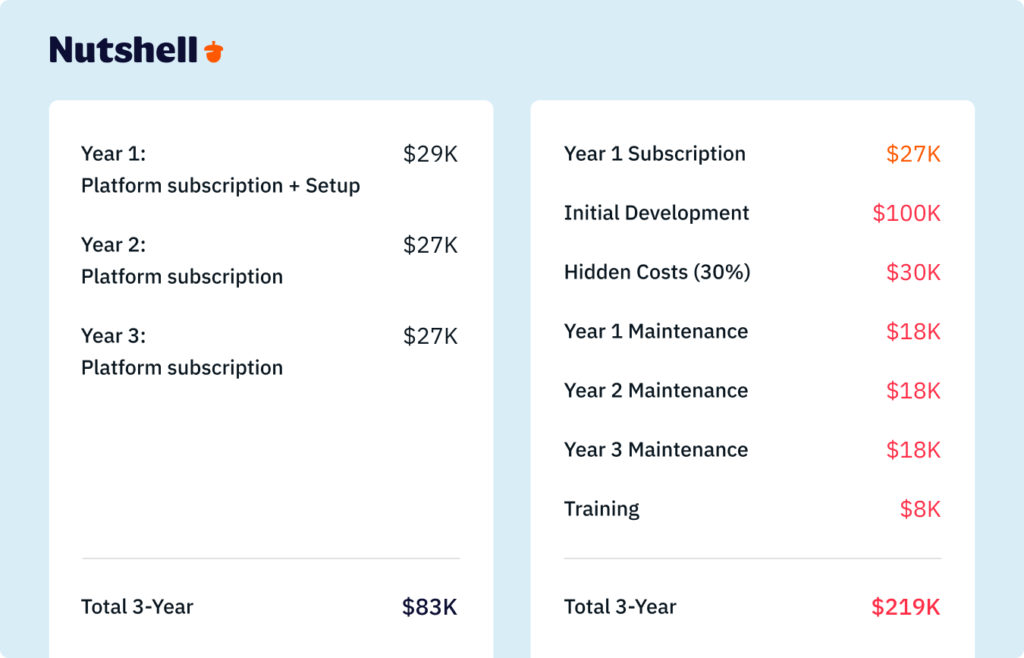
Here’s the ROI reality: Custom development must deliver four to five times the value of configuration to justify the $190,000 difference. For most businesses, it doesn’t.
But for the 3% of businesses with truly specialized needs, it does.
Configuration first: Why smart setup beats custom coding for most businesses
Most businesses vastly overestimate how “unique” their requirements are.
Sales processes vary by industry, sure. But most industries don’t have 47 different sales methodologies that require custom development. If you’re like most companies, you probably have five that can all be accommodated through flexible configuration.
Why 90% of businesses need only configuration
Most perceived “customization needs” can be mapped to flexible configuration options.
Think about your own business. What makes your sales process unique? You probably have specific pipeline stages. You track certain data points that your competitors might not. You have particular workflows for follow-ups. You might route leads by geography or product interest.
None of that requires custom development. All of it requires good configuration.
Configuration provides customization benefits without the technical debt. Your platform vendor maintains the system. Updates enhance capabilities rather than breaking customizations. Your business users can make changes instead of waiting for developer availability. Changes happen in hours or days, not sprint cycles.
Five key benefits of a configuration-based approach
- Faster implementation: Operational in days to weeks versus months to years for custom development. You’re not waiting for developers, requirements gathering, testing cycles, or debugging. Your team starts using the CRM immediately.
- Lower total cost: No $75,000 to $150,000 development investment. No ongoing maintenance costs. Maintenance is included in your platform subscription. You know your costs in advance instead of getting surprised by annual maintenance bills.
- Easier ongoing maintenance: Platform vendor handles updates, bug fixes, and security. You’re not managing technical debt. You’re not hiring developers to fix compatibility issues. You’re not frozen in place waiting for the developer who built the original system.
- Better team adoption: Intuitive interfaces don’t require weeks of specialized training. Your team learns the system quickly because it’s designed for business users, not developers. New employees become productive in days instead of weeks, which directly benefits the 42% who struggle with CRM complexity.
- Future flexibility: Adjust processes as your business grows without redevelopment projects. Your first pipeline configuration won’t be perfect. You’ll learn what works. Configuration lets you evolve without starting over. Custom development locks you in.
Specific configuration examples that solve complex needs
Let’s translate theoretical benefits into practical applications:
- Custom fields: Track industry-specific data like “project type,” “referral source,” “service tier,” “renewal date,” “buyer persona,” “engagement score” without writing code. Every field is searchable and reportable. You can build workflows around these fields. You can segment audiences using field combinations.
- Multiple pipelines: Separate sales processes for new business acquisition versus customer expansion versus renewal versus professional services. Each pipeline has appropriate stages and probability settings. Different deal types move through their own logical progression. Reporting shows pipeline-specific metrics.
- Automated workflows: Lead assignment rules based on territory, product interest, company size, or custom field values. Automated follow-up task creation when deals enter specific stages. Triggered email sequences based on milestone completion. Automatic notifications keeping managers informed. Team handoffs that happen systematically instead of depending on individual initiative.
- Role-based dashboards: Sales reps see personal pipeline metrics and next actions. Sales managers see team performance, win rates, and forecasts. Executives see revenue pipeline, projected close dates, and pipeline health. Marketing directors see lead generation metrics and campaign performance. Customer success managers see at-risk accounts and renewal status. Everyone sees the data that matters for their role.
- Segmentation: Marketing teams create sophisticated audience segments using custom field combinations—perhaps “high-engagement leads from web traffic in the technology sector who visited pricing pages.” Sales teams segment opportunities by size, stage, and probability. Customer success teams segment accounts by health score and contract value. All without custom coding.
The “Goldilocks approach”
Configuration isn’t too simple—it provides enterprise-level capabilities for genuinely complex business needs. And it isn’t over-engineered—it avoids unnecessary technical complexity that hinders adoption. It’s just right: the balance between flexibility and usability that optimizes team productivity.
Critical questions to ask before customizing your CRM
Before you commit to customization, run through this decision framework. Honestly answer these questions. If most answers land in the “customization might not be necessary” camp, you have your answer.
Comprehensive decision checklist
1. Evaluate all your options
Have we fully explored built-in configuration options? Many perceived customization needs can be solved with existing platform features.
2. Get to know your platform
Have you spent time understanding what the platform can do before deciding it can’t do what you need? Most businesses haven’t. They assume that if the solution isn’t immediately obvious, it doesn’t exist.
3. Identify a business case
Does this solve a documented pain point or bottleneck? Avoid customizing for theoretical future needs. Focus on current, measurable problems. “It would be nice if…” is not a business case. “Our sales reps waste two hours daily searching for customer information” is a business case.
4. Estimate total costs
What’s the three-year total cost including maintenance? Calculate initial development plus 15-20% annual maintenance plus training investment. Compare that number against business value. Does solving this problem generate that much value?
5. Consider maintenance needs
Will this require ongoing developer maintenance? If yes, factor in long-term technical resource costs. You’re not just paying for initial development. You’re committing to ongoing expenses indefinitely.
6. Justify potential customizations
Can our team explain why this customization is necessary? If stakeholders can’t articulate the business case, reconsider. Customization for its own sake adds technical burden without value.
7. Plan to maximize adoption
Will this improve adoption or create more training burden? Complexity often decreases usage. Ask honestly—will teams embrace this customization or avoid it because it’s complicated?
8. Consider how costs will evolve
How will this impact future platform updates? Custom code may break with vendor updates. You’re creating technical debt that requires ongoing maintenance when the platform evolves.
Is there a configured alternative that achieves 80% of the goal? Sometimes “good enough” configuration is better than “perfect” customization. The last 20% rarely justifies the cost and complexity.
The problem-first test
Apply this progression before considering customization:
- Start with the pain point: “Our sales reps waste two hours daily searching for customer information scattered across multiple systems.”
- Note the feature request: “We need a custom dashboard with real-time data visualization.”
- Validate the problem: Measure current state. How many hours are actually wasted? What’s the revenue impact? Two hours × sales team size × average deal size—what’s the real cost of this inefficiency?
- Explore configuration solutions first: Can custom fields + saved views + smart search filters solve this? Can role-based dashboards organized around key metrics eliminate the need for custom development?
- Finally, consider customization: If configuration can’t solve it, evaluate custom development ROI.
When customization indicates wrong platform choice
If you’re heavily customizing just to work around poor core CRM design, you chose the wrong platform. It’s uncomfortable to acknowledge, but it’s the truth.
Red flags include:
- Building workarounds for weak contact management
- Creating custom fields because the standard data model is inadequate
- Extensive customization just to match basic competitor features
If you’re constantly fighting the platform instead of adapting your processes to leverage the platform, the solution isn’t more customization. It’s switching to a CRM that provides the core capabilities you need out of the box.
Measuring success
Use these metrics to measure whether your CRM is actually delivering value:
- User adoption rate
- Daily active users
- Data quality
- Process compliance
And avoid these metrics:
- Technical complexity
- Number of custom features
- Lines of custom code
These measure technical sophistication, not business results.
Success equals solving business problems and increasing team productivity, not showcasing technical capabilities. A simple configured CRM that your team uses daily beats an over-engineered system that sits unused.
How Nutshell delivers smart customization that saves you time
Nutshell is built for sales and marketing teams that need enterprise-level flexibility without the complexity of custom development. We deliver smart configuration through an intuitive interface designed for business users, not developers—so you spend less time managing your CRM and more time selling.
Download our Sales Manager’s Survival Guide!
Ready to become the best sales manager for your team? Get 70+ leading tips and strategies from the experts for sales management success with our Sales Manager’s Survival Guide.
Nutshell’s configuration capabilities
Here’s how Nutshell solves the customization vs. configuration debate:
- Unlimited custom fields: Capture industry-specific data without writing code. Add fields for lead source, buyer persona, project type, service tier, renewal date, or any unique data point your business tracks. Every field is searchable, reportable, and automatable.
- Multiple customizable pipelines: Create separate sales processes for different product lines, customer segments, or deal types. Each pipeline has appropriate stages and probability settings. Different sales methodologies coexist in one system.
- Workflow automation without coding: Build sophisticated automations through an intuitive interface—lead routing, task creation, email sequences, team notifications. No developer required. Business users can create and adjust workflows as processes evolve.
- Flexible reporting and dashboards: Create role-specific views with a drag-and-drop report builder. Sales reps see personal pipelines, while managers see team performance, and executives see revenue forecasts. Everyone sees metrics that matter for their role.
- Smart segmentation: Combine custom fields with behavior data to create targeted marketing audiences without complex queries. Marketing teams segment based on engagement, company type, product interest, or custom field combinations.
Unified platform advantage
Integrated sales plus marketing in one system eliminates expensive middleware integrations. You’re not customizing data sync between separate platforms. You’re maintaining a single source of truth where marketing sees sales activity and sales sees marketing engagement.
Then there are the real cost savings. Normally, you’d need a separate sales CRM, a marketing automation platform, and a custom integration connecting them. Nutshell includes sales, marketing, and engagement in one platform. Data automatically syncs. No customization required to connect separate systems.
This unified approach addresses a major hidden cost: analysts spend nearly half of their time preparing data before analysis. When sales and marketing live in separate systems with manual data sync, information gets duplicated, lost, or contradictory. One unified platform eliminates this waste entirely.
Implementation speed
Nutshell is operational in days—not months. While other CRMs can take three months or longer to set up, Nutshell’s typical implementation takes just one to two weeks for configuration and data migration.
Pre-built templates for common industries accelerate setup, so you’re not starting from scratch. You’re starting with a foundation designed for your industry and customizing from there.
Business users can also make configuration changes without IT involvement. A sales manager wants to adjust pipeline stages? Done in minutes. Marketing wants to add a custom field? It takes 10 minutes. No ticket, no sprint cycle, no developer queue.
These capabilities directly help the 42% who struggle with CRM training and complexity. Nutshell’s intuitive design means new team members become productive in days instead of weeks.
Built for business users, not developers
You don’t need to understand code to customize your CRM. Nutshell’s configuration interface is designed for sales managers and operations leaders, not technical teams.
Changes take minutes (adding custom fields, adjusting pipeline stages) instead of weeks (developer sprint cycles). The system responds to business needs with the speed of business, not the pace of development cycles.
Team members can self-serve for reports, views, and basic automation. Your sales team isn’t waiting for IT. Your marketing team isn’t putting in requests. They’re taking action.
This reduces dependency on technical resources, meaning your developers can work on strategic initiatives instead of maintaining CRM infrastructure.
Industry-specific examples
Here’s what Nutshell can look like in your industry:
- Professional services: Custom fields for project type, billing method, client industry. Separate pipelines for new client acquisition versus existing client expansion. Automated task creation for project milestones. One system tracking both sales and delivery.
- Manufacturing: Custom fields for product specifications, order volume, delivery requirements. Pipeline stages matching manufacturing sales cycle (quote, order, production, fulfillment). Automated lead routing based on geographic territory and product category. Integration points with manufacturing systems without custom development.
- Technology/SaaS: Custom fields for product tier, trial status, use case. Multiple pipelines for direct sales, partner channel, self-service upgrades. Workflow automation for trial-to-paid conversion sequences. Marketing integration capturing product usage as engagement signals.
The Nutshell difference
Smart configuration delivers enterprise-level flexibility without the enterprise price tag. You get configuration power without custom development costs. Configuration flexibility grows with your business without redevelopment projects. You spend less time managing your CRM, more time selling.
Ready to stop over-engineering your CRM? Explore how thousands of sales and marketing teams use Nutshell to work smarter, not harder. Start your free 14-day trial today.
Frequently asked questions about CRM customization
Q: What’s the difference between CRM configuration and customization?
Configuration uses built-in platform settings to adapt the CRM to your needs. You’re adding custom fields, adjusting pipeline stages, creating automation rules, building reports—all without writing code. Configuration is what most businesses need.
Customization involves modifying the platform through coding, APIs, or extensions to add functionality beyond built-in capabilities. This typically requires developers and creates technical debt.
Think of it this way—configuration is the art of creatively using what the platform provides. Customization asks the platform to do something it wasn’t designed to do.
Most businesses need configuration, not customization. 90% of “unique” requirements can be met through flexible configuration options. Configuration benefits include faster implementation, lower cost, easier maintenance, and business user control. You can change things yourself. You don’t wait for developers.
Q: How much does CRM customization typically cost?
Costs vary dramatically based on what you’re actually doing:
- Configuration: Included in platform subscription ($50–$100 per user per month for most business CRMs). You’re not paying additional costs for configuration flexibility.
- Light customization: $5,000–$30,000 for workflow automation, basic integrations, or UI modifications. Still relatively affordable and doesn’t require deep development resources.
- Custom development: $30,000–$300,000+ depending on complexity. Legacy system integrations, proprietary data models, specialized compliance requirements—these are expensive.
- Ongoing costs: Add 15-20% of initial development cost annually for maintenance, updates, and bug fixes. A one-time investment of $100,000 becomes $15,000–$20,000 per year indefinitely.
- Hidden costs: Add 25-40% to initial estimates for requirements changes, testing, and unforeseen complications. Budgeted $100,000? Plan on $125,000–$140,000 minimum.
Total cost example: $100,000 custom development becomes $125,000–$140,000 year one, then $15,000–$20,000 annually forever. Over three years, you’re approaching $200,000+ total investment. Configuration-based approach for the same functionality? Expect to pay $30,000–$40,000 total.
Q: When should I consider custom CRM development instead of configuration?
Custom development makes sense for only about 3% of businesses with highly specialized needs.
Valid reasons for custom development include:
- Critical legacy system integration where no existing connector works with your proprietary systems
- Industry-specific compliance requirements that require custom security or audit trails
- Proprietary business processes that genuinely cannot be adapted to standard CRM models
Invalid reasons for custom development can include:
- Wanting the CRM to match current (inefficient) processes exactly
- Pursuing “nice to have” features without ROI calculation
- Customizing just because competitors are customizing
- Solving theoretical future problems instead of documented current pain points
Try this decision test: If configuration can achieve 80% of your goal, choose configuration. The remaining 20% rarely justifies custom development costs.
Always calculate three-year total cost and measure against documented business value before committing to custom development.
Q: Can CRM customization hurt user adoption?
Absolutely. Over-customization is a leading cause of poor CRM adoption rates.
Statistics show 42% cite lack of training and expertise as their biggest CRM barrier. Complex customizations make this problem worse because they require specialized training that takes weeks instead of days.
How customization hurts adoption:
- Creates steeper learning curve that overwhelms new team members
- Requires specialized training that takes weeks instead of days
- Makes the system intimidating for users unfamiliar with custom features
- Slows down basic tasks with unnecessary complexity
- Creates workarounds because people can’t figure out the system
Q: How long does CRM customization take to implement?
Timeline depends entirely on which level of customization you’re pursuing:
- Configuration: Days to weeks. The typical timeline is one to two weeks for setup, data migration, and team training. You’re operational and seeing value quickly. Your team can start using the CRM immediately.
- Light customization: Weeks to months. Workflow automation and integrations typically take four to eight weeks depending on complexity. You’re still operational relatively quickly, but there’s more complexity than pure configuration.
- Custom development: Months to years. Complex development projects average six to twelve months, with some enterprise implementations taking 18 to 24 months. You’re waiting a long time before your CRM is operational.
Time factors that extend implementation include:
- Requirements gathering and definition
- Development cycles and code writing
- Testing and quality assurance
- Bug fixes and refinement
- Training and adoption period
Fast implementation offers an advantage. A configuration-based approach means you start realizing ROI immediately. Your team isn’t waiting months to begin using the system. Every week of faster implementation is value delivered sooner.
Q: What happens to my customizations when the CRM platform updates?
This is the hidden maintenance burden that kills customization ROI:
- Configuration-based changes: Typically unaffected by platform updates. Vendor ensures configuration features remain compatible. When Nutshell releases a new version, your custom fields, pipelines, and automations continue working.
- Custom code and APIs: May break with platform updates, requiring developer time to fix compatibility issues. You’re not just paying for initial development. You’re paying for ongoing fixes every time the vendor releases an update.
- Technical debt reality: Each customization creates potential maintenance burden with every vendor release. A heavily customized system becomes increasingly expensive to maintain over time as the vendor’s platform evolves.
The configuration approach wins here because platform updates enhance your capabilities automatically. When Nutshell adds new features, you benefit immediately. Your configuration adapts to the improved platform instead of breaking.
This is why configuration beats customization for long-term success. Platform improvements compound your capabilities over time instead of creating ongoing maintenance burden.
BACK TO TOP Written by
Ready to try
Nutshell for Free?Thank you! Your submission has been received!Oops! Something went wrong while submitting the form.




Better Together: Nutshell Named One of the Best Mailchimp CRM Integrations
Published on: December 8, 2022
7 Stellar Contact Form Design Examples, Key Elements, Benefits, and More
Published on: February 29, 2024
Establishing a System for CRM Data Entry and Management
Published on: April 11, 2023Highly Effective Strategies for Elevating Sales Team Performance
Published on: November 10, 2022Introducing Nutshell Forms Spam Prevention
Published on: April 22, 2024Join 30,000+ other sales and marketing professionals. Subscribe to our Sell to Win newsletter!










