Understanding drip email campaigns

“Nutshell is super user-friendly and intuitive
“I would highly recommend Nutshell
“Easy to use and... wait for it ... 100% buy in!
“Nutshell is both simple and powerful
A drip email campaign puts the right message in front of the right contact at the right moment — automatically, based on what they’ve done or where they are in your pipeline. Unlike a one-time blast, a drip campaign runs in the background, delivering a sequence of pre-written emails that build toward a specific outcome. This guide is for B2B sales and marketing teams who want automated sequences that actually convert, not just ones that send.
A drip email campaign is a set of pre-written emails triggered automatically by a contact’s behavior or a defined schedule, with each message designed to move the recipient one step closer to a specific outcome. This guide covers both marketing drip campaigns and CRM-powered sales sequences — and the key differences between them.

Take our guided tour to explore Nutshell’s incredible features!

Table of Contents
You already know email works. The question is whether your email is working — actually moving leads through your pipeline, or landing in inboxes and getting ignored.
Most teams send the same message to everyone, cross their fingers on timing, and wonder why open rates look fine but conversions don’t follow. Drip campaigns solve that. They put the right email in front of the right person at the right moment, automatically, based on what that person has actually done.
This guide gives you two things: a clear picture of how drip campaigns and sequences work mechanically, and a step-by-step process for building ones that convert. No theory for theory’s sake — just what you need to get a sequence live and performing.

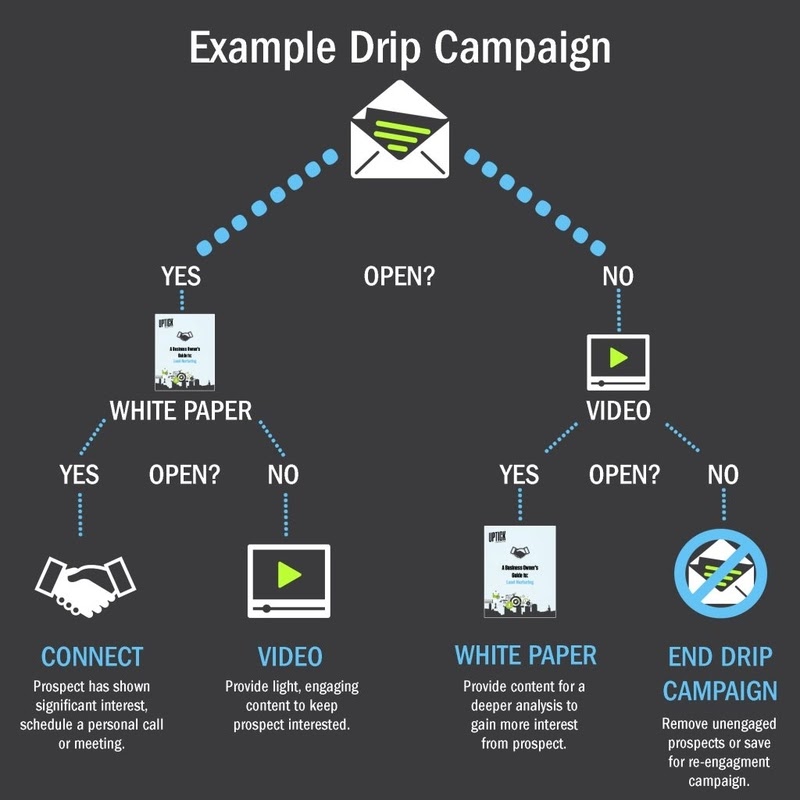
A drip email campaign is a series of pre-written emails sent automatically to a contact based on a trigger, a schedule, or a behavioral condition — with each email building on the last to move the recipient toward a specific outcome. Here’s what that looks like when it’s actually running.
A lead downloads your pricing guide. They immediately receive an introductory email. Two days later, a follow-up lands that addresses the most common question your sales team hears. A few days after that, a short customer story. If they reply at any point, the sequence stops — the conversation has moved somewhere more important than an automated inbox. If they go quiet, it resumes. Five emails over two weeks, running without anyone pressing send.
Now, here’s the distinction that actually matters for B2B teams: a drip campaign and a drip sequence aren’t quite the same thing, even though the terms get used interchangeably.
A drip campaign is typically a marketing email series. It goes out to a segment of your list on a set schedule, measured by open rates and click-through rates, and managed from an email marketing platform. The emails go out whether or not any individual recipient has done something new since the last one landed.
A drip sequence is typically a sales email series. It’s sent from a rep’s individual email address, written to feel like a personal outreach, measured primarily by reply rate, and managed from a CRM. The sequence stops automatically when the lead replies, books a meeting, or hits a defined stage in your pipeline.
Both automate email delivery over time. The difference is personalization level, what you’re measuring, and where the behavior data lives. A CRM-powered email platform handles both — which is what makes it categorically more useful for B2B teams than a standalone email tool.
For a deeper look at how CRM and email marketing connect at the platform level, see our complete guide to CRM and email marketing →
Every drip campaign runs on three components: a trigger that starts it, a sequence of emails that move the recipient forward, and exit conditions that stop it when the conversation has changed. Get all three right and the sequence feels like a timely, natural conversation. Miss one and it feels like spam.
The trigger is whatever event starts the sequence. A form submission. A content download. A specific page visit. A tag applied to a contact record. A deal moving to a new pipeline stage. Or a date — like 30 days before a contract renewal.
It matters more than most teams give it credit for. A CRM-connected platform gives you a much richer set of trigger options than a standalone email tool, not just because of what it can detect, but because it has access to deal data. A contact visiting your pricing page is interesting. A contact visiting your pricing page while sitting in an open deal worth $40,000 is a different situation entirely — and a CRM knows the difference.
The emails themselves are written in advance, each designed to move the recipient one step forward rather than repeat the same ask. Effective B2B sequences tend to be short — three to seven emails for most use cases. The angle should shift from email to email: one introduces, one provides value, one makes a soft ask, one addresses an objection. Repetition kills sequences. Variety keeps them alive.
They should also feel personal, even when they’re not. That means writing in a direct, conversational tone, using the recipient’s name and company, and making each email feel like it was written for them — not broadcast to a list of five hundred.
Exit conditions are what stops the sequence. At minimum, a reply from the recipient should always end it. For CRM-connected sequences, you can add more: a meeting booked, a deal moved to a new stage, a form filled out, a purchase completed.
This is the detail that separates a well-designed sequence from an annoying one. The sequence should stop the moment the conversation moves forward. A lead who replied to your third email and is now on a call with your sales rep does not need to receive email four. Automation that talks over an active conversation doesn’t just feel awkward — it can undo the relationship your rep just worked to build.
There are six main types of drip email campaigns B2B teams use — each built around a different trigger, audience, and goal. Most high-performing email programs run several simultaneously, targeting different segments at different stages of the funnel.
A welcome sequence onboards a new subscriber or trial user and introduces value before making any kind of ask. It’s the first impression your automation makes, which means it sets the tone for everything that follows.
A SaaS company might send a four-email welcome sequence to every new trial signup: Email 1 confirms the account and sets expectations. Email 2, sent two days later, highlights the one feature most users activate in their first week. Email 3 shares a short customer story that mirrors the new user’s situation. Email 4 offers a live demo for anyone who wants a guided walkthrough. No hard sell — just a steady hand pointing toward value.
A lead nurture sequence moves a lead from awareness to consideration over a defined window. It’s built for longer B2B sales cycles where a single email rarely closes anything and the goal is staying relevant long enough for the lead to be ready to buy.
One example: a lead downloads a pricing comparison guide and enters a six-email sequence over three weeks. Early emails address common objections and share ROI data. Middle emails bring in customer proof. The final one is a soft CTA — a call booking link, not a hard pitch — for leads who’ve engaged consistently.
A pipeline-triggered sequence starts automatically when a deal moves to a specific stage. No manual follow-up required. The rep focuses on the conversation; the sequence handles the in-between.
When a deal moves to “Proposal Sent,” the sequence sends a check-in email on day three, a relevant case study on day seven, and a light nudge on day ten if there’s been no reply. It keeps the deal warm without putting the rep on a rigid follow-up schedule they have to manage themselves.
A re-engagement sequence targets contacts who’ve gone quiet — no opens, no clicks, no replies in 60 or 90 days. It’s shorter and more direct than a nurture sequence, designed to surface genuine interest or confirm that it’s time to move on.
Three emails usually does it. The first acknowledges the silence without being awkward about it. The second takes a different angle — something they haven’t heard from you before. The third gives them an easy out: “If now’s not the right time, no hard feelings — just let us know and we’ll stop reaching out.” That last email often gets the highest reply rate of the three. Go figure.
An onboarding sequence runs after a sale and focuses on one thing: making sure the customer actually uses what they bought. Churn often happens not because the product failed, but because the customer never got far enough in to see the value.
A 30-day onboarding sequence might include five emails triggered by what the customer has — or hasn’t — done in the product. Set up your account? You get tips on the next step. Haven’t logged in after day five? You get a check-in with a short how-to. The sequence responds to behavior, not just the calendar.
A win-back sequence targets churned customers or lapsed leads with a specific offer or a fresh angle. It acknowledges the gap honestly, leads with what’s changed since they left, and closes with something concrete — a limited re-engagement offer, an updated product walkthrough, or a direct line to a real person.
Three emails is usually the right length. If they’re not interested after three, they’re not interested — and continuing to reach out is just burning goodwill you might need later.
For real-world examples of how B2B teams use CRM data across campaign types, see CRM marketing examples and strategies →
Building a drip email campaign comes down to six decisions made in the right order — who enters, what you want them to do, how many emails it takes to get there, what each one says, when the sequence stops, and whether it actually works before you scale it.
Step 1: Define the trigger and the audience
Start here, not with the emails. Who enters this sequence, and what action puts them in it? The trigger defines the sequence’s entire purpose — and a tight trigger produces a relevant sequence. A broad one produces noise.
A lead who visited your pricing page and a lead who downloaded a general industry report are in very different places. One has shown commercial intent. The other is still in research mode. Running them through the same sequence wastes both their time and yours — and it’s one of the most common reasons drip campaigns underperform before anyone looks at the email copy.
Step 2: Set one goal
One goal per sequence. Reply, book a demo, start a trial, renew. That’s it.
Sequences built to accomplish multiple things at once fail at all of them. Pick the single action you want the recipient to take and build every email toward it. Everything else is a distraction.
Step 3: Decide on length and cadence
For B2B sales sequences: four to seven emails, spaced two to four days apart, across two to three weeks. For marketing nurture sequences: longer windows are fine — four to eight weeks — but frequency should decrease as the sequence progresses, not increase. Ramping up email frequency on an unresponsive contact doesn’t create urgency. It creates unsubscribes.
For personalization strategies that make sequences feel less automated and more like a real conversation, see email personalization →
Step 4: Write the emails — varying the angle
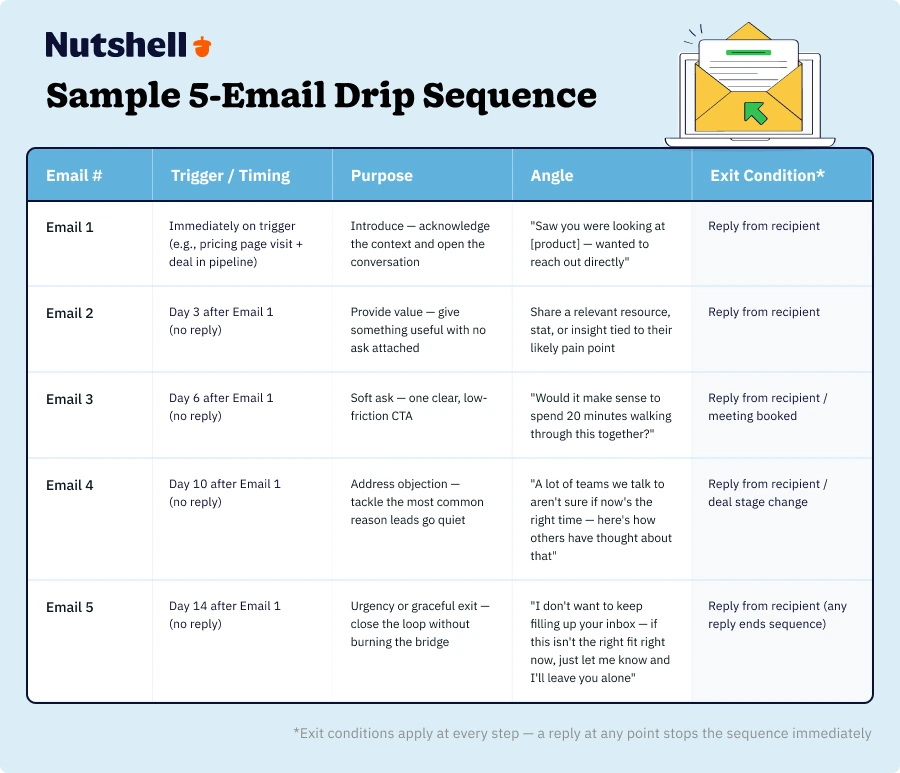
Here’s a framework that works for most B2B sales sequences:
Each email should feel like a natural next step from the previous one. A quick gut-check: if someone could read Email 3 without having seen Emails 1 and 2 and it made complete sense on its own, the sequence isn’t building toward anything. Fix that before you send.
Step 5: Set your exit conditions
Before anything goes live, define at minimum one exit condition: a reply stops the sequence. For CRM-connected sequences, add pipeline triggers — meeting booked, deal stage change, form submitted.
Not optional. A sequence without exit conditions isn’t a sales tool — it’s an automated annoyance.
Step 6: Test before sending at scale
Send the full sequence to yourself first. Check every personalization token. Confirm the timing intervals. Make sure the exit conditions actually trigger when they’re supposed to. Read each email on a mobile screen — because that’s where most of your recipients will see it.
One specific thing to verify: does the sequence stop when it should? Sounds obvious. It’s the thing teams skip most often, and it’s the thing that causes the most damage when it’s wrong.
For a step-by-step walkthrough of setting up automated email campaigns in your CRM, see setting up automated email campaigns →
A standalone email tool can schedule and send a drip sequence. A CRM-connected one can trigger it on deal data, stop it the moment a lead replies, and show you whether it actually moved revenue — not just whether anyone opened it. That’s a categorically different capability, not just a feature upgrade.
A basic email platform triggers on a form fill or a date. A CRM adds pipeline stage changes, deal value thresholds, last contact date, rep-assigned tags, and product usage data. The trigger options aren’t just broader — they’re commercially smarter.
A lead who filled out a demo request form is worth one sequence. A lead who filled out a demo request form while sitting in a deal that’s been stalled for 14 days is worth a completely different one. Only a CRM can make that call, because only a CRM has the deal data to back it up.
When a lead responds, the sequence stops. Automatically. Because the CRM has visibility into email replies alongside every other piece of contact activity — call logs, meeting notes, deal history — all in one place.
Standalone tools often can’t guarantee this. And when a sequence keeps sending after a lead has already replied and started a real conversation with your team, it doesn’t just feel tone-deaf — it can actively undermine the relationship your rep just worked to establish.
Every email sent, opened, clicked, or replied to shows up on the contact record. Right next to the call log, the meeting notes, the deal history. Before any touchpoint, your sales reps see the full picture.
That context changes the conversation. The rep who picks up the phone after Email 3 knows what the lead read, what they clicked, and what they ignored. That’s what turns a drip campaign from a standalone marketing activity into a genuine sales coordination tool.
CRM-connected sequences can show which campaigns correlate with pipeline movement and closed deals — not just who opened what. That’s the number that justifies the investment to leadership. Open rates are a curiosity. Revenue attribution is a business case.
For a deeper look at aligning your CRM and email marketing setup, see aligning CRM and email marketing →
Most drip campaigns that underperform fail for the same five reasons — and every one of them is fixable before the sequence ever goes live.
The sequence keeps sending after the lead has already responded, which makes the whole operation look like it’s not paying attention. Fix: set reply as an exit condition before anything launches. Non-negotiable.
Daily emails in a B2B context don’t build urgency — they build resentment. Fix: space sales sequence emails two to four days apart. For nurture sequences, longer gaps are fine as the sequence progresses.
If Emails 1 through 5 are all making the same value proposition in slightly different words, the sequence isn’t moving anyone forward. The lead gets the message by Email 2. After that, you’re just repeating yourself. Fix: map each email to a distinct angle or objection before writing a single word.
Open rates tell you whether your subject line worked. Nothing else. Fix: use reply rate as the primary success metric for sales sequences and optimize everything else around that signal.
A broad trigger produces a diverse audience that isn’t actually a good fit for the sequence’s goal. Engagement drops, and you end up drawing the wrong conclusions about what’s working. Fix: audit your trigger criteria before launch — not after five emails have gone out to a thousand people who shouldn’t have been in the sequence at all.
Nutshell includes both broadcast email campaigns and personal email sequences in one platform — sequences sent from the rep’s own email address, tracked on the individual contact record, and automatically stopped when the lead replies.
Here’s what that looks like in practice:
Broadcast campaigns and personal sequences, in one place. Most teams run a separate email marketing tool for campaigns and their CRM for managing deals. Nutshell connects both. Marketing can run broadcast campaigns to segmented audiences; sales reps can enroll leads in personal sequences — all without switching platforms or manually syncing data between tools.
Pipeline-triggered enrollment. When a deal moves to a specific stage, a sequence starts automatically. No rep has to remember to enroll the contact. The CRM handles it based on the trigger you define — which means follow-up actually happens consistently, not just when someone remembers to do it.
Auto-stop on reply. When a lead responds, the sequence stops. Built in, not bolted on. The rep gets notified, the contact record is updated, and the conversation continues where it left off — without the sequence talking over it.
AI-assisted sequence writing. Nutshell’s Email Sequence Writer AI Agent generates drip messages, nurture sequences, and follow-ups through a chat interface using your actual CRM data — so what it produces is grounded in your pipeline, not generic templates.
Team visibility and A/B testing. Managers can see which sequences are running and which are getting replies. A/B testing lets you compare subject lines and email copy across campaigns so you’re improving based on real data, not instinct.
Reply rate tracking. Nutshell tracks reply rates natively — the metric that actually tells you whether a sales sequence is working, not just whether people are opening it.
We built Nutshell for B2B sales and marketing teams at growing companies who want sequences that run well without needing a dedicated operations person to set them up and maintain them. Fast to get live, easy to adjust, and connected to the deal data that makes every send smarter.

Foundation
If you’re newer to how CRM and email marketing connect at the platform level, start with our complete guide to CRM and email marketing →
For a step-by-step walkthrough of setting up automated sequences in your CRM, see setting up automated email campaigns →
Strategy
For personalization strategies that make sequences feel less like automation and more like a real conversation, see email personalization →
For segmentation strategies that sharpen who enters each sequence, see market segmentation for email campaigns →
For using CRM data to inform broader campaign decisions, see using data insights to drive marketing strategy →
CRM marketing context
For examples of how B2B teams use CRM data across campaign types, see CRM marketing examples and strategies →
For a practical look at aligning your CRM and email marketing setup, see aligning CRM and email marketing →
For personalized and targeted campaign approaches that go beyond basic segmentation, see creating personalized campaigns →
Nutshell-specific
For a closer look at Nutshell’s drip sequence tool, see Nutshell drip sequences →
For email marketing fundamentals, visit email marketing school →
The number of emails in your drip sequence will depend on lots of factors, like whether recipients are customers or prospects, the goal of your campaign, your industry, and more. Generally, drip sequences include between three and 10 emails, all with their own unique goal.
Like the number of emails in your drip campaign, the answer to this question depends on lots of things like the goal of your campaign. An email drip sequence should be long enough to successfully nurture a lead into completing the action you want them to take.
You can optimize a drip campaign in lots of ways, including tracking email metrics, leveraging A/B testing, and building everything in your campaigns around your goals.
The best triggers depend on your goals. Common high-performing triggers include form submissions, email sign-ups, content downloads, purchase completions, cart abandonment, website page visits, inactivity periods, and milestone events like anniversaries. Match your trigger to where leads are in their buyer journey for maximum relevance.
Drip campaigns typically perform better than broadcast emails. Aim for 45-55% open rates—anything above 50% is exceptional. Click rates average around 4-5% for automated sequences. If your rates are lower, focus on improving subject lines, sender names, and ensuring your content matches subscriber expectations and interests.
Drip campaigns are automated email sequences triggered by specific actions (like downloading a guide) and tailored to individual behavior. Newsletters are scheduled broadcasts sent to your entire list with the same content. Use drip campaigns to nurture leads through your sales funnel and newsletters to maintain ongoing relationships.
Table of Contents



Join 30,000+ other sales and marketing professionals. Subscribe to our Sell to Win newsletter!