User-friendly CRMs are giving small businesses their training time back. Here’s how to use it.

-
Investing in a leading user-friendly CRM should see your sales and marketing teams save most (if not all) the hours they would have dedicated to training. The trick is to use the time saved to your advantage.
But what does “user-friendly” really mean?
A user-friendly CRM is a customer relationship management platform built to make navigating and using the app as easy as possible. These CRMs close the gap between implementation and onboarding, helping teams reduce downtime and remain productive as they move from their previous system to the new CRM. And they give teams time to develop more impactful skills.
This Nutshell guide gives teams insight into determining which skills to develop, prioritize, and measure, to ensure the training time they recover truly gives them the upper hand.
Key takeaways
- User-friendly CRMs make it easier for teams to get up and running quickly and free up time for more advanced CRM training.
- Some of the most beneficial revenue-driving CRM skills are custom reporting, workflow automation, and pipeline refinement.
- A strategic, high-level training plan gives teams the skills they need to master their CRM software and gain a competitive advantage.
Why is basic CRM adoption just the beginning?
Switching to a simple CRM that’s easy to pick up and use offers teams a real advantage because it fast-tracks your team’s understanding of the new system. High-performing teams are using the time gained to develop skills that distinguish them from other teams.
CRM adoption is the level to which a team adopts a CRM and the depth at which it uses its features. Teams implementing a simple, easy-to-learn CRM system leverage the time saved to increase CRM adoption beyond basic contact management, elevating system usage to a real competitive advantage.
What should teams learn once they know the basics?
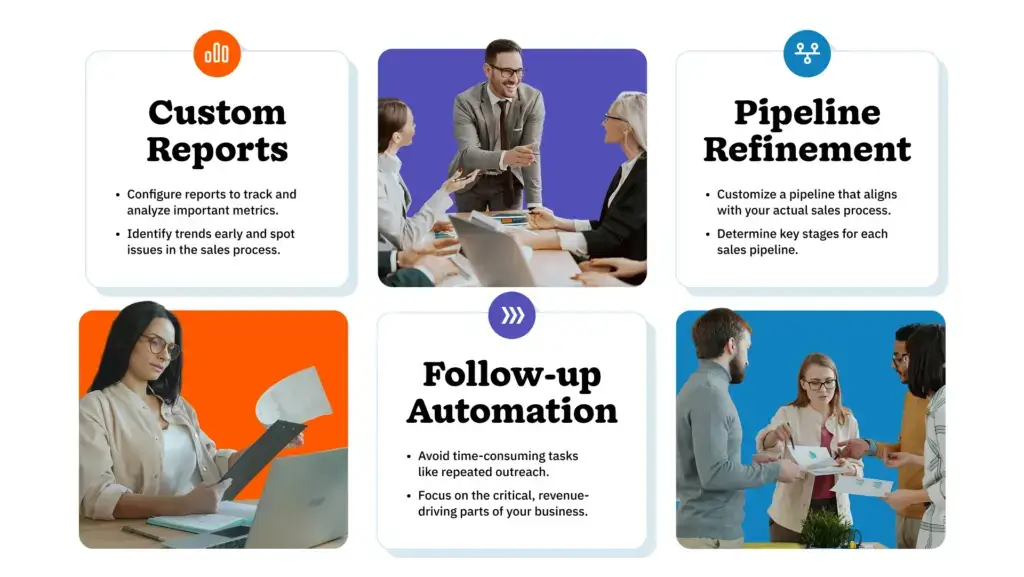
Once they have basic CRM functionality down pat, teams should expand their learning to include refining their sales pipelines and setting up smart automations. It’s also incredibly beneficial to understand how to build custom reports to track performance and spot opportunities.
With these additional skills, teams will realize how powerful their CRM system can be in helping them become more efficient and productive. Leveling up their CRM usage this way helps them move from basic data entry to work that impacts sales revenue and business goals.

Building custom reports that surface real insights
Custom reporting is about configuring your CRM reporting settings to track and evaluate the metrics that matter most to your team. It takes CRM reporting beyond standard report setups, allowing teams to pinpoint data to answer questions specific to their business.
Building custom reports and dashboards helps teams and leadership identify trends early and spot bottlenecks compromising the sales process. Using the data unlocked from these custom reports, teams can make informed decisions based on real data.
A 2023 study by Salesforce shows that sales teams spend a whopping 72% of their time doing administrative, repetitive tasks and only 28% of their time actually selling. Deliberate, tailored reporting shared across the team can help reps gain that vital selling time back.
Setting up automation that takes care of the follow-up
Sales automation is the use of CRM automation tools to initiate an action based on a specific trigger with little to no human intervention. It’s typically tied to the completion of a task or a lead progressing from one stage to the next in the sales pipeline. Automation is a great way to handle time-consuming tasks like repetitive outreach and follow-ups.
In modern CRMs, AI and automation work hand-in-hand, heavily optimizing processes to save teams even more time. In fact, in a 2024 survey, HubSpot determined that 78% of sales professionals said that AI automation helped save time, which they could focus on more critical, revenue-driving work.
Refining pipeline stages to reflect how deals actually move
Pipeline refinement means building a custom pipeline with stages that align with your actual sales process, instead of adapting your process to your CRM’s default pipeline stages. The standard pipeline stages present when you first open your CRM typically use generic names to appeal to a broad range of businesses. But these may not necessarily reflect the core pipeline decision points for your specific industry or business type.
For a clear pipeline view and smoother sales process, it’s essential for teams to determine the key stages leads move through for each sales process and adapt their sales pipelines accordingly. Setting up a custom build like this also makes it easier for sales managers to identify roadblocks and coach team members more effectively.
How do you turn saved training time into a more CRM-fluent team?
Just because user-friendly CRMs allow teams to pick up the basics quickly and save training time, it doesn’t mean you should skip training altogether. Planning for continuous CRM fluency development is an opportunity to make your team super users.
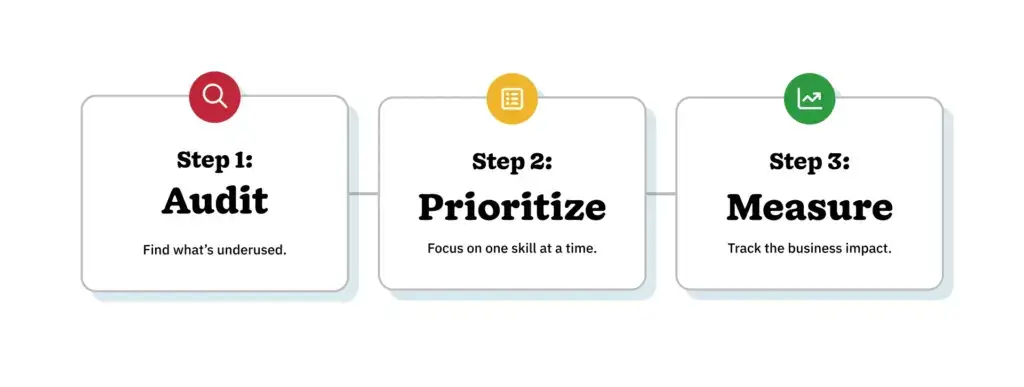
A CRM fluent team is a group of employees who understand CRM software to the point that they’re able to use it strategically to enhance processes and reach business goals. Teams that achieve CRM fluency do so through continuous learning following three crucial steps.

1. Audit
Establishing the current lay of the land is an important first step. Run a CRM audit to evaluate how your team uses the software and determine which advanced features are underused but useful to your process. This provides you with a good starting point to start building your skills development plan.
2. Prioritize
Avoid forcing your team to learn a long list of new features at once. Prioritize those that are most beneficial to your team’s productivity and effectiveness, and then pick one to focus on at a time.
Depending on your team and business, you could choose to focus on one new feature per month or per quarter. Reporting, follow-up sequences, and pipeline automations are typically the first port of call for sales teams.
3. Measure
A 2024 study by Gallup found that companies actively investing in employee development have reported 11% more profitability. And research conducted by TalentLMS in 2026 shows that 95% of HR managers surveyed feel that more deliberate training and skill development lead to better employee retention.
The point being that using this additional time for strategic CRM user training is worth the effort, and you can measure the results through employee retention, team productivity, sales revenue, profitability, and related tangible business outcomes.
The real ROI of easy CRM software is what comes next
Before, the search for user-friendly CRM software was about quick implementation and onboarding. Today, businesses are realizing that with the right easy-to-use system, the benefits extend far beyond that initial stage.
The real advantage is the amount of time saved on basic training and how high-growth companies are reinvesting that time into their teams, helping them develop additional skills that make them even more effective at what they do. Over time, this translates to CRM reporting, automation, and pipeline management mastery and a meaningful competitive edge.
Teams that achieve CRM fluency move from logging data to building a smarter, more data-driven business. Your success comes down to what you decide to build with the additional time you’ve received.
Frequently asked questions about user-friendly CRM training
-
1. What makes a CRM user-friendly?
A user-friendly CRM is one that allows new users to navigate core features like contact management, pipeline tracking, and activity logging without extensive technical training. Intuitive interfaces, logical workflow, and responsive support all contribute to CRM usability.
-
2. How long does basic CRM training typically take?
For sales reps, basic CRM training typically takes one to two weeks. This covers contact logging, deal movement, and follow-up tasks. Sales managers typically require two to three weeks to get comfortable with pipeline visibility and reporting features.
-
3. What is the difference between CRM onboarding and CRM training?
CRM onboarding is the structured process of getting a team set up and using a CRM from day one. It covers system configuration, data migration, and initial skill-building. CRM training is an ongoing investment in deepening a team’s ability to use the platform strategically over time.
-
4. Which CRM features tend to deliver the highest value once teams move past the basics?
Custom reporting, workflow automation, and pipeline stage refinement consistently rank among the highest-value advanced CRM features. These capabilities reduce manual work, improve forecast accuracy, and help teams act on data rather than just collect it.
-
5. How do small businesses know when their team is ready for advanced CRM training?
A reliable signal is the consistent daily usage of core features combined with a plateau in the insights those features deliver. When the basics feel completely routine, it’s time to invest in the next layer of skills.
BACK TO TOPWritten by
Will Gordon Sr. Director of MarketingEdited by
Sam Poole Associate Content MarketerReviewed by
Chris Cain VP of Product Development, NutshellReady to try
Nutshell for Free?Thank you! Your submission has been received!Oops! Something went wrong while submitting the form.
Best Microsoft CRM for 2025: Top Solutions for Microsoft 365 Users
Published on: December 22, 2025Highly Effective Strategies for Elevating Sales Team Performance
Published on: November 10, 2022Join 30,000+ other sales and marketing professionals. Subscribe to our Sell to Win newsletter!
- Product
- Nutshell Overview
CRM & Sales
Our powerful and easy-to-use flagship product.Marketing
Email marketing, forms, landing pages, and more.Engagement
Webchat, SMS, WhatsApp & more in your Omni-Channel Inbox.Prospecting
Prospect for new leads and new contacts in your CRM.Proposals & Invoices
Create & send quotes, invoices and contracts in your CRM.
AI
See why Nutshell is the leading AI CRM.Integrations
Connect to Google/Microsoft and over 5,000 Apps. Reporting
Create reports and forecasts in an instant.Mobile App
Take your CRM with you wherever you go.CRM Advisor
Get a dedicated point of contact to get the most out of Nutshell.
- Pricing
Nutshell AI
- Marketplace
- Resources
- Contact Us
Contact Sales
Send us your questions or book a 1-on-1 demo.Join a Demo
Join a group demo for a general overview of Nutshell.
Contact Support
Contact our support team via live chat in app or via email.Become a Partner
Refer businesses to Nutshell & earn commissions.
Contact Marketing
Questions about our website or our marketing opportunities?Careers
Join our growing team! See current openings.