WhatsApp Business for B2B: How SMBs Are Cutting Sales Cycles in Half

-

Quick answer: How do you use WhatsApp Business for B2B sales?
You use WhatsApp Business for B2B sales most effectively by integrating it with your CRM, so every message appears alongside the customer’s history and deal stage instead of getting scattered across reps’ phones, while automation handles logging conversations, assigning messages, and creating follow-ups. With open rates near 98%—far above email—SMBs taking this approach report meaningfully higher close rates and significant time savings per rep, often within weeks.
Here’s a surprising reality: 175 million people chat with brands on WhatsApp every single day. Yet many SMBs still rely on email and spreadsheets to manage these conversations. Your sales rep receives a WhatsApp message on their phone, opens your CRM on their laptop, and tries to piece together context while the customer waits. Meanwhile, another rep is doing the exact same thing with the same customer—and nobody knows it. This fragmentation costs SMBs significant revenue through lost deals, missed follow-ups, and wasted time switching between apps.
Today, 80% of B2B interactions happen digitally, and email—the workhorse of business communication for two decades—is broken. It sits at a 20-25% open rate while WhatsApp boasts a 98% open rate. Your B2B customers aren’t checking email anymore. They’re messaging on WhatsApp. The question isn’t whether to use WhatsApp for sales—it’s how to use it without losing control of your pipeline.
The answer is integration. When you connect WhatsApp to your CRM, something remarkable happens: conversations stop scattering across devices and team members. Every message appears alongside your customer’s history, deal stage, and preferences. Better yet, automation takes over the busywork—copy-pasting conversations, creating follow-up reminders, assigning messages to the right rep. You get the speed of WhatsApp without sacrificing the organization and visibility that makes sales predictable.
Key takeaways
- SMBs using WhatsApp + CRM integration are seeing 28-32% increases in closure rates and 65-70% time savings per rep—measurable gains that show up in your pipeline within weeks, not months.
- Every WhatsApp message should trigger a clear next step, automatically. Without this automation, you’re just using a faster version of email
- WhatsApp alone is a channel. WhatsApp plus CRM is a sales system. When integrated properly, your team sees unified conversations (no app-switching), automatic next actions keep deals moving (no forgotten follow-ups), and managers get full visibility into what’s actually converting (no guessing).
- The security and compliance concerns that many SMBs worry about? With proper setup, WhatsApp is as secure and compliant as any enterprise messaging system—and far less complicated.
Download our B2B Marketer’s Toolkit!
Need fresh new ideas to generate more leads? We’ve got your back. Download our free marketer’s tool kit today!

Key features and considerations for WhatsApp B2B sales
WhatsApp didn’t become a sales tool by accident. The platform has built-in advantages that make B2B communication faster, more trustworthy, and more effective than with email or phone calls. Understanding these advantages helps you see why integration with your CRM unlocks so much more value than WhatsApp alone.
Speed and engagement win deals
The numbers are stark. WhatsApp messages have a 98% open rate compared to email’s 20% open rate—and that’s just the beginning. Nearly 80% of WhatsApp messages are read within 5 minutes, while your average email sits unopened for hours or days. For B2B sales, this speed matters because it keeps momentum going. A prospect interested in your solution today loses interest by tomorrow if you don’t respond.
When you respond within minutes instead of hours, you signal that you’re available, that you take their business seriously, and that you’re organized enough to help them quickly. This builds trust faster than any pitch deck ever could.
Engagement is 10x better than email
Beyond open rates, the engagement metrics are remarkable. WhatsApp sees 45-60% click-through rates compared to email’s 2-5% CTR. When you send a proposal link via WhatsApp, customers actually click it. When you ask a question, they answer.
Why? WhatsApp feels personal. It’s a one-to-one channel, not a broadcast. When a customer sees a message from your business on WhatsApp, they know you’re reaching out to them specifically, not blasting 10,000 similar messages. This personal feel builds trust and dramatically increases the likelihood they’ll engage.
Cost-effectiveness for SMBs
The WhatsApp Business App is free. The WhatsApp Business API—which you’ll need for CRM integration and team collaboration—costs just 0.025 to 0.004 cents per message, depending on your region and message type (marketing vs. transactional messages have different rates).
A team sending 1,000 messages per day pays roughly $2.50-4 per day for WhatsApp messaging—plus your CRM subscription, which remains the same regardless of WhatsApp integration.
Customers are already there
This might be the most important point: your customers are already on WhatsApp. Over 3 billion people use WhatsApp globally, and 54% of customers prefer messaging via WhatsApp over email or SMS, and many prefer chat-based communication overall. You’re not asking customers to adopt a new tool. You’re meeting them where they already live.
This network effect is powerful. When a new customer needs to reach you, their first instinct is to text—and WhatsApp is their natural choice. By being there, you reduce friction, increase adoption, and make it easier for customers to do business with you. This is the opposite of forcing customers to use your preferred channel – you’re using their preferred channel.
Why CRM integration is the game-changer
WhatsApp is fast. But WhatsApp alone isn’t enough. Without CRM integration, you’re just using a better version of email—faster, sure, but still fragmented, still manual, still prone to the same problems that plague unorganized sales teams.
The problem with WhatsApp alone
Imagine this: Your prospect messages you on WhatsApp with a question about pricing. Your sales rep answers on their phone. Two hours later, another team member sees the same customer in your CRM and sends a separate message asking about their timeline. The customer is confused—why are two people messaging them? And your rep who answered the first question has no idea that a follow-up happened.
Without integration, every WhatsApp conversation lives on someone’s phone, disconnected from your CRM. Your sales pipeline shows an “opportunity” with a prospect, but you have no idea what was actually discussed on WhatsApp. Did you send a quote? Did the prospect say yes? Did they ask for a discount? You have to scroll through message threads to find out—and if the original rep left your company, that context vanishes entirely.
Manual data entry also becomes a hassle. Your rep receives a WhatsApp message, reads it, types a response, and then has to manually log the conversation in your CRM. Copy. Paste. Update the deal stage. Create a follow-up task. All of that should happen automatically, but without integration, it’s a tedious manual process that reps skip when they’re busy.
Unified context—no app-switching
When WhatsApp connects to your CRM, something fundamental changes. A message arrives, and your rep sees the full customer history instantly—previous conversations, current deal stage, past purchases, preferences, pain points. They can respond with intelligence, not blind guesses.
Here’s what the workflow looks like. A prospect messages, “Can we get a 10% discount?” Your rep sees in the CRM that this prospect has been in your pipeline for 45 days, that they mentioned budget concerns in a call three weeks ago, and that your standard discount for their company size is 5%. Armed with this context, the rep responds thoughtfully: “I see you’re working within budget constraints. Let me show you the ROI that justifies full pricing—or we can explore a 5% discount if that helps you move forward this month.” That’s a smarter conversation than “Sure, 10% off!” texted from a phone with zero context.
For teams with multiple reps handling the same customer, this context is invaluable. When a customer handoff happens—maybe one rep closes the initial deal and another manages implementation—the new rep doesn’t start from scratch. They see the entire history. No “Wait, who did you talk to?” No duplicated conversations. No lost information.
Web Chat, WhatsApp, SMS, & More in Your CRM
Receive and reply to customers via Messenger, Instagram, and WhatsApp—without leaving your CRM!

Automatic next-action identification—the game-changer
Here’s where SMBs typically fail: A rep sends a proposal via WhatsApp. In their head, they think, “I’ll follow up in three days.” But they don’t write it down. They don’t create a reminder. Three days pass. The rep forgets. The customer waits. The deal dies.
This is where next-action selling comes in—and it’s the difference between a tool and a system. Nutshell’s next-action approach is built around the idea that every sales interaction should result in a clear, automatic next step. With WhatsApp + CRM integration, you can set this up systematically.
Example: A sales rep sends a proposal via WhatsApp on Monday. The CRM automatically creates a task: “Follow-up call with [customer name]” scheduled for Thursday at 2 PM. The task appears on the rep’s calendar. A reminder pings them two hours before. Thursday arrives, and the follow-up happens—automatically, consistently, without relying on human memory.
Without automation, reps rely on willpower and memory. With automation, reps rely on systems. Systems scale. Memory doesn’t. This is why automated next actions are non-negotiable for SMB sales teams trying to close more deals without hiring proportionally.
Ready to see how WhatsApp + CRM integration transforms your sales process? Start your free 14-day trial of Nutshell to experience unified conversations and automatic next actions in action.
Team coordination at scale
What happens when multiple reps see the same unassigned WhatsApp message? Without coordination, both might respond, creating confusion and wasting time. With CRM integration, you eliminate this chaos entirely.
Smart assignment rules route messages intelligently: by territory, by product expertise, by rep availability, or by who last spoke with the customer. An unassigned message from a prospect interested in your enterprise solution routes to your senior rep who specializes in enterprise deals. A message from an existing customer routes to their assigned account manager. Your newest rep never sees messages they’re not ready for. Your best rep focuses on your biggest opportunities.
Managers gain visibility too. They can see response times (Is Sarah responding fast enough?), message volume (Which reps are handling the most conversations?), and conversion rates (Which messages are turning into deals?). This visibility enables coaching. If one rep has stellar conversion rates on certain message templates, the manager can share those templates with the rest of the team. If another rep is responding slowly, the manager can coach them before deals start slipping.
ROI tracking and pipeline visibility
Here’s the question every SMB owner wants answered: Is WhatsApp actually moving deals forward, or is it just another distraction?
With CRM integration, you can answer this definitively. You can trace a WhatsApp conversation that started on January 15 to a deal that closed on February 28—a 44-day sales cycle. You can see that this specific rep converts WhatsApp conversations into deals 40% of the time, while another rep converts at 25%. You can determine that proposal-related WhatsApp conversations have a 65% conversion rate, while initial outreach has a 20% conversion rate.
This data transforms WhatsApp from a guess into a science. You can A/B test different opening messages and measure which ones get responses. You can test different follow-up timings and see which ones move deals fastest. You can optimize continuously because you’re measuring continuously.
For SMB owners juggling tight budgets and big growth goals, this visibility is critical. You’re not just adopting a new channel—you’re verifying it actually works before scaling it.
Real SMB success: How teams are actually doing this
Theory is fine, but real results matter more. Here’s how actual SMBs are using WhatsApp + CRM integration to move deals forward.
Real estate: Speed and scale
The challenge: Real estate agents spent 3-4 hours per day messaging—sending property photos, coordinating showings, answering questions about neighborhoods. For an agent billing $150/hour in closed deals, spending 3-4 hours on WhatsApp instead of selling is catastrophically expensive. Plus, prospects messaging from 10 different agents meant conversations were scattered, and nobody had a complete picture of what each prospect was interested in.
The solution: These teams connected WhatsApp to their CRM, creating a unified inbox. When a new message came in, it appeared in the CRM with full context—past properties the prospect viewed, their stated budget and timeline, feedback from previous showings. The CRM auto-replied: “Thanks for reaching out! We’ll respond within 15 minutes during business hours.” For common questions (“What’s the square footage?” or “Can we schedule a showing?”), templated responses with pre-filled property details sent automatically. Reps handled nuanced negotiations and objections personally, but busywork disappeared.
The results:
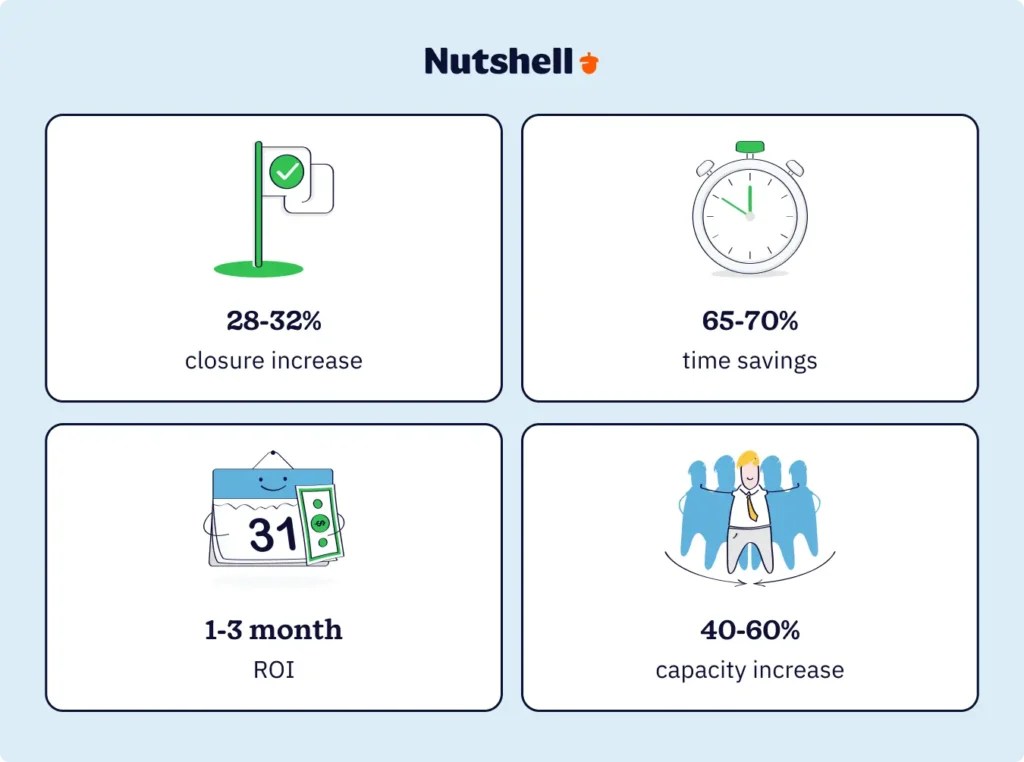
- 28-32% increase in closure rates (faster responses keep deals moving)
- Response time dropped from 2-3 hours to 2-3 minutes (98% improvement)
- 65-70% time savings per rep (automation eliminates busywork)
- 40-60% increase in lead capacity (same team size handles significantly more prospects)
- 1-3 month ROI payback period (gains show up fast)
The lesson: Even small optimizations compound in SMB environments. A real estate agent now handling 40% more prospects doesn’t need to hire 40% more staff. They just need to eliminate the busywork that was wasting their day. WhatsApp + CRM integration is that elimination.
Anghami: Personalization at speed
The challenge: Anghami, a music streaming platform, needed to engage artists at scale. Artists were scattered across email, WhatsApp, SMS, and in-person interactions. Each artist had different preferences, availability, and communication styles. The team couldn’t personalize at the volume they needed—every campaign felt generic, and artists didn’t feel valued.
The solution: Anghami centralized artist communication on WhatsApp, connecting it to their CRM. Now, when an artist’s song hits a milestone (1 million streams, for example), the system automatically sends a personalized WhatsApp message: “Congratulations! Your song ‘[Song Name]’ just hit 1 million streams. Here’s what’s happening in your listener demographics…” The message feels personal because it is—the CRM pulled the artist’s actual data, milestones, and past preferences.
The results:
- 3.7x increase in engagement relative to email
- 97% decrease in response time relative to email
The lesson: CRM + WhatsApp integration enables personalization at scale. You’re not treating every customer identically—you’re treating each one individually, using data to customize messages to their specific situation. For SMBs in music, real estate, fintech, or any industry with individual customer relationships, this personal touch is a competitive advantage.
Mukuru: Trust-driven adoption
The challenge: Mukuru, a fintech platform, needed to drive digital wallet adoption among customers who traditionally used cash. Email campaigns about “mobile money benefits” fell flat—people didn’t trust digital payments. The company needed a channel that felt trustworthy and could drive behavior change.
The solution: Mukuru launched targeted WhatsApp campaigns tied to their CRM. When a customer received their salary via Mukuru’s platform, a WhatsApp message congratulated them and explained how to use the digital wallet for their next purchase. When a customer made their first digital payment, a follow-up message celebrated the milestone and showed how the wallet simplified their next transaction. Each message felt personal because it was triggered by the customer’s actual behavior and journey—not a generic blast.
The results:
- Growth from 4,000 to 129,000 active customers (32x growth)
- 92% read rates on WhatsApp campaigns
- Behavior shift from cash to digital (customers actually changed their payment habits)
The lesson: WhatsApp builds trust because it’s personal and direct. When customers see a message from a company they do business with on WhatsApp, they trust it more than an email that could be phishing. For fintech, healthcare, or any industry where trust is critical, WhatsApp + CRM integration creates an advantage that competitors using generic email campaigns can’t match.
These aren’t outliers—they’re the predictable results of WhatsApp + CRM integration done right. See how Nutshell makes this possible with a free 14-day trial. No credit card required.
See Nutshell in action!
Try Nutshell free for 14 days or let us show you around before you dive in.

Step-by-step implementation for SMBs
Theory is great. Implementation is what matters. Here’s how to actually get WhatsApp + CRM integration working in your SMB—broken into phases that can start this week.
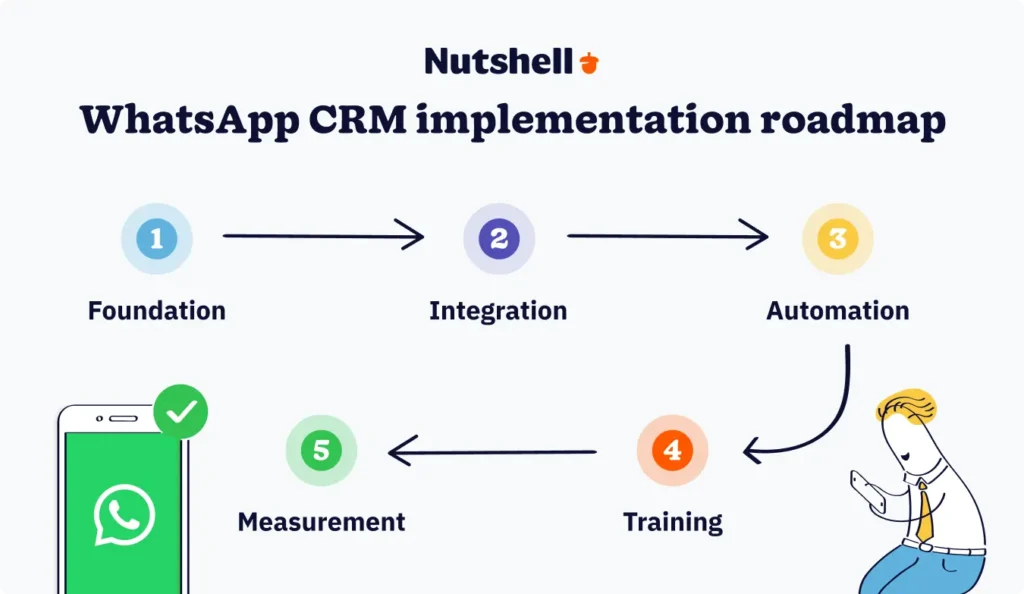
Phase 1: Foundation (Week 1)
Before any integration, you need the right foundation.
Select a CRM with built-in WhatsApp integration. Don’t choose a CRM and then try to bolt on WhatsApp via some third-party service—integration should be native, not a hack. Nutshell offers WhatsApp integration built directly into the platform. Other CRMs like HubSpot and Pipedrive support WhatsApp, but via third-party apps, which adds complexity. The best choice is a CRM where WhatsApp integration is built in.
Set up your WhatsApp Business account. If your team is under five people and you don’t need automation yet, start with the free WhatsApp Business App. You can manually manage your inbox and get a feel for the channel. But if you’re scaling or want CRM integration, you’ll need the WhatsApp Business API, which requires a provider (like Infobip or Twilio) and your CRM platform.
Create a professional business profile. Add your logo, business description, hours of operation, and verify your account (Meta provides a verification badge to trusted businesses). Why? Because customers judge your professionalism by your WhatsApp presence. A verified, professional profile signals legitimacy and increases trust immediately.
Phase 2: Integration (Week 2)
Now connect WhatsApp to your CRM.
Connect WhatsApp Business API to your CRM. If you’re using Nutshell, the integration is straightforward—authenticate with WhatsApp, and conversations start flowing into your CRM. Follow your CRM provider’s integration documentation step-by-step. This is a technical setup, not a sales setup.
Map WhatsApp conversations to CRM contacts and opportunities. When a new message arrives, the system should automatically create or update a contact record and link the conversation to the relevant opportunity. To test this, send a message to your business WhatsApp number. Does it appear in your CRM? Is the conversation thread connected to the contact? If not, troubleshoot before moving forward.
Set up automatic lead capture. When an unknown person messages you for the first time, the CRM should automatically create a new lead record. You shouldn’t have to manually create contacts—the system should do it.
Test, test, test. Before your team uses this, make sure it works. Send test messages. Verify they appear in the CRM. Check that your team can see the full conversation thread. If something’s broken, fix it now, not after your team is frustrated.
Phase 3: Automation setup (Week 3)
Automation is where WhatsApp + CRM transforms from a tool into a system.
Create auto-reply templates. Set up an automatic first response: “Thanks for reaching out! We’re here to help. We’ll respond within [15 minutes/1 hour, depending on your SLA] during business hours. In the meantime, here’s some helpful info about [common topic]…” This sets expectations and makes customers feel acknowledged immediately.
Build message templates for common scenarios. Create templates for:
- Quote request acknowledgment: “Got your request! Here’s your custom quote. Let’s schedule a time to discuss next steps—[booking link]”
- Demo scheduling: “Excited to show you how this works! Pick a time that works for you: [scheduling link]”
- Post-demo follow-up: “Thanks for taking the time today. Based on our conversation, here are the next steps…”
- Proposal sent: “Your proposal is ready! Open it here: [link]. Questions? Let’s hop on a quick call: [booking link]”
- Objection handling: “I understand cost is a concern. Here’s how other [company size] see ROI within [timeframe]…”
These templates save time and ensure consistent messaging. Reps still customize per conversation, but they start from a strong template rather than a blank slate.
Define workflow triggers. Automation rules that tie WhatsApp messages to CRM actions:
- Quote sent via WhatsApp → Auto-create “Follow-up call scheduled” task for 3 days later
- Demo booked via WhatsApp → Auto-create “Prepare demo materials” task for the rep
- Proposal approved by customer → Auto-create “Implementation kickoff call” task
- No response after 48 hours → Auto-create “Check-in message” task and alert manager
These rules embody the next-action philosophy: every message should automatically trigger the next step in your sales process.
Set up smart assignment rules. Route incoming WhatsApp messages intelligently:
- “If prospect is in territory A, assign to Rep A”
- “If customer is asking about Product X, assign to Product X expert”
- “If no territory/product assigned, assign to rep with lowest current message load”
- “If rep is unavailable (on vacation or offline), assign to manager or queue for later”
Smart assignment ensures the right rep handles the right conversation, eliminating bottlenecks and improving response times.
Automation is what separates SMBs that win from SMBs that just work harder. You’re not hiring more reps—you’re making existing reps more efficient.
Phase 4: Team training (Week 3-4)
Tools fail without adoption. Training ensures your team uses WhatsApp + CRM correctly.
Sales rep training (1-2 hours): Cover these topics:
- How to find WhatsApp conversations in your CRM
- When to respond on WhatsApp vs. when to move to a phone call (WhatsApp is for quick updates, decisions, confirmations; phone calls are for complex negotiations, objection handling, and relationship building)
- Tone guidelines (friendly and helpful, not robotic; show personality without being unprofessional)
- Response time SLA (e.g., “Reply to all messages within 15 minutes during business hours”)
- When to escalate (if a customer is upset or the situation is complex, move to a call—don’t try to resolve it via WhatsApp)
Manager training (1-2 hours): Cover questions such as:
- How to access WhatsApp conversation reports
- How to coach reps on tone and responsiveness
- How to review conversation histories for quality assurance
- How to measure team metrics (response time, message volume, conversion rate)
- How to identify top performers and coaching opportunities
Establish etiquette guidelines:
- Response time SLA: “Reply within 15 minutes during business hours; set expectations if you’ll be delayed”
- Professional but personable tone: “Use customer names, add emojis sparingly, show genuine interest in their situation”
- Know when to move to a call: “If a customer is asking multiple clarifying questions, it’s faster to talk than to message back and forth”
- Confidentiality: “Don’t share customer messages in team chat without permission; use CRM for all message history”
Define escalation paths: When does a WhatsApp conversation become a phone call?
- If a customer is frustrated or upset
- If the situation involves complex problem-solving
- If the conversation is going back-and-forth excessively (more than 5 messages on the same topic)
- If it’s a high-value deal or important customer relationship
Clear escalation rules prevent “WhatsApp conversations gone bad” and ensure complex situations get the attention they deserve.
Phase 5: Measure and optimize (Ongoing)
You can’t improve what you don’t measure. Set up metrics and review monthly.
Track these KPIs:
- Response time: How fast do reps reply to WhatsApp messages? Target: <15 minutes during business hours
- Message volume per rep: How many WhatsApp conversations is each rep handling? Helps identify bottlenecks
- Conversation-to-deal attribution: Which WhatsApp conversations convert to opportunities? How many close?
- Conversion rate: What percentage of WhatsApp conversations result in closed deals?
- First-response satisfaction: Are customers satisfied with initial WhatsApp responses? (simple survey: “Was this helpful? 👍👎”)
Conduct monthly reviews:
- Which reps have the fastest response times? Which ones have the highest conversion rates?
- Which message templates get the most responses? Which ones get ignored?
- Which types of conversations convert fastest? (proposals, demos, objection-handling, etc.)
- Are there bottlenecks? (if Rep A is handling 40% of messages, add another rep or redistribute)
Run A/B tests:
- Test different opening messages for new leads: “Hi [Name]! Quick question about…” vs. “Hey [Name], saw you checked out [product]. Curious if…”
- Test different follow-up timing: Follow up after 3 days vs. 5 days
- Test different templates: Shorter messages vs. longer messages with more detail
Adjust workflows based on data:
- If follow-up tasks aren’t moving deals forward, change the timing or messaging
- If a certain template converts at 60% but another at 20%, retire the low-performer
- If one rep consistently outperforms, analyze their approach and share it with the team
Continuous improvement compounds. A 5% improvement in response time, multiplied by 10 reps across 100 conversations per month, means 50 more deals moving forward. Small optimizations create big results over time.
Compliance and security: The SMB checklist
WhatsApp is secure by default—end-to-end encryption protects every message. But for B2B sales, you need more than encryption. You need compliance processes that protect your business and your customers’ data.
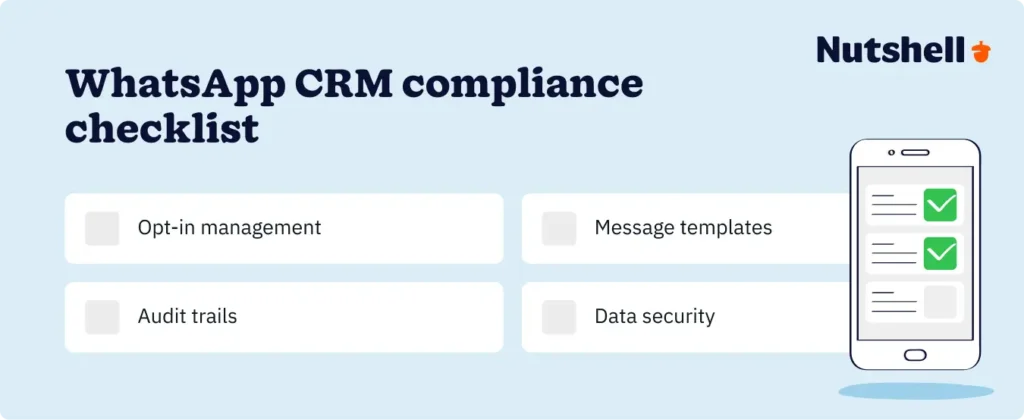
Opt-in management
Requirement: Customers must opt-in to receive sales messages from you. This isn’t optional. It’s a legal requirement under GDPR, CASL (Canada’s anti-spam law), TCPA (US telephony regulations), and similar laws worldwide.
Implementation: Set up clear opt-in processes in your CRM. When a customer provides their WhatsApp number, log that they’ve consented to receive WhatsApp messages. Keep this documentation—auditors may ask to see it. Give customers an easy opt-out option in every message: “Reply STOP to unsubscribe” or a link to an unsubscribe page.
Why it matters: One spam complaint from a customer can get your WhatsApp account suspended. Compliance documentation protects you from that risk.
Message templates (Meta approval)
Requirement: Use WhatsApp-approved templates for marketing and transactional messages. You can’t just send whatever you want—Meta reviews templates to prevent abuse.
Implementation: Submit your message templates to Meta for approval. Use only approved templates in your campaigns. Keep a record of which templates are approved. If a template gets rejected, iterate and resubmit.
Why it matters: Unapproved templates don’t send, or worse, get your account flagged for violations. Approved templates keep your account in good standing.
Audit trails
Requirement: Your CRM should log all WhatsApp messages—who sent it, to whom, when, and what it said.
Implementation: This happens automatically if your CRM is properly integrated. The system keeps a conversation history. Don’t delete messages or conversations—keep them for audit purposes. Most regulations require you to retain customer communication records for a period of time (usually 1-3 years).
Why it matters: If a customer disputes whether they received a message or agreed to something, your audit trail proves it. If a regulator audits your business, you have documentation.
Data security
End-to-end encryption: WhatsApp encrypts all messages by default. Conversations between your rep and a customer are encrypted in transit and at rest. This is a baseline security feature—you don’t need to do anything, as it’s built in.
CRM access controls: Just because WhatsApp messages are encrypted doesn’t mean your team should have unlimited access to all conversations. Set up role-based access:
- Reps see only their own customers’ conversations and shared leads
- Managers can see all team conversations (for coaching and oversight)
- Admin can see everything and manage access controls
- Finance sees only deal-closed messages and payment-related conversations (if applicable)
Sensitive data rule: Never send sensitive information (social security numbers, payment card numbers, passwords, or legal documents) via WhatsApp. Use a secure portal for sensitive data. Example: “Your contract is ready! Access it here: [secure link]” (not “Here’s your contract: [contract text]”).
Why this matters: WhatsApp is secure, but it’s not a secure document repository. For sensitive data, always use appropriate channels.
Build a winning sales system with WhatsApp and CRM
3.2 billion people use WhatsApp, and your B2B customers are among them. They’re checking WhatsApp far more frequently than email. They’re responding to WhatsApp messages within minutes. They’re expecting businesses to meet them on the channels they actually use.
WhatsApp alone, though, is just a channel. It’s fast, but it’s also scattered.
But WhatsApp connected to your CRM? That’s a different story. That’s a sales system. Every message appears alongside full customer history. Automatic next actions ensure nothing falls through the cracks. Smart routing ensures the right rep handles the right conversation. Managers get visibility into what’s actually converting. And your SMB team—without hiring more people—handles significantly more deals.
This isn’t the future. It’s happening now. If your competitors haven’t integrated WhatsApp into their CRM yet, you have a window to get ahead. If they have, you’re falling behind.
Ready to get started? Try Nutshell free for 14 days and see how WhatsApp + CRM integration moves more deals forward. No credit card required. Or download our WhatsApp + CRM Implementation Checklist to start planning your rollout today.
Frequently asked questions
1. Should we use WhatsApp Business App or Business API?
It depends on your team size, budget, and goals:
- WhatsApp Business App: Free, designed for small teams (1-5 people) manually managing a single inbox. Limited automation and basic CRM integration options.
- WhatsApp Business API: Requires a provider (Infobip, Twilio, etc.) and monthly costs (roughly $50-500 depending on provider), but enables full automation, multiple team members managing shared inboxes, advanced CRM integration, and message templates.
The bottom line: If you’re under five people and don’t need CRM integration, the free App is fine. If you’re scaling or want unified CRM management, upgrade to the API. Most SMBs serious about WhatsApp for sales eventually move to the API because the scalability and automation benefits pay for themselves quickly.
2. How much does WhatsApp Business API cost?
Using the WhatsApp Business API costs 0.5 to 4 cents per message, depending on your region (some regions are cheaper than others) and message type. Transactional messages (order confirmations, shipping updates) are usually cheaper than marketing messages (promotions, sales outreach). Most API providers charge monthly platform fees ranging from $50 to $500+, depending on features and message volume.
If you’re using Nutshell with WhatsApp integration, the integration itself is included in your Nutshell subscription—you just pay for WhatsApp API messages separately.
3. Can we integrate WhatsApp with our existing CRM?
It depends on the CRM platform you’re using.
- Nutshell: Native WhatsApp integration built in. No third-party setup required.
- HubSpot: Yes, via Twilio or other third-party integrations (adds complexity but possible).
- Pipedrive: Yes, via Zapier or custom integrations (adds some complexity).
- Salesforce: Yes, via third-party apps (more expensive and complex setup).
4. How long until we see ROI from WhatsApp + CRM?
According to real-world case studies, you can see measurable improvement in closure rates and response times in 1-3 months, depending on your industry. Other factors that affect this timeline include:
- Sales cycle length
- Team adoption
- Implementation quality
5. What if we get spam complaints, account suspensions, or mass opt-outs?
Only message customers who’ve opted in. Every message should provide value (not just sales pitches). Respect opt-out requests immediately. Follow template approval guidelines. Meta built-in filters catch obvious spam and abuse. However, repeated complaints from customers can trigger account review, and serious violations (mass unsolicited messages, phishing, misleading content) result in account suspension. If customers are opting out at high rates, it’s a signal that your messaging isn’t valuable or frequency is too high. Analyze opt-out patterns. Are certain message types causing more opt-outs? Is your frequency too aggressive? Adjust and improve.
If suspended, contact Meta Support. Explain what happened and how you’re fixing it. Reinstatement takes time, so prevention is far better than recovery.
6. How do we handle customer opt-out and GDPR compliance?
Include an easy way to unsubscribe in every message—either “Reply STOP” or a link to your preference center. Make it obvious, not hidden. When a customer opts out, mark them as opted-out in your CRM immediately. Automation should prevent further messages to opted-out contacts. A simple rule to follow is if a customer asks to stop, stop immediately. Don’t argue. Don’t delay. Just stop and document it.
GDPR compliance checklist:
- Document customer consent when they provide their WhatsApp number
- Honor opt-out requests within 24 hours (immediately is better)
- Keep audit trail of consent and opt-outs
- Allow customers to manage preferences (frequency, message types)
- Respond to data access requests (GDPR gives customers the right to see what data you have on them)
BACK TO TOP Written by
Simone Morgan Associate Content MarketerEdited by
Will Gordon Sr. Director of MarketingReviewed by
Andy Fowler Co-FounderReady to try
Nutshell for Free?Thank you! Your submission has been received!Oops! Something went wrong while submitting the form.


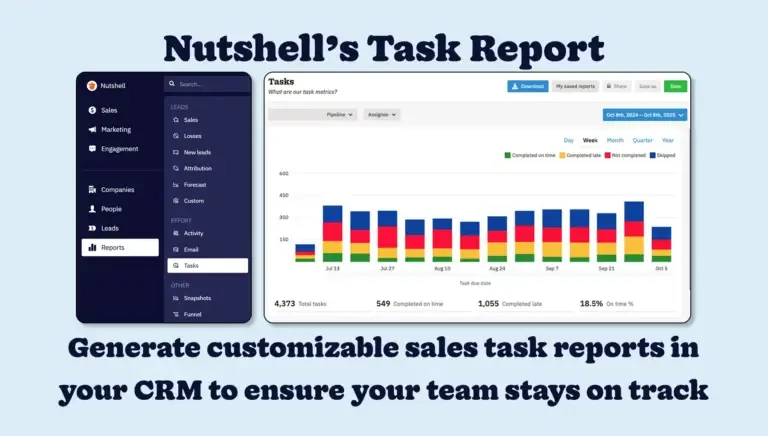
Track Task Follow-Through Across Your Team With Nutshell’s Task Report
Published on: October 28, 2025

What Is Revenue Intelligence? An All-Encompassing Guide
Published on: January 24, 2024Highly Effective Strategies for Elevating Sales Team Performance
Published on: November 10, 2022Join 30,000+ other sales and marketing professionals. Subscribe to our Sell to Win newsletter!










