
“Nutshell is super user-friendly and intuitive
“I would highly recommend Nutshell
“Easy to use and... wait for it ... 100% buy in!
“Nutshell is both simple and powerful
When your CRM and your email marketing tool live in separate systems, something gets lost in the gap. Sales reps go into calls blind. Marketing sends campaigns with no idea where a contact stands in the pipeline. Follow-ups happen on a schedule, not in response to what’s actually going on.
CRM email marketing fixes that—and this guide explains exactly how.
CRM email marketing is the practice of using your CRM’s contact data, pipeline stages, and behavioral history to send more targeted, better-timed, and more personalized email communications than a standalone email platform allows — so instead of sending the same message to everyone on a list, every email reflects where a contact actually is in their relationship with your company.
We expand on this definition and what this means in practice in the first section below.
Table of Contents
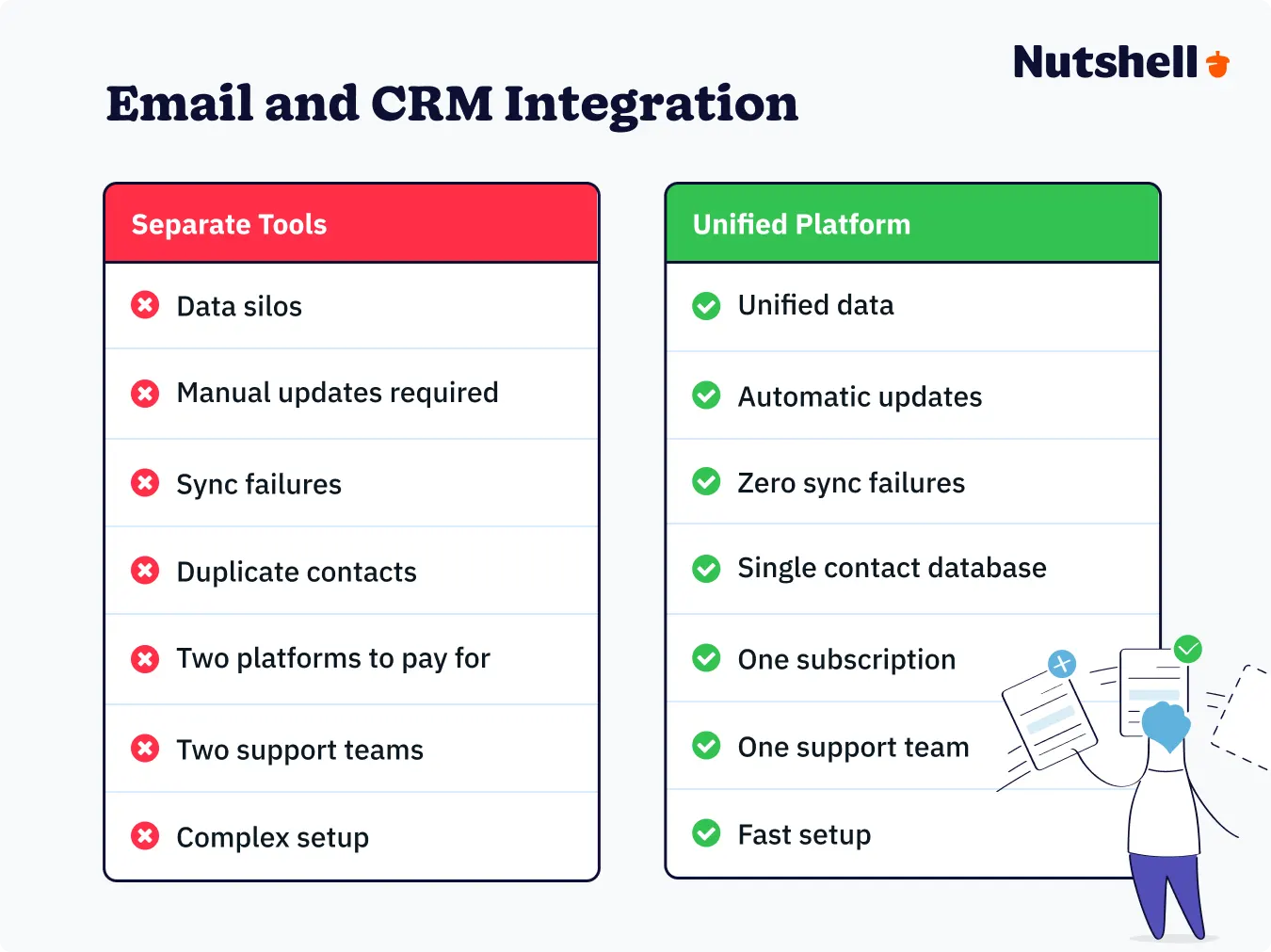
Most teams treat it as CRM vs email marketing, using them as separate tools. The CRM tracks customers. The email tool sends campaigns. They work alone, not together.
This causes real problems:
Customers get confused when tools don’t connect. Confused customers don’t buy.
This guide covers everything you need to connect them effectively: what CRM email marketing actually means, why it matters for revenue, what to look for in a platform, how to set up email marketing CRM integration, and how to build a strategy that goes beyond sending slightly smarter blasts.
CRM email marketing is the practice of using your CRM’s contact data to send smarter emails.
Instead of sending the same email to everyone on a list, you send the right email to the right person at the right time. Your emails connect to what your sales team already knows about each customer.
Using email alone:
Using email with your CRM:
This is completely different. Your emails match what’s really happening with each customer.
CRM email marketing includes two types of emails:
Nutshell’s built-in email marketing tool lets you build, send, and track broadcast campaigns to targeted audiences — no separate platform needed.

Different platforms are better at different types. Ask which one you need most before you pick a platform.
Common examples of CRM emails:
See how Nutshell’s personal email sequences let your sales team send automated, pipeline-triggered follow-ups that feel hand-written.

The real question isn’t whether to connect them. It’s how much money you’re losing when they’re not connected. Here are four ways:
Email alone segments by name, location, and maybe job title.
CRM-connected email segments by:
Real example: Someone who saw your demo last month and has a proposal waiting is very different from someone who downloaded a whitepaper and disappeared.
On a regular email list, they look the same. In your CRM, they’re completely different. When you send them different emails, your emails actually work.
Standalone email automation sends emails on a schedule (example: send email 3 days after signup). CRM email automation sends emails based on what’s actually happening:
Regular automation doesn’t know what’s really happening with each customer. CRM email automation does, and your prospects can feel the difference.
Learn more about automating your sales and marketing
When connected, every email your customer gets shows up in their CRM record next to notes, calls, and meetings. A CRM for email management gives your whole team visibility into everything.
When not connected:
Everyone on your team sees the same information. You don’t repeat yourself. Your customer feels like you actually know them.
This is the one that changes conversations between sales and marketing. CRM-triggered drip campaigns tie specific messages and sequences to pipeline movement and closed revenue, not just opens and clicks.
Without CRM connection, the report shows “31% of people opened the email.”
With CRM connection, the report shows “People who got this email moved through the sales pipeline 40% faster and closed more deals.”
One is just an email stat. The other shows CRM email drives revenue, helping you get more budget.
Explore our complete library of marketing resources including automation strategies, segmentation guides, and real-world examples of teams driving revenue with integrated CRM marketing.
Knowing why CRM and email marketing belong together is one thing, but understanding what to actually look for when you’re evaluating platforms is a different question—and it’s where most buyers get stuck.
They end up demo-ing tools based on template libraries and pricing pages, and miss the five features that determine whether the integration actually delivers value once the contract is signed.
With native email (email built into your CRM):
With an integration (email tool connected to CRM):
To test during a demo, ask: “What happens on the contact record when someone replies to an email?” If they have to go to another system to show you, that’s your answer.
This is the most important feature—and the one most buyers forget to ask about until they’re already three months in and dealing with the fallout.
Do sequences auto-stop when a contact replies? When they book a meeting? When a deal hits a specific pipeline trigger? If not, a prospect who responds to email number two keeps receiving emails three, four, and five.
That’s not automation helping your team. That’s automation making your team look like they’re not paying attention.
Ask during a demo: “Does the sequence stop automatically if a prospect replies? What exactly triggers the stop?”
Can contacts be automatically enrolled in a sequence when they move to a specific deal stage—no manual action required? This is the feature that turns your pipeline from a tracking tool into an outreach engine.
Without it, someone on your team has to notice a deal moved stages and then manually add the contact to the right sequence. That happens sometimes. Not always. And “sometimes” is where leads fall through the cracks.
Ask during a demo: “Can I trigger a sequence from a pipeline stage change without any manual steps?”
Can managers see sequence performance across the whole team? Can a top-performing sequence from one rep be shared as a template so the rest of the team doesn’t start from zero?
This feels like a nice-to-have at the individual rep level. At the team level, it’s how you identify what’s working and scale it—and it’s how new reps get up to speed without six months of trial and error.
Ask during a demo: “Can a sales manager see reply rates for every rep’s sequences in one view?”
Open rates tell you who saw your email. Click rates tell you who engaged with it. Neither tells you whether any of it moved a deal forward.
Can the platform show which sequences correlate with closed deals rather than just the ones that generate the most clicks? This is the reporting feature that connects email activity to business outcomes. Without it, you’re optimizing for the wrong signal.
Ask during a demo: “Can I filter sequence performance by deal outcome?”
Guide to choosing a CRM for email marketing
Use our interactive CRM comparison checklist to evaluate vendors side-by-side on the features that actually matter—including email integration, automation intelligence, and team visibility.
Here’s what those five criteria actually look like in practice. A dedicated email platform can look feature-rich on paper, but the real test is whether it knows what’s actually happening with a deal, or just what’s happening with an email.
| Platform | Native email vs. integration | Sequence intelligence | Pipeline-triggered enrollment | Team visibility | Revenue analytics |
| Nutshell | Native, built into the CRM, no separate login or data sync to manage | Auto-stops the moment a contact replies, books a meeting, or a deal changes stage, tied directly to what’s actually happening with the deal | Yes, no manual step required | Team-wide reply rates, shareable sequence templates | Filterable by deal outcome |
| ActiveCampaign | Integration required, your deal data and your email data live in two systems that need to stay in sync | A capable automation builder with conditional branching, but stopping conditions are based on email engagement and tags, not live pipeline data | Yes, deal-stage triggers can launch automations | Team reporting available on CRM-tier plans | Deal/revenue reporting exists, but is less directly tied to individual sequence performance than a native sales CRM |
Want the full lineup? See our comparison of 9 CRMs for email marketing for a broader rundown beyond these two.
There are three ways to connect your CRM and email marketing: use a platform that has both built in, connect separate tools via a native integration, or bridge them with a middleware connector like Zapier. Which path makes sense depends on your technical resources, your existing tool stack, and how much ongoing maintenance your team can realistically absorb.
Native solutions offer the simplest setup. Your CRM and email marketing live in the same platform, built on the same database. No integration to configure. No sync to monitor. No separate billing, which can significantly impact your total cost of email marketing.
This is the right call for most small-to-mid-sized B2B teams—especially ones that want to be up and running quickly without pulling in a developer. The main trade-off is flexibility: native email tools may not have the advanced template libraries or multi-step automation builders that dedicated platforms like ActiveCampaign offer.
For most teams, that trade-off is worth it. For marketing-heavy orgs running highly complex automation sequences, it might not be.
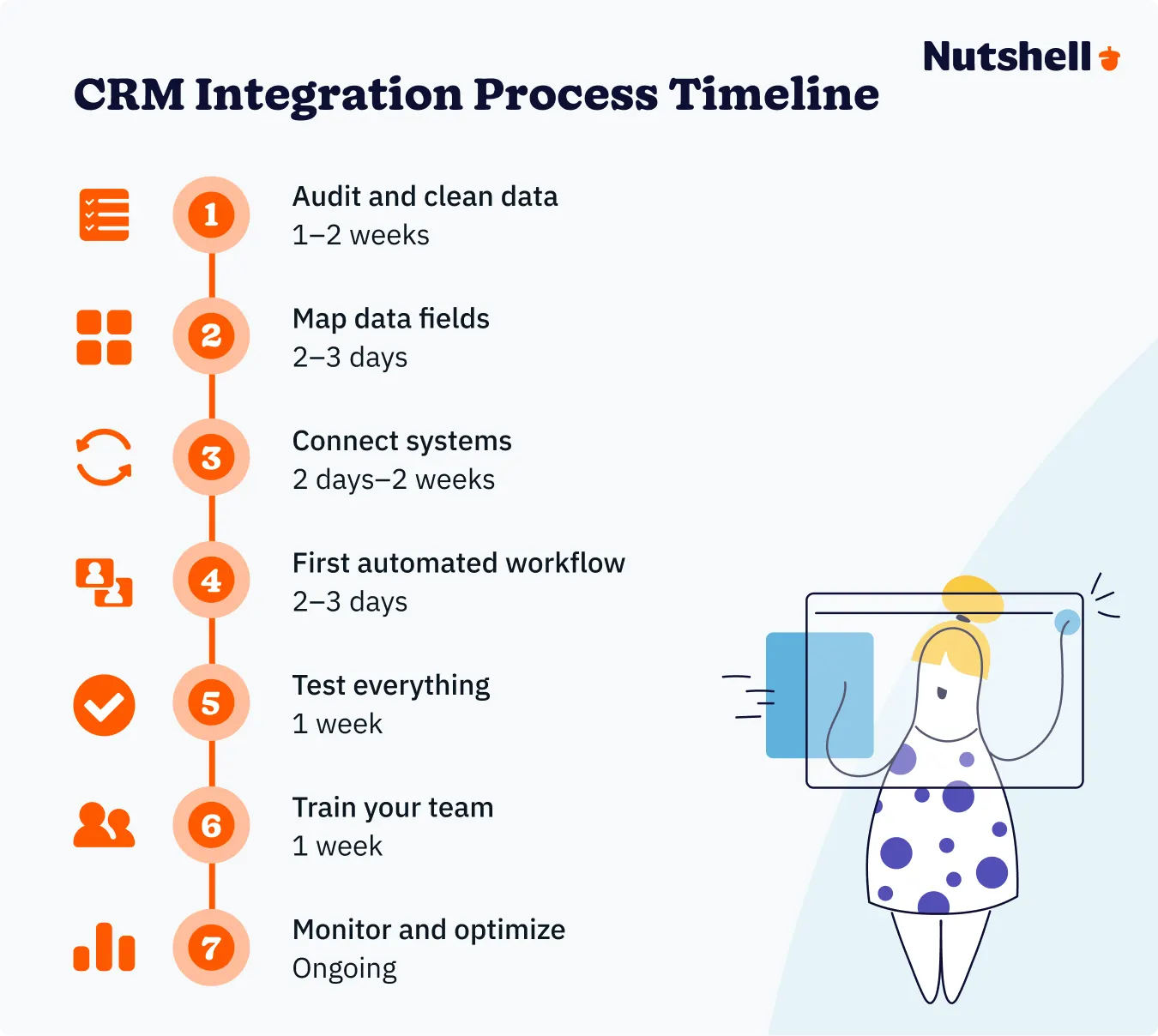
Implementation timeline for most small businesses: days to a couple of weeks, not months.
Best for: Smaller businesses and startups with straightforward email sequences and newsletters.
Most major CRMs offer native integrations with Mailchimp, ActiveCampaign, Brevo, and others. When configured correctly, contact data flows from your CRM into your email platform, and engagement data—opens, clicks, replies—flows back to individual contact records.
This works well for teams that are already invested in a dedicated email platform and don’t want to replace it. The trade-offs are real, though. Sync is never truly real-time. Field mapping takes setup time upfront. And when either vendor pushes a platform update, someone needs to check that the connection still works. It usually does. Until it doesn’t.
Best for: Teams with a dedicated email platform they rely on heavily, and either the technical resources or the tolerance to manage an ongoing integration.
Middleware tools like Zapier and Make create trigger-based connections between platforms that don’t have native integrations. For example:
The flexibility here is real. So is the maintenance. Every “zap” is a potential point of failure. Sync happens on a schedule—often every 15 minutes or longer—rather than in real time. And as your workflow complexity grows, so does the overhead of keeping everything running correctly.
Best for: Teams with a specific tool combination that has no native integration, or teams that want to test a connection before committing to a more permanent solution.
Setting up automated email campaigns
While your digital infrastructure connects your CRM and email platform, your strategy is what determines whether that infrastructure generates revenue or just creates chaos.
Most teams that get the setup right still underperform here—not because the tools don’t work, but because they default to using CRM email marketing like a slightly smarter version of broadcast email. The data is better. The execution looks the same.
Here’s where to focus instead.
The most common mistake is treating CRM email marketing like an upgraded list tool—better data, same approach. The real value is pipeline-based segmentation:
Think about what that looks like in practice. A prospect sitting in “Proposal Sent” for 10 days needs something different than a lead who just entered the pipeline from a webinar. A customer in month two of their subscription needs a different message than one approaching their annual renewal. Both pairs look identical on a demographic list. In your CRM, they’re in completely different conversations—and your emails should reflect that.
The teams that get the most out of CRM email marketing aren’t necessarily the ones with the most sophisticated automation. They’re the ones who’ve thought carefully about what each segment actually needs to hear, and built emails around that instead of a calendar.
Personalization strategies using CRM contact data
Download our Playbook and Lorem ipsum dolor sit amet, consectetur adipiscing elit. Integer sit amet posuere erat, a feugiat nulla. Vestibulum sapien tellus, tristique et arcu ut, vehicula bibendum lorem.
Personal sequences are the primary outreach tool for B2B sales teams — replacing manual, one-off follow-up emails with automated, timed touchpoints that feel personal because they come from the rep’s actual email address.
A few design decisions have an outsized impact on how well sequences perform:
How many emails? Most effective sales sequences are three to five emails — not ten. More touches don’t always mean more replies. They often mean more unsubscribes.
How long between each touch? Day one, day three, day seven is a common starting cadence. The goal is persistent without being aggressive — giving a prospect enough time to see and respond before the next email lands.
When does it stop? Auto-stop on reply is non-negotiable. A sequence that keeps running after a prospect responds isn’t saving your team time. It’s damaging a relationship that was just starting to open up.
How does the angle shift? Email one might introduce a concept. Email two adds a specific example. Email three asks a direct question. The point is to vary the angle across touches so the sequence reads like a conversation developing, not the same ask repeated with slightly different subject lines.
CRM and email marketing integration in practice
Most teams measure email marketing by open rates and click rates. Those metrics aren’t useless—but for CRM-connected email, they’re incomplete. Three additional metrics tell you whether your integration is actually working:
Reply rate is the most important signal for sales sequences. Opens tell you who saw the email. Replies tell you who engaged. If your reply rates are low, your segmentation or your message isn’t working—and no amount of subject line A/B testing will fix a relevance problem.
Sequence completion rate—how many prospects made it through the full sequence—tells you whether contacts are opting out, going cold, or making it all the way through. A low completion rate on a five-email sequence is worth investigating before you scale it to your whole pipeline.
Pipeline influence tracks how email activity correlates with stage progression and closed revenue. This is the metric that moves the conversation from “here’s how our email campaigns performed” to “here’s what email contributed to revenue this quarter.” That’s a very different conversation to be in.
Open rate is a useful benchmark. For sales sequences, reply rate is the number that actually matters. Set up your reporting to reflect that before you start optimizing.
The most common CRM email marketing mistakes share the same root cause: teams set up the integration but keep operating it like a standalone email tool. The data is richer. The habits are the same. Here are five specific patterns to watch for—and fix before they cost you deals.
1. Running sequences without auto-stop on reply: If your sequence doesn’t stop when a prospect responds, you’re not automating follow-up—you’re just scheduling awkwardness. A prospect who replies to email two and then receives emails three and four is not going to feel nurtured. Confirm auto-stop behavior before you launch anything.
2. Setting up the integration and never auditing sync lag: Data drift between your CRM and email platform is quiet and cumulative. A contact unsubscribes in your email tool but stays active in your CRM. A deal closes but the contact keeps receiving prospect emails. Schedule a quarterly audit — 20 minutes to catch these mismatches before they compound into a real problem.
3. Treating CRM segments like email list segments: Segmenting by job title or company size misses the pipeline-stage opportunity almost entirely. Build segments around lifecycle stage, deal activity, last contact date, and behavioral signals — not just the demographic fields you’d use on a static list.
4. Measuring sequences by open rate instead of reply rate: Optimizing for opens pushes you toward clickbait subject lines. Optimizing for replies pushes you toward relevance. For sales sequences, reply rate is the primary KPI. Build your reporting around it from day one.
5. Not connecting email activity to the contact record: If your sales team can’t see which emails a prospect received and engaged with before a call, you’ve lost half the value of the integration. Confirm that email engagement — not just aggregate campaign stats — syncs to individual contact records.
Nutshell is a CRM that includes both broadcast email campaigns and personal email sequences natively—no separate email platform, no integration to configure, and all email activity visible directly on every contact record. For B2B sales and marketing teams at SMBs, that’s a meaningful simplification.
Here’s what that looks like in practice.
Broadcast campaigns are built, sent, and tracked directly inside Nutshell. Your CRM contact data powers your audience—so instead of exporting a list and importing it somewhere else, you build your segment using the same filters you’d use anywhere else in the CRM. Geographic region, life cycle stage, deal activity, and custom fields—all available as targeting criteria without any sync required.
Personal email sequences go out from your reps’ actual email addresses, on a schedule they set, with open, click, and reply tracking appearing directly on each contact’s timeline. A rep can see—at a glance, in the same place they track everything else—exactly where a prospect stands in a sequence, what they’ve opened, and whether they’ve replied.
On the five evaluation criteria from the previous section:
Nutshell is built for B2B teams that want a CRM that handles email without needing a dedicated marketing operations person to keep it running. If your team is spending more time managing integrations than managing relationships, it’s worth a look.
Everything above gives you the framework—the concepts, the evaluation criteria, the setup paths, and the strategy. The resources below go further on each specific topic, whether you’re just getting started, comparing platforms, building out a strategy, or trying to prove ROI to leadership.
Yes, for most small to mid-sized businesses. All-in-one CRMs like Nutshell combine contact management with email marketing features—eliminating data sync issues and reducing costs. However, if you need enterprise-level email features like 200-step automations or advanced A/B testing, specialized platforms may still be necessary.
For all-in-one platforms like Nutshell, setup takes 2-4 weeks for most small businesses. This includes data migration, customization, and team training. If you’re integrating separate systems (CRM + standalone email tool), expect 4-8 weeks. Proper planning during week one saves 3-4 weeks during rollout.
Essential fields include contact information (name, email, phone), lifecycle stage, purchase history, deal values, lead scores, and engagement metrics (opens, clicks). Also sync behavioral data like website activity, email preferences, and geographic information. This enables personalized campaigns beyond just using first names.
CRM data enables dynamic content based on purchase history, deal stage, location, and behavior. You can recommend products based on past orders, send location-specific offers, trigger emails when deals reach certain stages, and adjust messaging for lifecycle stages—all automatically, creating genuinely relevant experiences.
The biggest mistakes include starting with messy data (duplicates, outdated records), skipping segmentation (sending generic blasts), neglecting team training, failing to automate workflows, and not cleaning data regularly. Avoid these by auditing data first, defining clear goals, training your team, and establishing ongoing maintenance schedules.
Start a free 14-day Nutshell trial to explore our native email marketing!

Table of Contents











