Skip to main content ↓

The CRM AI tools built for email personalization are the ones teams often overlook


Written by
Will Gordon director of Marketing at Nutshell
Will Gordon Sr. Director of Marketing
Last updated on: September 16, 2026
Sales professional reviewing personalized email drafts on a laptop

Many sales teams have enough faith in AI to let it help them with prospect outreach. In fact, HubSpot’s 2025 State of Sales Report reveals that 83% of sales professionals agree that AI can be used to personalize prospect engagement, and 31% deem it the tool that delivers the highest return. Despite that, 72% of sales organizations fail to invest in high-value sales activities (such as email personalization), according to a Gartner survey conducted in 2026.

The technology is there, but many sales teams haven’t taken the time to implement it. This Nutshell guide offers an insight into how the trust in CRM AI tools hasn’t yet evolved into high-value habits, how sales reps should deploy email personalization, and how to gauge if your personalization efforts are paying off.

Key takeaways

  • The barrier to AI email personalization is awareness of the feature availability, and developing a habit of using the AI tools when sending emails.
  • Effective email personalization focuses on high-value data points, such as deal stage, interaction history, and behavioral signals.
  • An increase in email reply rate and sales meetings booked are signs that your personalized emails are working.

What is AI email personalization in a CRM?

AI email personalization involves using your CRM’s native AI features to craft custom email content, including subject and opening lines, using the contact’s stored data and behavior. The AI in your CRM uses data points like the contact’s industry, last activity, and deal stage to customize the email content.

Data volume affects the depth of AI personalization. In other words, the more contact history in your CRM, the more specific your messaging can be. That means that an email sent to a contact with years of purchase history and support tickets could potentially include many more specifics than one sent to a brand-new lead that has only completed a submission form.

Beyond the historical context, another common function in the personalization process is optimizing when the email is sent. A CRM AI tool uses a contact’s past activity to predict when they are most likely to open an email, and tailors the send time to maximize the chances of an open.

It’s a level-up approach to standardized email templates used for prospect outreach and lead follow-ups. And it’s a capability that most modern CRMs include. 

Why do many sales teams still send generic emails?

Sales teams are still sending out non-personalized generic emails because activating that capability involves making a deliberate decision, which is often just postponed to a “more convenient time” later. Considering the praise teams have given AI personalization, we can assume that they have enough faith in the feature.

The missing element is ownership, because without an official owner, teams are unlikely to switch the capability on. Businesses must identify and assign ownership of the feature’s rollout, the creation of its initial templates, and the continuous monitoring of the tool’s efficacy to ensure it’s turned on and utilized.

A framework for turning on AI personalization the right way

Turning on the AI personalization feature is the easiest part of the process. Making sure your team uses it well and reaps the benefits is where the real work lies.

Which data points are worth using for email personalization?

These days, adding the name of the recipient to the email subject line and greeting doesn’t really count as personalization. And some CRM fields are better suited for personalization than others, so it’s important to know what data is useful here.

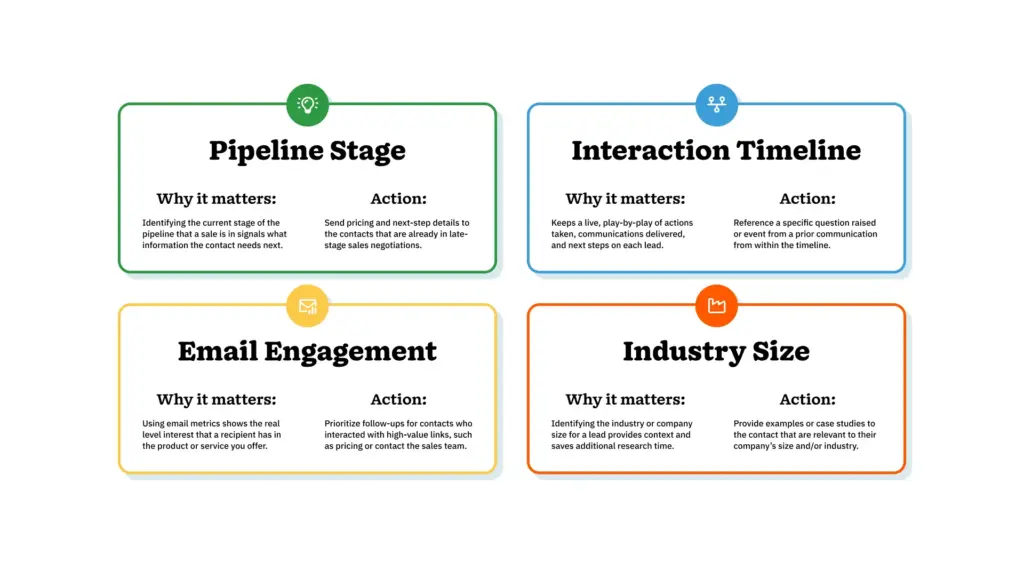
It’s important to focus on more than just demographic data. Data points that typically prove helpful for personalization include deal stage, interaction history, and behavioral signals.

Illustration of a table depicting key CRM data points used for AI email personalization

How do you ensure AI-personalized emails sound natural?

To make sure that your AI personalization efforts deliver natural-sounding emails, it’s important to read every email draft before it’s sent to your recipients. Check for everything from openers and subject lines to information the contact already knows. Make the necessary adjustments before you hit send.

But beware of crossing the line when personalizing your messaging. A 2021 study by McKinsey discovered that while 71% of consumers expect personalized brand interactions, 76% don’t respond well to messaging that feels invasive or misses the mark.

For example, mentioning a specific LinkedIn comment posted by the prospect in your first meeting might give them the impression that you’ve been surveilling their social media accounts. The better play is to keep the conversation focused on the information they’ve volunteered.

What’s a simple rollout plan for a CRM AI email personalization tool?

Rolling out your CRM’s AI email personalization feature shouldn’t be a complicated process, but it should incorporate a few stages for the smoothest possible integration into your workflow. 

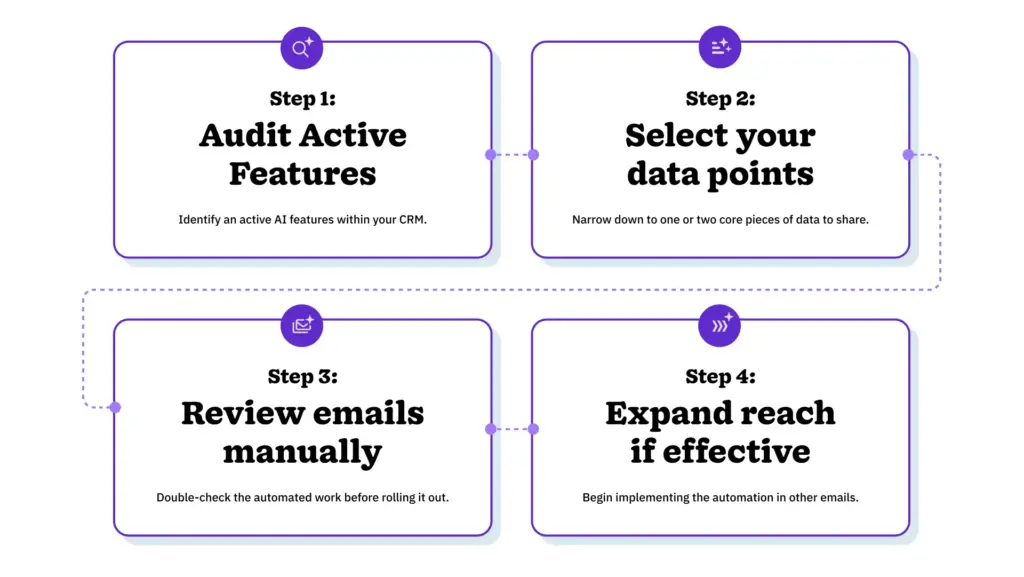
These four steps should be all you need to get up and running:

  1. Audit active features: Run an audit to establish whether you already have any active AI personalization features.
  2. Select your data points: Avoid trying to personalize your messaging with every possible piece of data off the bat, and pick one or two core data points as a start instead. 
  3. Review emails manually: Although the point is to speed up the email personalization process, test and double-check an initial batch of emails before locking in.
  4. Expand if effective: If your CRM’s AI tool has successfully personalized your emails to the point that you’re seeing an increase in replies and conversions, start implementing the feature across a broader set of email communications.
Four-step rollout process for turning on CRM AI email personalization

How do you measure personalized email performance?

To figure out whether AI personalization actually improves email performance, run an A/B test sending a personalized email to a portion of your list and your standard email template to a different portion. Then, compare the numbers to see which one performs better.

Two core metrics you’ll want to keep tabs on to determine whether your AI personalized emails are performing well, including:

  • Reply rate: This is the percentage of emails that your recipients actually respond to, and a great indicator of real engagement.
  • Time-to-first reply: This is the time between when the email is sent and when you receive a response. A quick response is indicative of stronger engagement.

But at the end of the day, the real impact of effective AI email personalization through your CRM tools is seen in your team’s sales productivity. When personalization works well, it reduces time spent on manual personalization, increases your reply rate, and makes your team more productive.

The next step is turning AI personalization on

Another key insight from McKinsey’s 2021 research is that companies that personalize their messaging generate 40% more revenue from their personalization efforts than standard messaging. 

AI email personalization already exists as part of your team’s CRM toolset. What’s missing is the decision to flick the switch and the ownership that comes with that. Then, teams can start personalizing based on the data points that matter most to them, and track and check results as they interact with contacts.

The gains are literally one simple setting away.

Frequently asked questions about AI email personalization

  • 1. Does AI email personalization work for small sales teams, or only large teams?

    It works at any team size. Small teams often see the clearest gains because a handful of reps can review and adjust AI-drafted emails quickly, without layers of approval slowing down the rollout.

  • 2. Is AI email personalization the same as mail-merge?

    No. Mail-merge inserts a name or company name into a fixed template. AI email personalization adjusts the message itself, including the opening line, examples included, and sending time, based on CRM data.

  • 3. Will personalized emails have a negative impact on deliverability?

    Deliverability is the likelihood that an email reaches a recipient’s inbox and not a spam folder. Personalization itself won’t hurt your deliverability. Things like sending volume, list quality, and authentication protocols like SPF and DKIM affect deliverability far more than whether an email is personalized.

  • 4. How much editing does AI-drafted copy typically need before sending?

    Most teams do a quick manual pass, checking the tone of the email, removing anything that feels invasive, and confirming factual details pulled from the CRM are current.

  • 5. How long before a team sees measurable results?

    Reply rate differences between personalized and generic emails typically show up within a few weeks, once a reasonable sample size of sent emails accumulates.

BACK TO TOP
Join 30,000+ other sales and marketing professionals. Subscribe to our Sell to Win newsletter!