If you’re building quotes in Word, emailing PDFs with no tracking, and following up by guessing, you’re not just losing time—you’re losing deals you don’t even know you’re competing for.
Research from Google and the Corporate Executive Board shows that 35% to 50% of B2B deals go to the vendor who responds first. In markets where prospects are contacting three to four vendors simultaneously, your quoting speed is a direct competitive variable—not a back-office inconvenience.
Quote management software fixes this by centralizing every step of the quoting process—creation, delivery, tracking, and acceptance—inside a single system connected to your sales data. In this guide, we’ll cover what quote management software actually is, how to recognize when you’ve outgrown manual quoting, what features matter most for small businesses, and how to get up and running without a complicated IT project.
As Chris Cain, VP of Product Development at Nutshell, wrote in the Nutshell Quotes launch post: “In sales, speed matters. Delivering quick, professional quotes impresses your prospects and gives your team a head start in winning the business.“
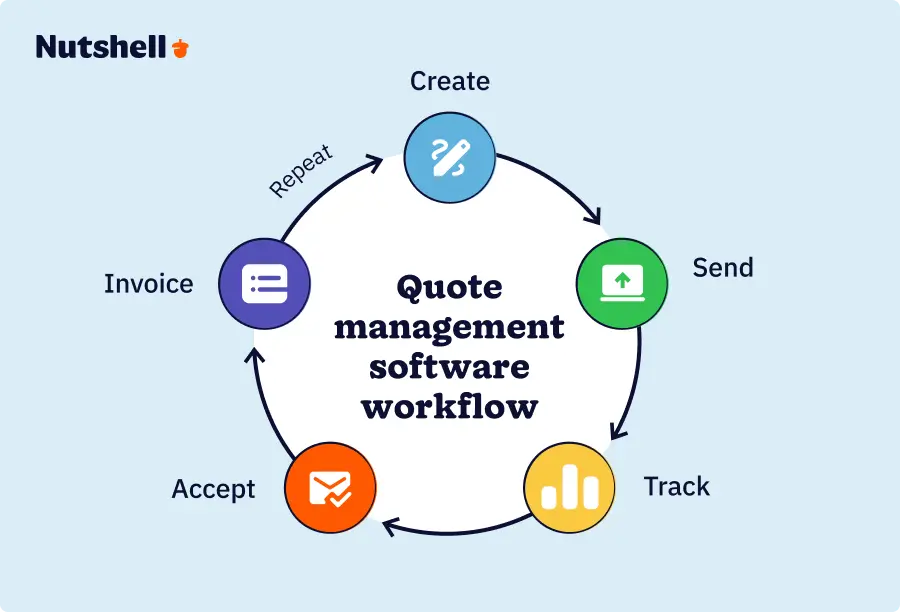
Quote management software is a tool that enables sales teams to create, send, track, and receive acceptance on price quotes—all within a single system. Rather than assembling documents manually and waiting to hear back, quote management software automates the routine steps so reps can focus on the conversation, not the paperwork. The best solutions connect directly to a CRM, pulling in lead, contact, and product data to populate quotes automatically.
Here’s how the end-to-end workflow unfolds:

Here’s how that compares to the manual approach most small businesses start with:
| Manual quoting | Quote management software |
| Word/Excel templates | Branded templates with auto-fill |
| Email attachment, no tracking | Shareable link with open/view/accept alerts |
| Follow up by guessing | Follow up when prospect engages |
| Separate from CRM data | Pulls directly from CRM lead records |
| Invoice created separately | Quote converts directly to invoice |
You’re ready for quote management software when your current process is costing you time, consistency, or deals you should be winning. Manual quoting tends to work fine at first—a few quotes a week, a template that mostly holds up, a rhythm that feels manageable. But there’s a specific moment when the friction stops being inconvenient and starts being expensive. Here are the clearest signals you’ve reached it:
Sound familiar? Moving from spreadsheets to a CRM is often the first step—and the impact shows up quickly once everything lives in one place. We’ll look at a real example of this in the next section.
Try Nutshell free for 14 days—no credit card required.
Not all quoting tools are built the same, and for small businesses, the difference between a standalone tool and a CRM-integrated solution is significant. The right platform eliminates friction across the entire deal lifecycle—not just the document creation step. Here are the features that matter most:
Here’s how standalone tools compare to CRMs with quoting built in:
| Feature | Standalone quoting tool | CRM-integrated quoting (e.g., Nutshell) |
| Branded templates | ✓ | ✓ |
| CRM data auto-fill | ✗ | ✓ |
| Real-time engagement alerts | Sometimes | ✓ |
| Pipeline stage automation | ✗ | ✓ |
| Quote-to-invoice | Sometimes | ✓ |
| Flat-fee SMB pricing | Varierande | ✓ (currently $67/month) |
The column that matters most for small businesses is CRM data auto-fill. Every standalone quoting tool requires you to manually enter information already sitting in your CRM—which is exactly the kind of duplicated work that slows teams down and introduces pricing errors.
Brothers Leather Supply, a Michigan-based leather goods brand, achieved 40% month-over-month growth by 2016 after moving from spreadsheets to Nutshell—results that reflect the operational clarity that comes when customer data, communications, and deal pipeline all live in one place. It’s worth noting that these results reflect Brothers Leather Supply’s overall adoption of Nutshell CRM, not quoting in isolation.
Before Nutshell, Founder & CEO Adam Kail was manually managing customer emails, wholesale inquiries, and vendor outreach across disconnected tools while simultaneously trying to design new products and run the business. The spreadsheet system worked until it didn’t—and then it started costing deals. As Kail put it directly:
“We were running on spreadsheets and that was becoming unsustainable. We needed a better solution.”
– Adam Kail, Founder & CEO, Brothers Leather Supply
After switching, the entire team had real-time visibility into the same customer data. Brothers Leather scaled from a basement side business to a six-figure brand with retail presence across 25-plus stores nationwide. Kail’s verdict:
“We definitely would’ve lost sales without it.”
Third-party research reinforces what Nutshell customers experience firsthand. A 17% increase in lead conversion rates is one of the documented outcomes for organizations using integrated quoting tools, according to SuperOffice research cited by CPQ Integrations.
Separately, companies using non-integrated quoting tools take 73% more time to produce and move quotes through their process than those using automated solutions. The pattern is consistent: speed and integration compound each other—faster quotes sent from accurate data, tracked in real time, produce better outcomes than slower quotes sent from disconnected systems.
35% to 50% of B2B deals go to the vendor who responds first—not the one with the best price or the strongest track record. That’s the environment your quoting process operates in. When prospects are contacting multiple vendors at once, your sales quoting tool is a direct determinant of whether you’re the first voice in the inbox or an afterthought.
The speed advantage is well-documented. Non-CRM quoting users take 73% more time to produce and move quotes through approval. NetSuite’s CPQ ROI research confirms that speed and accuracy improvements in automated quoting consistently produce shorter, more predictable sales cycles. Quote management software doesn’t just help you work faster—it helps you move deals through your pipeline with less friction at every stage.
There’s also a psychological dimension to this that goes beyond the numbers. Buyers interpret response speed as a signal of how a vendor operates after the sale. A quote that arrives in five minutes communicates that you’re organized, responsive, and ready to deliver. A quote that arrives in two days sends the opposite message—before a single conversation about your actual product or service has happened.
Quote management software doesn’t just speed up your workflow; it changes how prospects perceive your business from the very first touchpoint.
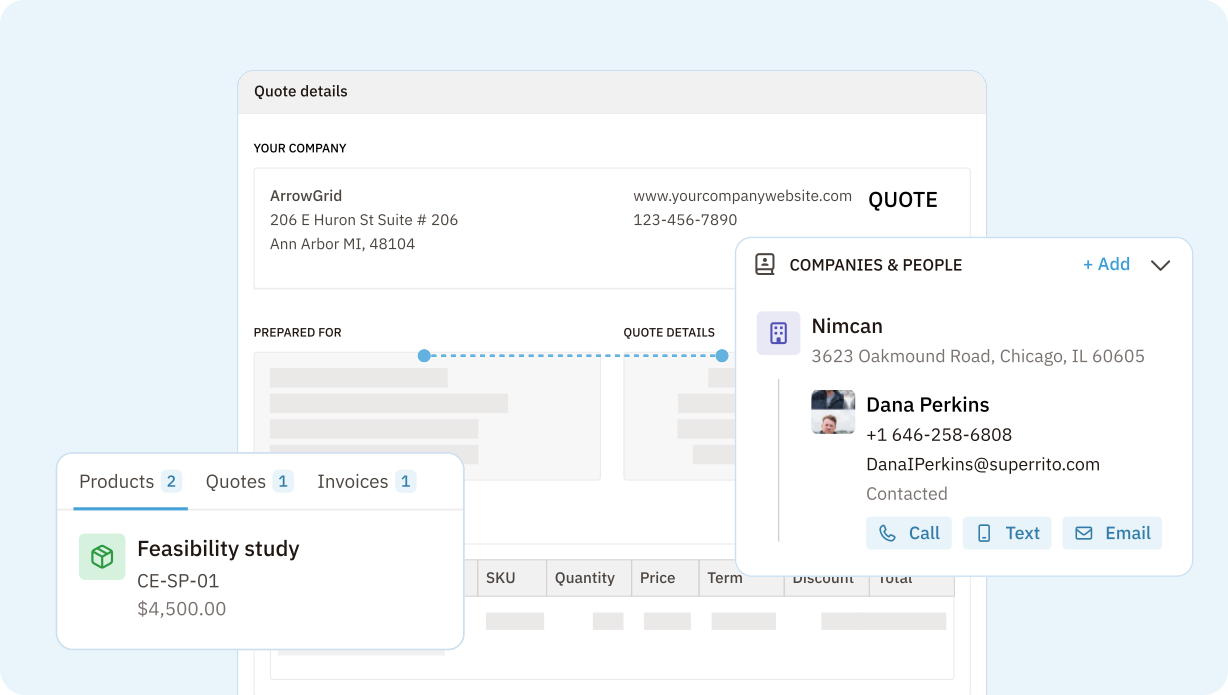
Nutshell Quotes is a fully integrated add-on for Nutshell CRM that lets your team create, send, track, and manage quotes without leaving the platform. Every feature is built around eliminating the steps that slow small teams down—specifically, the duplicate data entry, the app-switching, and the post-send silence that characterizes most manual quoting workflows. Here’s what the tool includes, based on confirmed features from the Nutshell Quotes product page and launch post:
Nutshell can also automatically log call notes and meeting summaries with Nutshell Notetaker, so quote context never gets lost between conversations.
Getting started doesn’t require an IT team or a lengthy implementation. Most small businesses are up and running with their first branded template within a day.
Enterprise-grade CPQ (configure, price, quote) tools like Salesforce CPQ and Oracle CPQ exist for a reason—businesses with large product catalogs, complex, tiered pricing structures, approval hierarchies, and product configurator logic that can span hundreds of variables. For a manufacturer with 10,000 SKUs and a global dealer network, that infrastructure makes sense.
Most small businesses aren’t that business.
Is CPQ software the right choice for small businesses? For the majority of small B2B companies, CPQ software is over-engineered for their actual needs. What small businesses need is speed, visibility, and a system that doesn’t require double data entry—not a configure-price-quote engine built for enterprise sales teams. A modern proposal software or quote management tool covers template creation, delivery, tracking, and acceptance without the implementation overhead, training requirements, or per-seat costs that come with a full CPQ system.
Nutshell’s integrated approach is right-sized for small business evaluators who’ve looked at CPQ and found it more than they need—powerful enough to automate and track the full quoting workflow, simple enough to set up without a dedicated admin, and priced for teams that can’t absorb enterprise licensing costs.
Setting up quote management software doesn’t have to be a project. For most small businesses, it’s a configuration exercise that takes a few hours, not weeks. Nutshell is built to get teams live in days. Here’s a straightforward framework:
Before choosing a tool, map where time is being lost. How long does it take to build a quote from scratch? How often do reps send inconsistent pricing? Where do quotes typically stall or disappear? This baseline gives you a clear picture of which features will have the biggest impact—and it takes less time than you’d expect.
Use the feature checklist from the “what to look for” section above as your evaluation guide. Prioritize CRM integration, real-time tracking, and flat-fee pricing—the three factors that most directly affect small team productivity and cost predictability.
Prioritize tools that integrate with or are built into your existing CRM. A quoting tool that sits outside your CRM creates the same duplicate data entry problem you’re trying to solve. CRM-integrated quoting means your lead records, contact data, and deal history are all in the same place.
Before sending your first quote, set up a professional, on-brand template with your company logo, contact details, standard line items, payment terms, and T&Cs. This is the one-time investment that pays off on every quote that follows.
Configure alerts so you know the moment a prospect opens or views your quote. This is the feature that transforms follow-up from guesswork into a well-timed conversation—and it takes about two minutes to enable.
If the idea of implementing new software feels daunting, keep this in mind: you’re not building a custom integration or migrating a complex data warehouse. You’re enabling an add-on, uploading a logo, and adding your pricing. That’s a configuration, not an implementation.
Most quoting problems aren’t caused by bad sales reps—they’re caused by systems that weren’t built for speed or consistency. These are the mistakes we see most often, along with the fix for each:
Pricing transparency is a genuine gap in most quoting software conversations—so here’s a straightforward breakdown of what you’ll typically encounter across three tiers:
Free tools: Free quoting options exist—Google Docs templates, basic free tiers in standalone tools—and they work fine for businesses sending a handful of quotes per month. The tradeoff is significant: no CRM integration, no real-time tracking, no engagement notifications, and no automation. Free tools handle document creation; they don’t handle deal management.
Per-user standalone tools: Many dedicated quoting platforms charge per seat, which feels manageable early on. As your team grows from two sales reps to five to ten, however, per-seat pricing compounds quickly and can make a “simple” quoting tool surprisingly expensive at scale.
CRM-bundled flat-fee options: The most cost-predictable model for small businesses is a quoting tool that’s bundled into or offered as a flat-fee add-on to an existing CRM. Nutshell’s Quotes & Invoices add-on is currently priced at $67 per month for the entire company—not per user. For a five-person team, that’s $13.40 per person per month for quote-to-invoice software that’s fully integrated with your CRM. For a ten-person team, the per-person cost drops further.
The flat-fee model also makes budget planning simple. Your quoting cost doesn’t change when you hire your next rep—which matters when you’re running a lean operation and watching every line item.
A quote focuses on pricing and scope for a specific product or service—it’s a concrete offer with a number attached. A proposal is broader, typically including background, methodology, timeline, and terms in addition to pricing. For most small B2B businesses, a professional quote is sufficient to move a deal forward.
Free quoting tools exist—including basic templates in Google Docs or free tiers of standalone tools—but they typically lack CRM integration, real-time tracking, and engagement notifications. For businesses sending more than a handful of quotes per month, the time saved and deals won with a paid, integrated solution quickly outweigh the cost.
Stand-alone quoting tools work without a CRM, but CRM-integrated quoting eliminates duplicate data entry, connects quotes directly to your pipeline, and gives you a single source of truth from first contact through closed deal. If you’re already using a CRM, look for a solution that lives inside it rather than alongside it.
Most modern quoting tools—including Nutshell—are designed to get small businesses up and running in days, not weeks. Setup typically involves connecting your CRM data, building a branded template, and configuring your notification preferences. There’s no IT department required.
CPQ (configure, price, quote) software is designed for complex enterprise sales environments with large product catalogs, multi-tier pricing rules, and approval workflows. Quote management software is right-sized for small businesses—it handles template creation, delivery, tracking, and acceptance without the implementation overhead of a full CPQ system.
Quote management software with real-time engagement tracking sends an automatic notification the moment a prospect opens, views, or accepts your quote. Nutshell, for example, alerts reps instantly—so follow-up happens at the exact moment a prospect is most engaged, not days later when the conversation has gone cold.
Manual quoting is costing small businesses deals they never see slip away—because by the time a slow quote arrives, a faster competitor has already started the conversation. The fix isn’t complicated: get quotes out faster, know when prospects engage, and keep the entire deal lifecycle in one system that doesn’t require re-entering data every time a lead moves forward.
The first vendor in the inbox wins the conversation. CRM integration eliminates the friction that slows small teams down. And at $67 per month for the entire company, professional quoting doesn’t have to come with a per-seat price tag that grows every time you hire.
Prova Nutshell gratis i 14 dagar eller låt oss visa dig runt innan du dyker in.
Gå med i 30 000+ andra proffs inom försäljning och marknadsföring. Prenumerera på vårt nyhetsbrev Sell to Win!