Expanding Nutshell’s Conversational AI With Notetaker
-
As of October 2024, the Power AI plan has been renamed to Business. Learn more here.
Sometimes, typing notes about a customer call or interaction with a prospect just isn’t as fast as you’d like it to be, especially if you have a lot to write down.
Introducing Nutshell Notetaker, the new voice-to-text tool as part of Business, our plan powered by artificial intelligence. Notetaker helps you get your thoughts down faster. With Notetaker, you’ll be able to quickly and accurately add notes, comment on logged activities, mention teammates, and write emails in Nutshell—all using your voice instead of your keyboard.
You talk, and Nutshell types. Simple as that!
How does Notetaker work?
Notetaker uses your computer’s microphone to record and transcribe your voice into text in Nutshell for faster note-taking.
There are three convenient places where you can use Notetaker:
1. In the ‘Log an activity’ and ‘Write a note’ tabs on top of Person, Company, and Lead timelines:

2. The notes section in the activity dialog:

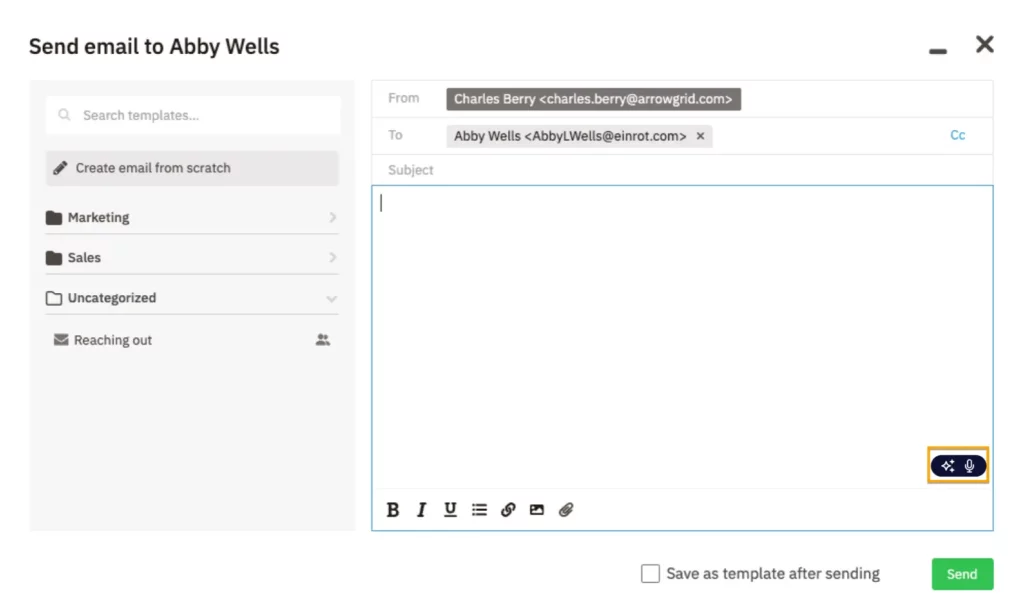
3. In your Nutshell email composer:

How do I use Notetaker?
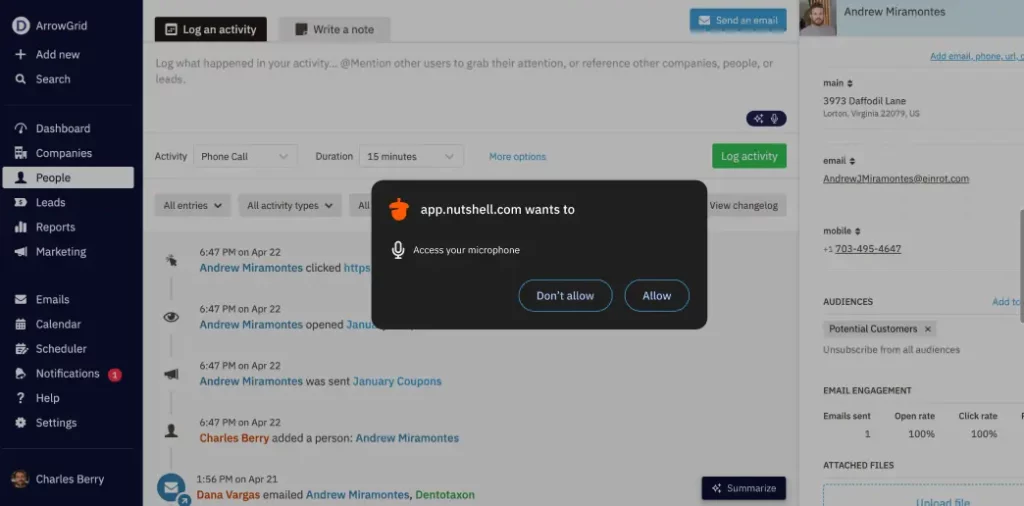
To use Notetaker, you’ll first need to grant Nutshell permission to your computer’s microphone so Notetaker can transcribe your voice.
When you click the Notetaker button for the first time, you’ll see a dialog popup requesting access to your computer’s microphone. Once you allow access, you’ll be ready to start transcribing notes.

The next time you click the Notetaker button, the button will change to the red recording icon to indicate that your voice is now being recorded. All you need to do is start speaking and Nutshell will turn your spoken words into written text. Click the button a final time to stop the recording and edit your notes if needed.

Nutshell Notetaker FAQs
-
Is Notetaker available for multiple languages?
Currently, Notetaker only supports English.
-
How long can a transcription be?
Notetaker will write down your notes whether they’re one minute long or more than an hour—there’s no limit to how long transcriptions can be!
-
Can I use Notetaker if I’m not on a Business plan?
If you want to try out Notetaker without being on a Business plan, you’ll be able to use five transcriptions per month. Upgrade to a Business plan to enjoy unlimited access to transcriptions.
Type less and remember more with Nutshell Notetaker
Want to speed up note-taking and email composing in Nutshell? Get started with Notetaker today, or head to your billing page to upgrade to Business!
Get started with Notetaker
Not a Nutshell customer yet? Sign up for a 14-Day free trial and try Nutshell Notetaker during your trial!
BACK TO TOPWritten by
Chris Cain VP of Product Development, NutshellReady to try
Nutshell for Free?Thank you! Your submission has been received!Oops! Something went wrong while submitting the form.
Introducing Power AI, Nutshell’s Newest Plan Charged With Artificial Intelligence
Published on: August 8, 2023Sales Performance Reviews: 9 Tips to Make Them Valuable
Published on: November 10, 2022Unify Team Meeting Processes for Increased Productivity With Nutshell Scheduler Managed Meetings
Published on: May 16, 2025What Are the Top 3 Go-To-Market Strategies?
Published on: November 10, 2022Join 30,000+ other sales and marketing professionals. Subscribe to our Sell to Win newsletter!
- Product
- Nutshell Overview
CRM & Sales
Our powerful and easy-to-use flagship product.Marketing
Email marketing, forms, landing pages, and more.Engagement
Webchat, SMS, WhatsApp & more in your Omni-Channel Inbox.Prospecting
Prospect for new leads and new contacts in your CRM.Quotes & Invoices
Quickly create quotes & invoices in your CRM.
AI
See why Nutshell is the leading AI CRM.Integrations
Connect to Google/Microsoft and over 5,000 Apps.
ReportingCreate reports and forecasts in an instant.CRM Advisor
Get a dedicated point of contact to get the most out of Nutshell.Partner Marketplace
Find trusted partners to help optimize your Nutshell CRM.
- Pricing
Nutshell AI
- Resources
- Contact Us
Contact Sales
Send us your questions or book a 1-on-1 demo.Join a Demo
Join a group demo for a general overview of Nutshell.
Contact Support
Contact our support team via live chat in app or via email.Become a Partner
Refer businesses to Nutshell & earn commissions.
Contact Marketing
Questions about our website or our marketing opportunities?Careers
Join our growing team! See current openings.