Skip to main content ↓

Why understanding the AI-native CRM spectrum closes the gap on real results


Written by
Will Gordon director of Marketing at Nutshell
Will Gordon Sr. Director of Marketing
Last updated on: July 21, 2026
Split-brain illustration contrasting traditional CRM architecture on the left with AI-native neural network integration on the right

Quick answer: What is an AI-native CRM, and how is it different from an AI-assisted CRM?

An AI-native CRM has AI built into its core architecture (the same databases, workflows, and automations) rather than added on top. Most CRMs today are AI-assisted, meaning AI was layered onto an existing system. The depth of integration determines the level of data accuracy and real-time pipeline visibility.

Here’s an important statistic to consider: According to McKinsey’s State of AI 2025 Report, 88% of companies utilize artificial intelligence (AI) in at least one function of their business. However, just 39% of these companies experience measurable impacts from AI at the enterprise level. 

That means there’s a considerable amount of financial investment into AI with minimal results. And the question is why. When it comes to customer relationship management (CRM) systems, there’s a definitive gap, and it’s not caused by the AI.

Many CRM platforms claim to be AI-based. However, the spectrum of AI-powered CRM systems reveals significant differences between those built on AI (AI-native CRM) at one end of the scale and those that simply have integrated AI capabilities (AI-assisted CRM) at the other end. 

These differences are where measurable business impact occurs. This Nutshell guide aims to help sales and marketing teams understand the difference and make informed AI CRM purchase decisions.

Key takeaways

  • AI-native CRM represents a completely different architecture than AI-assisted CRM, rather than just a more sophisticated set of features.
  • Many prominent CRM systems add AI as a layer on top of their existing systems. This can result in limitations related to data quality, pipeline visibility, and scalability in the long term.
  • The companies achieving real enterprise-level gains through AI are the ones fundamentally redesigning their processes and workflows around AI, rather than simply supplementing their existing systems with AI functionalities hosted elsewhere.

What is an AI-native CRM?

An AI-native CRM is an AI-built customer relationship management platform, where AI is embedded in the core systems. It comprises an AI infrastructure built on the same databases, workflow engines, and automations, where the AI is at its foundation and not an add-on.

A practical way to test for an AI-native CRM system is to strip it of all its AI functionalities. Its core systems should still work. If its core CRM systems still work, then those AI functionalities were just added on the periphery. If the system fails to work as intended, then AI is embedded in the core infrastructure of the system.

What is an AI-assisted CRM?

AI-assisted CRM systems are built with a framework that existed prior to AI, and AI capabilities have been bolted on after the fact. This describes the majority of modern AI CRM solutions on the market. And while this system type offers valuable AI functionality, the AI is not part of its core architecture. 

What’s the difference between AI-native and AI-assisted CRMs?

The core difference is that with AI-native CRM systems, AI is the core infrastructure, whereas AI-assisted CRM systems have AI as a component of their systems. But the reality is that most modern CRMs don’t fall perfectly into either of these categories.

The CRM market has matured, and established systems no longer rely on simply bolting on the AI. Instead, they now weave AI agents, automation, and AI-powered workflows deeply into their platforms, leaning closer to AI-native without having been designed as an AI-native system from the start.

In that light, it’s more useful to ask where the CRM sits on the spectrum between AI-native and AI-assisted, and whether it has woven AI in enough to deliver the results your business needs. 

Where does AI-assisted CRM fall short?

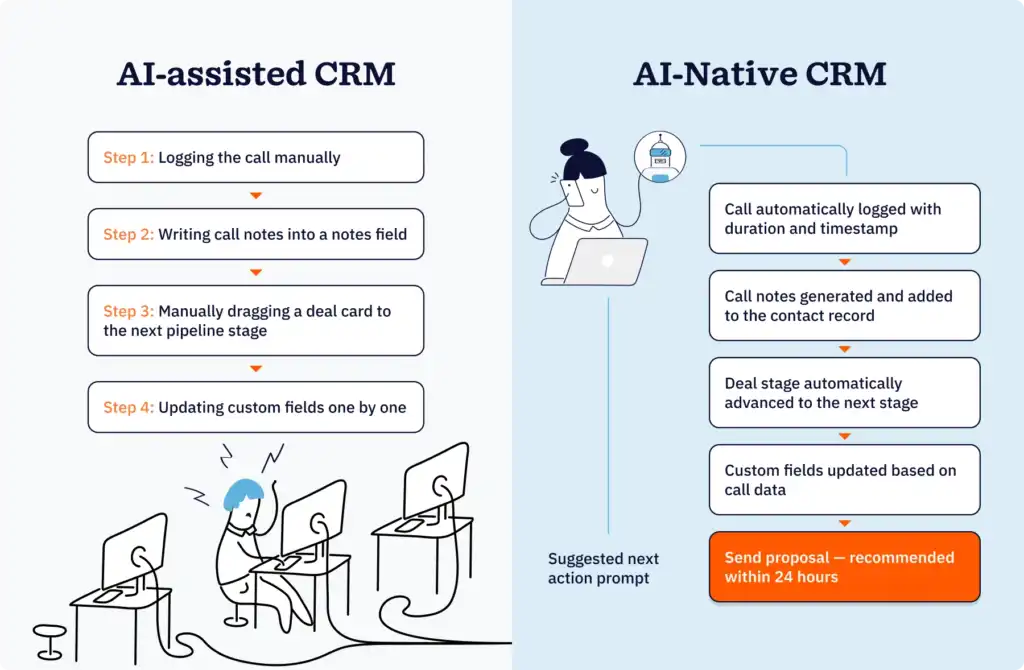
Side-by-side illustration comparing manual post-call data entry in an AI-assisted CRM versus automatic activity logging and next-action prompts in an AI-native CRM

The primary pitfall of AI-assisted CRM relates to data. When AI is layered on top of CRM systems, it typically works with a version of customer data that’s either synced or cached rather than live. So, often, the AI and the CRM work with different versions of the same data.

You could compare an AI-assisted CRM to when companies would edit a shared Excel spreadsheet living on a local service. If two people worked on the shared spreadsheet at the same time, one or both would inevitably end up working with inaccurate data. Whereas working with a cloud-based document (the AI-native equivalent) allows teams to work simultaneously, ensuring up-to-date information across the board.

A typical outcome related to this type of AI CRM design is what’s known as a declared pipeline problem. With a traditional CRM and an AI-assisted CRM, the sales pipeline is a reflection of what sales representatives manually enter. With AI-native CRMs, the sales pipeline shows real-time data from emails, calls, meetings, and other behavioral data.

The need to enter the data manually is the biggest shortcoming of the sales process within a CRM system. Sales representatives often don’t provide all the necessary data, such as delayed call logging and stale deal stages. AI-assisted CRMs inherit these shortcomings because they operate based on the data inputs provided by their users. AI-native systems reduce the dependency on the sales reps from the beginning.

This is not a critique of any specific system. It’s simply a design limitation. CRM platforms integrated with AI become smarter. However, this doesn’t change the architectural design of the CRM system.

What does an AI-native CRM actually change for your business?

Allocating your CRM budget appropriately requires an understanding of what systems on the AI-native end of the spectrum can offer your business in both the short and long term.

Short-term impact

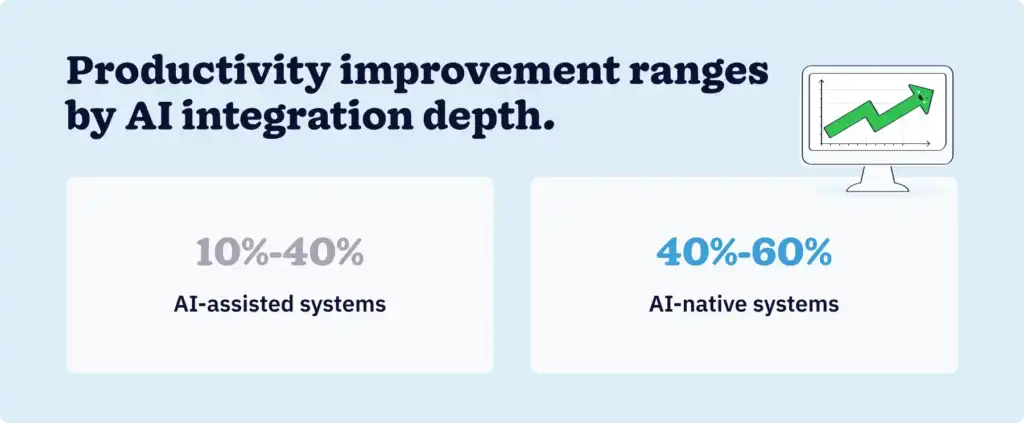
Split stat card showing 10 to 40 percent productivity improvement for AI-assisted systems versus 40 to 60 percent for AI-native systems

Most of the changes your business will see in the short term will be operational. CRMs leaning toward the AI-native side will eliminate a huge chunk of manual data entry across the company.

AI-native CRM systems use behavioral signals to log activities, enrich contacts, schedule follow-ups, and move deals from one stage to the next. Perhaps most notable, teams will spend significantly less time on CRM administration. Because of the AI-native CRM, revenue teams will benefit from clear and updated data visibility across the entire sales pipeline.

These real-world examples illustrate the difference in productivity impact:

  • AI-assisted system example: A study conducted by Bain & Company in 2025 revealed that developers saw an increase in productivity of between 10% and 40% when using AI coding assistants to execute different tasks.
  • AI-native system example: A 2026 CIO article describes a recent project run using an AI-native system. The team working on the project saw their overall productivity improve by 40% to 60%. 

Long-term impact

This is where the gap between AI-native and AI-assisted CRMs widens. According to McKinsey’s 2025 research, the companies that achieve a significant positive financial impact are the ones that completely redesign their internal workflows around AI.

In a 2026 study, the Everest Group calls this type of transformation a new operating model for customer engagement. AI-native CRMs are designed to make decisions, not merely to record data. These systems are designed to learn from customer interactions to provide better recommendations. 

Sales, marketing, and customer success teams will be able to work from a real-time and unified view of all customer interactions, something that is not possible when AI resides outside the data layer.

How do you evaluate whether a CRM is AI-native or AI-assisted?

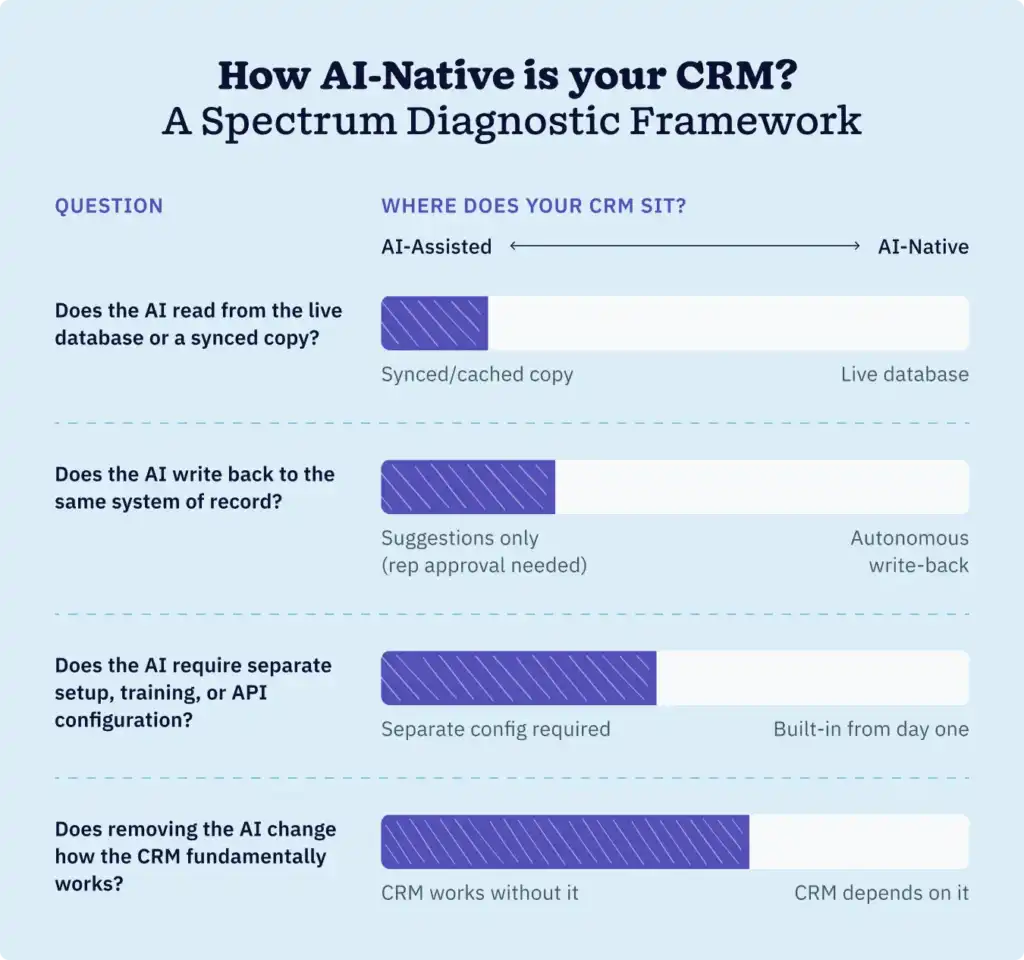
Spectrum diagnostic framework for evaluating the depth of AI integration in any CRM platform across four key architectural questions

Because most CRM vendors incorporate some facet of AI, you cannot rely on their marketing copy to indicate where their systems lie on the AI-powered spectrum. Ultimately, it’s the system architecture that will provide the answers. 

Here are four relevant questions you can ask to help you determine how deeply AI is woven into the system and evaluate AI-based CRM platforms for your business.

1. Does the AI read from the live database or a synced copy?

When the AI functions using real-time data, it provides teams with the most current and accurate insights. The further toward the AI-native end of the spectrum a platform sits, the less it relies on synced or indexed copies of data. Pulling data from a synchronized or indexed copy introduces lag, and lag typically leads to data errors. This is something you should ask the vendor about directly.

2. Does the AI write back to the same system of record?

CRM systems on the AI-native side of the spectrum don’t require reps to interact with the system to push records or modify system fields. If the system is further toward the AI-assisted end, the output tends to be a recommendation where the user needs to approve the recommendation for any changes to take effect. 

For instance, some CRMs include MCP server integration, allowing users to read and/or write CRM data to and from an LLM like Claude or ChatGPT. Integrations that are “read-only” fall within the AI-assisted end of the spectrum, while those that also allow the LLM to update your CRM are more AI-native. Neither is inherently wrong, but knowing which model a platform uses tells you how much manual oversight your team will still need.

3. Does the AI require separate setup, training, or API configuration?

The need for specialized onboarding or training is a strong indication that the AI is more of a product layer. In CRM systems closer to the AI-native end of the spectrum, the AI is part of the core product, which means the system intelligence is built in from the outset. Platforms toward the AI-assisted end may require more configuration to get AI working alongside your existing data and workflows.

4. Does removing the AI change how the CRM fundamentally works?

This is the most relevant question to ask. If the vendor is able to turn off the CRM’s AI capabilities, then the AI is an optional product layer, while still being useful. The more the core CRM depends on AI to function as designed, the further toward the AI-native end of the spectrum it sits.

AI-native vs. AI-assisted CRM: A side-by-side comparison

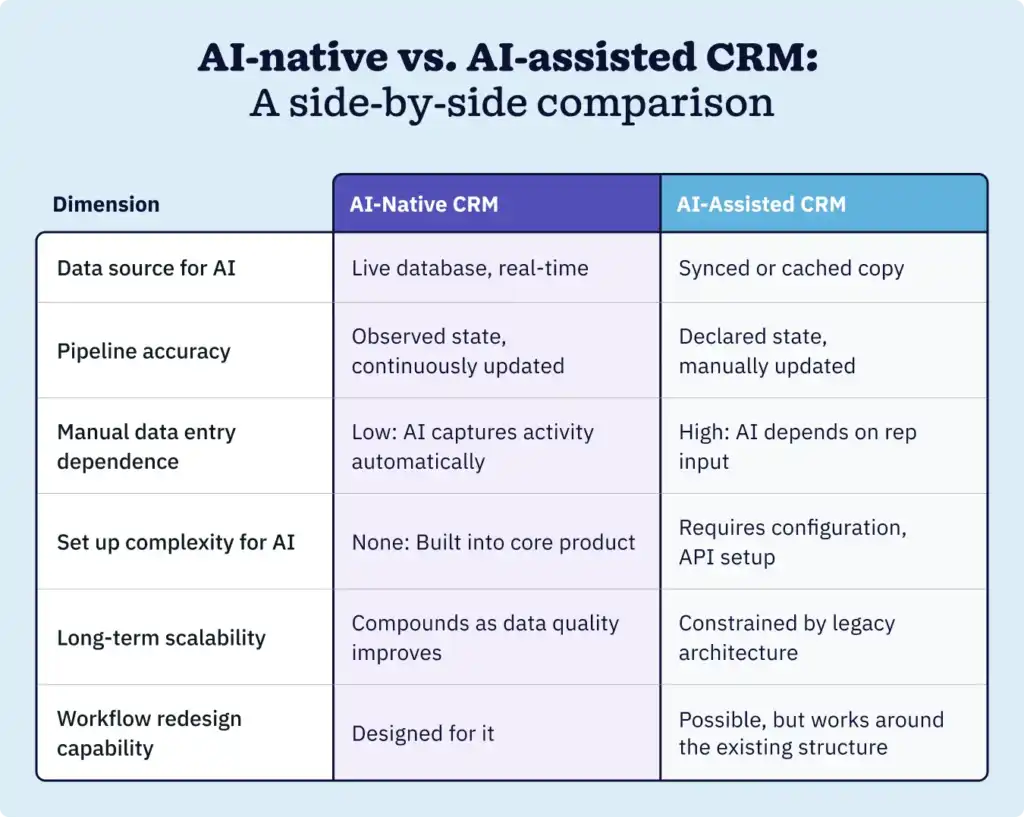
Side-by-side comparison table of AI-native CRM versus AI-assisted CRM across six key dimensions, including data source, pipeline accuracy, and setup complexity

The businesses closing the gap aren’t waiting

The difference between AI hype and AI that leads to actionable business outcomes boils down to system architecture.

Native AI in systems sharing the same data, workflows, and real-time customer relationship views, reshape how CRM dependent business operate at a fundamental level. Whereas AI added on top of the CRM merely streamlines existing systems. 

The Everest Group describes this as a transition from passive data collection to systems that interpret signals in context, make decisions, and shape outcomes in real time. And the transition is evident. 

Companies that have successfully integrated AI into their core business functions aren’t those with the most AI features and capabilities. They’re the companies that have embedded AI deeply enough into their platforms and workflows that it changes how their business functions and operates.

FAQs

  • 1. What is the best CRM with AI?

    The best CRM with AI depends on your business size, budget, and how deeply you want AI embedded in your workflow. For teams that want AI woven into every part of the sales process (from data capture to pipeline management), an AI-native CRM is the stronger long-term investment. Teams already embedded in platforms like Salesforce or HubSpot can still see meaningful productivity gains from AI-assisted features.

  • 2. What is the difference between AI-native and AI-powered CRM?

    AI-native CRM is a system where AI is foundational to the architecture, built into the same database and workflow engine from day one. AI-powered is a marketing term used broadly across the industry and does not indicate a specific architectural standard. When evaluating a platform, focus on how the AI accesses data and whether it requires a separate setup, rather than the label a vendor uses.

  • 3. What are the main benefits of AI-native CRM?

    The primary benefits of AI-native CRM include reduced manual data entry, more accurate pipeline visibility, faster access to customer insights, and the ability to redesign sales workflows around AI rather than adapting AI to existing processes. Over time, cleaner and more complete data improves every AI output the system produces.

  • 4. Can small businesses benefit from an AI-native CRM?

    Yes. AI-native CRM is not exclusively an enterprise category. Smaller teams often see disproportionate benefit because they have fewer resources dedicated to CRM administration. Automating data capture and pipeline management frees up time that small teams simply don’t have to spare.

  • 5. How do I know if my current CRM is AI-native or AI-assisted?

    Use the four-question framework from this article. Does your CRM’s AI read from the live database? Can it write back without human confirmation? Does it need a separate setup or API configuration? And would removing AI features change how the core CRM works? The answers will tell you where your platform sits on the spectrum, and whether that’s far enough along to meet your business needs.

  • 6. Can I use Claude, ChatGPT, or Gemini connected to a spreadsheet or Notion as a CRM?

    Technically, yes. But it fails every test in the framework above. There’s no live database, no reliable system of record, and no audit trail. Security and access controls become your responsibility to manage, and when the API changes, your system breaks. The hidden costs tend to far exceed the price of a purpose-built platform.

BACK TO TOP
Join 30,000+ other sales and marketing professionals. Subscribe to our Sell to Win newsletter!