Overcome closed lead management challenges with follow-up pipeline automations
-
Last updated on: March 4, 2026
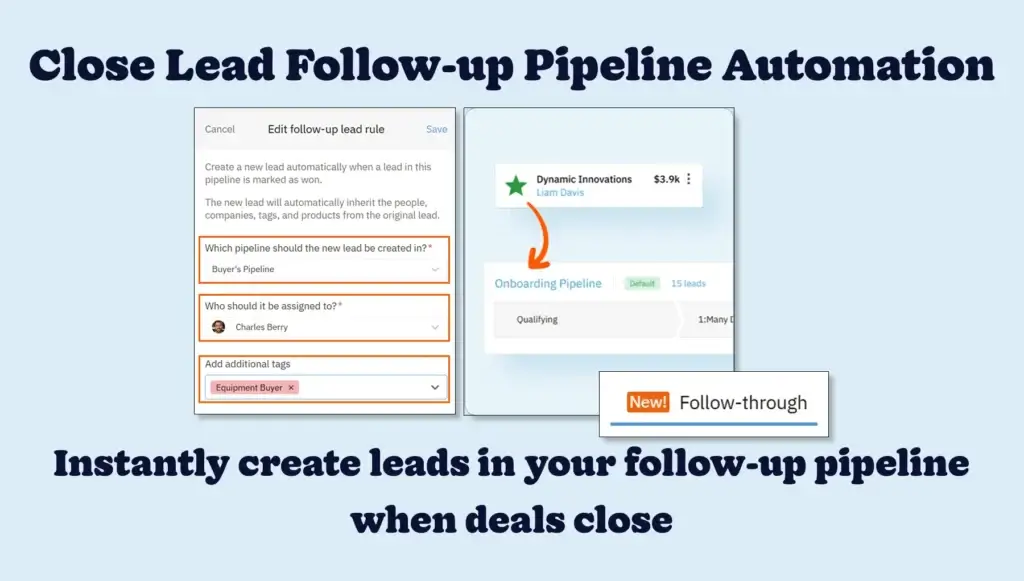
When a lead closes, getting it to the right team quickly is the key to keeping your process efficient and your customers supported. Nutshell’s new closed lead follow-up pipeline automations feature helps you save time and maintain momentum by instantly creating a lead in your follow-up pipeline.
Your sales reps close the deal—then what? In many organizations, a closed lead isn’t the end of the journey. Whether it’s a Customer Success team stepping in after a win or a support rep following up on a lost deal, what happens after the close is just as critical.
Managing this process across pipelines has historically meant clunky task setups or manually cloning leads—neither of which scales well. That’s why we’re introducing closed lead follow-up pipeline automations in Nutshell. Now, you can automatically trigger a new lead in a follow-up pipeline whenever a lead is marked as Won, Lost, or Cancelled—no manual steps, no duplicate data entry, and no process gaps.
What are closed lead follow-up pipeline automations?
Closed lead follow-up pipeline automations are a new way to keep your pipelines clean, connected, and collaborative. Instead of stretching a single pipeline across multiple teams or creating messy workarounds, you can now configure Nutshell to spin up a new lead in a different pipeline when a lead hits a final stage in another.
Unlock automated renewal and win-back campaigns, so no revenue opportunity slips through your fingers. Spin up dedicated onboarding or re-engagement pipelines the moment a lead is marked Won or Lost, keeping every post-sale touch point organized.
With closed lead follow-up pipeline automations, each team can work in their own space with their own process—while you maintain full visibility into performance across the entire customer journey.

How do Nutshell’s closed lead follow-up pipeline automations work?
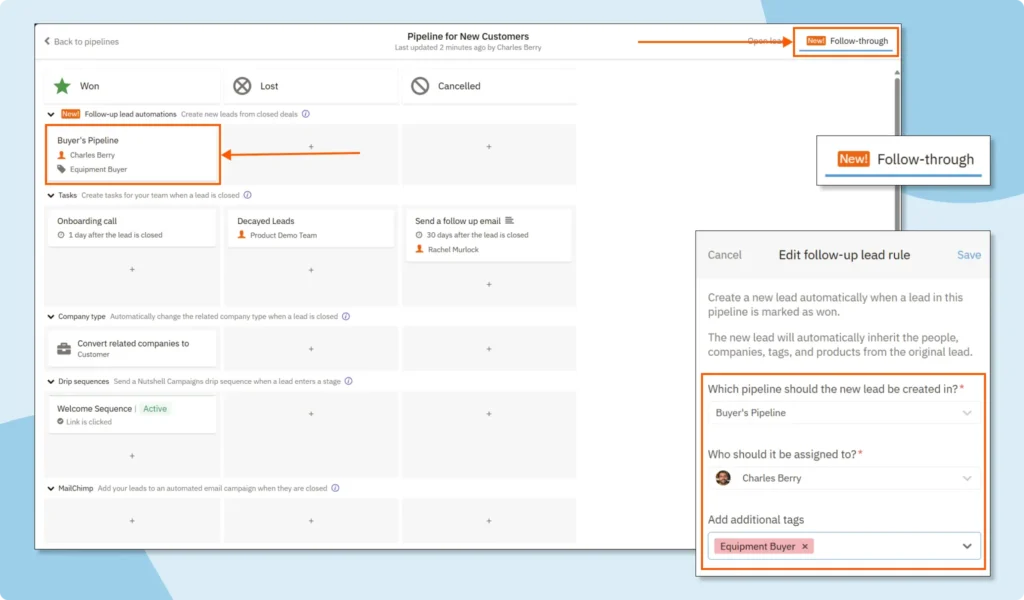
For each closed status—Won, Lost, or Cancelled—you can create a dedicated automation that creates a new lead in your chosen pipeline. When triggered, the follow-up lead is automatically populated with all the important details from the original lead, such as:
- People and companies
- Activities
- Notas
- Emails
- Productos
- Custom field values
You can also pre-assign the follow-up lead to the right team member and apply new tags to help with tracking or segmentation. It’s a powerful way to pass the baton while keeping your data and your workflows perfectly in sync.

How do I get started with closed lead follow-up pipeline automations?
Closed lead follow-up pipeline automations are available to all Nutshell Sales customers, no matter your plan. Read our helpful support article to learn more about configuring your follow-up workflows and setting automation rules for each lead status. Or head straight to the Pipelines section in Nutshell to get started.
Simplify closed lead management with follow-up pipeline automations
When leads are removed or stay stuck in the same pipeline after closing, reporting is inaccurate, and team workflows are complex. Closed lead follow-up pipeline automations eliminate these hurdles by keeping pipelines focused, connected, and clean, and giving each team a process suited to their needs.
Get your close lead follow-up pipeline processes set up today. If you have questions along the way, simply reach out to our friendly support team, who are always here to help.
If you’re not a Nutshell user yet, sign up for a free 14-day trial—no credit card required—to experience our full set of features, including free live support.
Streamline your lead pipeline-to-pipeline progression with Nutshell!
From onboarding new customers to running win-back and renewal plays, follow-up pipeline automations keep every closed lead moving forward, automatically—no manual work, no missed steps, just seamless transitions.
VOLVER ARRIBAWritten by
Chris Cain VP of Product Development, Nutshell¿Listo para probar
Nutshell gratis?Muchas gracias. Hemos recibido su envío.¡Uy! Algo ha ido mal al enviar el formulario.
AI for Sales: Complete Guide to AI Types, Tools, and Use Cases for Sales Teams
Publicado el: 11 de mayo de 2023
Easy Sales CRM: The Top User-Friendly Tools for Small Businesses Compared
Published on: December 2, 2025Sales Performance Reviews: 9 Tips to Make Them Valuable
Publicado el: 10 de noviembre de 2022Highly Effective Strategies for Elevating Sales Team Performance
Publicado el: 10 de noviembre de 2022¿Cuáles son las tres principales estrategias de comercialización?
Publicado el: 10 de noviembre de 2022Únase a más de 30.000 profesionales del marketing y las ventas. Suscríbase a nuestro boletín Vender para ganar.
- Producto
- Nutshell Overview
CRM & Sales
Our powerful and easy-to-use flagship product.Marketing
Email marketing, forms, landing pages, and more.Engagement
Your omni-channel inbox in your CRM.Prospección
Prospect for new leads and new contacts in your CRM.Quotes & Invoices
Quickly create quotes & invoices in your CRM.
AI
See why Nutshell is the leading AI CRM.Integraciones
Connect to Google/Microsoft and over 5,000 Apps.
InformesCreate reports and forecasts in an instant.Asesor CRM
Get a dedicated point of contact to get the most out of Nutshell.Partner Marketplace
Find trusted partners to help optimize your Nutshell CRM.
- Precios
Nutshell AI
- Recursos
- Contacte con nosotros
Contacto de ventas
Send us your questions or book a 1-on-1 demo.Participar en una demostración
Join a group demo for a general overview of Nutshell.
Contacto
Contact our support team via live chat in app or via email.Hágase socio
Refer businesses to Nutshell & earn commissions.
Contact Marketing
Questions about our website or our marketing opportunities?Carreras profesionales
Join our growing team! See current openings.