The Real Cost of CRM Software That’s Catching Small Businesses Off Guard
-
You budgeted for software, but ended up with a costly system.
That’s the reality for many small businesses when they receive a CRM vendor invoice, and the price doesn’t match what’s on the company’s pricing page. A $25 per month per user plan is pretty easy to swallow. But then, the user has to upgrade to the next tier to unlock automation, which comes with an additional integration fee. And let’s not forget the mysterious onboarding fee that’s not mentioned in the sales call.
The cost of CRM software is the total monetary commitment to acquire, use, and support the platform. And the reality is that the final cost is often significantly more than what’s indicated on the pricing page.
In reality, the subscription fee is just the beginning, and this Nutshell analysis shines a spotlight on these hidden costs. Understanding all the costs involved before signing the contract separates a CRM investment from a purchase that sinks your budget.
Key takeaways
- The cost of CRM software is typically much more than what’s initially advertised. The remaining balance is made up of implementation, training, and the required add-on costs.
- Many of the useful features small businesses need from a CRM can be found in higher-cost tiers.
- CRM systems can generate, on average, a return of $3.10 per dollar spent, as long as small businesses are mindful to set the right goals when budgeting for the investment, according to a 2024 Nucleus Research study.
What does CRM software really cost?
CRM expenditures extend beyond the monthly fee for the purchase, application, and upkeep of the platform. For many small businesses, the total dollar figure ends up being many times more than what the figure shows on the vendor’s pricing page. And the difference tends to increase the more features the business requires and adds.
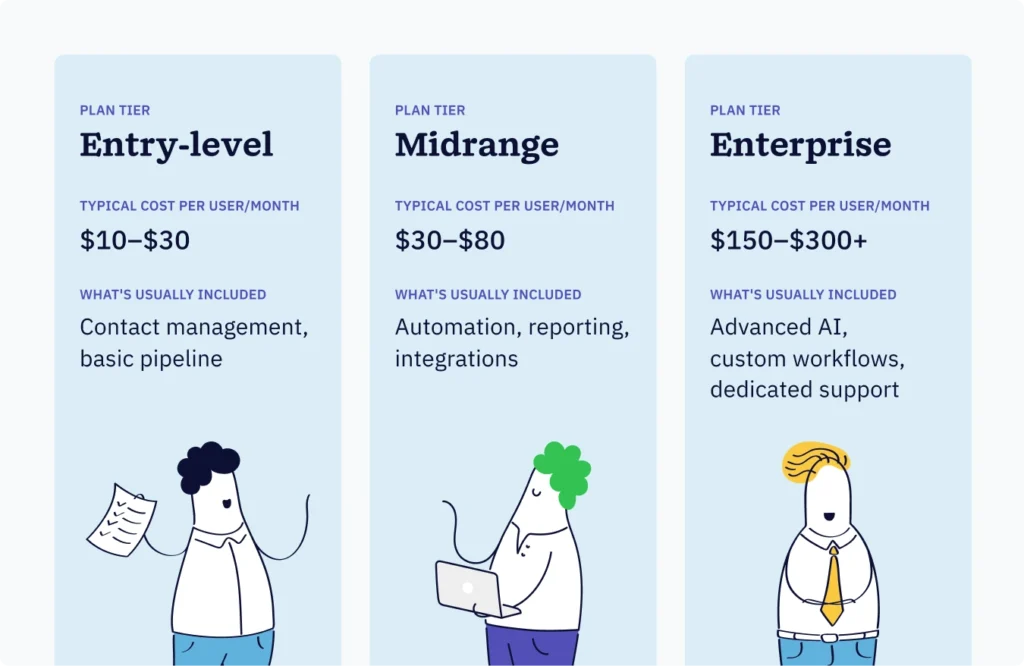
Subscription pricing can generally be broken into three tiers:

The problem is that the entry-level plans of popular CRM vendors almost always exclude the features that many small businesses require. Those capabilities are typically found in their midrange or enterprise plans, forcing many businesses to upgrade. As a result, a team that signs on at $14 per user often pays $40 to $100 per user within a quarter.
The cost of a CRM is also shaped by factors that go beyond the per-seat cost. And it can also increase based on the contact database size, volume of data storage, API call limits, and number of active pipelines, depending on the platform. All of that is often glossed over in the headline number.
What hidden fees should you watch for in CRM packages?
Vendors bundle feature sets into CRM packages that determine their pricing tiers. The gaps between those packages are where teams discover the budget surprises.
These are the core costs that impact business CRM budgets most:
- Feature gating and tier upgrades: The features that make CRM truly valuable and useful, such as workflow automation, advanced reporting, and pipeline analytics, are almost never available on the entry-level plans. Budget for the tier above the cheapest option before you begin the vendor comparison process.
- Data migration: Data migration refers to the importation of contact, deal, and pipeline data from an old system or spreadsheet to a new CRM. The price of data migration services ranges from a few hundred to several thousand dollars, depending on how simple or complex the migration is, so take this into account.
- Integrations: A CRM integration occurs when a separate business tool is connected to the CRM. Connections between these business tools and the CRM may be Zapier, Slack, QuickBooks, or email marketing software. Integrations could require paid connectors, developer time, or a higher-tier plan to access.
- Onboarding fees: Many platforms charge separately for guided onboarding. Some implementations even require third-party consultants who charge $150 to $250 per hour.
- Per-contact and storage overages: Some CRM platforms charge based on the size of the contact database or per contact email sent. These charges scale as your business grows and can add up quickly.
- Premium support: Most packages include basic support. Response times that meet your service level agreements, dedicated account managers, and service level assurance (SLA) support usually come at an additional cost.
But this is not the case with all CRMs. There are platforms with transparent CRM pricing where the advertised price is the actual cost, and includes full access with no hidden costs. Transparency is a differentiator that those vendors will prioritize.
Implementation and training: The costs buyers often forget
The implementation cost of a CRM system is the investment of time, money, and other resources that a company has to absorb to get the platform fully operational. And more often than not, it’s an expense that many underestimate.
Peer-reviewed research published in the Journal of Database Marketing & Customer Strategy Management found that poor planning and not having clear goals are the main reasons for the failure of a CRM system. The good news is that most cost overruns are preventable.
Here’s what should be in your CRM software budget for implementation and training:
- Internal time: Someone from your company has to take ownership of making the platform fully operational. The value of that person’s time should be included in the budget, even if you don’t see the cost in an invoice.
- Staff training: Purchasing a CRM means your employees have a tool to use. If your employees aren’t properly educated on the framework, then there’s no return on investment for getting the CRM in the first place. The time spent on training should be planned for, because it’s time and money that you won’t get back.
- Productivity dip: Staff output will typically drop during the transition and will return to normal within two to six weeks. This is to be expected, and the time impact will depend on the size and nature of your business. Even a temporary decrease in productivity has an impact on the bottom line.
- Consultant fees: There’s a loss incurred for engaging consultants to address the integration of complicated pieces. This could be in the context of a customized framework or the migration of a significant amount of data. You should allow for this in your projections.
For small businesses, the total cost of implementing a basic CRM, such as a free platform, will be at the zero-cost end of the range. Third-party integrations or complex platform configurations will be closer to the $5,000 end of the estimate.
How to build a CRM budget that actually holds up

Total cost of ownership (TCO) is the complete view of the cost of a CRM. It includes the annual purchase of the CRM, the implementation costs, the annual operational costs, and the maintenance costs over the course of one to three years. This number should be the basis for your budget, not the advertised price per seat.
Here’s a practical cost calculation framework to follow:
- Calculate your annual subscription cost: Consider purchases at the total cost of the subscription for the actual tier you’ll use. Multiply the per-user fee by the number of seats, then by 12.
- Add implementation costs: Include the costs you’ll incur to migrate your data and any consultant fees attached. Bear in mind the value of your team’s time and what that translates to cost-wise during the transition.
- Add training costs: Determine the time your team will spend training and the number of users that’ll need training. Then, multiply that by the average training cost per hour to get an estimate.
- Add integration and add-on costs: Identify each tool you’ll need to connect to your CRM. Verify what’s included and what will result in additional costs.
- Subtract tools you can retire: A good CRM usually comes with several tools built in, which means you may be able to shed some external tools. If these are native within your CRM, you could potentially cancel your standalone emailing tool, contact database, and deal-tracking spreadsheet.
Let’s walk through an example: If you calculate for a five-person team on a mid-tier plan at $50 for each user per month, the minimum annual subscription cost is $3,000 a year. But after including training, data migration, and a single integration, a more realistic first-year cost would be between $5,000 and $7,000. So, instead of presenting the CRM software cost as $3,000 to stakeholders, budget for $5,000 to $7,000.
How do you justify the CRM investment to stakeholders?
Justifying a CRM investment boils down to quantifying the financial returns realized from the CRM platform as compared to the total cost incurred to purchase and maintain the platform. The numbers speak for themselves.
In 2024, Nucleus Research found that for every dollar spent on their CRM, companies earned an average of $3.10. A combination of CRM benefits makes this return possible, including shorter sales cycles, increased close rates, lowered administrative overhead, and reduced customer churn. And as CRM technology advances, those overall returns increase.
Use these three categories to support your business case:
- Time saved: CRM automation reduces time spent on sales and marketing-related, repetitive tasks such as data entry, follow-ups, and pipeline reports. If a CRM solution can save a five-person sales team one hour per person per week (which is conservative), it equates to 250+ hours saved in a year. That value needs to be calculated.
- Pipeline visibility: CRM pipeline visibility means your team can see all the active deals in the pipeline, along with the current deal stage and an estimated likelihood of closing. Because the lead pipeline is actively managed, the deals that fall through the cracks are minimized.
- Revenue impact: The time from CRM system implementation to realized revenue impact is shortened due to the faster time to close, resulting from improved follow-up and more consistent and better targeted outreach. These factors and the resulting impact on revenue are measurable.
The true CRM software implementation investment goes above and beyond the system purchase. Offer your stakeholders the real cost, including the hidden costs, then show them what that equates to in returns.
Frequently asked questions
-
1. What is the average cost of CRM software for small businesses?
Small business CRM software typically costs between $30 and $80 per user per month for a fully functional mid-range plan. First-year total costs, including implementation, training, and integrations, commonly run much higher than the base subscription price.
-
2. What are the most common hidden fees in CRM packages?
The most common hidden CRM costs include forced tier upgrades to access core features, data migration fees, integration costs for tools like Zapier or QuickBooks, onboarding charges, per-contact or storage overages, and premium support fees.
-
3. How long does CRM implementation take for a small business?
Most small business CRM implementations take between two and eight weeks, depending on setup complexity, data migration volume, and the number of integrations required. Simpler platforms with strong onboarding support typically have shorter timelines.
-
4. How do you calculate CRM return on investment?
CRM ROI is calculated by comparing the total cost of ownership, which includes subscription fees, implementation, training, and add-ons, against measurable gains in revenue, time saved, and customer retention. Nucleus Research found companies earn an average of $3.10 for every dollar spent on CRM when properly implemented.
-
5. What should a small business look for in CRM pricing to avoid surprises?
Prioritize platforms with transparent, all-inclusive pricing that doesn’t gate core features behind higher tiers. Confirm whether data migration, onboarding, and integrations are included or charged separately. Always calculate the cost at the tier you’ll actually use, not the lowest advertised price.
Budget for reality, not the brochure
Unlike brochures, a reality-based budget sways technology decisions.
The price tag for the CRM system is just the beginning of the technology cost. Small businesses that see the whole picture are able to select the correct platform, circumvent budget traps, and achieve the anticipated returns.
BACK TO TOPWritten by
Andy Fowler CEO & Co-Founder, NutshellReady to try
Nutshell for Free?Thank you! Your submission has been received!Oops! Something went wrong while submitting the form.
Sales Performance Reviews: 9 Tips to Make Them Valuable
Published on: November 10, 2022Unify Team Meeting Processes for Increased Productivity With Nutshell Scheduler Managed Meetings
Published on: May 16, 2025What Are the Top 3 Go-To-Market Strategies?
Published on: November 10, 2022Join 30,000+ other sales and marketing professionals. Subscribe to our Sell to Win newsletter!
- Product
- Nutshell Overview
CRM & Sales
Our powerful and easy-to-use flagship product.Marketing
Email marketing, forms, landing pages, and more.Engagement
Webchat, SMS, WhatsApp & more in your Omni-Channel Inbox.Prospecting
Prospect for new leads and new contacts in your CRM.Quotes & Invoices
Quickly create quotes & invoices in your CRM.
AI
See why Nutshell is the leading AI CRM.Integrations
Connect to Google/Microsoft and over 5,000 Apps.
ReportingCreate reports and forecasts in an instant.CRM Advisor
Get a dedicated point of contact to get the most out of Nutshell.Partner Marketplace
Find trusted partners to help optimize your Nutshell CRM.
- Pricing
Nutshell AI
- Resources
- Contact Us
Contact Sales
Send us your questions or book a 1-on-1 demo.Join a Demo
Join a group demo for a general overview of Nutshell.
Contact Support
Contact our support team via live chat in app or via email.Become a Partner
Refer businesses to Nutshell & earn commissions.
Contact Marketing
Questions about our website or our marketing opportunities?Careers
Join our growing team! See current openings.